Abbracsfree

 Prepared for
NHS Connecting for Health
Version 1.0.0.0 Baseline
Prepared by
Mark A. Wilson-Thomas
Program Manager
cuistakeholder.mailbox@hscic.gov.uk
Contributors
Jarnail Chudge
This document was prepared for NHS Connecting for Health which ceased to exist on 31 March
2013. It may contain references to organisations, projects and other initiatives which also no
longer exist. If you have any questions relating to any such references, or to any other aspect of
the content, please contact cuistakeholder.mailbox@hscic.gov.uk
Prepared for
NHS Connecting for Health
Version 1.0.0.0 Baseline
Prepared by
Mark A. Wilson-Thomas
Program Manager
cuistakeholder.mailbox@hscic.gov.uk
Contributors
Jarnail Chudge
This document was prepared for NHS Connecting for Health which ceased to exist on 31 March
2013. It may contain references to organisations, projects and other initiatives which also no
longer exist. If you have any questions relating to any such references, or to any other aspect of
the content, please contact cuistakeholder.mailbox@hscic.gov.uk
1 INTRODUCTION
- 1 INTRODUCTION
- 2 SAMPLE VIEWS
- 3 ACCESSIBILITY
- 4 RESEARCH
- 5 ASSUMPTIONS AND DEPENDENCIES
- 6 DOCUMENT INFORMATION
- REVISION AND SIGNOFF SHEET
Source PDF: abbracsfree.pdf
This document is Annex D to ” Abbreviations and Acronyms ” and proposes a possible design approach for handling free text input in NHS clinical applications. This approach conforms to current practices within safety critical systems.
Note
This document does not present a fully researched proposal. The information is presented here as a suggested starting point for research to prove its validity more fully.
1.1 Design Suggestion
The suggested design is that when a user enters free text into an NHS clinical application, the application should:
-
Alert the user to any unexpanded abbreviations and acronyms
-
Avoid restrictions that could cause the user to circumvent the clinical application
-
Warn other application users of any remaining unexpanded abbreviations and acronyms
This design would notify all users about any abbreviation and acronym ambiguities in free text input and prompt them to take appropriate action.
1.2 Design Details
To conform to this design approach, clinical applications which provide free text input should:
- Alert a user to the presence of unexpanded abbreviations and acronyms in the text input
after he finishes entering the information but before storing the text.
-
Offer potential expansions for unexpanded abbreviations and acronyms in a simple fashion.
-
Insert expansions for abbreviations and acronyms into the text once the user selects the
correct term
- Avoid errors by not offering default expansions for abbreviations and acronyms, which the
user could select by accident.
- Preserve the flow of user input when offering expansions and alerts. For example, a
background task could check text on entry but only alert the user to ambiguities when he stores the text or moves to the next input field.
- Prevent the storage of known dangerous acronyms or abbreviations. For more information,
see the Abbreviations and Acronyms feature area.
- Alert users to the presence of unexpanded abbreviations and acronyms. These alerts make
users aware of the risk and prompt them to make an informed decision about interpretation of the unexpanded acronym.
Page 1
Copyright ©2013 Health and Social Care Information Centre
HSCIC Controlled Document
1.3 Patient Safety
Unambiguous presentation of abbreviations and acronyms promotes patient safety by minimising the probability of confusion between similar terms. The approach that this document suggests significantly enhances patient safety by enabling clinical applications to:
- Display a warning when users enter text containing ambiguous or misleading abbreviations
or acronyms.
-
Avoid display of ambiguous or misleading abbreviations and acronyms.
-
Display a warning when reading text that ambiguous items are present. This warning helps
the user to avoid acting on an incorrect interpretation of the original author’s intent, with possible undesirable consequences for the patient.
Page 2
Copyright ©2013 Health and Social Care Information Centre
HSCIC Controlled Document
2 SAMPLE VIEWS
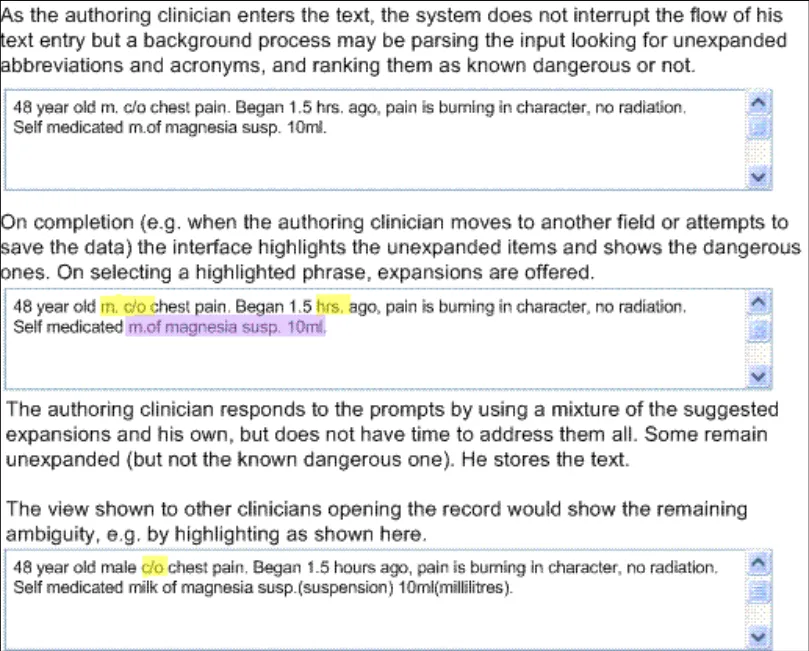
The following figure shows an illustration of this design.
Figure 1: How Unexpanded Abbreviations and Acronyms May Be Handled
Note
Figure 1is only a simple illustration of the design principles; It is not intended to prescribe any particular interaction. This design suggestion does not mandate the use of a text box or this highlighting style, nor does it specify the interaction for selecting the correct expansion for an abbreviation or acronym.
Page 3
Copyright ©2013 Health and Social Care Information Centre
 HSCIC Controlled Document
3 ACCESSIBILITY
The detailed accessibility considerations for this guidance depend on the precise design adopted to adhere to the guidance. However this design must address several issues:
- The interface that alerts the user to the presence of unexpanded terms and allows users to
select the next unexpanded term must allow use by screen reader users, and those who prefer or require keyboard or other input devices rather than mouse input.
- The difference between non-dangerous and dangerous unexpanded terms must be
apparent to users that cannot distinguish colours.
Page 4
Copyright ©2013 Health and Social Care Information Centre
HSCIC Controlled Document
4 RESEARCH
Free-form patient notes are one of the most common areas of medical record-keeping, and are likely to become increasingly computerised over the coming years. This change requires free text input handlers in clinical applications that can deal with abbreviations and acronyms.
The challenge of interpreting shorthand terms is particularly evident in handover scenarios in hospitals. In these scenarios, misinterpretation of abbreviations or acronyms can endanger patient safety.
V.Hoban {R1} makes the following observation:
“When handing over information between colleagues, the avoidance of jargon and explanation of abbreviations is essential”.
The Junior Doctor’s Committee guidance on clinical handover for clinicians and managers {R2} echoes this advice. Clinical applications need to address this potential hazard and should reduce the possibility of misinterpretation.
Clinical applications should allow busy clinicians to use abbreviations during note-taking, while preventing or mitigating the consequences that could result from the display of abbreviations and acronyms which users can misinterpret. Research in safety critical systems by Professor James Reason {R3} presents a useful approach to thinking about how such systems work with people in those organisations with the best safety records. Professor Reason calls these “High Reliability Organisations”.
“High reliability organisations are the prime examples of the system approach. They anticipate the worst and equip themselves to deal with it at all levels of the organisation. It is hard, even unnatural, for individuals to remain chronically uneasy, so their organisational culture takes on a profound significance. Individuals may forget to be afraid, but the culture of a high reliability organisation provides them with both the reminders and the tools to help them remember.”
“For these organisations, the pursuit of safety is not so much about preventing isolated failures, either human or technical, as about making the system as robust as is practicable in the face of its human and operational hazards. High reliability organisations are not immune to adverse events, but they have learnt the knack of converting these occasional setbacks into enhanced resilience of the system.”
This observation implies that computerised systems achieve the best safety results when they put “reminders and tools” in place which aid the organisational culture in helping clinicians remember when to be “afraid” at the right time.
Thomas Nolan extends this idea {R4} and states that:
“Although errors cannot be reduced to zero, the aim of the system should be to reduce to zero the instances in which an error harms a patient. A safe system has procedures and attributes that make errors visible to those working in the system so that they can be corrected before causing harm.”
This statement leads to the conclusion that safe handling of abbreviations and acronyms should ensure that the application highlights potentially hazardous unexpanded items to the user. Even a time pressured user should then be aware of any ambiguity and be able to view possible alternative meanings.
Page 5
Copyright ©2013 Health and Social Care Information Centre
HSCIC Controlled Document
5 ASSUMPTIONS AND DEPENDENCIES
This section identifies project-oriented assumptions and dependencies that have been identified in the process of developing this specification.
5.1 Assumptions
A1. None.
A2.
A3.
A4.
A5.
A6.
5.2 Dependencies
D1. None
D2.
D3.
Page 6
Copyright ©2013 Health and Social Care Information Centre
HSCIC Controlled Document
6 DOCUMENT INFORMATION
6.1 Terms and Abbreviations
CSA Clinical Spine Application
CUI Common User Interface
ISV Independent Software Vendor
LSP Local Service Provider
NHS National Health Service
NHS CFH NHS Connecting for Health
Table 1: Terms and Abbreviations
6.2 Definitions
NHS Entity Within this document, defined as a single NHS organisation or group that is operated within a single technical infrastructure environment by a defined group of IT administrators.
The Authority The organisation implementing the NHS National Programme for IT (currently NHS Connecting for Health)
Current best practice Current best practice is used rather than best practice, as over time best practice guidance may change or be revised due to changes to products, changes in technology, or simply the additional field deployment experience that comes over time.
Table 2: Definitions
6.3 Nomenclature
All content subject to completion, agreement or verification is denoted with highlighting.
Code, script and markup languages are denoted with monospace text .
6.4 Audience
The audience for this document includes:
- Authority CUI Manager / Project Sponsor . Overall project manager and sponsor for the
NHS CUI project within the Authority.
- Authority NHS Design Guide Workstream Project Manager. Responsible for ongoing
management and administration of the workstream.
- The Authority Project Team . This document defines the approach to be taken during this
assessment and therefore must be agreed by the Authority.
- Microsoft NHS CUI Team . This document defines the approach to be taken during this
assessment, including a redefinition of the Design Guide Workstream strategy.
Page 7
Copyright ©2013 Health and Social Care Information Centre
HSCIC Controlled Document
6.5 Open Issues Summary
None
Table 3: Open Issues Summary
6.6 References
R1. “How to…handle a handover”, Hoban V., The Nursing Times 99(9): 54-5 4 March 2003
R2. “Safe handover: safe patients. Guidance on clinical handover for clinicians and managers”, Junior Doctors Committee of the BMA, with the National Patient Safety Agency,
http://www.bma.org.uk/ap.nsf/Content/Handover/$file/Handover.pdf
R3. “Human error: models and management”, James Reason, BMJ 2000;320:768770
http://bmj.bmjjournals.com/cgi/content/full/320/7237/768
R4. “System changes to improve patient safety”, Thomas W Nolan, BMJ 2000;320:771-773
http://bmj.bmjjournals.com/cgi/content/full/320/7237/771
Table 4: References
Copyright ©2013 Health and Social Care Information Centre
August 2004
18 March
18 March
Page 8
HSCIC Controlled Document
REVISION AND SIGNOFF SHEET
Change Record
31-May2005
01-Jun2005
01-Jun2005
02-Jun2005
30-Jun2005
31-Mar2006
01-Jun2006
Mark A.WilsonThomas
0.0.0.1 Extracted from “Abbreviations and Acronyms in Quick Wins Phase” v.0.5 for inclusion in Design Guide
Anthony Steven 0.0.0.2 Developmental Edit
Mark A.WilsonThomas
0.0.0.3 Reviewed and made minor corrections to Developmental Edit
Anthony Steven 0.0.0.4 Version released to customer at conculsion of Quick Wins phase.
Anthony Steven 0.0.1.0 Quick Wins Release
L Boardmanrule
0.0.1.1 First copy edit.
Vivienne Jones 1.0.0.0 Cleansed and Baselined ready for converting to PDF.
Document Status has the following meaning:
- Drafts 0.0.0.X - Draft document reviewed by the Microsoft CUI project team and the
Authority designate for the appropriate workstream. The document is liable to change.
- Working Baseline 0.0.X.0 - The document has reached the end of the review phase and
may only have minor changes. The document will be submitted to the Authority CUI project team for wider review by stakeholders, ensuring buy-in and to assist in communication.
- Baseline Candidate 0.X.0.0 - The document has reached the end of the review phase and
it is ready to be frozen on formal agreement between the Authority and the Company
- Baseline X.0.0.0 - The document has been formally agreed between the Authority and the
Company
Note that minor updates or corrections to a document may lead to multiple versions at a particular status.
Reviewers
Jarnail Chudge 0.0.0.1 UX Lead
Distribution
Page 9
Copyright ©2013 Health and Social Care Information Centre
HSCIC Controlled Document
Document Properties
Document Title NHS CUI Design Guide and Toolkit Workstream Abbreviations and Acronyms in Free Text Input
Author Mark A. Wilson-Thomas
Restrictions RESTRICTED – COMMERCIAL; MICROSOFT COMMERCIAL; Access restricted to: NHS CUI Project Team, Microsoft NHS Account Team
Creation Date
Last Updated 23 June 2015
Copyright:
You may re-use this information (excluding logos) free of charge in any format or medium, under the terms of the Open Government Licence. To view this licence, visit nationalarchives.gov.uk/doc/open-government-licence or email psi@nationalarchives.gsi.gov.uk
Page 10
Copyright ©2013 Health and Social Care Information Centre