Medication Line

 Prepared for
NHS Connecting for Health
Version 2.0.0.0 Baseline
Prepared by
Clinical Applications and Patient Safety Project
NHS CUI Programme Team
Cuistakeholder.mailbox@hscic.gov.uk
Prepared for
NHS Connecting for Health
Version 2.0.0.0 Baseline
Prepared by
Clinical Applications and Patient Safety Project
NHS CUI Programme Team
Cuistakeholder.mailbox@hscic.gov.uk
PREFACE
- PREFACE
- 1 INTRODUCTION
- 2 GUIDANCE OVERVIEW
- 3 GUIDANCE DETAILS
- 4 DOCUMENT INFORMATION
- APPENDIX A REFERENCE SUMMARY OF GUIDANCE
- REVISION AND SIGNOFF SHEET
Source PDF: medline.pdf
Documents replaced by this document Medications Management – Medication Line – User Interface Design Guidance 1.0.0.0 Documents to be read in conjunction with this document Design Guide Entry – Medications Management – Medications Views 2.0.0.0 Design Guide Entry – Medications Management – Drug Administration 3.0.0.0 Design Guide Entry – Patient Banner 3.0.0.0 Patient Safety Process The development cycle for this design guide is compliant with the Clinical Safety Management System (CSMS) – the patient safety risk assessment and management process defined by NHS Connecting for Health (NHS CFH) in conjunction with the National Patient Safety Agency (NPSA). The design guide developers reviewed patient safety incidents arising from both current practice and existing systems for medications management. The resulting guidance points support mitigation of these known patient safety risks. In addition, the developers identified any potential new risks by applying a patient-safety risk-assessment process. The developers are assessing and managing all risks to support a Clinical Safety Case for this design guide. The Hazard Log records all hazards and risks raised to date and includes mitigation actions that, in some cases, will be applicable to you if you are an implementer or other user of this design guide. The Hazard Log is a live document and updates regularly whilst this design guide continues its development. Until this design guide has received full Clinical Authority to Release (CATR) from the NHS CFH Clinical Safety Group (CSG) – based on an approved Clinical Safety Case – there may be outstanding patient safety risks yet to be identified and mitigated. Therefore, it is essential that you review the relevant Hazard Log in conjunction with this design guide. Refer to nww.cui.nhs.uk (N3 connection required) for all current patient safety documentation, including Hazard Logs and the current patient safety process status for this and other design guides. This document was prepared for NHS Connecting for Health which ceased to exist on 31 March 2013. It may contain references to organisations, projects and other initiatives which also no longer exist. If you have any questions relating to any such references, or to any other aspect of the content, please contact cuistakeholder.mailbox@hscic.gov.uk
1 INTRODUCTION
This document provides guidance for the representation of a medication in a user interface (UI). It describes the area of focus, lists mandatory and recommended guidance points with usage examples and explains the rationale behind the guidance.
This document replaces the previously published guidance Medications Management – Medication Line {R1} . It has been extended to provide formatting and layout rules that add structure and consistency to the way that medications are displayed in a user interface.
Table 1 describes the changes made since the previous version of this document:

1.0.0.0 28-Mar-2008 The following table summarises updates that have been made to this document:
Deleted :
MEDi-006 deleted to remove constraint to UK or NHS standards
Modified :
MEDi-002 includes additional information that cites exceptions in which capital letters can be
used in a generic drug name
MEDi-004 has been split into MEDi-023 and MEDi-026. These two guidance points are listed in
separate sections to provide more detailed guidance for truncation and abbreviation respectively
MEDi-005 has been split into MEDi-018 and MEDi-027. These two guidance points are listed in
separate sections to provide more detailed guidance for separators and symbols respectively
MEDi-007 has been updated to mandate the use of the word ‘DOSE’ in a text label for a dose
value
MEDI-010, MEDi-011 and MEDi-012 have been reworded to clarify the guidance
Added :
A further 42 guidance points, MEDi-013 to MEDi-054, have been added. Refer to section 2.1 for
more details
Table 1: Changes Since the Last Baseline Version
Note
In this document, the words ‘generic’ and ‘brand’, when associated with drug names, are used with very specific meanings that may differ from their accepted meanings in other contexts. Refer to section 4.2 for definitions of the specific terminology used in this document.
1.1 Customer Need
An electronic – system for managing a patient’s medications must be able to support the complex needs of a wide range of health care professions and health care settings. A successful display solution must therefore balance those complex information needs with safety concerns, and ensure consistency across views and between systems.
Medications Incidents - The National Patient Safety Agency (NPSA) reports that the majority of medication incidents reported between January 2005 and June 2006 related to the administration of medicines (59.3 percent), followed by incidents related to the preparation and dispensing of medications (17.8 percent) and the prescribing of medications (15.7 percent). Their findings, documented in Safety in doses: medication safety incidents in the NHS [1], also state that the most
1 NPSA – Safety in doses: medication safety incidents in the NHS {R2} : http://www.npsa.nhs.uk/EasySiteWeb/GatewayLink.aspx?alId=5535
Page 1
Copyright ©2013 Health and Social Care Information Centre
HSCIC Controlled Document
common types of medication incidents reported to the NSPA included incorrect dose, incorrect strength or frequency, omitted medicine and wrong medicine.
Existing Systems - In-patient hospital care settings currently use multiple kinds of medications documents, both paper-based and electronic. As care professionals move between hospitals and are faced with new information groupings while working in stressful environments, the differences in the designs of the documents they use may well already impact patient safety. Differences in display formats for medicines impact both the review and management of those medications and will become a safety concern as electronic systems become more widely available in the next few years. The challenge for designers developing electronic systems in this area is particularly great as there are no universally-accepted paper-based standards to reference.
Research in which extensive studies of medication-related errors were reviewed, suggests that the most powerful means of preventing medication-related errors are computerised order entry and administration management along with standards for processes and for the writing of prescriptions (see Medication Errors {R3}, To Err Is Human {R4} and Understanding Patient Safety {R5} ).
Anecdotal references to medication errors most frequently describe problems with legibility of handwritten scripts, the use of abbreviations, translation errors in verbal communications and mistakes exacerbated by similar looking bottles or product labels and similar looking or similar sounding drug names. These well-documented errors focus on specific elements of a medication order, as do the means by which we mitigate them. In addition to these specific errors, there is a need to ensure that medications orders are more thorough in terms of the information they contain, and that they are created, structured, displayed and communicated in a consistent way. Mitigations of this kind may also address the specific errors described above, by providing additional information in a medication order in a way that leaves less room for misinterpretation.
1.2 Scope
This guidance has been designed for the display of medications for a single patient in a hospital ward environment. The guidance applies to the display of the details of a medication including drug name, strength, form, dose, route and frequency. The additional information about medication required for safe medication management, review and modification is out of scope.
1.2.1 In Scope
The guidance in this document covers the following features:
- Line item display rules:
Generic rules for the display of medication including wrapping, truncation, abbreviation, spacing, fonts formatting and labelling
The following users are covered in this guidance:
-
Doctors and other independent prescribers
-
Nurses with responsibility for medicines administration
-
Pharmacists
The following care settings are covered in this guidance:
- Inpatient
The following medications are covered in this guidance:
-
Oral solids and liquids
-
Inhalers and sprays
-
Eye, ear and nose drops
Page 2
Copyright ©2013 Health and Social Care Information Centre
HSCIC Controlled Document
-
Topical liquids
-
Creams, ointments and gels
-
Enemas and rectal solutions
-
Granules and powders
-
Suppositories and pessaries
-
Topical patches
-
Nebuliser solutions
-
Simple infusions (by example only)
-
Injections (insulin example only)
-
Unlicensed medications
1.2.2 Out of Scope
Although there may be specific risks associated with the out of scope areas that are not addressed in this guidance, it is likely that the principles in this guidance will extend to the display of medication information in many of the areas listed below.
The following features are not covered in this guidance:
- The display of all information about a single medication:
Guidance for the layout and structure for the presentation of ‘all’ information for one medication from the selection of a medication anywhere in a clinical application
- Identity of a medication:
Definition of which attributes can be changed without the need for a new medication line to be created (in the UI)
The following users are not covered in this guidance:
-
Other health care professionals
-
Senior nurse (for ward management and multi-patient tasks)
-
Non-clinical staff
-
Patient
Note
The patient is out of scope because the guidance is designed to support user interfaces used by clinicians. As such, it will therefore present information in formats that are designed to support health care professionals. The display of medication information in views that are designed for patients is not addressed in this guidance.
The following care settings are not covered in this guidance:
-
Outpatients
-
Clinics
-
Pharmacies
-
Emergency services and departments
Page 3
Copyright ©2013 Health and Social Care Information Centre
HSCIC Controlled Document
-
Intensive Care, High Dependency Unit (HDU)
-
Primary care, including General Practice
-
Community and home visits
The following types of medications are not covered in this guidance:
-
Enteral feeds
-
Dressings and devices
-
Implants and sticks
-
Intrauterine devices (IUDs)
-
Cements
-
Homeopathic products (including complementary and alternative therapies)
-
Dialysis solutions
-
Injections (except by specific example)
-
Insulin (except by specific example)
-
Infusions and fluids (except by specific examples)
-
Combination infusions
-
Total Parental Nutrition (TPN)
-
Gases
-
Blood and platelet products
-
Radio-pharmacy
-
Variable dose medications (by example only)
-
Foams
-
Radioactive agents
-
Regimens and order sets
-
Advisory Committee on Borderline Substances (ACBS) products
-
Over the counter (OTC) medications
-
Recreational drugs
-
Medications with titrating doses
-
Discharge medications – to take out (TTO)
-
Patient’s own drugs (PODs)
-
Epidurals and analgesia (and similar patient controlled medications)
-
Extemporaneous prescriptions
-
Medication prescribed by Patient Group Direction (PGD)
-
Medication prescribed by supplementary prescribers
Copyright ©2013 Health and Social Care Information Centre
Page 4
HSCIC Controlled Document
The following are also not covered in this guidance:
-
Sealed envelopes
-
Decision support
-
Knowledge support
-
Alerts and warnings
-
When a patient is ‘Nil by Mouth’
-
Allergies
-
Patient preference (for example, for a particular drug form)
1.3 Dependencies
D1 This guidance is informed by ongoing and unpublished work by the NHS National Programme for IT (NPfIT) that is referred to in this document as NHS Connecting for Health (NHS CFH) Medication Types Rules. The NHS CFH Medication Types Rules is still evolving and is based on extensive research and consultation. Changes to this work will trigger changes to this guidance.
D2 The guidance points in section 3.3.1 are particularly dependent on research into the application of Tallman lettering, as documented by the Institute for Safe Medication Practices (ISMP) in How should Tallman lettering be applied to look- alike/sound-alike drug name pairs? [2]. In summary, Tallman lettering is a proposed solution for mitigating the risks of ‘lookalike, sound-alike’ drug names. Tallman lettering is mandated in the US and recommended by the World Health Organization (WHO) in Look-Alike Sound-Alike Medication Names [3]. The uptake of Tallman lettering in electronic prescribing in the UK would require a review of the use of capital letters for differentiating brand names, and is currently the subject of an ongoing NHS CFH research project.
D3 This guidance is informed by the NHS CFH ePrescribing Functional Specification [4].
D4 This guidance uses the concepts ‘generic drug’ and ‘brand name’ and depends on access to, or creation of, a database or dictionary, that can support these concepts, such as the Dictionary of Medicines and Devices (known as ‘dm+d’) [5].
Table 2: Dependencies
2 The Institute for Safe Medication Practices – Frequently Asked Questions (FAQ) – How should Tallman lettering be applied to look-alike/sound-alike drug name pairs? {R6} : http://www.ismp.org/faq.asp#Question_5
3 World Health Organization – WHO Collaborating Centre for Patient Safety Releases – Patient Safety Solutions – Volume 1, Solution 1 – Look-Alike, Sound-Alike Medication Names {R7} : http://www.ccforpatientsafety.org/fpdf/Presskit/PS-Solution1.pdf
4 NHS CFH – ePrescribing Functional Specification {R8} : http://www.connectingforhealth.nhs.uk/newsroom/news-stories/eprescfunctspec
5 Dictionary of Medicines and Devices {R9} : http://www.dmd.nhs.uk/
Page 5
Copyright ©2013 Health and Social Care Information Centre
HSCIC Controlled Document
2 GUIDANCE OVERVIEW
When a medication is prescribed, a series of choices are made about the type of medication and the way in which it is to be administered. Assuming that the prescribing and administration of a medication is recorded electronically, those choices are then represented in various degrees of detail and in different areas of a user interface. For example, a summary of the prescription might be displayed in a patient summary, a more detailed set of information might be displayed in a list of that patient’s current medications and a different set of detailed information might be displayed in an electronic drug administration schedule.
The details that are displayed on the screen, as well as the formatting and layout applied to them, will vary depending on the purpose of the part of the clinical application in which they are being displayed. Some views will show medications information in text while others will show some of that information encoded visually. A text description of a medication in any of these views is referred to in guidance as a ‘medication line’.
Guidance for two medication views, Medications Management – Medication View {R10} and Medications Management – Drug Administration {R11}, define specific layout and details for the display of medication information in those views. The guidance in this document includes layout and formatting details that apply to all views that are designed to support medications management for a single patient in a hospital ward.
It is likely that many of the principles in this guidance will extend to the display of medication information in all areas of a clinical application.
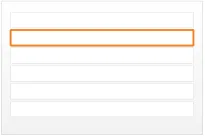
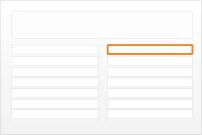
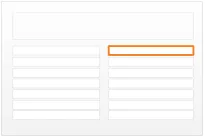
Figure 1 illustrates how the guidance can be applied to four different styles of medication line in four notional views:
diltiazem - CALCICARD CR – modified-release tablet – DOSE 120 mg - oral – three times a day
view 1
diltiazem - CALCICARD CR – modified-release tablet DOSE 120 mg ROUTE oral – three times a day
view 2
diltiazem - CALCICARD CR – modified-release tablet DOSE 120 mg - oral – three times a day
view 3
diltiazem - CALCICARD CR FORM modified-release tablet DOSE 120 mg ROUTE oral FREQUENCY three times a day
view 4
Figure 1: Examples of Medication Line Guidance Applied to a Medication Line in Four Notional Views
Page 6
Copyright ©2013 Health and Social Care Information Centre




 HSCIC Controlled Document
2.1 Summary of Guidance
Detailed guidance and rationale for all guidance points is in sections 3.3.1 to 3.3.13. Refer to APPENDIX A for a reference list of all the guidance descriptions. Table 3 provides a summary of the guidance.
Note
In the Visual Summary column, items highlighted in blue indicate correct usage and those in red indicate incorrect usage.
MEDi-001 MEDi-002 MEDi-003 MEDi-013
MEDi-014 to MEDi-017
MEDi-018 to MEDi-020
MEDi-010 MEDi-011 MEDi-021 MEDi-008
MEDi-022 to MEDi-024
MEDi-025 MEDi-012 MEDi-054
MEDi-026 to MEDi-028
3.3.1 Formatting Drug Names
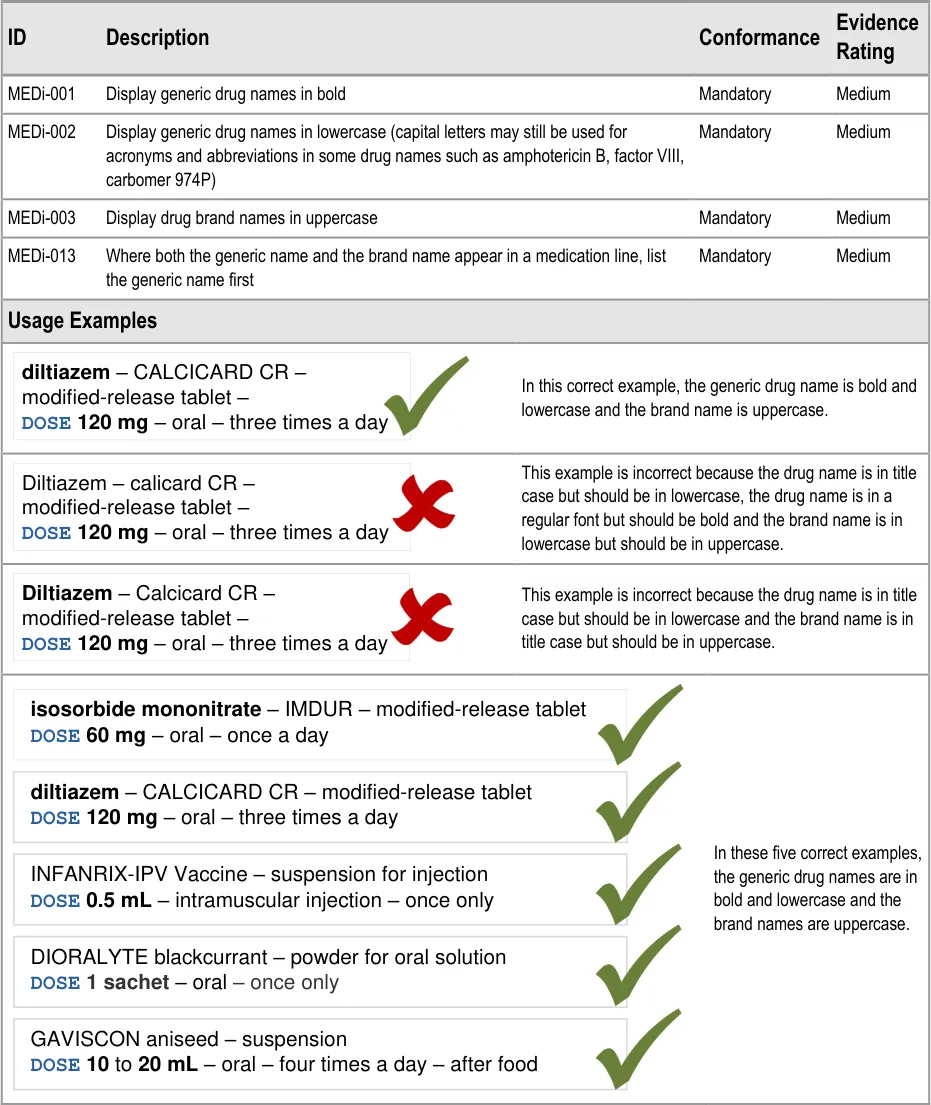
How to use bold, uppercase and lowercase to support recognition of generic versus brand names.
3.3.2 Displaying Numbers
How to display numbers including large numbers with many zeros and numbers that use decimal points.
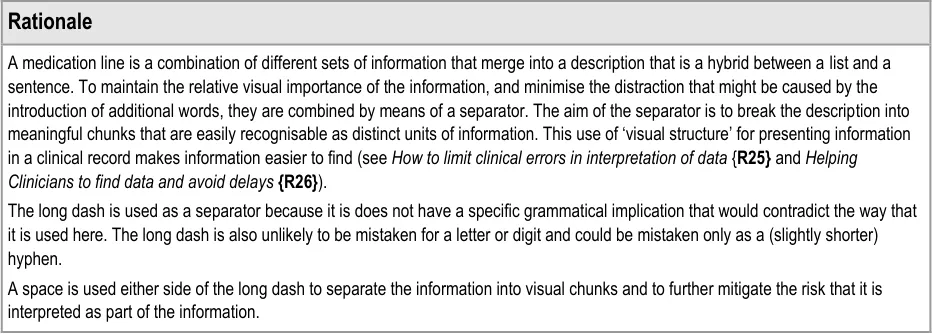
3.3.3 Separators
How to use separators to support recognition of chunks of information combined into a text string like a sentence.
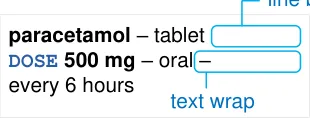
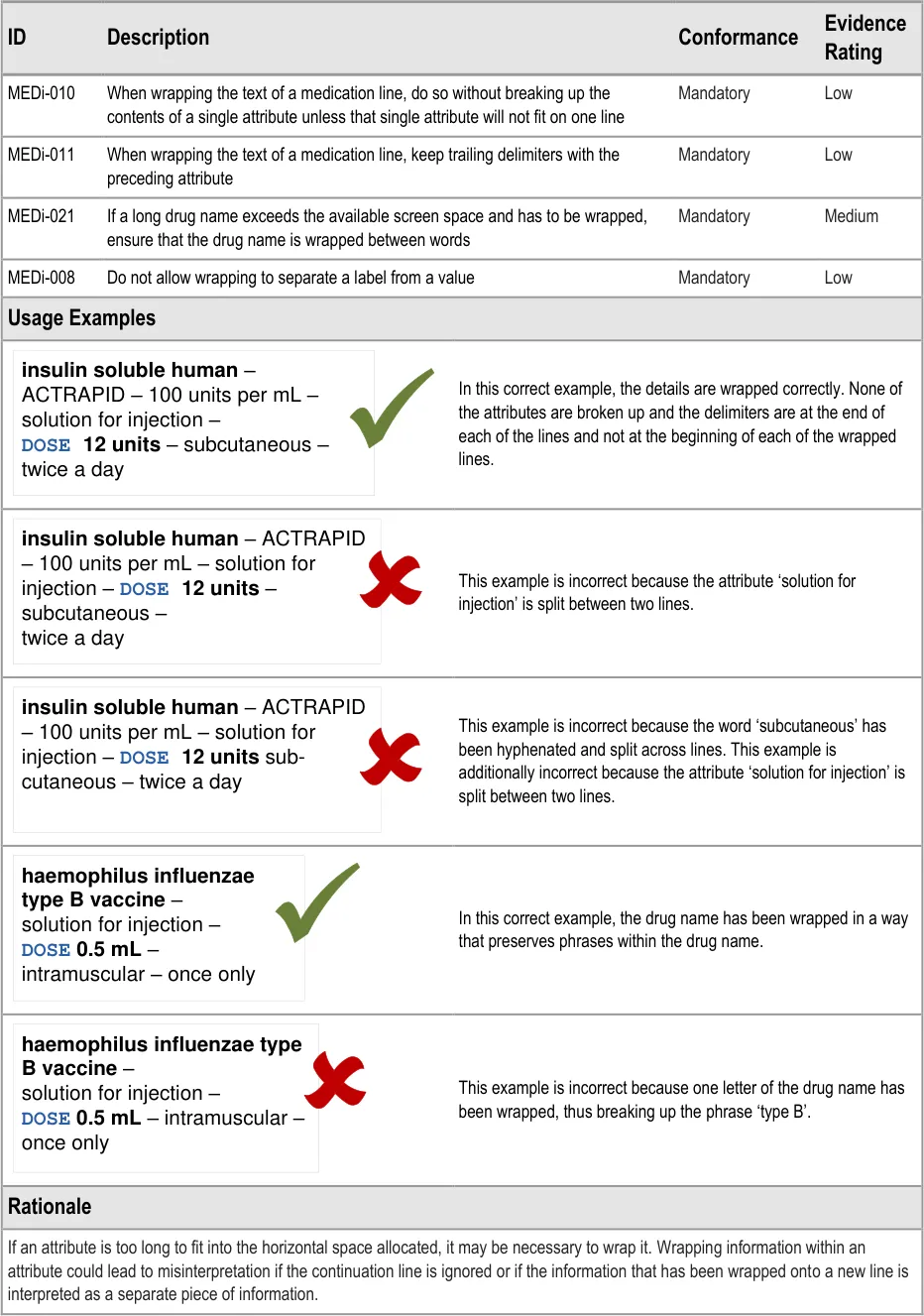
3.3.4 Wrapping
How to determine where to wrap the text in a medication line when horizontal space is limited.
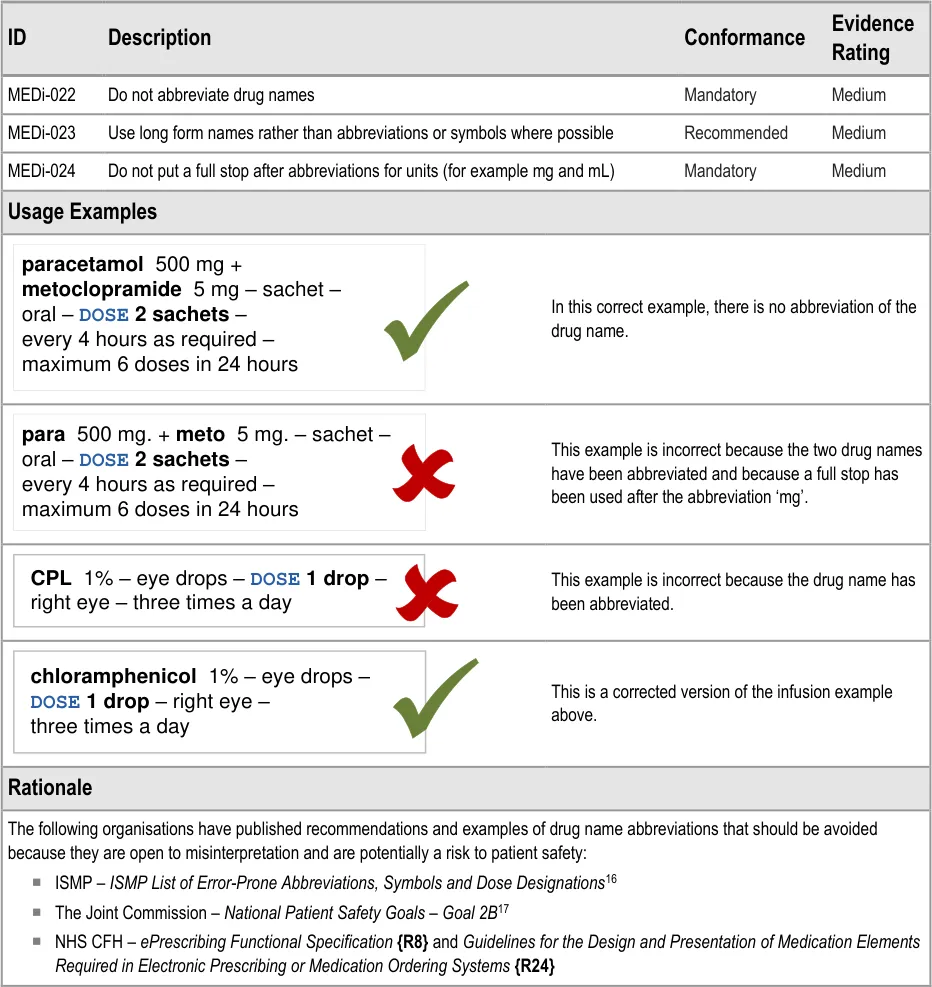
3.3.5 Abbreviation
How to handle specific examples of abbreviation and abbreviations that should be avoided.
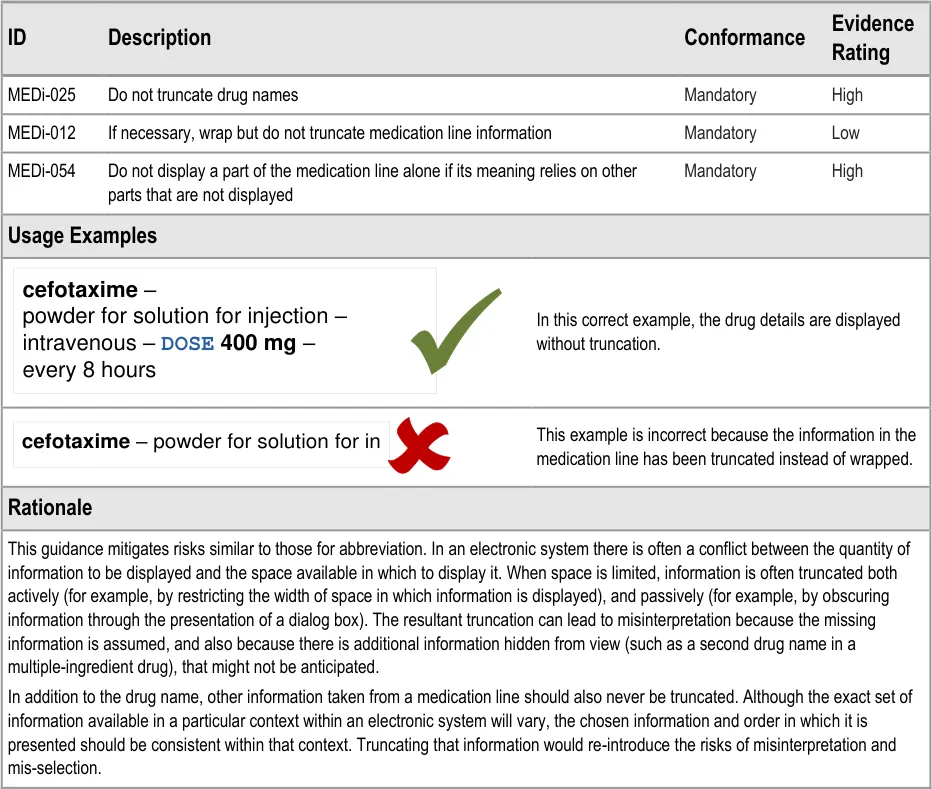
3.3.6 Truncation
Specific examples of when it is important to avoid truncation.
3.3.7 Symbols
When to use specific symbols and symbols that should be avoided.
| Col1 | generic | brand |
|---|---|---|
| diltiazem– CALCICARD CR – modified-release tablet – DOSE 120 mg – oral – twice a day | diltiazem– CALCICARD CR – modified-release tablet – DOSE 120 mg – oral – twice a day | diltiazem– CALCICARD CR – modified-release tablet – DOSE 120 mg – oral – twice a day |
| Col1 | paracetamol |
|---|---|
para – tablet –DOSE 500 mg –oral – every 6 hours | para – tablet –DOSE 500 mg –oral – every 6 hours |
| Col1 | i |
|---|---|
| heparin– 5,000 units per mL – solution for in | heparin– 5,000 units per mL – solution for in |
Do not truncate or omit information from a medication line
@ & | / \ < > ( ) [ ] { }
Page 7
Do not abbreviate drug names
Copyright ©2013 Health and Social Care Information Centre
HSCIC Controlled Document
MEDi-009 MEDi-029 to MED-034
3.3.8 Text Labels
How and when to use text labels.

MEDi-035 3.3.9 Line Breaks
Where to place separators when hard line breaks are used.
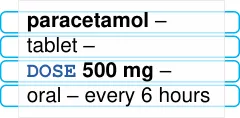
Preserve white space between lines
MEDi-036 MEDi-037
MEDi-007 MEDi-038 to MEDi-044
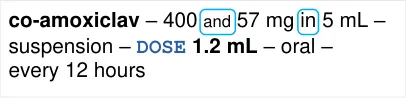
MEDi-045 to MEDi-050
MEDi-051 to MEDi-053
3.3.10 Line Spacing
How much space to leave between lines of text.
3.3.11 Displaying Dose
How to use labels and text formatting to support recognition of a dose within a medication line. How to display numbers in a dose value.
3.3.12 Displaying Strength
How to use layout and appropriate words to display a strength. How to display numbers in a strength value.
3.3.13 Attribute Order
The order in which to display the chunks of information that make up a medication line.
| Col1 | label | space |
|---|---|---|
DOSE 500 mg | DOSE 500 mg | DOSE 500 mg |
generic - BRAND – strength – form – DOSE dose - route – frequency
Table 3: Summary of Guidance
Copyright ©2013 Health and Social Care Information Centre
Page 8
HSCIC Controlled Document
3 GUIDANCE DETAILS
3.1 Introduction
This section contains detailed guidance for the display of a medication that has been prescribed for a single patient.
3.2 Principles
The following key principles inform the guidance in this section:
- Minimise visual clutter so that formatting and icons are effective for providing emphasis and
implying priorities: draw attention to important information without introducing too much distraction
- Support legibility through the use of font, line spacing, and letter spacing and other proven
mechanisms
- Define rules to support standard display of medications information wherever possible
whilst allowing flexibility for information to be displayed appropriately for different tasks
Page 9
Copyright ©2013 Health and Social Care Information Centre
HSCIC Controlled Document
3.3 Guidelines
3.3.1 Formatting Drug Names
Page 10
Copyright ©2013 Health and Social Care Information Centre
HSCIC Controlled Document
6 Lothian Joint Formulary {R12} Lothian Joint Formulary
7 Northumberland and North Tyneside Drugs and Therapeutics Committee Formulary – Version 1.1 September 2004 {R13} : http://www.gp-training.net/protocol/therapeutics/formulary_northumberland.pdf
8 British National Formulary – BNF No. 56 {R16} : http://bnf.org/bnf/bnf/current/104945.htm
9 British National Formulary – BNF No. 56 – Product Label List {R17} : http://bnf.org/bnf/bnf/current/100159.htm
10 British National Formulary – BNF No. 56 – BNF Extra – Resources – Name changes {R18} : http://bnf.org/bnf/extra/56/450049.htm
11 WHO Drug Information, Vol. 22, No. 1, 2008 – International Nonproprietary Names for Pharmaceutical Substances (INN) {R19} : http://whqlibdoc.who.int/druginfo/INN_2008_list59.pdf
Page 11
Copyright ©2013 Health and Social Care Information Centre
HSCIC Controlled Document
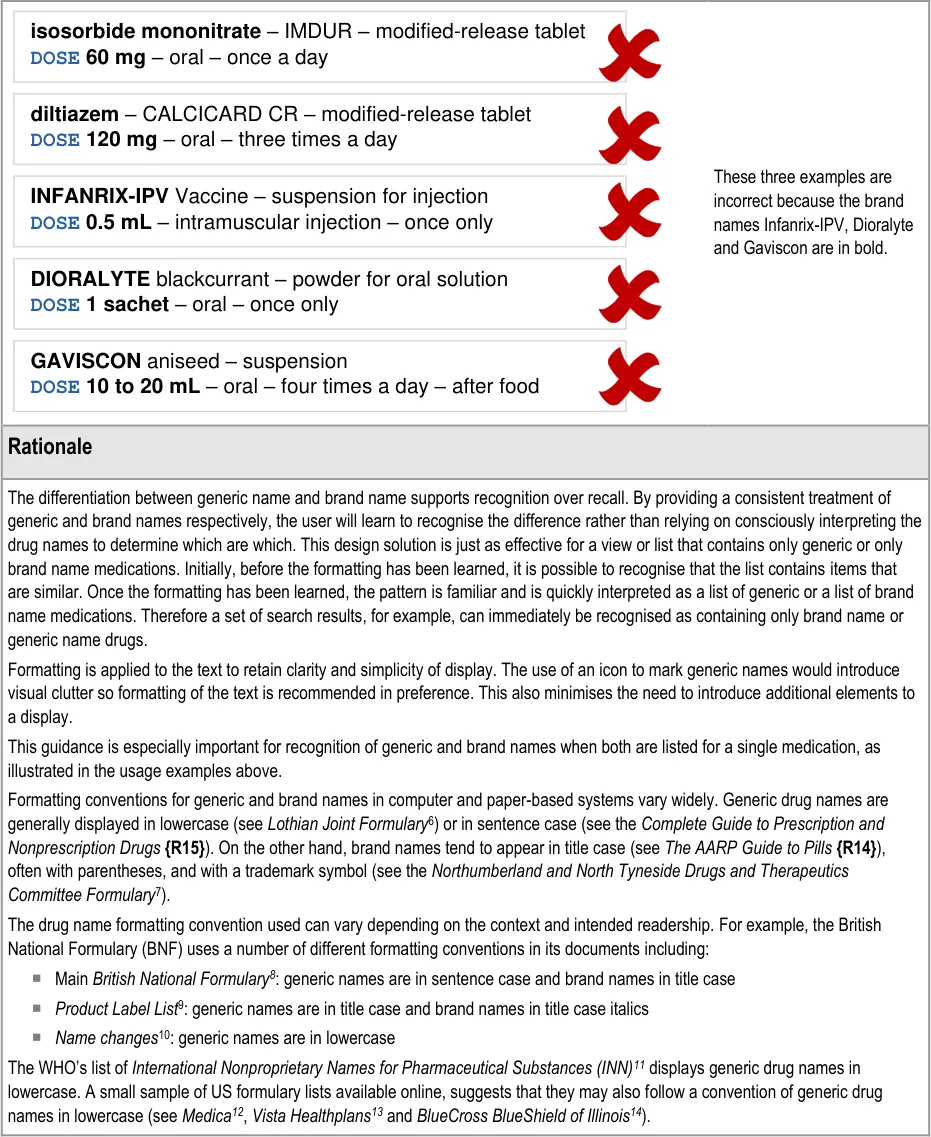
The ISMP’s Draft Guidelines for Safe Electronic Communication of Medication Orders [15] and NHS CFH’s ePrescribing Functional Specification {R8} and Guidelines for the Design and Presentation of Medication Elements Required in Electronic Prescribing or Medication Ordering Systems {R24}, have recommendations and guidelines that advise the use of lowercase letters for generic names and uppercase letters for brand names.
The WHO’s publication Look-Alike, Sound-Alike Medication Names {R7} provides advice on mitigating the risks of look-alike, soundalike medication names. Their description of the problem and associated issues includes reference to the potential for confusion between generic and brand names. Their related suggested action is to:
“…include both the non-proprietary name and the brand name of the medication on medication orders and labels, with the nonproprietary name in proximity to, and in larger font size than the brand name.”
In this document, generic names are shown in bold lowercase and brand names in title case italics.
Guidance is supported by the prevalence of an emerging convention in which generic drug names are displayed in lowercase. Guidance also follows one of a few commonly used conventions for displaying brand names. It thus aims to introduce consistency and achieve the benefits described above whilst minimising the impact of potential conflict with existing conventions.
12 Medica – Over-the-Counter Drug List {R20} : http://member.medica.com/router/default.pdf?doc=/C15/DrugFormulary/Document%20Library/OTC_Druglist_2007.pdf
13 Vista Healthplans – Formulary Drug List 2006 {R21} : http://www.vistahealthplan.com/Static/shared/PDF/Formulary/vista_member_formulary.pdf
14 BlueCross BlueShield of Illinois – 2008 Blue Cross and Blue Shield of Illinois Drug Formulary {R22} : http://www.bcbsil.com/rx/pdf/2008_prescription_drug_formulary.pdf
15 ISMP – ISMP MedicationSafetyAlert! – It’s Time for Standards to Improve Safety with Electronic Communication of Medication Orders – Draft Guidelines for Safe Electronic Communication of Medication Orders {R23} : http://www.ismp.org/Newsletters/acutecare/articles/20030220.asp
Page 12
Copyright ©2013 Health and Social Care Information Centre
HSCIC Controlled Document
3.3.2 Displaying Numbers
Page 13
Copyright ©2013 Health and Social Care Information Centre
HSCIC Controlled Document
Page 14
Copyright ©2013 Health and Social Care Information Centre
HSCIC Controlled Document
3.3.3 Separators
Page 15
Copyright ©2013 Health and Social Care Information Centre
HSCIC Controlled Document
Page 16
Copyright ©2013 Health and Social Care Information Centre
HSCIC Controlled Document
3.3.4 Wrapping
Page 17
Copyright ©2013 Health and Social Care Information Centre
HSCIC Controlled Document
3.3.5 Abbreviation
16 ISMP List of Error-Prone Abbreviations, Symbols, and Dose Designations – November 2003, Volume 8, Issue 24 {R27} : http://www.usp.org/pdf/EN/patientSafety/ismpAbbreviations.pdf
17 The Joint Commission – National Patient Safety Goals – Goal 2B {R28} : http://www.jointcommission.org/PatientSafety/NationalPatientSafetyGoals/08_npsg_facts.htm
Page 18
Copyright ©2013 Health and Social Care Information Centre
HSCIC Controlled Document
3.3.6 Truncation
Page 19
Copyright ©2013 Health and Social Care Information Centre
HSCIC Controlled Document
3.3.7 Symbols
Page 20
Copyright ©2013 Health and Social Care Information Centre
HSCIC Controlled Document

Page 21
Copyright ©2013 Health and Social Care Information Centre
HSCIC Controlled Document
3.3.8 Text Labels
Page 22
Copyright ©2013 Health and Social Care Information Centre
HSCIC Controlled Document
Page 23
Copyright ©2013 Health and Social Care Information Centre
HSCIC Controlled Document
3.3.9 Line Breaks
Page 24
Copyright ©2013 Health and Social Care Information Centre
HSCIC Controlled Document
Page 25
Copyright ©2013 Health and Social Care Information Centre
HSCIC Controlled Document
3.3.10 Line Spacing
Page 26
Copyright ©2013 Health and Social Care Information Centre
HSCIC Controlled Document
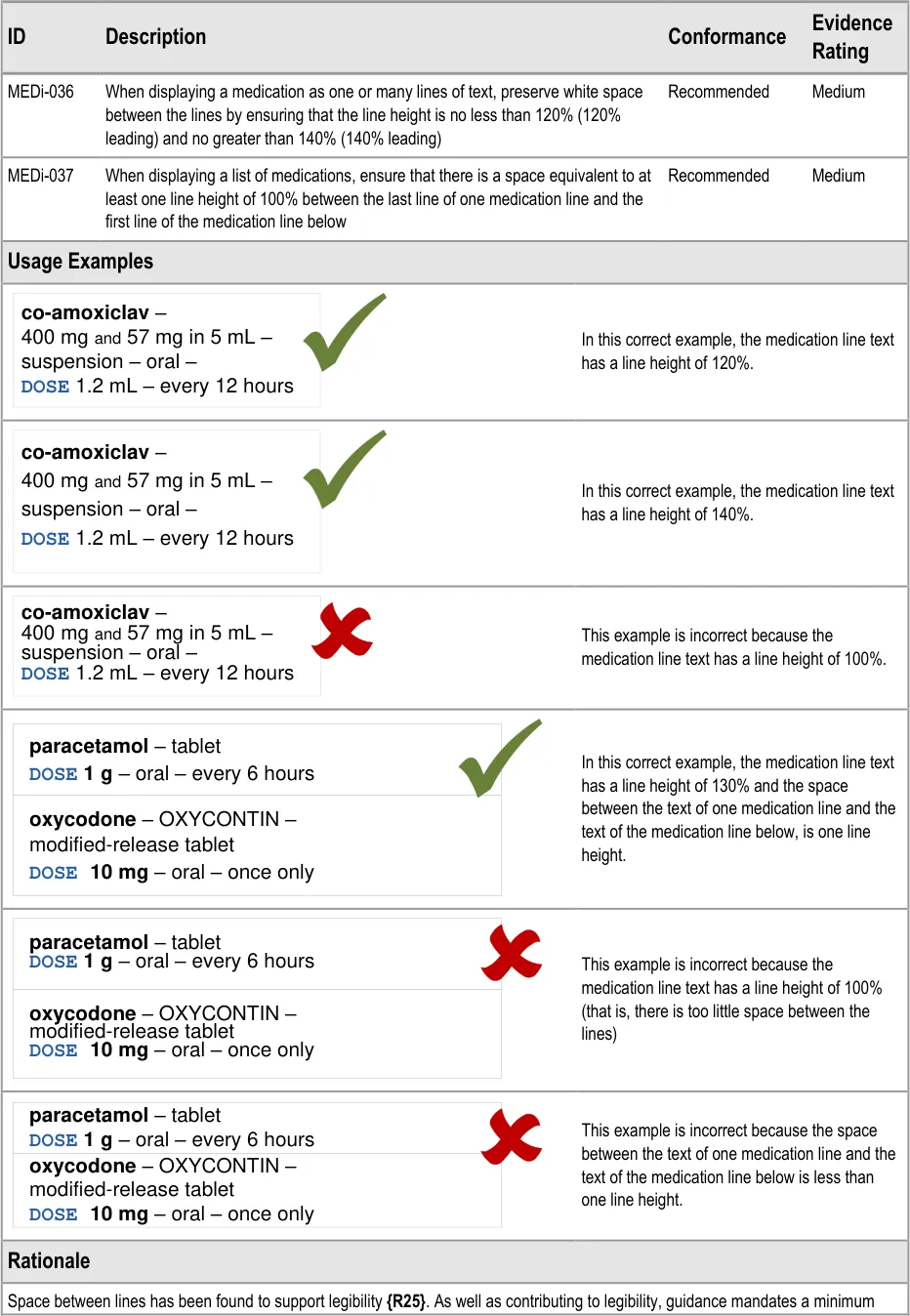
space between the lines to mitigate the risk of mis-associating information in one line with the medication in the lines above or below.
3.3.11 Displaying Dose
Page 27
Copyright ©2013 Health and Social Care Information Centre
HSCIC Controlled Document
Page 28
Copyright ©2013 Health and Social Care Information Centre
HSCIC Controlled Document
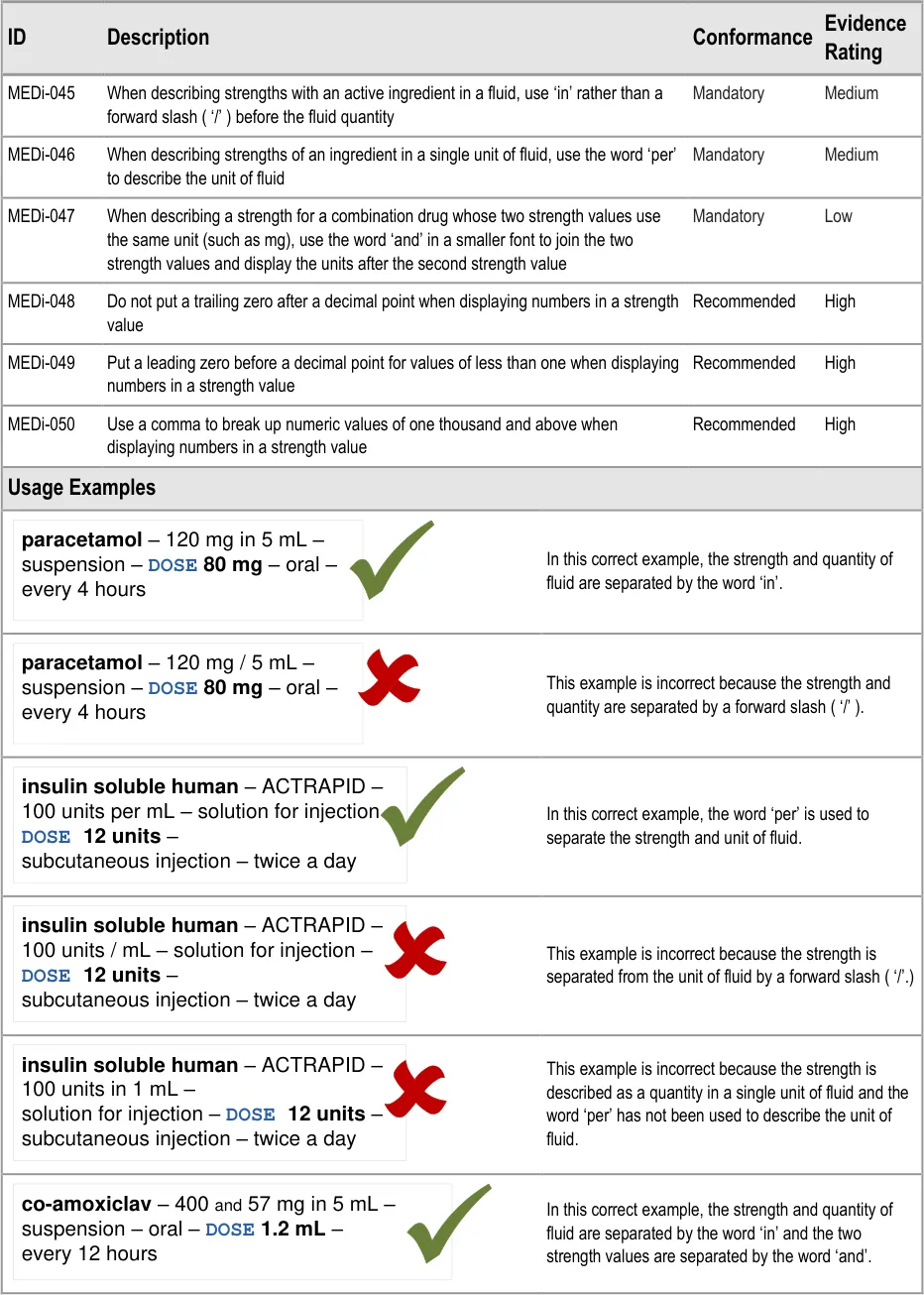
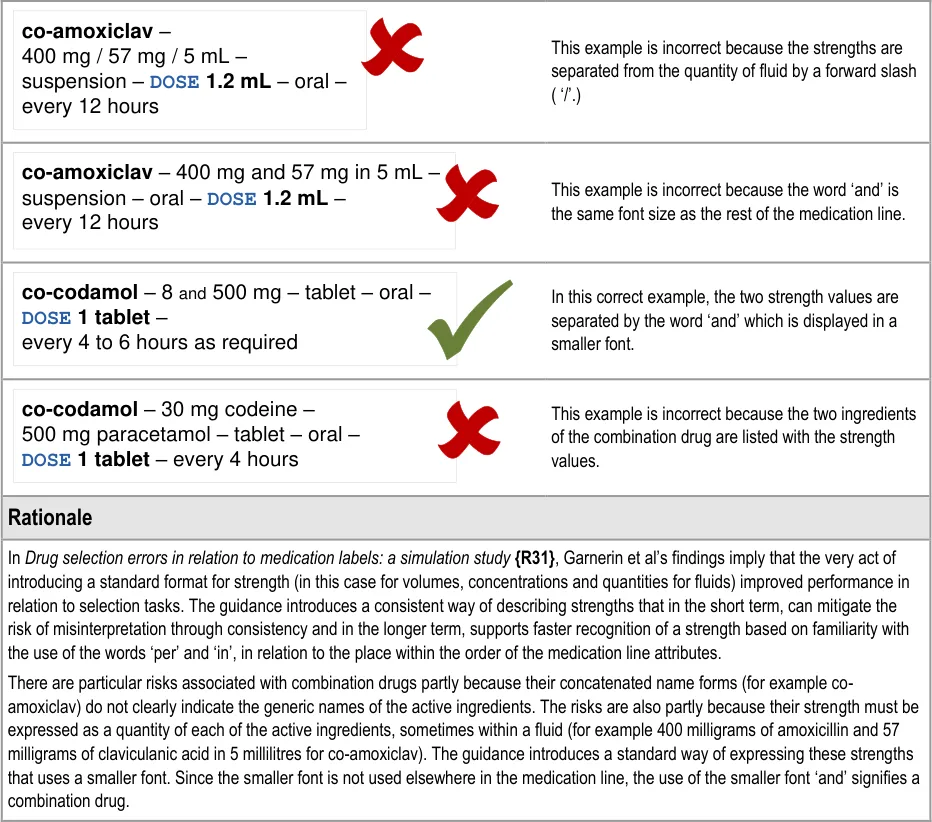
3.3.12 Displaying Strength
Page 29
Copyright ©2013 Health and Social Care Information Centre
HSCIC Controlled Document
Page 30
Copyright ©2013 Health and Social Care Information Centre
HSCIC Controlled Document
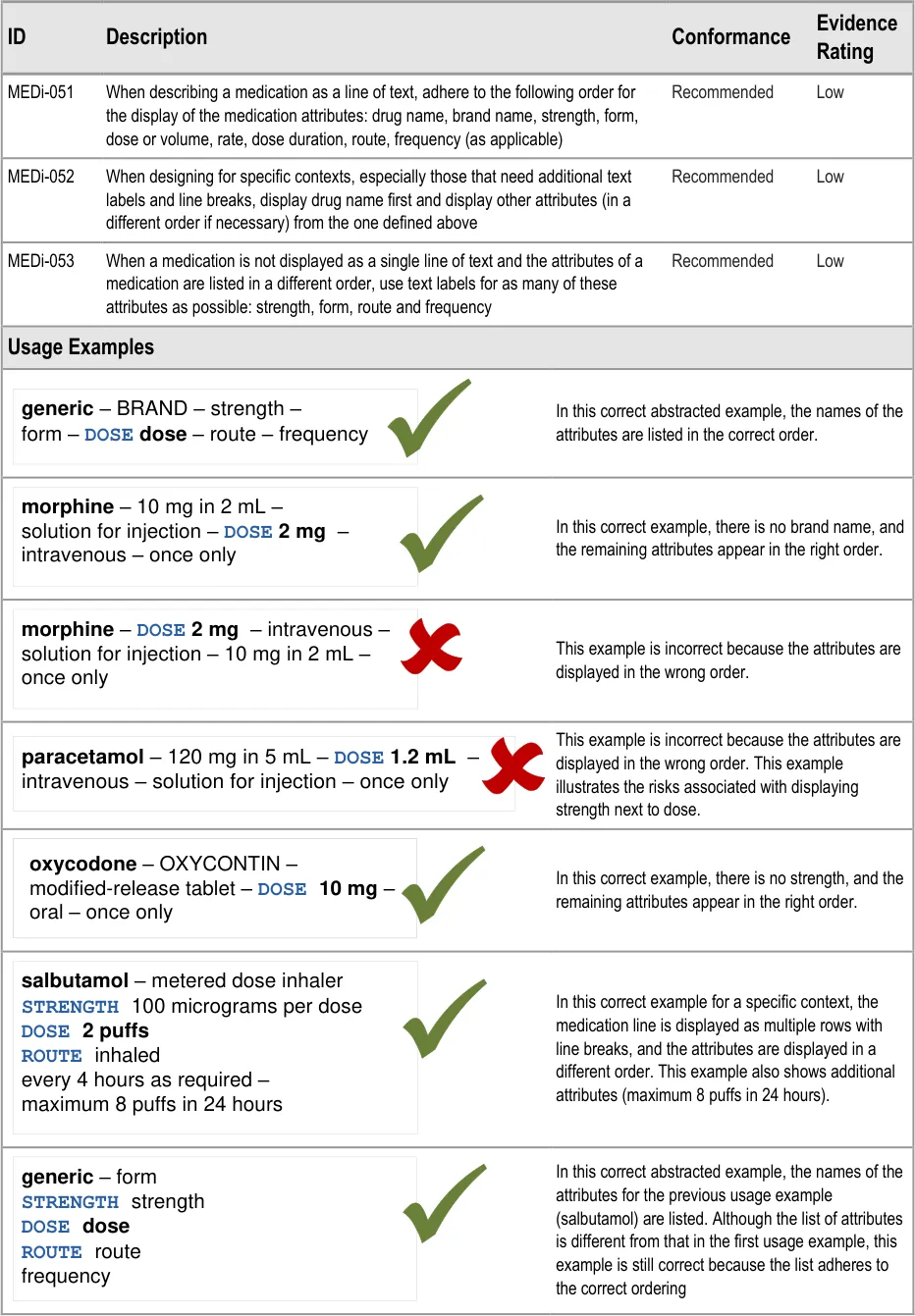
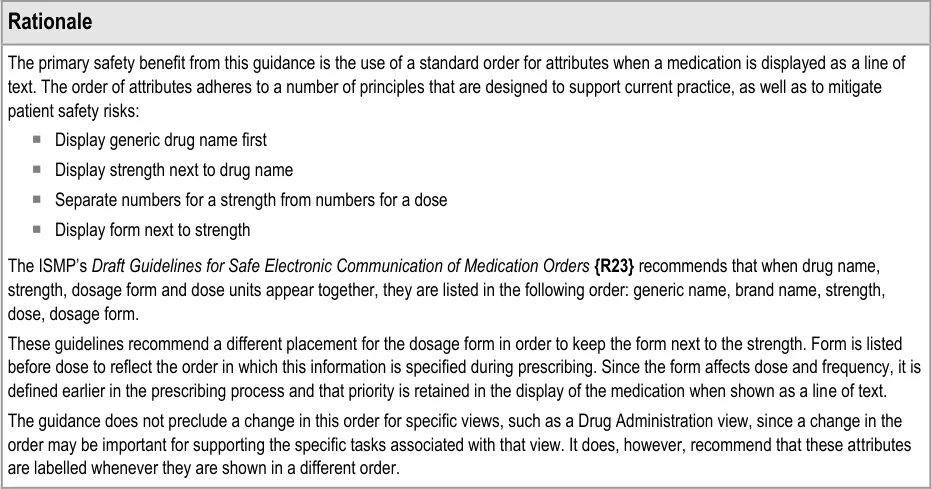
3.3.13 Attribute Order
Page 31
Copyright ©2013 Health and Social Care Information Centre
HSCIC Controlled Document
Page 32
Copyright ©2013 Health and Social Care Information Centre
HSCIC Controlled Document
3.4 Rationale Summary
This section summarises the principles behind the rationale for all guidance points in this document.
General Principles:
-
Provide support for legibility
-
Mitigate risks of incorrect selection and mis-interpretation
Usability Principles:
- Minimise the use of embellishments (for example, bold, colour, fonts, font sizes, italics,
separators and symbols)
-
Minimise instances of each type of embellishment within a reading unit
-
Consistent use of specific embellishments within and preferably between user-interface
contexts or ‘views’
- Use words instead of symbols where it is important for removing ambiguity
Existing Standards:
-
NHS CFH – ePrescribing Functional Specification {R8}
-
NHS NPfIT – Guidelines for the Design and Presentation of Medication Elements Required
in Electronic Prescribing or Medication Ordering Systems {R24}
- ISMP (US) – Draft Guidelines for Safe Electronic Communication of Medication
Orders {R23}
Evolving Standards:
- NHS NPfIT – Types of medication item for display and prescribing within Secondary Care
electronic systems {R32}
Page 33
Copyright ©2013 Health and Social Care Information Centre
HSCIC Controlled Document
4 DOCUMENT INFORMATION
4.1 Terms and Abbreviations
ACBS Advisory Committee on Borderline Substances
AMP Actual Medicinal Product
BNF British National Formulary
CATR Clinical Authority to Release
CSG Clinical Safety Group
CSMS Clinical Safety Management System
CUI Common User Interface
dm+d Dictionary of Medicines and Devices
HDU High Dependency Unit
ISMP The Institute for Safe Medication Practices
IUD Intrauterine Device
NHS National Health Service
NHS CFH NHS Connecting for Health
NPfIT National Programme for IT
NPSA National Patient Safety Agency
OTC Over the Counter
PGD Patient Group Direction
PODs Patient’s Own Drugs
TFN Trade Family Name
TPN Total Parental Nutrition
TTO To Take Out
UI User Interface
VTM Virtual Therapeutic Moiety
WHO World Health Organization
Table 4: Terms and Abbreviations
Copyright ©2013 Health and Social Care Information Centre
Page 34
HSCIC Controlled Document
4.2 Definitions
NHS Entity Within this document, defined as a single NHS organisation or group that is operated within a single technical infrastructure environment by a defined group of IT administrators.
The Authority The organisation implementing the NHS National Programme for IT (currently NHS Connecting for Health).
Current best practice Current best practice is used rather than best practice, as over time best practice guidance may change or be revised due to changes to products, changes in technology, or simply the additional field deployment experience that comes over time.
Generic drug name This can be a single drug name that refers to a single active ingredient or it can be multiple active ingredients that are prescribed as one drug. In the structure of the dm+d {R9}, this generally equates to a Virtual Therapeutic Moiety (VTM).
Important Note
This definition is for this document only and may not reflect the definitions that are used in clinical practice or healthcare organisations.
Brand name A brand name for a product containing medication. A brand name may be associated with many products. In some cases, the same brand name may be associated with different generic drugs. Future versions of the dm+d {R9} are expected to include a separate entity for brand name, known as Trade Family Name (TFN). In the meantime, the brand name is part of the Actual Medicinal Product (AMP).
Important Note
This definition is for this document only and may not reflect the definitions that are used in clinical practice or healthcare organisations.
Table 5: Definitions
4.3 Nomenclature
This section shows how to interpret the different styles used in this document to denote various types of information.
4.3.1 Body Text
Code Monospace
Script
Other markup languages
Interface dialog names Bold
Field names
Controls
Folder names Title Case
File names
Table 6: Body Text Styles
Page 35
Copyright ©2013 Health and Social Care Information Centre
HSCIC Controlled Document
4.3.2 Cross References
Current document – sections Section number only
Current document – figures/tables Caption number only
Other project documents Italics and possibly a footnote
Publicly available documents Italics with a footnote
External Web-based content Italics and a hyperlinked footnote
Table 7: Cross Reference Styles
4.4 References
R1. NHS CUI Programme – Design Guide Entry – Medications Management – Medication Line 1.0.0.0
R2. NPSA – Safety in doses: medication safety incidents in the NHS http://www.npsa.nhs.uk/EasySiteWeb/GatewayLink.aspx?alId=5535
R3. Medication Errors – Causes, Prevention, and Risk Management – Cohen M R (Ed) – Jones and Bartlett Publishers
R4. To Err is Human – Building a Safer Health System – Kohn L, Corrigan J, Donaldson M – Washington, DC: National Academy Press, 2000
2007
2004
2000
R5. Understanding Patient Safety – Wachter R M – The McGraw-Hill Companies, Inc, 2008 2008
R6. ISMP – Frequently Asked Questions (FAQ) – How should Tallman lettering be applied to lookalike/sound-alike drug name pairs? http://www.ismp.org/faq.asp#Question_5
R7. WHO Collaborating Centre for Patient Safety Releases – Patient Safety Solutions – volume 1, solution 1 – Look-Alike, Sound-Alike Medication Names http://www.ccforpatientsafety.org/fpdf/Presskit/PS-Solution1.pdf
R8. NHS CFH – ePrescribing Functional Specification http://www.connectingforhealth.nhs.uk/newsroom/news-stories/eprescfunctspec
R9. NHS – dictionary of medicines + devices Welcome to the dm+d website — The NHS Dictionary of Medicines and Devices
2008
May 2007
1.0
Release 2.3
R10. NHS CUI Programme – Design Guide Entry – Medications Management – Medication Views 2.0.0.0
R11. NHS CUI Programme – Design Guide Entry – Medications Management – Drug Administration 3.0.0.0
R12. Lothian Joint Formulary Lothian Joint Formulary
R13. Northumberland and North Tyneside Drugs and Therapeutics Committee – Formulary – Version 1.1 September 2004 http://www.gp-training.net/protocol/therapeutics/formulary_northumberland.pdf
R14. The AARP Guide to Pills – Essential Information on More than 1,200 Prescription & Nonprescription Medications, Including Generics – AARP, Avord, J, Greider, K
July 2008
September 2004
January 2006
R15. Complete Guide to Prescription and Nonprescription Drugs – Griffith H W, Moore S, Boesen, K August 2007
R16. British National Formulary – BNF No. 56 http://bnf.org/bnf/bnf/current/104945.htm
R17. British National Formulary – BNF No. 56 – Product Label List http://bnf.org/bnf/bnf/current/100159.htm
Copyright ©2013 Health and Social Care Information Centre
September 2008
September 2008
Page 36
HSCIC Controlled Document
R18. British National Formulary – BNF No. 56 – BNF Extra – Resources – Name changes http://bnf.org/bnf/extra/56/450049.htm
R19. WHO Drug Information, Vol. 22, No. 1, 2008 – International Nonproprietary Names for Pharmaceutical Substances (INN) http://whqlibdoc.who.int/druginfo/INN_2008_list59.pdf
R20. Medica – Over-the-Counter Drug List http://member.medica.com/router/default.pdf?doc=/C15/DrugFormulary/Document%20Library/OTC_ Druglist_2007.pdf
R21. Vista Healthplans – Formulary Drug List 2006 http://www.vistahealthplan.com/Static/shared/PDF/Formulary/vista_member_formulary.pdf
R22. BlueCross BlueShield of Illinois – 2008 Blue Cross and Blue Shield of Illinois Drug Formulary http://www.bcbsil.com/rx/pdf/2008_prescription_drug_formulary.pdf
R23. ISMP – ISMP MedicationSafetyAlert! – It’s Time for Standards to Improve Safety with Electronic Communication of Medication Orders – Draft Guidelines for Safe Electronic Communication of Medication Orders http://www.ismp.org/Newsletters/acutecare/articles/20030220.asp
R24. NHS NPfIT – Guidelines for the Design and Presentation of Medication Elements Required in Electronic Prescribing or Medication Ordering Systems – NPfIT-EP-DB-0003.01
R25. How to limit clinical errors in interpretation of data – Wright P, Jansen C, Wyatt J – Lancet 1998; 352: 1539-43
R26. Helping Clinicians to find data and avoid delays – Nygren E, Wyatt J C, Wright, P – Lancet 1998; 352: 1462-66
R27. ISMP List of Error-Prone Abbreviations, Symbols, and Dose Designations – November 2003, Volume 8, Issue 24 http://www.usp.org/pdf/EN/patientSafety/ismpAbbreviations.pdf
R28. The Joint Commission – National Patient Safety Goals – Goal 2B http://www.jointcommission.org/PatientSafety/NationalPatientSafetyGoals/08_npsg_facts.htm
R29. Data Presentation & Visual Literacy in Medicine and Science – Simmonds D, Reynolds L – Newton, MA, USA – Butterworth-Heinemann – 1994
September 2008
2008
01-Aug-2007
2006
01-Jul-2008
20-Feb-2003
2005
1998
1998
27-Nov-2003
June 2007
1994
R30. Designing Instructional Text – Hartley J – London, Kogan Page Third Edition, 1994
R31. Drug selection errors in relation to medication labels: a simulation study – Garnerin et al – Anaesthesia 2007, 62, pages 1090-1094
R32. NHS NPfIT – Types of medication item for display and prescribing within Secondary Care electronic systems – NPfIT-EP-DB-0022.01
Table 8: References
Copyright ©2013 Health and Social Care Information Centre
2007
2008
Page 37
HSCIC Controlled Document
APPENDIX A REFERENCE SUMMARY OF GUIDANCE
MEDi-001 to MEDi-003, MEDi-013 Visual Summary:
| Col1 | generic | brand |
|---|---|---|
| diltiazem– CALCICARD CR – modified-release tablet – DOSE 120 mg – oral – twice a day | diltiazem– CALCICARD CR – modified-release tablet – DOSE 120 mg – oral – twice a day | diltiazem– CALCICARD CR – modified-release tablet – DOSE 120 mg – oral – twice a day |
MEDi-001 3.3.1 Display generic drug names in bold
MEDi-002 3.3.1 Display generic drug names in lowercase (capital letters may still be used for acronyms and abbreviations in some drug names such as amphotericin B, factor VIII, carbomer 974P)
MEDi-003 3.3.1 Display drug brand names in uppercase
MEDi-013 3.3.1 Where both the generic name and the brand name appear in a medication line, list the generic name first
MEDi-014 to MEDi-017 Visual Summary:
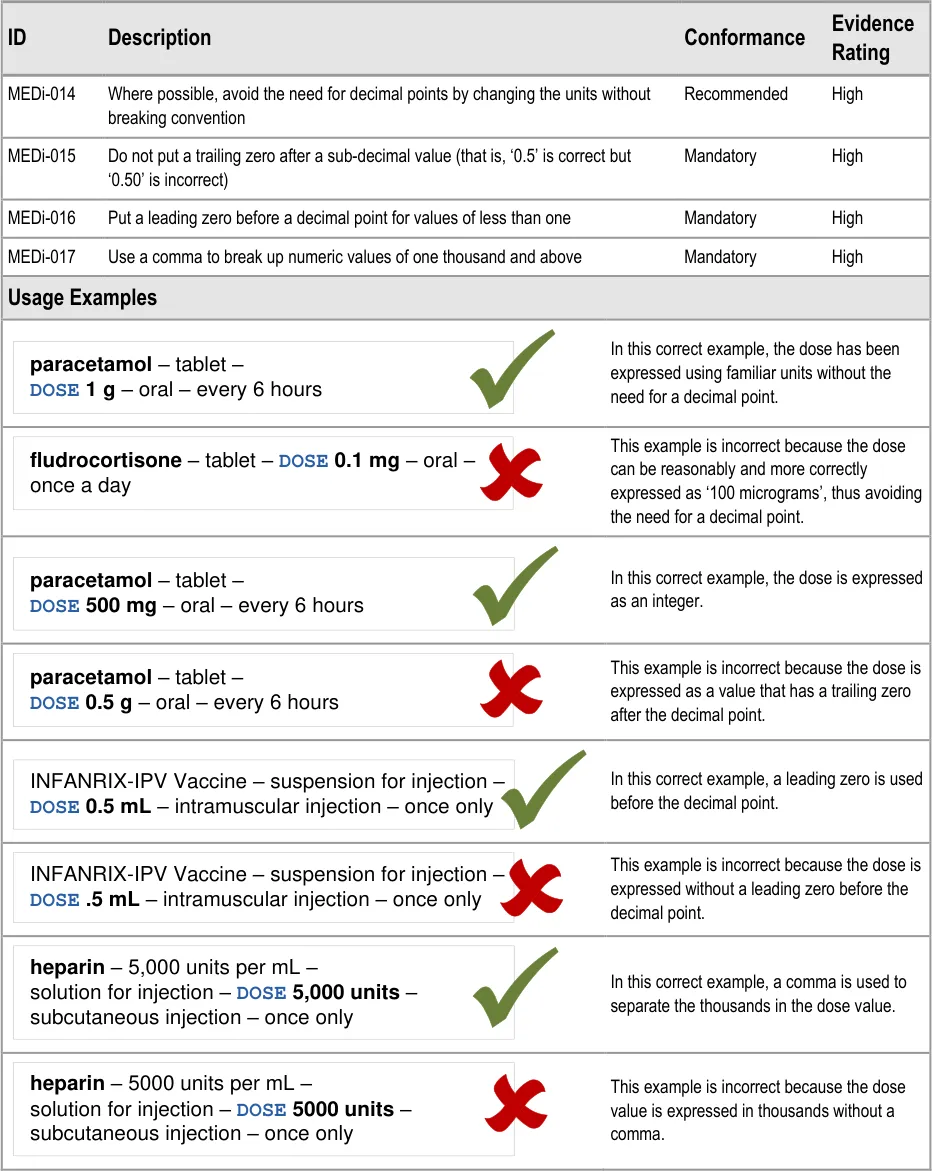
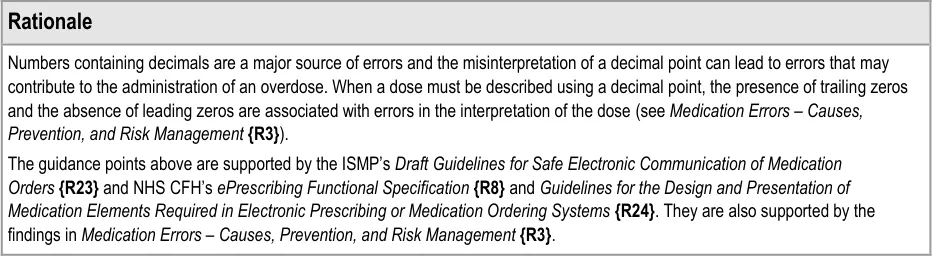
MEDi-014 3.3.2 Where possible, avoid the need for decimal points by changing the units without breaking convention
MEDi-015 3.3.2 Do not put a trailing zero after a sub-decimal value (that is, ‘0.5’ is correct but ‘0.50’ is incorrect)
MEDi-016 3.3.2 Put a leading zero before a decimal point for values of less than one
MEDi-017 3.3.2 Use a comma to break up numeric values of one thousand and above
MEDi-018 to MEDi-020 Visual Summary:
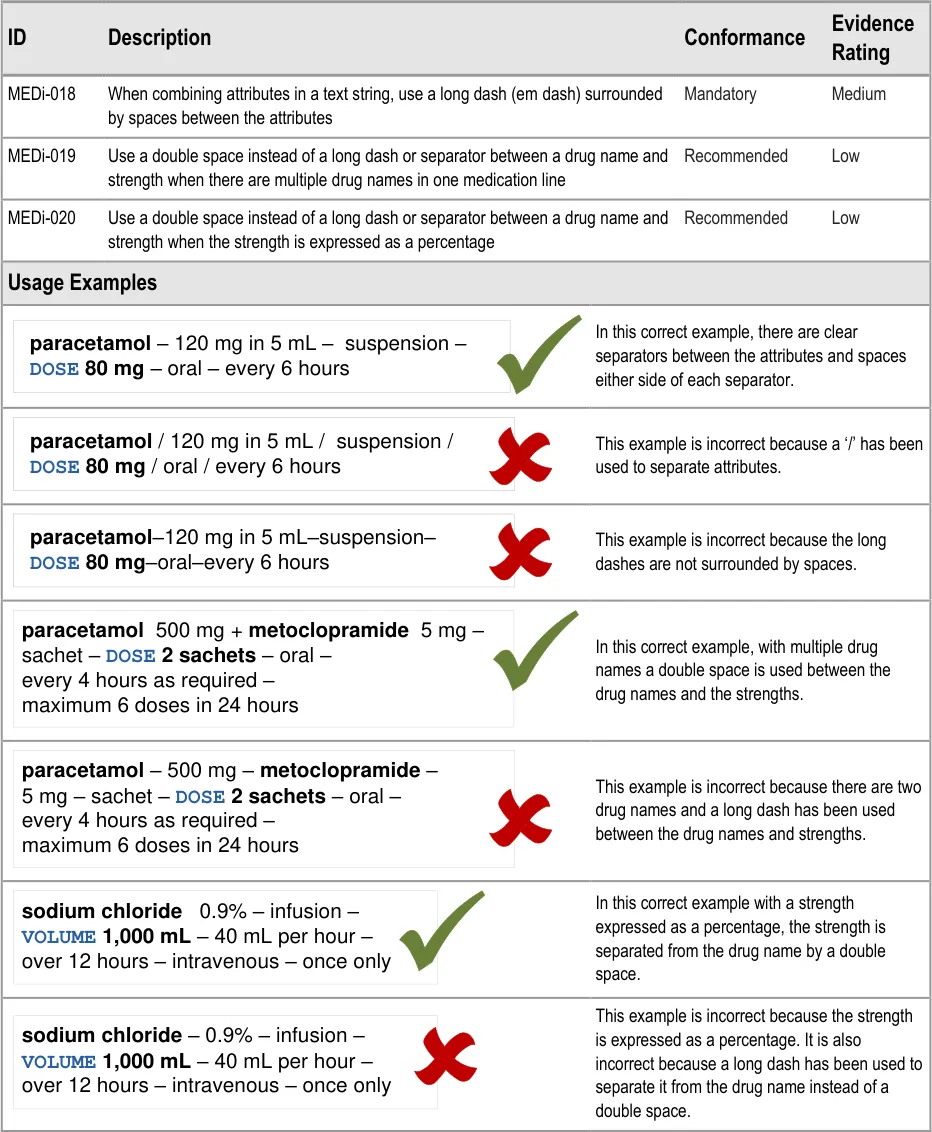
MEDi-018 3.3.3 When combining attributes in a text string, use a long dash (em dash) surrounded by spaces between the attributes
MEDi-019 3.3.3 Use a double space instead of a long dash or separator between a drug name and strength when there are multiple drug names in one medication line
MEDi-020 3.3.3 Use a double space instead of a long dash or separator between a drug name and strength when the strength is expressed as a percentage
MEDi-010, MEDi-011, MEDi-021, MEDi-008 Visual Summary:
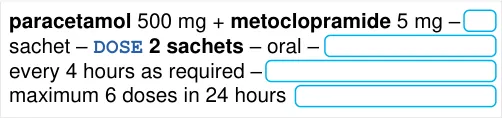
MEDi-010 3.3.4 When wrapping the text of a medication line, do so without breaking up the contents of a single attribute unless that single attribute will not fit on one line
MEDi-011 3.3.4 When wrapping the text of a medication line, keep trailing delimiters with the preceding attribute
MEDi-021 3.3.4 If a long drug name exceeds the available screen space and has to be wrapped, ensure that the drug name is wrapped between words
MEDi-008 3.3.4 Do not allow wrapping to separate a label from a value
Page 38
Copyright ©2013 Health and Social Care Information Centre
HSCIC Controlled Document
MEDi-022 to MEDi-024 Visual Summary:
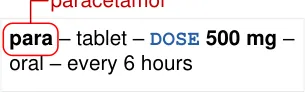
Do not abbreviate drug names
MEDi-022 3.3.5 Do not abbreviate drug names
MEDi-023 3.3.5 Use long form names rather than abbreviations or symbols where possible
MEDi-024 3.3.5 Do not put a full stop after abbreviations for units (for example, mg and mL)
MEDi-025, MEDi-012 Visual Summary:
| Col1 | i |
|---|---|
| heparin– 5,000 units per mL – solution for in | heparin– 5,000 units per mL – solution for in |
Do not truncate or omit information from a medication line
MEDi-025 3.3.6 Do not truncate drug names
MEDi-012 3.3.6 If necessary, wrap but do not truncate medication line information
MEDi-054 3.3.6 Do not display a part of the medication line alone if its meaning relies on other parts that are not displayed
MEDi-026 to MEDi-028 Visual Summary:
@ & | / \ < > ( ) [ ] { }
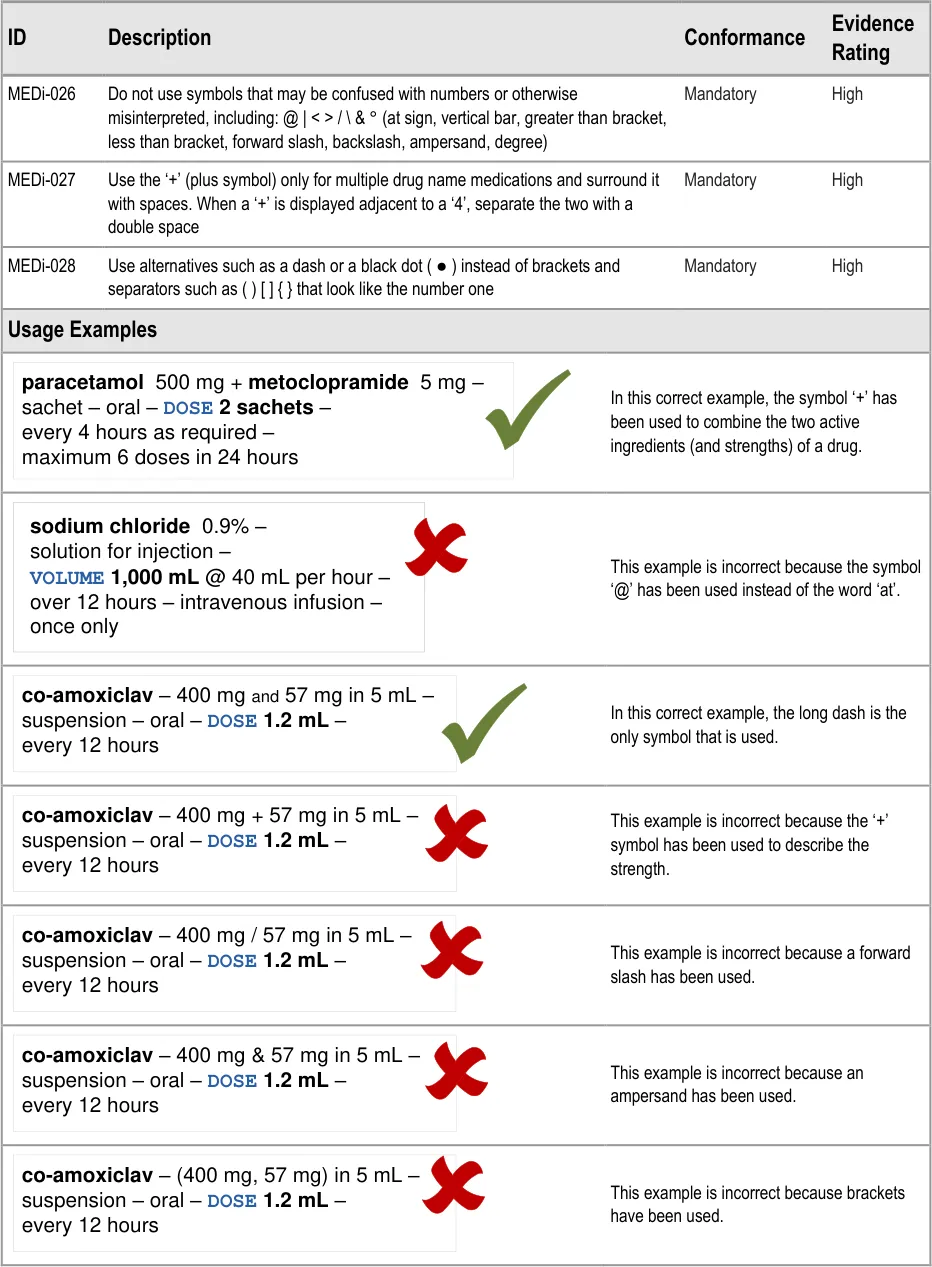
MEDi-026 3.3.7 Do not use symbols that may be confused with numbers or otherwise misinterpreted, including: @ | <
- / \ & ° (at sign, vertical bar, greater than bracket, less than bracket, forward slash, backslash,ampersand, degree)
MEDi-027 3.3.7 Use the ‘+’ (plus symbol) only for multiple drug name medications and surround it with spaces. When a ‘+’ is displayed adjacent to a ‘4’, separate the two with a double space
MEDi-028 3.3.7 Use alternatives such as a dash or a black dot ( ● ) instead of brackets and separators such as ( ) [ ] { } that look like the number one
MEDi-009, MEDi-029 to MED-034 Visual Summary:

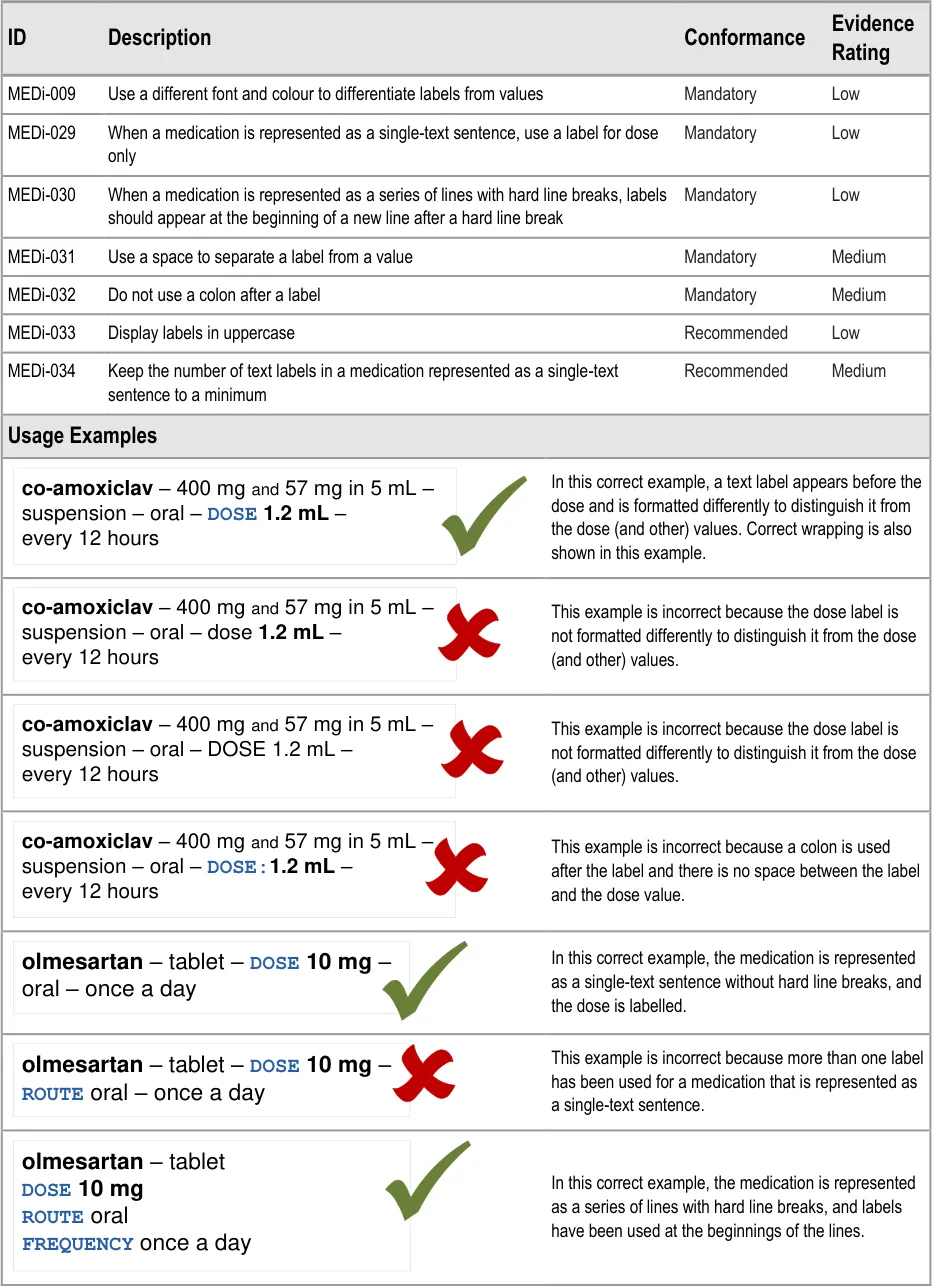
MEDi-009 3.3.8 Use a different font and colour to differentiate labels from values
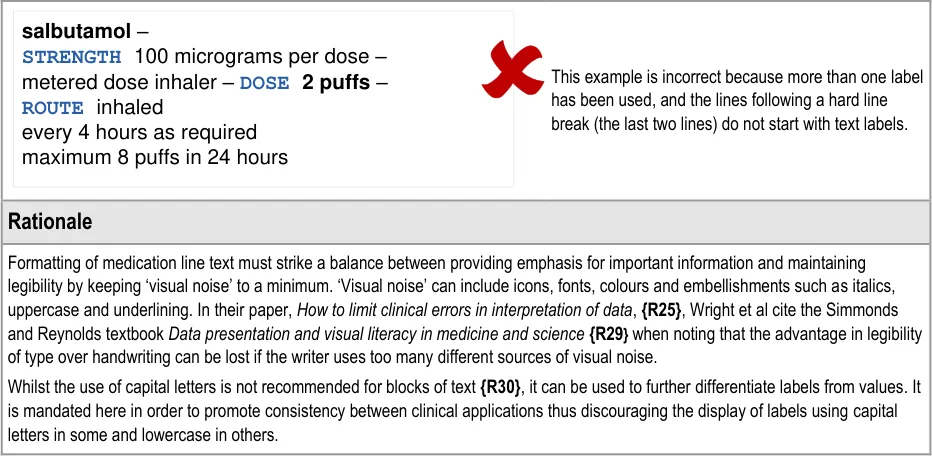
MEDi-029 3.3.8 When a medication is represented as a single-text sentence, use a label for dose only
MEDi-030 3.3.8 When a medication is represented as a series of lines with hard line breaks, labels should appear at the beginning of a new line after a hard line break
MEDi-031 3.3.8 Use a space to separate a label from a value
MEDi-032 3.3.8 Do not use a colon after a label
MEDi-033 3.3.8 Display labels in uppercase
MEDi-034 3.3.8 Keep the number of text labels in a medication represented as a single-text sentence to a minimum
Page 39
Copyright ©2013 Health and Social Care Information Centre
HSCIC Controlled Document
MEDi-035 Visual Summary:
| Col1 | line b |
|---|---|
paracetamol – tabletDOSE 500 mg – oral –every 6 hours text wrap | paracetamol – tabletDOSE 500 mg – oral –every 6 hours text wrap |
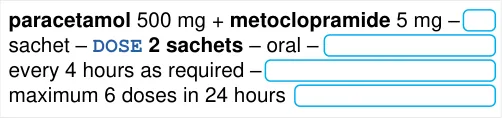
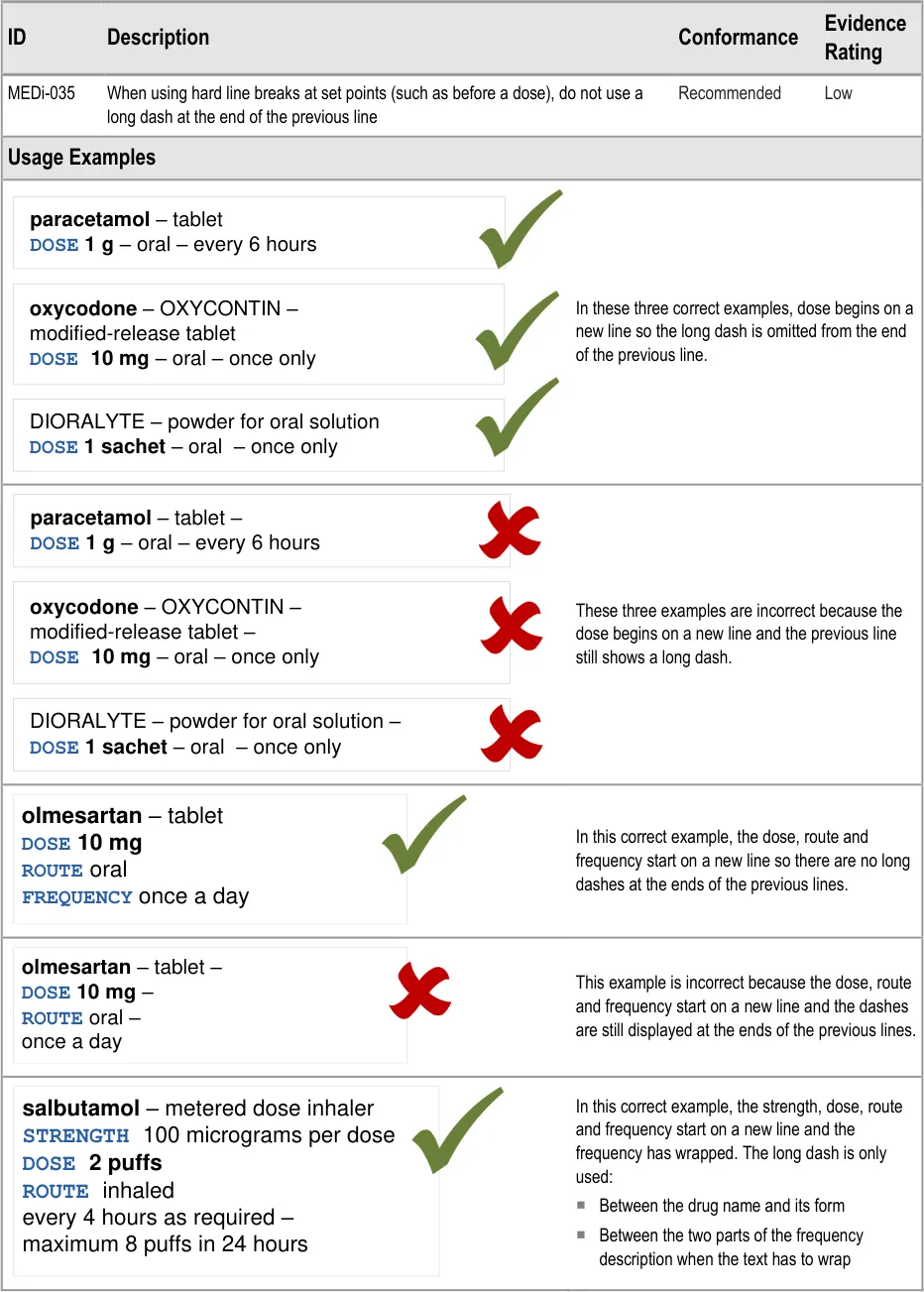
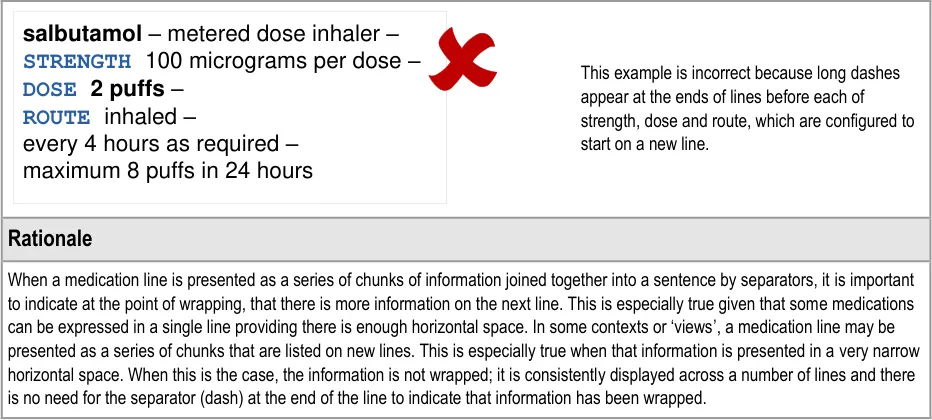
MEDi-035 3.3.9 When using hard line breaks at set points (such as before a dose), do not use a long dash at the end of the previous line
MEDi-036, MEDi-037 Visual Summary:
Preserve white space between lines
| Col1 | Col2 | Col3 |
|---|---|---|
| paracetamol – | ||
| tablet – | ||
DOSE 500 mg – | ||
| oral – every 6 hours | ||
MEDi-036 3.3.10 When displaying a medication as one or many lines of text, preserve white space between the lines by ensuring that the line height is no less than 120% (120% leading) and no greater than 140% (140% leading)
MEDi-037 3.3.10 When displaying a list of medications, ensure that there is a space equivalent to at least one line height of 100% between the last line of one medication line and the first line of the medication line below
MEDi-007, MEDi-038 to MEDi-044 Visual Summary:
| Col1 | label | spac |
|---|---|---|
DOSE 500 mg | DOSE 500 mg | DOSE 500 mg |
| Col1 | bold |
|---|---|
DOSE 500 mg | DOSE 500 mg |
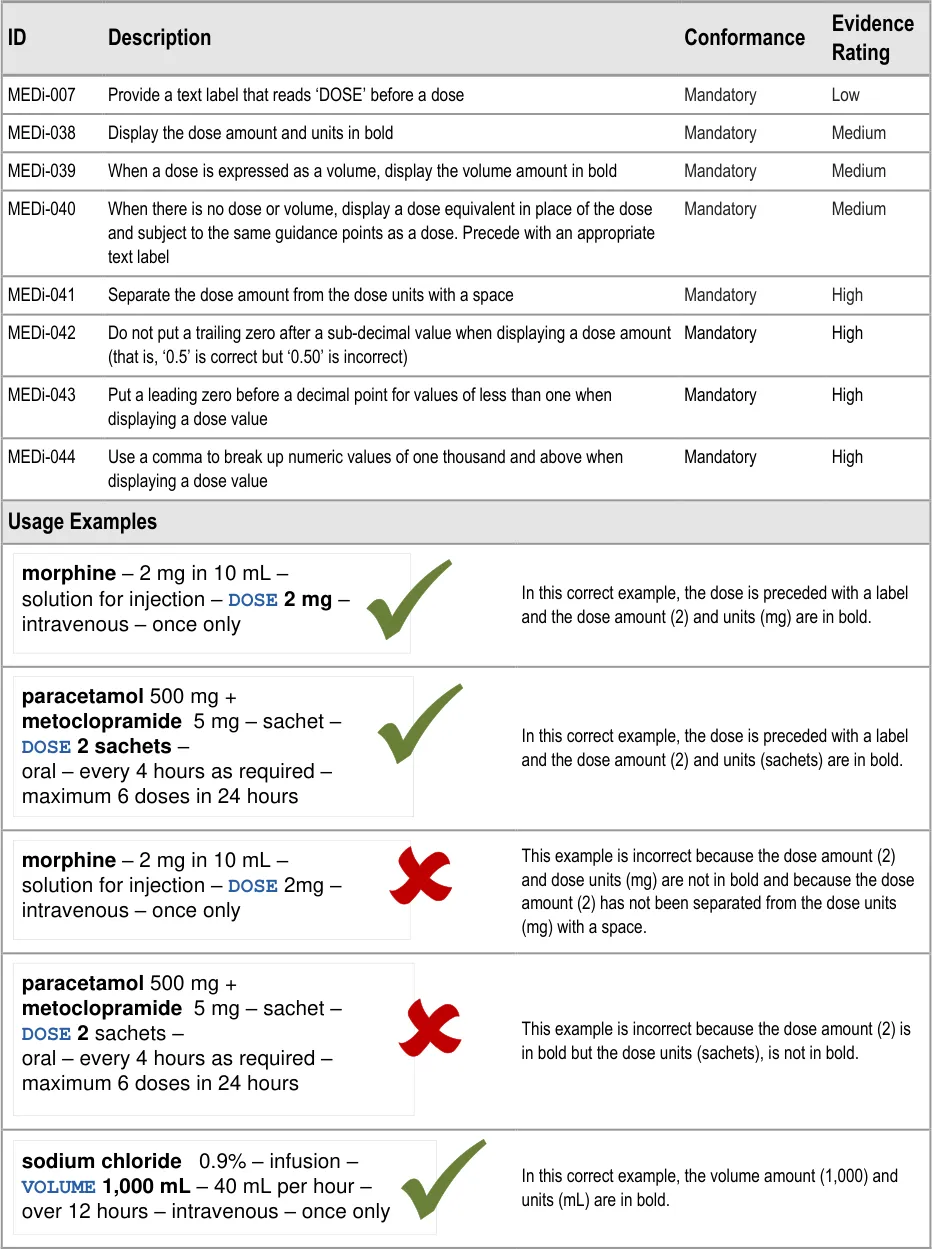
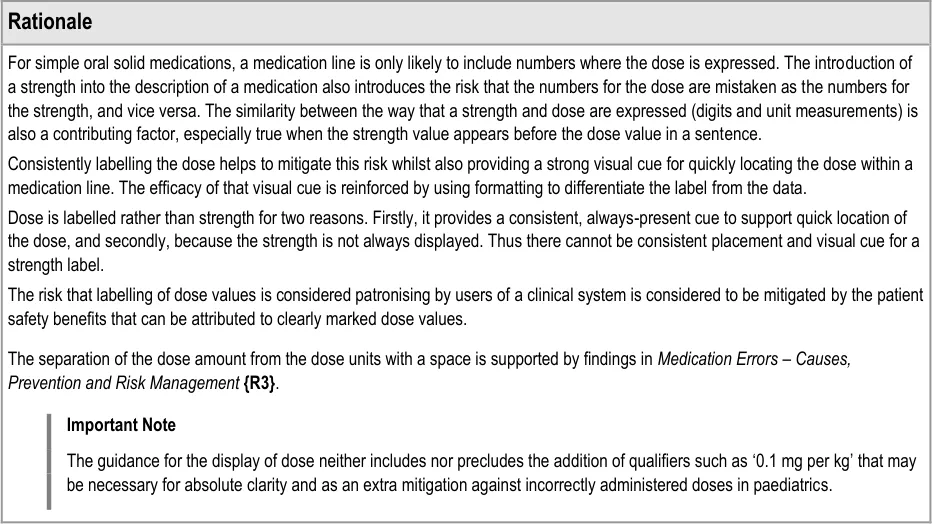
MEDi-007 3.3.11 Provide a text label that reads ‘DOSE’ before a dose
MEDi-038 3.3.11 Display the dose amount and units in bold
MEDi-039 3.3.11 When a dose is expressed as a volume, display the volume amount in bold
MEDi-040 3.3.11 When there is no dose or volume, display a dose equivalent in place of the dose and subject to the same guidance points as a dose. Precede with an appropriate text label
MEDi-041 3.3.11 Separate the dose amount from the dose units with a space
MEDi-042 3.3.11 Do not put a trailing zero after a sub-decimal value when displaying a dose amount (that is, ‘0.5’ is correct but ‘0.50’ is incorrect)
MEDi-043 3.3.11 Put a leading zero before a decimal point for values of less than one when displaying a dose value
MEDi-044 3.3.11 Use a comma to break up numeric values of one thousand and above when displaying a dose value
MEDi-045 to MEDi-050 Visual Summary:
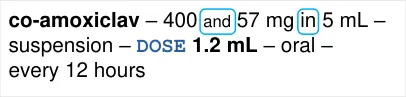
MEDi-045 3.3.12 When describing strengths with an active ingredient in a fluid, use ‘in’ rather than a forward slash ( ‘/’ ) before the fluid quantity
MEDi-046 3.3.12 When describing strengths of an ingredient in a single unit of fluid, use the word ‘per’ to describe the unit of fluid
MEDi-047 3.3.12 When describing a strength for a combination drug whose two strength values use the same unit (such as mg), use the word ‘and’ in a smaller font to join the two strength values and display the units after the second strength value
MEDi-048 3.3.12 Do not put a trailing zero after a decimal point when displaying numbers in a strength value
Page 40
Copyright ©2013 Health and Social Care Information Centre
HSCIC Controlled Document
MEDi-049 3.3.12 Put a leading zero before a decimal point for values of less than one when displaying numbers in a strength value
MEDi-050 3.3.12 Use a comma to break up numeric values of one thousand and above when displaying numbers in a strength value
MEDi-051 to MEDi-053 Visual Summary:
generic - BRAND – strength – form – DOSE dose - route – frequency
MEDi-051 3.3.13 When describing a medication as a line of text, adhere to the following order for the display of the medication attributes: drug name, brand name, strength, form, dose or volume, rate, dose duration, route, frequency (as applicable)
MEDi-052 3.3.13 When designing for specific contexts, especially those that need additional text labels and line breaks, display drug name first and display other attributes (in a different order if necessary) from the one defined above
MEDi-053 3.3.13 When a medication is not displayed as a single line of text and the attributes of a medication are listed in a different order, use text labels for as many of these attributes as possible: strength, form, route and frequency
Table 9: Reference Summary of Guidance
Page 41
Copyright ©2013 Health and Social Care Information Centre
HSCIC Controlled Document
REVISION AND SIGNOFF SHEET
Change Record
28-Jul-2008 Sarah Parker 0.0.0.1 Initial draft for review/discussion
10-Sep-2008 Sarah Parker 0.0.0.2 Revised draft for second review
16-Sep-2008 Niki Nicolaides 0.0.0.3 Initial copyedit
30-Sep-2008 Sarah Parker 0.0.0.4 Responses to copyedit
01-Oct-2008 Sarah Parker 0.0.0.5 Guidance updated in response to technical feedback and user research findings
03-Oct-2008 Mick Harney 0.0.0.6 Remaining questions for Sarah after copyedit
03-Oct-2008 Sarah Parker 0.0.0.7 Updates in response to Mick’s questions. A few questions remain.
06-Oct-2008 Mick Harney 1.0.0.8 Restored correct versioning. Last few points to agree with Sarah.
07-Oct-2008 Sarah Parker 1.0.0.9 Updates in response to Mick’s questions. One last point to resolve.
07-Oct-2008 Mick Harney 1.0.1.0 Raised to Working Baseline
23-Oct-2008 Sarah Parker 1.0.1.1 Updates in response to CRS
23-Oct-2008 Mick Harney 1.0.1.2 Copyedit of updates: final points to check.
23-Oct-2008 Sarah Parker 1.0.1.3 Final points updated
29-Oct-2008 Mick Harney 1.1.0.0 Raised to Baseline Candidate
06-Nov-2008 Mick Harney 2.0.0.0 Raised to Baseline
Document Status has the following meaning:
- Drafts 0.0.0.X - Draft document reviewed by the Microsoft CUI Project team and the
Authority designate for the appropriate Project. The document is liable to change.
- Working Baseline 0.0.X.0 - The document has reached the end of the review phase and
may only have minor changes. The document will be submitted to the Authority CUI Project team for wider review by stakeholders, ensuring buy-in and to assist in communication.
- Baseline Candidate 0.X.0.0 - The document has reached the end of the review phase and
it is ready to be frozen on formal agreement between the Authority and the Company
- Baseline X.0.0.0 - The document has been formally agreed between the Authority and the
Company
Note that minor updates or corrections to a document may lead to multiple versions at a particular status.
Open Issues Summary
None
Page 42
Copyright ©2013 Health and Social Care Information Centre
HSCIC Controlled Document
Audience
The audience for this document includes:
- Authority CUI Manager / Project Sponsor . Overall project manager and sponsor for the
NHS CUI project within the Authority.
- Authority Clinical Applications and Patient Safety Project Project Manager.
Responsible for ongoing management and administration of the Project.
- The Authority Project Team . This document defines the approach to be taken during this
assessment and therefore must be agreed by the Authority.
- Microsoft NHS CUI Team . This document defines the approach to be taken during this
assessment, including a redefinition of the Clinical Applications and Patient Safety Project strategy.
Reviewers
Mike Carey Workstream Lead
Tim Chearman UX Architect
Peter Johnson Clinical Architect
Ann Slee Clinical Lead for e-Prescribing
Beverley Scott Clinical Safety Advisor
Dee Hackett Clinical Advisor
Mark Wills Clinical Advisor
Distribution
Mike Carey Workstream Lead
Tim Chearman UX Architect
Peter Johnson Clinical Architect
Ann Slee Clinical Lead for e-Prescribing
Beverley Scott Clinical Safety Advisor
Dee Hackett Clinical Advisor
Mark Wills Clinical Advisor
Page 43
Copyright ©2013 Health and Social Care Information Centre
HSCIC Controlled Document
Document Properties
Document Title Medications Management – Medication Line User Interface Design Guidance
Author Clinical Applications and Patient Safety Project
Restrictions RESTRICTED – COMMERCIAL; MICROSOFT COMMERCIAL; Access restricted to: NHS CUI Project Team, Microsoft NHS Account Team
Creation Date 22 July 2008
Last Updated 23 June 2015
Copyright:
You may re-use this information (excluding logos) free of charge in any format or medium, under the terms of the Open Government Licence. To view this licence, visit nationalarchives.gov.uk/doc/open-government-licence or email psi@nationalarchives.gsi.gov.uk.
Page 44
Copyright ©2013 Health and Social Care Information Centre