Medications List

 Prepared for
NHS Connecting for Health
Version 1.0.0.0 Baseline
Prepared by
Clinical Applications and Patient Safety Project
NHS CUI Programme Team
Cuistakeholder.mailbox@hscic.gov.uk
Prepared for
NHS Connecting for Health
Version 1.0.0.0 Baseline
Prepared by
Clinical Applications and Patient Safety Project
NHS CUI Programme Team
Cuistakeholder.mailbox@hscic.gov.uk
PREFACE
- PREFACE
- 1 INTRODUCTION
- 2 GUIDANCE OVERVIEW
- 3 GUIDANCE DETAILS
- 3.1 Introduction
- 3.2 Principles
- 3.3 Guidelines
- 3.3.1 Tabular Layout
- 3.3.2 Indicating List Length
- 3.3.3 Gridlines
- 3.3.4 Row Formatting
- 3.3.5 Displaying Icons for Drug Details
- 3.3.6 Empty Lists
- 3.3.7 Mandatory Columns
- 3.3.8 Date Columns
- 3.3.9 Column Headings
- 3.3.10 Composite Columns
- 3.3.11 Constraining Dimensions
- 3.3.12 Displaying Status
- 3.3.13 Specific Status Values
- 3.3.14 Formatting Status
- 3.3.15 Controls for Displaying Current and Past Medications
- 3.3.16 Displaying Current Medications
- 3.3.17 Displaying Recent Past Notifications
- 3.3.18 Displaying Past Medications
- 3.3.19 Filtering Past Medications
- 3.3.20 Displaying a LASB
- 3.3.21 Defining LASB Interactions
- 3.3.22 Displaying LASB Notifications
- 3.3.23 Selecting LASB Contents
- 3.3.24 Displaying LASB Contents
- 3.3.25 Formatting LASB Contents
- 3.3.26 Drug Names in the LASB
- 3.3.27 Formatting LASB Notifications
- 3.3.28 Displaying a LASB for Past Medications
- 3.3.29 Providing a Grouping Control
- 3.3.30 Supporting Grouping
- 3.3.31 Displaying Group Headings
- 3.3.32 Collapsing Groups
- 3.3.33 Combining Groups to Avoid Duplication
- 3.3.34 Supporting Sorting
- 3.3.35 Supporting Levels of Detail
- 3.3.36 Supporting Selection and Action
- 3.3.37 Providing Context Menus
- 3.3.38 Providing Access to Medication Details
- 3.4 Rationale Summary
- 4 DOCUMENT INFORMATION
- APPENDIX A REFERENCE SUMMARY OF GUIDANCE
- REVISION AND SIGNOFF SHEET
Source PDF: medlist.pdf
Documents replaced by this document Design Guide Entry – Medications Management – Medication Views 2.0.0.0 Documents to be read in conjunction with this document Medications Management – Medication Line – User Interface Design Guidance 2.0.0.0 Design Guide Entry – Patient Banner 3.0.0.0 Displaying Graphs and Tables – User Interface Design Guidance 2.0.0.0 Patient Safety Process The development cycle for this design guide is compliant with the Clinical Safety Management System (CSMS) – the patient safety risk assessment and management process defined by NHS Connecting for Health (NHS CFH) in conjunction with the National Patient Safety Agency (NPSA). The design guide developers reviewed patient safety incidents arising from both current practice and existing systems for medications management. The resulting guidance points support mitigation of these known patient safety risks. In addition, the developers identified any potential new risks by applying a patient-safety risk-assessment process. The developers are assessing and managing all risks to support a Clinical Safety Case for this design guide. The Hazard Log records all hazards and risks raised to date and includes mitigation actions that, in some cases, will be applicable to you if you are an implementer or other user of this design guide. The Hazard Log is a live document and updates regularly whilst this design guide continues its development. Until this design guide has received full Clinical Authority to Release (CATR) from the NHS CFH Clinical Safety Group (CSG) – based on an approved Clinical Safety Case – there may be outstanding patient safety risks yet to be identified and mitigated. Therefore, it is essential that you review the relevant Hazard Log in conjunction with this design guide. Refer to nww.cui.nhs.uk (N3 connection required) for all current patient safety documentation, including Hazard Logs and the current patient safety process status for this and other design guides. This document was prepared for NHS Connecting for Health which ceased to exist on 31 March 2013. It may contain references to organisations, projects and other initiatives which also no longer exist. If you have any questions relating to any such references, or to any other aspect of the content, please contact cuistakeholder.mailbox@hscic.gov.uk
1 INTRODUCTION
This document provides guidance for the display of a list of medications for one patient in a user interface (UI). It describes what is meant by a list of medications, defines the scope, lists mandatory and recommended guidance points with usage examples and explains the rationale behind the guidance.
This document replaces the previously published guidance Medications Management – Medication Views {R1} . A significant number of the changes to the guidance are designed to allow flexibility and encourage innovation. The guidance has been amended to ensure that it is relevant to lists of medications that may have different structures and content and it has been extended to provide specific guidance where a standard is needed to mitigate patient safety hazards.
Table 1 describes the changes made since the previous version of this guidance (Baseline version 2.0.0.0 dated 12-Oct-2008):
Deleted MEDv-001 to MEDv-015
MEDv-016 to MEDv-018
Deleted to remove constraints that relate to specific views other than a medication list, navigation between views and guidance relating to a framework of views
Removed because they are general versions of the more specific guidance in the sections on Current and Past (MEDv-063), Past Filters (MEDv-066) and Grouping (MEDv-084) respectively
MEDv-019 Removed as further research is being carried out that may inform the production of guidance for the display of and navigation between different sets of medications information (Levels of Detail)
MEDv-033 Removed because decision support alerts need to be considered as part of a larger framework
MEDv-034 MEDv-040
Superseded by more detailed guidance in Medications Management – Medication Line {R2} guidance document, section 3.3.4
MEDv-039 Replaced by MEDi-001 in Medications Management – Medication Line {R2} guidance document
MEDv-041 Replaced by MEDi-018 in Medications Management – Medication Line {R2} guidance document
MEDv-026 Removed because the formatting defined in MEDv-024 and MEDv-025 is sufficient to distinguish medications with a different status
MEDv-046 Replaced by MEDv-179, MEDv-180 and MEDv-181 as the look-ahead scroll bar (LASB) is now displayed in a reserved space
MEDv-047 Replaced by the more specific MEDv-181
MEDv-057 Deleted because medication lines are no longer shown within a recent past notification
MEDv-060 MEDv-061
Superseded by MEDv-182 because the LASB is no longer recommended as a navigation tool
MEDv-073 Removed because this is covered by MEDv-068
MEDv-076 MEDv-078 to MEDv-082
Removed to mitigate UI design and technical issues associated with the display of recent past medications within the current medications list
MEDv-088 Removed to allow the user to control the grouping and group states (expanded or collapsed) in each of Current and Past medications respectively and independently
MEDv-093 to MEDv-098
Relate to the duplication of medications that belong in more than one group. Removed as this approach is no longer recommended since guidance cannot effectively mitigate the risks that it has been found to introduce.
MEDv-106 This sorting restriction (do not allow sorting by hidden attributes) has been removed to allow the provision of mechanisms that can support sorting other than by clicking on visible column headings
MEDv-107 to Relate to the control and display of Levels of Detail. Removed because guidance can only assess risks by
Page 1
Copyright ©2013 Health and Social Care Information Centre
HSCIC Controlled Document
rather than extending it, we hope to encourage innovation in this area
MEDv-134 Removed to avoid the implication that the context menu should be used to display information about the selected medications
MEDv-137 to MEDv-140
Relate to display of detailed information about a single medication. These guidance points have been removed because further work is needed to identify guidance in this area. If all details for one medication are displayed in such a way that occludes the information in the list, there is a risk that the partially visible medications information may be used to inform clinical judgement. This risk needs further assessment and further design exploration is needed to explore the provision of information without occluding the medications in the list. These risks are best addressed as part of a more comprehensive design for the display of all details for one medication.
Modified MEDv-020 Rephrased and extended to clarify that each line represents one medication
MEDv-025 Rephrased to remove the potential for it to be interpreted as supporting the display of current and past medications concurrently in the same list
MEDv-028 to MEDv-032 MEDv-034 to MEDv-038
Replaced with new guidance that is provides principles for the ordering and formatting of columns and for wrapping rather than requiring the display of specific columns in a set order
MEDv-049 Rephrased to clarify that the order of drugs in the look-ahead notifications must be consistent with the order of medications in the list
MEDv-056 Rephrased to clarify that the black dot in the look-ahead scroll bar notifications should have a space either side
MEDv-067 Rephrased to clarify that a ‘show all past’ (or equivalent) option should be available in the list of filters for past medications
MEDv-068 Rephrased to differentiate it from MEDv-070 and to clarify that it refers specifically to the presence and location of a control for removing a filter
MEDv-072 Conformance rating changed from Mandatory to Recommended to allow for brevity in filter notification messages
MEDv-083 Conformance rating changed from Mandatory to Recommended to allow for the default presentation of grouping to support users focused solely on a specific task
MEDv-084 Rephrased to replace to ‘combo-box’ with the more accurate ‘drop-down box’
MEDv-089 Changed so that it only requires counts to be shown in group headings for groups that are collapsed
MEDv-090 Conformance rating changed from mandatory to recommended in order to allow for the display of group headings for empty groups when the grouping scheme has few groups and is used for specific tasks that require explicit confirmation of empty groups
MEDv-099 MEDv-100
Rephrased to clarify that ‘start date’ and ‘end date’ are not necessarily the correct definitions or column labels for the dates to which the default sorts are applied
MEDv-103 Conformance rating changed from Mandatory to Recommended since it is supplementary to the use of an icon to indicate the sort order in a column heading
MEDv-104 Rephrased to clarify that a text symbol such as a triangle could be used instead of an icon
MEDv-105 Rephrased to refer to the default sort rather than reference an explicit sort order
MEDv-127 Extended to describe the keyboard shortcuts explicitly
MEDv-022 MEDv-059 MEDv-064 MEDv-074
Wording revised for clarity, without altering the meaning
Copyright ©2013 Health and Social Care Information Centre
Page 2
HSCIC Controlled Document
Added MEDv-141 to MEDv-201
These guidance points have been added
Table 1: Changes Since the Last Baseline Version
Note
In this document, the words ‘generic’ and ‘brand’, when associated with drug names, are used with very specific meanings that may differ from their accepted meanings in other contexts. Refer to section 4.2 for definitions of the specific terminology used in this document.
1.1 Customer Need
An electronic system for managing a patient’s medications must be able to support the complex needs of a wide range of health care professions and health care settings. A successful display solution must therefore balance those complex information needs with safety concerns, and ensure consistency across views and between systems.
Medications Incidents - The National Patient Safety Agency (NPSA) reports that the majority of medication incidents reported between January 2005 and June 2006 (59,802 in total) related to the administration of medicines (59.3 percent), followed by incidents related to the preparation and dispensing of medications (17.8 percent) and the prescribing of medications (15.7 percent). Their findings, documented in Safety in doses: medication safety incidents in the NHS [1], also state that the most common types of medication incidents reported to the NSPA included incorrect dose, incorrect strength or frequency, omitted medicine and wrong medicine.
Existing Systems - In-patient hospital care settings currently use multiple kinds of medications documents, both paper-based and electronic. As care professionals move between hospitals and are faced with new information groupings while working in stressful environments, the differences in the designs of the documents they use may well already impact patient safety. Differences in display formats for medicines impact both the review and management of those medications and will become a safety concern as electronic systems become more widely available in the next few years. The challenge for designers developing electronic systems in this area is particularly great as there are no universally-accepted paper-based standards to reference.
Research in which extensive studies of medication-related errors were reviewed, suggests that the most powerful means of preventing medication-related errors are computerised order entry and administration management along with standards for processes and for the writing of prescriptions (see Medication Errors {R4}, To Err Is Human {R5} and Understanding Patient Safety {R6} ).
In the UK, emerging standards and guidelines designed to improve medicines management in the NHS draw attention to the need for active review of long term medications in a Primary Care environment (see Room for Review {R7} and National Service Framework for Older People (NHS) [2] ) . For in-patient settings however, medication reviews are carried out as part of regular and often daily reviews of treatment. Medications are reviewed to assess whether they are achieving the desired therapeutic intent, ensure that there are no more medications prescribed than is necessary and to monitor for adverse effects.
An in-patient review of medications may form only part of a more comprehensive review that depends on other information such as observations, test results and clinical notes (including diagnoses and plans). The information required for a medication review will vary for different
1 NPSA – Safety in doses: medication safety incidents in the NHS {R3} : http://www.npsa.nhs.uk/nrls/alerts-and-directives/directives-guidance/safety-in-doses/
2 National service framework for older people – Department of Health {R8} : http://www.dh.gov.uk/en/publicationsandstatistics/publications/publicationspolicyandguidance/DH_4003066
Page 3
Copyright ©2013 Health and Social Care Information Centre
HSCIC Controlled Document
contexts so it is unlikely that the needs for all kinds of medications review would be met by the design of one, specific UI. However, there are needs that are common to all kinds of medications review. Guidance for these areas can help to mitigate errors caused or heightened by inconsistencies of core medications information between systems.
1.2 Scope
This guidance has been designed for the display of medications for a single patient in a hospital ward environment. The guidance applies to the display of information about medications in a list that is organised using columns and rows and specifically to the way that the information is organised and can be manipulated by the clinical user.
1.2.1 In Scope
Users Hospital-based doctors, nurses and pharmacists
Care settings In-patient, hospital ward environment only
Tasks Reviewing medications that have been prescribed for a single patient and checking the accuracy of scripts
Medications Oral solids and liquids
Inhalers and sprays
Eye, ear and nose drops
Topical liquids
Creams, ointments and gels
Enemas and rectal solutions
Granules and powders
Insulin
Suppositories and pessaries
Topical patches
Nebuliser solutions
Simple infusions (by example only)
Injections (insulin example only)
Unlicensed medications
Grouping Controls for applying and changing sorting and grouping respectively. The display of group headers, expanding and collapsing groups and handling medications that belong in more than one group
Notifications General notifications, such as ‘Patient nil by mouth’ and recent past medications
Look-ahead scroll bars Generic guidance for the display of a look-ahead scroll bar in any view and guidance that is specific to the display of current medications and past medications. See section 3.3.20 for a description of the lookahead scroll bar.
List structure Structure and layout of a list of medications
Filtering Filtering to display current or past medications respectively and filters to display subsets of past medications
Table 2: In Scope
1.2.2 Out of Scope
Table 3 defines areas that are not covered in this guidance. Although there may be specific risks associated with these areas that are not addressed in this guidance, it is likely that the principles in this guidance will extend to the display of medication information in many of the areas listed below.
The patient is indicated as out of scope in so far as not being a user of clinical software; the guidance is designed to support user interfaces used by clinicians. As such, it will therefore present information in formats that are designed to support health care professionals. The display of medication information in views that are designed for patients is not addressed in this guidance.
The care settings listed in Table 3 are out of scope because they have not been studied in depth in our research. The Medication List guidance is likely to be relevant to all of these care settings, but
Page 4
Copyright ©2013 Health and Social Care Information Centre
HSCIC Controlled Document
there may be specific risks associated with each that have not been considered and therefore mitigated in this guidance.
Guidance Areas Details
Users Non-clinical staff, patients and other health care professionals not listed in the in scope section (that is, only hospital-based doctors, nurses and pharmacists are in scope).
Care settings Care settings other than in-patient, hospital ward environments, including: outpatients, clinics, pharmacies, emergency services and departments, intensive care, High Dependency Unit (HDU), primary care, including general practice, community and home visits, ward management, multi-patient tasks.
Tasks Reviewing administration events to gain an understanding of the degree to which the medication has
been successfully administered
Relating medications to information elsewhere in the patient record, including the linking of information
in a plan or notes to medications
Medications reconciliation
Medications
Although these medications can be displayed in the list view defined by this guidance, they may have additional requirements or introduce specific risks that are not explicitly addressed by the guidance.
Enteral feeds
Dressings and devices
Implants and sticks
Intrauterine devices (IUDs)
Cements
Homeopathic products (including
complementary and alternative therapies)
Dialysis solutions
Injections (except by specific example)
Infusions and fluids (except by specific
examples)
Combination infusions
Total Parental Nutrition (TPN)
Gases
Blood and platelet products
Radio-pharmacy
Variable dose medications
Foams
Radioactive agents
Regimens and order sets
Advisory Committee on Borderline Substances
(ACBS) products
Over the counter (OTC) medications
Recreational drugs
Medications with titrating doses
Discharge medications – to take out (TTO)
Patient’s own drugs (PODs)
Epidurals and patient controlled analgesia
Extemporaneous prescriptions
Medication administered or supplied as part of a
Patient Group Direction (PGD)
Medication prescribed by supplementary
prescribers
Identity of a medication Definition of which attributes can be changed without the need for a new medication line to be represented (in the UI).
All details for one medication
Specific Properties of Individual Medications
Decision and knowledge support
The layout and structure for the presentation of all information about one medication from the selection of a medication anywhere in a clinical application. This includes the selection of a medication to present a separate window or area with more detailed information about that medication.
Guidance for the indication (as text or as an icon) of specific attributes of a medication, including:
Indicating medications that were added when they were already ‘past’ medications in order to
complete missing information in a past medical history
Indicating an owner for each medication (for within multi-disciplinary cross boundary records)
All forms of decision support, including alerting for allergies and drug-to-drug interactions. Knowledge support such as browsing drugs by classification and looking up information about medications.
Allergies The display and recording of allergy information and adverse drug reaction risks is covered in a separate guidance document.
Patient consent and preference
Patient preference, such as for a particular drug form. Patient consent, particularly in a mental health context.
Page 5
Copyright ©2013 Health and Social Care Information Centre
HSCIC Controlled Document
Guidance Areas Details
Other Sealed envelopes
Supply and dispensing
Guidance (other than notifications) that might be needed for when a patient is ‘Nil by Mouth’
Table 3: Out of Scope
1.3 Dependencies
D1 This guidance is informed by ongoing and unpublished work by the NHS National Programme for IT (NPfIT) that is referred to in this document as NHS Connecting for Health (NHS CFH) Medication Types Rules. The NHS CFH Medication Types Rules is still evolving and is based on extensive research and consultation. Changes to this work may trigger changes to this guidance.
D2 This guidance is informed by the NHS NPfIT ePrescribing Functional Specification [3]
D3 This guidance uses the concepts ‘generic drug’ and ‘brand name’ and depends on access to, or creation of, a database or dictionary, that can support these concepts, such as the Dictionary of Medicines and Devices (known as ‘dm+d’) [4].
D4 This guidance includes guidance points for filtering, sorting and grouping that are expected to be included in a separate guidance document for this area. Availability of such a document may trigger changes to this guidance.
D5 This guidance assumes that a list of medications is provided as part of a larger framework of medications that collectively provide enough information to support a review of the current and past medications of a single patient. A comprehensive understanding of the current status of a patient’s medications is expected to be gained from the use of more than one medications view.
Table 4: Dependencies
3 NHS NPfIT – ePrescribing Functional Specification {R9} : http://www.connectingforhealth.nhs.uk/newsroom/news-stories/eprescfunctspec
4 Dictionary of Medicines and Devices {R10} : http://www.dmd.nhs.uk/
Page 6
Copyright ©2013 Health and Social Care Information Centre
HSCIC Controlled Document
2 GUIDANCE OVERVIEW
Important
The visual representations used within this document to display the guidance are illustrative only. They are simplified in order to support understanding of the guidance points in each section respectively, so some details that are included in usage examples are excluded from the summary. Stylistic choices such as colours, fonts or icons, are not part of the guidance and, unless otherwise specified, are therefore not mandatory requirements for compliance with the guidance in this document.
2.1 Summary of Guidance
Detailed guidance and rationale for all guidance points is in sections 3.3.1 to 3.3.38. Refer to APPENDIX A for a reference list of all the guidance descriptions. Table 5 provides a summary of the guidance.
Note
In the Visual Summary column, items highlighted in blue indicate correct usage and those in red indicate incorrect usage.
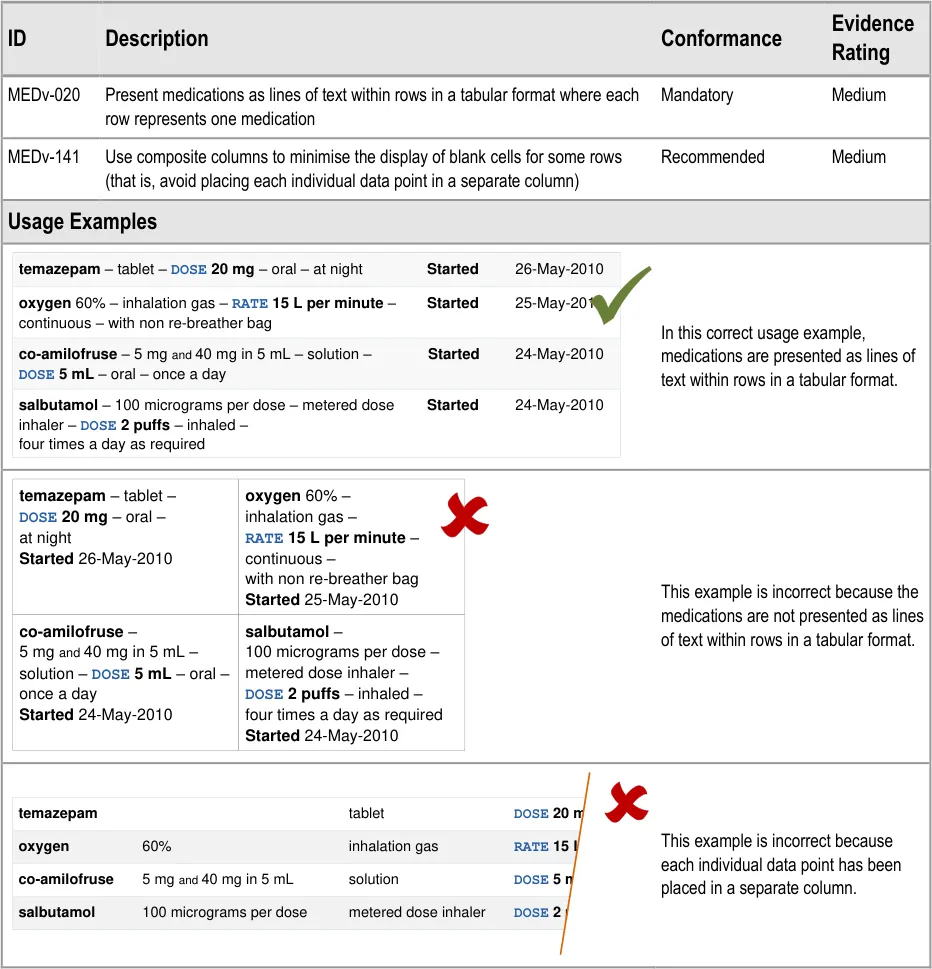
MEDv-020 MEDv-141
3.3.1 Tabular Layout
| Col1 | sentence | tabula |
|---|---|---|
| xxxx– xxxx - xxxx yyyy zzzz | xxxx– xxxx - xxxx yyyy zzzz | xxxx– xxxx - xxxx yyyy zzzz |
| xxxx– xxxx - xxxx yyyy zzzz | xxxx– xxxx - xxxx yyyy zzzz | xxxx– xxxx - xxxx yyyy zzzz |
| xxxx– xxxx - xxxx yyyy zzzz | xxxx– xxxx - xxxx yyyy zzzz | xxxx– xxxx - xxxx yyyy zzzz |
| xxxx– xxxx - xxxx yyyy zzzz | xxxx– xxxx - xxxx yyyy zzzz | xxxx– xxxx - xxxx yyyy zzzz |
MEDv-142 3.3.2 Indicating List Length
MEDv-021 3.3.3 Gridlines
| xxxx – xxxx - xxxx yyyy zzzz xxxx – xxxx - xxxx yyyy zzzz xxxx – xxxx - xxxx yyyy zzzz xxxx – xxxx - xxxx yyyy zzzz | Col2 |
|---|---|
| space |
| Col1 | no strong |
|---|---|
| xxxx– xxxx - xxxx yyyy zzzz | xxxx– xxxx - xxxx yyyy zzzz |
| xxxx– xxxx - xxxx yyyy zzzz | xxxx– xxxx - xxxx yyyy zzzz |
| xxxx– xxxx - xxxx yyyy zzzz | xxxx– xxxx - xxxx yyyy zzzz |
| xxxx– xxxx - xxxx yyyy zzzz | xxxx– xxxx - xxxx yyyy zzzz |
MEDv-022 MEDv-143 to MEDv-145
3.3.4 Row Formatting
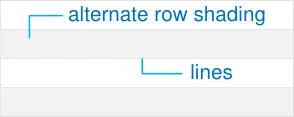
Alternate row shading and lines between rows.
MEDv-023 3.3.5 Displaying Icons for Drug Details
| Col1 | Col2 | icons | Col4 |
|---|---|---|---|
| xxxx– xxxx - xx | A | B | yyyy zzzz |
| xxxx– xxxx - xx yyyy zzzz B | xxxx– xxxx - xx yyyy zzzz B | xxxx– xxxx - xx yyyy zzzz B | xxxx– xxxx - xx yyyy zzzz B |
| xxxx– xxxx - xx | A | yyyy zzzz | yyyy zzzz |
Page 7
Copyright ©2013 Health and Social Care Information Centre
HSCIC Controlled Document
MEDv-146 3.3.6 Empty Lists
| aaaa | bbbb | cccc |
|---|---|---|
| There are no current medications for this patient empty list message | There are no current medications for this patient empty list message | There are no current medications for this patient empty list message |
MEDv-147 to MEDv-150
MEDv-151 to MEDv-154
MEDv-155 to MEDv-157
MEDv-027 MEDv-158
MEDv-159 to MEDv-161
MEDv-162 to MEDv-165
MEDv-166 to MEDv-173
MEDv-024 MEDv-025 MEDv-042
MEDv-062 to MEDv-067 MEDv-174
3.3.7 Mandatory Columns
3.3.8 Date Columns
Relative placement of date columns, column widths and recommended date columns to include.
3.3.9 Column Headings
How to label columns appropriately.
3.3.10 Composite Columns
How to combine information into a single column.
3.3.11 Constraining Dimensions
How to ensure appropriate column and overall list widths.
3.3.12 Displaying Status
How to display status for medications in the list.
3.3.13 Specific Status Values
Recommended values to use for status.
3.3.14 Formatting Status
How to format the display of status.
3.3.15 Controls for Displaying Current and Past Medications
| Drug Details | Status | Date |
|---|---|---|
mandatory columns
| Col1 | Col2 | Col3 |
|---|---|---|
| Start | Start | End |
First Administration
Last Administration
Start and End Dates Start zzzz
End zzzz
Start zzzz
End zzzz
| aaaa | bbbb | cccc |
|---|---|---|
| relative widths |
Current Past
Status Started
Not Started
Suspended
Current
Past
Status Completed
Discontinued
Started
Not Started
Suspended
Completed
Discontinued
| xxxx – xxxx - xxxx yyyy zzzz | Col2 |
|---|---|
| xxxx– xxxx - xxxx yyyy zzzz | xxxx– xxxx - xxxx yyyy zzzz |
| xxxx– xxxx - xxxx yyyy zzzz | xxxx– xxxx - xxxx yyyy zzzz |
| xxxx– xxxx - xxxx | yyyy zzzz |
| Important S |
Page 8
Copyright ©2013 Health and Social Care Information Centre
HSCIC Controlled Document
MEDv-099 MEDv-173
MEDv-074 MEDv-075 MEDv-077 MEDv-174
MEDv-100 MEDv-175
MEDv-068 to MEDv-073
MEDv-176
MEDv-177 to MEDv-181
MEDv-058 MEDv-059 MEDv-182
MEDv-043 to MEDv-045
3.3.16 Displaying Current Medications
3.3.17 Displaying Recent Past Notifications
How to present a notification for recently past medications.
3.3.18 Displaying Past Medications
Sort order and column placement for past medications.
3.3.19 Filtering Past Medications
How to support filtering for past medications.
3.3.20 Displaying a LASB
How to present a look-ahead scroll bar.
3.3.21 Defining LASB Interactions
How a look-ahead scroll bar should behave.
3.3.22 Displaying LASB Notifications
How to present look-ahead scroll bar notifications
| Drug Details | xxxx | Start ▼ |
|---|---|---|
| default sort | default sort |
| Status | Col2 | Drug Details | End ▼ |
|---|---|---|---|
| default sort | default sort | ||
| first column | first column | first column |
| look-ahead notification | Col2 | Col3 | Col4 | Col5 |
|---|---|---|---|---|
| reserved space | reserved space | reserved space | reserved space |
| Col1 | Col2 | Col3 |
|---|---|---|
| ddd– xxxx - xxxx eee– xxxx - xxxx ccc– xxxx - xxxx yyyy zzzz yyyy zzzz yyyy zzzz | ddd– xxxx - xxxx eee– xxxx - xxxx ccc– xxxx - xxxx yyyy zzzz yyyy zzzz yyyy zzzz | ddd– xxxx - xxxx eee– xxxx - xxxx ccc– xxxx - xxxx yyyy zzzz yyyy zzzz yyyy zzzz |
Current
first column
Current
Past
Past
| joined to scroll bar | Col2 | Col3 | Col4 | Col5 |
|---|---|---|---|---|
| single line | single line | single line |
Page 9
Copyright ©2013 Health and Social Care Information Centre
HSCIC Controlled Document
MEDv-049 MEDv-183
MEDv-048 MEDv-052 MEDv-053 MEDv-055
MEDv-056 MEDv-184 MEDv-185
MEDv-050 MEDv-051
MEDv-186 to MEDv-189
3.3.23 Selecting LASB Contents
How to determine what the contents of a look-ahead scroll bar notification should be
3.3.24 Displaying LASB Contents
How to display the contents of a look-ahead scroll bar notification
3.3.25 Formatting LASB Contents
How to format the contents of a look-ahead scroll bar notification.
3.3.26 Drug Names in the LASB
How to present drug names in the look-ahead scroll bar notification.
3.3.27 Formatting LASB Notifications
How to format the look-ahead scroll bar notifications.
| aaa – xxxx - xxxx | l |
|---|---|
| bbb– xxxx - xxxx | bbb– xxxx - xxxx |
| ccc– xxxx - xxxx | ccc– xxxx - xxxx |
| ccc– xxxx - xxxx | l |
| ddd– xxxx - xxxx | ddd– xxxx - xxxx |
| eee– xxxx - xxxx | eee– xxxx - xxxx |
| fff– xxxx - xxxx | fff– xxxx - xxxx |
| Col1 | Col2 | aaa · | bbb |
|---|---|---|---|
| ddd– xxxx - xxxx eee– xxxx - xxxx ccc– xxxx - xxxx yyyy zzzz yyyy zzzz yyyy zzzz | ddd– xxxx - xxxx eee– xxxx - xxxx ccc– xxxx - xxxx yyyy zzzz yyyy zzzz yyyy zzzz | ddd– xxxx - xxxx eee– xxxx - xxxx ccc– xxxx - xxxx yyyy zzzz yyyy zzzz yyyy zzzz | ddd– xxxx - xxxx eee– xxxx - xxxx ccc– xxxx - xxxx yyyy zzzz yyyy zzzz yyyy zzzz |
| 2 more·** kkk**·** jjj**·** iii**·** ggg**·** fff** | 2 more·** kkk**·** jjj**·** iii**·** ggg**·** fff** | 2 more·** kkk**·** jjj**·** iii**·** ggg**·** fff** |
| Col1 | text | Col3 |
|---|---|---|
| atenolol·** fluoxetine**·** naproxen** | atenolol·** fluoxetine**·** naproxen** | atenolol·** fluoxetine**·** naproxen** |
| background |
Past Current
visible list
MEDv-054 3.3.28 Displaying a LASB for Past Medications
How to display a look-ahead scroll bar in past medications.
| Col1 | 2 more |
|---|---|
| ppp– xxxx - xxxx qqq– xxxx - xxxx ooo– xxxx - xxxx | ppp– xxxx - xxxx qqq– xxxx - xxxx ooo– xxxx - xxxx |
| 4 more |
| Col1 | Col2 | aaa · bbb |
|---|---|---|
| ddd– xxxx - xxxx eee– xxxx - xxxx ccc– xxxx - xxxx | ddd– xxxx - xxxx eee– xxxx - xxxx ccc– xxxx - xxxx | ddd– xxxx - xxxx eee– xxxx - xxxx ccc– xxxx - xxxx |
| 2 more ·** ggg**·** fff** | 2 more ·** ggg**·** fff** |
MEDv-084 MEDv-085 MEDv-190
MEDv-083 MEDv-087 MEDv-191 to MEDv-193
MEDv-086 MEDv-090 MEDv-091 MEDv-194 MEDv-195
3.3.29 Providing a Grouping Control
How to provide a control to support grouping and the display of the currently selected group.
3.3.30 Supporting Grouping
How to support grouping within the list.
3.3.31 Displaying Group Headings
How to display headings for groups.
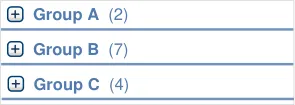
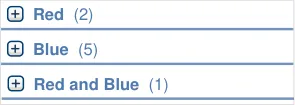
Group A
xxxx - xxxx - xxxx
Group B
yyyy zzzz
xxxx - xxxx - xxxx yyyy zzzz
xxxx - xxxx - xxxx
yyyy zzzz
| Tablet | Col2 |
|---|---|
| xxxx– xxxx - xxxx yyyy zzzz | xxxx– xxxx - xxxx yyyy zzzz |
| (No Form Specified) | (No Form Specified) |
| xxxx– xxxx - xxxx yyyy zzzz xxxx– xxxx - xxxx yyyy zzzz | xxxx– xxxx - xxxx yyyy zzzz xxxx– xxxx - xxxx yyyy zzzz |
Page 10
Copyright ©2013 Health and Social Care Information Centre
HSCIC Controlled Document
MEDv-089 MEDv-092 MEDv-093 MEDv-196
MEDv-197 to MEDv-200
MEDv-101 to MEDv-105
3.3.32 Collapsing Groups
How to support expanding and collapsing of groups.
3.3.33 Combining Groups to Avoid Duplication
How to combine groups for medications that belong to more than one group.
3.3.34 Supporting Sorting
How to support changing the sort order.
| Col1 | Col2 | Col3 | Col4 |
|---|---|---|---|
| aaaa | Start▼ | Start▼ | Start▼ |
| aaaa | Start▼ | ||
| zzzz yyyy xxxx aaaa aaaa aaaa | zzzz yyyy xxxx aaaa aaaa aaaa |
MEDv-201 3.3.35 Supporting Levels of Detail
How to support access to medication lists that display different details.
| xxxx – xxxx - xxxx yyyy | Col2 |
|---|---|
| xxxx– xxxx - xxxx yyyy | xxxx– xxxx - xxxx yyyy |
| xxxx– xxxx - xxxx yyyy | |
| xxxx– xxxx - xxxx yyyy | xxxx– xxxx - xxxx yyyy |
formatting
MEDv-122 to MEDv-127 MEDv-202 MEDv-203
MEDv-128 to MEDv-133
MEDv-135 MEDv-136
3.3.36 Supporting Selection and Action
How to support selection of list items and access relevant actions.
3.3.37 Providing Context Menus
How to present a context menu.
3.3.38 Providing Access to Medication Details
How to support access to detailed information about a selected medication.
| xxxx – xxxx - xxxx yyyy zzzz | Col2 | Col3 |
|---|---|---|
| xxxx– xxxx - xxxx yyyy zzzz | xxxx– xxxx - xxxx yyyy zzzz | xxxx– xxxx - xxxx yyyy zzzz |
| xxxx– xxxx - xxxx yyyy zzzz | xxxx– xxxx - xxxx yyyy zzzz | xxxx– xxxx - xxxx yyyy zzzz |
| xxxx– xxxx - xxxx yyyy zzzz | yyyy zzzz | yyyy zzzz |
| xxxx– xxxx - xxxx | yyyy zzzz Action 2 | |
| Action 3 |
| xxxx – xxxx - xxxx yyyy zzzz | Col2 | Col3 |
|---|---|---|
| xxxx– xxxx - xxxx yyyy zzzz | xxxx– xxxx - xxxx yyyy zzzz | |
| xxxx– | xxxx - xxxx yyyy zzzz | xxxx - xxxx yyyy zzzz |
| xxxx– | xxxx - xxxx yyyy zzzz | xxxx - xxxx yyyy zzzz |
| xxxx– | xxxx - xxxx yyyy zzzz | xxxx - xxxx yyyy zzzz |
Table 5: Summary of Guidance
Copyright ©2013 Health and Social Care Information Centre
Page 11
HSCIC Controlled Document
3 GUIDANCE DETAILS
3.1 Introduction
This section contains detailed guidance for the display of a list of medications that have been prescribed for a single patient. A list of medications is expected to be one of many ways of displaying medications information for a single patient. This list of medications forms only part of the medications management views and tools that would be available in a clinical application.
A full framework for medications management in a clinical application might include:
-
The definition of a set of views each of which has a different focus and presentation style
-
The definition of specialist views that combine information in a particular way for use in
specific contexts. For example, a monitoring chart for tracking medication doses, observations and test results in a high dependency unit, or a Timeline View for long term management of diabetes
- Mechanisms for accessing medications management tools and navigating between
medications views. These may be dependent on the application architecture
- The degree to which, and means by which, medications information is integrated into other
parts of a clinical application
- The dimensions of each of the medications views and the way in which they integrate into
the surrounding application. This includes whether views are panels, separate windows or full-screen views and defines how the user navigates between and interacts with them. Figure 1 shows an example of a full width medications view and Figure 2 shows a medications view displayed alongside another view.
Global Navigation
Patient Banner
| Col1 | Col2 |
|---|---|
| Medications View | |
Figure 1: A Medications View Within a Clinical Application
Patient Banner
Global Navigation
Medications Toolbar
| Col1 | Col2 | Other Toolbar Other View |
|---|---|---|
| Medications View | ||
Figure 2: A Medications View Displayed Alongside Another View
Copyright ©2013 Health and Social Care Information Centre
Page 12
HSCIC Controlled Document
The CUI program provides design guidance for selected medications views that are expected to be commonly used and that would provide more benefit to the user by being consistent between clinical applications.
A common set of medications views is expected to include:
-
A Medications List View, in line with the guidance in this document
-
A Drug Administration View, in line with the guidance in Drug Administration {R11}
-
A Timeline View, in which medications and associated events are plotted along a vertical
timescale. A Timeline View could be designed to support users reviewing sequences of medications-related events and allow users to review medications being taken on a specific day or within a date range
- A view in which medication doses can be tracked alongside related test results and
recorded observations
Medications information is not only displayed in views that are dedicated to medications management. The Medication Line {R2} design guidance defines display rules that remain consistent wherever a medication is displayed. Figure 3 shows medications information displayed in a view that focuses on other (non-medications) information:
| Patient Banner Global Navigation Other Toolbar | Col2 | Col3 | Medications information displayed within a view that is designed to display other information |
|---|---|---|---|
| Patient Banner Global Navigation Other Toolbar | Other View | Other View | |
| Other Toolbar | Other Toolbar | Other Toolbar | Other Toolbar |
Figure 3: Medications Information Displayed as Part of a View that is Designed to Display Other Information
Although not displayed within a Medications List View, Drug Administration View or Timeline View, the medications information must still conform to the Medication Line {R2} design guidance.
3.2 Principles
The following key principles inform the guidance in this section:
- Provide the information required to make a high-level clinical assessment of the patient’s
medications
- Restrict the display of unnecessary information to reduce clutter and prioritise information
most likely to require action
-
Provide access in context to further details on demand
-
Mitigate the potential for action to be taken without sufficient information by presenting
carefully selected information by default, avoiding occlusion and providing clear signposts to further information.
- Describe inclusion criteria clearly by providing explicit labels to clarify what information is
displayed and the extent to which it is complete
Page 13
Copyright ©2013 Health and Social Care Information Centre
HSCIC Controlled Document
3.3 Guidelines
Figure 4 is a simplified diagram that shows how some of the areas of guidance fit together in a Medications List View:
Current and Past Menu Buttons
Grouping Control

bar notification
| Drug Details | yyyy | zzzz | Start ▼ | Col5 |
|---|---|---|---|---|
| Drug Details | yyyy | aaa· | aaa· | ** bbb** |
Medications
Group Headings
Notification
Look-ahead scroll bar notification
Figure 4: Key Parts of a Medications List View
Copyright ©2013 Health and Social Care Information Centre
Page 14
HSCIC Controlled Document
3.3.1 Tabular Layout
Page 15
| temazepam – tablet – DOSE 20 mg – oral – at night Started 26-May-2010 | oxygen 60% – inhalation gas – RATE 15 L per minute – continuous – with non re-breather bag Started 25-May-2010 |
|---|---|
| co-amilofruse– 5 mgand40 mg in 5 mL – solution – DOSE 5 mL– oral –once a day Started24-May-2010 | salbutamol– 100 micrograms per dose – metered dose inhaler – DOSE 2 puffs– inhaled –four times a day as required Started24-May-2010 |
Copyright ©2013 Health and Social Care Information Centre
HSCIC Controlled Document
Page 16
Copyright ©2013 Health and Social Care Information Centre
HSCIC Controlled Document
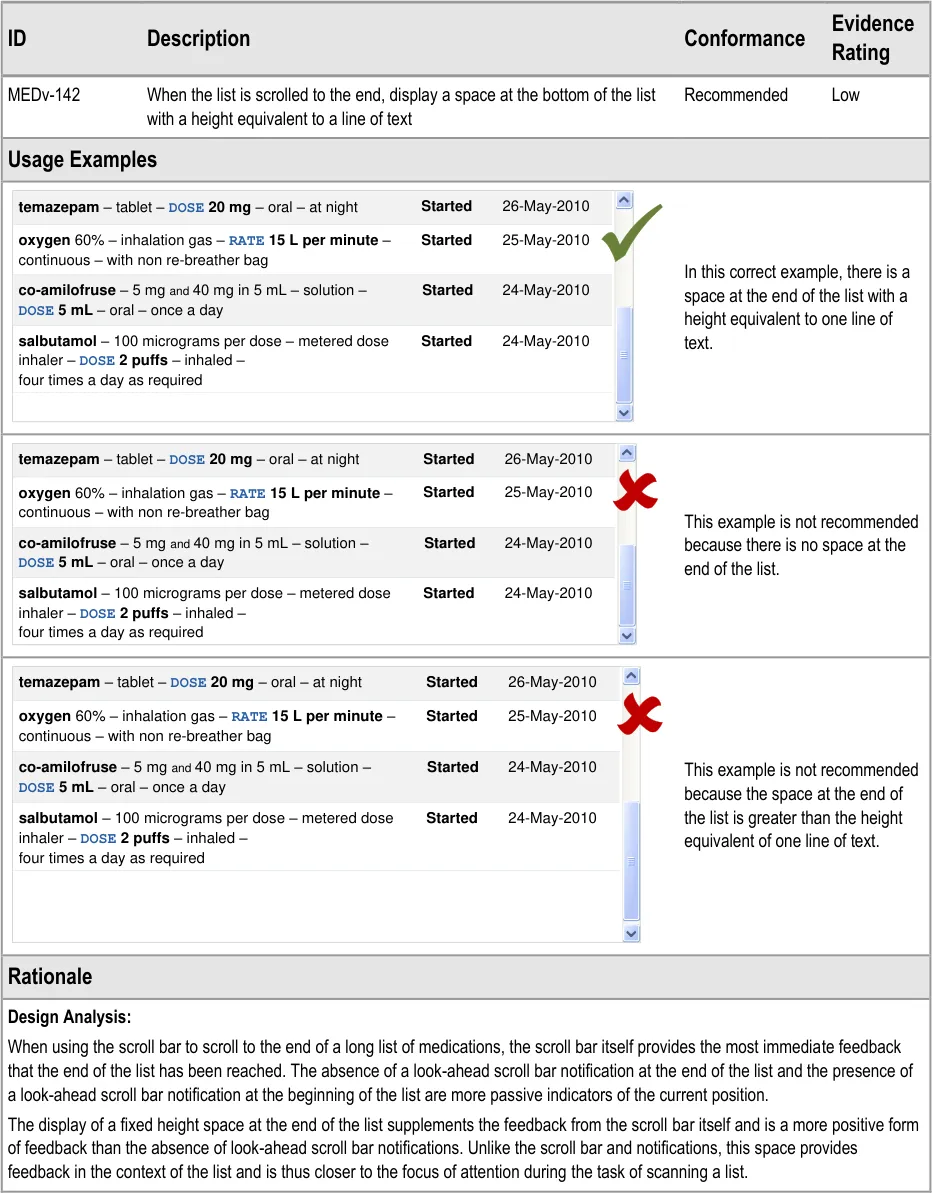
3.3.2 Indicating List Length
For the sake of brevity, the usage examples in this section omit look-ahead scroll bar notifications. Refer to sections 3.3.21 to 3.3.28 for guidance on the look-ahead scroll bar and to sections 3.3.20 and 3.3.22 for specific guidance on reserving space for and displaying the look-ahead scroll bar notifications.
Page 17
Copyright ©2013 Health and Social Care Information Centre
HSCIC Controlled Document
3.3.3 Gridlines
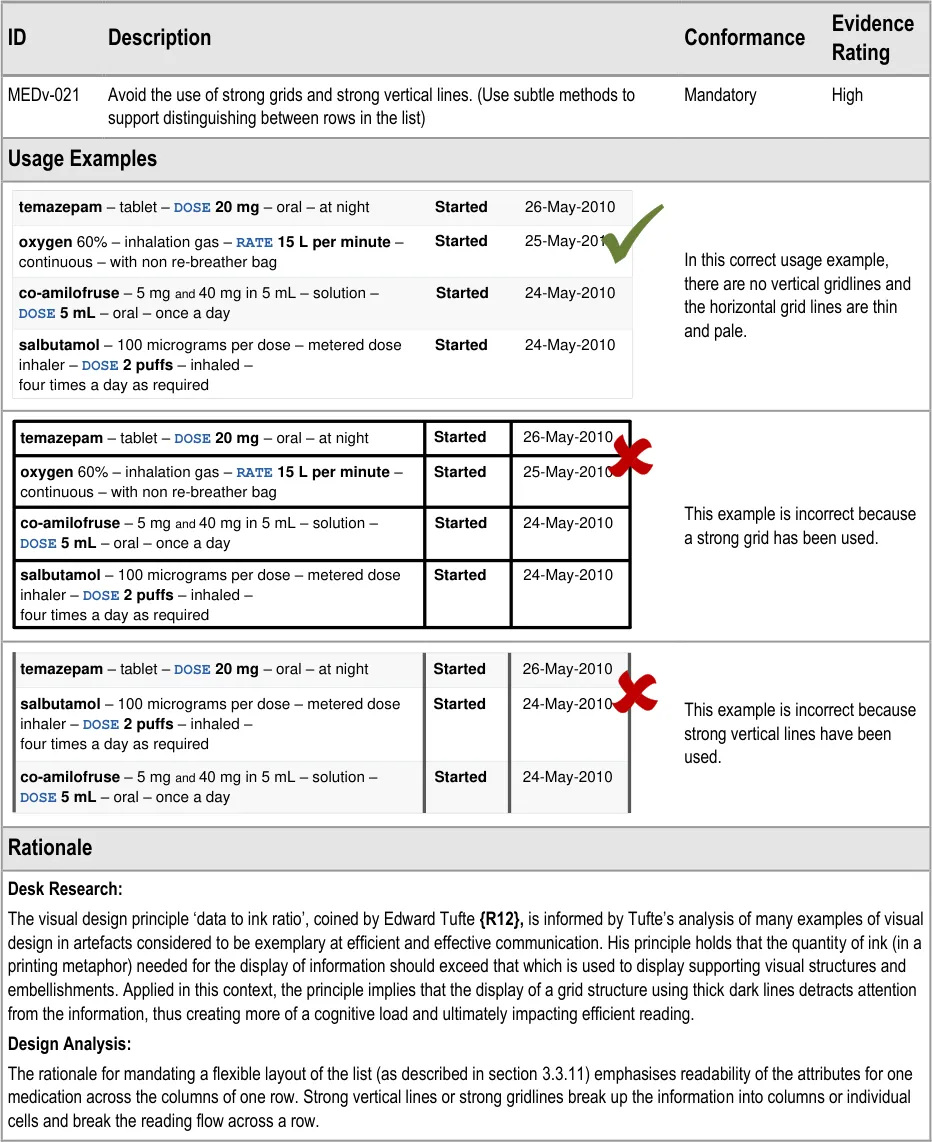
| temazepam – tablet – DOSE 20 mg – oral – at night | Started | 26-May-2010 |
|---|---|---|
oxygen 60% – inhalation gas –RATE 15 L per minute– continuous – with non re-breather bag | Started | 25-May-2010 |
co-amilofruse– 5 mgand40 mg in 5 mL – solution –DOSE 5 mL– oral – once a day | Started | 24-May-2010 |
| salbutamol– 100 micrograms per dose – metered dose inhaler – DOSE 2 puffs– inhaled –four times a day as required | Started | 24-May-2010 |
| temazepam – tablet – DOSE 20 mg – oral – at night | Started | 26-May-2010 |
|---|---|---|
| salbutamol– 100 micrograms per dose – metered dose inhaler – DOSE 2 puffs– inhaled –four times a day as required | Started | 24-May-2010 |
co-amilofruse– 5 mgand40 mg in 5 mL – solution –DOSE 5 mL– oral – once a day | Started | 24-May-2010 |
Page 18
Copyright ©2013 Health and Social Care Information Centre
HSCIC Controlled Document
3.3.4 Row Formatting
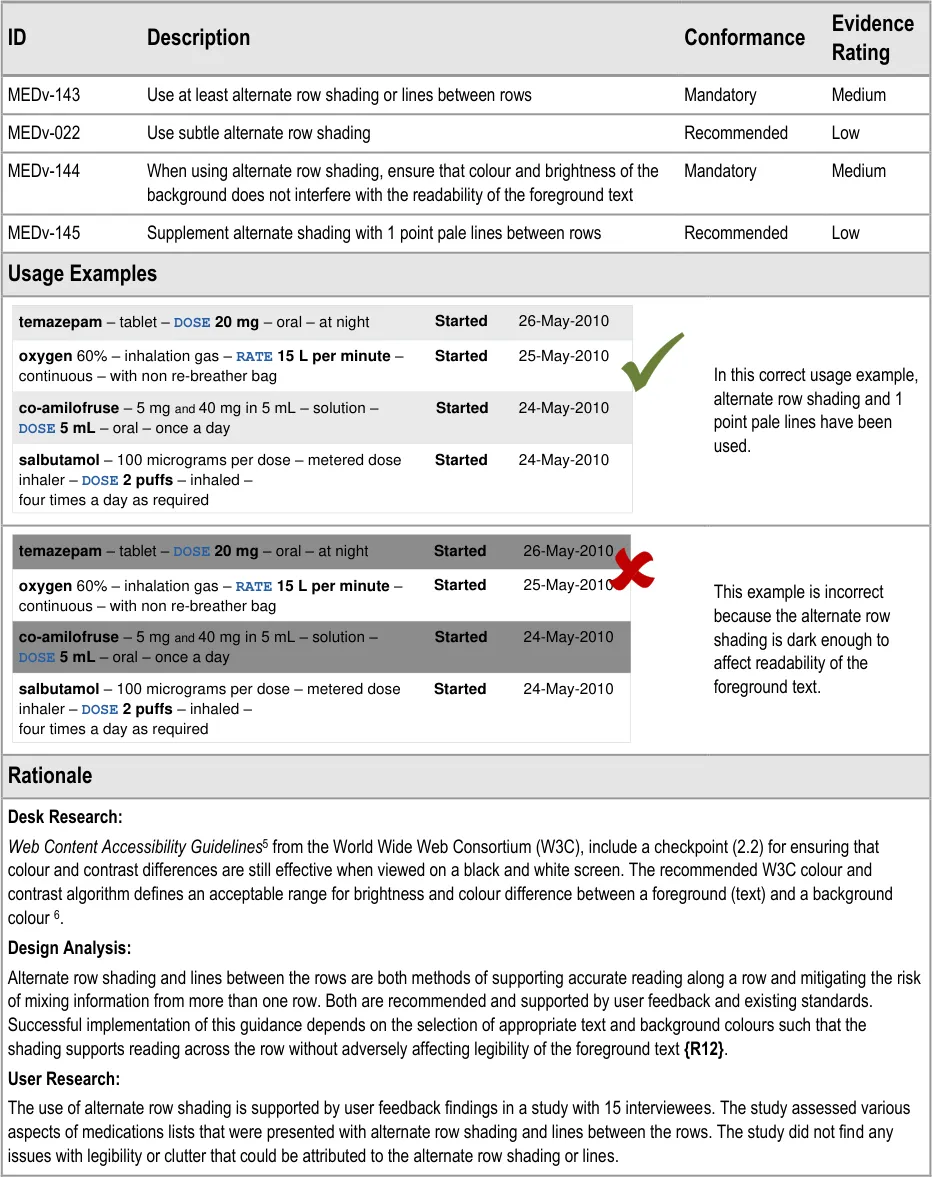
5 Web Content Accessibility Guidelines 1.0 {R13} : http://www.w3.org/TR/WAI-WEBCONTENT/
6 Techniques for Accessibility Evaluation and Repair Tools – Technique 2.2.1 {R14} : http://www.w3.org/TR/AERT#color-contrast
Page 19
Copyright ©2013 Health and Social Care Information Centre
HSCIC Controlled Document
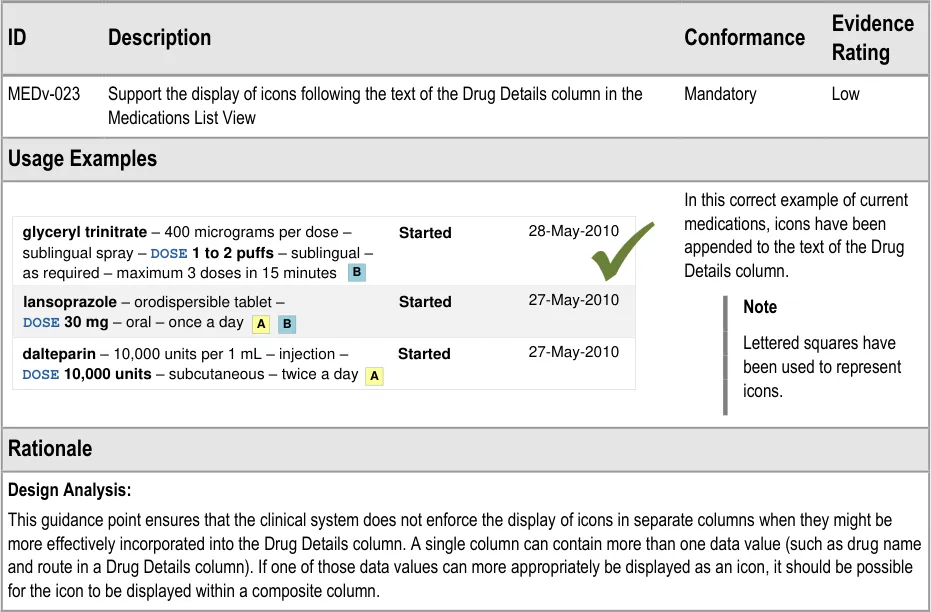
3.3.5 Displaying Icons for Drug Details
3.3.6 Empty Lists
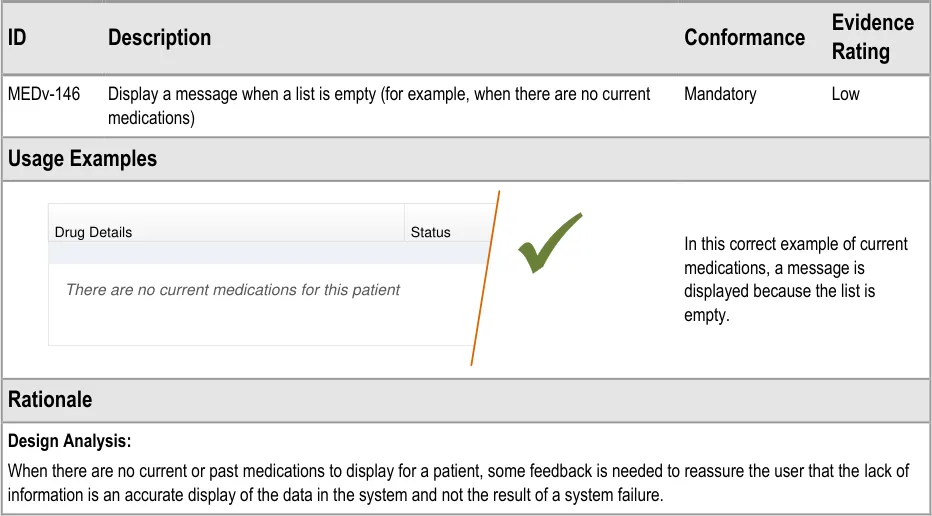
| Drug Details | Status |
|---|---|
| There are no current medications for this patient | There are no current medications for this patient |
Page 20
Copyright ©2013 Health and Social Care Information Centre
HSCIC Controlled Document
3.3.7 Mandatory Columns
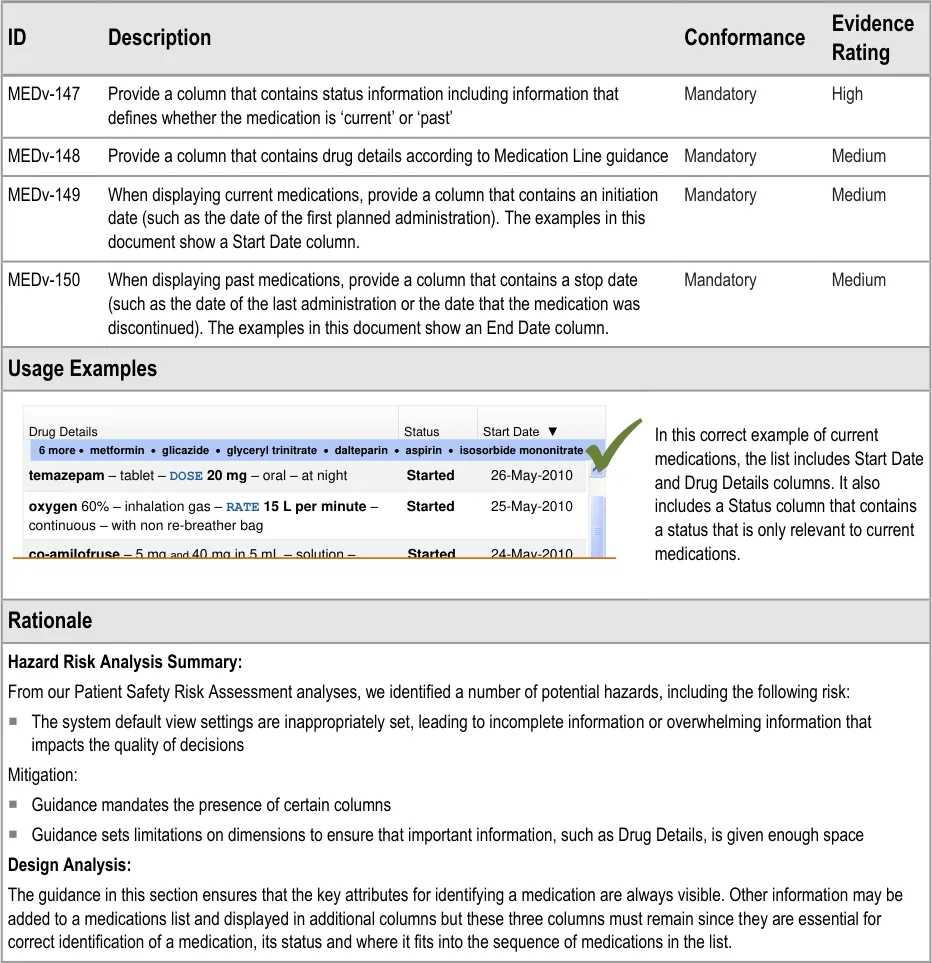
| Col1 | Col2 | Col3 | Col4 |
|---|---|---|---|
| Drug Details | Drug Details | Status | Start Date ▼ |
| 6 more·** metformin**·** glicazide**·** glyceryl trinitrate**·** dalteparin**·** aspirin**·** isosorbide mononitrate** | 6 more·** metformin**·** glicazide**·** glyceryl trinitrate**·** dalteparin**·** aspirin**·** isosorbide mononitrate** | 6 more·** metformin**·** glicazide**·** glyceryl trinitrate**·** dalteparin**·** aspirin**·** isosorbide mononitrate** | |
| 25-May-2010 26-May-2010 Started Started oxygen 60% – inhalation gas – RATE 15 L per minute– continuous – with non re-breather bag temazepam– tablet – DOSE 20 mg– oral – at nightco-amilofruse– 5 mgand40 mg in 5 mL – solution – 24-May-2010 Started | 25-May-2010 26-May-2010 Started Started oxygen 60% – inhalation gas – RATE 15 L per minute– continuous – with non re-breather bag temazepam– tablet – DOSE 20 mg– oral – at nightco-amilofruse– 5 mgand40 mg in 5 mL – solution – 24-May-2010 Started | 25-May-2010 26-May-2010 Started Started oxygen 60% – inhalation gas – RATE 15 L per minute– continuous – with non re-breather bag temazepam– tablet – DOSE 20 mg– oral – at nightco-amilofruse– 5 mgand40 mg in 5 mL – solution – 24-May-2010 Started | 25-May-2010 26-May-2010 Started Started oxygen 60% – inhalation gas – RATE 15 L per minute– continuous – with non re-breather bag temazepam– tablet – DOSE 20 mg– oral – at nightco-amilofruse– 5 mgand40 mg in 5 mL – solution – 24-May-2010 Started |
DOSE 5 mL– oral – once a day | DOSE 5 mL– oral – once a day | DOSE 5 mL– oral – once a day | DOSE 5 mL– oral – once a day |
Page 21
Copyright ©2013 Health and Social Care Information Centre
HSCIC Controlled Document
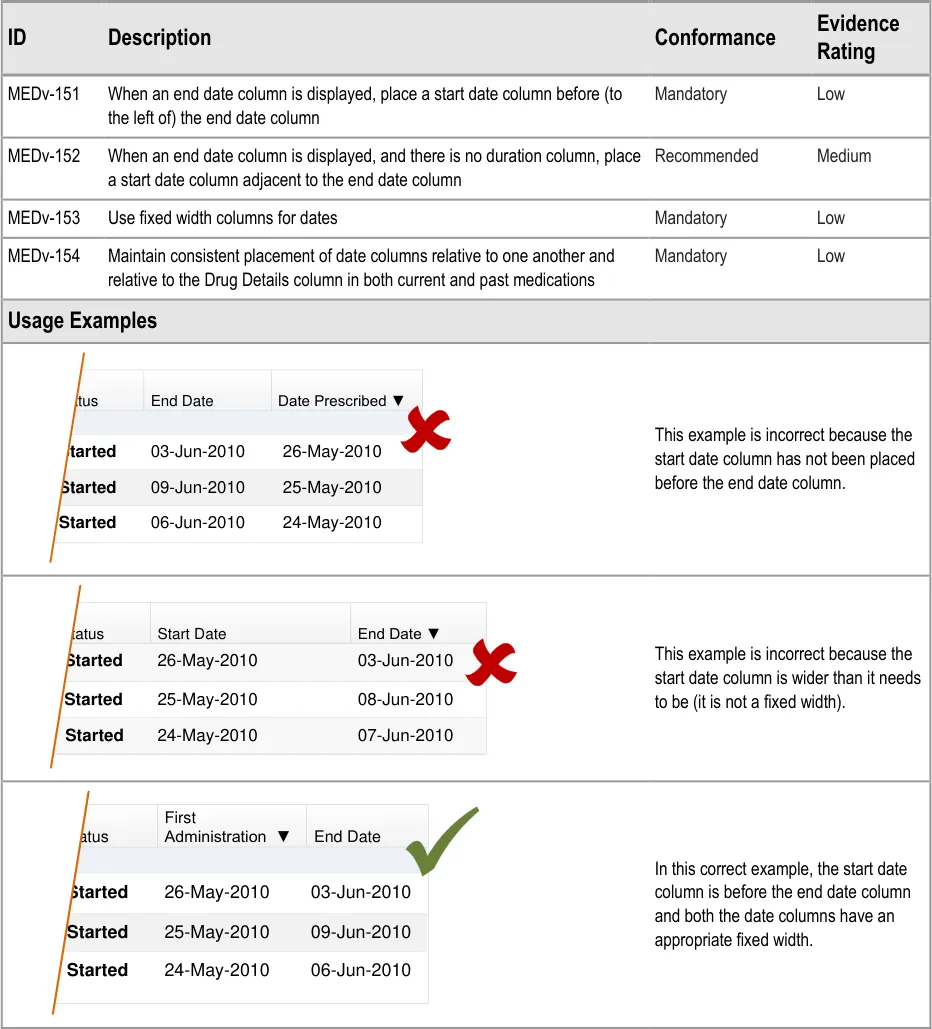
3.3.8 Date Columns
The guidance in this section refers to date columns. The specific information to display in these columns is not part of guidance because needs differ between tasks and contexts. Guidance is provided for the relative placement of date columns when there are columns such as ‘Date Prescribed’ or ‘First Administration’ that include date and time information.
In what follows, columns that contain date and time information for the start or initiation of a medication are referred to as ‘start date’. Columns that contain date and time information for an end or completion of a medication are referred to as ‘end date’. The guidance does not refer to the relative placement of any other date columns (such as ‘Review Date’) that may be present.
Page 22
| Col1 | Status | End Date | Date Prescribed ▼ |
|---|---|---|---|
| 03-Jun-2010 Started 26-May-2010 | 03-Jun-2010 Started 26-May-2010 | 03-Jun-2010 Started 26-May-2010 | 03-Jun-2010 Started 26-May-2010 |
| 09-Jun-2010 Started 25-May-2010 | 09-Jun-2010 Started 25-May-2010 | 09-Jun-2010 Started 25-May-2010 | 09-Jun-2010 Started 25-May-2010 |
| 06-Jun-2010 Started 24-May-2010 | 06-Jun-2010 Started 24-May-2010 | 06-Jun-2010 Started 24-May-2010 | 06-Jun-2010 Started 24-May-2010 |
| Col1 | Status | Start Date | End Date ▼ |
|---|---|---|---|
| 26-May-2010 Started 03-Jun-2010 | 26-May-2010 Started 03-Jun-2010 | 26-May-2010 Started 03-Jun-2010 | 26-May-2010 Started 03-Jun-2010 |
| 25-May-2010 Started 08-Jun-2010 | 25-May-2010 Started 08-Jun-2010 | 25-May-2010 Started 08-Jun-2010 | 25-May-2010 Started 08-Jun-2010 |
| 24-May-2010 Started 07-Jun-2010 | 24-May-2010 Started 07-Jun-2010 | 24-May-2010 Started 07-Jun-2010 | 24-May-2010 Started 07-Jun-2010 |
| Col1 | Status | First Administration ▼ | End Date |
|---|---|---|---|
| 03-Jun-2010 Started 26-May-2010 | 03-Jun-2010 Started 26-May-2010 | 03-Jun-2010 Started 26-May-2010 | 03-Jun-2010 Started 26-May-2010 |
| 09-Jun-2010 Started 25-May-2010 | 09-Jun-2010 Started 25-May-2010 | 09-Jun-2010 Started 25-May-2010 | 09-Jun-2010 Started 25-May-2010 |
| 06-Jun-2010 Started 24-May-2010 | 06-Jun-2010 Started 24-May-2010 | 06-Jun-2010 Started 24-May-2010 | 06-Jun-2010 Started 24-May-2010 |
Copyright ©2013 Health and Social Care Information Centre
HSCIC Controlled Document
Page 23
Copyright ©2013 Health and Social Care Information Centre
HSCIC Controlled Document
3.3.9 Column Headings

Page 24
Copyright ©2013 Health and Social Care Information Centre
HSCIC Controlled Document
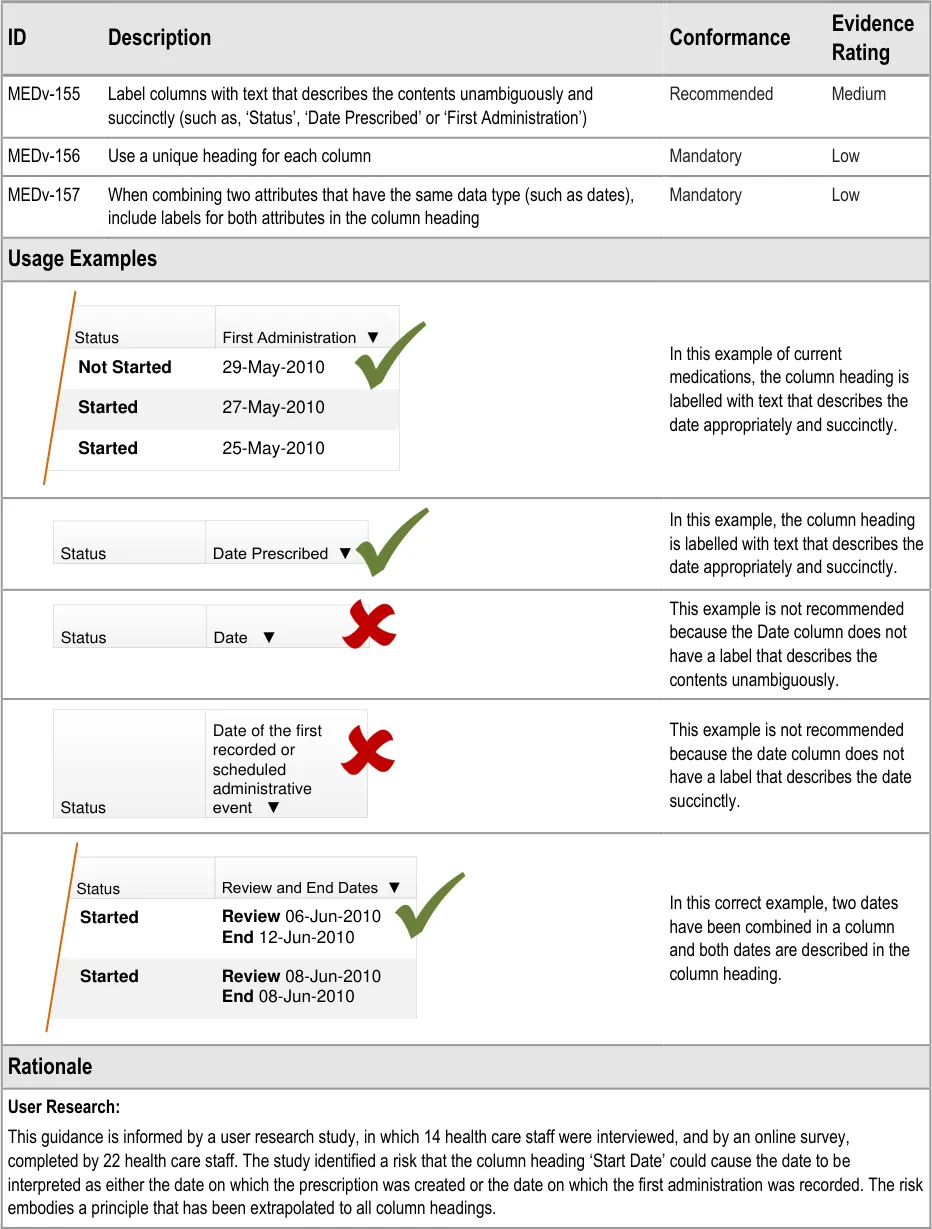
3.3.10 Composite Columns
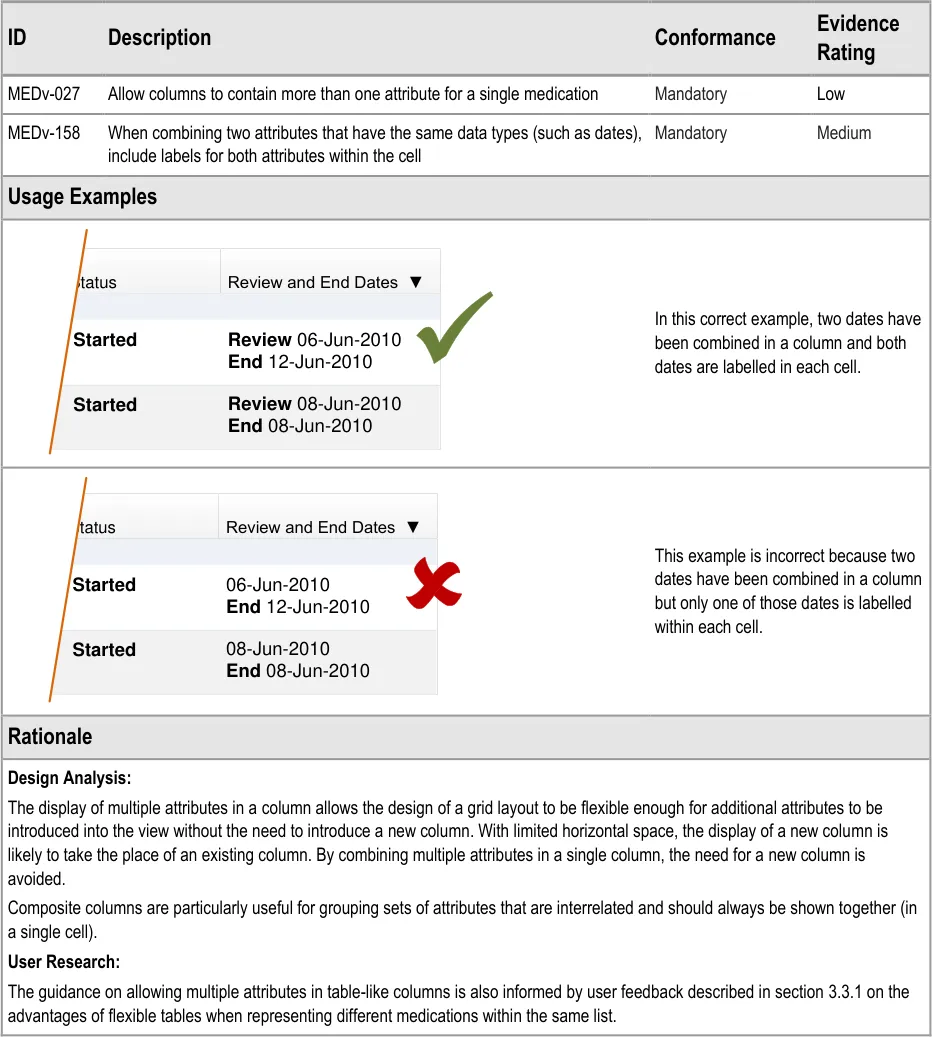
| Status Review and End Dates ▼ Started 06-Jun-2010 End 12-Jun-2010 | Status | Review and End Dates ▼ |
|---|---|---|
| 08-Jun-2010 End08-Jun-2010 Started | 08-Jun-2010 End08-Jun-2010 Started | 08-Jun-2010 End08-Jun-2010 Started |
Page 25
Copyright ©2013 Health and Social Care Information Centre
HSCIC Controlled Document
3.3.11 Constraining Dimensions
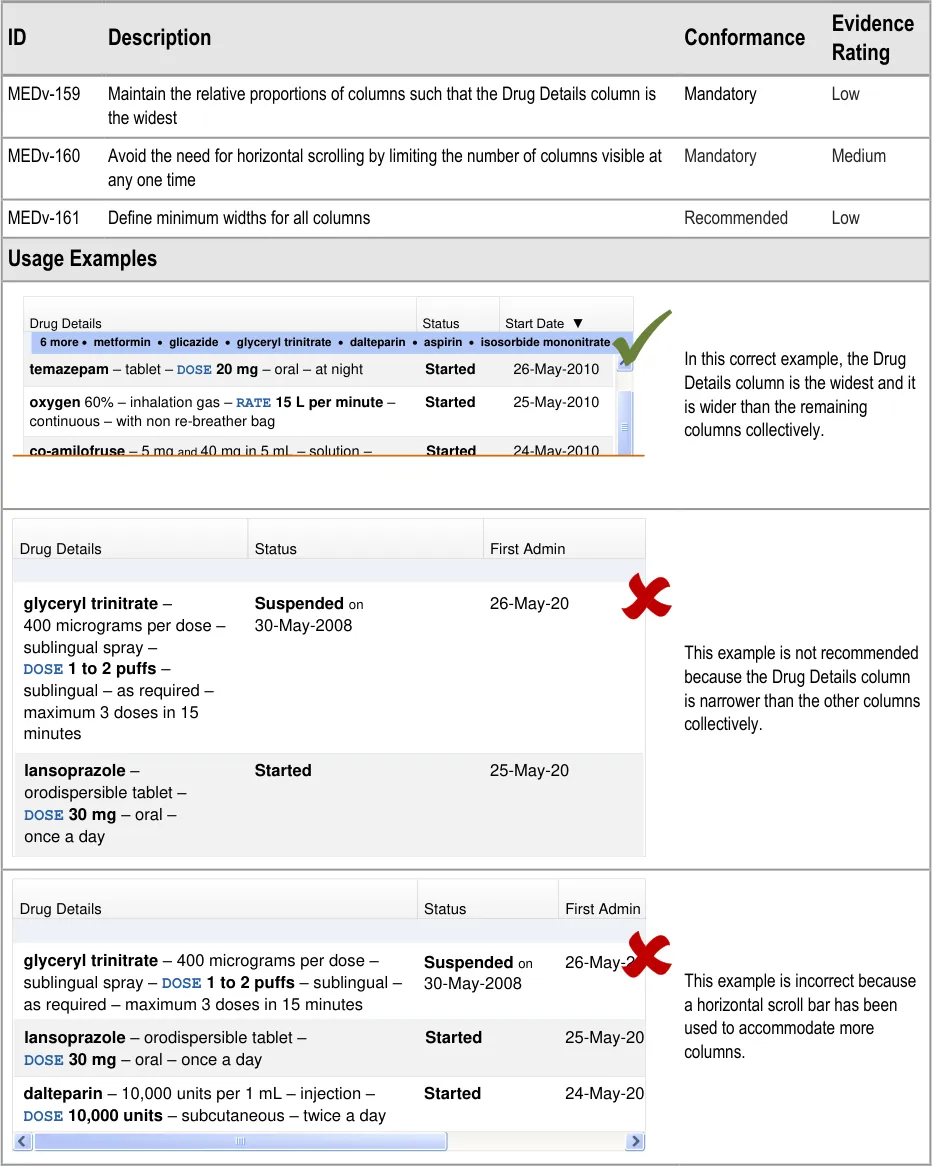
| Col1 | Col2 | Col3 | Col4 |
|---|---|---|---|
| Drug Details | Drug Details | Status | Start Date ▼ |
| 6 more·** metformin**·** glicazide**·** glyceryl trinitrate**·** dalteparin**·** aspirin**·** isosorbide mononitrate** | 6 more·** metformin**·** glicazide**·** glyceryl trinitrate**·** dalteparin**·** aspirin**·** isosorbide mononitrate** | 6 more·** metformin**·** glicazide**·** glyceryl trinitrate**·** dalteparin**·** aspirin**·** isosorbide mononitrate** | |
| 25-May-2010 26-May-2010 Started Started oxygen 60% – inhalation gas – RATE 15 L per minute– continuous – with non re-breather bag temazepam– tablet – DOSE 20 mg– oral – at nightco-amilofruse– 5 mgand40 mg in 5 mL – solution – 24-May-2010 Started | 25-May-2010 26-May-2010 Started Started oxygen 60% – inhalation gas – RATE 15 L per minute– continuous – with non re-breather bag temazepam– tablet – DOSE 20 mg– oral – at nightco-amilofruse– 5 mgand40 mg in 5 mL – solution – 24-May-2010 Started | 25-May-2010 26-May-2010 Started Started oxygen 60% – inhalation gas – RATE 15 L per minute– continuous – with non re-breather bag temazepam– tablet – DOSE 20 mg– oral – at nightco-amilofruse– 5 mgand40 mg in 5 mL – solution – 24-May-2010 Started | 25-May-2010 26-May-2010 Started Started oxygen 60% – inhalation gas – RATE 15 L per minute– continuous – with non re-breather bag temazepam– tablet – DOSE 20 mg– oral – at nightco-amilofruse– 5 mgand40 mg in 5 mL – solution – 24-May-2010 Started |
DOSE 5 mL– oral – once a day | DOSE 5 mL– oral – once a day | DOSE 5 mL– oral – once a day | DOSE 5 mL– oral – once a day |
| Drug Details | Status | First Admin |
|---|---|---|
| glyceryl trinitrate – 400 micrograms per dose – sublingual spray – DOSE 1 to 2 puffs– sublingual – as required – maximum 3 doses in 15 minutes Suspendedon 30-May-2008 26-May-20 | glyceryl trinitrate – 400 micrograms per dose – sublingual spray – DOSE 1 to 2 puffs– sublingual – as required – maximum 3 doses in 15 minutes Suspendedon 30-May-2008 26-May-20 | glyceryl trinitrate – 400 micrograms per dose – sublingual spray – DOSE 1 to 2 puffs– sublingual – as required – maximum 3 doses in 15 minutes Suspendedon 30-May-2008 26-May-20 |
| lansoprazole – orodispersible tablet – DOSE 30 mg– oral –once a day Started 25-May-20 | lansoprazole – orodispersible tablet – DOSE 30 mg– oral –once a day Started 25-May-20 | lansoprazole – orodispersible tablet – DOSE 30 mg– oral –once a day Started 25-May-20 |
Page 26
| Drug Details | Status | First Admin |
|---|---|---|
| glyceryl trinitrate – 400 micrograms per dose – sublingual spray – DOSE 1 to 2 puffs– sublingual –as required – maximum 3 doses in 15 minutes Suspendedon 30-May-2008 26-May-20 | glyceryl trinitrate – 400 micrograms per dose – sublingual spray – DOSE 1 to 2 puffs– sublingual –as required – maximum 3 doses in 15 minutes Suspendedon 30-May-2008 26-May-20 | glyceryl trinitrate – 400 micrograms per dose – sublingual spray – DOSE 1 to 2 puffs– sublingual –as required – maximum 3 doses in 15 minutes Suspendedon 30-May-2008 26-May-20 |
lansoprazole – orodispersible tablet –DOSE 30 mg– oral – once a dayStarted 25-May-20 | lansoprazole – orodispersible tablet –DOSE 30 mg– oral – once a dayStarted 25-May-20 | lansoprazole – orodispersible tablet –DOSE 30 mg– oral – once a dayStarted 25-May-20 |
dalteparin – 10,000 units per 1 mL – injection –DOSE 10,000 units– subcutaneous – twice a dayStarted 24-May-20 | dalteparin – 10,000 units per 1 mL – injection –DOSE 10,000 units– subcutaneous – twice a dayStarted 24-May-20 | dalteparin – 10,000 units per 1 mL – injection –DOSE 10,000 units– subcutaneous – twice a dayStarted 24-May-20 |
Copyright ©2013 Health and Social Care Information Centre
HSCIC Controlled Document
Page 27
Copyright ©2013 Health and Social Care Information Centre
HSCIC Controlled Document
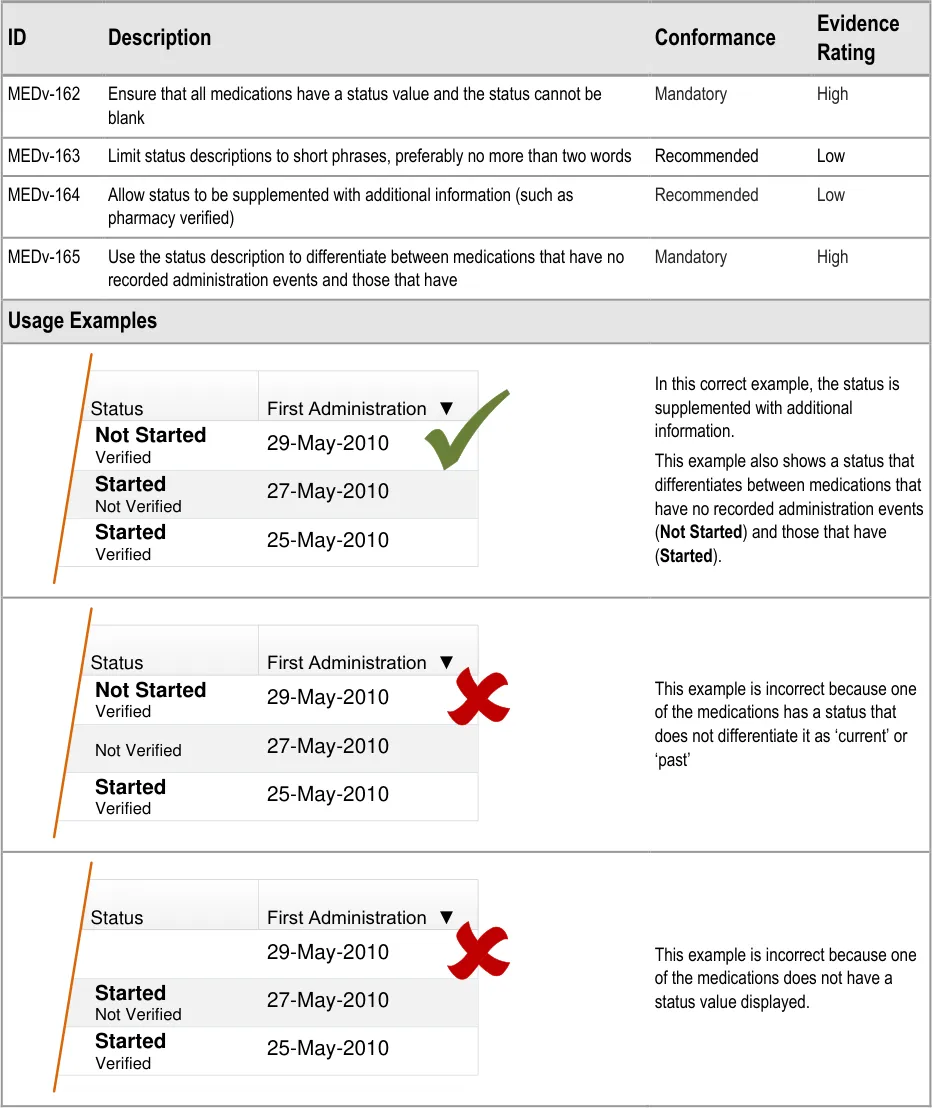
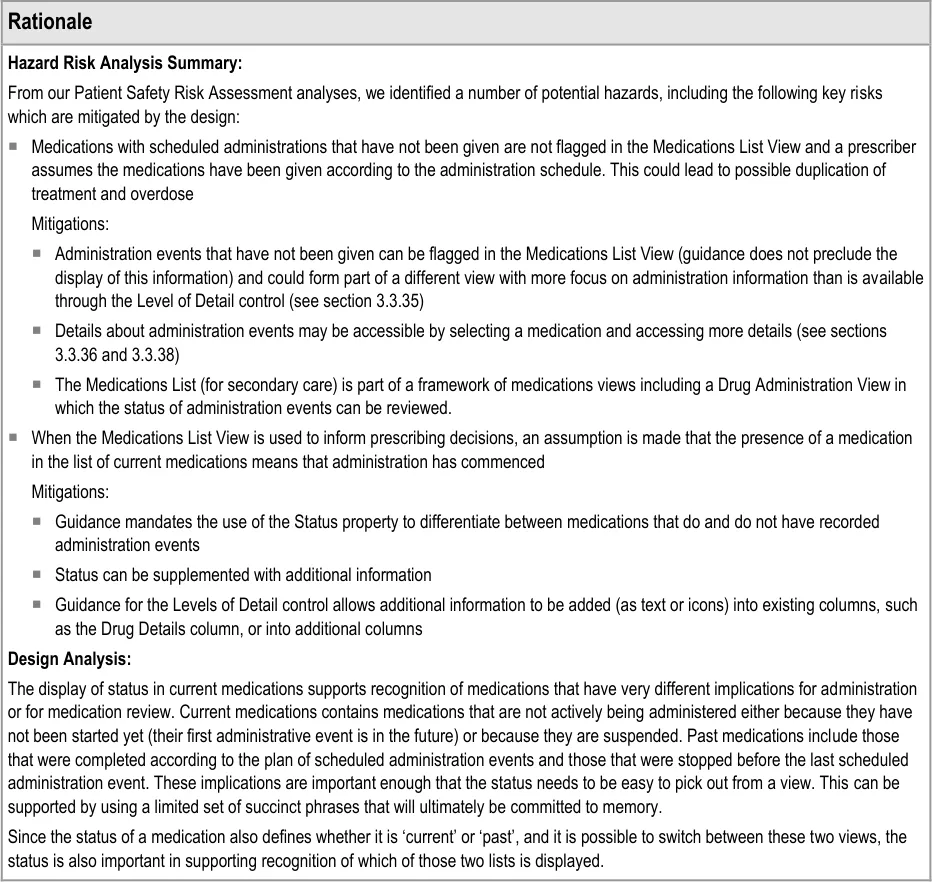
3.3.12 Displaying Status
Page 28
| Status First Administration ▼ Not Started 29-May-2010 Verified | Status | First Administration ▼ |
|---|---|---|
| 27-May-2010 Started Not Verified | 27-May-2010 Started Not Verified | 27-May-2010 Started Not Verified |
| 25-May-2010 Started Verified | 25-May-2010 Started Verified | 25-May-2010 Started Verified |
| Status First Administration ▼ Not Started 29-May-2010 Verified | Status | First Administration ▼ |
|---|---|---|
| 27-May-2010 Not Verified | 27-May-2010 Not Verified | 27-May-2010 Not Verified |
| 25-May-2010 Started Verified | 25-May-2010 Started Verified | 25-May-2010 Started Verified |
| Status First Administration ▼ 29-May-2010 | Status | First Administration ▼ |
|---|---|---|
| 27-May-2010 Started Not Verified | 27-May-2010 Started Not Verified | 27-May-2010 Started Not Verified |
| 25-May-2010 Started Verified | 25-May-2010 Started Verified | 25-May-2010 Started Verified |
Copyright ©2013 Health and Social Care Information Centre
HSCIC Controlled Document
Page 29
Copyright ©2013 Health and Social Care Information Centre
HSCIC Controlled Document
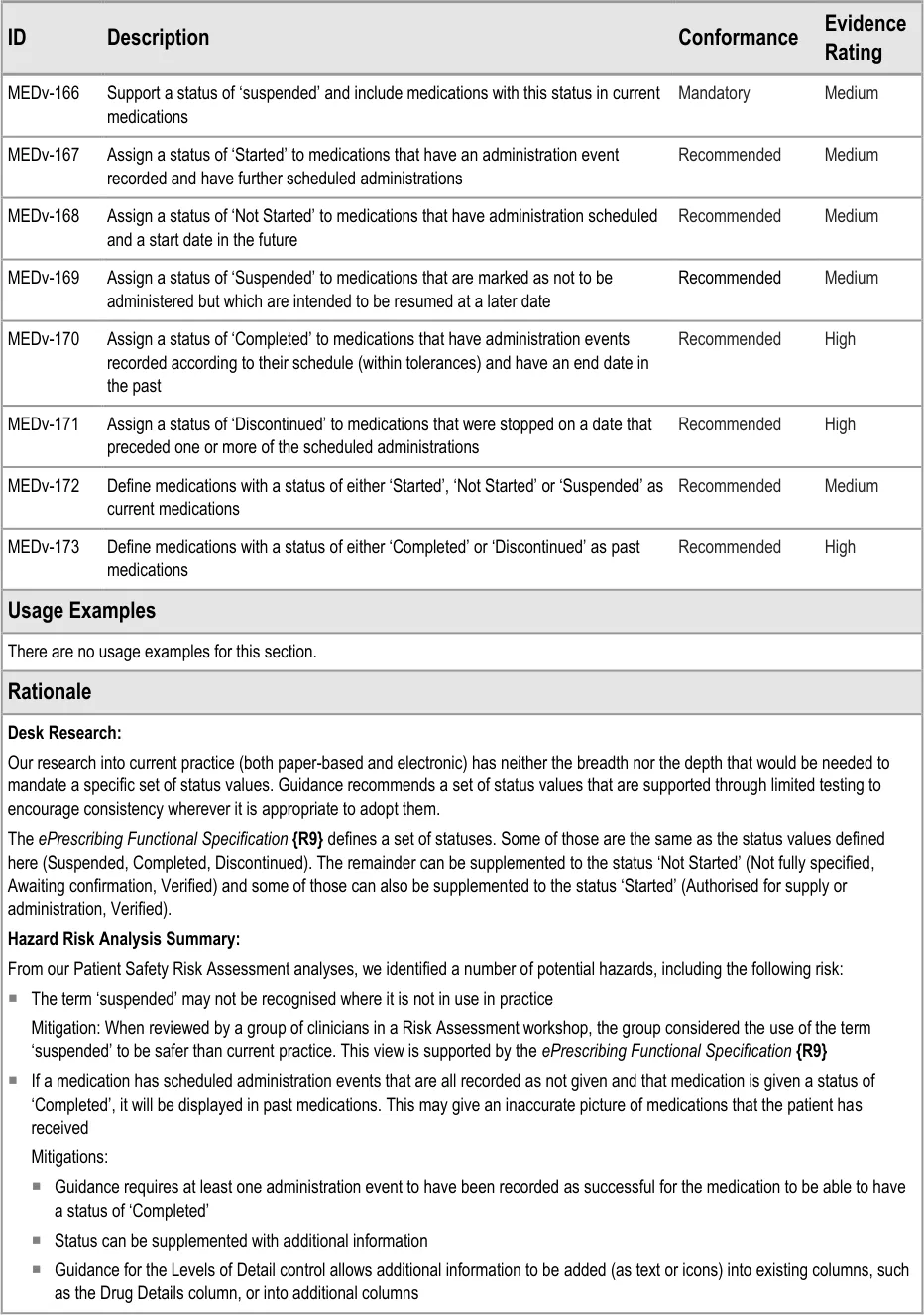
3.3.13 Specific Status Values
Page 30
Copyright ©2013 Health and Social Care Information Centre
HSCIC Controlled Document
Design Analysis:
This guidance aims to introduce a set of status values that::
Are more detailed than simply ‘current’ and ‘past’
Are relevant to all care settings and can be supplemented to add granularity
Can be used in conjunction with other, more granular sets of status values.
Copyright ©2013 Health and Social Care Information Centre
Page 31
HSCIC Controlled Document
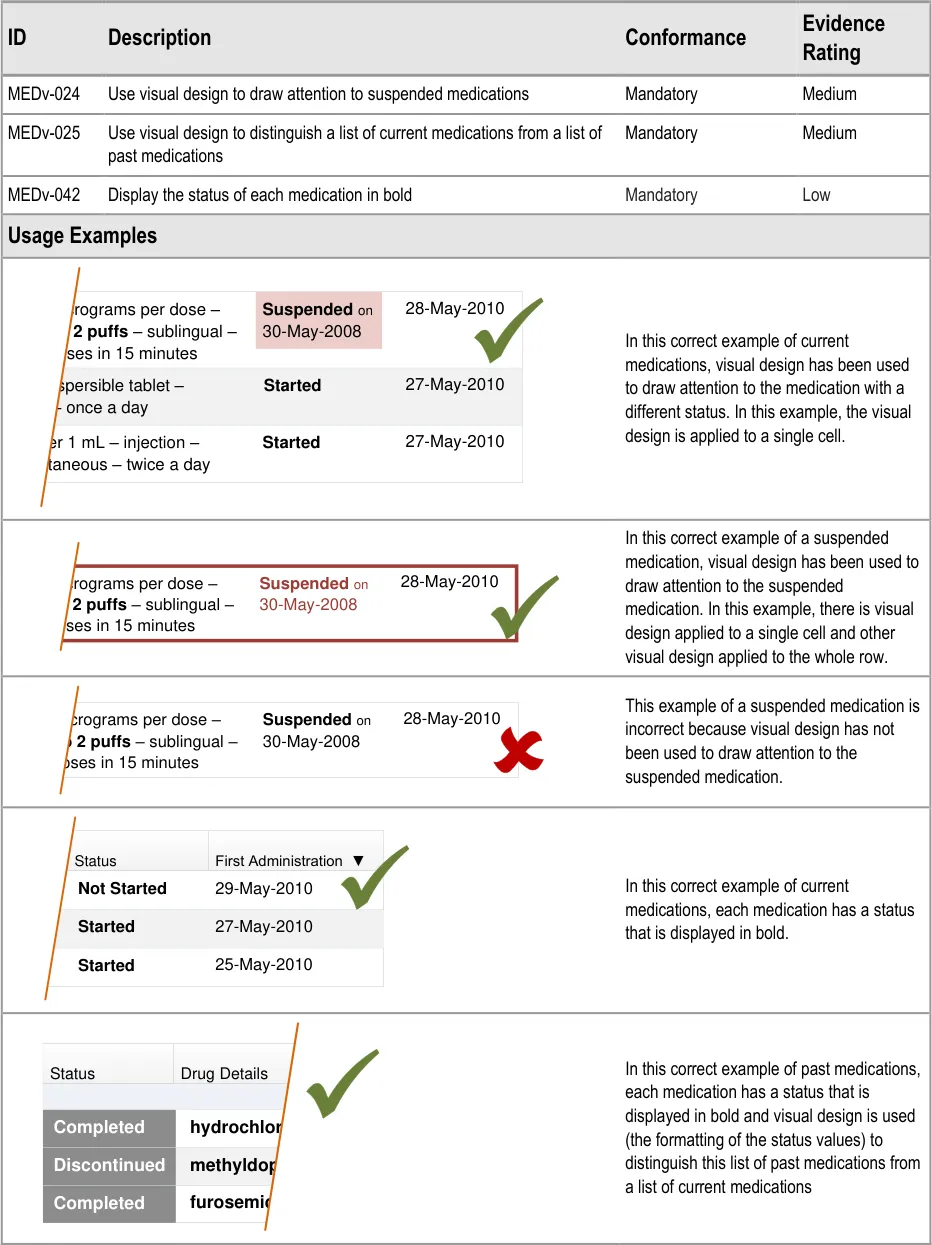
3.3.14 Formatting Status
Page 32
| Status First Administration ▼ Not Started 29-May-2010 | Status | First Administration ▼ |
|---|---|---|
| 27-May-2010 Started | 27-May-2010 Started | 27-May-2010 Started |
| 25-May-2010 Started | 25-May-2010 Started | 25-May-2010 Started |
| Status | Drug Details |
|---|---|
| hydrochloro Completed | hydrochloro Completed |
| methyldopa – Discontinued | methyldopa – Discontinued |
| furosemide – Completed | furosemide – Completed |
Copyright ©2013 Health and Social Care Information Centre
HSCIC Controlled Document
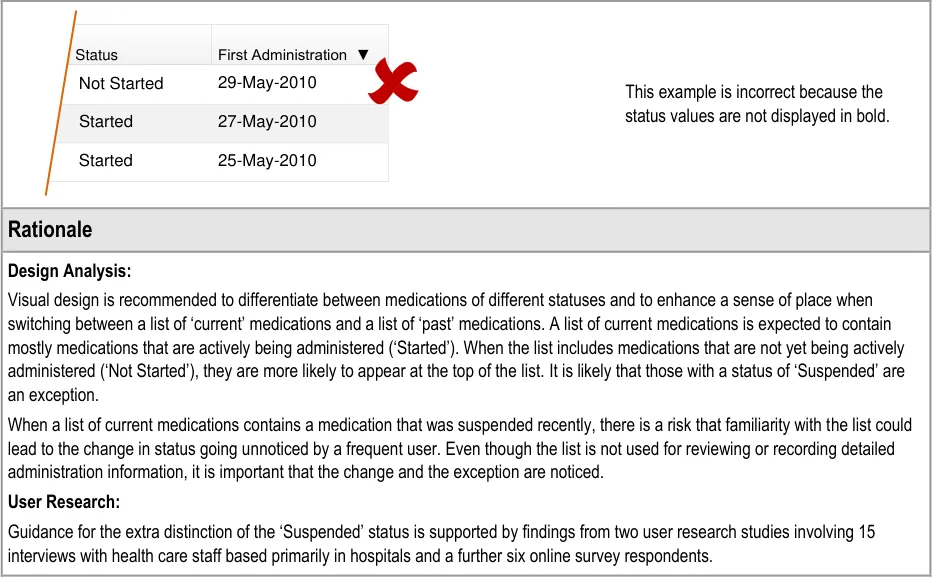
| Status First Administration ▼ Not Started 29-May-2010 | Status | First Administration ▼ |
|---|---|---|
| 27-May-2010 Started | 27-May-2010 Started | 27-May-2010 Started |
| 25-May-2010 Started | 25-May-2010 Started | 25-May-2010 Started |
Page 33
Copyright ©2013 Health and Social Care Information Centre
HSCIC Controlled Document
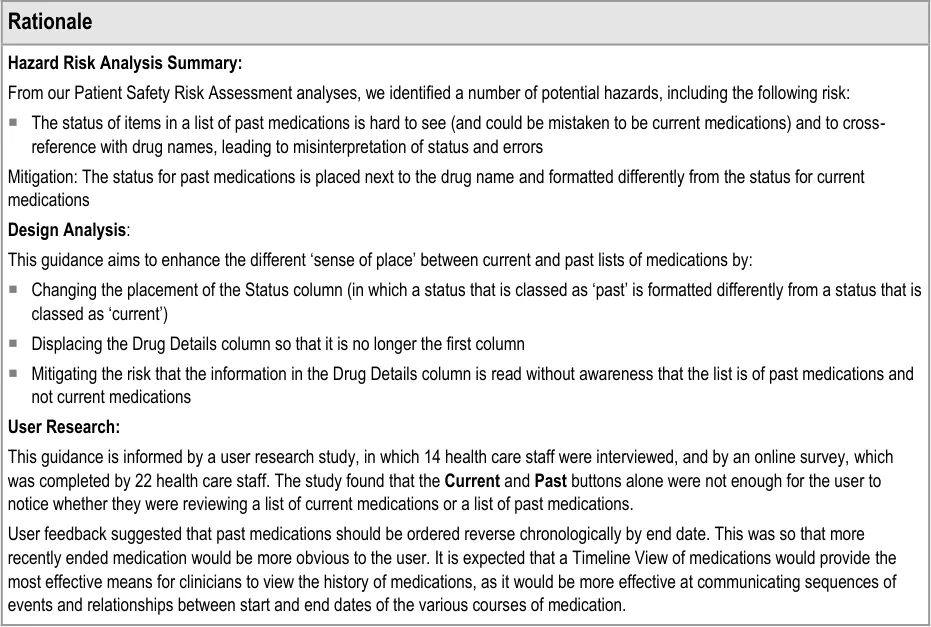
3.3.15 Controls for Displaying Current and Past Medications
Page 34

Copyright ©2013 Health and Social Care Information Centre
HSCIC Controlled Document
Page 35
Copyright ©2013 Health and Social Care Information Centre
HSCIC Controlled Document
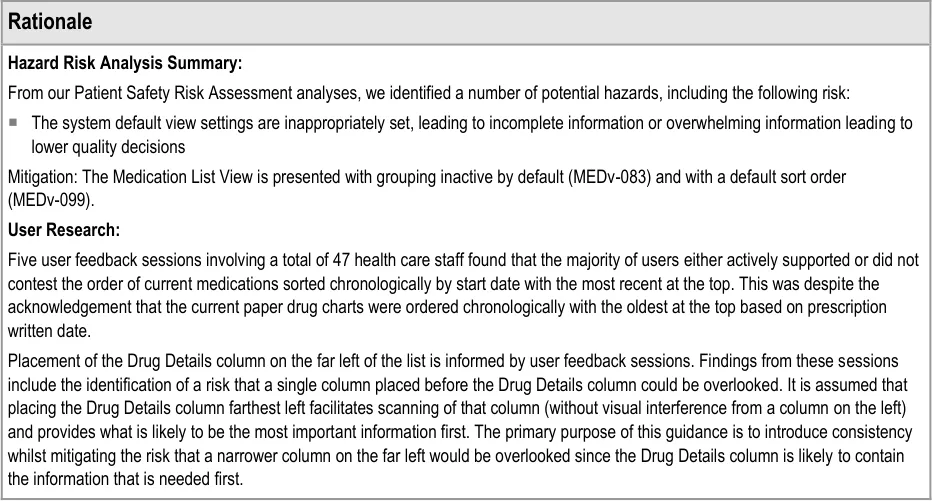
3.3.16 Displaying Current Medications
Page 36
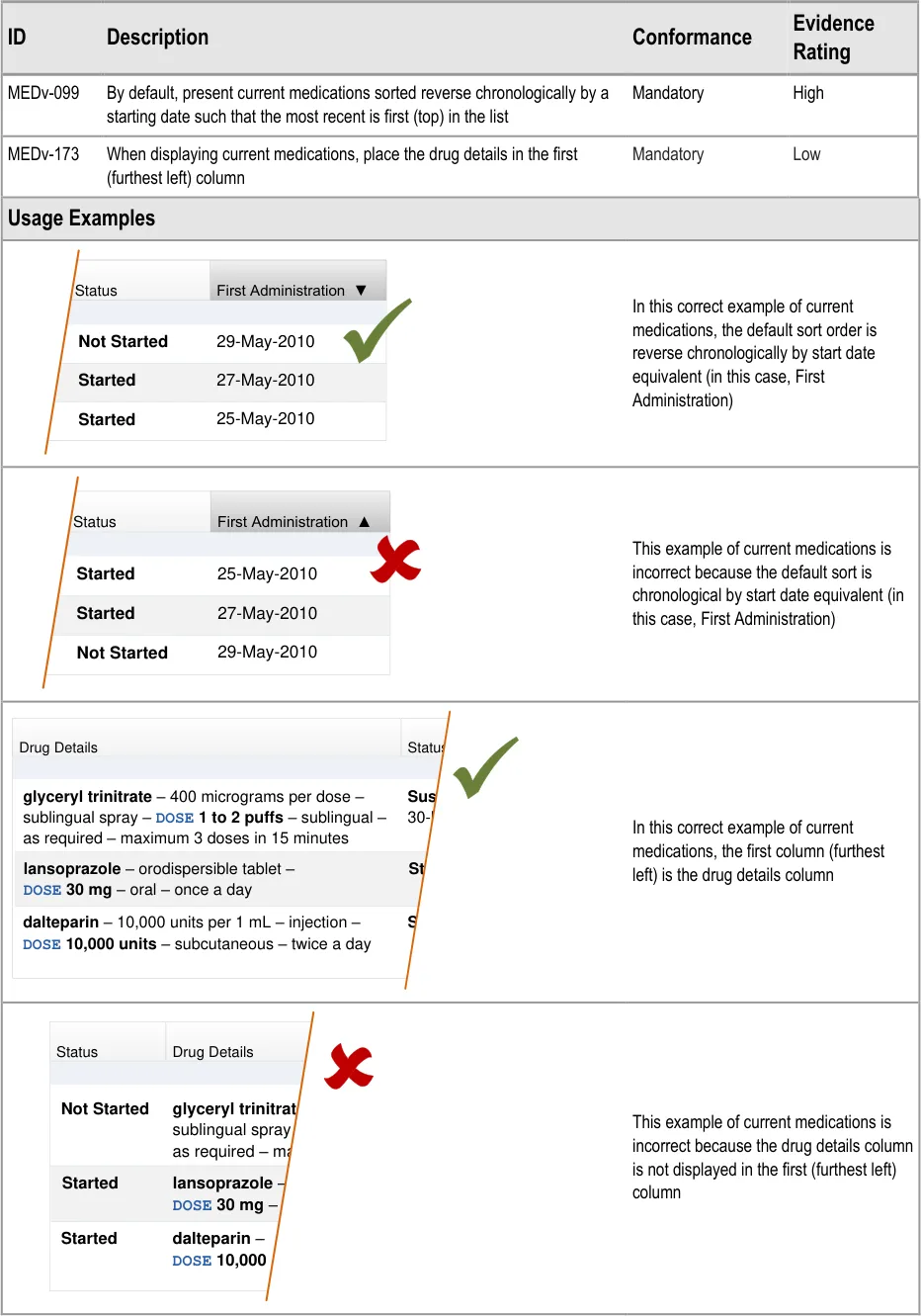
| Status First Administration ▼ Not Started 29-May-2010 | Status | First Administration ▼ |
|---|---|---|
| 27-May-2010 Started | 27-May-2010 Started | 27-May-2010 Started |
| 25-May-2010 Started | 25-May-2010 Started | 25-May-2010 Started |
| Status First Administration ▲ Started 25-May-2010 | Status | First Administration ▲ |
|---|---|---|
| 27-May-2010 Started | 27-May-2010 Started | 27-May-2010 Started |
| 29-May-2010 Not Started | 29-May-2010 Not Started | 29-May-2010 Not Started |
| Drug Details | Status |
|---|---|
| glyceryl trinitrate – 400 micrograms per dose – sublingual spray – DOSE 1 to 2 puffs– sublingual –as required – maximum 3 doses in 15 minutes Suspen 30-May | glyceryl trinitrate – 400 micrograms per dose – sublingual spray – DOSE 1 to 2 puffs– sublingual –as required – maximum 3 doses in 15 minutes Suspen 30-May |
lansoprazole – orodispersible tablet –DOSE 30 mg– oral – once a dayStarted | lansoprazole – orodispersible tablet –DOSE 30 mg– oral – once a dayStarted |
dalteparin – 10,000 units per 1 mL – injection –DOSE 10,000 units– subcutaneous – twice a dayStarted | dalteparin – 10,000 units per 1 mL – injection –DOSE 10,000 units– subcutaneous – twice a dayStarted |
| Status | Drug Details |
|---|---|
| Started Not Started Started glyceryl trinitrate sublingual spray as required – max lansoprazole – DOSE 30 mg– dalteparin – DOSE 10,000 | Started Not Started Started glyceryl trinitrate sublingual spray as required – max lansoprazole – DOSE 30 mg– dalteparin – DOSE 10,000 |
Copyright ©2013 Health and Social Care Information Centre
HSCIC Controlled Document
Page 37
Copyright ©2013 Health and Social Care Information Centre
HSCIC Controlled Document
3.3.17 Displaying Recent Past Notifications
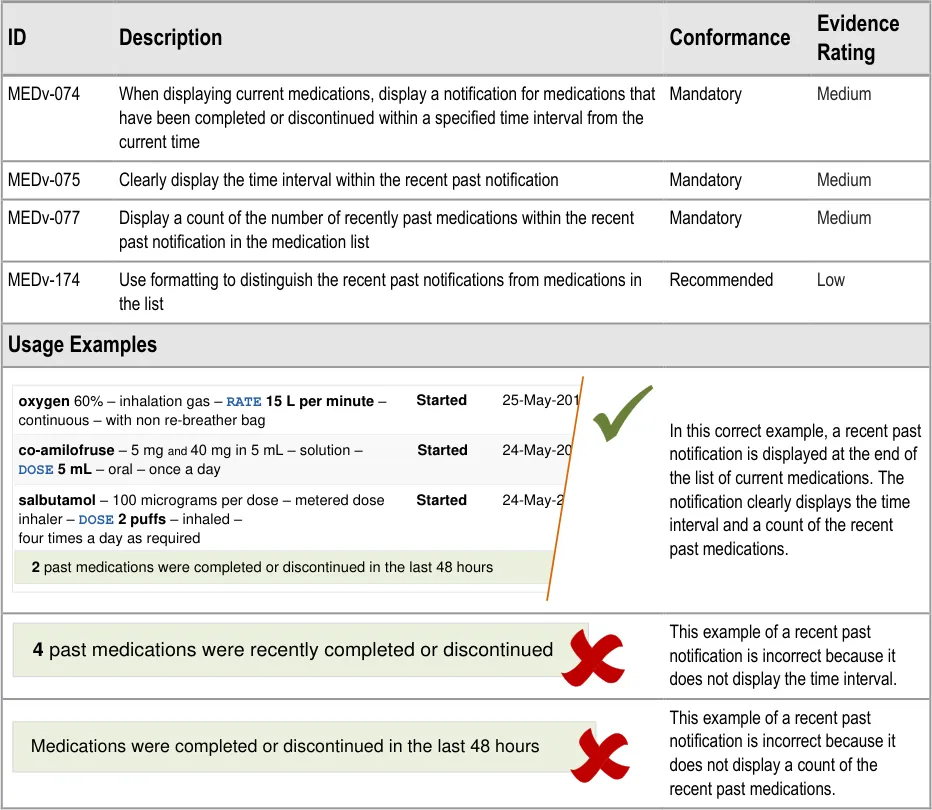
Page 38
Copyright ©2013 Health and Social Care Information Centre
HSCIC Controlled Document
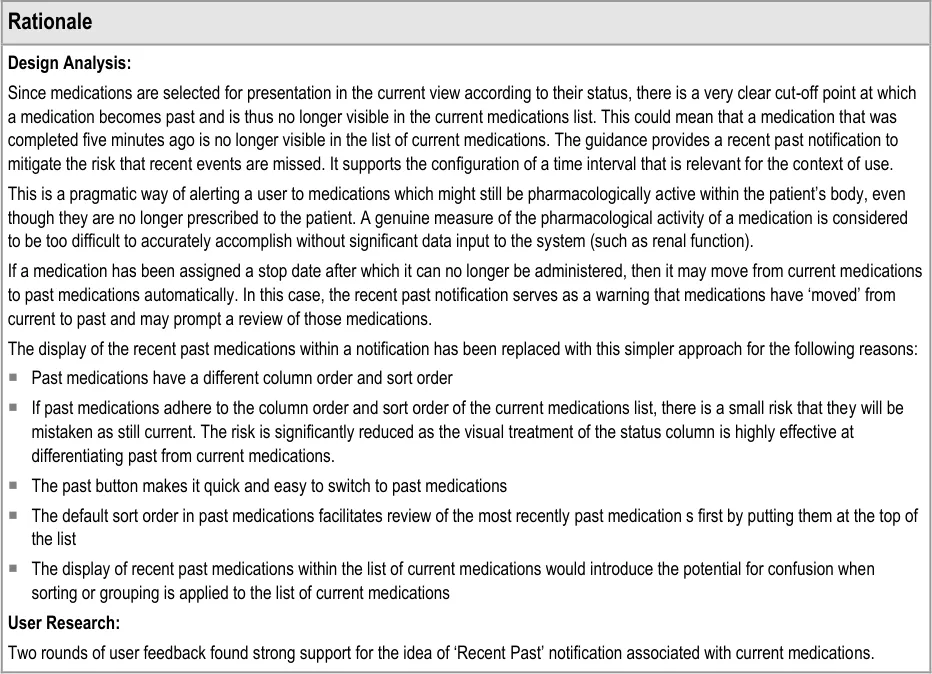
Page 39
Copyright ©2013 Health and Social Care Information Centre
HSCIC Controlled Document
3.3.18 Displaying Past Medications
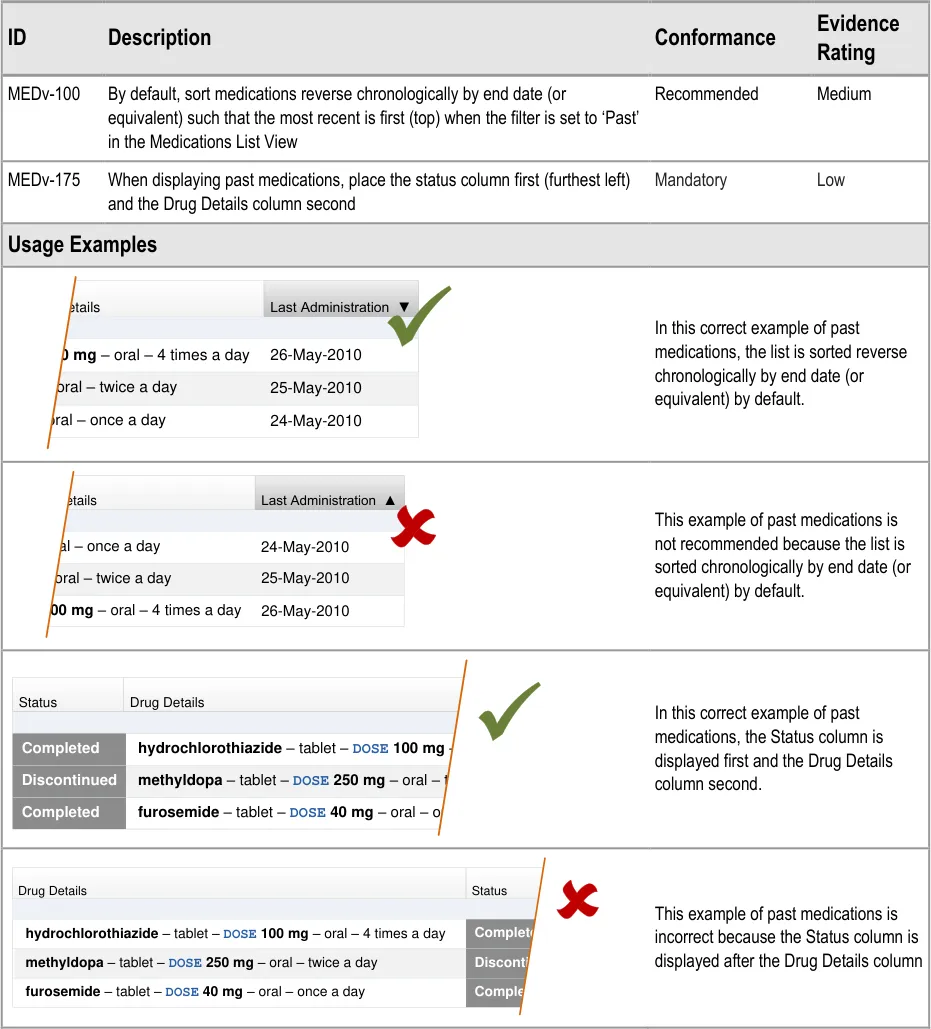
Page 40
| Drug Details | Last Administration ▼ |
|---|---|
26-May-2010E 100 mg – oral – 4 times a day | 26-May-2010E 100 mg – oral – 4 times a day |
| g – oral – twice a day 25-May-2010 | g – oral – twice a day 25-May-2010 |
| 24-May-2010 – oral – once a day | 24-May-2010 – oral – once a day |
| Drug Details | Last Administration ▲ |
|---|---|
| 24-May-2010 – oral – once a day | 24-May-2010 – oral – once a day |
| g – oral – twice a day 25-May-2010 | g – oral – twice a day 25-May-2010 |
26-May-2010E 100 mg – oral – 4 times a day | 26-May-2010E 100 mg – oral – 4 times a day |
| Status | Drug Details |
|---|---|
hydrochlorothiazide – tablet –DOSE 100 mg – oraCompleted | hydrochlorothiazide – tablet –DOSE 100 mg – oraCompleted |
methyldopa – tablet –DOSE 250 mg – oral – twiceDiscontinued | methyldopa – tablet –DOSE 250 mg – oral – twiceDiscontinued |
furosemide – tablet –DOSE 40 mg – oral – once aCompleted | furosemide – tablet –DOSE 40 mg – oral – once aCompleted |
| Drug Details | Status | Col3 |
|---|---|---|
hydrochlorothiazide – tablet –DOSE 100 mg – oral – 4 times a dayCompleted | hydrochlorothiazide – tablet –DOSE 100 mg – oral – 4 times a dayCompleted | hydrochlorothiazide – tablet –DOSE 100 mg – oral – 4 times a dayCompleted |
methyldopa – tablet –DOSE 250 mg – oral – twice a dayDiscontinue | methyldopa – tablet –DOSE 250 mg – oral – twice a dayDiscontinue | methyldopa – tablet –DOSE 250 mg – oral – twice a dayDiscontinue |
furosemide – tablet –DOSE 40 mg – oral – once a dayCompleted | furosemide – tablet –DOSE 40 mg – oral – once a dayCompleted | furosemide – tablet –DOSE 40 mg – oral – once a dayCompleted |
Copyright ©2013 Health and Social Care Information Centre
HSCIC Controlled Document
Page 41
Copyright ©2013 Health and Social Care Information Centre
HSCIC Controlled Document
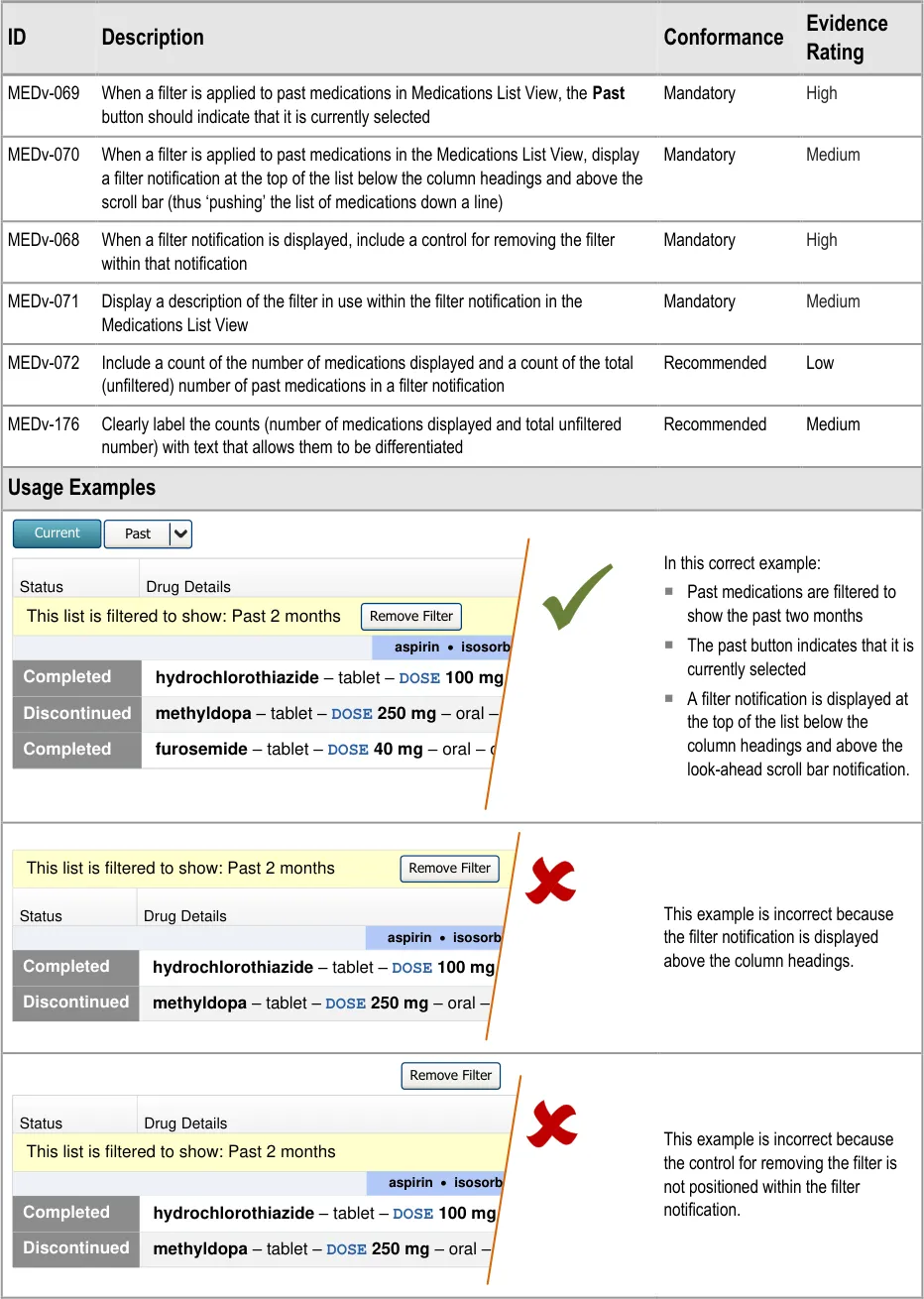
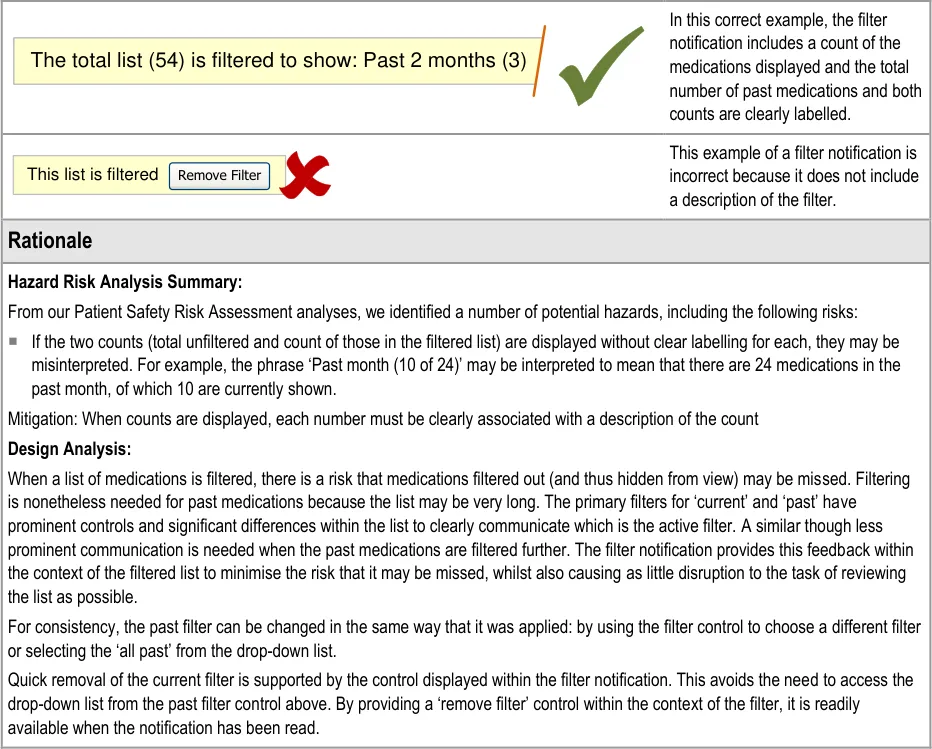
3.3.19 Filtering Past Medications
Page 42
| Status | Drug Details | Col3 | Col4 |
|---|---|---|---|
| This list is filtered to show: Past 2 months Remove Filter | This list is filtered to show: Past 2 months Remove Filter | This list is filtered to show: Past 2 months Remove Filter | |
| aspirin·** isosorbide** | |||
hydrochlorothiazide – tablet –DOSE 100 mg – oraCompleted | hydrochlorothiazide – tablet –DOSE 100 mg – oraCompleted | hydrochlorothiazide – tablet –DOSE 100 mg – oraCompleted | |
methyldopa – tablet –DOSE 250 mg – oral – twiceDiscontinued | methyldopa – tablet –DOSE 250 mg – oral – twiceDiscontinued | methyldopa – tablet –DOSE 250 mg – oral – twiceDiscontinued | |
furosemide – tablet –DOSE 40 mg – oral – once aCompleted | furosemide – tablet –DOSE 40 mg – oral – once aCompleted | furosemide – tablet –DOSE 40 mg – oral – once aCompleted |
| This list is filtered to show: Past 2 months Remove Filter | Col2 | Col3 | Col4 |
|---|---|---|---|
| Status | Drug Details | Drug Details | |
| aspirin·** isosorbide** | |||
hydrochlorothiazide – tablet –DOSE 100 mg – oraCompleted | hydrochlorothiazide – tablet –DOSE 100 mg – oraCompleted | hydrochlorothiazide – tablet –DOSE 100 mg – oraCompleted | |
methyldopa – tablet –DOSE 250 mg – oral – twiceDiscontinued | methyldopa – tablet –DOSE 250 mg – oral – twiceDiscontinued | methyldopa – tablet –DOSE 250 mg – oral – twiceDiscontinued |
| Status | Drug Details | Col3 | Col4 |
|---|---|---|---|
| This list is filtered to show: Past 2 months | This list is filtered to show: Past 2 months | This list is filtered to show: Past 2 months | |
| aspirin·** isosorbide** | |||
hydrochlorothiazide – tablet –DOSE 100 mg – oraCompleted | hydrochlorothiazide – tablet –DOSE 100 mg – oraCompleted | hydrochlorothiazide – tablet –DOSE 100 mg – oraCompleted | |
methyldopa – tablet –DOSE 250 mg – oral – twiceDiscontinued | methyldopa – tablet –DOSE 250 mg – oral – twiceDiscontinued | methyldopa – tablet –DOSE 250 mg – oral – twiceDiscontinued |
Copyright ©2013 Health and Social Care Information Centre
HSCIC Controlled Document
Page 43
Copyright ©2013 Health and Social Care Information Centre
HSCIC Controlled Document
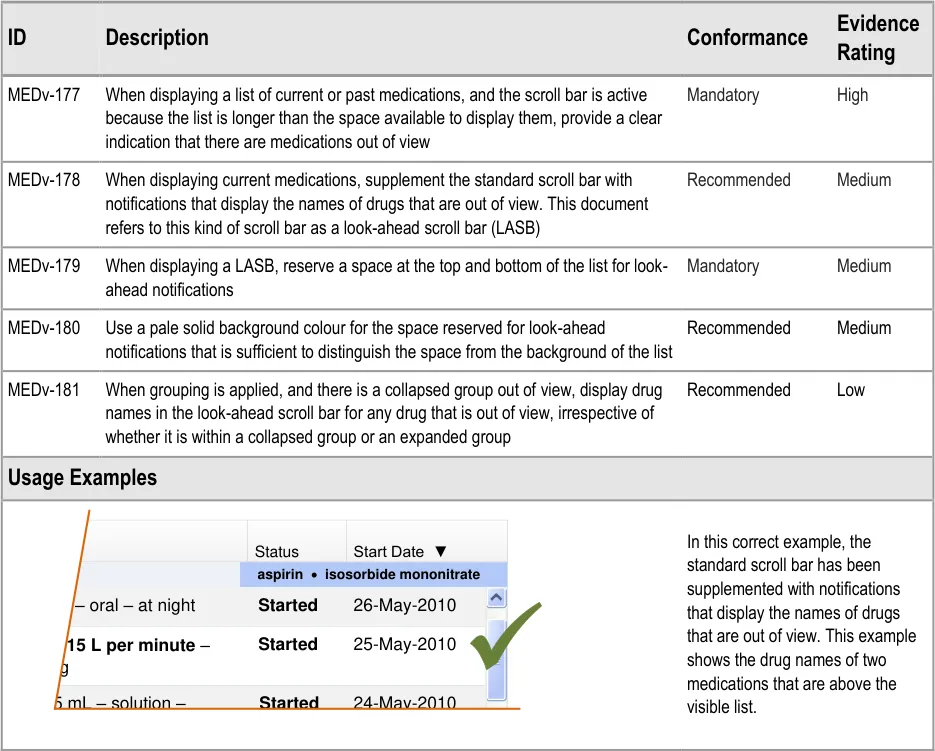
3.3.20 Displaying a LASB
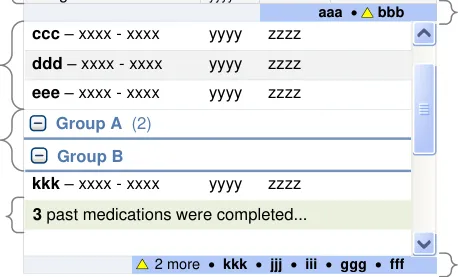
Sections 3.3.20 to 3.3.28 include guidance for look-ahead scroll bars. A look-ahead scroll bar is a standard scroll bar that is supplemented with notifications at the top and bottom to indicate that

Look-ahead scroll bar notification
Look-ahead scroll bar
Look-ahead scroll bar notification
Medications
| Drug Details | Col2 | yyyy | zzzz | Start ▼ | Col6 |
|---|---|---|---|---|---|
| aaa· | aaa· | ** bbb** | |||
| ddd– xxxx - xxxx eee– xxxx - xxxx ccc– xxxx - xxxx yyyy zzzz yyyy zzzz yyyy zzzz fff– xxxx - xxxx yyyy zzzz ggg– xxxx - xxxx yyyy zzzz hhh– xxxx - xxxx yyyy zzzz iii– xxxx - xxxx yyyy zzzz jjj– xxxx - xxxx yyyy zzzz | ddd– xxxx - xxxx eee– xxxx - xxxx ccc– xxxx - xxxx yyyy zzzz yyyy zzzz yyyy zzzz fff– xxxx - xxxx yyyy zzzz ggg– xxxx - xxxx yyyy zzzz hhh– xxxx - xxxx yyyy zzzz iii– xxxx - xxxx yyyy zzzz jjj– xxxx - xxxx yyyy zzzz | ddd– xxxx - xxxx eee– xxxx - xxxx ccc– xxxx - xxxx yyyy zzzz yyyy zzzz yyyy zzzz fff– xxxx - xxxx yyyy zzzz ggg– xxxx - xxxx yyyy zzzz hhh– xxxx - xxxx yyyy zzzz iii– xxxx - xxxx yyyy zzzz jjj– xxxx - xxxx yyyy zzzz | ddd– xxxx - xxxx eee– xxxx - xxxx ccc– xxxx - xxxx yyyy zzzz yyyy zzzz yyyy zzzz fff– xxxx - xxxx yyyy zzzz ggg– xxxx - xxxx yyyy zzzz hhh– xxxx - xxxx yyyy zzzz iii– xxxx - xxxx yyyy zzzz jjj– xxxx - xxxx yyyy zzzz | ddd– xxxx - xxxx eee– xxxx - xxxx ccc– xxxx - xxxx yyyy zzzz yyyy zzzz yyyy zzzz fff– xxxx - xxxx yyyy zzzz ggg– xxxx - xxxx yyyy zzzz hhh– xxxx - xxxx yyyy zzzz iii– xxxx - xxxx yyyy zzzz jjj– xxxx - xxxx yyyy zzzz | ddd– xxxx - xxxx eee– xxxx - xxxx ccc– xxxx - xxxx yyyy zzzz yyyy zzzz yyyy zzzz fff– xxxx - xxxx yyyy zzzz ggg– xxxx - xxxx yyyy zzzz hhh– xxxx - xxxx yyyy zzzz iii– xxxx - xxxx yyyy zzzz jjj– xxxx - xxxx yyyy zzzz |
| 2 more ·** ooo**·** nnn**·** mmm · lll**·** kkk** | 2 more ·** ooo**·** nnn**·** mmm · lll**·** kkk** | 2 more ·** ooo**·** nnn**·** mmm · lll**·** kkk** | 2 more ·** ooo**·** nnn**·** mmm · lll**·** kkk** | 2 more ·** ooo**·** nnn**·** mmm · lll**·** kkk** |
Alert icon
Figure 5: Diagram of a Medication List View with Look-ahead Scroll Bars
Page 44
| Col1 | Col2 | Status | Start Date ▼ |
|---|---|---|---|
| aspirin·** isosorbide mononitrate** | aspirin·** isosorbide mononitrate** | aspirin·** isosorbide mononitrate** | |
| 25-May-2010 26-May-2010 Started Started ATE 15 L per minute– bag 0 mg– oral – at night in 5 mL – solution – 24-May-2010 Started | 25-May-2010 26-May-2010 Started Started ATE 15 L per minute– bag 0 mg– oral – at night in 5 mL – solution – 24-May-2010 Started | 25-May-2010 26-May-2010 Started Started ATE 15 L per minute– bag 0 mg– oral – at night in 5 mL – solution – 24-May-2010 Started | 25-May-2010 26-May-2010 Started Started ATE 15 L per minute– bag 0 mg– oral – at night in 5 mL – solution – 24-May-2010 Started |
Copyright ©2013 Health and Social Care Information Centre
HSCIC Controlled Document
Page 45
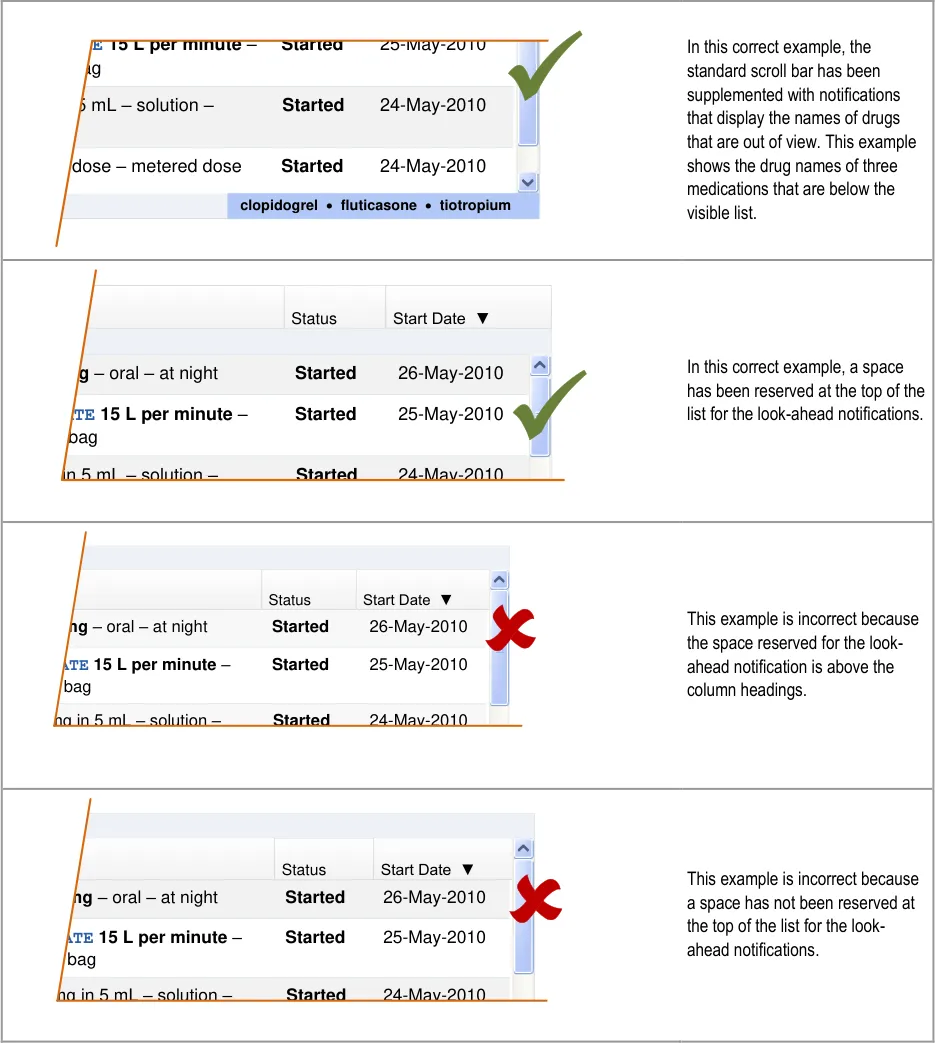
| TE 15 L per minute – Started 25-May-2010 ag 5 mL – solution – Started 24-May-2010 r dose – metered dose Started 24-May-2010 | Col2 |
|---|---|
| 25-May-2010 Started 24-May-2010 Started TE 15 L per minute– ag r dose – metered dose 5 mL – solution – 24-May-2010 Started | |
| clopidogrel·** fluticasone**·** tiotropium** |
| Col1 | Status | Start Date ▼ |
|---|---|---|
| 25-May-2010 26-May-2010 Started Started RATE 15 L per minute– er bag mg– oral – at night in 5 mL – solution – 24-May-2010 Started | 25-May-2010 26-May-2010 Started Started RATE 15 L per minute– er bag mg– oral – at night in 5 mL – solution – 24-May-2010 Started | 25-May-2010 26-May-2010 Started Started RATE 15 L per minute– er bag mg– oral – at night in 5 mL – solution – 24-May-2010 Started |
| Col1 | Col2 | Col3 |
|---|---|---|
| Status | Start Date ▼ | |
| 25-May-2010 26-May-2010 Started Started RATE 15 L per minute– er bag ** mg**– oral – at night mg in 5 mL – solution – 24-May-2010 Started | 25-May-2010 26-May-2010 Started Started RATE 15 L per minute– er bag ** mg**– oral – at night mg in 5 mL – solution – 24-May-2010 Started | 25-May-2010 26-May-2010 Started Started RATE 15 L per minute– er bag ** mg**– oral – at night mg in 5 mL – solution – 24-May-2010 Started |
| Col1 | Col2 | Col3 |
|---|---|---|
| Status | Start Date ▼ | |
| 25-May-2010 26-May-2010 Started Started RATE 15 L per minute– er bag ** mg**– oral – at night mg in 5 mL – solution – 24-May-2010 Started | 25-May-2010 26-May-2010 Started Started RATE 15 L per minute– er bag ** mg**– oral – at night mg in 5 mL – solution – 24-May-2010 Started | 25-May-2010 26-May-2010 Started Started RATE 15 L per minute– er bag ** mg**– oral – at night mg in 5 mL – solution – 24-May-2010 Started |
Copyright ©2013 Health and Social Care Information Centre
HSCIC Controlled Document
Page 46
Copyright ©2013 Health and Social Care Information Centre
HSCIC Controlled Document
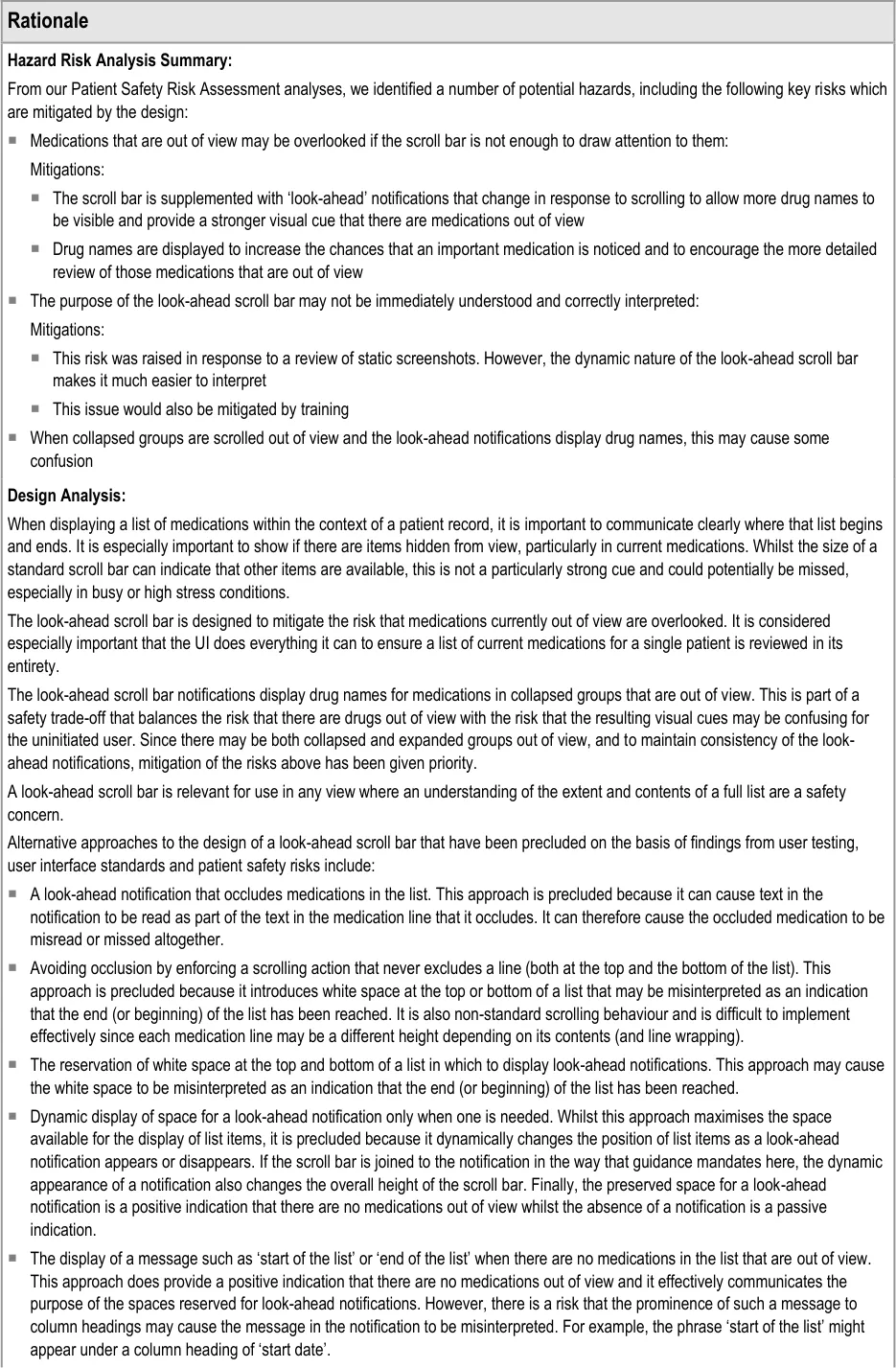
Reserving space for the look-ahead scroll bar achieves the following:
The scroll bar and look-ahead notifications have fixed positions so there is no impact from the resizing or repositioning of the scroll
bar or the contents of the list as the notifications appear and disappear
The look-ahead notification cannot overlap a medication in the list, so some of the risks associated with occlusion are mitigated
A clearer definition of when a medication should appear in the notification can be achieved
User Feedback:
The guidance is supported by a user feedback study with nine health care staff that showed strong support for a mechanism of indicating that there are medications out of view. The look-ahead scroll bar is the example mechanism that was used in this study. The guidance is also supported by an iterative assessment of an interactive prototype.
Page 47
Copyright ©2013 Health and Social Care Information Centre
HSCIC Controlled Document
3.3.21 Defining LASB Interactions
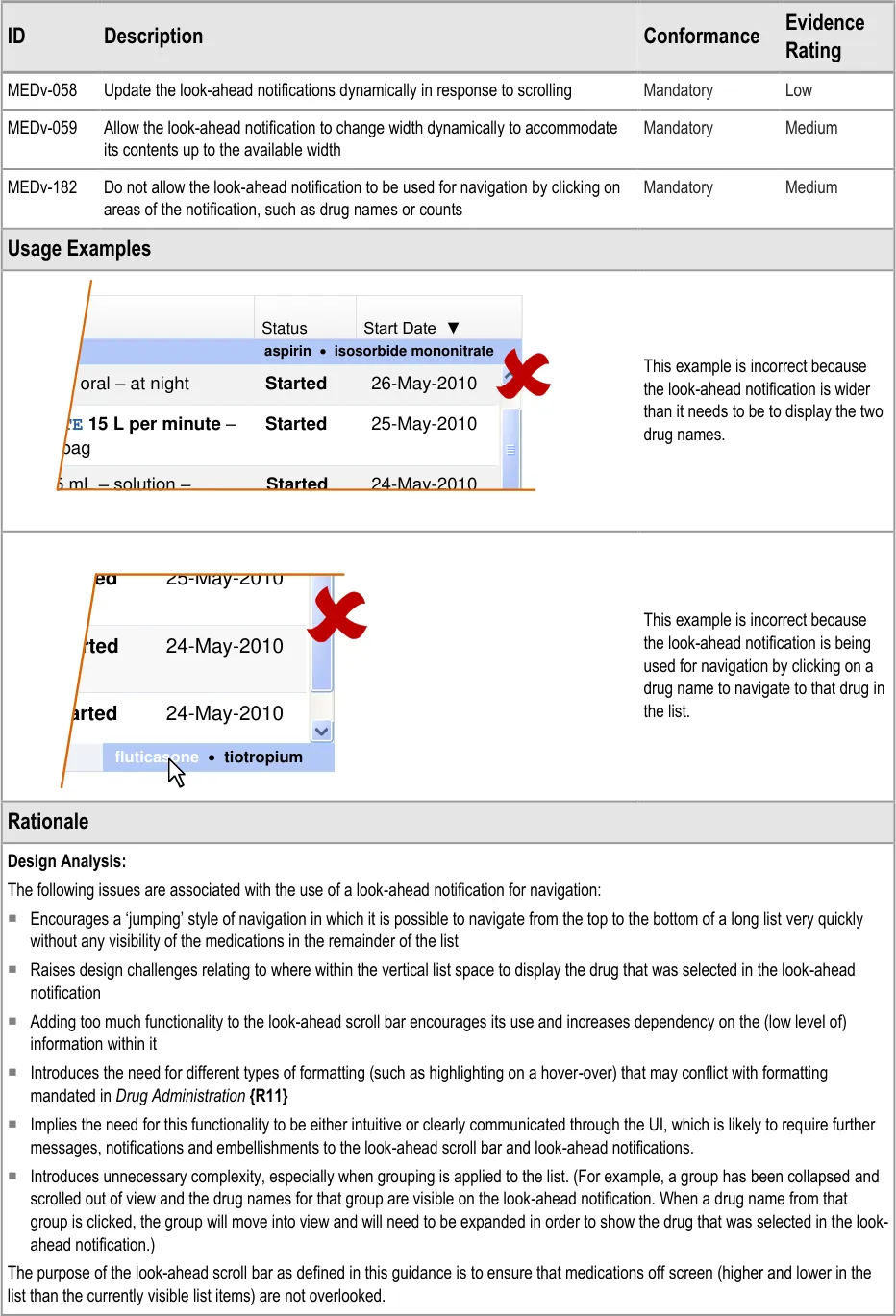

| Col1 | Col2 | Status | Start Date ▼ |
|---|---|---|---|
| aspirin·** isosorbide mononitrate** | aspirin·** isosorbide mononitrate** | aspirin·** isosorbide mononitrate** | aspirin·** isosorbide mononitrate** |
| 25-May-2010 26-May-2010 Started Started RATE 15 L per minute– er bag – oral – at night 24-May-2010 Started in 5 mL – solution – | 25-May-2010 26-May-2010 Started Started RATE 15 L per minute– er bag – oral – at night 24-May-2010 Started in 5 mL – solution – | 25-May-2010 26-May-2010 Started Started RATE 15 L per minute– er bag – oral – at night 24-May-2010 Started in 5 mL – solution – | 25-May-2010 26-May-2010 Started Started RATE 15 L per minute– er bag – oral – at night 24-May-2010 Started in 5 mL – solution – |
| S S S | Col2 | Col3 |
|---|---|---|
| S S S | 25-May-2010 tarted 24-May-2010 tarted 24-May-2010 tarted | 25-May-2010 tarted 24-May-2010 tarted 24-May-2010 tarted |
| S S S | 25-May-2010 tarted 24-May-2010 tarted 24-May-2010 tarted | |
| S S S | fluticasone · tiotropium |
Page 48
Copyright ©2013 Health and Social Care Information Centre
HSCIC Controlled Document
User Research:
The use of look-ahead notifications to support navigation has been explored extensively in user research studies, including a study with an interactive prototype. It has also been explored extensively through the assessment of design alternatives.
Page 49
Copyright ©2013 Health and Social Care Information Centre
HSCIC Controlled Document
3.3.22 Displaying LASB Notifications
Page 50
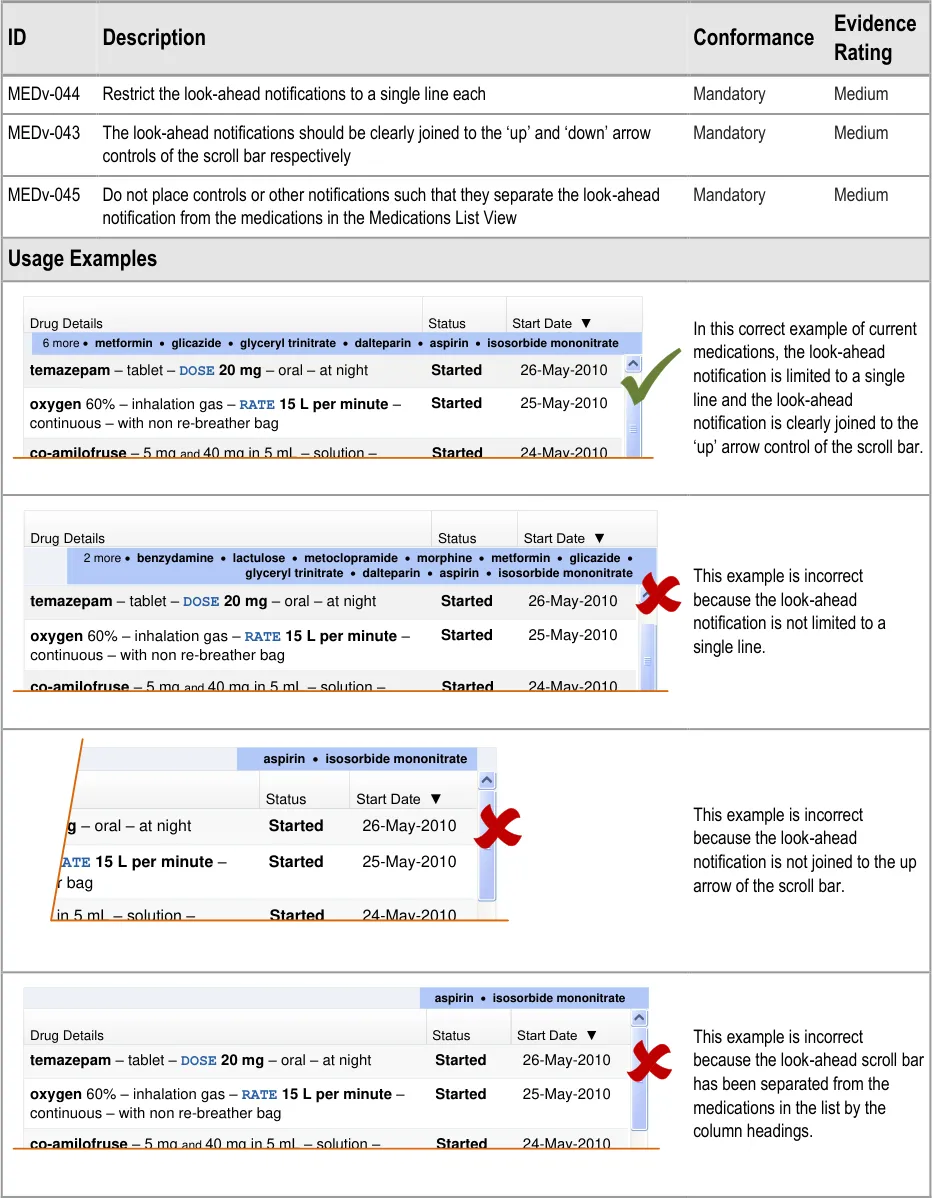
| Col1 | Col2 | Col3 |
|---|---|---|
| Drug Details | Status | Start Date ▼ |
| 6 more·** metformin**·** glicazide**·** glyceryl trinitrate**·** dalteparin**·** aspirin**·** isosorbide mononitrate** | 6 more·** metformin**·** glicazide**·** glyceryl trinitrate**·** dalteparin**·** aspirin**·** isosorbide mononitrate** | 6 more·** metformin**·** glicazide**·** glyceryl trinitrate**·** dalteparin**·** aspirin**·** isosorbide mononitrate** |
| 25-May-2010 26-May-2010 Started Started oxygen 60% – inhalation gas – RATE 15 L per minute– continuous – with non re-breather bag temazepam– tablet – DOSE 20 mg– oral – at nightco-amilofruse– 5 mgand40 mg in 5 mL – solution – 24-May-2010 Started | 25-May-2010 26-May-2010 Started Started oxygen 60% – inhalation gas – RATE 15 L per minute– continuous – with non re-breather bag temazepam– tablet – DOSE 20 mg– oral – at nightco-amilofruse– 5 mgand40 mg in 5 mL – solution – 24-May-2010 Started | 25-May-2010 26-May-2010 Started Started oxygen 60% – inhalation gas – RATE 15 L per minute– continuous – with non re-breather bag temazepam– tablet – DOSE 20 mg– oral – at nightco-amilofruse– 5 mgand40 mg in 5 mL – solution – 24-May-2010 Started |
DOSE 5 mL– oral – once a day | DOSE 5 mL– oral – once a day | DOSE 5 mL– oral – once a day |
| Col1 | Col2 | Col3 | Col4 |
|---|---|---|---|
| Drug Details | Drug Details | Status | Start Date ▼ |
| 2 more ·** benzydamine**·** lactulose**·** metoclopramide**·** morphine**·** metformin**·** glicazide**· glyceryl trinitrate·** dalteparin**·** aspirin**·** isosorbide mononitrate** | 2 more ·** benzydamine**·** lactulose**·** metoclopramide**·** morphine**·** metformin**·** glicazide**· glyceryl trinitrate·** dalteparin**·** aspirin**·** isosorbide mononitrate** | 2 more ·** benzydamine**·** lactulose**·** metoclopramide**·** morphine**·** metformin**·** glicazide**· glyceryl trinitrate·** dalteparin**·** aspirin**·** isosorbide mononitrate** | |
| 25-May-2010 26-May-2010 Started Started oxygen 60% – inhalation gas – RATE 15 L per minute– continuous – with non re-breather bag temazepam– tablet – DOSE 20 mg– oral – at nightco-amilofruse– 5 mgand40 mg in 5 mL – solution – 24-May-2010 Started | 25-May-2010 26-May-2010 Started Started oxygen 60% – inhalation gas – RATE 15 L per minute– continuous – with non re-breather bag temazepam– tablet – DOSE 20 mg– oral – at nightco-amilofruse– 5 mgand40 mg in 5 mL – solution – 24-May-2010 Started | 25-May-2010 26-May-2010 Started Started oxygen 60% – inhalation gas – RATE 15 L per minute– continuous – with non re-breather bag temazepam– tablet – DOSE 20 mg– oral – at nightco-amilofruse– 5 mgand40 mg in 5 mL – solution – 24-May-2010 Started | 25-May-2010 26-May-2010 Started Started oxygen 60% – inhalation gas – RATE 15 L per minute– continuous – with non re-breather bag temazepam– tablet – DOSE 20 mg– oral – at nightco-amilofruse– 5 mgand40 mg in 5 mL – solution – 24-May-2010 Started |
DOSE 5 mL– oral – once a day | DOSE 5 mL– oral – once a day | DOSE 5 mL– oral – once a day | DOSE 5 mL– oral – once a day |
| Col1 | aspirin · isosorbide mononitrate | Col3 | Col4 | Col5 |
|---|---|---|---|---|
| Status | Start Date ▼ | Start Date ▼ | ||
| 25-May-2010 26-May-2010 Started Started – RATE 15 L per minute– ther bag mg– oral – at night mg in 5 mL – solution – 24-May-2010 Started | 25-May-2010 26-May-2010 Started Started – RATE 15 L per minute– ther bag mg– oral – at night mg in 5 mL – solution – 24-May-2010 Started | 25-May-2010 26-May-2010 Started Started – RATE 15 L per minute– ther bag mg– oral – at night mg in 5 mL – solution – 24-May-2010 Started | 25-May-2010 26-May-2010 Started Started – RATE 15 L per minute– ther bag mg– oral – at night mg in 5 mL – solution – 24-May-2010 Started | 25-May-2010 26-May-2010 Started Started – RATE 15 L per minute– ther bag mg– oral – at night mg in 5 mL – solution – 24-May-2010 Started |
| Col1 | aspirin · isosorbide mononitrate | Col3 |
|---|---|---|
| Drug Details | Status | Start Date ▼ |
| 25-May-2010 26-May-2010 Started Started oxygen 60% – inhalation gas – RATE 15 L per minute– continuous – with non re-breather bag temazepam– tablet – DOSE 20 mg– oral – at nightco-amilofruse– 5 mgand40 mg in 5 mL – solution – 24-May-2010 Started | 25-May-2010 26-May-2010 Started Started oxygen 60% – inhalation gas – RATE 15 L per minute– continuous – with non re-breather bag temazepam– tablet – DOSE 20 mg– oral – at nightco-amilofruse– 5 mgand40 mg in 5 mL – solution – 24-May-2010 Started | 25-May-2010 26-May-2010 Started Started oxygen 60% – inhalation gas – RATE 15 L per minute– continuous – with non re-breather bag temazepam– tablet – DOSE 20 mg– oral – at nightco-amilofruse– 5 mgand40 mg in 5 mL – solution – 24-May-2010 Started |
DOSE 5 mL– oral – once a day | DOSE 5 mL– oral – once a day | DOSE 5 mL– oral – once a day |
Copyright ©2013 Health and Social Care Information Centre
HSCIC Controlled Document
Page 51
Copyright ©2013 Health and Social Care Information Centre
HSCIC Controlled Document
3.3.23 Selecting LASB Contents
Page 52

| Col1 | Col2 | Col3 | Col4 | 25-May-2010 24-May-2010 24-May-2010 |
|---|---|---|---|---|
oxygen 60% – inhalation gas –RAcontinuous – with non re-breather | oxygen 60% – inhalation gas –RAcontinuous – with non re-breather | Tba | **E **g | **E **g |
co-amilofruse– 5 mgand40 mg inDOSE 5 mL– oral – once a day | co-amilofruse– 5 mgand40 mg inDOSE 5 mL– oral – once a day | 5 | 5 | |
| salbutamol– 100 micrograms per dose 4 more ·** paracetamol**·** atenolol**· | salbutamol– 100 micrograms per dose 4 more ·** paracetamol**·** atenolol**· | |||
| salbutamol– 100 micrograms per dose 4 more ·** paracetamol**·** atenolol**· | ose 4 more ·** paracetamol**·** atenolol**· | t | iot | ropium·** salbutamol** |
| Col1 | Col2 | Col3 | Col4 | 25-May-2010 24-May-2010 24-May-2010 |
|---|---|---|---|---|
oxygen 60% – inhalation gas –RAcontinuous – with non re-breather | oxygen 60% – inhalation gas –RAcontinuous – with non re-breather | Tba | **E **g | **E **g |
co-amilofruse– 5 mgand40 mg inDOSE 5 mL– oral – once a day | co-amilofruse– 5 mgand40 mg inDOSE 5 mL– oral – once a day | 5 | 5 | |
| salbutamol– 100 micrograms per dose 3 more·** simvastatin**·** paracetam** | salbutamol– 100 micrograms per dose 3 more·** simvastatin**·** paracetam** | |||
| salbutamol– 100 micrograms per dose 3 more·** simvastatin**·** paracetam** | ose 3 more·** simvastatin**·** paracetam** | ** lut** | ** icasone**·** tiotropium** | |
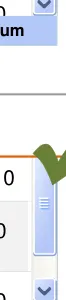
| Col1 | Col2 | Col3 | Col4 | 25-May-2010 24-May-2010 24-May-2010 |
|---|---|---|---|---|
oxygen 60% – inhalation gas –RAcontinuous – with non re-breather | oxygen 60% – inhalation gas –RAcontinuous – with non re-breather | Tba | **E **g | **E **g |
co-amilofruse– 5 mgand40 mg inDOSE 5 mL– oral – once a day | co-amilofruse– 5 mgand40 mg inDOSE 5 mL– oral – once a day | 5 | 5 | |
| salbutamol– 100 micrograms per dose 3 more·** simvastatin**·** paracetam** | salbutamol– 100 micrograms per dose 3 more·** simvastatin**·** paracetam** | |||
| salbutamol– 100 micrograms per dose 3 more·** simvastatin**·** paracetam** | ose 3 more·** simvastatin**·** paracetam** | ** lut** | ** icasone**·** tiotropium** | |
| Col1 | Col2 | Col3 | Col4 | e 25-May-2010 24-May-2010 24-May-2010 |
|---|---|---|---|---|
| salbutamol– 100 micrograms per inhaler – DOSE 2 puffs– inhaled – | salbutamol– 100 micrograms per inhaler – DOSE 2 puffs– inhaled – | o | o | |
| salbutamol– 100 micrograms per inhaler – DOSE 2 puffs– inhaled – | salbutamol– 100 micrograms per inhaler – DOSE 2 puffs– inhaled – | |||
co-amilofruse– 5 mgand40 mg inDOSE 5 mL– oral – once a day | co-amilofruse– 5 mgand40 mg inDOSE 5 mL– oral – once a day | 5 | 5 | |
co-amilofruse– 5 mgand40 mg inDOSE 5 mL– oral – once a day | co-amilofruse– 5 mgand40 mg inDOSE 5 mL– oral – once a day | |||
oxygen 60% – inhalation gas –RAcontinuous – with non re-breather 3 more·** simvastatin**·** paracetam** | oxygen 60% – inhalation gas –RAcontinuous – with non re-breather 3 more·** simvastatin**·** paracetam** | T | **E ** | **E ** |
oxygen 60% – inhalation gas –RAcontinuous – with non re-breather 3 more·** simvastatin**·** paracetam** | ontinuous – with non re-breather 3 more·** simvastatin**·** paracetam** | b | ** lut** ag | ** icasone**·** tiotropium** |
Copyright ©2013 Health and Social Care Information Centre
HSCIC Controlled Document
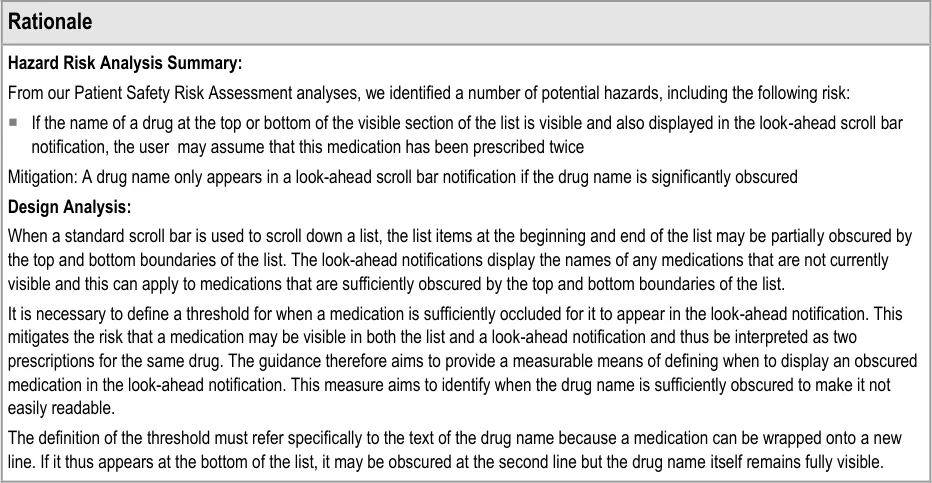
Page 53
Copyright ©2013 Health and Social Care Information Centre
HSCIC Controlled Document
3.3.24 Displaying LASB Contents
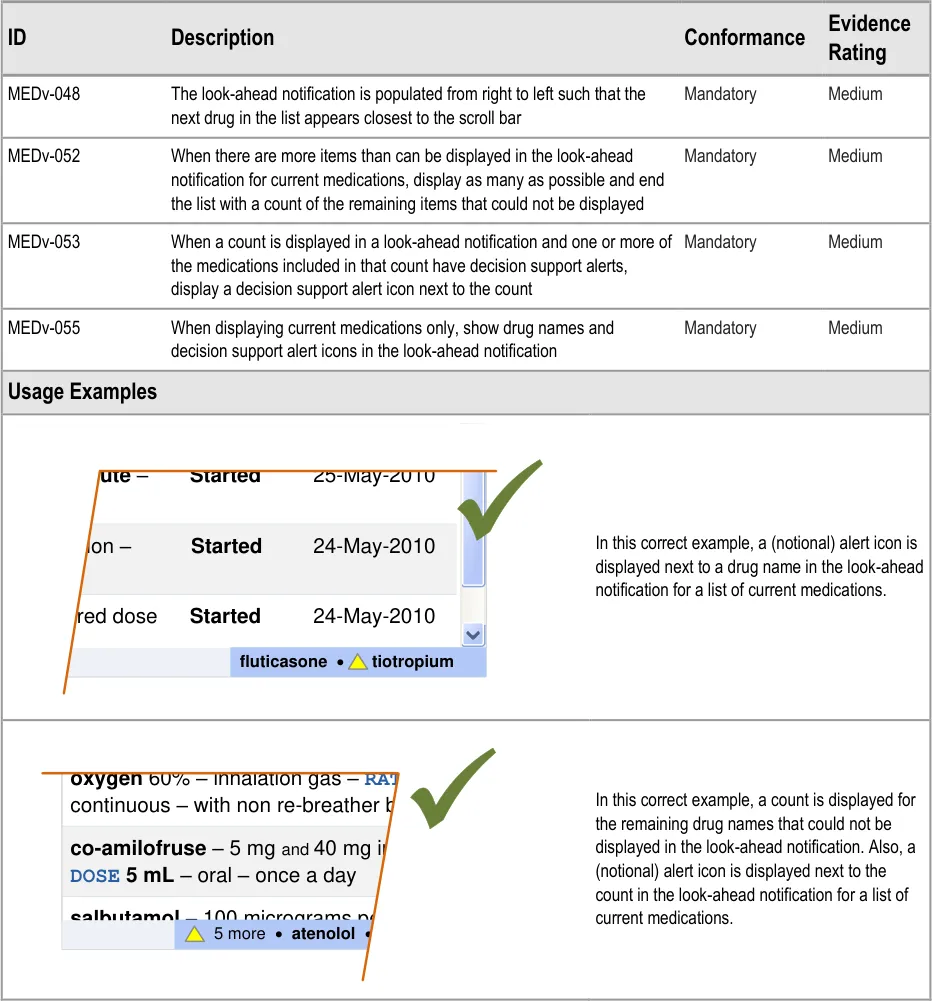

Page 54
| Col1 | Col2 |
|---|---|
| 25-May-2010 Started 24-May-2010 Started er minute– metered dose solution – 24-May-2010 Started | 25-May-2010 Started 24-May-2010 Started er minute– metered dose solution – 24-May-2010 Started |
| 25-May-2010 Started 24-May-2010 Started er minute– metered dose solution – 24-May-2010 Started | |
| fluticasone·** tiotropium** |
Copyright ©2013 Health and Social Care Information Centre
HSCIC Controlled Document
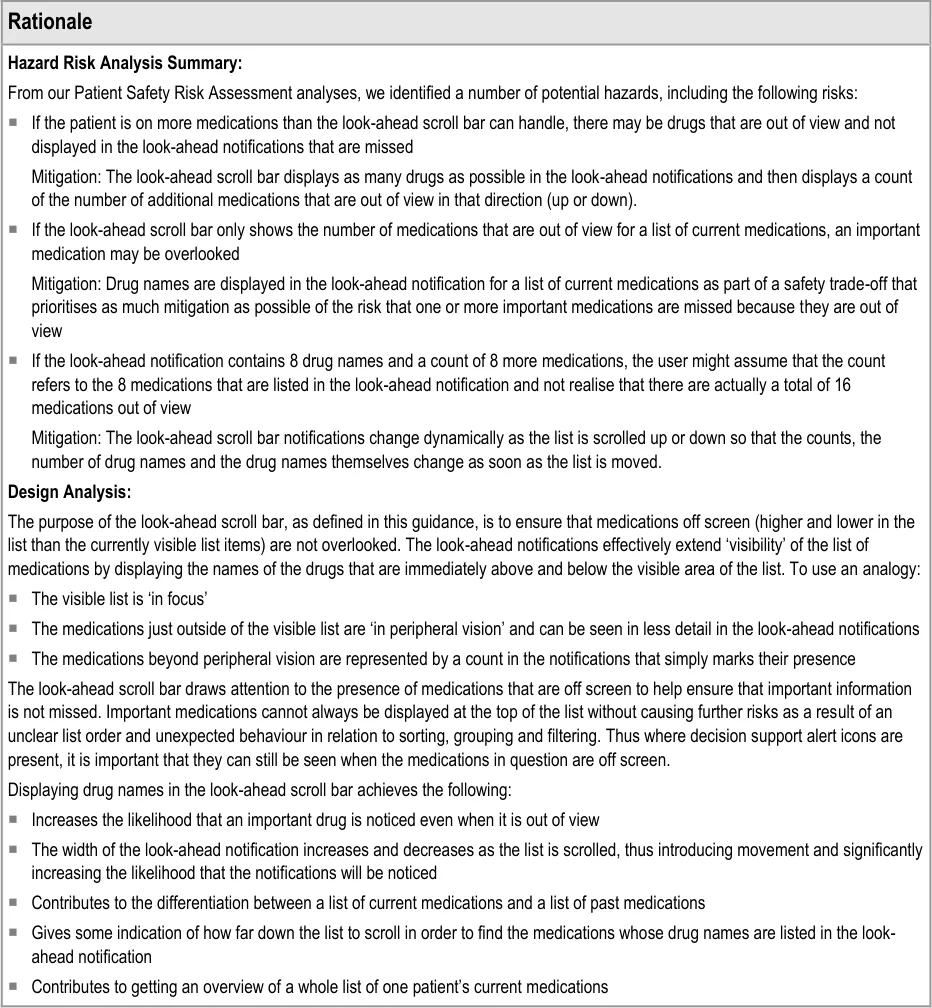
Page 55
Copyright ©2013 Health and Social Care Information Centre
HSCIC Controlled Document
3.3.25 Formatting LASB Contents
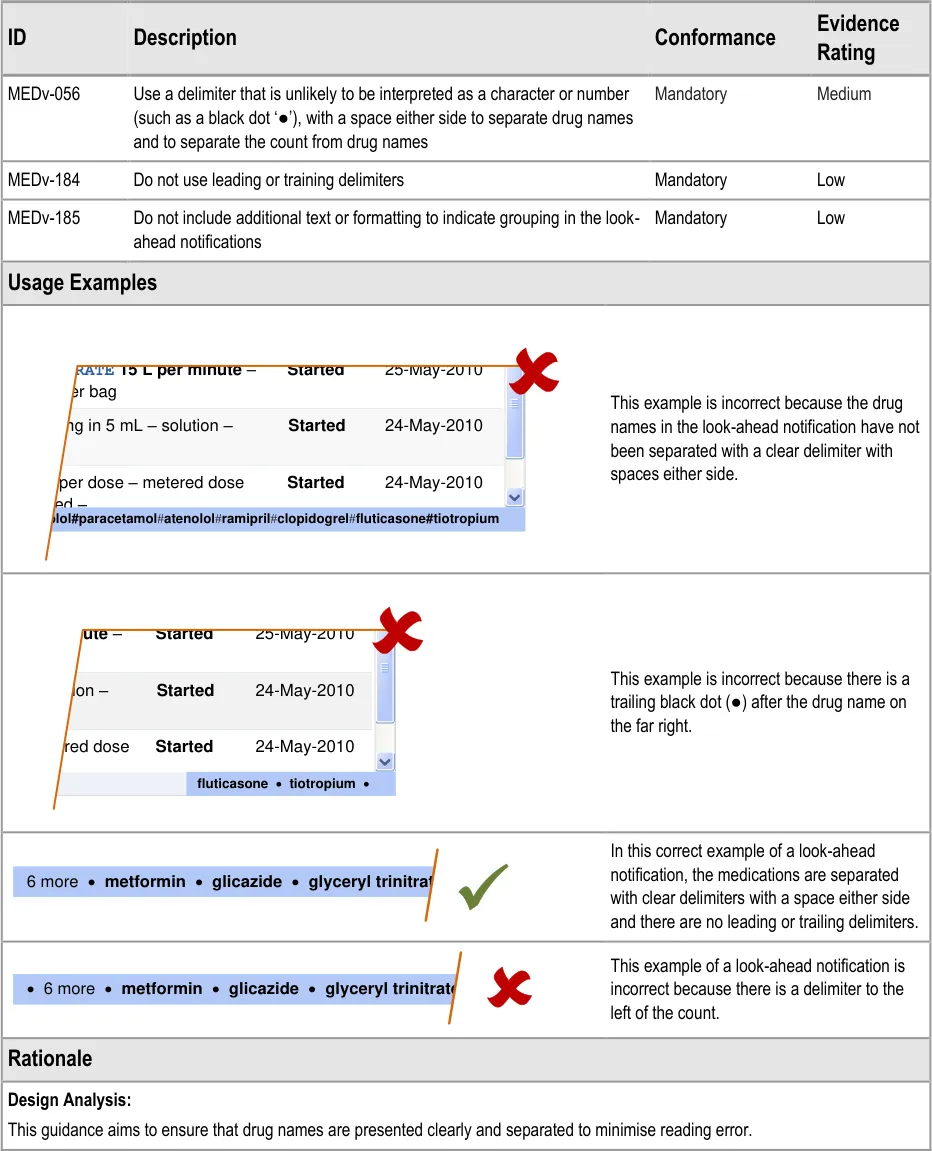
| Col1 | – RATE 15 L per minute – Started 25-May-2010 ther bag mg in 5 mL – solution – Started 24-May-2010 ms per dose – metered dose Started 24-May-2010 haled – |
|---|---|
| enolol#paracetamol#atenolol#ramipril#clopidogrel#fluticasone#tiotropium |
| Col1 | Col2 |
|---|---|
| 25-May-2010 Started 24-May-2010 Started er minute– metered dose solution – 24-May-2010 Started | 25-May-2010 Started 24-May-2010 Started er minute– metered dose solution – 24-May-2010 Started |
| 25-May-2010 Started 24-May-2010 Started er minute– metered dose solution – 24-May-2010 Started | |
| fluticasone·** tiotropium**· |
Copyright ©2013 Health and Social Care Information Centre
Page 56
HSCIC Controlled Document
3.3.26 Drug Names in the LASB
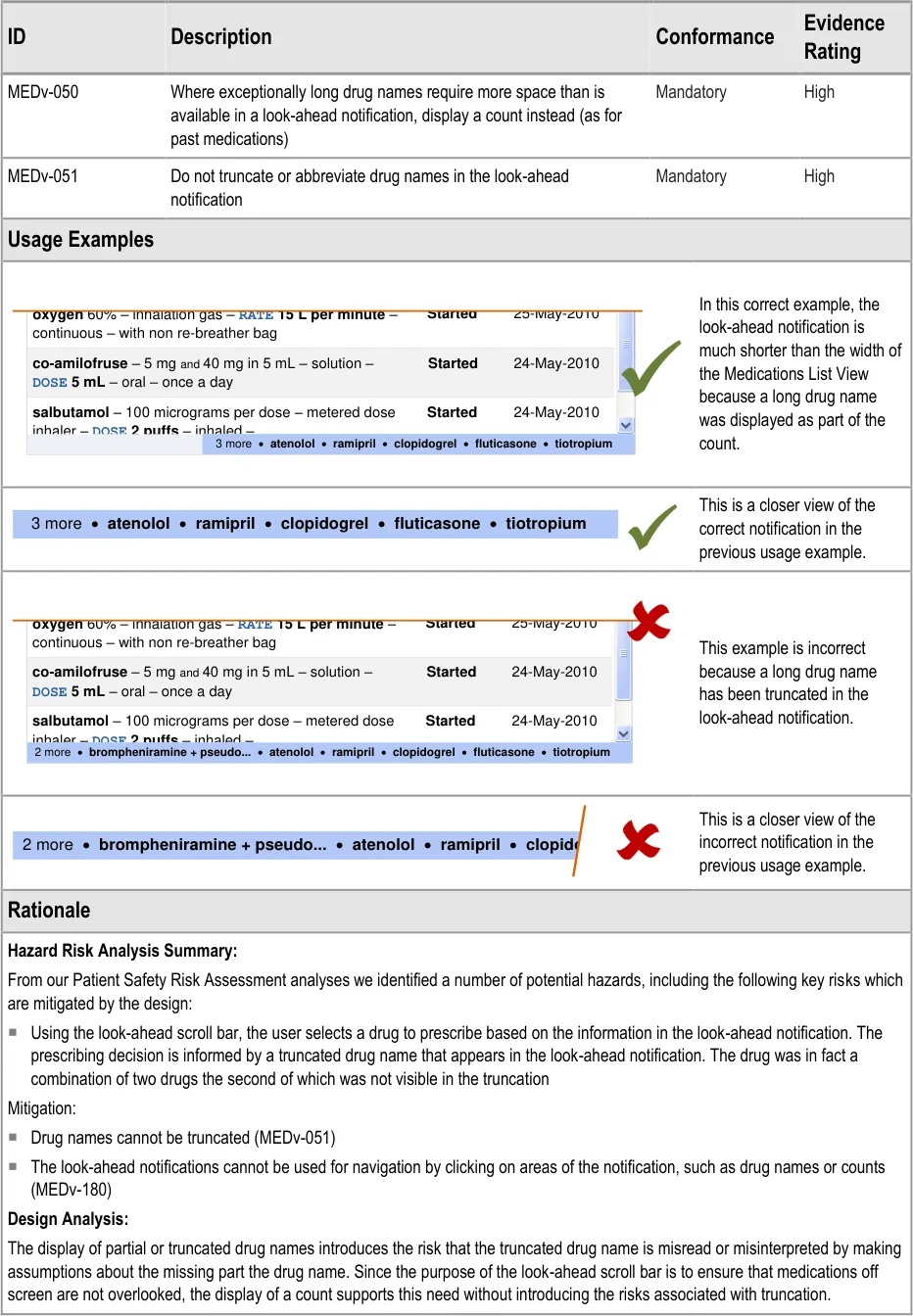
| Col1 | Col2 |
|---|---|
| 25-May-2010 Started 24-May-2010 Started oxygen 60% – inhalation gas – RATE 15 L per minute– continuous – with non re-breather bag salbutamol– 100 micrograms per dose – metered dose inhaler – DOSE 2 puffs– inhaled –co-amilofruse– 5 mgand40 mg in 5 mL – solution – DOSE 5 mL– oral – once a day24-May-2010 Started | 25-May-2010 Started 24-May-2010 Started oxygen 60% – inhalation gas – RATE 15 L per minute– continuous – with non re-breather bag salbutamol– 100 micrograms per dose – metered dose inhaler – DOSE 2 puffs– inhaled –co-amilofruse– 5 mgand40 mg in 5 mL – solution – DOSE 5 mL– oral – once a day24-May-2010 Started |
| 25-May-2010 Started 24-May-2010 Started oxygen 60% – inhalation gas – RATE 15 L per minute– continuous – with non re-breather bag salbutamol– 100 micrograms per dose – metered dose inhaler – DOSE 2 puffs– inhaled –co-amilofruse– 5 mgand40 mg in 5 mL – solution – DOSE 5 mL– oral – once a day24-May-2010 Started | |
| four times a day as require | d 3 more ·** atenolol**·** ramipril**·** clopidogrel**·** fluticasone**·** tiotropium** |
Page 57
Copyright ©2013 Health and Social Care Information Centre
HSCIC Controlled Document
3.3.27 Formatting LASB Notifications
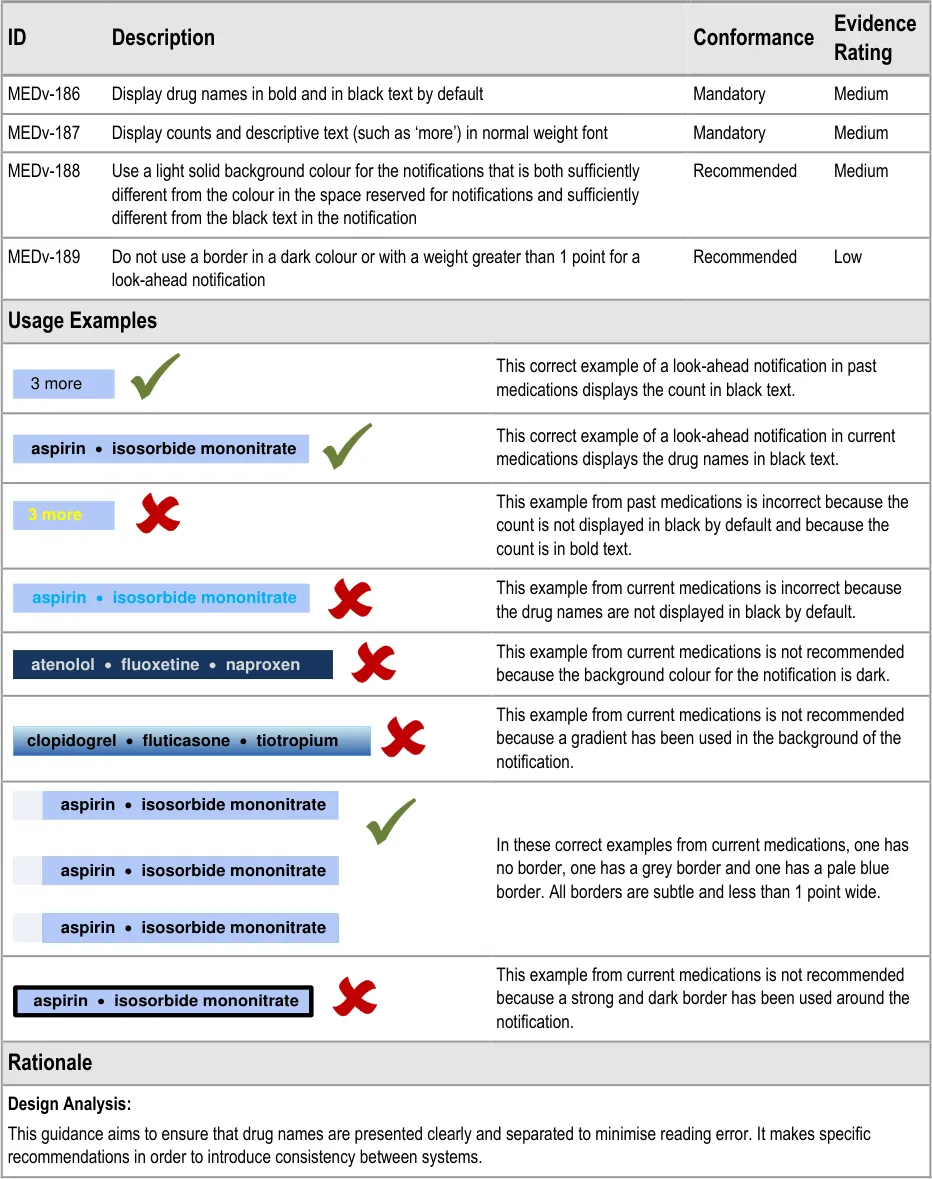
Page 58
Copyright ©2013 Health and Social Care Information Centre
HSCIC Controlled Document
3.3.28 Displaying a LASB for Past Medications
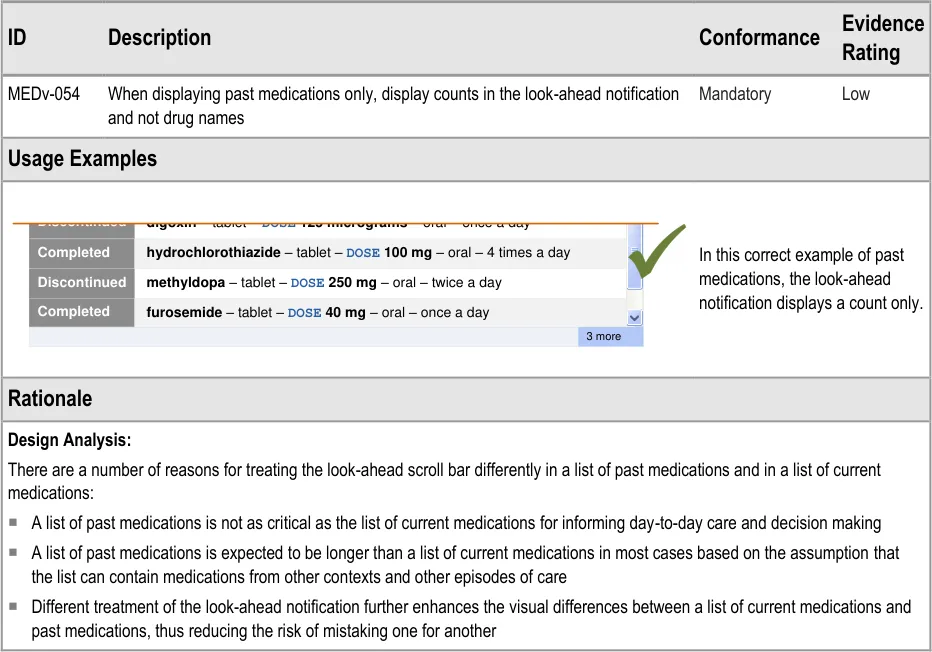
| Discontinued digoxin – tablet – DOSE 125 micrograms – oral – once a day | Col2 |
|---|---|
methyldopa – tablet – DOSE 250 mg – oral – twice a dayDiscontinued Completed Completed hydrochlorothiazide – tablet – DOSE 100 mg – oral – 4 times a dayfurosemide – tablet – DOSE 40 mg – oral – once a day | methyldopa – tablet – DOSE 250 mg – oral – twice a dayDiscontinued Completed Completed hydrochlorothiazide – tablet – DOSE 100 mg – oral – 4 times a dayfurosemide – tablet – DOSE 40 mg – oral – once a day |
| 3 more |
Page 59
Copyright ©2013 Health and Social Care Information Centre
HSCIC Controlled Document
3.3.29 Providing a Grouping Control
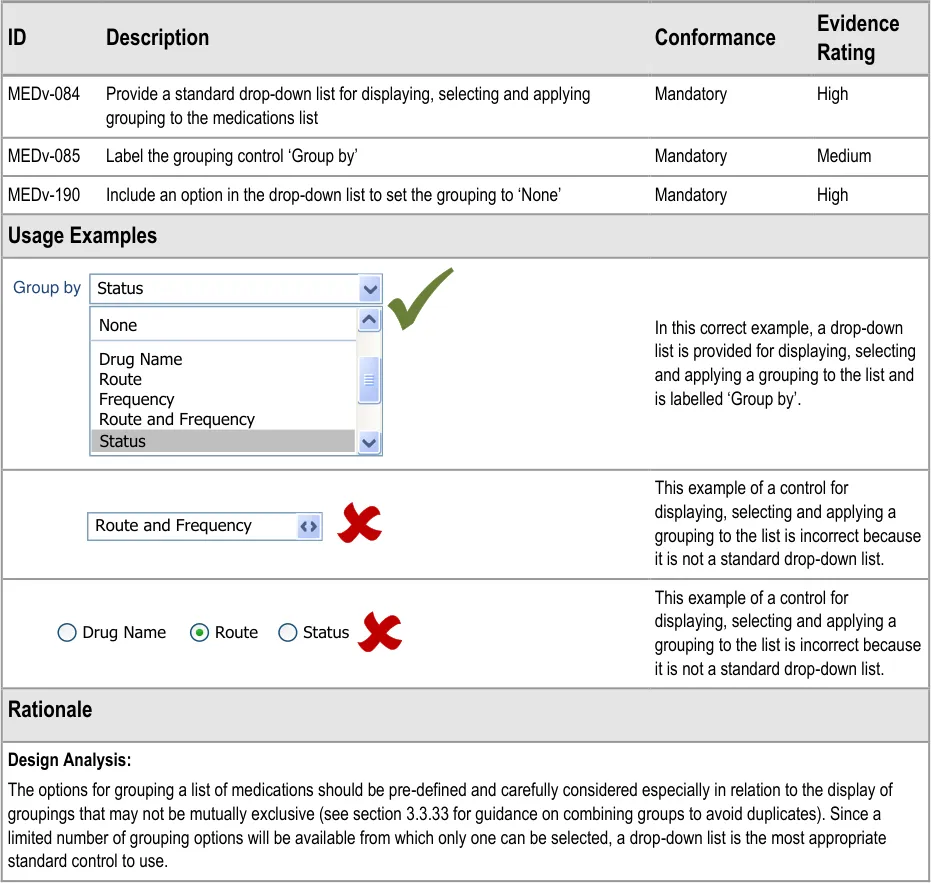

Page 60
Copyright ©2013 Health and Social Care Information Centre
HSCIC Controlled Document
3.3.30 Supporting Grouping
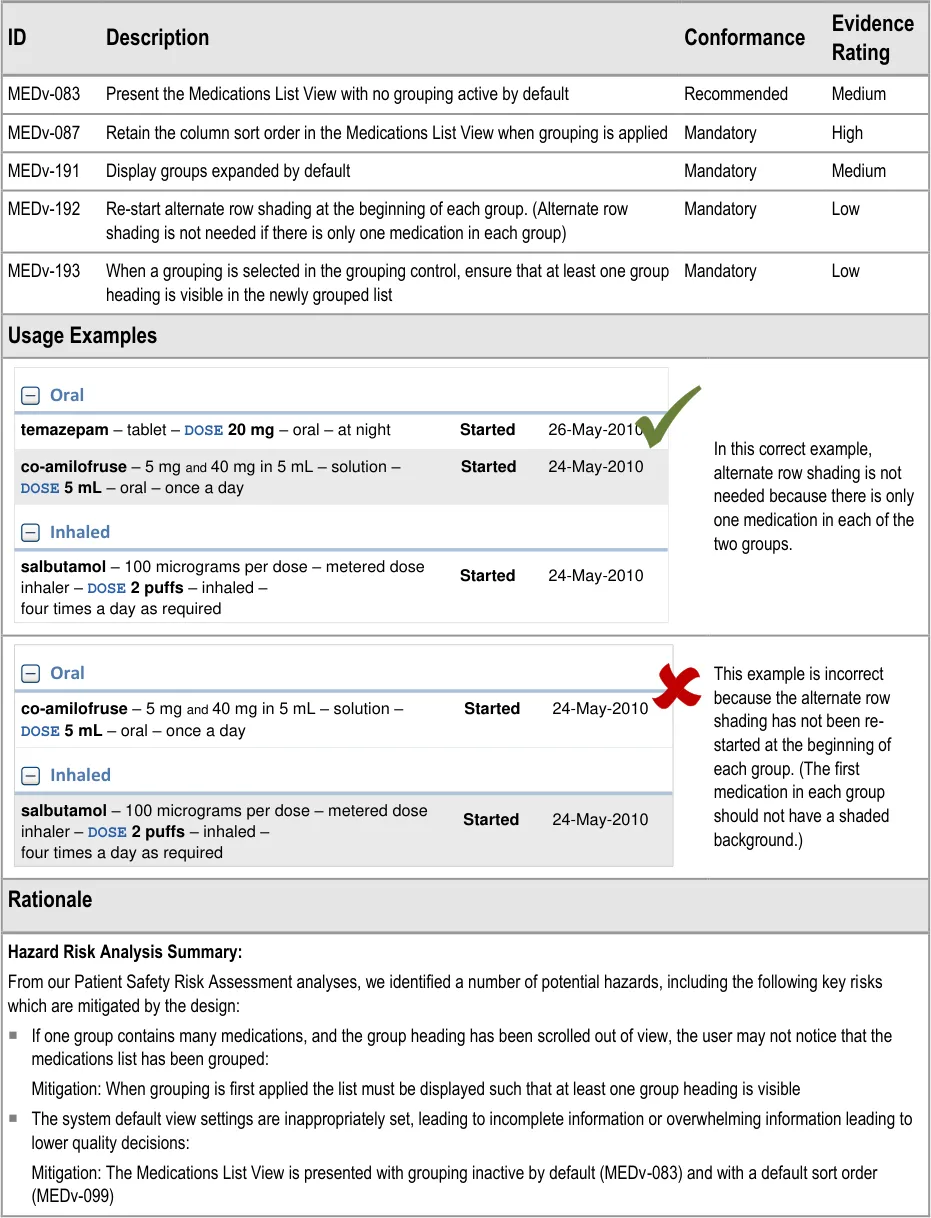
Page 61
Copyright ©2013 Health and Social Care Information Centre
HSCIC Controlled Document
Page 62
Copyright ©2013 Health and Social Care Information Centre
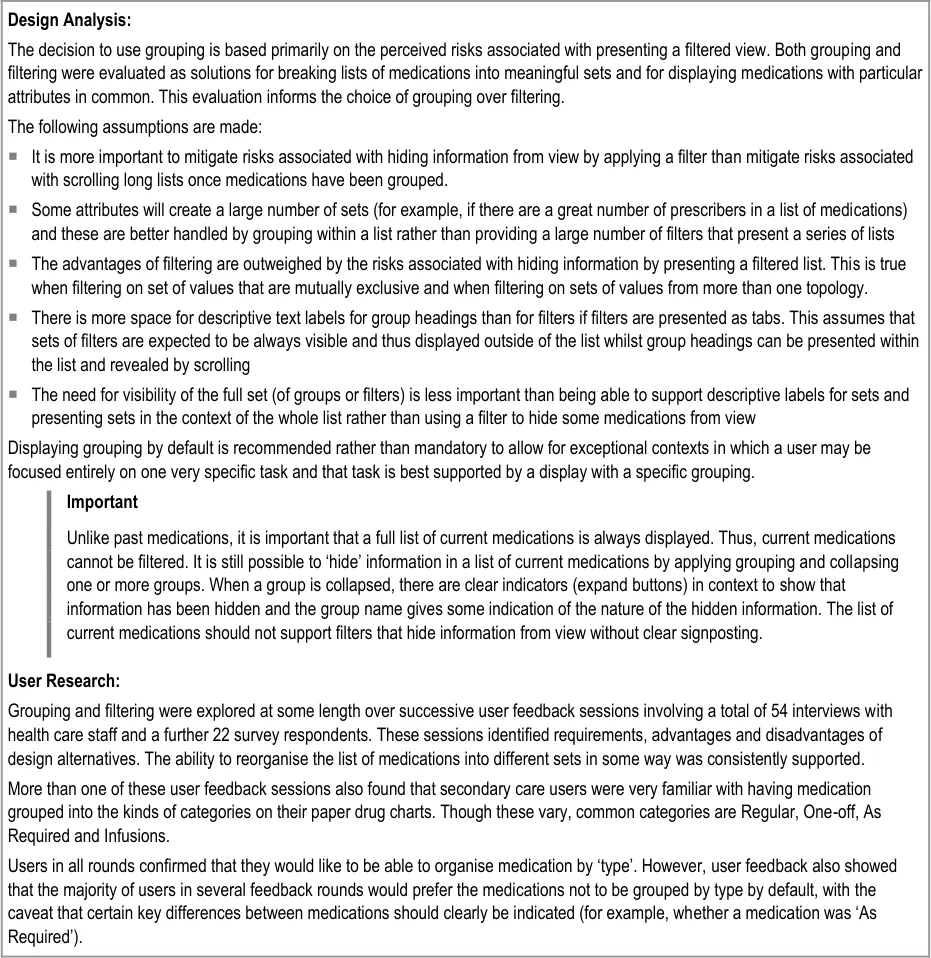 HSCIC Controlled Document
3.3.31 Displaying Group Headings
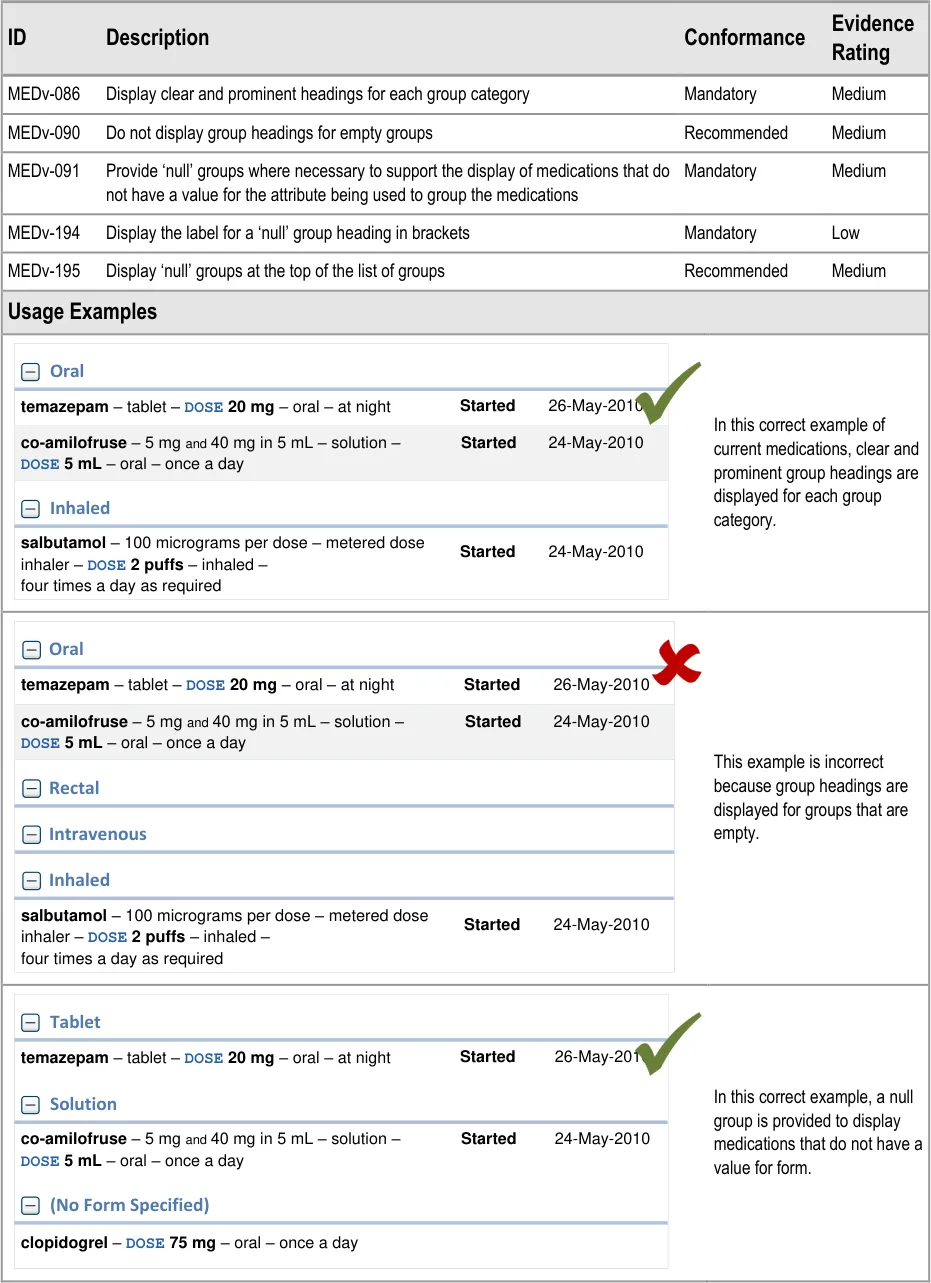
Page 63
Copyright ©2013 Health and Social Care Information Centre
HSCIC Controlled Document
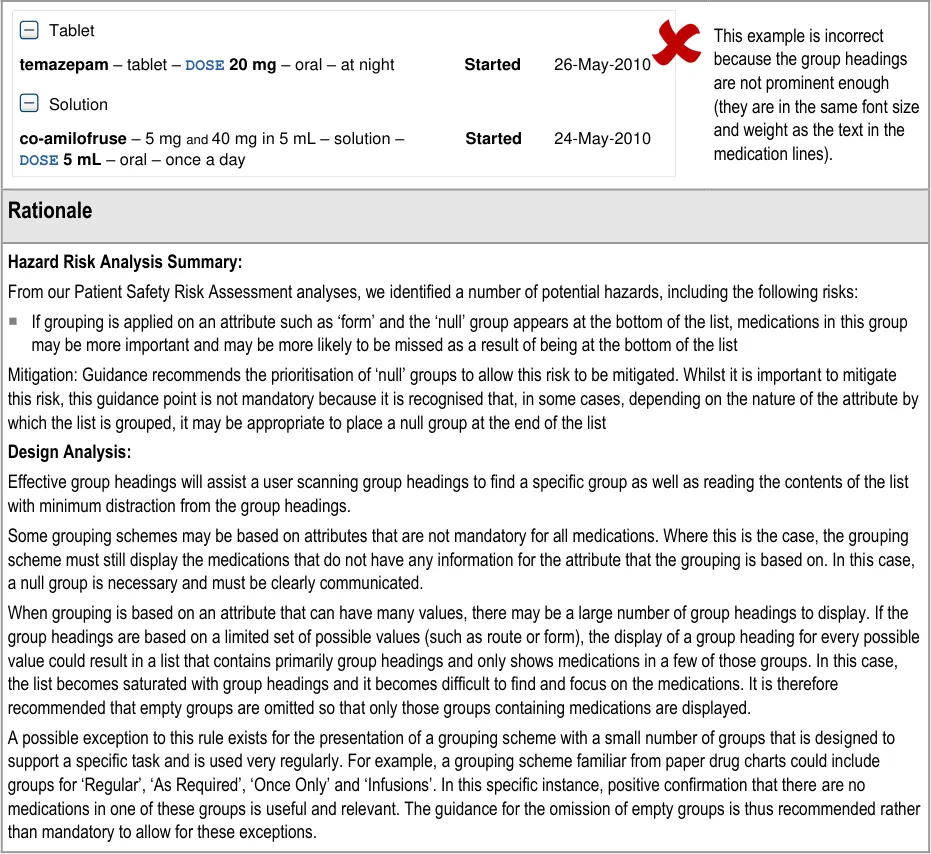
Page 64
Copyright ©2013 Health and Social Care Information Centre
HSCIC Controlled Document
3.3.32 Collapsing Groups
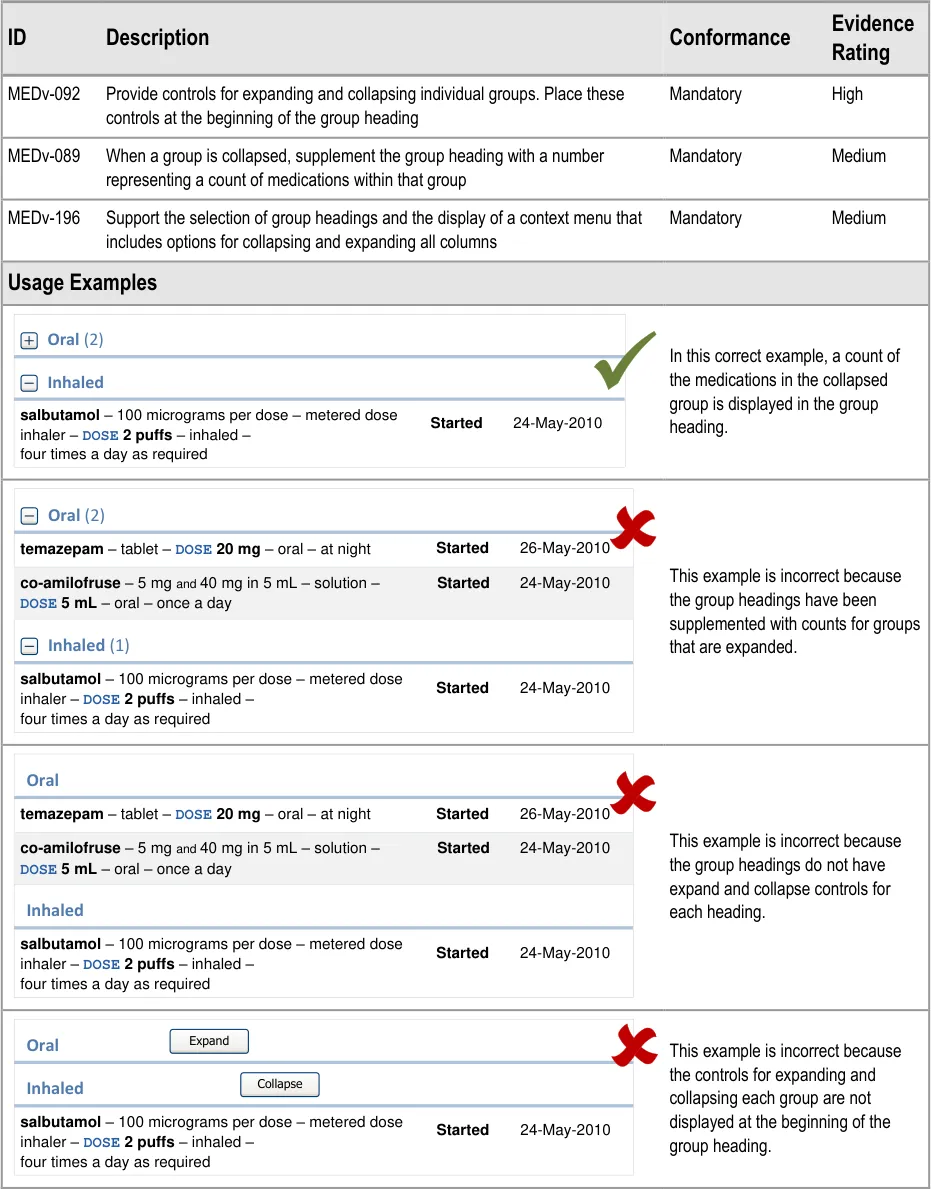
Page 65
Copyright ©2013 Health and Social Care Information Centre
HSCIC Controlled Document
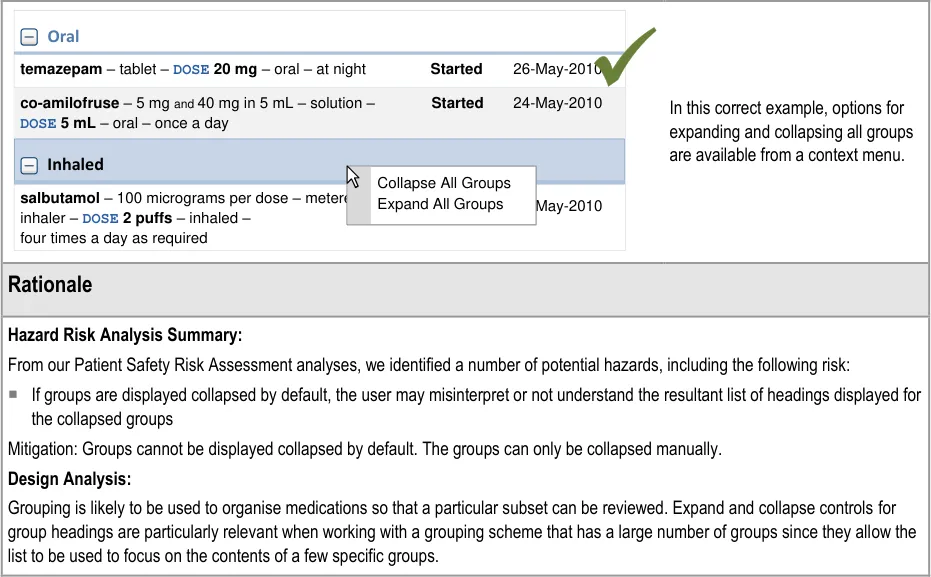
Page 66
Copyright ©2013 Health and Social Care Information Centre
HSCIC Controlled Document
3.3.33 Combining Groups to Avoid Duplication
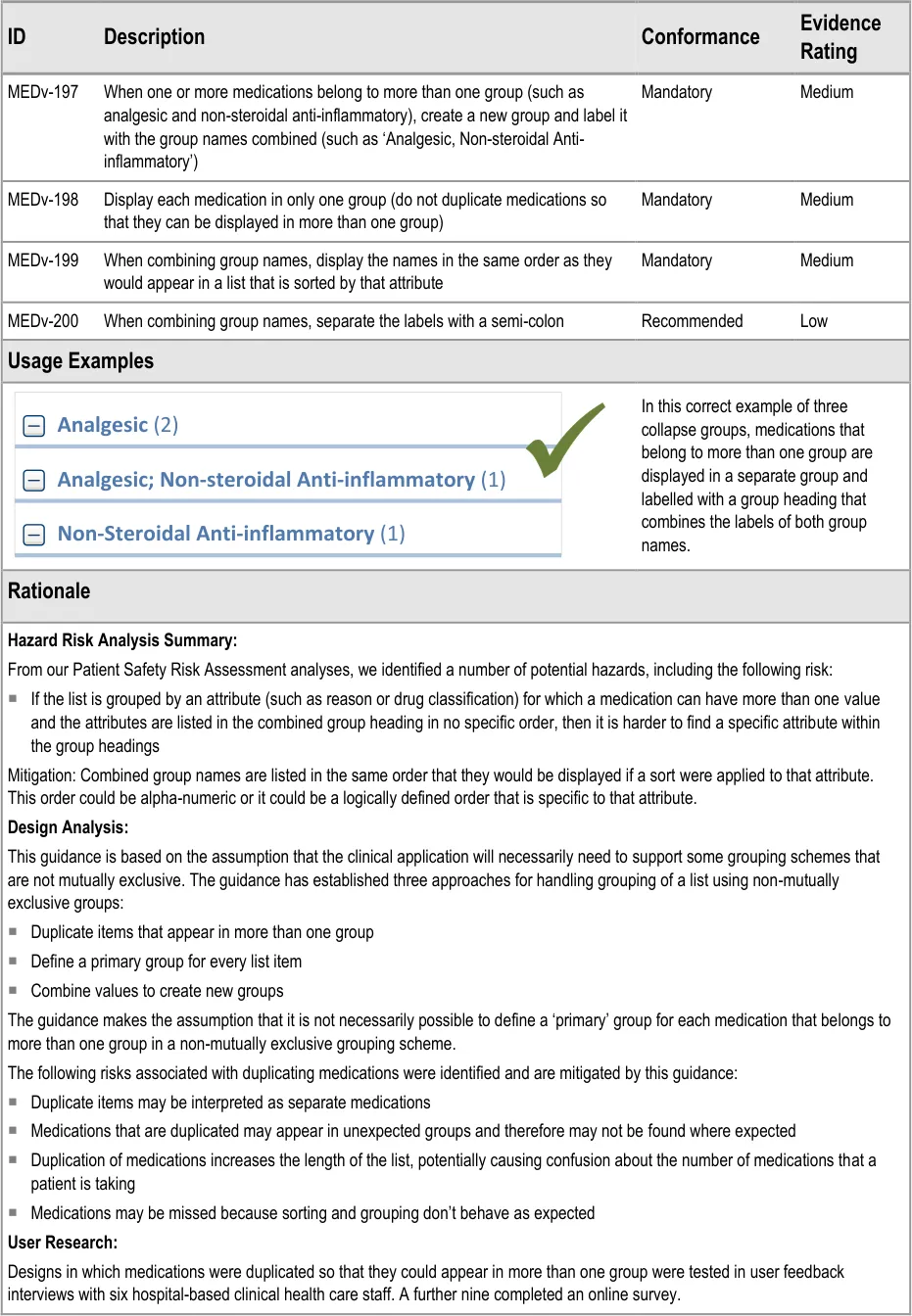
Page 67
Copyright ©2013 Health and Social Care Information Centre
HSCIC Controlled Document
3.3.34 Supporting Sorting
Section 3.3.15 includes guidance on the default sort order of a list of current medications and section 3.3.18 includes guidance on the default sort order of past medications.
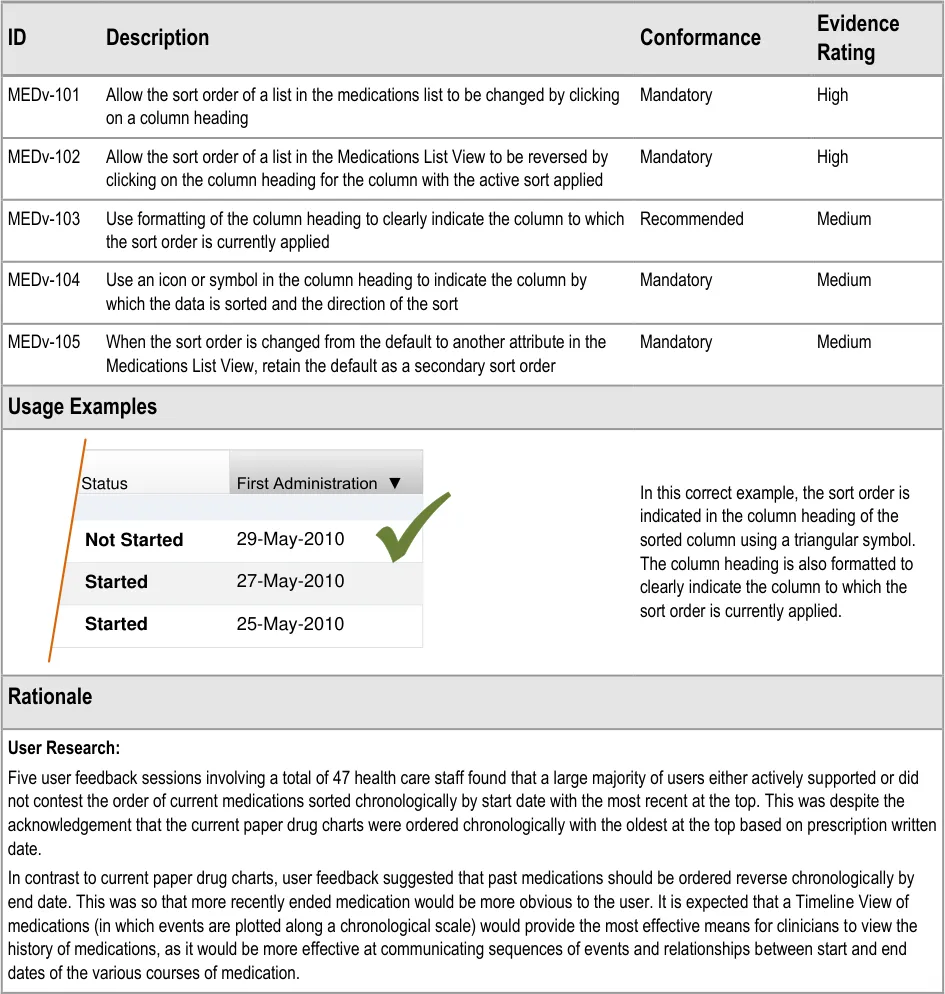
| Status First Administration ▼ Not Started 29-May-2010 | Status | First Administration ▼ |
|---|---|---|
| 27-May-2010 Started | 27-May-2010 Started | 27-May-2010 Started |
| 25-May-2010 Started | 25-May-2010 Started | 25-May-2010 Started |
Page 68
Copyright ©2013 Health and Social Care Information Centre
HSCIC Controlled Document
3.3.35 Supporting Levels of Detail
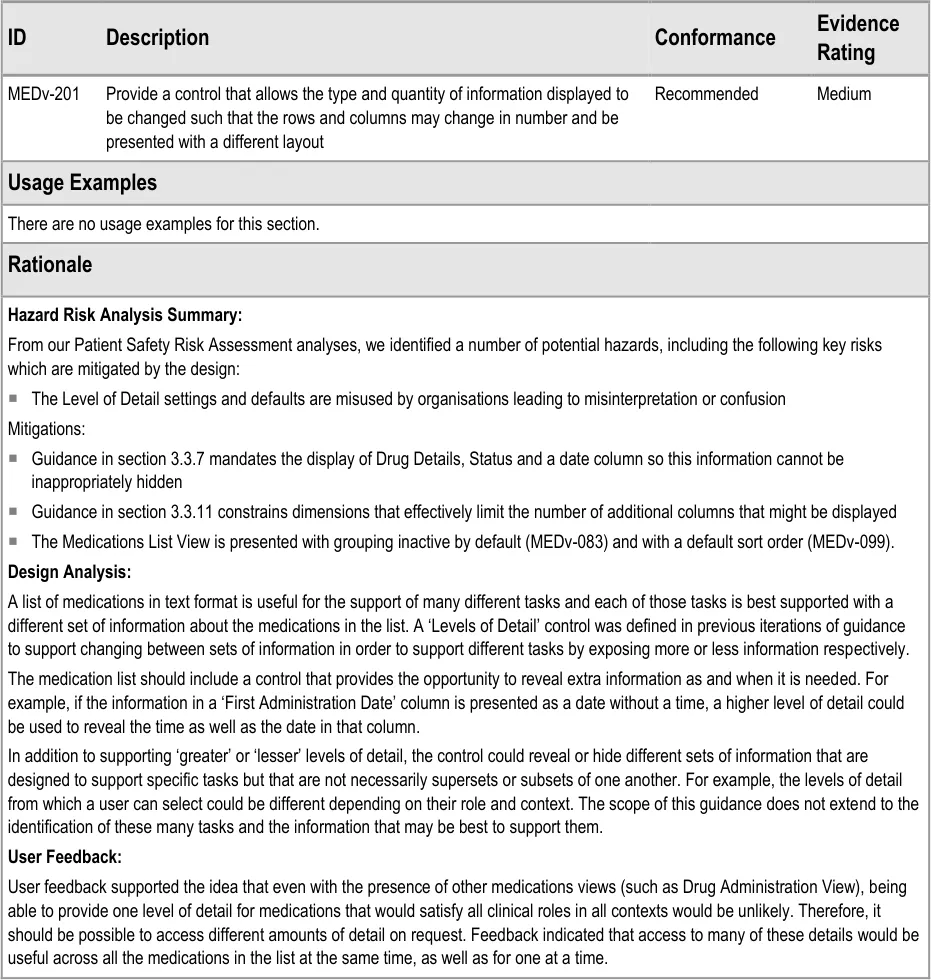
Page 69
Copyright ©2013 Health and Social Care Information Centre
HSCIC Controlled Document
3.3.36 Supporting Selection and Action
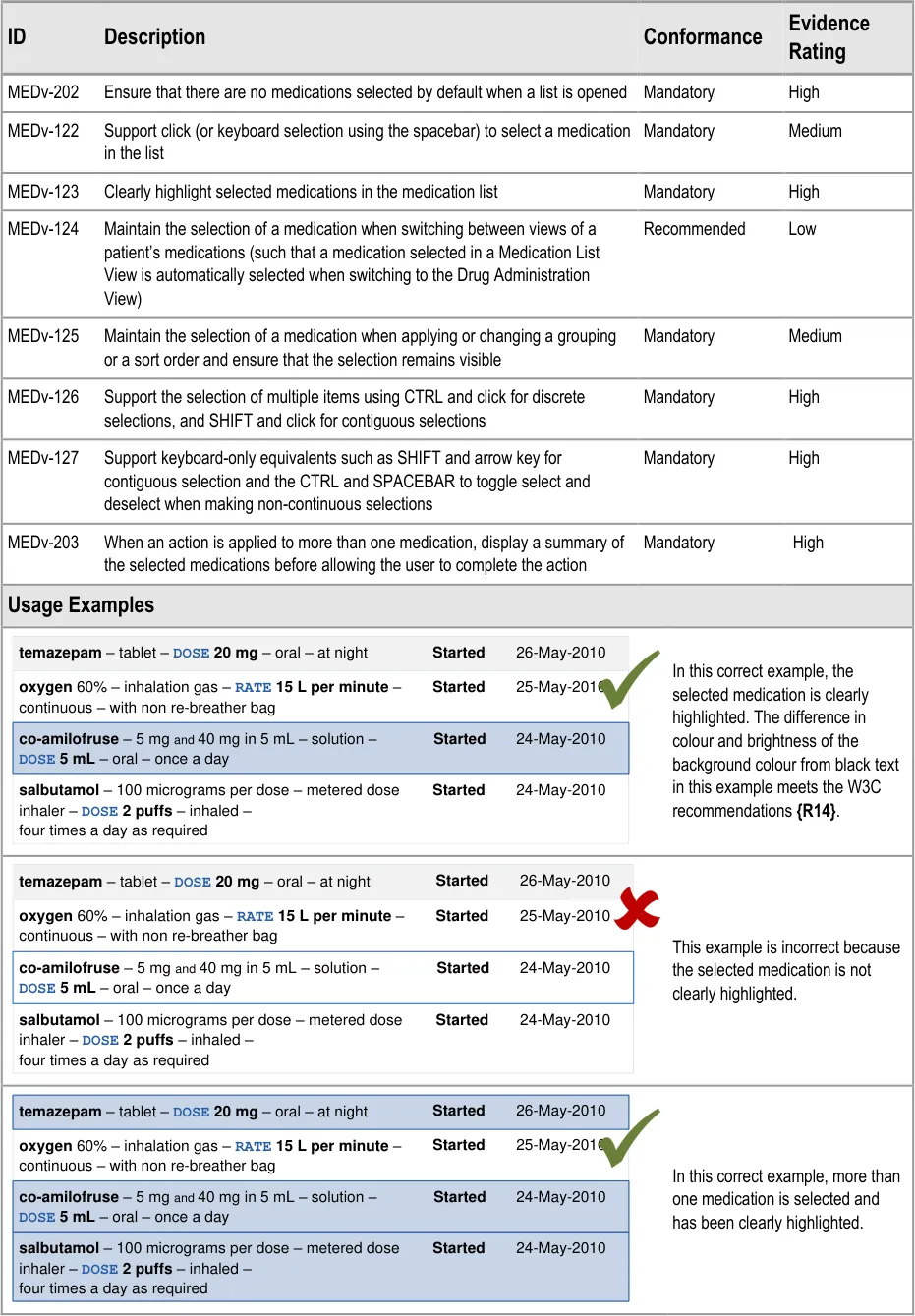
Page 70
Copyright ©2013 Health and Social Care Information Centre
HSCIC Controlled Document
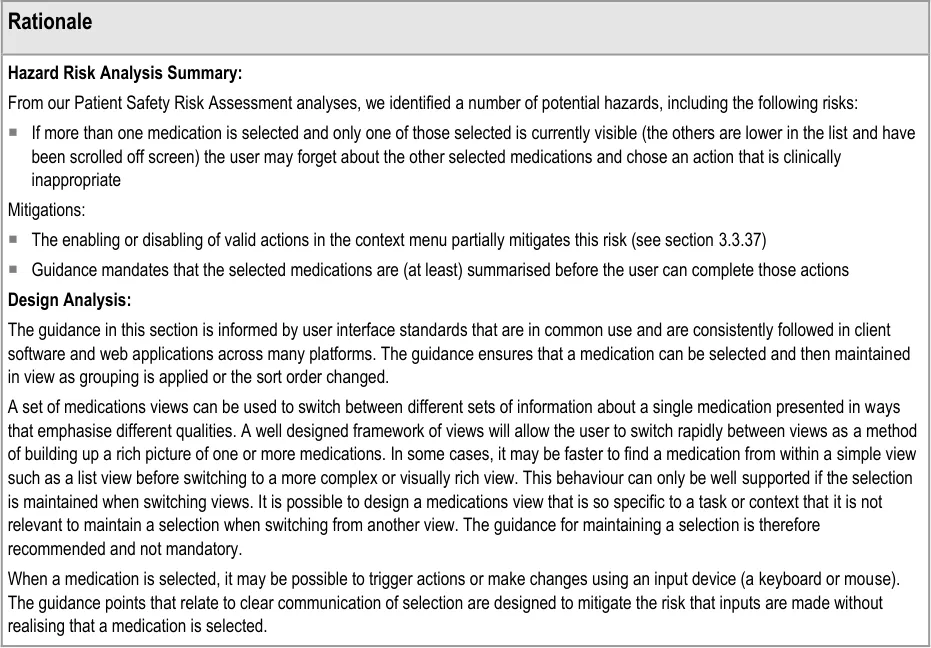
Page 71
Copyright ©2013 Health and Social Care Information Centre
HSCIC Controlled Document
3.3.37 Providing Context Menus
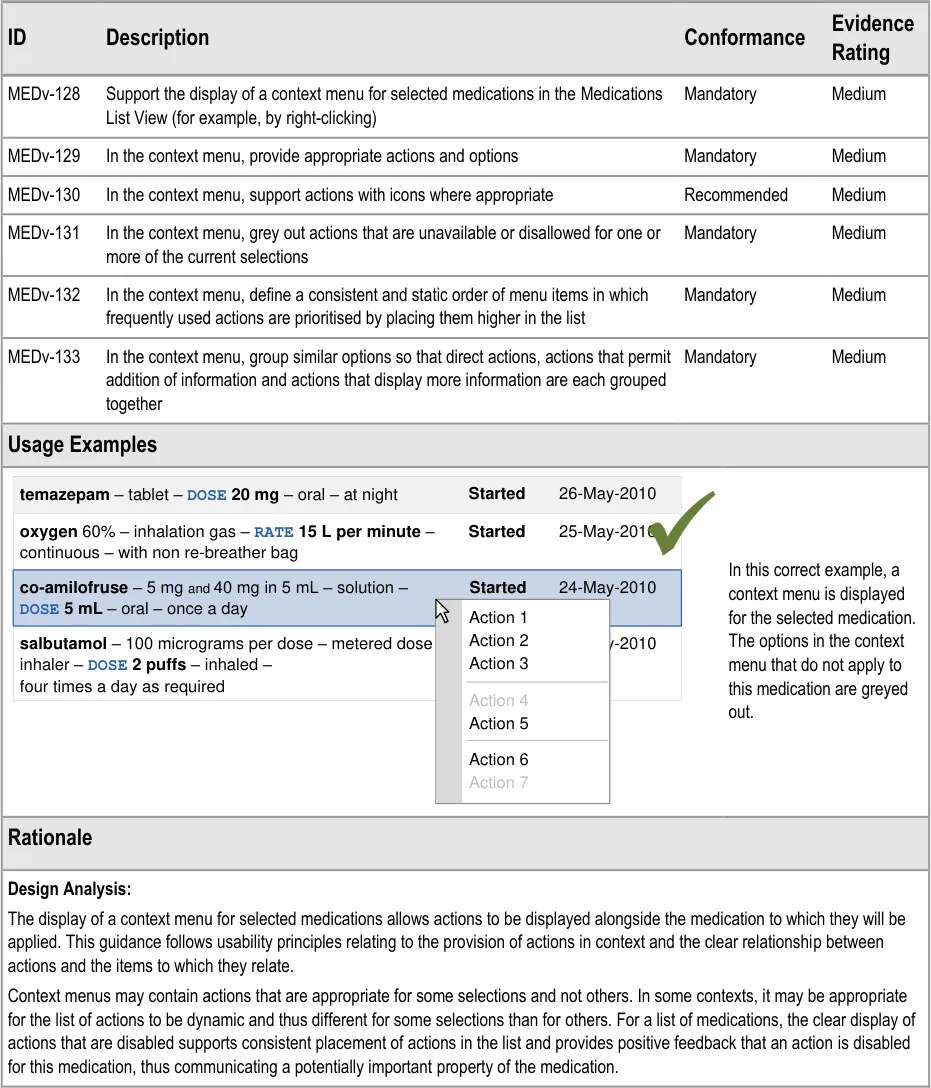
| temazepam – tablet – DOSE 20 mg – oral – at night Started 26-May-2010 | Col2 | Col3 |
|---|---|---|
oxygen 60% – inhalation gas –RATE 15 L per minute– continuous – with non re-breather bag 25-May-2010 Started | oxygen 60% – inhalation gas –RATE 15 L per minute– continuous – with non re-breather bag 25-May-2010 Started | oxygen 60% – inhalation gas –RATE 15 L per minute– continuous – with non re-breather bag 25-May-2010 Started |
co-amilofruse– 5 mgand40 mg in 5 mL – solution –DOSE 5 mL– oral – once a day24-May-2010 Started Action 1 | co-amilofruse– 5 mgand40 mg in 5 mL – solution –DOSE 5 mL– oral – once a day24-May-2010 Started Action 1 | co-amilofruse– 5 mgand40 mg in 5 mL – solution –DOSE 5 mL– oral – once a day24-May-2010 Started Action 1 |
co-amilofruse– 5 mgand40 mg in 5 mL – solution –DOSE 5 mL– oral – once a day24-May-2010 Started Action 1 | Action 1 | Action 1 |
| salbutamol– 100 micrograms per dose – metered dose inhaler – DOSE 2 puffs– inhaled –four times a day as required | Started 24-Ma Action 2 Action 3 Action 4 | y-2010 |
| salbutamol– 100 micrograms per dose – metered dose inhaler – DOSE 2 puffs– inhaled –four times a day as required | Action 5 Action 6 Action 7 | Action 5 Action 6 Action 7 |
Page 72
Copyright ©2013 Health and Social Care Information Centre
HSCIC Controlled Document
3.3.38 Providing Access to Medication Details
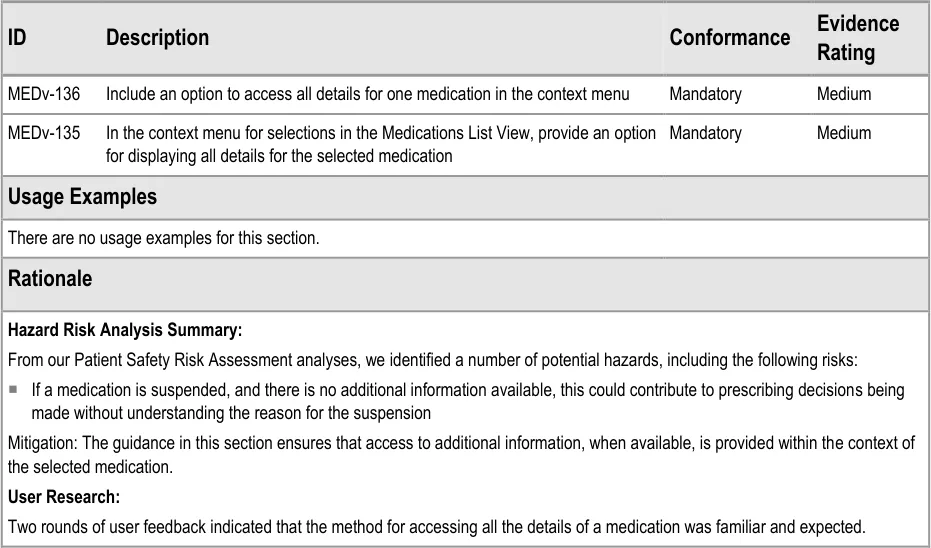
Page 73
Copyright ©2013 Health and Social Care Information Centre
HSCIC Controlled Document
3.4 Rationale Summary
This section summarises the principles behind the rationale for all guidance points in this document.
General Principles:
-
Provide support for legibility
-
Mitigate risks of incorrect selection and misinterpretation
Usability Principles:
- Minimise the use of embellishments (for example, bold, colour, fonts, font sizes, italics,
separators and symbols)
-
Minimise instances of each type of embellishment within a reading unit
-
Consistent use of specific embellishments within and preferably between user-interface
contexts or ‘views’
- Use words instead of symbols where it is important for removing ambiguity
Existing Standards:
-
NHS NPfIT – ePrescribing Functional Specification {R9}
-
NHS NPfIT – Guidelines for the Design and Presentation of Medication Elements Required
in Electronic Prescribing or Medication Ordering Systems {R15}
- Institute for Safe Medication Practices (ISMP) (US) – Draft Guidelines for Safe Electronic
Communication of Medication Orders [7]
Evolving Standards:
- Standard set of information needed to safely describe a medication
7 ISMP – ISMP MedicationSafetyAlert! – It’s Time for Standards to Improve Safety with Electronic Communication of Medication Orders – Draft Guidelines for Safe Electronic Communication of Medication Orders {R16} : http://www.ismp.org/Newsletters/acutecare/articles/20030220.asp
Page 74
Copyright ©2013 Health and Social Care Information Centre
HSCIC Controlled Document
4 DOCUMENT INFORMATION
4.1 Terms and Abbreviations
ACBS Advisory Committee on Borderline Substances
AMP Actual Medicinal Product
CATR Clinical Authority to Release
CSG Clinical Safety Group
CSMS Clinical Safety Management System
CUI Common User Interface
dm+d Dictionary of Medicines and Devices
HDU High Dependency Unit
ISMP The Institute for Safe Medication Practices
IUD Intrauterine Device
LASB Look-Ahead Scroll Bar
NHS National Health Service
NHS CFH NHS Connecting for Health
NPfIT National Programme for IT
NPSA National Patient Safety Agency
OTC Over the Counter
PGD Patient Group Direction
PODs Patient’s Own Drugs
TFN Trade Family Name
TPN Total Parental Nutrition
TTO To Take Out
UI User Interface
VTM Virtual Therapeutic Moiety
W3C World Wide Web Consortium
Table 6: Terms and Abbreviations
Copyright ©2013 Health and Social Care Information Centre
Page 75
HSCIC Controlled Document
4.2 Definitions
NHS Entity Within this document, defined as a single NHS organisation or group that is operated within a single technical infrastructure environment by a defined group of IT administrators.
The Authority The organisation implementing the NHS National Programme for IT (currently NHS Connecting for Health).
Current best practice Current best practice is used rather than best practice, as over time best practice guidance may change or be revised due to changes to products, changes in technology, or simply the additional field deployment experience that comes over time.
Generic drug name This can be a single drug name that refers to a single active ingredient or it can be multiple active ingredients that are prescribed as one drug. In the structure of the dm+d {R10}, this generally equates to a Virtual Therapeutic Moiety (VTM)
Brand name A brand name for a product containing medication. A brand name may be associated with many products. In some cases, the same brand name may be associated with different generic drugs. Future versions of the dm+d {R10} are expected to include a separate entity for brand name, known as Trade Family Name (TFN). In the meantime, the brand name is part of the Actual Medicinal Product (AMP)
Table 7: Definitions
4.3 Nomenclature
This section shows how to interpret the different styles used in this document to denote various types of information.
4.3.1 Body Text
Code Monospace
Script
Other markup languages
Interface dialog names Bold
Field names
Controls
Folder names Title Case
File names
Table 8: Body Text Styles
4.3.2 Cross References
Current document – sections Section number only
Current document – figures/tables Caption number only
Other project documents Italics and possibly a footnote
Publicly available documents Italics with a footnote
External Web-based content Italics and a hyperlinked footnote
Table 9: Cross Reference Styles
Page 76
Copyright ©2013 Health and Social Care Information Centre
HSCIC Controlled Document
4.4 References
R1. NHS CUI Programme – Design Guide Entry – Medications Management – Medication Views 2.0.0.0
R2. NHS CUI Programme – Medications Management – Medication Line – User Interface Design Guidance
R3. NPSA – Safety in doses: medication safety incidents in the NHS http://www.npsa.nhs.uk/nrls/alerts-and-directives/directives-guidance/safety-in-doses/
R4. Medication Errors – Causes, Prevention, and Risk Management – Cohen M R (Ed) – Jones and Bartlett Publishers
R5. To Err is Human – Building a Safer Health System – Kohn L, Corrigan J, Donaldson M – Washington, DC: National Academy Press, 2000
2.0.0.0
2007
2004
2000
R6. Understanding Patient Safety – Wachter R M – The McGraw-Hill Companies, Inc, 2008 2008
R7. Healthcare Commission Patient Survey – Room for Review: a Guide to Medication Review 2004
R8. National service framework for older people – Department of Health http://www.dh.gov.uk/en/publicationsandstatistics/publications/publicationspolicyandguidance/DH_4 003066
R9. NHS NPfIT – ePrescribing Functional Specification http://www.connectingforhealth.nhs.uk/newsroom/news-stories/eprescfunctspec
R10. NHS – dictionary of medicines + devices http://www.dmd.nhs.uk/
R11. NHS CUI Programme – Medications Management – Drug Administration – User Interface Design Guidance
2001
1.0
Release 2.3
3.0.0.0
R12. The Visual Display of Quantitative Information – Tufte E, 2001, Cheshire, CT – Graphics Press Second Edition 2001
R13. Web Content Accessibility Guidelines 1.0 – W3C Recommendation 5-May-1999 http://www.w3.org/TR/WAI-WEBCONTENT/
R14. Techniques for Accessibility Evaluation and Repair Tools – W3C Working Draft – 26 April 2000 – Technique 2.2.1 [priority 3] Test the colour attributes of the following elements for visibility: http://www.w3.org/TR/AERT#color-contrast
R15. NHS NPfIT – Guidelines for the Design and Presentation of Medication Elements Required in Electronic Prescribing or Medication Ordering Systems – NPfIT-EP-DB-0003.01
R16. ISMP – ISMP MedicationSafetyAlert! – It’s Time for Standards to Improve Safety with Electronic Communication of Medication Orders – Draft Guidelines for Safe Electronic Communication of Medication Orders http://www.ismp.org/Newsletters/acutecare/articles/20030220.asp
Table 10: References
Copyright ©2013 Health and Social Care Information Centre
1999
2000
2005
20-Feb-2003
Page 77
HSCIC Controlled Document
APPENDIX A REFERENCE SUMMARY OF GUIDANCE
MEDv-020 MEDv-141 Visual Summary:
| Col1 | sentence | tabula |
|---|---|---|
| xxxx– xxxx - xxxx yyyy zzzz | xxxx– xxxx - xxxx yyyy zzzz | xxxx– xxxx - xxxx yyyy zzzz |
| xxxx– xxxx - xxxx yyyy zzzz | xxxx– xxxx - xxxx yyyy zzzz | xxxx– xxxx - xxxx yyyy zzzz |
| xxxx– xxxx - xxxx yyyy zzzz | xxxx– xxxx - xxxx yyyy zzzz | xxxx– xxxx - xxxx yyyy zzzz |
| xxxx– xxxx - xxxx yyyy zzzz | xxxx– xxxx - xxxx yyyy zzzz | xxxx– xxxx - xxxx yyyy zzzz |
MEDv-020 3.3.1 Present medications as lines of text within rows in a tabular format where each row represents one medication
MEDv-142 Visual Summary:
| minimise the display of blank cells for some row n a separate column) | Col2 |
|---|---|
| xxxx– xxxx - xxxx xxxx– xxxx - xxxx xxxx– xxxx - xxxx xxxx– xxxx - xxxx yyyy zzzz yyyy zzzz yyyy zzzz yyyy zzzz | xxxx– xxxx - xxxx xxxx– xxxx - xxxx xxxx– xxxx - xxxx xxxx– xxxx - xxxx yyyy zzzz yyyy zzzz yyyy zzzz yyyy zzzz |
| space |
MEDv-142 3.3.2 When the list is scrolled to the end, display a space at the bottom of the list with a height equivalent to a line of text
MEDv-021 Visual Summary:
| Col1 | no strong |
|---|---|
| xxxx– xxxx - xxxx yyyy zzzz | xxxx– xxxx - xxxx yyyy zzzz |
| xxxx– xxxx - xxxx yyyy zzzz | xxxx– xxxx - xxxx yyyy zzzz |
| xxxx– xxxx - xxxx yyyy zzzz | xxxx– xxxx - xxxx yyyy zzzz |
| xxxx– xxxx - xxxx yyyy zzzz | xxxx– xxxx - xxxx yyyy zzzz |
MEDv-021 3.3.3 Avoid the use of strong grids and strong vertical lines. (Use subtle methods to support distinguishing between rows in the list)
MEDv-022, MEDv-142 to MEDv-145 Visual Summary:
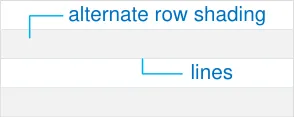
MEDv-143 3.3.4 Use at least alternate row shading or lines between rows
MEDv-022 3.3.4 Use subtle alternate row shading
MEDv-144 3.3.4 When using alternate row shading, ensure that colour and brightness of the background does not interfere with the readability of the foreground text
MEDv-145 3.3.4 Supplement alternate shading with 1 point pale lines between rows
MEDv-023 Visual Summary:
| Col1 | Col2 | icons | Col4 |
|---|---|---|---|
| xxxx– xxxx - xx | A | B | yyyy zzzz |
| xxxx– xxxx - xx yyyy zzzz B | xxxx– xxxx - xx yyyy zzzz B | xxxx– xxxx - xx yyyy zzzz B | xxxx– xxxx - xx yyyy zzzz B |
| xxxx– xxxx - xx | A | yyyy zzzz | yyyy zzzz |
MEDv-023 3.3.5 Support the display of icons following the text of the Drug Details column in the Medications List View
Page 78
Copyright ©2013 Health and Social Care Information Centre
HSCIC Controlled Document
MEDv-146 Visual Summary:
| aaaa | bbbb | cccc |
|---|---|---|
| empty list message | empty list message | empty list message |
MEDv-146 3.3.6 Display a message when a list is empty (for example, when there are no current medications)
MEDv-147 to MEDv-150 Visual Summary:
mandatory columns
MEDv-147 3.3.7 Provide a column that contains status information including information that defines whether the medication is ‘current’ or ‘past’
MEDv-148 3.3.7 Provide a column that contains drug details according to Medication Line guidance
MEDv-149 3.3.7 When displaying current medications, provide a column that contains an initiation date (such as the date of the first planned administration). The examples in this document show a Start Date column.
MEDv-150 3.3.7 When displaying past medications, provide a column that contains a stop date (such as the date of the last administration or the date that the medication was discontinued). The examples in this document show an End Date column.
MEDv-151 to MEDv-154 Visual Summary:
| Col1 | Col2 | Col3 |
|---|---|---|
| Start | Start | End |
MEDv-151 3.3.8 When an end date column is displayed, place a start date column before (to the left of) the end date column
MEDv-152 3.3.8 When an end date column is displayed, and there is no duration column, place a start date column adjacent to the end date column
MEDv-153 3.3.8 Use fixed width columns for dates
MEDv-154 3.3.8 Maintain consistent placement of date columns relative to one another and relative to the Drug Details column in both current and past medications
MEDv-150 toMED-152 Visual Summary:
First Administration
Last Administration
MEDv-155 3.3.9 Label columns with text that describes the contents unambiguously and succinctly (such as, ‘Status’, ‘Date Prescribed’ or ‘First Administration’)
MEDv-156 3.3.9 Use a unique heading for each column
MEDv-157 3.3.9 When combining two attributes that have the same data type (such as dates), include labels for both attributes in the column heading
Page 79
Copyright ©2013 Health and Social Care Information Centre
HSCIC Controlled Document
MEDv-027, MEDv-158 Visual Summary:
Start and End Dates Start zzzz
End zzzz
Start zzzz
End zzzz
MEDv-027 3.3.10 Allow columns to contain more than one attribute for a single medication
MEDv-158 3.3.10 When combining two attributes that have the same data types (such as dates), include labels for both attributes within the cell
MEDv-159 to MEDv-161 Visual Summary:
| aaaa | bbbb | cccc |
|---|---|---|
| relative widths |
MEDv-159 3.3.11 Maintain the relative proportions of columns such that the Drug Details column is the widest
MEDv-160 3.3.11 Avoid the need for horizontal scrolling by limiting the number of columns visible at any one time
MEDv-161 3.3.11 Define minimum widths for all columns
Current Past
Status Completed
Discontinued
MEDv-162 to MEDv-165 Visual Summary:
Status Started
Not Started
Suspended
MEDv-162 3.3.12 Ensure that all medications have a status value and the status cannot be blank
MEDv-163 3.3.12 Limit status descriptions to short phrases, preferably no more than two words
MEDv-164 3.3.12 Allow status to be supplemented with additional information (such as pharmacy verified).
MEDv-165 3.3.12 Use the status description to differentiate between medications that have no recorded administration events and those that have.
Started
Not Started
Suspended
Completed
Discontinued
MEDv-166 to MEDv-172 Visual Summary:
Current
Past
MEDv-166 3.3.13 Support a status of ‘suspended’ and include medications with this status in current medications
MEDv-167 3.3.13 Assign a status of ‘Started’ to medications that have an administration event recorded and have further scheduled administrations
MEDv-168 3.3.13 Assign a status of ‘Not Started’ to medications that have administration scheduled and a start date in the future
MEDv-169 3.3.13 Assign a status of ‘Suspended’ to medications that are marked as not to be administered but which are intended to be resumed at a later date
MEDv-170 3.3.13 Assign a status of ‘Completed’ to medications that have administration events recorded according to their schedule (within tolerances) and have an end date in the past
MEDv-171 3.3.13 Assign a status of ‘Discontinued’ to medications that were stopped on a date that preceded one or more of the scheduled administrations
Page 80
Copyright ©2013 Health and Social Care Information Centre
HSCIC Controlled Document
MEDv-172 3.3.13 Define medications with a status of either ‘Started’, ‘Not Started’ or ‘Suspended’ as current medications
MEDv-173 3.3.13 Define medications with a status of either ‘Completed’ or ‘Discontinued’ as past medications
MEDv-024, MEDv-025, MEDv-042 Visual Summary:
| xxxx – xxxx - xxxx yyyy zzzz | Col2 |
|---|---|
| xxxx– xxxx - xxxx yyyy zzzz | xxxx– xxxx - xxxx yyyy zzzz |
| xxxx– xxxx - xxxx yyyy zzzz | xxxx– xxxx - xxxx yyyy zzzz |
| xxxx– xxxx - xxxx | yyyy zzzz |
| Important S |
MEDv-024 3.3.14 Use visual design to draw attention to suspended medications
MEDv-025 3.3.14 Use visual design to distinguish a list of current medications from a list of past medications
MEDv-042 3.3.14 Display the status of each medication in bold
MEDv-062 to MEDv-067, MEDv-172 Visual Summary:
MEDv-063 3.3.15 Provide buttons for displaying current and past medications respectively in the Medications List View and label the buttons ‘Current’ and ‘Past’
MEDv-062 3.3.15 Present the Medications List View with Current selected by default
MEDv-064 3.3.15 Use the visual formatting of the Current and Past buttons to indicate which is currently selected
MEDv-065 3.3.15 Do not allow Current and Past buttons to be selected simultaneously
MEDv-174 3.3.15 Ensure that either the Current or the Past button is selected at any one time
MEDv-066 3.3.15 Supplement the Past button in the Medications List view with a drop-down control for displaying, selecting and applying a filter on the past medications view
MEDv-067 3.3.15 Include an option for displaying all past medications in the drop-down control
Current
MEDV-099, MEDV-173 Visual Summary:
| Drug Details | Col2 | xxxx | Start ▼ |
|---|---|---|---|
| default sort | default sort | ||
| first column | first column | first column |
MEDv-099 3.3.16 By default, present current medications sorted reverse chronologically by a starting date such that the most recent is first (top) in the list
MEDv-173 3.3.16 When displaying current medications, place the drug details in the first (furthest left) column
Current
MEDv-074, MEDv-075, MEDv-077, MEDv-175 Visual Summary:
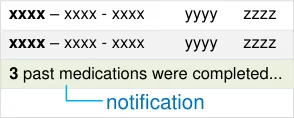
MEDv-074 3.3.17 When displaying current medications, display a notification for medications that have been completed or discontinued within a specified time interval from the current time
MEDv-075 3.3.17 Clearly display the time interval within the recent past notification
Page 81
Copyright ©2013 Health and Social Care Information Centre
HSCIC Controlled Document
MEDv-077 3.3.17 Display a count of the number of recently past medications within the recent past notification in the medication list
MEDv-174 3.3.17 Use formatting to distinguish the recent past notifications from medications in the list
Past
MEDv-100, MEDv-173 Visual Summary:
| Status | Col2 | Drug Details | End ▼ |
|---|---|---|---|
| default sort | default sort | ||
| first column | first column | first column |
MEDv-100 3.3.18 By default, sort medications reverse chronologically by end date (or equivalent) such that the most recent is first (top) when the filter is set to ‘Past’ in the Medications List View
MEDv-175 3.3.18 When displaying past medications, place the status column first (furthest left) and the Drug Details column second
Past
MEDv-068 to MEDv-073 Visual Summary:
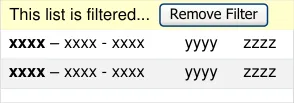
MEDv-069 3.3.19 When a filter is applied to past medications in the Medications List View, the Past button should indicate that it is currently selected
MEDv-070 3.3.19 When a filter is applied to past medications in the Medications List View, display a filter notification at the top of the list below the column headings and above the scroll bar (thus ‘pushing’ the list of medications down a line)
MEDv-068 3.3.19 When a filter notification is displayed, include a control for removing the filter within that notification
MEDv-071 3.3.19 Display a description of the filter in use within the filter notification in the medications list
MEDv-072 3.3.19 Include a count of the number of medications displayed and a count of the total (unfiltered) number of past medications in a filter notification
MEDv-073 3.3.19 Clearly label the counts (number of medications displayed and total unfiltered number) with text that allows them to be differentiated
MEDv-176 3.3.19 When a filter is applied to past medications in the Medications List View, the Past button should indicate that it is currently selected
MEDv-177 to MEDv-179 Visual Summary:
| look-ahead notification | Col2 | Col3 | Col4 | Col5 |
|---|---|---|---|---|
| reserved space | reserved space | reserved space | reserved space |
MEDv-177 3.3.20 When displaying a list of (current or past) medications and the scroll bar is active because the list is longer than the space available to display them, provide a clear indication that there are medications out of view
MEDv-178 3.3.20 When displaying current medications, supplement the standard scroll bar with notifications that display the names of drugs that are out of view. This document refers to this kind of scroll bar as a look-ahead scroll bar (LASB)
MEDv-179 3.3.20 When displaying a LASB, reserve a space at the top and bottom of the list for look-ahead notifications
Page 82
Copyright ©2013 Health and Social Care Information Centre
HSCIC Controlled Document
MEDv-180 3.3.20 Use a pale solid background colour for the space reserved for look-ahead notifications that is sufficient to distinguish the space from the background of the list
MEDv-181 3.3.20 When grouping is applied and there is a collapsed group out of view, display drug names in the lookahead scroll bar for any drug that is out of view irrespective of whether it is within a collapsed group or an expanded group
MEDv-058, MEDv-059, MEDv-177 Visual Summary:
| Col1 | Col2 | Col3 |
|---|---|---|
| ddd– xxxx - xxxx eee– xxxx - xxxx ccc– xxxx - xxxx yyyy zzzz yyyy zzzz yyyy zzzz | ddd– xxxx - xxxx eee– xxxx - xxxx ccc– xxxx - xxxx yyyy zzzz yyyy zzzz yyyy zzzz | ddd– xxxx - xxxx eee– xxxx - xxxx ccc– xxxx - xxxx yyyy zzzz yyyy zzzz yyyy zzzz |
MEDv-058 3.3.21 Update the look-ahead notifications dynamically in response to scrolling
MEDv-059 3.3.21 Allow the look-ahead notification to change width dynamically to accommodate its contents up to the available width
MEDv-182 3.3.21 Do not allow the look-ahead notification to be used for navigation by clicking on areas of the notification, such as drug names or counts
MEDv-043 to MEDv045 Visual Summary:
alignment
| Col1 | Col2 | Col3 | Col4 | Col5 |
|---|---|---|---|---|
| aaaa | bbbb | bbbb | cccc | cccc |
| ddd– xxxx - xxxx eee– xxxx - xxxx ccc– xxxx - xxxx yyyy zzzz yyyy zzzz yyyy zzzz | ddd– xxxx - xxxx eee– xxxx - xxxx ccc– xxxx - xxxx yyyy zzzz yyyy zzzz yyyy zzzz | ddd– xxxx - xxxx eee– xxxx - xxxx ccc– xxxx - xxxx yyyy zzzz yyyy zzzz yyyy zzzz | ddd– xxxx - xxxx eee– xxxx - xxxx ccc– xxxx - xxxx yyyy zzzz yyyy zzzz yyyy zzzz | |
MEDv-044 3.3.22 Restrict the look-ahead notifications to a single line each
MEDv-043 3.3.22 The look-ahead notifications should be clearly joined to the ‘up’ and ‘down’ arrow controls of the scroll bar respectively
MEDv-045 3.3.22 Do not place controls or other notifications such that they separate the look-ahead notification from the
visible list
MEDv-049, MEDv-181 Visual Summary:
| edications List View | Col2 |
|---|---|
| aaa– xxxx - xxxx | l |
| bbb– xxxx - xxxx | bbb– xxxx - xxxx |
| ccc– xxxx - xxxx | ccc– xxxx - xxxx |
| ccc– xxxx - xxxx | l |
| ddd– xxxx - xxxx | ddd– xxxx - xxxx |
| eee– xxxx - xxxx | eee– xxxx - xxxx |
| fff– xxxx - xxxx | fff– xxxx - xxxx |
MEDv-049 3.3.23 The order of both the items in the look-ahead notification and the Medications List View should always be the same
MEDv-183 3.3.23 If any of the drug name text (other than letter ascenders and descenders) is obscured by the boundaries of the list, include that drug in the look-ahead notification.
Page 83
Copyright ©2013 Health and Social Care Information Centre
HSCIC Controlled Document
MEDv-048, MEDv-052, MEDv-053, MEDv-055 Visual Summary:
| Col1 | Col2 | aaa · | bbb |
|---|---|---|---|
| ddd– xxxx - xxxx eee– xxxx - xxxx ccc– xxxx - xxxx yyyy zzzz yyyy zzzz yyyy zzzz | ddd– xxxx - xxxx eee– xxxx - xxxx ccc– xxxx - xxxx yyyy zzzz yyyy zzzz yyyy zzzz | ddd– xxxx - xxxx eee– xxxx - xxxx ccc– xxxx - xxxx yyyy zzzz yyyy zzzz yyyy zzzz | ddd– xxxx - xxxx eee– xxxx - xxxx ccc– xxxx - xxxx yyyy zzzz yyyy zzzz yyyy zzzz |
| 2 more·** kkk**·** jjj**·** iii**·** ggg**·** fff** | 2 more·** kkk**·** jjj**·** iii**·** ggg**·** fff** | 2 more·** kkk**·** jjj**·** iii**·** ggg**·** fff** |
MEDv-048 3.3.24 The look-ahead notification is populated from right to left such that the next drug in the list appears closest to the scroll bar
MEDv-052 3.3.24 When there are more items than can be displayed in the look-ahead notification for current medications, display as many as possible and end the list with a count of the remaining items that could not be displayed
MEDv-053 3.3.24 When a count is displayed in a look-ahead notification and one or more of the medications included in that count have decision support alerts, display a decision support alert icon next to the count
MEDv-055 3.3.24 When displaying current medications only, show drug names and decision support alert icons in the look-ahead notification
MEDv-056, MEDv-179, MEDv-180 Visual Summary:
MEDv-056 3.3.25 Use a delimiter that is unlikely to be interpreted as a character or number (such as a black dot ‘●’), with a space either side to separate drug names and to separate the count from drug names
MEDv-184 3.3.25 Do not use leading or training delimiters
MEDv-185 3.3.25 Do not include additional text or formatting to indicate grouping in the look-ahead notifications
MEDv-050, MEDv-051 Visual Summary:
MEDv-050 3.3.26 Where exceptionally long drug names require more space than is available in a look-ahead notification, display a count (as for past medications) instead
MEDv-051 3.3.26 Do not truncate or abbreviate drug names in the look-ahead notification
MEDv-184 to MEDv-186 Visual Summary:
MEDv-186 3.3.27 Display drug names in bold and in black text by default
MEDv-187 3.3.27 Display counts and descriptive text (such as ‘more’) in normal weight font
MEDv-188 3.3.27 Use a light solid background colour for the notifications that is both sufficiently different from the colour in the space reserved for notifications and sufficiently different from the black text in the notification
MEDv-189 3.3.27 Do not use a border in a dark colour or with a weight greater than 1 point for a look-ahead notification
Past Current
MEDv-054 Visual Summary:
| Col1 | 2 more |
|---|---|
| ppp– xxxx - xxxx qqq– xxxx - xxxx ooo– xxxx - xxxx | ppp– xxxx - xxxx qqq– xxxx - xxxx ooo– xxxx - xxxx |
| 4 more |
| Col1 | Col2 | aaa · bbb |
|---|---|---|
| ddd– xxxx - xxxx eee– xxxx - xxxx ccc– xxxx - xxxx | ddd– xxxx - xxxx eee– xxxx - xxxx ccc– xxxx - xxxx | ddd– xxxx - xxxx eee– xxxx - xxxx ccc– xxxx - xxxx |
| 2 more·** ggg**·** fff** | 2 more·** ggg**·** fff** |
MEDv-054 3.3.28 When displaying past medications only, display counts in the look-ahead notification and not drug names.
Page 84
Copyright ©2013 Health and Social Care Information Centre
HSCIC Controlled Document
MEDv-084, MEDv-085, MEDv185 Visual Summary:
MEDv-084 3.3.29 Provide a drop-down list for displaying, selecting and applying a grouping to the medications list
MEDv-085 3.3.29 Label the grouping control ‘Group by’
MEDv-190 3.3.29 Include an option in the drop-down list to set the grouping to ‘None’
Group A
yyyy zzzz
MEDv-083, MEDv-087, MEDv-188 to MEDv-190 Visual Summary:
xxxx - xxxx - xxxx
Group B
xxxx - xxxx - xxxx yyyy zzzz
xxxx - xxxx - xxxx
yyyy zzzz
MEDv-083 3.3.30 Present the Medications List View with no grouping active by default
MEDv-087 3.3.30 Retain the column sort order in the Medications List View when grouping is applied
MEDv-191 3.3.30 Display groups expanded by default
MEDv-192 3.3.30 Re-start alternate row shading at the beginning of each group. (Alternate row shading is not needed if there is only one medication in each group)
MEDv-193 3.3.30 When a grouping is selected in the grouping control, ensure that at least one group heading is visible in the newly grouped list
MEDv-086, MEDv088, MEDv-090, MEDv-091 Visual Summary:
| Col1 | Tablet |
|---|---|
| xxxx– xxxx - xxxx yyyy zzzz | |
| (No Form Specified) | |
| xxxx– xxxx - xxxx yyyy zzzz | |
| xxxx– xxxx - xxxx yyyy zzzz |
MEDv-086 3.3.31 Display clear and prominent headings for each group category
MEDv-090 3.3.31 Do not display group headings for empty groups
MEDv-091 3.3.31 Provide ‘null’ groups where necessary to support the display of medications that do not have a value for the attribute being used to group the medications
MEDv-194 3.3.31 Display the label for a ‘null’ group heading in brackets
MEDv-195 3.3.31 Display ‘null’ groups at the top of the list of groups
MEDv-092, MEDv-089, MEDv-092 Visual Summary:

MEDv-092 3.3.32 Provide controls for expanding and collapsing individual groups. Place these controls at the beginning of the group heading
MEDv-089 3.3.32 When a group is collapsed, supplement the group heading with a number representing a count of medications within that group
MEDv-196 3.3.32 Support the selection of group headings and the display of a context menu that includes options for collapsing and expanding all columns
Page 85
Copyright ©2013 Health and Social Care Information Centre
HSCIC Controlled Document
MEDv-193, MEDv-194 Visual Summary:
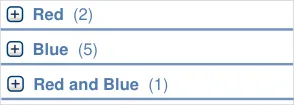
MEDv-197 3.3.33 When one or more medications belong to more than one group (such as analgesic and non-steroidal anti-inflammatory), create a new group and label it with the group names combined (such as ‘Analgesic, Non-steroidal Anti-inflammatory’)
MEDv-198 3.3.33 Display each medication in only one group (do not duplicate medications so that they can be displayed in more than one group)
MEDv-199 3.3.33 When combining group names, display the names in the same order that they would appear in a list that is sorted by that attribute
MEDv-200 3.3.33 When combining group names, separate the labels with a semi-colon
formatting
MEDv-101 to MEDv-106 Visual Summary:
| Col1 | Col2 | Col3 | Col4 |
|---|---|---|---|
| aaaa | Start▼ | Start▼ | Start▼ |
| aaaa | Start▼ | ||
| zzzz yyyy xxxx aaaa aaaa aaaa | zzzz yyyy xxxx aaaa aaaa aaaa |
MEDv-101 3.3.34 Allow the sort order of a list in the medications list to be changed by clicking on a column heading
MEDv-102 3.3.34 Allow the sort order of a list in the Medications List View to be reversed by clicking on the column heading for the column with the active sort applied
MEDv-103 3.3.34 Use formatting of the column heading to clearly indicate the column to which the sort order is currently applied
MEDv-104 3.3.34 Use an icon or symbol in the column heading to indicate the column by which the data is sorted and the direction of the sort
MEDv-105 3.3.34 When the sort order is changed from the default to another attribute in the Medications List View, retain the default as a secondary sort order
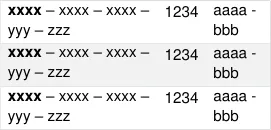
MEDv-195 Visual Summary:
| xxxx – xxxx - xxxx yyyy | Col2 |
|---|---|
| xxxx– xxxx - xxxx yyyy | xxxx– xxxx - xxxx yyyy |
| xxxx– xxxx - xxxx yyyy | |
| xxxx– xxxx - xxxx yyyy | xxxx– xxxx - xxxx yyyy |
MEDv-201 3.3.35 Provide a control that allows the type and quantity of information displayed to be changed such that the rows and columns may change in number and be presented with a different layout
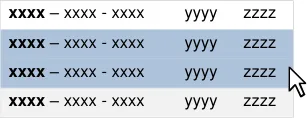
MEDv-122 to MEDv-127 Visual Summary:
MEDv-202 3.3.36 Ensure that there are no medications selected by default when a list is opened
MEDv-122 3.3.36 Support click (or keyboard selection using the spacebar) to select a medication in the list
MEDv-123 3.3.36 Clearly highlight selected medications in the medication list
Copyright ©2013 Health and Social Care Information Centre
Page 86
HSCIC Controlled Document
MEDv-124 3.3.36 Maintain the selection of a medication when switching between views of a patient’s medications (such that a medication selected in a medication list is automatically selected when switching to the Drug Administration view)
MEDv-125 3.3.36 Maintain the selection of a medication when applying or changing a grouping or a sort order and ensure that the selection remains visible
MEDv-126 3.3.36 Support the selection of multiple items using CTRL and click for discrete selections, and SHIFT and click for contiguous selections
MEDv-127 3.3.36 Support keyboard-only equivalents such as SHIFT and arrow key for contiguous selection and the CTRL and SPACEBAR to toggle select and deselect when making non-continuous selections
MEDv-203 3.3.36 When an action is applied to more than one medication, display a summary of the selected
MEDv-128 to MEDv133 Visual Summary:
| he user to complete the action | Col2 | Col3 |
|---|---|---|
| xxxx– xxxx - xxxx yyyy zzzz | xxxx– xxxx - xxxx yyyy zzzz | xxxx– xxxx - xxxx yyyy zzzz |
| xxxx– xxxx - xxxx yyyy zzzz | xxxx– xxxx - xxxx yyyy zzzz | xxxx– xxxx - xxxx yyyy zzzz |
| xxxx– xxxx - xxxx yyyy zzzz | xxxx– xxxx - xxxx yyyy zzzz | xxxx– xxxx - xxxx yyyy zzzz |
| xxxx– xxxx - xxxx yyyy zzzz | yyyy zzzz | yyyy zzzz |
| xxxx– xxxx - xxxx | yyyy zzzz Action 2 | |
| Action 3 |
MEDv-128 3.3.37 Support the display of a context menu for selected medications in the Medications List View (for example, by right-clicking)
MEDv-129 3.3.37 In the context menu for selections in the Medications List View, provide appropriate actions and options
MEDv-130 3.3.37 In the context menu for selections in the Medications List View, support actions with icons where appropriate
MEDv-131 3.3.37 In the context menu for selections in the Medications List View, grey out actions that are unavailable or disallowed for one or more of the current selections
MEDv-132 3.3.37 In the context menu for selections in the Medications List View, prioritise frequently used actions by placing them higher in the list
MEDv-133 3.3.37 In the context menu for selections in the Medications List View, group similar options so that direct actions, actions that permit addition of information and actions that display more information are each grouped together
MEDv-135, MEDv-136 Visual Summary:
| xxxx – xxxx - xxxx yyyy zzzz | Col2 | Col3 |
|---|---|---|
| xxxx– xxxx - xxxx yyyy zzzz | xxxx– xxxx - xxxx yyyy zzzz | |
| xxxx– | xxxx - xxxx yyyy zzzz | xxxx - xxxx yyyy zzzz |
| xxxx– | xxxx - xxxx yyyy zzzz | xxxx - xxxx yyyy zzzz |
| xxxx– | xxxx - xxxx yyyy zzzz | xxxx - xxxx yyyy zzzz |
MEDv-135 3.3.38 In the context menu for selections in the Medications List View, provide an option for displaying all details for the selected medication
MEDv-136 3.3.38 Support accessing all details for one medication by double-clicking the medication line in the Medications List View
Table 11: Reference Summary of Guidance
Page 87
Copyright ©2013 Health and Social Care Information Centre
HSCIC Controlled Document
REVISION AND SIGNOFF SHEET
Change Record
28-Oct-2008 Sarah Parker 0.0.0.1 Initial draft for review/discussion
05-Nov-2008 Sarah Parker 0.0.0.2 First draft for copyedit and customer review
06-Nov-2008 Manuela Perr 0.0.1.0 Raised to Working Baseline
10-Nov-2008 Mick Harney 0.0.1.1 Copyedited
18-Dec-2008 Sarah Parker 0.0.1.2 Updates to address copyedit and SA comments
09-Jan-2009 Mick Harney 0.0.1.3 Copyedit changes since Working Baseline. Last questions for Sarah.
17-Feb-2009 Sarah Parker 0.0.1.4 Responses to copyedit comments and further revisions in response to SA requests for further changes.
20-Feb-2009 Mick Harney 0.0.1.5 Copyedit pass. Remaining questions flagged.
23-Feb-2009 Sarah Parker 0.0.1.6 Responses to copyedit comments
23-Feb-2009 Mick Harney 0.1.0.0 Raised to Baseline Candidate
05-Mar-2009 Sarah Parker 0.1.0.1 Minor amendment in response to customer request
05-Mar-2009 Mick Harney 0.2.0.0 Raised to Baseline Candidate #2
16-Mar-2009 Mick Harney 1.0.0.0 Raised to Baseline
Document Status has the following meaning:
- Drafts 0.0.0.X - Draft document reviewed by the Microsoft CUI Project team and the
Authority designate for the appropriate Project. The document is liable to change.
- Working Baseline 0.0.X.0 - The document has reached the end of the review phase and
may only have minor changes. The document will be submitted to the Authority CUI Project team for wider review by stakeholders, ensuring buy-in and to assist in communication.
- Baseline Candidate 0.X.0.0 - The document has reached the end of the review phase and
it is ready to be frozen on formal agreement between the Authority and the Company
- Baseline X.0.0.0 - The document has been formally agreed between the Authority and the
Company
Note that minor updates or corrections to a document may lead to multiple versions at a particular status.
Open Issues Summary
None
Page 88
Copyright ©2013 Health and Social Care Information Centre
HSCIC Controlled Document
Audience
The audience for this document includes:
- Authority CUI Manager / Project Sponsor . Overall project manager and sponsor for the
NHS CUI project within the Authority.
- Authority Clinical Applications and Patient Safety Project Project Manager.
Responsible for ongoing management and administration of the Project.
- The Authority Project Team . This document defines the approach to be taken during this
assessment and therefore must be agreed by the Authority.
- Microsoft NHS CUI Team . This document defines the approach to be taken during this
assessment, including a redefinition of the Clinical Applications and Patient Safety Project strategy.
Reviewers
Mike Carey Workstream Lead
Tim Chearman UX Architect
Peter Johnson Clinical Architect
Ann Slee Clinical Lead for e-Prescribing
Beverley Scott Clinical Safety Advisor
Dee Hackett Clinical Advisor
Frank Cross Clinical Advisor
Jasdeep Gill Clinical Advisor
Distribution
Mike Carey Workstream Lead
Tim Chearman UX Architect
Peter Johnson Clinical Architect
Ann Slee Clinical Lead for e-Prescribing
Beverley Scott Clinical Safety Advisor
Dee Hackett Clinical Advisor
Frank Cross Clinical Advisor
Jasdeep Gill Clinical Adviser
Page 89
Copyright ©2013 Health and Social Care Information Centre
HSCIC Controlled Document
Document Properties
Document Title Medications Management – Medications List User Interface Design Guidance
Author Clinical Applications and Patient Safety Project
Restrictions RESTRICTED – COMMERCIAL; MICROSOFT COMMERCIAL; Access restricted to: NHS CUI Project Team, Microsoft NHS Account Team
Creation Date 10 October 2008
Last Updated 23 June 2015
Copyright:
You may re-use this information (excluding logos) free of charge in any format or medium, under the terms of the Open Government Licence. To view this licence, visit nationalarchives.gov.uk/doc/open-government-licence or email psi@nationalarchives.gsi.gov.uk.
Page 90
Copyright ©2013 Health and Social Care Information Centre