Datedisplay

 Prepared for
NHS Connecting for Health
Version 5.0.0.0 Baseline
Prepared by
Clinical Application and Patient Safety Project
NHS CUI Programme Team
cuistakeholder.mailbox@hscic.gov.uk
Prepared for
NHS Connecting for Health
Version 5.0.0.0 Baseline
Prepared by
Clinical Application and Patient Safety Project
NHS CUI Programme Team
cuistakeholder.mailbox@hscic.gov.uk
PREFACE
- PREFACE
- PATIENT SAFETY PROCESS
- 1 INTRODUCTION
- 2 RECOMMENDATION AND GUIDANCE
- 3 DOCUMENT INFORMATION
Source PDF: datedisplay.pdf
Documents replaced by this document Design Guide Entry – Date Display 4.0.0.0 Design Guide Entry – Date Display 3.0.0.0 Design Guide Entry – Time Display 2.0.0.0 Date Display 1.0.0.0 Date and Time Release 4 Summary 1.0.0.0 Documents to be read in conjunction with this document Design Guide Entry – Time Display 4.0.0.0 Design Guide Entry – Date and Time Input 3.0.0.0 Accessibility Checkpoints for NHS Applications 1.0.0.0 Accessibility for Clinical Applications 1.0.0.0 This document was prepared for NHS Connecting for Health which ceased to exist on 31 March 2013. It may contain references to organisations, projects and other initiatives which also no longer exist. If you have any questions relating to any such references, or to any other aspect of the content, please contact cuistakeholder.mailbox@hscic.gov.uk
PATIENT SAFETY PROCESS
The development lifecycle for this design guide includes an integrated patient / clinical safety risk assessment and management process. Known patient safety incidents relevant to this design guidance area have been researched and reviewed as part of ongoing development. The resulting guidance points aim to support mitigation of these known patient safety risks. In addition, the developers of this design guide have undertaken a patient safety risk assessment to identify new risks that could potentially be introduced by the guidance points in this document. Any potential risks identified have been assessed and managed to support the ongoing clinical safety case for this design guide. The Hazard Log records all the risks that have been identified during development and describes mitigatory actions that, in some cases, will need to be taken by users of this design guide. The Hazard Log is a live document that is updated as the design guide is developed and maintained. Until this design guide has received full Clinical Authority to Release (CATR) from the NHS Connecting for Health (NHS CFH) Clinical Safety Group (CSG) – based on an approved Clinical Safety Case – there may be outstanding patient safety risks yet to be identified and mitigated. Additionally, users implementing applications that follow this design guide’s guidelines (for example, healthcare system suppliers) are expected to undertake further clinical safety risk assessments of their specific systems within their specific context of use. Refer to www.cui.nhs.uk for further information on the patient safety process and for the safety status and any relevant accompanying safety documentation for this design guide.
1 INTRODUCTION
This document provides the design guidance for date display. It describes the area of focus, provides guidance and recommendations, and explains the rationale behind the guidance and recommendations.
This document is intended for the use of anyone whose role includes screen design, or the implementation or assessment of NHS clinical applications. This document can be used as guidance for the specification of display of dates within the user interface of a clinical application.
Modified Adjusted the text within rationale to reflect D+Ta-0005 (section 2.1.2)
D+Ta-0005 Removed reference to right alignment – recommending alignment only without speciftying left or right
Deleted Reference to Approximate Time as in scope (section 1.2.1)
Added Reference to Approximate Time as out of scope (section 1.2.2)
Table 1: Changes Since the Last Baseline Version describes the changes made since the previous version of this guidance (Baseline version 4.0.0.0 dated 24-Jun-2009):
Modified Adjusted the text within rationale to reflect D+Ta-0005 (section 2.1.2)
D+Ta-0005 Removed reference to right alignment – recommending alignment only without speciftying left or right
Deleted Reference to Approximate Time as in scope (section 1.2.1)
Added Reference to Approximate Time as out of scope (section 1.2.2)
1.1 Table 1: Changes Since the Last Baseline VersionCustomer Need
Unambiguous date display enhances patient safety and application usability by eliminating confusion between day, month and year elements. Displaying unambiguous dates is a core element in ensuring effective patient care. It is vital that healthcare professionals correctly interpret dates relating to patient demographics, clinical episodes and planned treatments, among others. Dates have several forms; they can be precise, approximate or be a date range. Currently, inconsistency and ambiguity of date display exists within the NHS and existing standards.
Inconsistency across systems
Clinical systems used within the NHS in England, across all care settings, differ in the way they display dates. Inherent within this is the risk that healthcare professionals moving between clinical systems made by different developers can misinterpret dates, potentially leading to patient safety incidents.
Unambiguous guidance
None of the existing standards provide an entirely unambiguous date display (see the World Wide Web Consortium (W3C [®] ) {R1} and the Organization for Standardization (ISO) {R2} ). For example, ISO stipulates that the day and month elements of a date are pairs of numerical values. This presents a risk of date misinterpretation by confusing month for day and vice versa. W3C reduces this ambiguity by using letters for the month, but it does not specify a format for long dates to compliment the short date format. The guidance in this document builds on these standards.
Page 1
Copyright ©2013 Health and Social Care Information Centre
HSCIC Controlled Document
Reduce ambiguity for people brought up in different locales
Date display is locale-specific. Some examples are provided by the W3C Internationalisation work:
“ Visitors to a web site from varying locales may be confused by date formats. The format MM/DD/YY is unique to the United States. Most of Europe uses DD/MM/YY. Japan uses YY/MM/DD. The separators may be slashes, dashes or periods. Some locales print leading zeroes, others suppress them. If a native Japanese speaker is reading a US English web page from a web site in Germany that contains the date 03/04/02 how do they interpret it?” {R3}
Healthcare professionals working within the NHS have been brought up and educated in a wide variety of locales, and hence are used to seeing dates in a wide variety of formats. The proportion of healthcare professionals to whom this applies is increasing. Considering the mixed NHS workforce using clinical systems displaying dates, there is a patient-safety concern, and therefore a pressing need, for the unambiguous display of dates.
1.2 Scope
1.2.1 In Scope
The guidance provided has been developed for all care settings. The scope of this guidance includes the display of single and precise dates. In addition, the scope includes considerations of patient safety, clinical utility and patient administration, all of which have been incorporated in the development of this guidance. Furthermore, this guidance has been developed for use in applications using the English language only.
1.2.2 Out of Scope
This section defines areas that are not covered in this guidance. Although there may be specific risks associated with these areas that are not addressed in this guidance, it is likely that the principles in this guidance will extend to the display of dates in many of the areas listed below.
The following subject areas are not included within this guidance:
- Date entry - Guidance on entering dates is described in Design Guide Entry – Date and
Time Input {R4}
- Display of Approximate Dates - This guidance only relates to the presentation of single
and precise dates
- Default dates - This guidance only relates to the input of data and not to any default dates
assumed by developers
- Time - This document only applies to the display of dates. Guidance on displaying time is
described in Design Guide Entry – Time Display {R5}, and entering time is described in Design Guide Entry – Date and Time Input {R4}
- Multi-language applications - Languages that use right-to-left writing, Cyrillic lettering or
ideograms such as Arabic, Russian and Japanese
- Other languages - Languages that require more than three letters to identify the month
uniquely, for example, French which requires a four-letter abbreviation to distinguish between Juin (June) and Juillet (July)
- Labels - In addition to the date format, an important factor for clarity is the display of
unambiguous and consistent labels for dates
- Display styles - Choice of display font size, background and foreground text colour will
affect the readability of dates, as it will with all other displayed text. This document does not address general rules for text display
Page 2
Copyright ©2013 Health and Social Care Information Centre
HSCIC Controlled Document
- Data storage - This guidance relates only to the display layer of a software application,
and does not prescribe the way in which data values should be stored. It is assumed that all clinical applications will be capable of transforming a date stored in a standard format (for example, ISO) into the format prescribed by this guidance for display purposes, without error
Note
Listing an item as out of scope does not classify it as unimportant. Project time and resource constraints inevitably restrict what can be in scope for a particular release. It is possible that items out of scope for this release may be considered for a future release.
1.3 Key Principles
The follow key principles are reflected in the guidance discussed in this document:
-
Eliminate confusion between the month and day values
-
Minimise the space required to display dates on a screen
-
Maintain a reading pattern that is natural to users
-
Eliminate opportunities for misinterpreting the date as representing some other data
-
Promote consistency across NHS applications by defining a set of two permissible date
formats
Page 3
Copyright ©2013 Health and Social Care Information Centre
HSCIC Controlled Document
2 RECOMMENDATION AND GUIDANCE
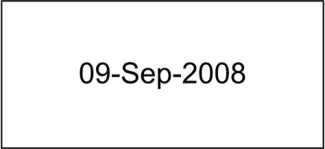
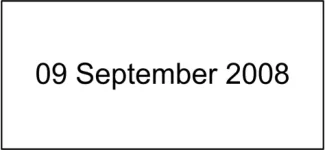
NHS applications can display dates in two formats, short and long, depending on the context. Figure 1 and Figure 2 show examples of the recommended short date format and long date format respectively.
Figure 1: Short Date Format
Figure 2: Long Date Format
General guidance which is applicable irrespective of the chosen format is presented first, followed by the specific guidance for each format.
Important
The visual representations used within this document to display the guidance are illustrative only. They are simplified in order to support understanding of the guidance points. Stylistic choices, such as colours, fonts or icons are not part of the guidance and unless otherwise specified are not mandatory requirements for compliance with the guidance in this document.
2.1 General Date Display
In this section, general guidance is listed followed by the supporting rationale. This rationale supports the additional guidance described later in this document.
2.1.1 Guidance
D+Ta-0002 Display the month textually, not numerically Mandatory
D+Ta-0003 Display the month with only the first letter in capitals Mandatory
D+Ta-0004 Display the year value numerically using four digits Mandatory
D+Ta-0005 Align dates when displaying dates in a vertical column, such as in a table Recommended
D+Ta-0016 When displaying the day of the week, use one of the following abbreviations: Mon, Tue, Wed, Thu, Fri, Sat and Sun
D+Ta-0017 Displaying the day of the week is optional, but when displayed, it must be placed immediately before the day value, with a single space separating the permitted abbreviated form of the day, from the day value
Recommended
Recommended
D+Ta-0022 Display null date using an appropriate value (for example, ‘Unknown’ or ‘Not recorded’) Mandatory
Table 2: Guidance – Date Formatting
Page 4
Copyright ©2013 Health and Social Care Information Centre
HSCIC Controlled Document
2.1.2 Rationale
Errors in interpreting dates correctly occur when individual elements, such as the day, month and year values, are represented numerically. Additionally, errors can occur when one element is mistaken for another element, such as between the day and month values. The main factors that a date display format must address are certainty (or removal of ambiguity), clarity and readability. The guidance proposed in this document aims to meet those factors by:
- Certainty
Providing certainty for the year element by enforcing a four-digit format
Providing certainty for the day element by inclusion of a leading zero
Removing ambiguity between the day and month elements through the use of words to represent the month
Providing confirmation of the date by showing the day of the week alongside it
- Clarity
Providing a clear distinction between elements through the inclusion of a single hyphen as a separator
Increasing clarity through the use of words to represent the month
- Readability
Providing a more comfortable user experience:
Through a natural reading pattern, and
By displaying month names where only the first letter is capitalised (for example, April and May), as studies have shown this to be the best readable form and uppercase (for example, APRIL and MAY) to be the least readable form
Numerous organisations have existing standards for displaying date information in applications. During the creation of this guidance, the following sources were consulted:
-
International Standards Organization (ISO), standard ISO 8601:2004 {R6}
-
World Wide Web Consortium (W3C), Dates and Time {R3 and R7}
-
The European Union
-
UK Government Data Standards Catalogue {R8}
-
Microsoft [®] Corporation, Microsoft Manual of Style for Technical Publications, Third Edition
{R9}
We have not adopted the ISO standard because it presents date elements in an unfamiliar sequence for users brought up in the UK, and allows ambiguity between date and month elements as both are represented numerically. We have taken the W3C standard as the basis for this guidance, but extended it by requiring the day element to be two digits, and for a separator to be provided between date elements.
The day of the week can be a useful item to have in a range of scenarios (such as, when scheduling appointments, arranging handover and so on) as it is a natural way for people to think about, and order, their commitments. Knowing the day of the week can help reduce the likelihood of a date being mis-interpreted. Additionally, the day of the week is more easily remembered by many people. These factors can contribute to greater efficiencies,therefore, the use of the day of the week is encouraged where appropriate. Examples where the day of the week is not relevant, and should not be displayed, are when displaying a patient’s date of birth or date of death.
Page 5
Copyright ©2013 Health and Social Care Information Centre
HSCIC Controlled Document
Guidance recommending the alignment of dates displayed in a tabular form is included to encourage consistency of data presentation and enhance readability when a user scans for example a list of dates. No guidance is included mandating or recommending specific alignment to the left or right because there is a need to give developers of clinical applications some flexibility in the design of their systems. If right alignment was mandatory it is recognised that certain data, for example months may not be perfectly aligned. This would not be an issue were monospaced fonts used.
2.2 Short Date Format
In all instances of clinical usage affecting patient treatment, including patient identification, NHS applications must display dates as short dates in the form DD-MMM-YYYY, where:
-
DD is the two-digit day
-
MMM is the correctly abbreviated month name
-
YYYY is the four-digit year
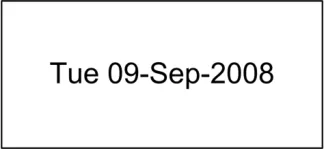
Figure 3 shows examples of the recommended short date format.
Figure 3: Short Date Format
2.2.1 Guidance
D+Ta-0006 Display dates using the short date format in all instances of clinical usage affecting patient treatment, including patient identification
D+Ta-0018 Display the day value using two digits (values less than 10 should appear with a zero in the first position)
D+Ta-0007 Display the month as a three letter abbreviation: Jan, Feb, Mar, Apr, Jun, Jul, Aug, Sep, Oct, Nov, and Dec, with May being displayed in full
Mandatory
Mandatory
Mandatory
D+Ta-0008 When displaying the month, do not include any punctuation, such as a full stop Mandatory
D+Ta-0009 Use a single hyphen to separate the day and month, and the month and year Mandatory
D+Ta-0010 When using the short date format, ignore the user’s regional settings Mandatory
Table 3: Short Date Formatting Guidance
Page 6
Copyright ©2013 Health and Social Care Information Centre
HSCIC Controlled Document
2.2.2 Examples of Correct Usage
DD-MMM-YYYY 01-Jan-2008
Tue 01-Jan-2008
28-Feb-2008
Thu 28-Feb-2008
05-Apr-2008
Sat 05-Apr-2008
31-Dec-2008
Wed 31-Dec-2008
Table 4: Correct Date Formatting Examples
The date is complete, clear, and unambiguous.
2.2.3 Examples of Incorrect Usage
D-MM-YY
DD-MM-YYYY
DD/MM/YYYY
DD.MM.YYYY
DD MM YYYY
D-MMM-YYYY
DD-MMM-YY
D-MMM-YY
DD/MMM/YYYY
DD.MMM.YYYY
DD MMM YYYY
Table 5: Incorrect Date Formatting Examples
2.2.4 Rationale
8-04-08
08-04-2008
08/04/2008
08.04.2008
08 04 2008
8-Apr-2008
08-Apr-08
8-Apr-08
08/Apr/2008
08.Apr.2008
08 Apr 2008
Patient Safety Critical
These examples lack certainty. The day and month elements are ambiguous causing confusion and a high chance of misinterpretation errors.
Lack of Completeness
These examples lack clarity because the day and/or year elements do not display complete information.
Lack of Readability
These examples lack readability because the separator is unlikely to be noticed.
Lack of Distinctiveness
This example lacks clarity when displayed in a banner context with other data types, such as NHS Number. The following examples illustrate this issue:
401 023 2137 08 Apr 2008
08 Apr 2008 401 023 2137
The short date format presents dates in a concise, easily readable and unambiguous form. This is achieved through inclusion of hyphen separators between day, month and year elements, and presentation of the month value as an abbreviated word except in the case of May. It must be used in all cases where the NHS application displays dates that affect patient treatment and identification. Examples of such dates are:
-
Date of birth
-
Medication ‘start’ and ‘end’ dates
-
Appointment dates
Additionally, the short date format provides accessibility advantages:
Page 7
Copyright ©2013 Health and Social Care Information Centre
HSCIC Controlled Document
- For screen magnification users, the short date format confers an advantage over the long
date format by providing an unambiguous format within a smaller horizontal space
- For screen reader users, the format successfully distinguishes between day, month and
year elements. The hyphen will cause no problems and may assist with the separation of the date elements. However, in the short date format, the majority of month names are read out in unambiguous syllables. Possible issues are caused by “Apr”, because a clear syllable sound is not formed, while “Jun” and “Jul” generate similar sounds. Some screen readers (for example, JAWS) implement common pattern recognition to improve their renderings of standard date formats and understand Windows [®] settings for separators, but this behaviour is not standardised across readers and cannot be presumed
2.3 Long Date Format
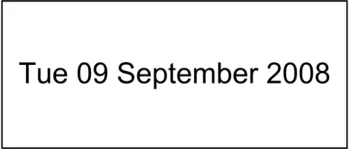
NHS clinical applications must present dates in the long date format in all documents intended for a patient, such as, patient information leaflets, letters, consent forms, and appointment cards.
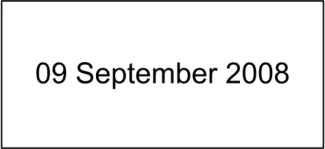
Figure 4 shows examples of the recommended long date format.
Figure 4: Long Date Format
2.3.1 Guidance
D+Ta-0011 Use the long date format when communicating with the patient Mandatory

D+Ta-0019 Display the day value using two digits (values less than 10 should appear with a zero in the first position, unless the day value is displayed in ordinal form)
Mandatory
D+Ta-0012 Display the month name in full Mandatory
D+Ta-0013 Use a single whitespace to separate the day and month, and the month and year Mandatory
D+Ta-0014 When using the long date format, follow the user’s default regional settings ignoring any changes made by the user to these default settings
Mandatory
D+Ta-0015 Use the long date format when interacting with screen readers Recommended
D+Ta-0020 When displaying the day value as an ordinal number, the suffix used must be one of the following: st, nd, rd, th
D+Ta-0021 When displaying the day value as an ordinal number, the two-letter suffix must be displayed in lower case and as a superscript immediately after the number
Table 6: Guidance – Long Date Formatting
Copyright ©2013 Health and Social Care Information Centre
Mandatory
Mandatory
Page 8
HSCIC Controlled Document
2.3.2 Examples of Correct Usage
DD Month YYYY 01 January 2008
1 [st] January 2008
22 February 2008
22 [nd] February 2008
03 April 2008
3 [rd] April 2008
14 December 2008
14 [th] December 2008
Table 7: Correct Date Formatting Examples
The date is complete, clear, and unambiguous.
2.3.3 Examples of Incorrect Usage
DD MM YYYY
DD-MM-YYYY
DD/MM/YYYY
DD.MM.YYYY
DD MM YYYY
D Month YYYY
DD Month YY
D Month YY
DD/Month/YYYY
DD.Month.YYYY
08 04 2008
08-04-2008
08/04/2008
08.04.2008
08 04 2008
8 Apr 2008
08 April 08
8 Apr 08
08/April/2008
08.April.2008
DD MM YYYY 08th April 2008
2ND April 2008
1sT April 2008
23Rd April 2008
Patient Safety Critical
These examples lack certainty. The day and month elements are ambiguous causing confusion and a high chance of misinterpretation errors.
Lack of Completeness
These examples lack clarity because the day and/or year elements do not display complete information.
Lack of Readability
These examples lack readability because the separator is unlikely to be noticed.
Patient Safety Critical
These examples may be confused with medication. As the abbreviation is not in superscript form, the number may be misinterpreted as unit of measurement of a medication.
Table 8: Incorrect Date Formatting Examples
2.3.4 Rationale
In addition to the rationale described here, much of section 2.1.2 also applies.
When communicating with patients and other non-clinical readers, such as in notification letters for patients, a non-technical date format is appropriate. The need to eliminate ambiguity and maximise readability, remains. Furthermore, there is a need to ensure that the date format is understood correctly by people from all over the world. Regional settings may be used where, for example, a local community follows a language other than English. The long date format meets these requirements and must therefore be used in all communications with non-clinical readers.
The ordinal form of the date, in the long date format, is the form in which dates are spoken, and is commonly used when writing letters. It is also a format which modern word-processor software supports, for example, by automatically superscripting a suffix (such as “rd”) upon typing. We have considered whether or not the four suffixes used with numbers to create the ordinal form, can be confused for units of medications. The suffix “st” can be confused, as it can mean any of the following:
Page 9
Copyright ©2013 Health and Social Care Information Centre
HSCIC Controlled Document
-
ST – Sinus Tachycardia
-
ST – Soft Tissue
-
st - standing
However, this guidance mitigates the risk of misinteretation, by requiring the suffix to be superscripted. Additionally, the ordinal will always be displayed alongside the name of a month, further minimising the risk of misinterpretation.
The long date format is the preferred format for screen reader users, because the month names are read out in their entirety. Screen readers may not read the ordinal number correctly, but their users are likely to be familiar with the form spoken by the reader, and will not be unduly confused.
Page 10
Copyright ©2013 Health and Social Care Information Centre
HSCIC Controlled Document
3 DOCUMENT INFORMATION
3.1 Terms and Abbreviations
CUI Common User Interface
ISO International Organization for Standardization
NHS National Health Service
NHS CFH NHS Connecting for Health
W3C World Wide Web Consortium
Table 9: Terms and Abbreviations
3.2 Definitions
NHS Entity Within this document, defined as a single NHS organisation or group that is operated within a single technical infrastructure environment by a defined group of IT administrators.
The Authority The organisation implementing the NHS National Programme for IT (currently NHS Connecting for Health).
Current best practice Current best practice is used rather than best practice, as over time best practice guidance may change or be revised due to changes to products, changes in technology, or simply the additional field deployment experience that comes over time.
Table 10: Definitions
3.3 Nomenclature
This section shows how to interpret the different styles used in this document to denote various types of information.
3.3.1 Body Text
Code Monospace
Script
Other markup languages
Interface dialog names Bold
Field names
Controls
Folder names Title Case
File names
Table 11: Body Text Styles
Page 11
Copyright ©2013 Health and Social Care Information Centre
HSCIC Controlled Document
3.3.2 Cross References
Current document – sections Section number only
Current document – figures/tables Caption number only
Other project documents Italics and possibly a footnote
Publicly available documents Italics with a footnote
External Web-based content Italics and a hyperlinked footnote
Table 12: Cross Reference Styles
3.4 References
R1. World Wide Web Consortium (W3C) http://www.w3.org
R2. International Organization for Standardization (ISO) http://www.iso.org
R3. World Wide Web Consortium (W3C) FAQ: Date formats http://www.w3.org/International/questions/qa-date-format
R4. NHS CUI Design Guide Workstream – Design Guide Entry – Date and Time Input 3.0.0.0
R5. NHS CUI Design Guide Workstream – Design Guide Entry – Time Display 4.0.0.0
R6. ISO 8601:2004 http://www.iso.org/iso/iso_catalogue/catalogue_tc/catalogue_detail.htm?csnumber=40874
(See also Numeric representation of Dates and Time – http://www.iso.org/iso/en/prods- services/popstds/datesandtime.html)
R7. World Wide Web Consortium (W3C): Dates and Time http://www.w3.org/International/O-time
R8. UK Government Data Standards Catalogue http://www.govtalk.gov.uk/gdsc/html/noframes/Date-1-0-Release.htm
R9. Microsoft Manual of Style for Technical Publications, Third Edition http://www.microsoft.com/mspress/books/6074.aspx
Table 13: References
Copyright:
You may re-use this information (excluding logos) free of charge in any format or medium, under the terms of the Open Government Licence. To view this licence, visit nationalarchives.gov.uk/doc/open-government-licence or email psi@nationalarchives.gsi.gov.uk.
Page 12
Copyright ©2013 Health and Social Care Information Centre