Date and Time Display
Date and Time Display
Source PDF: datetimedispqig.pdf
Quick Implementation Guide
Edition 1 22 [nd] April 2010
Copyright ©2013 Health and Social Care Information Centre
Duration Display
11
This document was prepared for NHS Connecting for Health which ceased to exist on 31 March 2013. It may contain references to organisations, projects and other initiatives which also no longer exist. If you have any questions relating to any such references, or to any other aspect of the content, please contact cuistakeholder.mailbox@hscic.gov.uk
Copyright: You may re-use this information (excluding logos) free of charge in any format or medium, under the terms of the Open Government Licence. To view this licence, visit nationalarchives.gov.uk/doc/open-governmentlicence or email psi@nationalarchives.gsi.gov.uk.
1
Copyright ©2013 Health and Social Care Information Centre
Guidance
Introduction
Checking a date, time or duration is a small but vital and extremely frequent aspect of clinical care. Health care professionals may encounter a variety of formats for displaying those values. Such ambiguities can lead to misinterpretation, with clear implications for patient safety.
Therefore, it is essential to implement a consistent format for the display of dates, times and duration across clinical systems.
Important
Although it contains all of the guidance points, this document omits supporting information and is therefore not intended as a substitute for the full NHS CUI documents Date Display [1 ] and Time Display [2] . Refer to those documents for the definitive statement of the design guidance in this area.
The visual representations used to display the guidance are illustrative only. Stylistic choices (for example, display font used), unless otherwise specified, are not part of the guidance and are therefore not mandatory requirements.
1 Design Guide Entry – Date Display (v5.0.0.0)
2 Design Guide Entry – Time Display (v4.0.0.0)
Copyright ©2013 Health and Social Care Information Centre
2
Guidance
Date Display
| 14-Aug-1980 | Col2 |
|---|---|
month
D+Ta-0002
Display the month textually, not numerically
Mandatory
D+Ta-0003
Display the month with only the first letter in capitals
Mandatory
D+Ta-0008
When displaying the month, do not include any punctuation, such as a full stop
Mandatory
D+Ta-0004

numerically using four digits
year
01-Jan-1994
06-Jan-1997
21-Feb-1997
28-Mar-1999
14-Aug-2001
Mandatory
D+Ta-0005
Align dates when displaying dates in a vertical column, as in a table
Recommended
Copyright ©2013 Health and Social Care Information Centre
3
Date Display
Guidance
D+Ta-0016
When displaying the day of the week, use one of the illustrated abbreviations
Recommended
D+Ta-0017
| Mon | Monday |
|---|---|
| Tue | Tuesday |
| Wed | Wednesday |
| Thu | Thursday |
| Fri | Friday |
| Sat | Saturday |
| Sun | Sunday |
Displaying the day of the week is optional but when displayed, it must be placed immediately before the day
| Tue 05-Jan-2009 | Col2 |
|---|---|
day of the week
value, with a single space separating the permitted abbreviated form of the day, from the day value
Unknown
Not recorded
Recommended
D+Ta-0022
Display null date using an appropriate value (for example ‘Unknown’ or ‘Not recorded’)
Mandatory
Copyright ©2013 Health and Social Care Information Centre
4
Guidance
Date Display
Short Date Format
| 01-Jan-1999 | Col2 | Col3 |
|---|---|---|
| Tue 05-Jan-2009 | Tue 05-Jan-2009 | Tue 05-Jan-2009 |
| 14-Aug-1980 | 14-Aug-1980 | 14-Aug-1980 |
| DD-Mmm-YYYY | DD-Mmm-YYYY | DD-Mmm-YYYY |
hyphens
D+Ta-0009
Use a single hyphen to separate the day and month, and the month and year
Mandatory
D+Ta-0006
Display dates using the short date format in all instances of clinical usage affecting patient treatment, including patient identification
Mandatory
D+Ta-0010
When using the short date format, ignore the user’s regional settings
Mandatory
D+Ta-0018
two digits (values less than 10 should appear with a zero in
| 14-Aug-1980 | Col2 |
|---|---|
day
the first position)
Mandatory
D+Ta-0007
letter abbreviation, as illustrated, with May being displayed in full
Mandatory
| Jan | January |
|---|---|
| Feb | February |
| Mar | March |
| Apr | April |
| May | May |
| Jun | June |
| Jul | July |
|---|---|
| Aug | August |
| Sep | September |
| Oct | October |
| Nov | November |
| Dec | December |
5
Copyright ©2013 Health and Social Care Information Centre
Guidance
Date Display
Long Date Format
01 January 1999
5 [th] January 2009
14 August 1980
DD Month YYYY
| 01 January 1999 | Col2 |
|---|---|
day
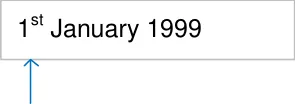
D+Ta-0011
Use the long date format when communicating with the patient
Mandatory
D+Ta-0014
When using the long date format, follow the user’s default regional settings ignoring any changes made by the user to these default settings
Mandatory
D+Ta-0015
Use the long date format when interacting with screen readers
Recommended
D+Ta-0019
Display the day value using two digits (values less than 10 should appear with a zero in the first position, unless the day value is displayed in ordinal form)
Mandatory
Copyright ©2013 Health and Social Care Information Centre
day
6
Guidance
Date Display
Long Date Format
| st | 1st |
|---|---|
| nd | 2nd |
ordinal number
D+Ta-0020
When displaying the day value as an ordinal number, the suffix used must be one of those illustrated
Mandatory
D+Ta-0021
When displaying the day value as an ordinal number, the two-letter suffix must be displayed in lower case and as a superscript immediately after the number
Mandatory
D+Ta-0012
| rd | 3rd |
|---|---|
| th | 4th |
| Col1 | Col2 |
|---|---|
| 1st January 1999 | 1st January 1999 |
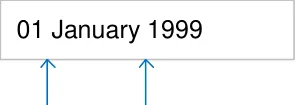
| 01 January 1999 | Col2 |
|---|---|
7
Mandatory
month
D+Ta-0013
Use a single whitespace to separate the day and month, and the month and year
space space
Mandatory
Copyright ©2013 Health and Social Care Information Centre
Time Display
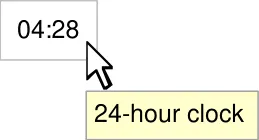
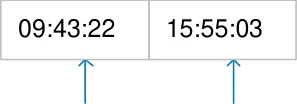
23:54
04:28
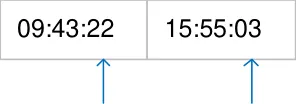
| 09:43:22 | Col2 | 15:55:03 | Col4 |
|---|---|---|---|
hours hours
| 09:43:22 | Col2 | 15:55:03 | Col4 |
|---|---|---|---|
minutes minutes
seconds seconds
Guidance
D+Tb-0001
Display time using the 24-hour clock only
Mandatory
D+Tb-0002
Display an exact time as HH:mm
Mandatory
D+Tb-0032
Provide indication to the user that the 24-hour clock is in use
Mandatory
D+Tb-0003
Display hours using two digits (values less than 10 should appear with a zero in the first position)
Mandatory
D+Tb-0004
Display minutes using two digits (values less than 10 should appear with a zero in the first position)
Mandatory
D+Tb-0005
Display seconds as two digits (values less than 10 should appear with a zero in the first position)
Mandatory
Copyright ©2013 Health and Social Care Information Centre
8
 Guidance
Time Display
| 09:43:22 | Col2 | 15:55:03 | Col4 |
|---|---|---|---|
colon colon
colon colon
| Tue 05-Jan-2009 09:43:22 | Col2 |
|---|---|
space
D+Tb-0006
Separate the hours and minutes with a colon
Mandatory
D+Tb-0007
Separate the minutes and seconds with a colon
Mandatory
D+Tb-0008
Separate date and time values with a white space
Mandatory
D+Tb-0009
9
00:00 Display midnight as 00:00
Mandatory
D+Tb-0010
Display the last minute in the 23:59 day as 23:59
Mandatory
D+Tb-0011
Unknown Display null times using an appropriate value, for example, ‘Unknown’ and ‘Not recorded’
Not recorded Mandatory
Copyright ©2013 Health and Social Care Information Centre
Time Display
15:55:03
From 06:23 to 08:23
Approx 02:00
Guidance
D+Tb-0012
Display seconds only if required
Recommended
D+Tb-0013
Display time ranges as two adjacent time displays, each identified by a contextually appropriate label, such as, ‘From’ and ‘To’
Recommended
D+Tb-0014
Precede the display of an approximate time value with the word ‘Approx’
Mandatory
D+Tb-0015
Display the time value using the guidance for exact time
Mandatory
D+Tb-0016
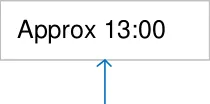
‘Approx’ and the HH element of the time display
space
Mandatory
Copyright ©2013 Health and Social Care Information Centre
10
Guidance
Duration Display
D+Tb-0017
Display durations using the illustrated values, as appropriate
Mandatory
D+Tb-0033
Ensure the illustrated minimal set of abbreviations is supported
Mandatory
D+Tb-0018
Use whole numbers for time duration, for example,1, 5, 60. Do not use decimals or fractions, for example, 0.5, 1.5, ¾
Mandatory
D+Tb-0034
Allow the set of duration unit abbreviations to be extended appropriately, for example, ‘hrs’ as well as ‘hr’. Ensure that any additions are unique within the entire set
Recommended
D+Tb-0026
Omit zero-valued units from the display
Mandatory
Copyright ©2013 Health and Social Care Information Centre
| hr | hours |
|---|---|
| min | minutes |
| sec | seconds |
| y | years |
|---|---|
| m | months |
| w | weeks |
| d | days |
4hr 32min 16sec
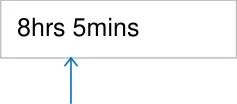
8hrs 5mins
8hr 10sec
Above for a duration of eight hours and ten seconds, the minutes are omitted
11
Guidance
Duration Display
| 8hrs 5mins | Col2 | Col3 |
|---|---|---|
no space between
values and units
space
5y 5m 5d 5min 55sec
Years, months, days, minutes, seconds
Approx 2hr 40min
| Approx 2hr 40min | Col2 |
|---|---|
space
D+Tb-0027
Display duration values and their respective units as pairs, with no intervening whitespace between
Mandatory
D+Tb-0028
Use a white space as the separator when displaying a duration composed of more than one unit
Mandatory
D+Tb-0029
Display time duration units in decreasing order of significance
Mandatory
D+Tb-0030
Precede the display of an approximate duration value with the word ‘Approx’
Mandatory
D+Tb-0031
Leave a white space between the ‘Approx’ and the first element of an approximate duration value
Mandatory
Copyright ©2013 Health and Social Care Information Centre
12