Date and Time Input
Date and Time Input
Source PDF: datetimeqig.pdf
Quick Implementation Guide
Edition 1 22 [nd] April 2010
Copyright ©2013 Health and Social Care Information Centre
This document was prepared for NHS Connecting for Health which ceased to exist on 31 March 2013. It may contain references to organisations, projects and other initiatives which also no longer exist. If you have any questions relating to any such references, or to any other aspect of the content, please contact cuistakeholder.mailbox@hscic.gov.uk
Copyright: You may re-use this information (excluding logos) free of charge in any format or medium, under the terms of the Open Government Licence. To view this licence, visit nationalarchives.gov.uk/doc/open-governmentlicence or email psi@nationalarchives.gsi.gov.uk.
1
Copyright ©2013 Health and Social Care Information Centre
Guidance
Introduction
The entry of date and time information is a fundamental function within clinical and administrative processes. Therefore, healthcare professionals should have a clear mechanism for entry of an accurate date or time value, and be assisted to disambiguate entries when necessary.
Important
Although it contains all of the guidance points, this document omits supporting information and is therefore not intended as a substitute for the full NHS CUI document Date and Time Input [1] . Refer to that document for the definitive statement of the design guidance in this area.
The visual representations used to display the guidance are illustrative only. Stylistic choices (for example, display font used), unless otherwise specified, are not part of the guidance and are therefore not mandatory requirements.
1 Design Guide Entry – Date and Time Input (v3.0.0.0)
Copyright ©2013 Health and Social Care Information Centre
2
Guidance
Date Input
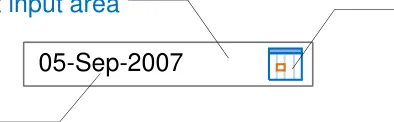
The basic date input control should comprise:
   - A free text input area
   - A calendar control
   - A default input, dependent on the context
in which the control is used
- A facility to disambiguate the date enteredA calendar control
3
A default input
Above Elements of a basic date input control
Though labels are not covered in this guidance, the control should have a short and descriptive label wherever it is used, for example ‘Date of Birth’.
Users should be able to input free text dates as fully specified dates, partially specified dates and arithmetic shortcuts.
The entry of partially specified dates will not be appropriate for every situation. Therefore, application designers should decide what types of dates are allowed for a given situation, based on the specific clinical context.
Copyright ©2013 Health and Social Care Information Centre
Guidance
Date Input
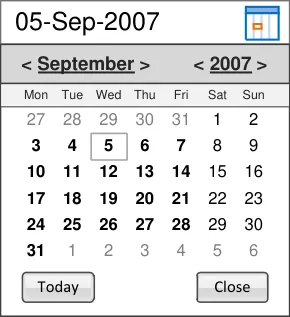
D+Tc-0001
Adopt the NHS Common User Interface standard for Date Display [1] for the format of any dates displayed within the date input control Mandatory
D+Tc-0002
Allow for both free text input of dates and the input of dates using a calendar control Mandatory
D+Tc-0004
Include the calendar icon within the boundary of the date input field
Mandatory
Copyright ©2013 Health and Social Care Information Centre
Calendar Control
Free Text Input
1 Design Guide Entry – Date Display (v5.0.0.0)
4
Guidance
Date Input
Free Text
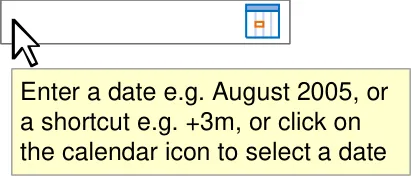
D+Tc-0003
Allow the date elements to be individually edited (day, month and year)
Mandatory
D+Tc-0006
Provide instructions on how to use the control, for example, via the use of tooltips. The instructions must contain details of the different date types that can be entered Mandatory
D+Tc-0008
Allow the input of ‘Unknown’ (or similar) to specify dates not known to the user Mandatory
Copyright ©2013 Health and Social Care Information Centre
5
Guidance
Date Input
Free Text
| + | For later dates |
|---|---|
| - | For earlier dates |
D+Tc-0046
Within the date input control, allow users to select the entire value to facilitate rapid editing or entry of arithmetic shortcuts relating to date (only)
Mandatory
D+Tc-0007
Allow users to enter arithmetic shortcuts, such as ‘+3m’ for three months later or ‘-2d’ for two days earlier. The relevant operators are as illustrated
Mandatory
Note Whole numbers are treated as positive by default
D+Tc-0041
Within the date input control, do not allow users to input arithmetic shortcuts relating to time
Mandatory
Copyright ©2013 Health and Social Care Information Centre
| d | days |
|---|---|
| w | weeks |
| m | months |
|---|---|
| y | years |
6
Guidance
Date Input
Free Text
7
Display a default input within the free text date input control
| 01-Jan-2010 | Col2 | Col3 |
|---|---|---|
| 01-Jan-2010 |
Mandatory
D+Tc-0042
When displaying a default input within the free text input box, provide the user with an example of date with either a non-specific value (such as the input mask) or a date appropriate to the clinical context (for example, ‘today’s date’)
Recommended
Copyright ©2013 Health and Social Care Information Centre
| DD-Mmm-YYYY | Col2 | Col3 |
|---|---|---|
| DD-Mmm-YYYY |
Guidance
Date Input
Calendar
| 05-Sep-2007 | Col2 | Col3 | Col4 |
|---|---|---|---|
| 05-Sep-2007 |
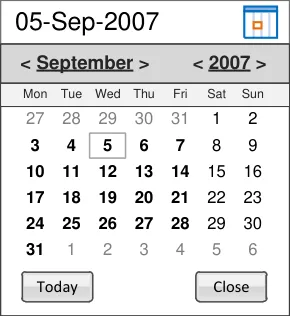
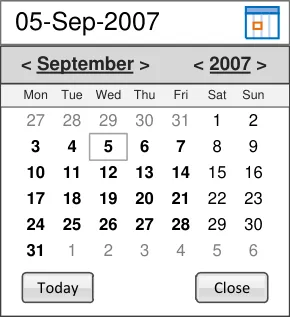
D+Tc-0010
Provide access to the calendar control via a calendar icon
Mandatory
D+Tc-0017
Allow the calendar to be closed either when the user clicks away from the calendar or clicks on the calendar icon
Mandatory
D+Tc-0011
Provide the ability to select a month independently, and a year independently. Signify the interactivity of these elements by suitable styling, for example as buttons or links, and ensure that they have descriptive tooltips
Mandatory
Note A partially specified date can be entered using the calendar control by clicking either the month or the year
Copyright ©2013 Health and Social Care Information Centre
8
Guidance
Date Input
Calendar
D+Tc-0016
Provide access to relevant instructional text (for example, via tooltips) on the clickable elements in the calendar header
Mandatory
D+Tc-0015
Include the days of the week within the calendar view
Mandatory
D+Tc-0014
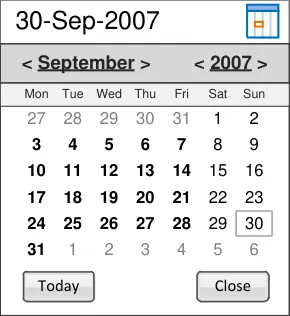
Provide a visual indication of the current date
Mandatory
D+Tc-0013
Provide a link or button to close the control
Mandatory
D+Tc-0012
Provide a button to allow the user to enter today’s date
Mandatory
Copyright ©2013 Health and Social Care Information Centre
| 05-Sep-2007 | Col2 | Col3 |
|---|---|---|
| < September> < 2007> | < September> < 2007> | < September> < 2007> |
| Mon Tue Wed Thu Fri Sat Sun | Mon Tue Wed Thu Fri Sat Sun | Mon Tue Wed Thu Fri Sat Sun |
| 27 28 29 30 31 1 2 3 4 5 6 7 8 9 10 11 12 13 14 15 16 17 18 19 20 21 22 23 24 25 26 27 28 29 30 31 1 2 3 4 5 6 Today Close Select a month or y clicking in the head select a day by clic | 27 28 29 30 31 1 2 3 4 5 6 7 8 9 10 11 12 13 14 15 16 17 18 19 20 21 22 23 24 25 26 27 28 29 30 31 1 2 3 4 5 6 Today Close Select a month or y clicking in the head select a day by clic | 27 28 29 30 31 1 2 3 4 5 6 7 8 9 10 11 12 13 14 15 16 17 18 19 20 21 22 23 24 25 26 27 28 29 30 31 1 2 3 4 5 6 Today Close Select a month or y clicking in the head select a day by clic |
| 27 28 29 30 31 1 2 3 4 5 6 7 8 9 10 11 12 13 14 15 16 17 18 19 20 21 22 23 24 25 26 27 28 29 30 31 1 2 3 4 5 6 Today Close Select a month or y clicking in the head select a day by clic | 1 2 3 4 5 6 y Close Select a month or y clicking in the head select a day by clic | 1 2 3 4 5 6 y Close Select a month or y clicking in the head select a day by clic |
9
Guidance
Date Input
Calendar
D+Tc-0019
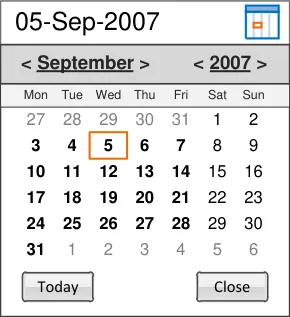
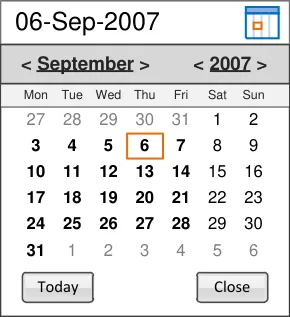
Ensure that the control can be operated effectively via the keyboard (for example, using arrow keys)
Mandatory
D+Tc-0018
Display the appropriate value in the free text field following selection of the date
Mandatory
Copyright ©2013 Health and Social Care Information Centre
10
Guidance
Date Input
Disambiguation
| 05/04/2 | Provide free text Mandator D+Tc-0005 |
|---|---|
| 05/04/2009 | |
| Did you mean: 05-Apr-2009 or04-May-2009 or different date? | Did you mean: 05-Apr-2009 or04-May-2009 or different date? |
D+Tc-0038
Provide the facility for a user to disambiguate a date entered via the date control
Mandatory
D+Tc-0039
Display a message dialog box with appropriate instructional text if the data is ambiguous or incomplete
Mandatory
D+Tc-0040
Display a maximum of two suggestions based on the data entered, plus an option to re-enter the value in the input field. Selection of a suggested value enters that value into the control
Recommended
Copyright ©2013 Health and Social Care Information Centre
11
Guidance
Time Input
The time input control should comprise:
 - An input area
 - A default input, dependent on the context
in which the control is used
 - A spin control
 - A tick box to indicate if the time is
approximate (where appropriate)
A default input
An input area
| 12:00 | Col2 |
|---|---|
| 12:00 |
A spin control
A tick box to indicate if the time is approximate
Above Elements of a basic time input control
The option to mark a time as approximate may not be appropriate for all situations, so the feature should be enabled in the control as required by the clinical context.
Though labels are not covered in this guidance, the control should have a short and descriptive label wherever it is used, for example ‘Time of Birth’.
Users can enter time in the input control as fully specified times, approximate times and arithmetic shortcuts, In addition, the ‘seconds’ element of time can be entered if required. The inclusion of seconds is at the discretion of the host ISV application.
Copyright ©2013 Health and Social Care Information Centre
12
Guidance
Time Input
D+Tc-0022
Use an ‘Approx’ check box to allow the user to indicate an approximate time
Mandatory
D+Tc-0020
Adopt the NHS Common User Interface standard for Time Display [1] for the format of any times displayed within the time input control
Mandatory
D+Tc-0021
Use the 24-hour clock only (rather than the 12-hour clock)
Mandatory
D+Tc-0023
Allow the time elements to be individually edited (hours, minutes and seconds)
Mandatory
Copyright ©2013 Health and Social Care Information Centre
| 23:35 | Col2 |
|---|---|
| 23:35 |
| 13:54 | Col2 |
|---|---|
| 13:54 |
| 13:54 | Col2 |
|---|---|
| 13:54 |
| 13:54 | Col2 |
|---|---|
| 13:54 |
| 123:54 | Col2 |
|---|---|
| 13:54 2 |
1 Design Guide Entry – Time Display (v4.0.0.0)
13
Guidance
Time Input
D+Tc-0047
| 13:54 | Col2 |
|---|---|
| 13:54 |
Within the time input control, allow users to select the entire
or entry of arithmetic shortcuts relating to time (only)
| +3h | Col2 |
|---|---|
| +3h |
Mandatory
D+Tc-0044
Within the time input control do not allow users to input arithmetic shortcuts relating to date
Mandatory
D+Tc-0025
Allow users to enter arithmetic shortcuts such as ‘+3h’ for three hours later and ‘-2m’ for two minutes earlier. The relevant operators are as illustrated
Mandatory
Note Whole numbers are treated as positive by default
| 16:54 | Col2 |
|---|---|
| 16:54 |
| + | For later times |
|---|---|
| - | For earlier times |
| h | hours |
| m | minutes |
| s | seconds |
Copyright ©2013 Health and Social Care Information Centre 14
Guidance
Time Input
| hh:mm:ss | Col2 |
|---|---|
| hh:mm:ss |
Enter a time using the 24hour clock, e.g. 13:05 or a shortcut, e.g. +3h.
D+Tc-0024
Provide access to instructions on how to use the control, for example, via the use of tooltips. The instructions must contain details of the different time types that can be entered
Mandatory
D+Tc-0043
Provide indication to the user that the 24-hour clock is in use
Mandatory
D+Tc-0026
Allow the entry of ‘Unknown’ (or similar) to specify times not known to the user
Mandatory
D+Tc-0027
Display a default input within the time input control
Mandatory
D+Tc-0045
When displaying a default input within the free text input box, provide the user with an example of time with either a non-specific value (such as the input mask) or a time appropriate to the clinical context
Recommended
Copyright ©2013 Health and Social Care Information Centre
| Un | Col2 |
|---|---|
| Un |
| Unknown | Col2 |
|---|---|
| Unknown |
| 16:00 | Col2 |
|---|---|
| 16:00 |
| 12:00 | Col2 |
|---|---|
| 12:00 |
Above A default time
| hh:mm:ss | Col2 |
|---|---|
| hh:mm:ss |
Above A default time with a non-specific value
15
Guidance
Time Input
D+Tc-0028
Increase/decrease the whole time by the least significant time unit if the entire value is selected or if no unit is selected
Mandatory
D+Tc-0029
Provide the ability to spin individual time units when selected
Mandatory
Copyright ©2013 Health and Social Care Information Centre
| 23:35:01 | Col2 |
|---|---|
| 23:35:01 |
| 23:35:02 | Col2 |
|---|---|
| 23:35:02 |
| 23:35:01 | Col2 |
|---|---|
| 23:35:01 |
| 22:35:01 | Col2 |
|---|---|
| 22:35:01 |
16
Guidance
Duration Input
Duration 15min 30sec
Duration 30 sec
Duration 15min 30sec
1 Design Guide Entry – Time Display (v4.0.0.0)
17
D+Tc-0030
Adopt the NHS Common User Interface standard for Time Display [1] for the format of any times displayed within the duration input control
Mandatory
D+Tc-0031
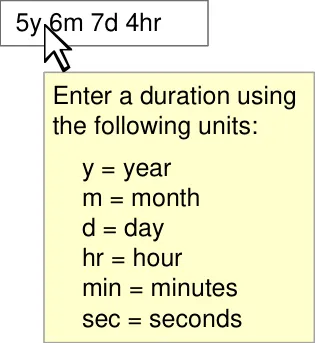
Provide access to instructions on how to use the control, for example, via the use of tooltips. The instructions must contain details of the different units that can be entered
Mandatory
D+Tc-0032
Allow the entry of time duration units either singly or in combination
Mandatory
Copyright ©2013 Health and Social Care Information Centre
Duration Input
Guidance
D+Tc-0033
Allow editing of the individual elements of a duration
Mandatory
D+Tc-0034
Ensure that the illustrated set of duration unit abbreviations is supported
Mandatory
D+Tc-0035
| hr | hours |
|---|---|
| min | minutes |
| sec | seconds |
| y | years |
|---|---|
| m | months |
| w | weeks |
| d | days |
Duration 5y 6m 7d 4hrs Allow the set of duration unit abbreviations to be extended appropriately, for example, ‘hrs’ as well as ‘hr’. Ensure that any additions are unique within the entire set
Recommended
D+Tc-0036
Duration 15min 30sec
Duration 15 min 30 sec
Allow the user to optionally enter white space within the duration input, for example ‘3 hr 5 min’ as well as ‘3hr 5min’
Recommended
Copyright ©2013 Health and Social Care Information Centre
18
Guidance
Duration Input
D+Tc-0037
Provide the facility for a user to disambiguate input which could be interpreted in more than one way, for example, ‘m’ (which could represent months or minutes)’
Recommended
| 6m | Col2 |
|---|---|
| Did you mean: 6 months or6 minutes? | Did you mean: 6 months or6 minutes? |
| 23:30 | Col2 |
|---|---|
| 23:30 |
| 23:30 | Col2 |
|---|---|
| 2 hrs | |
| This duration spans the change from GMT to BST. BST runs from 28-Mar-2010 01:00 to 31-Oct-2010 02:00. During BST, times will be automatically adjusted forward one hour such that 01:00 becomes 02:00. | This duration spans the change from GMT to BST. BST runs from 28-Mar-2010 01:00 to 31-Oct-2010 02:00. During BST, times will be automatically adjusted forward one hour such that 01:00 becomes 02:00. |
D+Tc-0048 D+Tc-0049
Where a time duration spans the change between GMT and BST, show a pop-up to inform the user that the system will automatically handle the data within the appropriate time zone
Recommended
Where a user adjusts time manually resulting in a time duration spanning a change between GMT and BST, show a pop-up to inform that user that the system will automatically adjust the data according to the appropriate time zone.
Recommended
Copyright ©2013 Health and Social Care Information Centre
19