Document Properties Document Title NHS Number Input and Display
 Prepared for
NHS Connecting for Health
Version 4.0.0.0 Baseline
Prepared by
Clinical Application and Patient Safety Project
NHS CUI Programme Team
cuistakeholder.mailbox@hscic.gov.uk
Prepared for
NHS Connecting for Health
Version 4.0.0.0 Baseline
Prepared by
Clinical Application and Patient Safety Project
NHS CUI Programme Team
cuistakeholder.mailbox@hscic.gov.uk

PREFACE
- PREFACE
- 1 INTRODUCTION
- 2 RECOMMENDATIONS AND GUIDANCE
- 3 DOCUMENT INFORMATION
- REVISION AND SIGNOFF SHEET
Source PDF: inputdisplay.pdf
Documents replaced by this document NHS Number Input and Display – User Interface Design Guidance 3.0.0.0 NHS Number Input and Display – User Interface Design Guidance 2.0.0.0 NHS Number Display 1.0.0.0 Documents to be read in conjunction with this document Accessibility Checkpoints for NHS Applications 1.0.0.0 Accessibility for Clinical Applications 1.0.0.0 This document was prepared for NHS Connecting for Health which ceased to exist on 31 March 2013. It may contain references to organisations, projects and other initiatives which also no longer exist. If you have any questions relating to any such references, or to any other aspect of the content, please contact cuistakeholder.mailbox@hscic.gov.uk Patient Safety Process The development lifecycle for this design guide includes an integrated patient / clinical safety risk assessment and management process. Known patient safety incidents relevant to this design guidance area have been researched and reviewed as part of ongoing development. The resulting guidance points aim to support mitigation of these known patient safety risks. In addition, the developers of this design guide have undertaken a patient safety risk assessment to identify new risks that could potentially be introduced by the guidance points in this document. Any potential risks identified have been assessed and managed to support the ongoing clinical safety case for this design guide. The Hazard Log records all the risks that have been identified during development and describes mitigatory actions that, in some cases, will need to be taken by users of this design guide. The Hazard Log is a live document that is updated as the design guide is developed and maintained. Until this design guide has received full Clinical Authority to Release (CATR) from the NHS Connecting for Health (CFH) Clinical Safety Group (CSG) – based on an approved Clinical Safety Case – there may be outstanding patient safety risks yet to be identified and mitigated. Additionally, users implementing applications that follow this design guide’s guidelines (for example, healthcare system suppliers) are expected to undertake further clinical safety risk assessments of their specific systems within their specific context of use. Refer to www.cui.nhs.uk for further information on the patient safety process and for the safety status and any relevant accompanying safety documentation for this design guide.
1 INTRODUCTION
This document describes the design guidance for input and display of the ‘NHS Number’. It describes the area of focus, provides guidance and recommendations, and explains the rationale behind the guidance and recommendations.
This document is intended for the use of anyone whose role includes screen design, implementation, or assessment of a National Health Service (NHS) clinical application. This document can be used as guidance for the:
- Specification of an input control and a display control for an NHS Number in a user
interface (UI)
- Implementation of an input control and a display control for an NHS Number within an
application
- Assessment of an input control and a display control for an NHS Number in an NHS clinical
application user interface
Note
Elements used within a software application are commonly referred to as a ‘control’. These can take many forms but the types referred to in this document will either be ‘input controls’ that can receive input from a user, such as a button, text box, option button (radio button) or check box, or ‘display controls’ such as a label, which can only display information.
Table 1 describes the changes made since the previous version of this guidance (Baseline version 3.0.0.0 dated 24-Jun-2009):
Deleted None
Modified None
Added Reference R10 (section 1.1)
Table 1: Changes Since the Last Baseline Version
1.1 Customer Need
The accurate identification of patients is vital to ensure that the correct patient receives the right care. This is a very frequent task and must necessarily be repeated every time a patient presents themselves, for example, to a receptionist, sometimes several times in one day. In addition to being accurate, the patient-identification task must therefore also be performed efficiently.
This patient identifier is the NHS Number and it is fundamental to the UK National Programme for IT (NPfIT). It is a national unique identifier that makes it possible to share patient information across the whole of the NHS safely, efficiently and accurately. As such, it is the key to unlocking services such as the NHS Care Records Service, Choose and Book or the Electronic Prescription Service, as described in the document NHS Number {R1} .
The NHS Number is a ten-digit number assigned to every one of the 56 million patients registered with GPs in England and Wales. Requirements are set out in NHS Number Standard for General Practice (England) {R10} . The first nine digits are the identifier, with the tenth used as a check digit to confirm the number’s validity. It will be read from screen displays and be correlated with information in different media, for example, wristbands (as described in Standardising wristbands improves patient safety {R2} ), paper records, and forms, to check that these show the same identifier. Unambiguous display enhances patient safety and application usability by enabling rapid
Page 1
Copyright ©2013 Health and Social Care Information Centre
HSCIC Controlled Document
correlation with paper records and forms on which the identifier is printed. Therefore, it should be presented in an easy-to-read and consistent format across all media.
The NHS Number will provide the means to efficiently integrate a patient’s data from disparate registers in a trust, combining this into a master register. Additional checks with the full set of patient information, such as family name, given name, gender, date of birth and address, are used for greater accuracy when matching for clinical purposes, as stated in General principles in the use of the NHS number {R3} .
Encouraging widespread use of the NHS Number is an important way of reducing the number of occasions when patients are incorrectly identified, which is a cause of clinical risk recognised by the National Patient Safety Agency (NPSA). In addition to wristbands, in When should I use the NHS Number? {R4}, NHS Connecting for Health (CFH) recommend, as a minimum, that the NHS Number is used on the following items:
-
Clinical records – detail and summaries
-
Referrals to other organisations – including electronic bookings
-
Clinic appointment letters
-
Test requests
-
Test results
-
Samples
-
Discharge notices
-
Payment by results
-
Practice-based commissioning
Therefore, the efficient input and display of the NHS Number is critical, and is discussed in this document.
1.2 Scope
This section defines the scope of this guidance document.
1.2.1 In Scope
This guidance is applicable to UIs such as those displayed on desktop or laptop computers. It is assumed that, as a minimum, these computers are capable of operating at a display resolution of 1024 x 768, and have a keyboard and pointing device. The following items are in scope:
-
Input of a fully specified NHS Number
-
Display of a fully specified NHS Number
1.2.2 Out of Scope
This section defines areas that are not covered in this guidance. Although there may be specific risks associated with these areas that are not addressed in this guidance, it is likely that the principles in this guidance will extend to the input and display of an NHS number in many of the areas listed below.
Page 2
Copyright ©2013 Health and Social Care Information Centre
HSCIC Controlled Document
The following items are out of scope:
- Validation - Conformance to the required format and checksum calculation is defined in
the UK Government Data Standards Catalogue {R5} and is outside the scope of this guidance, as is validation that a given NHS Number is that of the stated person
- Multi-language applications - Languages that use right-to-left writing, such as Arabic, the
Cyrillic alphabet such as Russian, or ideograms such as Japanese
- Display styles - Choice of display font size, background and foreground text colour will
affect the readability of NHS Numbers, as with all other displayed text
- Other patient identification numbers - Any locally allocated patient identification number
used in a hospital’s Patient Administration System (PAS) or other systems
- Bar code representation - The display on a wristband of an NHS Number in the form of a
bar code
- Reduced-size form factors - This guidance does not cover reduced-size form factors,
such as personal digital assistants (PDAs) and such other small mobile devices
- Data storage and transmission - This guidance relates only to the display layer of a
clinical application, and does not prescribe how NHS Numbers should be stored. It is assumed that all applications will be capable of transforming an NHS Number stored in an arbitrary format, into that prescribed by this guidance, without error
- Data history and provenance - The recording of dates for when an NHS Number is valid
is left to the designer of the NHS clinical application
- Form design - Typically an NHS Number will be entered in a form in which a user is asked
to enter additional information such as name and contact address. This guidance does not address form-level aspects such as the positioning of labels, error messages, or how mandatory fields should be displayed
Note
Listing an item as out of scope does not classify it as unimportant. Project time and resource constraints inevitably restrict what can be in scope for a particular release. It is possible that items out of scope for this release may be considered for a future release.
1.3 Dependencies and Assumptions
Compliance with other guidance is required as follows:
- The design of NHS clinical applications must conform to Accessibility Checkpoints for NHS
Applications {R6} and Accessibility for Clinical Applications {R7}
Important
The visual representations used within this document to display the guidance are illustrative only. Stylistic choices, unless otherwise specified, are not part of the guidance and are therefore not mandatory requirements for compliance with the guidance in this document.
Page 3
Copyright ©2013 Health and Social Care Information Centre
HSCIC Controlled Document
1.4 Key Principles
The following key principles have shaped the guidance in this document:
- Conforming to convention and existing best practice with which clinicians are already
familiar, so as to reduce the training requirements of clinical applications
-
Promoting data quality to reduce the occurrence of errors
-
Balancing the need for consistency and commonality across clinical applications with the
need to support Independent Software Vendor (ISV) requirements for flexibility
Page 4
Copyright ©2013 Health and Social Care Information Centre
HSCIC Controlled Document
2 RECOMMENDATIONS AND GUIDANCE
The guidance provided in this document is based upon a programme of user research, including:
- A desk-based research project looking at a range of information entry Web pages and
clinical applications
- A Web-based survey of 41 respondents from NHS clinicians and administrative staff, ISVs,
community pharmacists, and NHS CFH
- A Patient Safety Assessment
2.1 NHS Number Display
NHS Numbers will be read frequently by healthcare professionals and by patients, on computer monitors, as displayed by clinical applications, as well as on paper communications such as referral letters, appointment cards and test results. They must, therefore, be easy to read. As they are used to identify patients and match patient records, they must be displayed in full, to ensure these tasks are conducted accurately. The guidance for displaying the NHS Number takes these requirements into account.
2.1.1 Guidance
NUM-0001 Display the NHS Number in full, on a single line, without truncation or splitting it over multiple lines
NUM-0002 Display the NHS Number as three groups, with a single space included as a separator between groups, as follows:
The first group must consist of the first, second and third digits in order
The second group must consist of the fourth, fifth and sixth digits in order
The third group must consist of the seventh, eighth, ninth and tenth digits in order
Mandatory
Mandatory
NUM-0003 Support the copying of NHS Numbers by the user as part of the ‘Copy and Paste’ task Recommended
Table 2: Guidance for NHS Number Display
2.1.2 Examples of Correct Usage
with numbers grouped to improve screen reader performance
Table 3: Correct NHS Number Display Examples
2.1.3 Examples of Incorrect Usage
This example displays a very poor reading pattern because a single ten-digit number is beyond the normal capacity of short-term memory. This representation is likely to cause errors
Page 5
Copyright ©2013 Health and Social Care Information Centre
HSCIC Controlled Document
123456
Patient Safety Critical
9999 7890 The NHS Number is split over two lines making it
likely that users will not read all ten digits or assume that the hyphen is part of the number
99999 99999 12345 67890 Lack of Intuitive Structure
99 99 99 99 99 12 34 56 78 90 The display of more than four digits in a group or of
more than three groups does not make best use of short-term memory
999/999/9999 123/456/7890 Poor Readability
9999
7890
12345 67890
Lack of Intuitive Structure
99 99 99 99 99
12 34 56 78 90
Poor Readability
A space provides better separation; it also assists in differentiating the NHS Number from other numeric data items, such as dates and telephone numbers
999.999.9999
Table 4: Incorrect NHS Number Display Examples
2.1.4 Rationale
123/456/7890
123.456.7890
This section discusses the reasons underlying the guidance for displaying NHS Numbers.
2.1.4.1 Wrapping and Truncation
Readability is enhanced when the digits comprising the NHS Number can be read together. If the NHS Number is split over two lines, a hyphen will be inserted at the point at which the line breaks. This could potentially cause the reader to think that the NHS Number contains the hyphen. Alternatively, the continuation of the number on another line may not be noticed by the user, or may be read incorrectly.
2.1.4.2 Accessibility
The provision of a separator between number groups assists with interpretation of the number by screen readers. Without the separator, the numbers would often be read out as large numbers, which are difficult to deconstruct into their constituent numbers.
For example, the JAWS [®] for Windows screen reader reads 4010232137 as “Four billion and ten million two hundred and thirty two thousand one hundred and thirty seven”. However, the same screen reader software reads out the proposed patient identification number as a string of numbers. An inherent problem with screen readers is that the form the read-out numbers take is dependent on the numbers themselves. Some examples are:
-
401 023 2137 – read out as “four hundred and one zero two three twenty one thirty seven”
-
401 230 2137 – read out as “four hundred and one two hundred and thirty twenty one thirty
seven”
-
041 023 0104 – read out as “zero four one zero two three zero one zero four”
-
401 230 2009 – read out as “four hundred and one two hundred and thirty two thousand
and nine”
It is unfortunate that the audible reading patterns differ according to the specific number. However, this is considered acceptable because users of screen readers are accustomed to dealing with such numbers.
Page 6
Copyright ©2013 Health and Social Care Information Centre
HSCIC Controlled Document
2.2 NHS Number Input
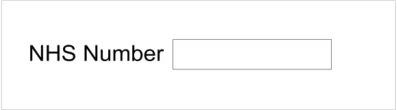
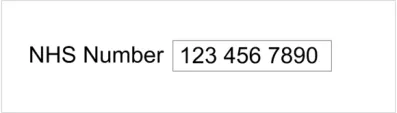
The purpose of the NHS Number input control is to enable the user to enter an NHS Number. The control is a ‘Text Input Box’ as shown in Figure 1. Typically, it would be preceded by a label as shown in Figure 2. Upon input, the control would display the number entered as illustrated in Figure 3.
Figure 1: Example of an NHS Number Control Without a Label
Figure 2: Example of an NHS Number Control with a Label
Figure 3: Example of an NHS Number Control with a Label (After Input)
Important
In the illustrations in this document, the text ‘NHS Number’ is provided as an example for a label. It is not part of the control and no guidance on the wording or positioning of this label is implied.
2.2.1 Hints, Prompts and Tooltips
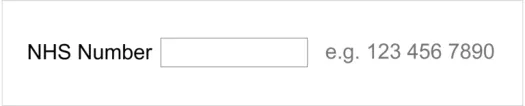
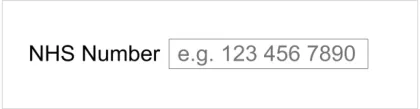
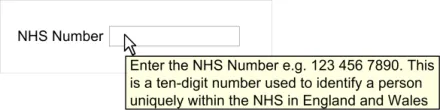
The input control may provide a hint, prompt, or tooltip. Hints are instructional text placed outside but adjacent, to the text input box. Prompts are commonly known as watermarks and comprise instructional text placed within the text input box. Tooltips are instructional text that appear when the mouse pointer is placed over the text input box. The wording of hints and prompts is left to the designers of NHS clinical applications. A suggestion is to use: ‘e.g. 123 456 7890’. A suggestion for a tooltip is: ‘Enter the NHS Number e.g. 123 456 7890. This is a ten-digit number used to identify a person uniquely within the NHS in England and Wales’. Examples of hints, prompts, and tooltips are shown in Figure 4, Figure 5 and Figure 6 respectively.
Figure 4: Example of an NHS Number Control with a Hint
Figure 5: Example of an NHS Number Control with a Prompt
Page 7
Copyright ©2013 Health and Social Care Information Centre

 HSCIC Controlled Document
Figure 6: Example of an NHS Number Control with a Tooltip
2.2.2 Guidance
NUM-0010 Provide a single text input box for NHS Number entry Recommended
NUM-0011 Permit only one NHS Number to be entered in an NHS Number input box Mandatory
NUM-0012 Set the length of the NHS Number input box such that the NHS Number is visible in full Recommended
NUM-0013 Set the height of the NHS Number input box to the largest character height in the currently active display font, taking the user’s settings into account
NUM-0014 Permit NHS Number input via all the mechanisms supported on a platform such as, but not limited to, typing on a keyboard, copy and paste, and handwriting with a stylus
NUM-0015 During input, reformat the numbers entered as per the NHS Number display format, namely three numbers, space, the next three numbers, space, the last four numbers
NUM-0016 Ensure the NHS Number only consists of 10 digits and two spaces as described in NUM-0015
NUM-0017 During input, permit only the single space character to act as a separator within the NHS Number, discarding all other non-numeric user input, including but not limited to:
Hyphens
Dashes
Forward slashes
Back slashes
Full stop
Comma
Colon
Recommended
Recommended
Recommended
Mandatory
Mandatory
NUM-0018 Do not permit input of old format and temporary NHS Numbers Mandatory
Table 5: Guidance for the Input of the NHS Number
2.2.3 Examples of Correct Usage
accommodate a single NHS Number; it must be no bigger and no smaller
Table 6: Correct NHS Number Display Examples
Page 8
Copyright ©2013 Health and Social Care Information Centre
 HSCIC Controlled Document
2.2.4 Examples of Incorrect Usage
more data than a single NHS Number can be entered, while also unnecessarily consuming real-estate on a monitor
Long input box A long input box incorrectly implies
that more data than a single NHS Number must be entered
Table 7: Incorrect NHS Number Display Examples
2.2.5 Rationale
The NHS Number is unique to an individual. This elevates its importance in patient identification over patient name and date of birth, which may not be unique to an individual. The chosen layout provides the best display format because it divides the NHS Number into a consistent set of easyto-read sections. This should increase patient safety through a reduction in patient identification errors, caused by misreading the number.
2.2.5.1 Old Format and Temporary NHS Numbers
Historically, a number of different formats for NHS Numbers were in use in the NHS. These have all been replaced by a new format ten-digit NHS Number. Old format NHS Numbers, of which there are over 20 formats, consist of various combinations of uppercase alphabetic characters and numeric digits and the delimiter character ‘/’. Temporary numbers are denoted by three letters followed by sequence of numbers, for example, BIR1234567. This is described further in Overview of 2008 - A Demographics Business Process {R8} .
Old format NHS Numbers were finally removed in November 2007. A concerted effort has already seen a marked reduction in the volume of temporary numbers, from over 225,000 in January 2005, to less than 25,000 in January 2008. At the time of writing, the NHS plans to remove the remaining historic local temporary numbers by March 2008, as advised in Personal Communication {R9} . Hence, input of both the old format and temporary numbers is prohibited.
As many staff in the NHS are less familiar with the new ten-digit NHS Number format, it is helpful to display the format at every opportunity of number entry, as shown in Figure 4, Figure 5 and Figure 6 respectively. This will promote data quality, a key aim of the NHS.
2.2.5.2 Alternative Designs
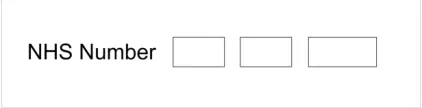
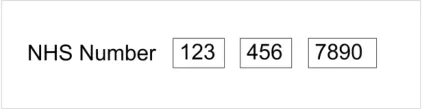
An alternative design, shown in Figure 7 and Figure 8, was considered for the NHS Number input control.
Figure 7: A Rejected Design – Multiple Boxes (Awaiting Input)
Figure 8: A Rejected Design – Multiple Boxes (After Input)
Page 9
Copyright ©2013 Health and Social Care Information Centre

 HSCIC Controlled Document
In the online user survey, 59% of respondents preferred the multiple box design shown in Figure 8, while only 35% preferred the single box design shown in Figure 3. The reasons given by those preferring the multiple box design were that it clearly displays the three constituent groups of numbers separately, and that this display style is a familiar one as it is used on credit cards. The reasons given for those preferring the single box design were that it correctly implies the NHS Number is a single number, and that it is easier to read in one box with internal separation. In spite of the larger percentage of respondents stating a preference for the multiple box design, this design was rejected, for the reasons discussed in Section 2.2.5.3.
2.2.5.3 Copy and Paste
The multiple box design in Figure 8 implies that the user cannot paste in an NHS Number. The resulting behaviour upon pasting a number into the first box is unclear. Would all the pasted numbers appear in the first box? Would only the first three numbers appear in the first box, with the remaining numbers being rejected? Or would the numbers be pasted correctly into all the three boxes? The reader will notice that the features that respondents liked in the multiple box design are also supported subtly in the single box design. The multiple box design was therefore rejected without compromising on respondents’ stated preferences.
2.2.5.4 Height and Length of the NHS Number Text Box
The dimensions of the text input box should be sufficient to correctly indicate the intended purpose of the box, namely to enter a single NHS Number. The height of the box should therefore be adequate to accommodate a single line, not a paragraph. The length of the box should be sufficient to permit the user to read the NHS Number in its entirety.
The checking of an NHS Number after it has been entered is a common task and one which users will perform after each NHS Number input. When a user enters an NHS Number in a box that is not long enough, the initial numbers will scroll to the left side of the box, and therefore, not be visible. The user will then be forced to scroll back to the start of the box to reveal the initial numbers of the NHS Number. To do this, keyboard users will have to locate and press either the left arrow or the HOME key, thereby, reducing task efficiency.
2.2.5.5 Automatic Reformatting
Entering, and then checking, the long sequence of numbers that make up an NHS Number is an error-prone task. The required display format, namely the constituent numbers arranged in three groups delimited by a single space, makes the number easier to read, and decreases the cognitive load on the user. By having the control do this automatically, the user is assisted proactively, and data quality is enhanced.
2.2.5.6 Screen Reader
Screen reader software would read out an NHS Number that did not contain any spaces in such a way that it did not make sense. For example, the number 1234567890 would be read out by JAWS as “one billion two hundred and thirty four million five hundred and sixty seven thousand eight hundred and ninety”. Read out in this way, the number is almost unintelligible and cannot be validated by the person who has just entered it. Conversely, a number displayed in the required form, for example, 123 456 7890, would be read out by JAWS as “one hundred and twenty three four hundred and fifty six seventy eight ninety”. Read out in this way, the number is easier for the listener to validate.
Page 10
Copyright ©2013 Health and Social Care Information Centre
HSCIC Controlled Document
3 DOCUMENT INFORMATION
3.1 Terms and Abbreviations
CUI Common User Interface
GP General Practitioner
ISV Independent Software Vendor
NHS National Health Service
NHS CFH NHS Connecting for Health
NPfIT National Programme for IT
NPSA National Patient Safety Agency
PAS Patient Administration System
PCT Primary Care Trust
PDA Personal Digital Assistant
UI User Interface
Table 7: Terms and Abbreviations
3.2 Definitions
NHS Entity Within this document, defined as a single NHS organisation or group that is operated within a single technical infrastructure environment by a defined group of IT administrators.
The Authority The organisation implementing the NHS National Programme for IT (currently NHS Connecting for Health)
Current best practice Current best practice is used rather than best practice, as over time best practice guidance may change or be revised due to changes to products, changes in technology, or simply the additional field deployment experience that comes over time.
Table 8: Definitions
3.3 Nomenclature
This section shows how to interpret the different styles used in this document to denote various types of information.
3.3.1 Body Text
Code Monospace
Script
Other markup languages
Interface dialog names Bold
Field names
Page 11
Copyright ©2013 Health and Social Care Information Centre
HSCIC Controlled Document
Controls
Folder names Title Case
File names
Table 9: Body Text Styles
3.3.2 Cross References
Current document – sections Section number only
Current document – figures/tables Caption number only
Other project documents Italics and possibly a footnote
Publicly available documents Italics with a footnote
External Web-based content Italics and a hyperlinked footnote
Table 10: Cross Reference Styles
3.4 References
R1. NHS Connecting for Health: NHS Number
http://www.connectingforhealth.nhs.uk/systemsandservices/nhsnumber
R2. NPSA Safer Practice Notice: Standardising wristbands improves patient safety:
http://www.npsa.nhs.uk/EasySiteWeb/GatewayLink.aspx?alId=5346
R3. Department of Health: General principles in the use of the NHS number
http://www.dh.gov.uk/en/Publicationsandstatistics/Publications/PublicationsPolicyAndGuidanc e/DH_4006813
R4. NHS Connecting for Health: When should I use the NHS Number?
http://www.connectingforhealth.nhs.uk/systemsandservices/nhsnumber/whenusenhsnumber
R5. Cabinet Office: UK Government Data Standards Catalogue
http://www.govtalk.gov.uk/gdsc/html/noframes/NHSnumber-2-0-Release.htm
2007
April 1998
R6. NHS CUI Design Guide Workstream – Accessibility Checkpoints for NHS Applications 1.0.0.0
R7. NHS CUI Design Guide Workstream – Accessibility for Clinical Applications 1.0.0.0
R8. Overview of 2008 - A Demographics Business Process, NPFIT-FNT-TO-DSD-0027.12 August 2007
R9. Personal Communication, Davie Hay, Standards Consulting Group, NHS CFH January 2008
R10. NHS Connecting for Health/Department of Health: NHS Number Standard for General Practice (England)
http://www.connectingforhealth.nhs.uk/dscn/dscn2009/data-set-change/312008v1_1.pdf
Table 11: References
Copyright ©2013 Health and Social Care Information Centre
Version 1.1
March 2009
Page 12
HSCIC Controlled Document
REVISION AND SIGNOFF SHEET
Change Record
02-Feb-2008 Ash Gupta 0.0.0.1 Initial draft
21-Feb-2008 Niki Nicolaides 0.0.0.2 Initial copyedit complete
22-Feb-2008 Ash Gupta 0.0.0.3 Copyedit amendments
22-Feb-2008 Niki Nicolaides 0.0.1.0 Copyedit complete and raised to Working Baseline
03-Mar-2008 Ash Gupta 0.0.1.1 Comments in CRS documents incorporated
05-Mar-2008 Simon Burnham 0.0.1.2 Second copyedit
06-Mar-2008 Simon Burnham 1.1.0.0 Copyedit changes accepted and raised to Baseline Candidate. Version number changed to 1.1.0.0 as the existing document replaced by this document is similarly titled.
12-Mar-2008 Ash Gupta 1.1.0.1 Incorporated modifications identified at verification meeting.
13-Mar2008 Simon Burnham 1.1.0.2 Changes copyedited and accepted.
17-Mar-2008 Simon Burnham 2.0.0.0 Baselined following e-mail approval.
20-Apr-2009 Mick Harney 2.0.0.1 Foundation draft for ISB updates
27-May-2009 Rachel Eno 2.0.0.2 Updated
27-May-2009 Mick Harney 2.0.0.3 Copyedit pass over updates
27-May-2009 Mick Harney 2.1.0.0 Raised to Baseline Candidate
24-June-2009 Simon Burnham 3.0.0.0 Raised to Baseline
17-Sep-2009 Rachel Eno 3.1.0.0 Added reference R10
17-Sep-2009 Manuela Perr 4.0.0.0 Raised to Baseline
Document Status has the following meaning:
- Drafts 0.0.0.X - Draft document reviewed by the Microsoft CUI project team and the
Authority designate for the appropriate Workstream. The document is liable to change.
- Working Baseline 0.0.X.0 - The document has reached the end of the review phase and
may only have minor changes. The document will be submitted to the Authority CUI project team for wider review by stakeholders, ensuring buy-in and to assist in communication.
- Baseline Candidate 0.X.0.0 - The document has reached the end of the review phase and
it is ready to be frozen on formal agreement between the Authority and the Company.
- Baseline X.0.0.0 - The document has been formally agreed between the Authority and the
Company.
Note that minor updates or corrections to a document may lead to multiple versions at a particular status.
Open Issues Summary
None
Page 13
Copyright ©2013 Health and Social Care Information Centre
HSCIC Controlled Document
Audience
The audience for this document includes:
- Authority CUI Manager / Project Sponsor . Overall project manager and sponsor for the
NHS CUI project within the Authority.
- Authority CAPS Project Manager. Responsible for ongoing management and
administration of the Project.
- The Authority Project Team . The Authority team involved in the development of this
document.
- Microsoft NHS CUI Team. The Authority team responsible for the development of this
document.
Reviewers
Mike Carey Toolkit Workstream Lead
Tim Chearman UX Architect
Distribution
Mike Carey Toolkit Workstream Lead
Tim Chearman UX Architect
Document Properties
Document Title NHS Number Input and Display User Interface Design Guidance
Author NHS CUI Programme Team
Restrictions RESTRICTED – COMMERCIAL; MICROSOFT COMMERCIAL; Access restricted to: NHS CUI Project Team, Microsoft NHS Account Team
Creation Date 19 November 2007
Last Updated 23 June 2015
Copyright:
You may re-use this information (excluding logos) free of charge in any format or medium, under the terms of the Open Government Licence. To view this licence, visit nationalarchives.gov.uk/doc/open-government-licence or email psi@nationalarchives.gsi.gov.uk.
Page 14
Copyright ©2013 Health and Social Care Information Centre