NHS Number Input and Display
NHS Number Input and Display
- NHS Number Input and Display
- Quick Implementation Guide
- Edition 1 22 [nd] April 2010
- NHS Number Display NHS Number 123 456 7890
- NHS Number Input
- NHS Number 123 456 7890
- Provide a single text input box for NHS Number entry
- Permit only one NHS Number to be entered in an NHS Number input box
- Set the length of the NHS Number input box such that the NHS Number is visible in full
- Set the height of the NHS Number input box to the largest character height in the currently active display font, taking the user’s settings into account
- Permit NHS Number input via all the mechanisms supported on a platform such as, but not limited to, typing on a keyboard, copy and paste and handwriting with a stylus
- 4
- During input, reformat the numbers entered as per the NHS Number display format, namely three numbers, space, the next three numbers, space, the last four numbers
- Ensure that the NHS Number only consists of 10 digits and two spaces as described in guidance point NUM-0015
- 123 123 4
- Quick Implementation Guide
Source PDF: inputdisplayqig.pdf
Quick Implementation Guide
Edition 1 22 [nd] April 2010
This document was prepared for NHS Connecting for Health which ceased to exist on 31 March 2013. It may contain references to organisations, projects and other initiatives which also no longer exist. If you have any questions relating to any such references, or to any other aspect of the content, please contact cuistakeholder.mailbox@hscic.gov.uk Copyright: You may re-use this information (excluding logos) free of charge in any format or medium, under the terms of the Open Government Licence. To view this licence, visit nationalarchives.gov.uk/doc/open-governmentlicence or email psi@nationalarchives.gsi.gov.uk.
1
Copyright ©2013 Health and Social Care Information Centre
Guidance Introduction
The NHS Number is a national unique patient identifier that makes it possible to share patient information across the whole of the NHS safely, efficiently and accurately. It will be read from screen displays and correlated with information in different media, for example, wristbands (as described in Standardising wristbands improves patient safety [1] ). It is a key component of services such as the NHS Care Record, Choose and Book and the Electronic Prescription Service. The NHS Number is described further in NHS Number [2] .
Important
Although it contains all of the guidance points, this document omits supporting information and is therefore not intended as a substitute for the full NHS CUI document Patient Identification Number Input and Display [3]. Refer to that document for the definitive statement of the design guidance in this area.
The visual representations used to display the guidance are illustrative only. Stylistic choices (for example, display font used), unless otherwise specified, are not part of the guidance and are therefore not mandatory requirements.
1 NPSA Safer Practice Notice: Standardising wristbands improves patient safety http://www.npsa.nhs.uk/EasySiteWeb/GatewayLink.aspx?alld=5346
2 NHS Connecting for Health: NHS Number http://www.connectingforhealth.nhs.uk/systemsandservices/nhsnumber
3 Patient Identification Number Input and Display – User Interface Design Guidance (v4.0.0.0)
Copyright ©2013 Health and Social Care Information Centre
2
Guidance
NHS Number Display NHS Number 123 456 7890
NUM-0001
Display the NHS Number in full, on a single line, without truncation or splitting it over multiple lines
Mandatory
NUM-0002
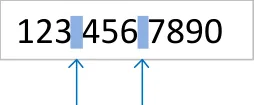
three groups of three, three and four digits respectively, with a
spaces
single space between groups
Mandatory
NUM-0003
Numbers by the user as part of the ‘Copy and Paste’ task
3
Recommended
Important
This document uses the label ‘NHS Number’ only as an example. It does not represent guidance on label wording or positioning.
Copyright ©2013 Health and Social Care Information Centre
NHS Number Input
NHS Number
NHS Number 123 456 7890
Guidance
NUM-0010
Provide a single text input box for NHS Number entry
Recommended
NUM-0011
Permit only one NHS Number to be entered in an NHS Number input box
Mandatory
NUM-0012
Set the length of the NHS Number input box such that the NHS Number is visible in full
Recommended
NUM-0013
NHS Number 123 456 7890
Set the height of the NHS Number input box to the largest character height in the currently active display font, taking the user’s settings into account
Recommended
NUM-0014
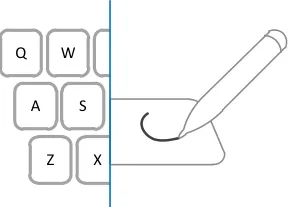
Permit NHS Number input via all the mechanisms supported on a platform such as, but not limited to, typing on a keyboard, copy and paste and handwriting with a stylus
Recommended
Copyright ©2013 Health and Social Care Information Centre
4
Guidance
NHS Number Input
NUM-0015
During input, reformat the numbers entered as per the NHS Number display format, namely three numbers, space, the next three numbers, space, the last four numbers
Recommended
NUM-0016
Ensure that the NHS Number only consists of 10 digits and two spaces as described in guidance point NUM-0015
123 123 4
spaces
Mandatory
| Col1 | Col2 | Col3 |
|---|---|---|
| 123 456 7890 | 123 456 7890 | 123 456 7890 |
| digits 3 digits | digits 3 digits | digits 3 digits |
4 digits
NUM-0017
During input, permit only the single space character to act as a separator within the NHS Number, discarding all other non-numeric user input, including but not limited to these
Mandatory
| . | Full stop |
|---|---|
| , | Comma |
| : | Colon |
| - | Hyphen |
| – — | Dashes |
| / | Forward slash |
| |Back slash |
5
NUM-0018
Do not permit input of old format and temporary NHS Numbers
Mandatory
Copyright ©2013 Health and Social Care Information Centre
Guidance
NHS Number Input
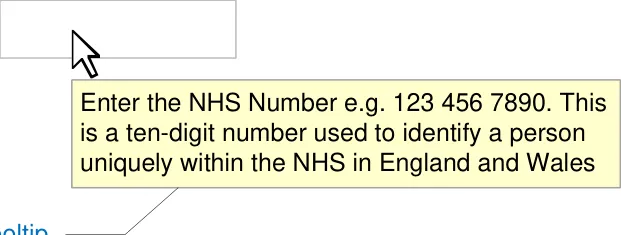
Hints, Prompts and Tooltips
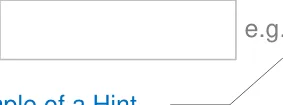
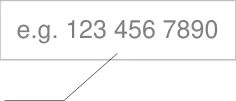
The input control may provide a hint, prompt or tooltip. Hints are instructional text placed outside but adjacent to the text input box. Prompts are commonly known as watermarks and comprise instructional text placed within the text input box. Tooltips are instructional text that appear when the mouse pointer is placed over the text input box.
The wording of hints and prompts is left to the designers of NHS clinical applications. Examples of hints, prompts, and tooltips are shown below.
NHS Number
Example of a Prompt
NHS Number
Copyright ©2013 Health and Social Care Information Centre