Document Properties Document Title Micro Patient Banner
 Prepared for
NHS Connecting for Health
Version 2.0.0.0 Baseline
Prepared by
Clinical Applications and Patient Safety Project
NHS CUI Programme Team
cuistakeholder.mailbox@hscic.gov.uk
Prepared for
NHS Connecting for Health
Version 2.0.0.0 Baseline
Prepared by
Clinical Applications and Patient Safety Project
NHS CUI Programme Team
cuistakeholder.mailbox@hscic.gov.uk

PREFACE
- PREFACE
- 1 INTRODUCTION
- 2 MICRO PATIENT BANNER GUIDANCE OVERVIEW
- 3 MICRO PATIENT BANNER GUIDANCE DETAILS
- 3.1 Introduction
- 3.2 Principles
- 3.3 Guidelines
- 3.3.1 Guidance – Structure and Composition
- 3.3.2 Guidance – Application Context and Positioning
- 3.3.3 Guidance – Minimum Data Set
- 3.3.4 Guidance – Information Grouping
- 3.3.5 Guidance – Data Labels and Values
- 3.3.6 Guidance – Patient Name
- 3.3.7 Guidance – Micro Patient Banner for a Deceased Patient
- 3.3.8 Guidance – Alignment of Information
- 3.4 Rationale Summary
- 4 DOCUMENT INFORMATION
- REVISION AND SIGNOFF SHEET
Source PDF: micropatban.pdf
Documents replaced by this document Micro Patient Banner – User Interface Design Guidance 1.0.0.0 Documents to be read in conjunction with this document Design Guide Entry – Patient Banner 4.0.0.0 Patient Name Input and Display – User Interface Design Guidance 1.0.0.0 Design Guide Entry – Date Display 4.0.0.0 Sex and Current Gender Input and Display — User Interface Design Guidance 4.0.0.0 Design Guide Entry – Time Display 4.0.0.0 NHS Number Input and Display – User Interface Design Guidance 3.0.0.0 Address Input and Display – User Interface Design Guidance 3.0.0.0 Accessibility Checkpoints for NHS Applications 1.0.0.0 Accessibility for Clinical Applications 1.0.0.0 This document was prepared for NHS Connecting for Health which ceased to exist on 31 March 2013. It may contain references to organisations, projects and other initiatives which also no longer exist. If you have any questions relating to any such references, or to any other aspect of the content, please contact cuistakeholder.mailbox@hscic.gov.uk Patient Safety Process The development lifecycle for this design guide includes an integrated patient / clinical safety risk assessment and management process. Known patient safety incidents relevant to this design guidance area have been researched and reviewed as part of ongoing development. The resulting guidance points aim to support mitigation of these known patient safety risks. In addition, the developers of this design guide have undertaken a patient safety risk assessment to identify new risks that could potentially be introduced by the guidance points in this document. Any potential risks identified have been assessed and managed to support the ongoing clinical safety case for this design guide. The Hazard Log records all the risks that have been identified during development and describes mitigatory actions that, in some cases, will need to be taken by users of this design guide. The Hazard Log is a live document that is updated as the design guide is developed and maintained. Until this design guide has received full Clinical Authority to Release (CATR) from the NHS Connecting for Health (CFH) Clinical Safety Group (CSG) – based on an approved Clinical Safety Case – there may be outstanding patient safety risks yet to be identified and mitigated. Additionally, users implementing applications that follow this design guide’s guidelines (for example, healthcare system suppliers) are expected to undertake further clinical safety risk assessments of their specific systems within their specific context of use. Refer to www.cui.nhs.uk for further information on the patient safety process and for the safety status and any relevant accompanying safety documentation for this design guide.
1 INTRODUCTION
This document provides guidance for the design of a Micro Patient Banner (MPB). It describes the area of focus, lists mandatory and recommended guidance points with usage examples and explains the rationale behind the guidance.
The term ‘patient banner’ (PAB) refers to the area of the user interface that contains demographic information for a patient record. The patient banner is the area within the user interface that is most often used to match records with patients and contains key information for identifying patients, such as name, address, date of birth, and NHS number. This information may be matched with that provided by the patient (or a third party, such as a parent), usually in their presence or over the telephone. Information in a patient banner may also be matched with that in any of the patient’s associated artefacts, such as samples, letters, specimens, wristbands and X-rays.
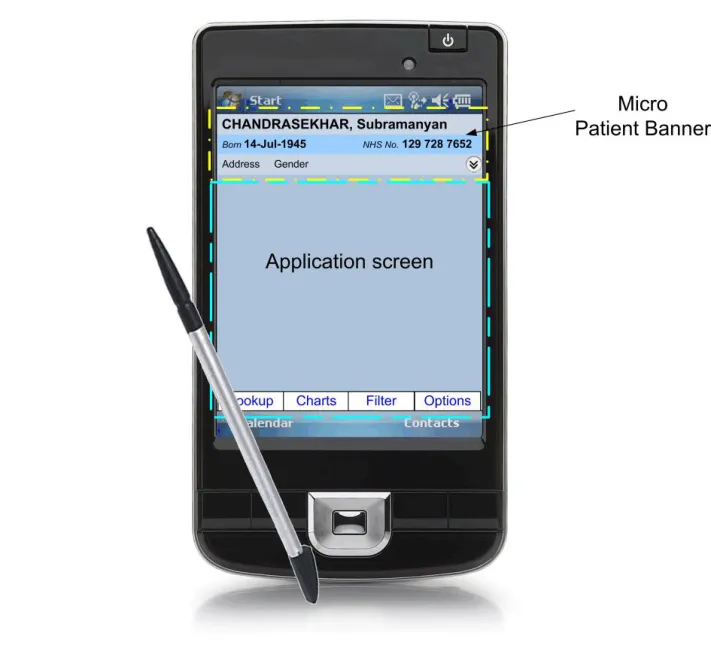
The Micro Patient Banner is a patient banner designed for small screen, hand-held devices such as Personal Digital Assistants (PDAs). Its purpose is to display patient demographic information for the patient whose record is currently being viewed on the PDA, so that health care staff can ensure the correct patient is identified and the correct record is displayed, as shown in Figure 1:
Figure 1: A Micro Patient Banner Displayed on a PDA
Note
Existing NHS Common User Interface (CUI) guidance on the full-screen Patient Banner is targeted at desktop monitors. Its title is Design Guide Entry – Patient Banner {R1} .
Important
The visual representations used within this document to display the guidance are illustrative only. Stylistic choices, unless otherwise specified, are not part of the guidance and are therefore not mandatory requirements for compliance with the guidance in this document.
Page 1
Copyright ©2013 Health and Social Care Information Centre
 HSCIC Controlled Document
Table 1 describes the changes made since the previous version of this guidance (Baseline version 1.0.0.0 dated 12-Aug-2008):
Deleted None
Modified Enhanced out of scope context setting (section 1.2.2)
Enhanced illustrations context setting (section2)
Length of name changed from 40 to 35 characters in Rationale (section 3.3.2)
Added Patient Safety Process note
Table 1: Changes Since the Last Baseline Version
1.1 Customer Need
The National Patient Safety Agency (NPSA) [1] states that, although there are no accurate figures on the frequency or cost of mismatching errors, they form a significant part of the whole range of errors in health care. These mismatches can occur between a patient, their record, laboratory results and, in the case of inpatients, their wristband. Whilst the wide variation in wristbands used in the NHS has now been addressed by a standard [2], there is considerable variation in patient banner layout across applications, which has already been the subject of CUI guidance {R1} . When errors do occur, they are typically one of three main types {R2} :
-
The patient is given the wrong treatment due to failure to identify the patient correctly
-
The patient is given the wrong treatment as a result of a failure to match the patient
correctly with samples, specimens or X-rays
- The patient is given the wrong treatment as a result of a failure in communication between
staff, or due to staff not performing checking procedures correctly
In addition to the NPSA, accurate patient identification is emphasised by the World Health Organization (WHO) publication on Patient Safety Solutions {R4}, and by the Joint Commission {R5}, both of whom provide guidance on how to improve patient identification.
Handheld computers, that is PDAs, are increasingly being used by health care staff. For a list of the many uses to which they are being applied in a health care setting, refer to Handheld Computers {R6} . For details of adoption rates, refer to Who’s Using PDAs? {R7} .
This Micro Patient Banner design guidance is restricted to PDA usage and aims to:
- Ensure patients are correctly identified and matched with their patient record and wristband
{R3} by displaying data items consistently
- Allow quick access to and display of other summary information for a patient (such as the
address)
Significant inconsistencies exist across existing micro patient banners used in PDA-based clinical applications displaying patient information. This has a large but unquantifiable cost in terms of incorrect identification of patients, leading to safety issues and, potentially, additional staff training. Reduction of inconsistency is therefore an important goal in itself. Finally, having a consistent,
1 Right patient - right care, NPSA {R2} : http://www.npsa.nhs.uk/EasySiteWeb/getresource.axd?AssetID=3234&type=full&servicetype=Attachment
2 Standardising wristbands improves patient safety, NPSA Safer Practice Notice {R3} : Standardising wristbands improves patient safety
Page 2
Copyright ©2013 Health and Social Care Information Centre
HSCIC Controlled Document
agreed layout for micro patient banners in clinical systems makes the design and development of such systems easier and quicker.
1.2 Scope
The guidance in this document informs the design of a patient-safe micro patient banner to support one task, namely patient identification. This section details the items that are in scope, and those that are out of scope, with respect to this guidance.
1.2.1 In Scope
This guidance is applicable to User Interfaces (UIs) such as those displayed on hand-held devices, also known as PDAs. These devices are characterised by a small display screen size, typically quoted by manufacturers as about 4 inches (that is, approximately 10 centimetres) in diagonal. It is assumed that, as a minimum, these devices are capable of operating at a display resolution greater than or equal to 240 x 320 pixels, but less than 1024 x 768 pixels, and have a pointing device such as a stylus.
This guidance informs the design of demographic information displays to support the identification of a single patient, safely and accurately. It is applicable for all care settings. This guidance was developed primarily to support the work of the following health care staff as these are especially likely not to have a previous relation with the patient. Additionally, they are the most likely users of a hand-held device such as a PDA (this guidance is not limited to these roles but applies across all health care staff in the NHS):
-
Inpatient doctor
-
Night nurse practitioner
-
Out of hours GP
-
First response paramedic
-
District nurse
-
Bank nurse
1.2.2 Out of Scope
This section defines areas that are not covered in this guidance. Although there may be specific risks associated with these areas that are not addressed in this guidance, it is likely that the principles in this guidance will extend to micro patient banner aspects in many of the areas listed below.
The following items are out of scope:
-
The display of clinical information
-
The modification of demographic information
-
The display of information for more than one patient at a time
-
Information governance, security and confidentiality
-
The following form factors: wall-mounted screens, whiteboards, projected images, desktop
monitors, Tablet PCs, telephones, and Smartphones
-
Displaying alerts in an MPB
-
Displaying an MPB in a pop-up window
-
Multi-language applications that use right-to-left writing (such as Arabic), the Cyrillic
alphabet (such as Russian), or ideograms (such as Japanese)
Page 3
Copyright ©2013 Health and Social Care Information Centre
HSCIC Controlled Document
- Display styles such as the choice of font size, background and foreground text colour that
can affect the readability of information in the MPB, as with all other displayed text
- Bar code representations (such as a patient identification number in the form of a bar code)
Note
Listing an item as out of scope does not classify it as unimportant. Project time and resource constraints inevitably restrict what can be in scope for a particular release. It is possible that items out of scope for this release may be considered for a future release.
1.3 Assumptions
A1 Existing CUI Guidance on the Patient Banner is targeted at desktop monitors and is an important reference document but is not automatically applicable to the MPB
A2 The ‘log in’ dialogue is out of scope and users are assumed to have logged in successfully to the application running on the PDA in order to view the patient record and MPB
A3 All aspects relating to security, privacy and data protection are out of scope of the MPB work
A4 A MPB is not to be used within a Patient List, but is displayed after a single patient has been selected from a Patient List
A5 In line with NHS policy, use of the NHS Number is to be encouraged, hence the MPB will not display any local patient identification numbers
A6 Whilst the MPB has not been designed for use by patients, health care staff may at their discretion, show an MPB to patients
A7 This guidance is equally applicable on devices used in portrait and in landscape display modes
Table 2: Assumptions
1.4 Dependencies
D1 Ongoing and unpublished work by the NHS National Programme for IT (NPfIT) that is referred to in this document as NHS Connecting for Health (NHS CFH), such as on the display of gender and sex
D2 Changes to the information defined in the Personal Demographics Service (PDS [3] )
D3 Changes to any of the documents listed in the References section in this guidance document
Table 3: Dependencies
3 The Personal Demographics Service {R24}: The Personal Demographics Service — NHS Connecting for Health
Page 4
Copyright ©2013 Health and Social Care Information Centre
HSCIC Controlled Document
2 MICRO PATIENT BANNER GUIDANCE OVERVIEW
Important
The visual representations used within this document to display the guidance are illustrative only. They are simplified in order to support understanding of the guidance points. Stylistic choices, such as colours, fonts or icons are not part of the guidance and unless otherwise specified are not mandatory requirements for compliance with the guidance in this document.
2.1 Summary of Guidance
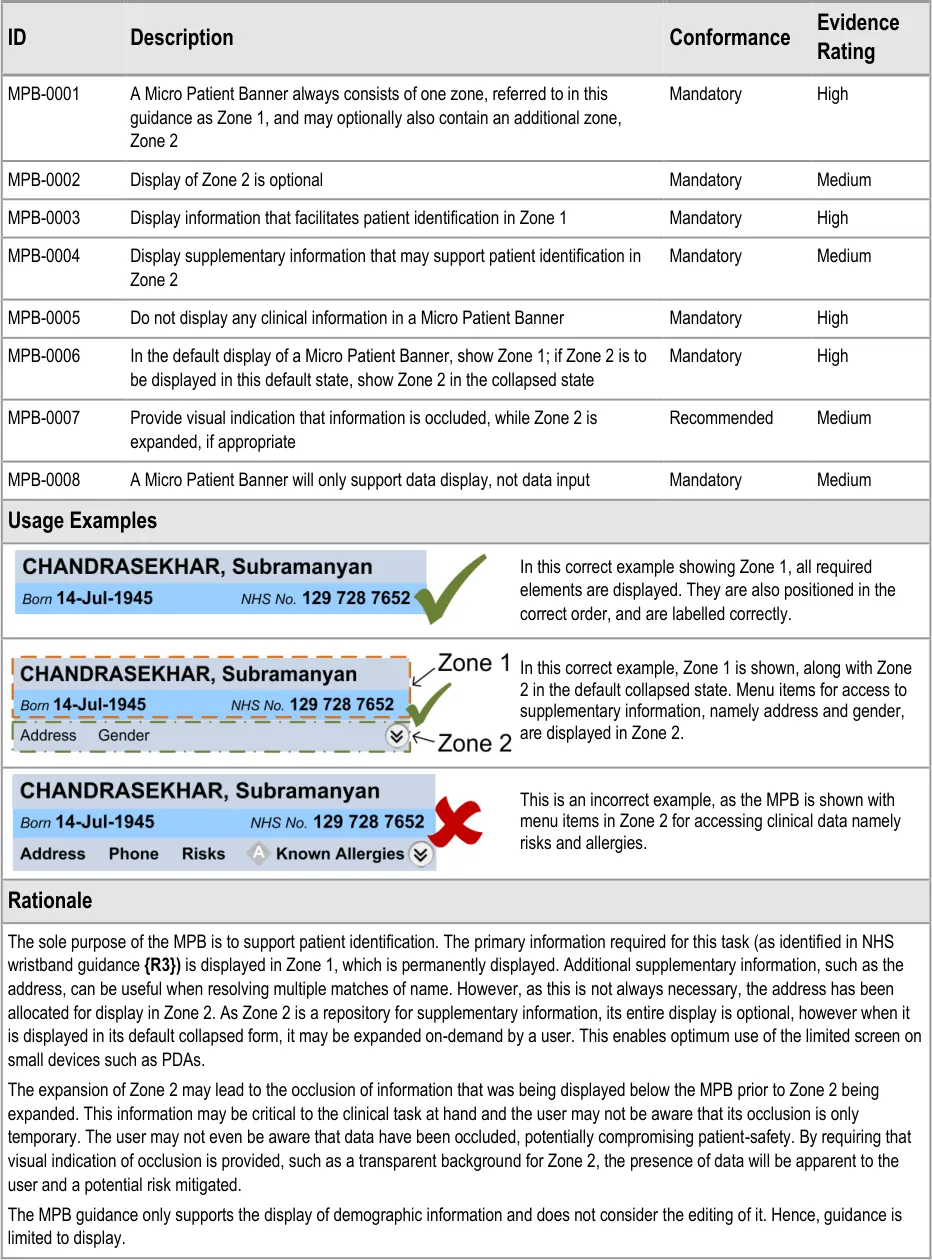
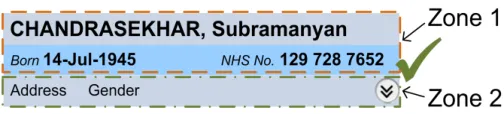
MPB-0001 3.3.1 A Micro Patient Banner always consists of one zone, referred to in this guidance as Zone 1, and may optionally also contain an additional zone, Zone 2
MPB-0002 3.3.1 Display of Zone 2 is optional
MPB-0003 3.3.1 Display information that facilitates patient identification in Zone 1
MPB-0004 3.3.1 Display supplementary information that may support patient identification in Zone 2
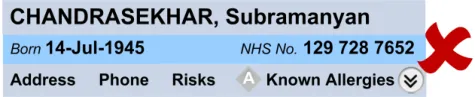
MPB-0005 3.3.1 Do not display any clinical information in a Micro Patient Banner
MPB-0006 3.3.1 In the default display of a Micro Patient Banner, show Zone 1; if Zone 2 is to be displayed in this default state, show Zone 2 in the collapsed state
MPB-0007 3.3.1 Provide visual indication that information is occluded, while Zone 2 is expanded, if appropriate
MPB-0008 3.3.1 A Micro Patient Banner will only support data display, not data input
MPB-0009 3.3.2 Display a Micro Patient Banner at the top of the screen
MPB-0010 3.3.2 Display a Micro Patient Banner horizontally rather than vertically
MPB-0011 3.3.2 Display a Micro Patient Banner in a fixed position, unmovable by the user
MPB-0012 3.3.2 Display a Micro Patient Banner so that it occupies the full width of the application window
MPB-0013 3.3.2 Do not obscure a Micro Patient Banner with other elements of the screen
MPB-0014 3.3.2 Apply visual styling to a Micro Patient Banner (such as a thick border or distinguishing background colour) in contrast to other elements of the application’s user interface
MPB-0015 3.3.2 Do not display a Micro Patient Banner on screens that contain information relating to more than one patient
MPB-0016 3.3.2 Do not display a Micro Patient Banner in or alongside a Patient List
MPB-0017 3.3.3 Always display the patient’s name (family name and given name), date of birth, and NHS number in a Micro Patient Banner
MPB-0018 3.3.3 An MPB may optionally display the patient’s title
MPB-0019 3.3.3 An MPB may optionally display the patient’s age
MPB-0020 3.3.3 Do not display the patient’s location (such as ward and bed), in an MPB
MPB-0021 3.3.3 For a deceased patient, an MPB additionally displays the date of death and age at death
MPB-0022 3.3.3 If an individual data item is not known or is otherwise unavailable, appropriate self-explanatory text or a blank string (but not a ‘?’), are to be displayed immediately after the corresponding data label
MPB-0023 3.3.3 Display the preferred name if available
MPB-0024 3.3.3 Do not display the patient’s photograph in a MPB
MPB-0025 3.3.4 Display the elements of the patient name, date of birth and NHS number in Zone 1
Page 5
Copyright ©2013 Health and Social Care Information Centre
HSCIC Controlled Document
MPB-0026 3.3.4 Where the age of a living patient is being displayed, display the age in Zone 1
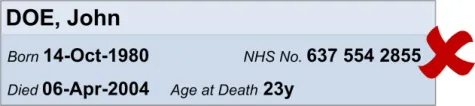
MPB-0027 3.3.4 For a deceased patient, display the date of death and the age at death in Zone 1
MPB-0028 3.3.4 Display the full address (including the postcode) and gender in the expanded Zone 2
MPB-0029 3.3.4 In the expanded Zone 2, precede the full address with the label ‘Usual address’, ’Temporary address’, or one of the types of temporary address, as appropriate, and as defined in the PDS
MPB-0030 3.3.4 In the expanded Zone 2, provide a means to access all addresses available in the record
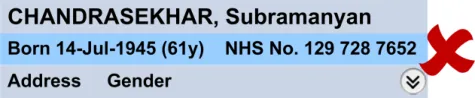
MPB-0031 3.3.5 Precede the date of birth with the label ‘Born’
MPB-0032 3.3.5 When displaying the age use only two abbreviated units, a lower and an upper unit, without any intermediate units (as described in the rationale)
MPB-0033 3.3.5 Precede the gender with the label ‘Gender’
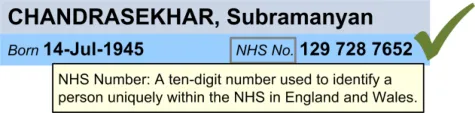
MPB-0034 3.3.5 Display the gender value in full (that is, do not display the gender value using a symbol, icon, pictogram or a textual abbreviation)
MPB-0035 3.3.5 Precede the NHS number with the label ‘NHS No.’
MPB-0036 3.3.5 Precede the preferred name with the label ‘Preferred name’
MPB-0037 3.3.5 Precede the date of death with the label ‘Died’
MPB-0038 3.3.5 Precede the age at death with the label ‘Age at Death’
MPB-0039 3.3.5 Do not add a colon after the label text
MPB-0040 3.3.5 Do not include unnecessary punctuation in a label
MPB-0041 3.3.5 Display labels in the style given to label text
MPB-0042 3.3.5 Display values in the style given to data text
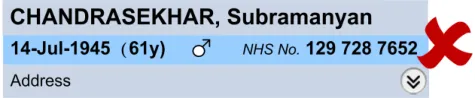
MPB-0043 3.3.5 Use text styles for labels and for values so that more visual emphasis is given to the value text relative to the label text
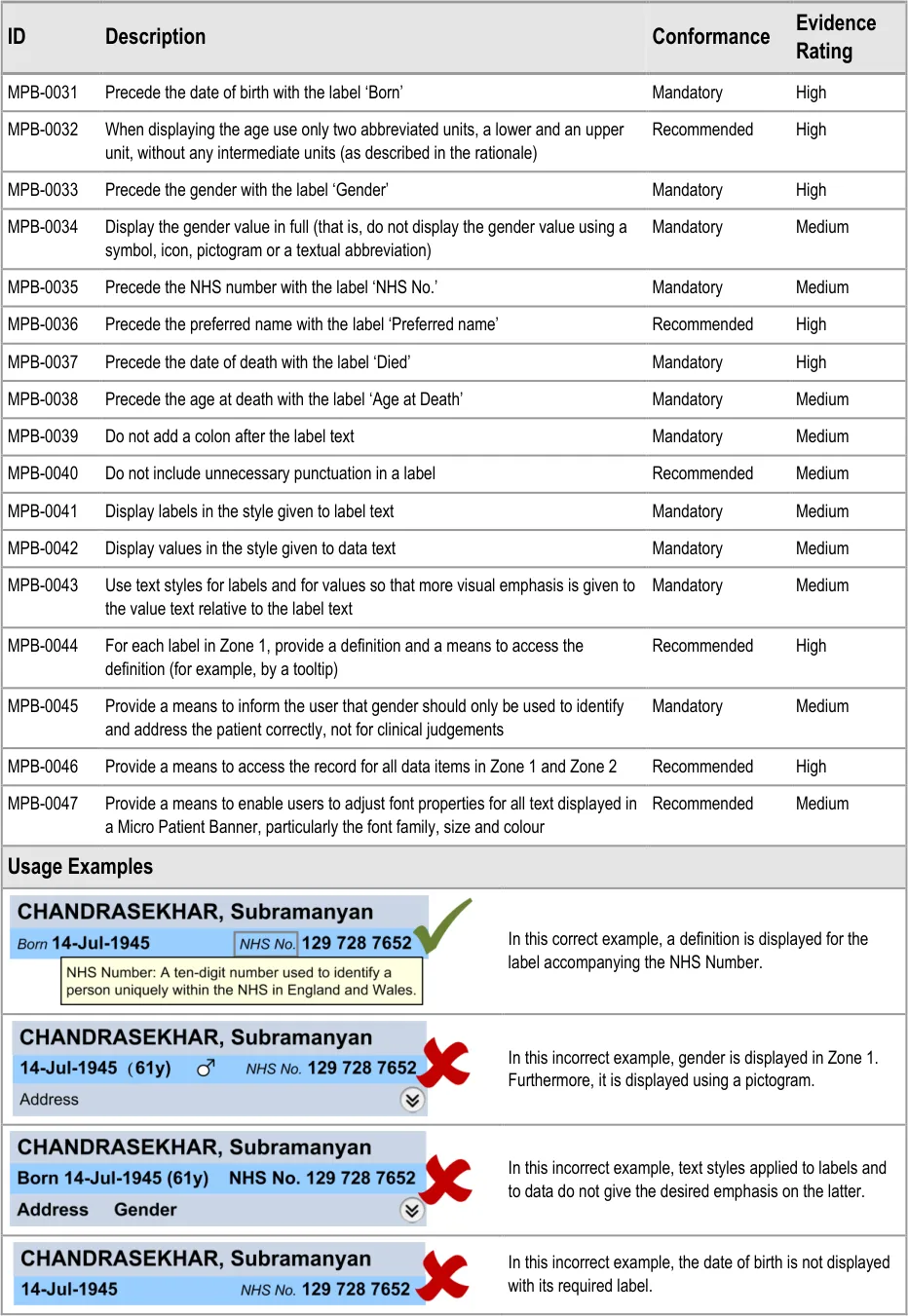
MPB-0044 3.3.5 For each label in Zone 1, provide a definition and a means to access the definition (for example, by a tooltip)
MPB-0045 3.3.5 Provide a means to inform the user that gender should only be used to identify and address the patient correctly, not for clinical judgements
MPB-0046 3.3.5 Provide a means to access the record for all data items in Zone 1 and Zone 2
MPB-0047 3.3.5 Provide a means to enable users to adjust font properties for all text displayed in a Micro Patient Banner, particularly the font family, size and colour
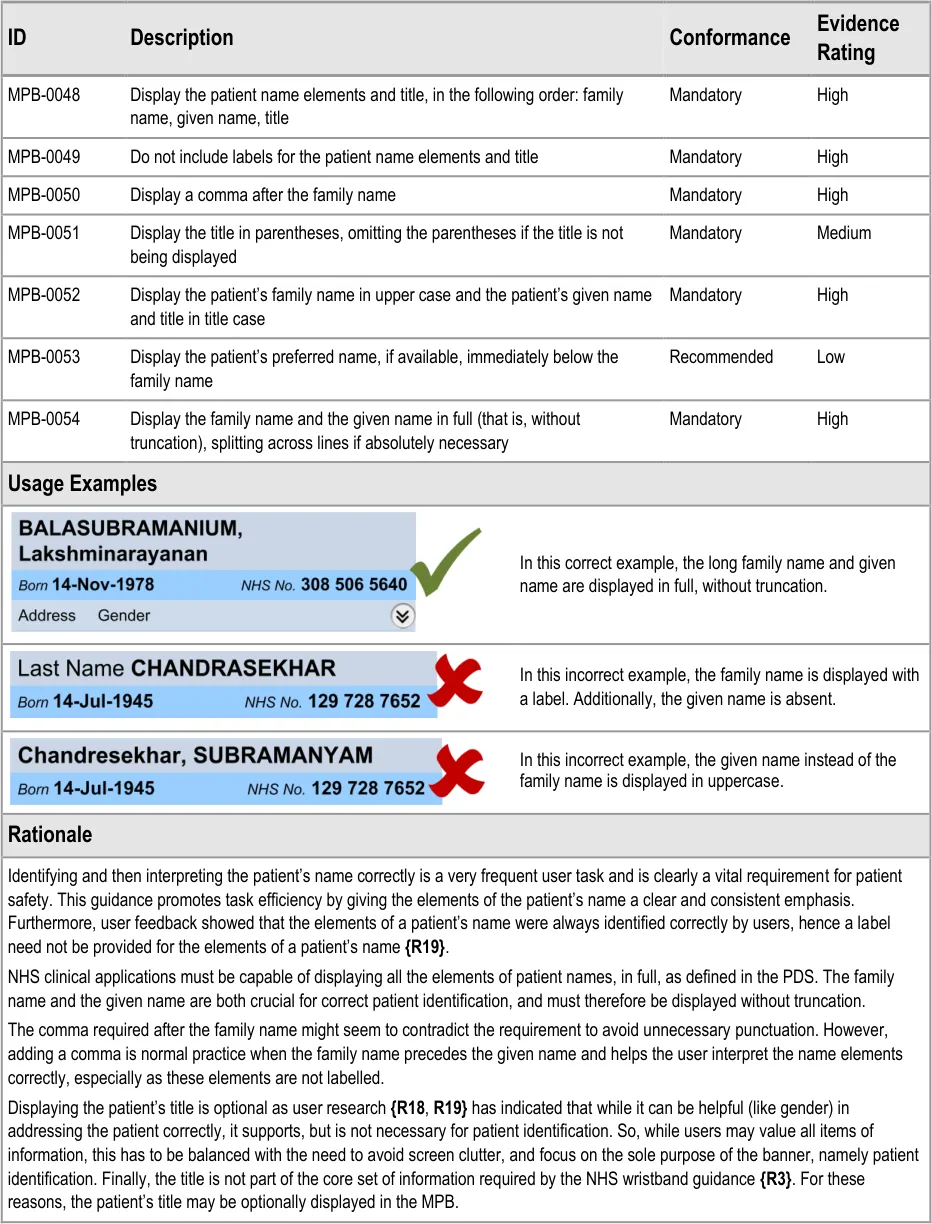
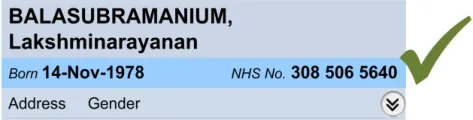
MPB-0048 3.3.6 Display the patient name elements and title, in the following order: family name, given name, title
MPB-0049 3.3.6 Do not include labels for the patient name elements and title
MPB-0050 3.3.6 Display a comma after the family name
MPB-0051 3.3.6 Display the title in parentheses, omitting the parentheses if the title is not being displayed
MPB-0052 3.3.6 Display the patient’s family name in upper case and the patient’s given name and title in title case
MPB-0053 3.3.6 Display the patient’s preferred name, if available, immediately below the family name
MPB-0054 3.3.6 Display the family name and the given name in full (that is, without truncation), splitting across lines if absolutely necessary
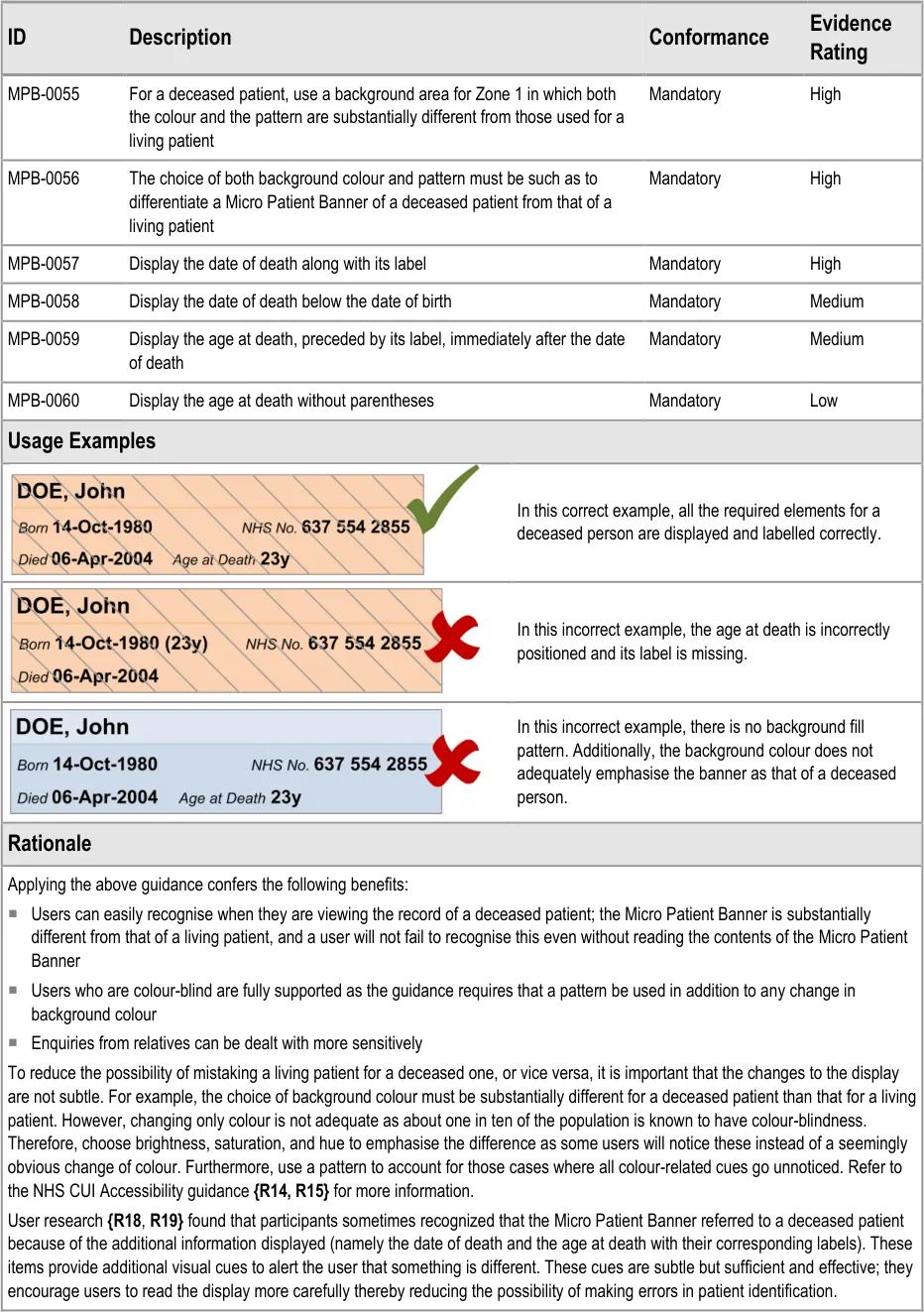
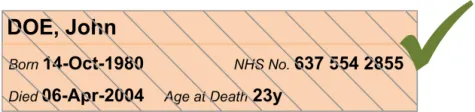
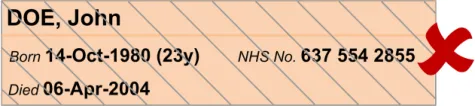
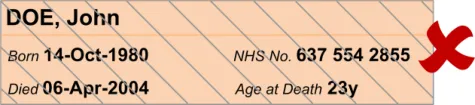
MPB-0055 3.3.7 For a deceased patient, use a background area for Zone 1 in which both the colour and the pattern are substantially different from those used for a living patient
Page 6
Copyright ©2013 Health and Social Care Information Centre
HSCIC Controlled Document
MPB-0056 3.3.7 The choice of both background colour and pattern must be such as to differentiate a Micro Patient Banner of a deceased patient from that of a living patient
MPB-0057 3.3.7 Display the date of death along with its label
MPB-0058 3.3.7 Display the date of death below the date of birth
MPB-0059 3.3.7 Display the age at death, preceded by its label, immediately after the date of death
MPB-0060 3.3.7 Display the age at death without parentheses
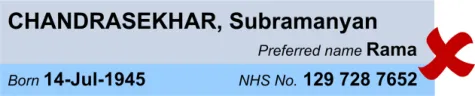
MPB-0061 3.3.8 Display the patient’s preferred name (if available) immediately below the given name, with both items left-aligned
MPB-0062 3.3.8 When a patient’s preferred name is not available, the patient’s name must be centred vertically and left-aligned in Zone 1
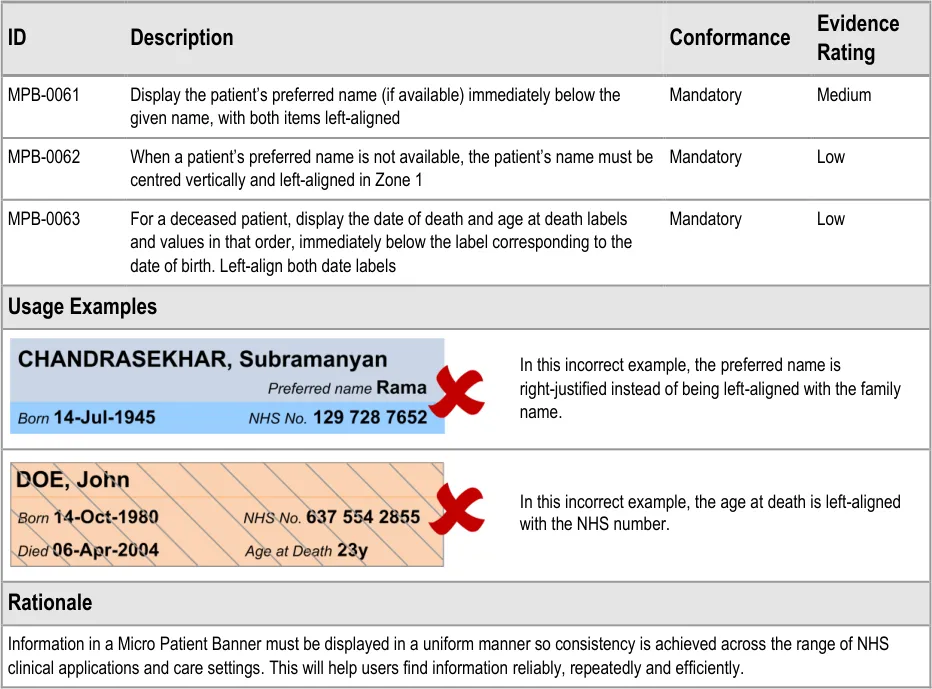
MPB-0063 3.3.8 For a deceased patient, display the date of death and age at death labels and values in that order, immediately below the label corresponding to the date of birth. Left-align both date labels
Table 4: Summary of Guidance
Page 7
Copyright ©2013 Health and Social Care Information Centre
HSCIC Controlled Document
3 MICRO PATIENT BANNER GUIDANCE DETAILS
3.1 Introduction
The guidance provided in this document is based upon a programme of research, including:
- A Web based survey of clinicians and administrative staff covering a range of patient
identification issues {R16}
-
One-to-one interviews with a range of healthcare professionals {R17}
-
A plenary discussion with members of the Clinical Spine Application (CSA) Design Steering
Group
3.2 Principles
The following key principles have shaped the guidance in this document:
-
Reliable and accurate identification of an individual patient record
-
Matching a patient record with:
The correct patient, whether present in person or by phone
Other artefacts associated with the patient, for example, samples, letters, or wristbands
- Displaying core information according to existing standards and guidance and using a
minimum data set available to all NHS clinical applications
-
Promoting consistency across the mix of users, NHS clinical applications and care settings
-
Displaying minimum supplementary information to support patient identification
-
Minimising opportunities for human error
Page 8
Copyright ©2013 Health and Social Care Information Centre
HSCIC Controlled Document
3.3 Guidelines
3.3.1 Guidance – Structure and Composition
Page 9
Copyright ©2013 Health and Social Care Information Centre
HSCIC Controlled Document
3.3.2 Guidance – Application Context and Positioning
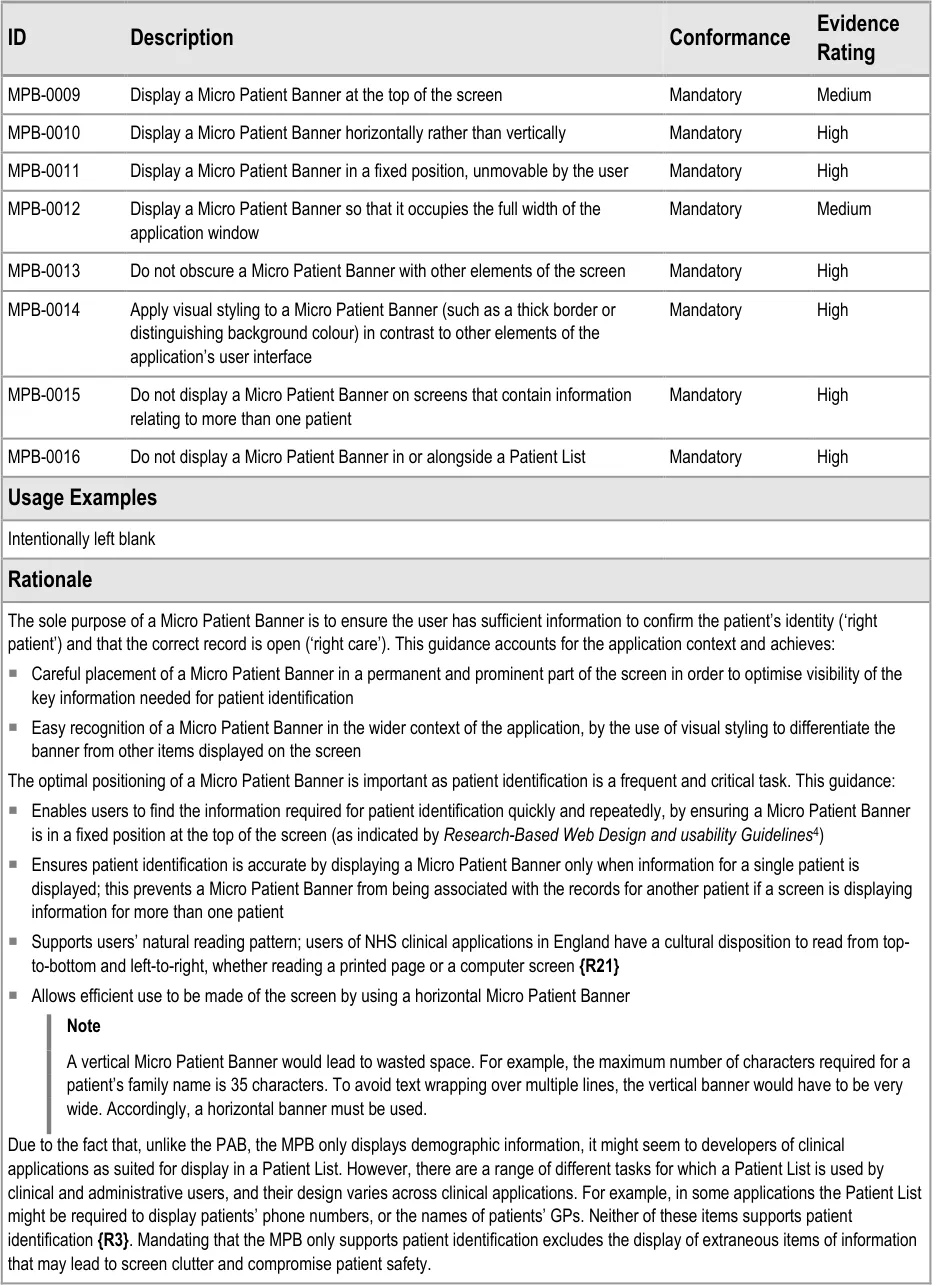
4 Koyani et al, Research-Based Web Design and Usability Guidelines: U.S. Department of Health and Human Services {R21} : http://www.usability.gov/pdfs/guidelines.html
Page 10
Copyright ©2013 Health and Social Care Information Centre
HSCIC Controlled Document
3.3.3 Guidance – Minimum Data Set
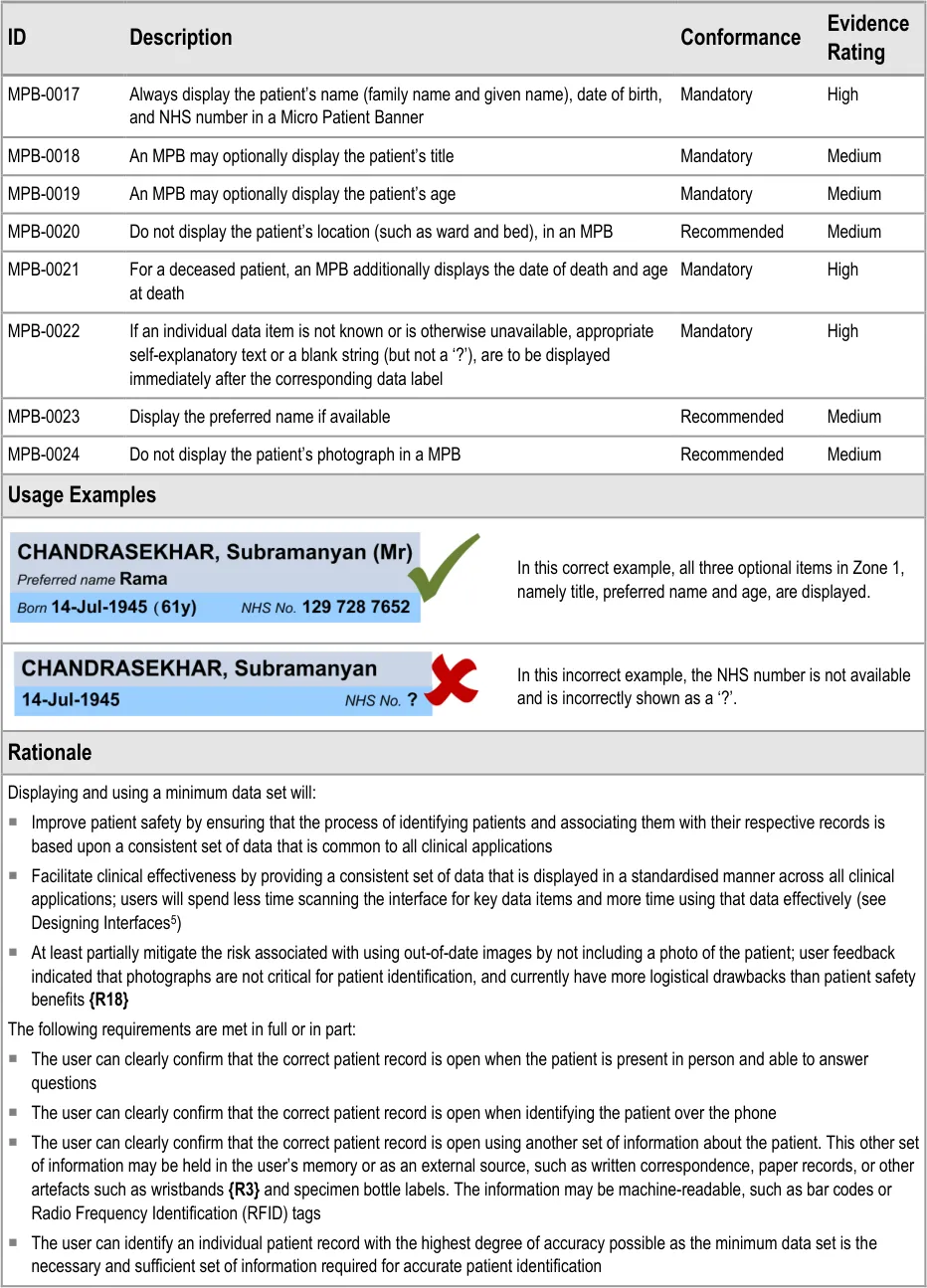

5 Tidwell J, Designing Interfaces {R22} : www.designinginterfaces.com
Page 11
Copyright ©2013 Health and Social Care Information Centre
HSCIC Controlled Document
Page 12
Copyright ©2013 Health and Social Care Information Centre
 HSCIC Controlled Document
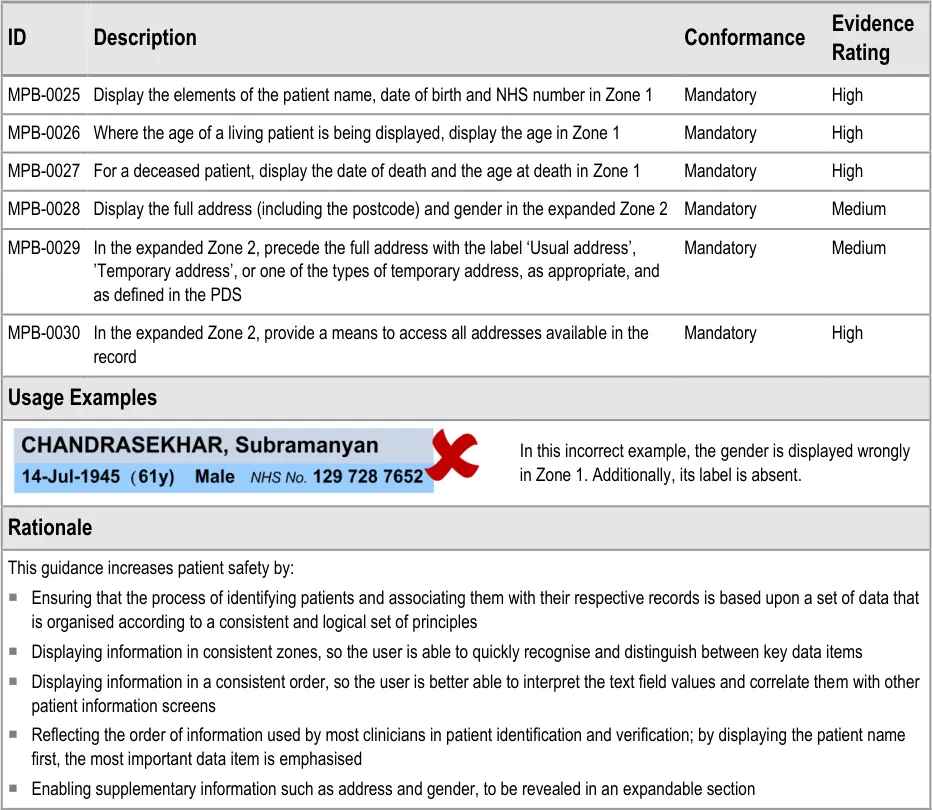
3.3.4 Guidance – Information Grouping
Page 13
Copyright ©2013 Health and Social Care Information Centre
HSCIC Controlled Document
3.3.5 Guidance – Data Labels and Values
Page 14
Copyright ©2013 Health and Social Care Information Centre
 HSCIC Controlled Document
| Col1 | Rationale |
|---|---|
| User feedback indicated that the labels ‘Born’, ‘Died’, ‘Preferred name’ and ‘NHS No.’ were seen as most suitable for the date of birth, date of death, preferred name and NHS number respectively**{R18}. For example, ‘DoB’ and ‘DoD’ were determined to be hard to differentiate visually; additionally some screen readers read aloud ‘DoB’ as ‘dob’. To guide the user’s eye to relevant information, the font size and weight must be chosen so more visual emphasis is given to data values than to their corresponding labels. Data values may, therefore, be rendered in, for example, a larger font size or with greater weight than the corresponding labels to help users locate the required information efficiently. The corresponding data text style and label text style are not specified here but are left to the designers of software applications to choose. As per NHS CUI Accessibility guidance{R14, R15}, users should be allowed to set their own font preferences to maximise readability. For a living patient, the patient’s age is displayed in parentheses and a label is not included as displaying the actual age alongside the date of birth makes the value self-explanatory. In addition, the parentheses separate the age from the other text placed nearby and give the age a unique style, helping users to identify this part of the display efficiently. For a deceased patient, there is again a need to give the age a unique style so as to ensure users do not mistake a deceased patient for one who is alive, nor vice versa. This is achieved by doing the converse to the case of a living patient, namely, by displaying a label with the age, which is displayed without parentheses. The display of an age value has been considered carefully for the range of patients from babies to adults. Short, that is, abbreviated units are used to save on space in the already constrained Micro Patient Banner. Additionally, only two units are used, a lower and an upper unit, without any intermediate units, further economising on space without compromising the displayed value. The permitted abbreviations for the units are listed in the_Design Guide Entry – Time Display_{R9}.** Here is a summary of the age bands with their lower and higher units: Age Lower Unit Higher Unit < 2 hours Minutes Minutes < 2 days Hours Hours < 4 weeks Days Days < 1 year Weeks Days < 2 years Months Days < 18 years Years Months >= 18 years Years Years Here are examples of the display of a patient’s age: Age Display 1 hour 30 minutes 90min 1 day 2 hours 5 minutes 26hrs 3 days 17 hours 7 minutes 3d 27 days 5 hours 2 minutes 27d 28 days 5 hours 2 minutes 4w 29 days 5 hours 2 minutes 4w 1d 1 year 1 day 5 hours 12m 1d 1 year 8 days 5 hours 12m 8d 1 year 39 days 5 hours 13m 8d 4 years 39 days 4y 1m |
Page 15
Copyright ©2013 Health and Social Care Information Centre
HSCIC Controlled Document
Labelling the information according to the above guidance confers the following benefits:
Users can clearly differentiate between data items (see How to limit clinical error in interpretation of data [6] )
Users are less likely to be confused about what certain data values represent, for example, a date on its own could be a date of
birth or a date of death
The user is able to read patient identification information in an unambiguous, consistent way wherever this information might
appear
This guidance supports the need for flexibility on the part of application designers by leaving open the choice of:
Data and label text styles
Label definitions. Definitions must be provided for all labels. The suggested definition for NHS number is: ‘A ten-digit number used
to identify a person uniquely within the NHS in England and Wales’ {R12}
Means to access the definitions and the record
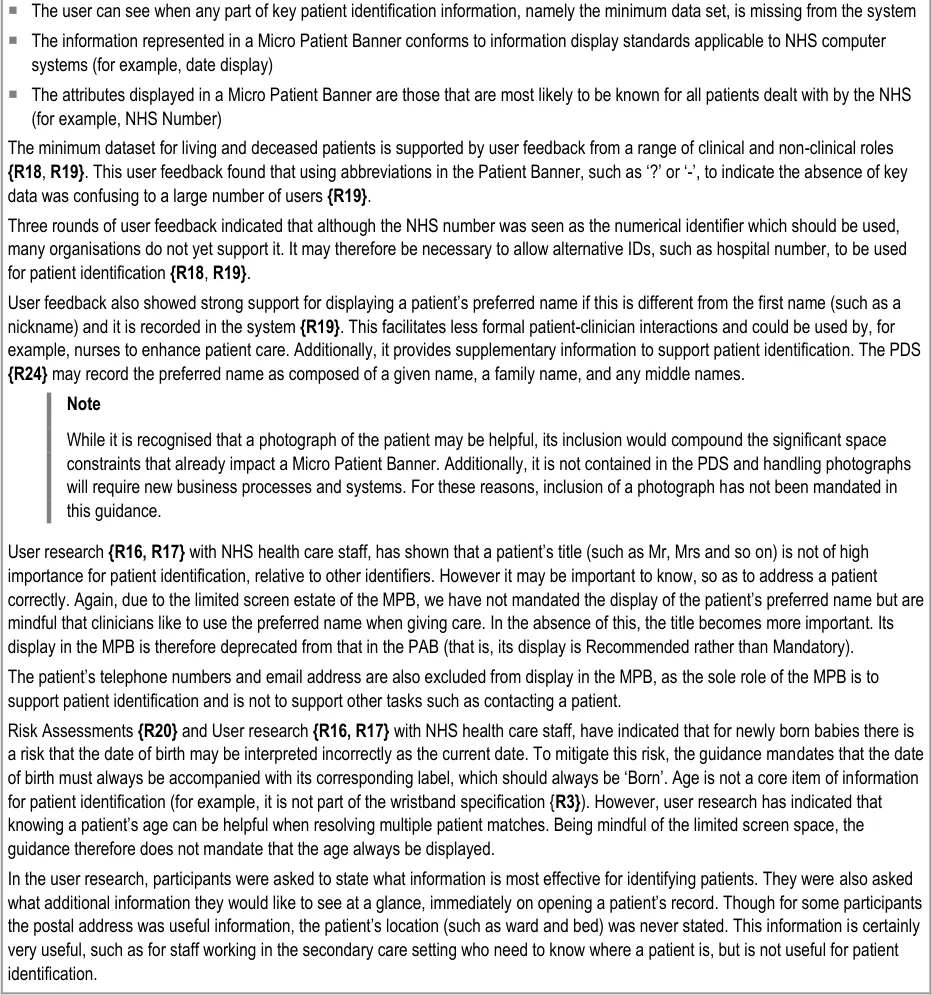
User research {R16, R17} with NHS health care staff has shown that using an icon such as or to display a patient’s gender is not understood. NHS CUI guidance for sex and gender display {R11}, based on the NHS Data Model and Dictionary {R25}, also specifies other permissible values (namely ‘Not known’ and ‘Not Specified’) for which there are no graphical representations. For these reasons, this guidance prohibits all pictorial forms of displaying gender in the MPB. A common form for displaying gender is in abbreviated form, such as ‘M’ for male and ‘F’ for female. While these are more intuitively understood, the problem remains for the other values, for which any abbreviation would be ambiguous. The overarching principle, which applies across all items in a MPB, is to always display the minimum data set and accompanying labels in full, provided screen space allows for this. Any departures from this principle should be based on sound safety assessments.
As already discussed, for age and for address, gender is not a core item of information for patient identification {R3}, but is a helpful item when resolving multiple matches or when addressing a patient. In the user research, a participant commented that “ Having gender displayed reduces the chance of mistaken identity by half. It is good to know the gender when discussing patients with relatives and over the phone, so that the correct personal pronouns can be used. This saves anxiety and embarrassment”. Its display is therefore not mandatory but, when displayed, the label ‘Gender’ must be used rather than ‘Sex’ as, for patient identification, the patient’s current gender classification is more relevant than that recorded at birth. Comments were also made by participants about the difference between sex and gender and that the former is used for clinical purposes (such as for prescribing). However, this difference between sex and gender was not understood by all participants in the user research, a number of whom saw these terms as being synonymous. To emphasise the difference, this guidance advises that suitable cautionary information be provided to users. The suggested definition for gender is: ‘Gender: a person’s current gender. This may be different from a person’s sex, which is a person’s gender defined at the point of birth registration.’
A further aspect mentioned by one participant in the user research was the need to know whether a patient was of transgender or whether the sex and gender differed. These aspects stray from the aim of the Micro Patient Banner and therefore the guidance does not advise displaying such information.
The label ‘Born’ is mandated, though wristband guidance uses ‘Date of Birth’, because the former is shorter and screen space is limited on the MPB. In the user research, one person commented that the label helps “ To avoid confusion with today’s date [for] new born babies.”
Finally, reference to tooltips is only to serve as an example, not as a recommended design choice. Indeed, tooltips may not be supported by the operating system software running on the PDA, as these do not typically support stylus-hover behaviour in the way that desktops support mouse-hover behaviour. One can envisage a tooltip-like display style activated upon touch instead of on hover. However, the guidance does not require that PDAs used for clinical applications must have touch-sensitive screens. The guidance endeavours to be platform-agnostic, so simply emphasises the need to support on-demand explanatory information to the user in a form suited to the chosen platform. In addition to the suggested definition for gender given above, the following definitions are suggested:
Patient name: ‘The patient’s family name, followed by their given name’
Date of birth: ‘The patient’s date of birth’.
6 Wright, P. C. Jansen, JC. Wyatt. (1998): How to limit clinical error in interpretation of data: Lancet 352: 1539-43 {R23} : http://www.ncbi.nlm.nih.gov/entrez/query.fcgi?db=PubMed&cmd=Retrieve&list_uids=9820319&dopt=Citation
Page 16
Copyright ©2013 Health and Social Care Information Centre
HSCIC Controlled Document
3.3.6 Guidance – Patient Name
Page 17
Copyright ©2013 Health and Social Care Information Centre
HSCIC Controlled Document
3.3.7 Guidance – Micro Patient Banner for a Deceased Patient
Page 18
Copyright ©2013 Health and Social Care Information Centre
HSCIC Controlled Document
3.3.8 Guidance – Alignment of Information
3.4 Rationale Summary
The guidance in this document mitigates patient safety issues that arise during patient identification.
General Principles:
-
Reliable and accurate identification of an individual patient record
-
Matching a patient record with:
The correct patient, whether present in person or on the telephone
Other artefacts associated with the patient (for example, samples, letters or wristbands)
- Displaying core information according to existing standards and guidance and using a
minimum data set available to all NHS clinical applications
-
Promoting consistency across the mix of users, NHS clinical applications and care settings
-
Displaying minimum supplementary information to support patient identification
-
Minimising opportunities for human error
Usability Principles:
-
Enhance readability of data over that of corresponding labels
-
Separate primary data required for patient identification from secondary supporting data
-
Permanent display of primary data for frequent and efficient access
-
On-demand display of secondary data to reduce screen clutter
Page 19
Copyright ©2013 Health and Social Care Information Centre
HSCIC Controlled Document
-
Guidance based on feedback from user research
-
Support all users by additionally addressing requirements for accessibility
Existing Standards:
- NPSA Safer Practice Notice: Standardising wristbands improves patient safety {R3}
Evolving Standards:
-
Information needed for patient identification
-
Information described in the PDS
-
Age display in electronic system for children (under development in the Child Health
Workstream at NHS CFH)
- Gender display
Copyright ©2013 Health and Social Care Information Centre
Page 20
HSCIC Controlled Document
4 DOCUMENT INFORMATION
4.1 Terms and Abbreviations
CSA Clinical Spine Application
CUI Common User Interface
MPB Micro Patient Banner
NPfIT National Programme for Information Technology
NHS National Health Service
NHS CFH NHS Connecting for Health
NPSA National Patient Safety Agency
PAB Patient Banner
PC Personal Computer
PDA Personal Digital Assistant
PDS Personal Demographics Service
RFID Radio Frequency Identification
UI User Interface
WHO World Health Organization
Table 5: Terms and Abbreviations
4.2 Definitions
NHS Entity Within this document, defined as a single NHS organisation or group that is operated within a single technical infrastructure environment by a defined group of IT administrators.
The Authority The organisation implementing the NHS National Programme for IT (currently NHS Connecting for Health).
Current best practice Current best practice is used rather than best practice, as over time best practice guidance may change or be revised due to changes to products, changes in technology, or simply the additional field deployment experience that comes over time.
Table 6: Definitions
Page 21
Copyright ©2013 Health and Social Care Information Centre
HSCIC Controlled Document
4.3 Nomenclature
This section shows how to interpret the different styles used in this document to denote various types of information.
4.3.1 Body Text
Code Monospace
Script
Other markup languages
Interface dialog names Bold
Field names
Controls
Folder names Title Case
File names
Table 7: Body Text Styles
4.3.2 Cross References
Current document – sections Section number only
Current document – figures/tables Caption number only
Other project documents Italics and possibly a footnote
Publicly available documents Italics with a footnote
External Web-based content Italics and a hyperlinked footnote
Table 8: Cross Reference Styles
4.4 References
R1. NHS CUI Design Guide Workstream – Design Guide Entry – Patient Banner 4.0.0.0
R2. Right patient - right care, NPSA: http://www.npsa.nhs.uk/EasySiteWeb/getresource.axd?AssetID=3234&type=full&servicetype=Attachment
R3. Standardising wristbands improves patient safety, NPSA Safer Practice Notice: Standardising wristbands improves patient safety
R4. WHO Collaborating Centre for Patient Safety Releases - Patient Safety Solutions – Volume 1, Solution 2: http://www.jcipatientsafety.org/fpdf/Presskit/PS-Solution2.pdf
R5. The Joint Commission - National Patient Safety Goals – Goal 1: http://www.jointcommission.org/PatientSafety/NationalPatientSafetyGoals/08_npsg_facts.htm
R6. Mohammad Al-Ubaydli, Handheld Computers, BMJ 2004;328;1181-1184
R7. Chantelle Garritty and Khaled El Emam: Who’s Using PDAs? Estimates of PDA Use by Health Care Providers: A Systematic Review of Surveys: J Med Internet Res 2006;8(2):e7: http://www.jmir.org/2006/2/e7/
2004
2007
2007
2007
R8. NHS CUI Design Guide Workstream – Design Guide Entry – Date Display 4.0.0.0
Page 22
Copyright ©2013 Health and Social Care Information Centre
HSCIC Controlled Document
R9. NHS CUI Design Guide Workstream – Design Guide Entry – Time Display 4.0.0.0
R10. NHS CUI Design Guide Workstream – Patient Name Input and Display – User Interface Design Guidance 2.0.0.0
R11. NHS CUI Design Guide Workstream – Sex and Current Gender Input and Display — User Interface Design Guidance
4.0.0.0
R12. NHS CUI Design Guide Workstream – NHS Number Input and Display – User Interface Design Guidance 3.0.0.0
R13. NHS CUI Design Guide Workstream – Address Input and Display – User Interface Design Guidance 3.0.0.0
R14. NHS CUI Design Guide Workstream – Accessibility Checkpoints for NHS Applications 1.0.0.0
R15. NHS CUI Design Guide Workstream – Accessibility for Clinical Applications 1.0.0.0
R16. NHS CUI Micro Patient Banner User Research – Online Survey 1.0.0.0
R17. NHS CUI Micro Patient Banner User Research – Interviews 1.0.0.0
R18. NHS CUI Patient Banner User Research 2006-12-07 0.0.0.5
R19. NHS CUI Patient Banner Survey Results 2007-08-06 1.0.0.0
R20. NHS CUI Micro Patient Banner Hazard Log 1.0.0.0
R21. Koyani et al, Research-Based Web Design and Usability Guidelines: U.S. Department of Health and Human Services: http://www.usability.gov/pdfs/guidelines.html
R22. Tidwell J, Designing Interfaces: www.designinginterfaces.com
R23. Wright, P. C. Jansen, JC. Wyatt. (1998): How to limit clinical error in interpretation of data: Lancet 352: 1539-43: http://www.ncbi.nlm.nih.gov/entrez/query.fcgi?db=PubMed&cmd=Retrieve&list_uids=9820319&dopt=Citati on
R24. The Personal Demographics Service The Personal Demographics Service — NHS Connecting for Health
R25. National Health Service (NHS) Data Model and Dictionary: http://www.datadictionary.nhs.uk/index.asp
Table 9: References
Copyright ©2013 Health and Social Care Information Centre
2006
First Edition
1998
Page 23
HSCIC Controlled Document
REVISION AND SIGNOFF SHEET
Change Record
04-Jul-2008 Ash Gupta 0.0.0.1 Initial draft for review/discussion
11-Jul-2008 Mick Harney 0.0.1.0 Made placeholder Working Baseline version prior to copyedit
11-Jul-2008 Mick Harney 0.0.2.0 First copyedit pass
17-Jul-2008 Ash Gupta 0.0.3.0 Second draft for review
17-Jul-2008 Mick Harney 0.0.4.0 Copyedit to reformat and highlight remaining input needed from author
17-Jul-2008 Ash Gupta 0.0.5.0 Remaining input added
18-Jul-2008 Mick Harney 0.1.0.0 Final copyedit checks and raised to Baseline Candidate
29-Jul-2008 Ash Gupta 0.1.0.1 Updates
29-Jul-2008 Mick Harney 0.2.0.0 Raised to Baseline Candidate for Approval
05-Aug-2008 Ash Gupta 0.2.0.1 Incorporated improvements identified while debranding
06-Aug-2008 Mick Harney 0.3.0.0 Raised to Baseline Candidate #3
12-Aug-2008 Mick Harney 1.0.0.0 Raised to Baseline
20-Apr-2009 Mick Harney 1.0.0.1 Foundation draft for ISB updates
29-May-2009 Rachel Eno 1.0.0.2 Updates
29-May-2009 Mick Harney 1.0.0.3 Copyedited updates
29-May-2009 Mick Harney 1.1.0.0 Raised to Baseline Candidate
24-June-2009 Simon Burnham 2.0.0.0 Raised to Baseline
Document Status has the following meaning:
- Drafts 0.0.0.X - Draft document reviewed by the Microsoft CUI Project team and the
Authority designate for the appropriate Project. The document is liable to change.
- Working Baseline 0.0.X.0 - The document has reached the end of the review phase and
may only have minor changes. The document will be submitted to the Authority CUI Project team for wider review by stakeholders, ensuring buy-in and to assist in communication.
- Baseline Candidate 0.X.0.0 - The document has reached the end of the review phase and
it is ready to be frozen on formal agreement between the Authority and the Company.
- Baseline X.0.0.0 - The document has been formally agreed between the Authority and the
Company.
Note that minor updates or corrections to a document may lead to multiple versions at a particular status.
Open Issues Summary
None
Page 24
Copyright ©2013 Health and Social Care Information Centre
HSCIC Controlled Document
Audience
The audience for this document includes:
- Authority CUI Manager / Project Sponsor . Overall project manager and sponsor for the
NHS CUI project within the Authority.
- Authority Clinical Applications and Patient Safety Project Project Manager.
Responsible for ongoing management and administration of the Project.
- The Authority Project Team . This document defines the approach to be taken during this
assessment and therefore must be agreed by the Authority.
- Microsoft NHS CUI Team . This document defines the approach to be taken during this
assessment, including a redefinition of the Clinical Applications and Patient Safety Project strategy.
Reviewers
Mike Carey Toolkit Workstream Lead
Tim Chearman UX Architect
Kate Verrier-Jones Clinical Advisor
Distribution
Mike Carey Toolkit Workstream Lead
Tim Chearman UX Architect
Dee Hackett Clinical Advisor
Peter Johnson Clinical Architect
Naveenta Kumar Clinical Advisor
Kate Verrier-Jones Clinical Advisor
Document Properties
Document Title Micro Patient Banner User Interface Design Guidance
Author Clinical Applications and Patient Safety Project
Restrictions RESTRICTED – COMMERCIAL; MICROSOFT COMMERCIAL; Access restricted to: NHS CUI Project Team, Microsoft NHS Account Team
Creation Date 4 July 2008
Last Updated 23 June 2015
Page 25
Copyright ©2013 Health and Social Care Information Centre
HSCIC Controlled Document
Copyright:
You may re-use this information (excluding logos) free of charge in any format or medium, under the terms of the Open Government Licence. To view this licence, visit nationalarchives.gov.uk/doc/open-government-licence or email psi@nationalarchives.gsi.gov.uk.
Page 26
Copyright ©2013 Health and Social Care Information Centre