Document Properties Document Title Patient List View
 Prepared for
NHS Connecting for Health
Version 1.0.0.0 Baseline
Prepared by
Clinical Applications and Patient Safety Project
NHS CUI Programme Team
cuistakeholder.mailbox@hscic.gov.uk
Prepared for
NHS Connecting for Health
Version 1.0.0.0 Baseline
Prepared by
Clinical Applications and Patient Safety Project
NHS CUI Programme Team
cuistakeholder.mailbox@hscic.gov.uk

PREFACE
- PREFACE
- 1 INTRODUCTION
- 2 GUIDANCE OVERVIEW
- 3 GUIDANCE DETAILS FOR PATIENT LIST LAYOUT
- 4 GUIDANCE DETAILS FOR MANAGING THE INFORMATION DISPLAYED
- 5 DOCUMENT INFORMATION
- APPENDIX A USABILITY PRINCIPLES
- APPENDIX B STUDY ID 77: EXECUTIVE SUMMARY
- REVISION AND SIGNOFF SHEET
Source PDF: patlistview.pdf
Documents replaced by this document None Documents to be read in conjunction with this document Design Guide Entry – Patient Banner 4.0.0.0 Displaying Graphs and Tables – User Interface Design Guidance 2.0.0.0 Filtering, Sorting and Grouping – User Interface Design Guidance 1.0.0.0 This document was prepared for NHS Connecting for Health which ceased to exist on 31 March 2013. It may contain references to organisations, projects and other initiatives which also no longer exist. If you have any questions relating to any such references, or to any other aspect of the content, please contact cuistakeholder.mailbox@hscic.gov.uk Patient Safety Process The development lifecycle for this design guide includes an integrated patient / clinical safety risk assessment and management process. Known patient safety incidents relevant to this design guidance area have been researched and reviewed as part of ongoing development. The resulting guidance points aim to support mitigation of these known patient safety risks. In addition, the developers of this design guide have undertaken a patient safety risk assessment to identify new risks that could potentially be introduced by the guidance points in this document. Any potential risks identified have been assessed and managed to support the ongoing clinical safety case for this design guide. The Hazard Log records all the risks that have been identified during development and describes mitigatory actions that, in some cases, will need to be taken by users of this design guide. The Hazard Log is a live document that is updated as the design guide is developed and maintained. Until this design guide has received full Clinical Authority to Release (CATR) from the NHS Connecting for Health (CFH) Clinical Safety Group (CSG) – based on an approved Clinical Safety Case – there may be outstanding patient safety risks yet to be identified and mitigated. Additionally, users implementing applications that follow this design guide’s guidelines (for example, healthcare system suppliers) are expected to undertake further clinical safety risk assessments of their specific systems within their specific context of use. Refer to NHS Common User Interface for further information on the patient safety process and for the safety status and any relevant accompanying safety documentation for this design guide.
1 INTRODUCTION
This document provides guidance for the design of Patient Lists. It describes the area of focus, lists mandatory and recommended guidance points with usage examples and explains the rationale behind the guidance.
To indicate their relative importance, each guideline in this document is ranked by Conformance and by Evidence Rating . Table 1 defines those terms:
Conformance Indicates the extent to which you should follow the guideline when defining your User Interface (UI) implementation. There are two levels:
Mandatory - An implementation should follow the guideline
Recommended - An implementation is advised to follow the guideline
Evidence Rating Summarises the strength of the research defining the guideline and the extent to which it mitigates patient safety hazards. There are three ratings (with example factors used to determine the appropriate rating):
Low :
Does not mitigate specific patient safety hazards
User research findings unclear and with few participants
Unreferenced usability principles indicate the design is not significantly better than alternatives
Medium :
Mitigates specific patient safety hazards
User research findings clear but with few participants
References old authoritative guidance (for example, from National Patient Safety Agency (NPSA),
Institute for Safe Medication Practices (ISMP) or World Health Organization (WHO)) that is potentially soon to be superseded
Referenced usability principles indicate the design is significantly better than alternatives
High :
Mitigates specific patient safety hazards
User research findings clear and with a significant number of participants
References recent authoritative guidance (for example, from NPSA, ISMP or WHO)
Referenced usability principles indicate the design is significantly better than alternatives
Table 1: Conformance and Evidence Rating Definitions
Note
Refer to section 5.2 for definitions of the specific terminology used in this document.
1.1 Customer Need
Patient Lists are used in a wide range of clinical contexts within both primary and secondary care settings.
A Patient List comprises a structured list of patients specific to a service, a location or a care provider. For each patient, the list contains unique identification information and a subset of the patient’s health record appropriate to the use of the list.
Uses of Patient Lists include:
-
Reviewing information about a set of patients
-
Gaining an overview of their clinical situation
-
Managing tasks
Page 1
Copyright ©2013 Health and Social Care Information Centre
HSCIC Controlled Document
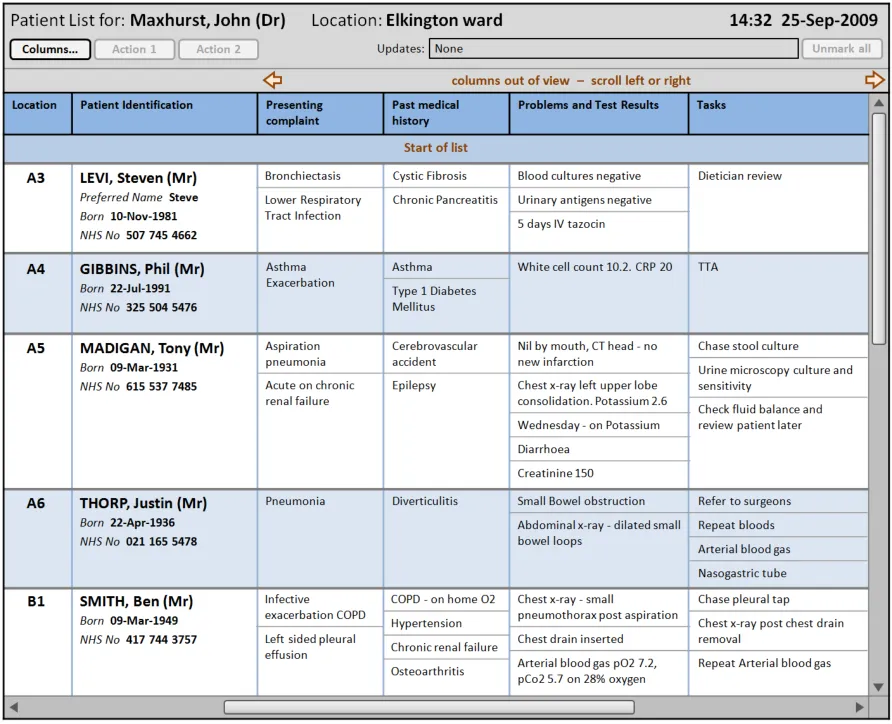
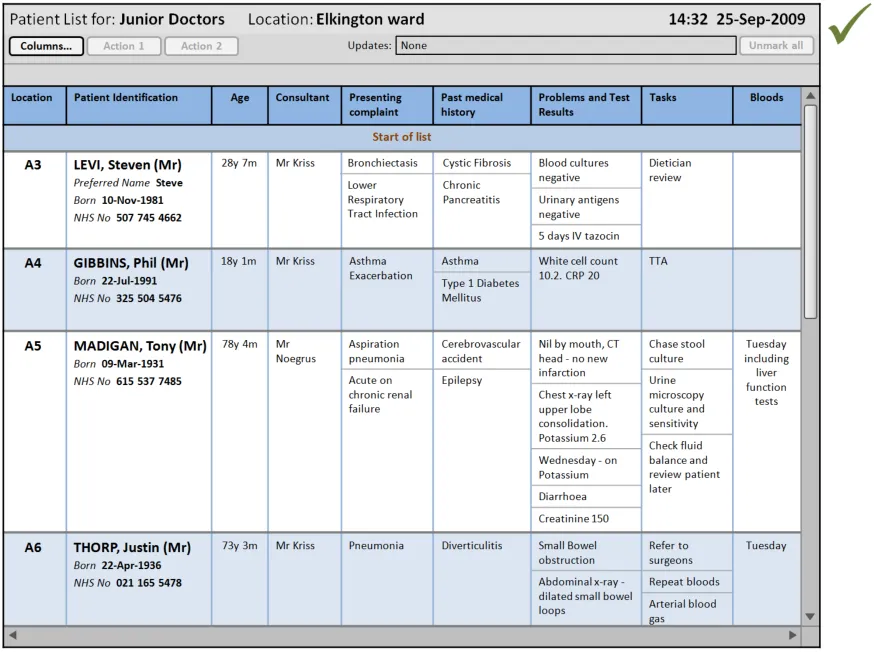
Figure 1 illustrates a Patient List that follows the guidance in this document:
Figure 1: Example Patient List Conformant to This Guidance, Populated with Fictitious Data
Important
The visual representations used within this document to display the guidance are illustrative only. They are simplified in order to support understanding of the guidance points. Stylistic choices, such as colours, fonts or icons are not part of the guidance and unless otherwise specified are not mandatory requirements for compliance with the guidance in this document.
Patient Lists may be used by an individual clinician (for example, consultant) or a team (for example, nursing team). The lists are typically used for a specific time period (for example, a shift) and are updated during this period if changes to the patient information occur.
During the research and collation of data for this document no guidance was found for a common presentation of Patient Lists as defined above.
During the development of this document, potential patient safety hazards around the display of patient data within a list were identified and recorded. The guidance within this document helps mitigate these recorded hazards and is determined by three key considerations:
-
Users must be able to easily access the Patient List information they need
-
Users must be able to quickly and easily familiarise themselves with the Patient List layout
on first use
- Users must be able to quickly understand how to manage the display of Patient List
information
This guidance covers the safe display of information for multiple patients in a Patient List format.
Page 2
Copyright ©2013 Health and Social Care Information Centre
 HSCIC Controlled Document
During research, the majority of identified potential patient safety hazards concerning Patient Lists applied to secondary care contexts, where teams of clinicians are caring for multiple patients in a single location (for example, a medical ward in a hospital). For this reason, the majority of examples provided throughout this document are based on a secondary care scenario, specifically a hospital respiratory ward. The medical information shown in these examples is fictitious but is based on the experiences of medical professionals who work or have recently worked on respiratory wards.
1.2 Scope
This section sets out the items that are in and out of scope for this design guidance.
1.2.1 In Scope
Datatype (format and layout)
Attribute (content and format)
Structured text (for example, tasks) excluding
associated metadata (for example, task status changes)
Patient identifiers (including layout and positioning)
Location (static location)
‘Appointment’ times (including multiple times)
Multiple data types per cell
Style (for example, banding
Size and resizing (both user and system initiated)
Cells Cell padding
Multiple entries per cell
List Header Label and inclusion criteria of list
Row and Column Headers (for example, style, labels)
Gridlines
More Details Opening items (for example, patient care records) ‘Opened’ items in context with list
Navigation Moving around a long or wide list (vertical and
horizontal scrolling)
No Data Empty rows (beds or timeslots) No results in list
Out of View Indicating data out of view per cell and/or row (for
example, truncation)
Indicating items out of list view
Use of out of view (that is, do you always show some
datatypes and/or attributes)
Fitting items on a page (for default views)
Provenance Indication of refreshed list Refreshing the list
Updates Indication of update (at list or ‘cell’ level, including
‘new’ items)
Viewing update history
Viewing previous patients on the list
Datasets Alter the visible dataset (for example, adding
columns, including role specific views, list level of detail, and so on)
Layout Layout of data (for example, column order)
Manipulation Indication of filtered list
Filtering the list
Indication of grouping
Similarity Flagging similar names and similarity (indication of
determining differential)
Table 2: In Scope
Provenance –- when was data last updated
Snapshot history (viewing, navigating, indication of
past, et cetera)
Indication of sort order
Showing and hiding ‘columns’
Page 3
Copyright ©2013 Health and Social Care Information Centre
HSCIC Controlled Document
1.2.2 Out of Scope
This section defines areas that are not covered by this guidance. Although there may be specific hazards associated with these areas that are not addressed in this guidance, it is likely that the principles in this guidance will extend to Patient Lists in many of the areas listed in Table 3:
Alerts Alerts of change in patient state (for example,
change of Medical Early Warning Score (MEWS))
Application Location in window
Context of list
Window or port sizing
Attribute (content and format)
Mark for discharge
Resuscitation status
Clinical summary (or equivalent) and its structure
Datasets Specifying datasets for particular contexts
Handling ‘exceptional data’ (that is, important data
but outside of the normal dataset)
Datatype (format and layout)
Numerical data per cell
Free-text
Numerical series
Scoring (for example, MEWS)
Flagging potentially incorrect information
Personal notes
Highlighting information
Dual layout view Ensuring equivalent patient information is presented
consistently between the two views
Dealing with information that is only displayed in one
of the views (for example, ‘summary’ not shown on a schematic view)
Consistent visual indication of selection
Form factor Size and interaction modality
Graphical layout Schematic, architectural, layout, and so on
Minimum information
Information constraints
Information Governance (IG)
Showing and hiding data
Screensaver or lockout
Input Input of any data
Layout Changing of layout (for example, column horizontal
order)
List actions The Patient List is not used to enter data into the system
Access to actions (for example, through header and incontext including selection)
Differing actions based on list and/or selection
Simultaneous user considerations (for example,
checkout, editing and so on)
Search in progress
Determining default row and column dimensions
Association of goals with tasks, results and
outcomes
Rationale for decisions
Sealed information
Multi-user view (for example, viewing in a
Multi-Disciplinary Team (MDT) meeting)
Alter level of detail shown within a column
Flagging and check of auto populated information
Flagging missing data
Graphing display
Data structured in contextually relevant handover
information structures (for example, Mechanism Illness/Injury Signs/Symptoms Treatment (MIST))
Abbreviations
Misspellings
Selection behaviour (for example, selecting a Patient
List row highlights location on a graphical schema)
Ensuring equivalent patient information is in view in a
table when selected on a graphical schema
Method of switching between views (if viewed
alternately)
Access to further information
Area showing ‘patient row’ for selection
Area showing Patient Banner for selected location
Restrictions on history viewing
Find within a list
Selection of rows, cells, data in cells, columns
(navigation, visual confirmation, states, navigation, and so on)
Page 4
Copyright ©2013 Health and Social Care Information Centre
HSCIC Controlled Document
List header Ward level aggregated scores (for example, number
of infections)
List inclusion Patient’s ‘outside’ the standard set (for example,
those pending admission)
View non-patient data (for example, ward level
information)
Data about patients not in the systems
Manipulation Indication of grouping
Change view setting
Use of sort order
Miscellaneous Handover status
Colours
Ambiguous information
Lists with multiple instance of the same patient
Specifying list criteria
Multiple patients allocated to the same bed (next
patient awaiting admission)
Sort on a key within multiple datatype cells
Sorting items within a cell (for example, prioritising
patients)
Remote view
Patient List summary in the context of a single record
Navigation Navigating to a Patient List Navigating from Patient List
Printing Printing all or part of a Patient List
Process Process of handover (for example, transfer of responsibility)
Structured layout Structured lines (for example, stack of Patient Banners)
Summary Indicating fallibility of summaries Usage of ‘how much’ data should be allowed ‘in’ a
Patient List
Tasks Basic task display layout and format
Task status indicator per task
Task status indicator per patient
Hierarchical view of tasks
Filtering tasks
Display of completed tasks
Colour coding
Role specific mark-up
View task assignment
Indicate overdue tasks
Table 3: Out of Scope
Note
Task state transition model
Viewing task priority
Viewing tasks independence
Viewing task time dependence
Discharge with outstanding tasks
Changing a task’s status
Allocation of tasks
Setting task priority
View tasks in relation to care pathway
Listing an item as out of scope does not classify it as unimportant. Project time and resource constraints inevitably restrict what can be in scope for a particular release. It is possible that items out of scope for this release may be considered for a future release.
1.3 Assumptions
A1 The quality (that is, provenance, accuracy, and completeness) of the data displayed in the Patient List is of an acceptable level. Data quality is particularly important in scenarios where there are multiple data sources (as the quality of data may vary between sources).
A2 Where the system supports the live update of Patient List information, the system performance and connectivity is of such a level that there is minimum delay between the update being entered and the Patient List being updated.
Page 5
Copyright ©2013 Health and Social Care Information Centre
HSCIC Controlled Document
A3 The minimum screen resolution used by the clinician is 1024 x 768 pixels, although a higher resolution may be employed.
A4 The Patient List consists entirely of information that resides in and is accessible through other views, including views that represent the data as entered into the system.
Table 4: Assumptions
1.4 Dependencies
D1 Changes in the following documents may affect the guidance presented in this document:
Design Guide Entry – Patient Banner
Displaying Graphs and Tables – User Interface Design Guidance
Filtering, Sorting and Grouping – User Interface Design Guidance
Table 5: Dependencies
Page 6
Copyright ©2013 Health and Social Care Information Centre
HSCIC Controlled Document
2 GUIDANCE OVERVIEW
2.1 Rationale Summary
The rationale for the current guidance draws on several pieces of evidence:
Research:
- Primary Research:
Interviews with healthcare professionals, including doctors (see APPENDIX B)
Regular consultation with a panel of clinical experts
- Secondary Research:
Existing guidelines and standards
UI best practice
Usability Principles (see APPENDIX A for details on these principles):
-
Nielsen’s usability heuristics
-
Shneiderman’s eight golden rules of interface design
-
International Organization for Standardization (ISO) 9241: Characteristics of presented
information (taken from BS EN ISO 9241-10: 1996 Ergonomic requirements for office work with visual display terminals (VDTs) — Part 10: Dialogues principles {R1} )
Existing Standards:
- BS EN ISO 9241-10:1996 Ergonomic requirements for office work with visual display
terminals (VDTs): Part 10: Dialogues principles {R1}
- BS 7581:1992 Guide to Presentation of tables and graphs {R2}
Evolving Standards:
-
Design Guide Entry – Patient Banner {R3}
-
Displaying Graphs and Tables – User Interface Design Guidance {R4}
-
Filtering, Sorting and Grouping – User Interface Design Guidance {R5}
Page 7
Copyright ©2013 Health and Social Care Information Centre
HSCIC Controlled Document
2.2 Summary of Guidance
Table 6 summarises the content of this document by outlining each area of guidance (along with a cross reference to the relevant section) and providing a visual example to illustrate how it might be implemented:
Section 3 provides guidance on the layout of Patient Lists
Section 3.2.1 provides guidance on the Patient List header, which communicates the context of the Patient List
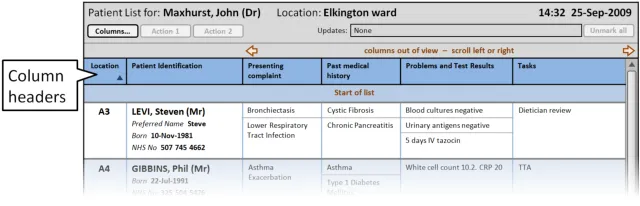
Section 3.2.2 provides guidance on column headers, which provide the titles for each column
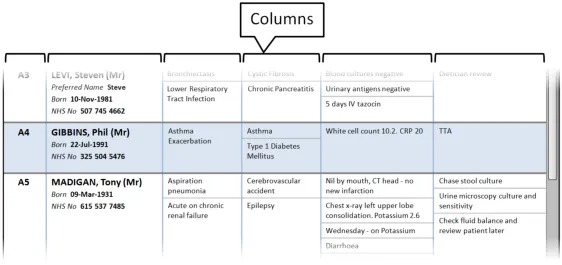
Section 3.2.3 provides guidance on columns, which contain the sets of information for the Patient List
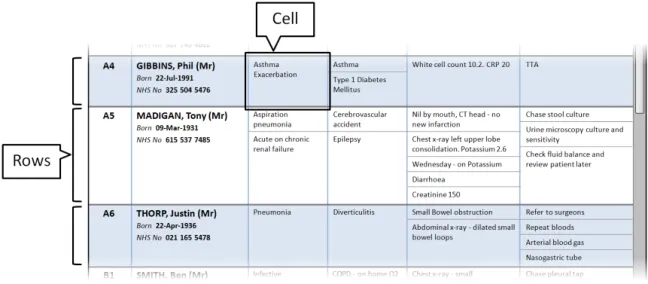
Section 3.2.4 provides guidance on rows and cells. Rows contain the information for each patient in the Patient List. Cells contain specific information for each patient
Page 8
Copyright ©2013 Health and Social Care Information Centre
 HSCIC Controlled Document
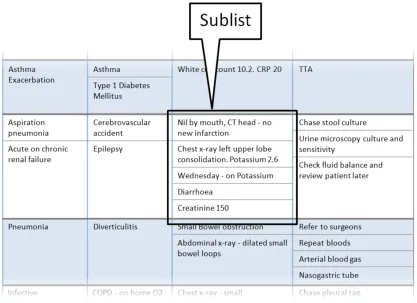
Section 3.2.5 provides guidance on sublists, which are located within cells and contain information that is structured in a list format
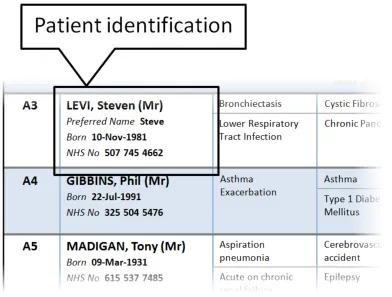
Section 3.2.6 provides guidance on the display of patient identification information
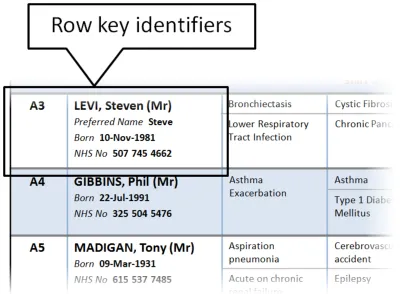
Section 3.2.7 provides guidance on row key identifiers, which uniquely identify each row from others in the Patient List
Section 4 provides guidance on managing the information displayed in a Patient List
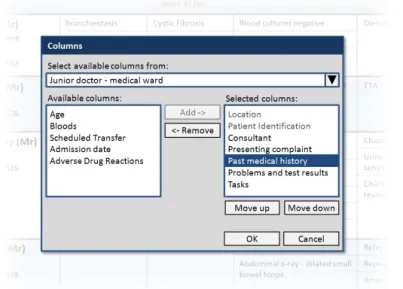
Section 4.2.1 provides guidance on how to manage the columns displayed in the Patient List
Copyright ©2013 Health and Social Care Information Centre
Page 9
 HSCIC Controlled Document
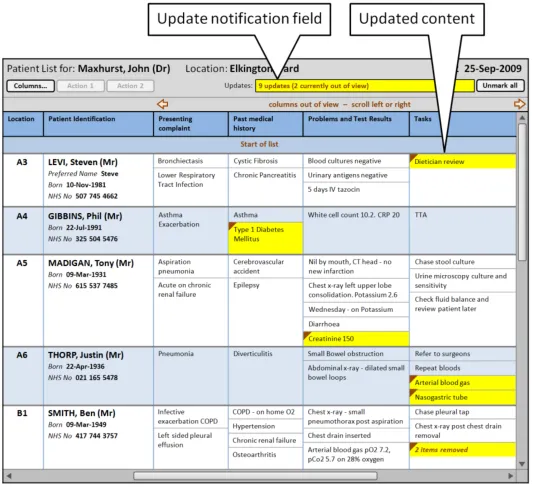
Section 4.2.2 provides guidance on notifying the user of updates to information displayed in the Patient List.
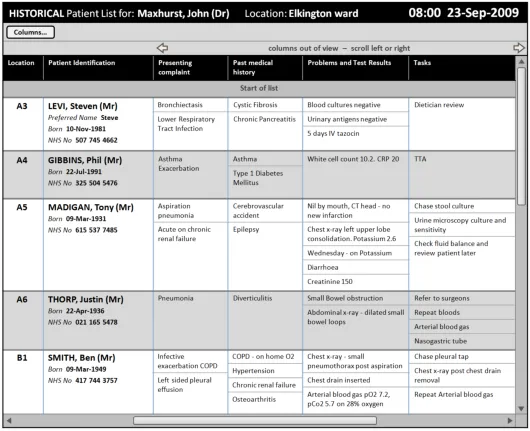
Section 4.2.3 provides guidance on displaying historical patient information as a complete Patient List ‘snapshot’.
Copyright ©2013 Health and Social Care Information Centre
Page 10
 HSCIC Controlled Document
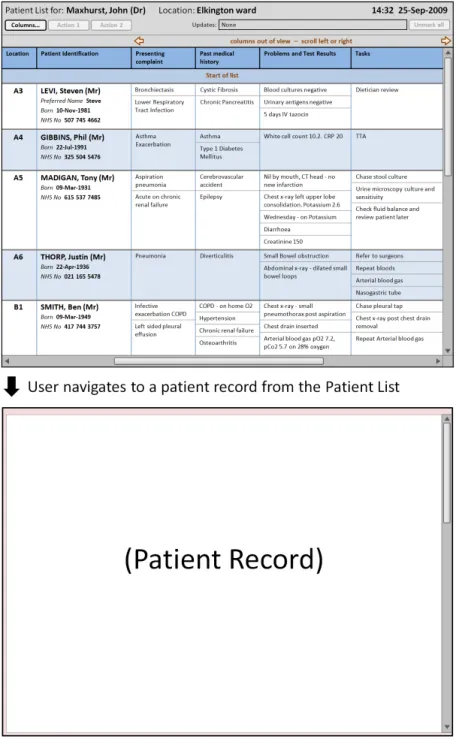
Section 4.2.4 provides guidance on how to display further information that a user has opened
Table 6: Summary of Guidance
Copyright ©2013 Health and Social Care Information Centre
Page 11
 HSCIC Controlled Document
3 GUIDANCE DETAILS FOR PATIENT LIST LAYOUT
3.1 Introduction
This section includes guidance for the layout of Patient Lists, specifically:
-
Patient List headers
-
Column headers
-
Columns
-
Rows and cells
-
Sublists
-
Patient identification
-
Row key identifiers
3.2 Guidelines
3.2.1 Patient List Header
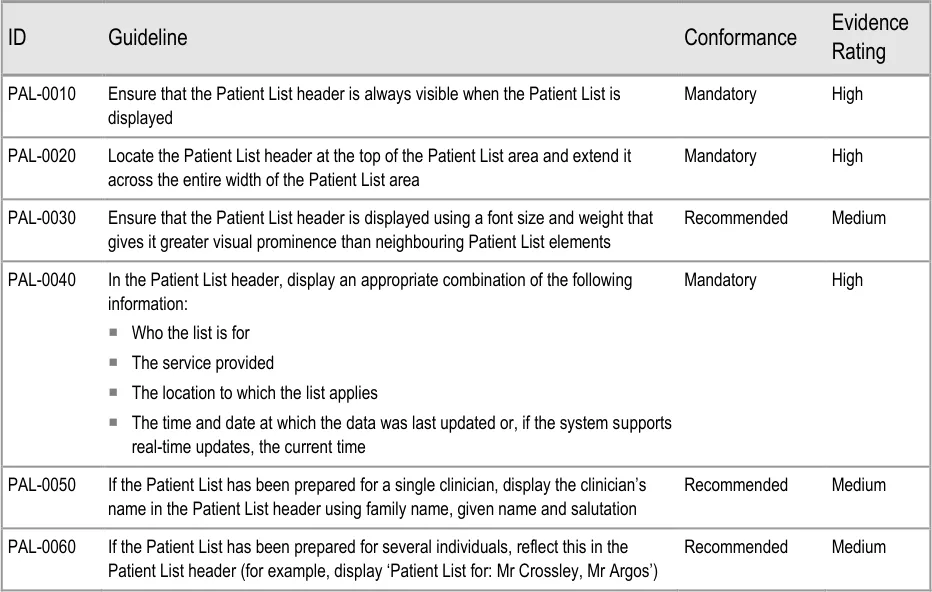
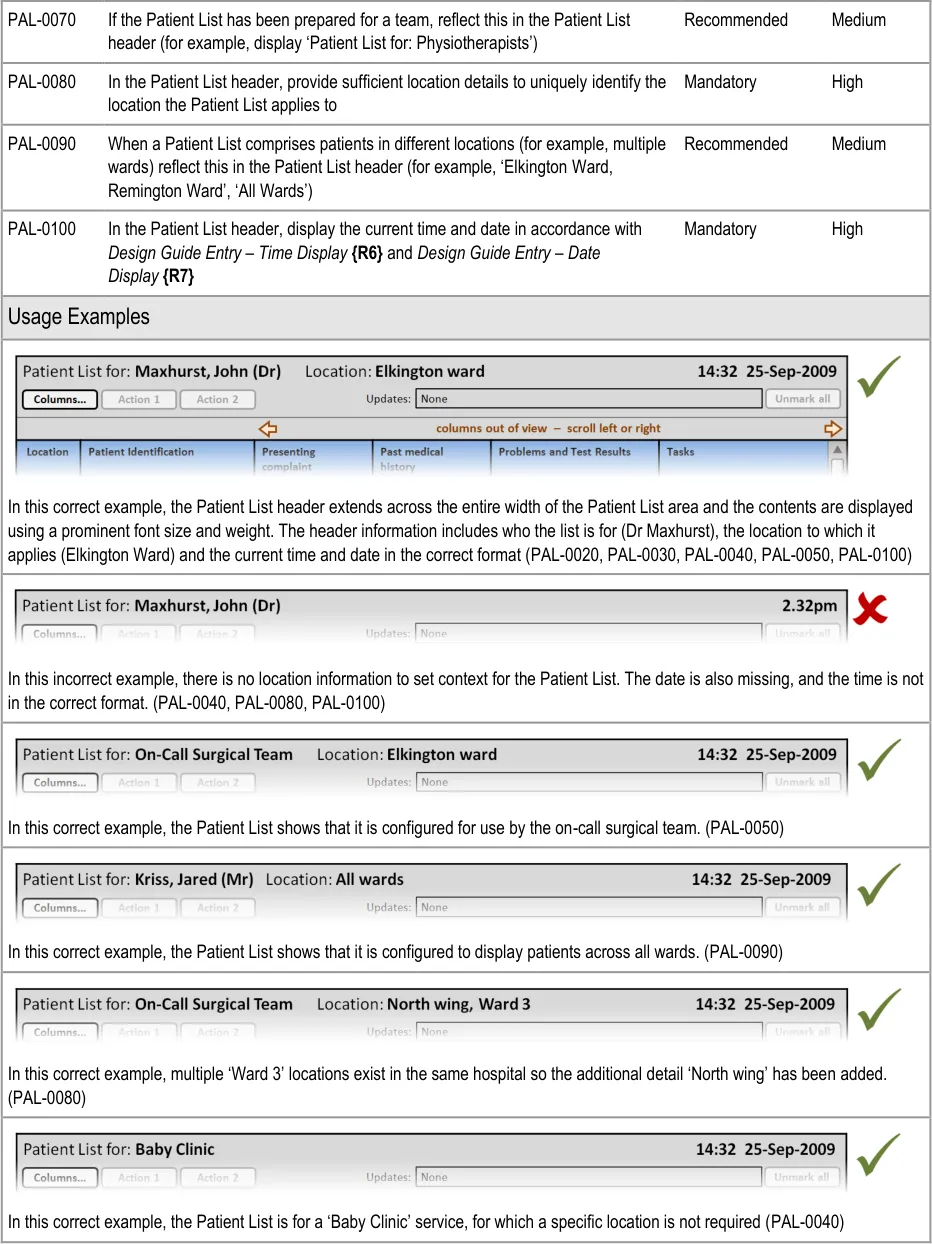
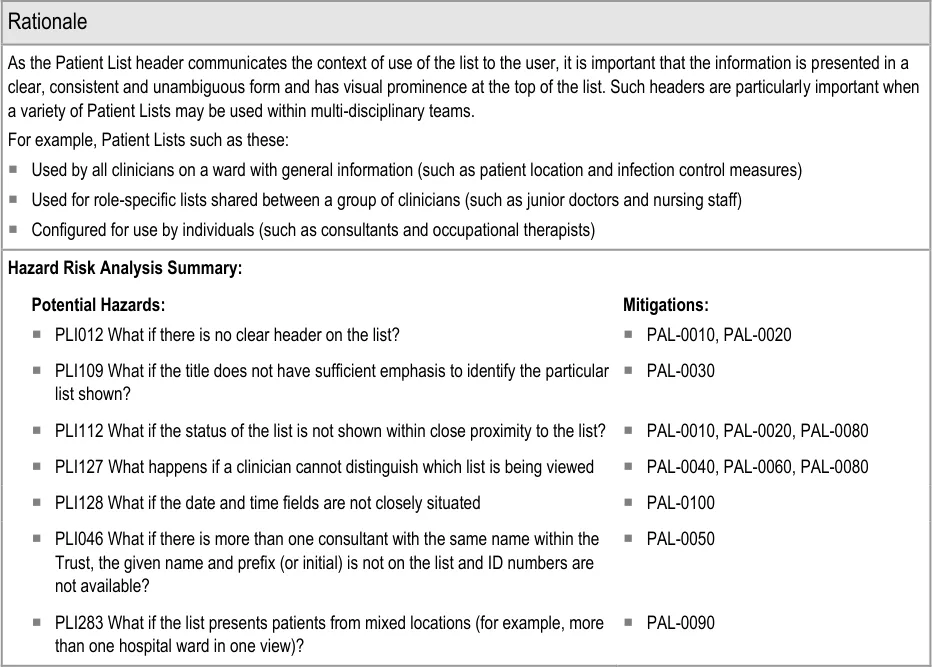
This section provides guidance on the Patient List header. This communicates the context of the list to the user. Figure 2 illustrates that feature:
Figure 2: Patient List Header

Page 12
Copyright ©2013 Health and Social Care Information Centre
HSCIC Controlled Document

Page 13
Copyright ©2013 Health and Social Care Information Centre
HSCIC Controlled Document
3.2.2 Column Headers
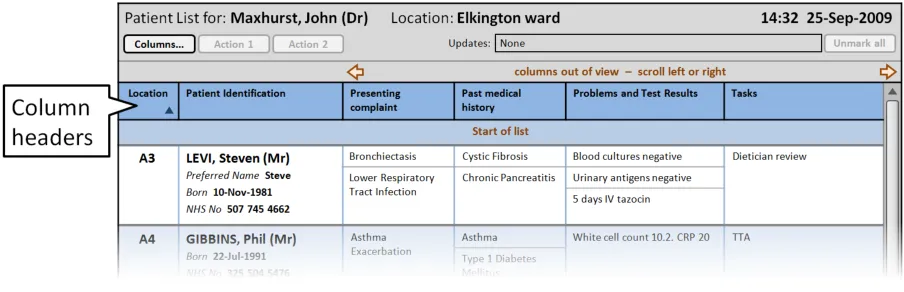
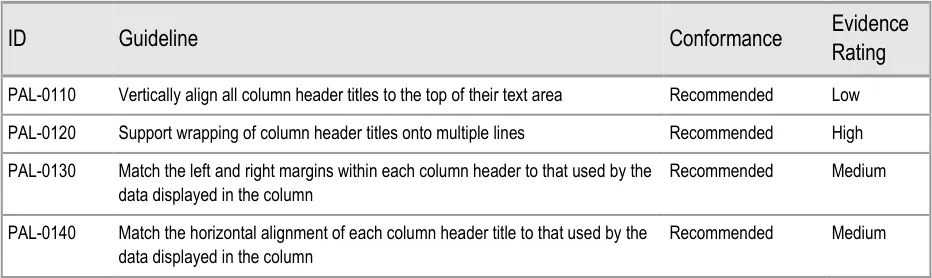
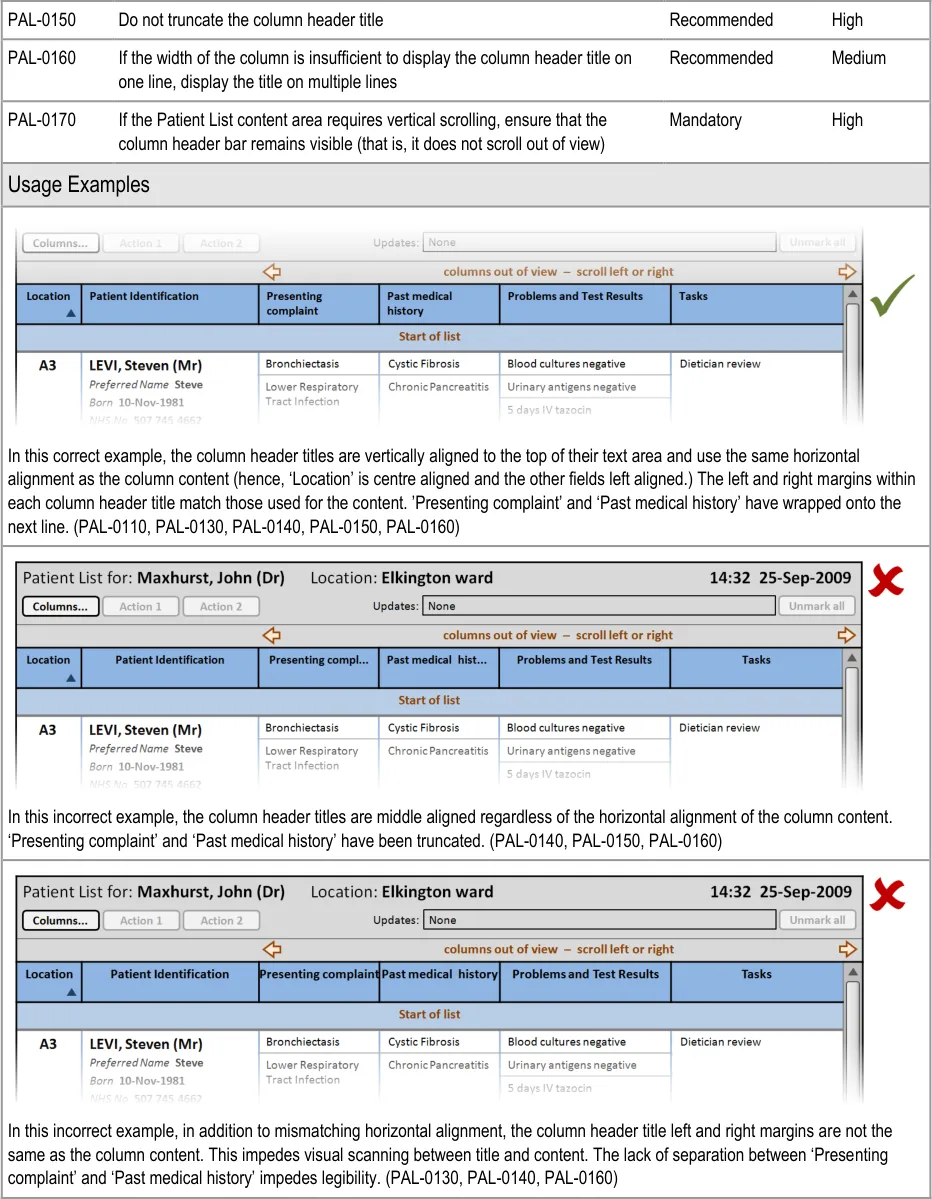
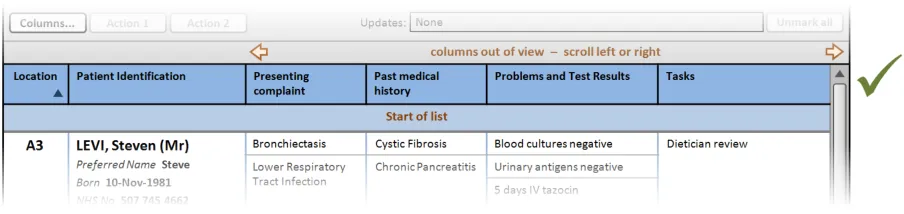
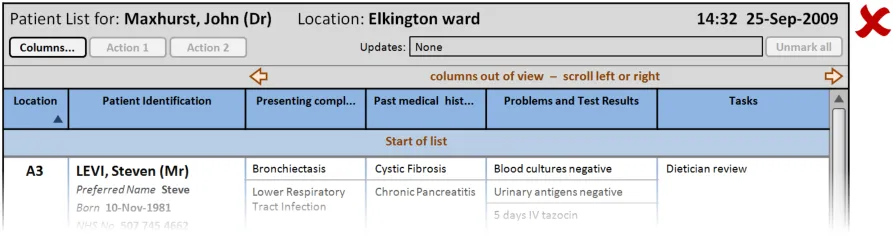
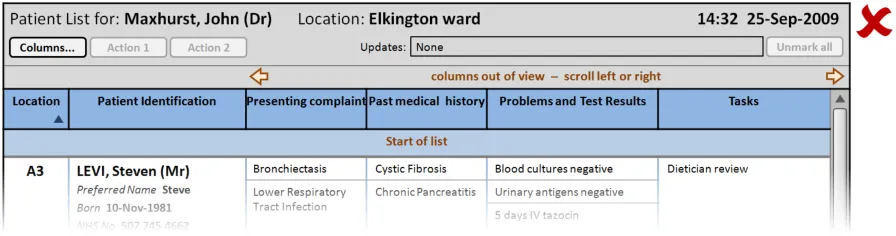
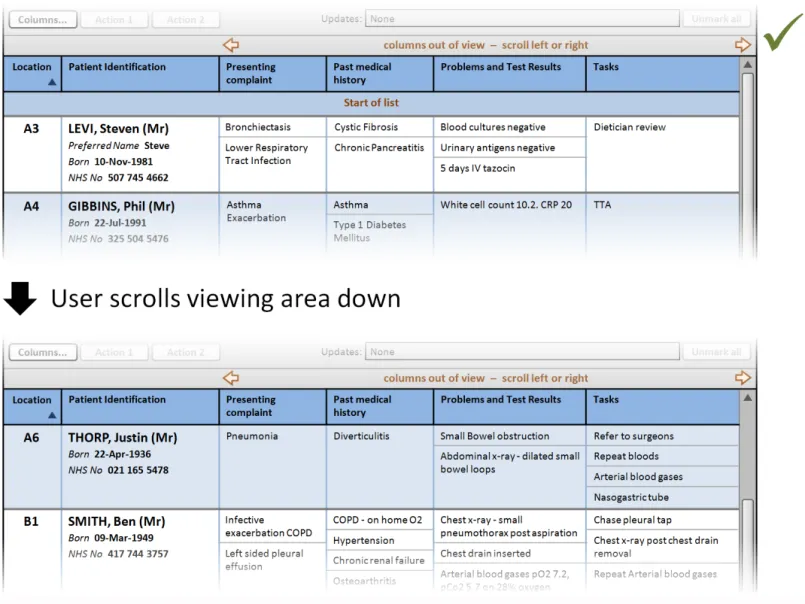
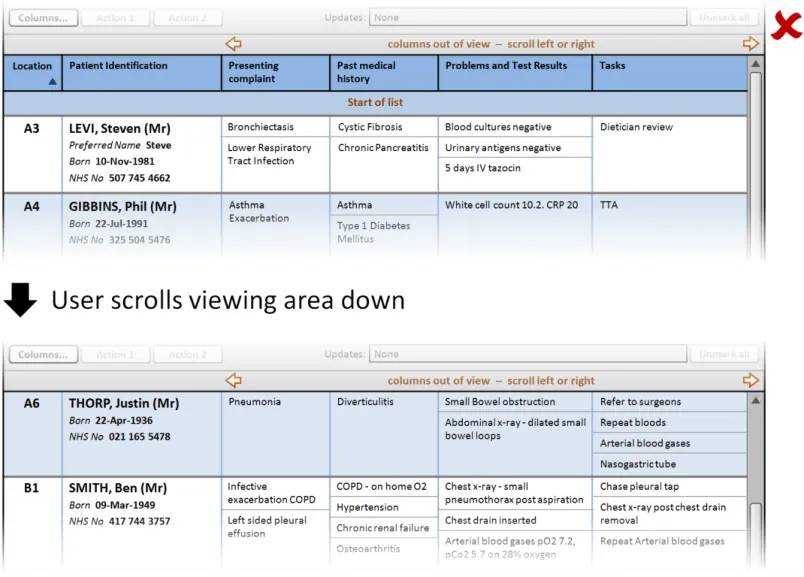
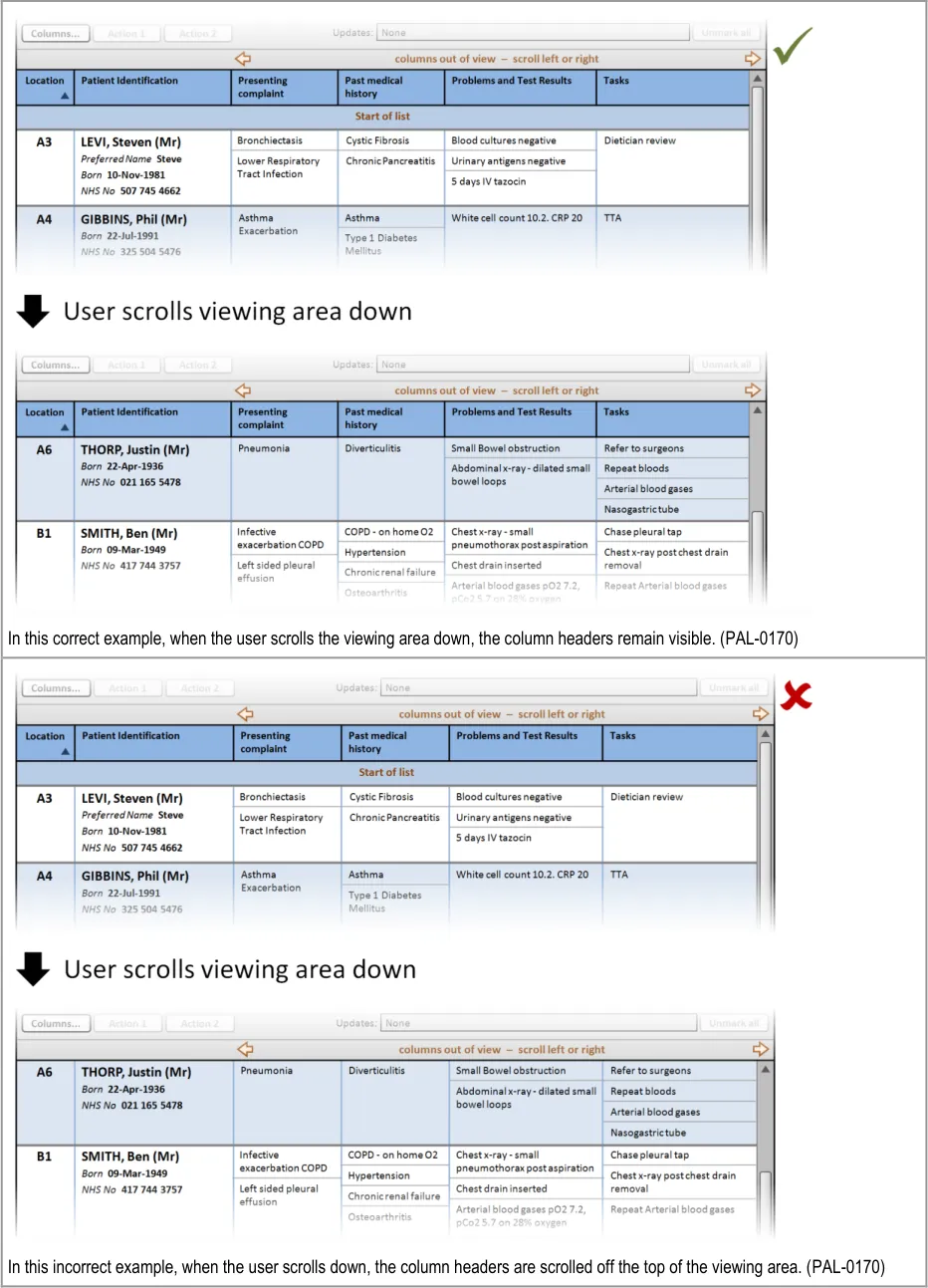
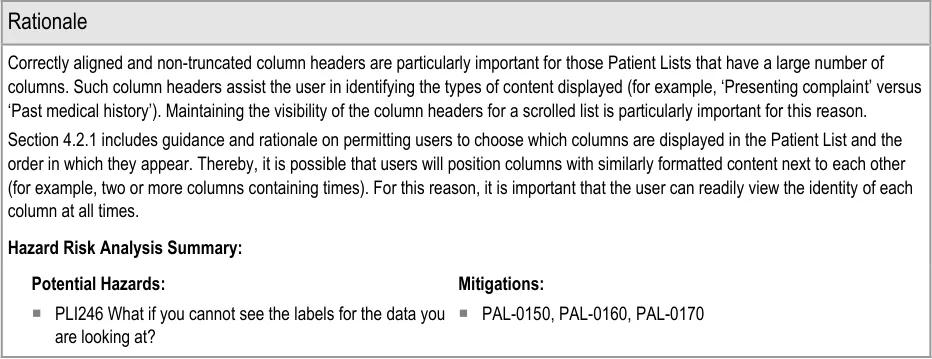
This section provides guidance on column headers, which provide the titles for each column. Figure 3 illustrates that feature:
Figure 3: Column Headers
Page 14
Copyright ©2013 Health and Social Care Information Centre
HSCIC Controlled Document
Page 15
Copyright ©2013 Health and Social Care Information Centre
 HSCIC Controlled Document
Page 16
Copyright ©2013 Health and Social Care Information Centre
 HSCIC Controlled Document
3.2.3 Columns
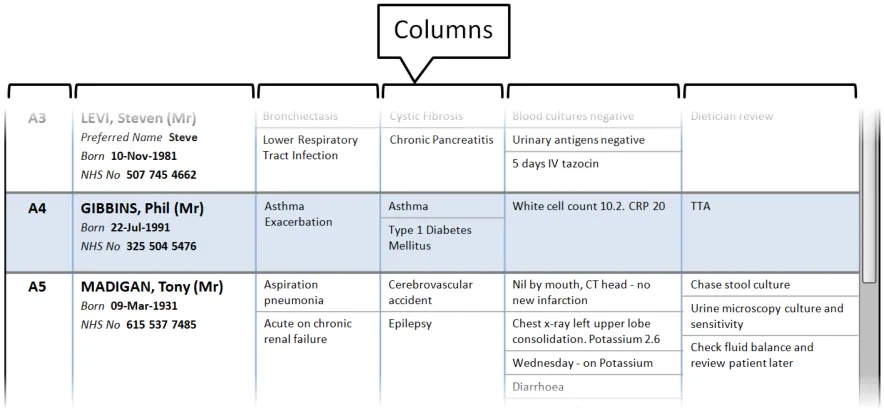
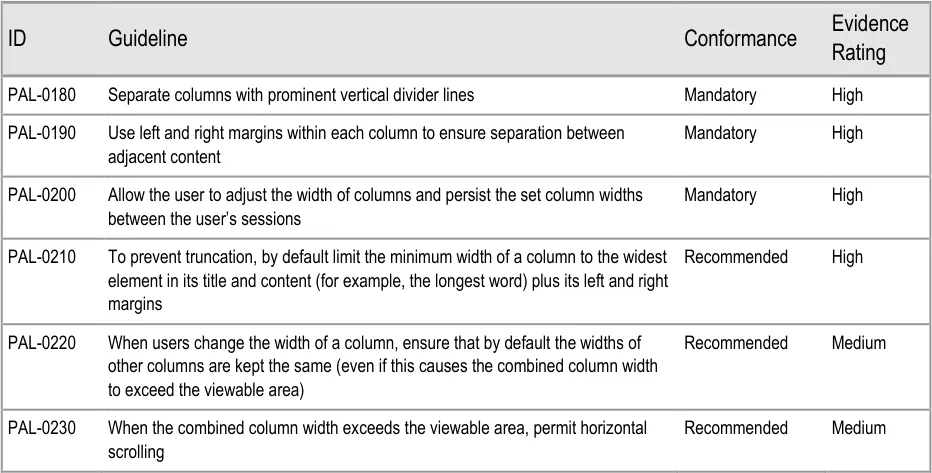
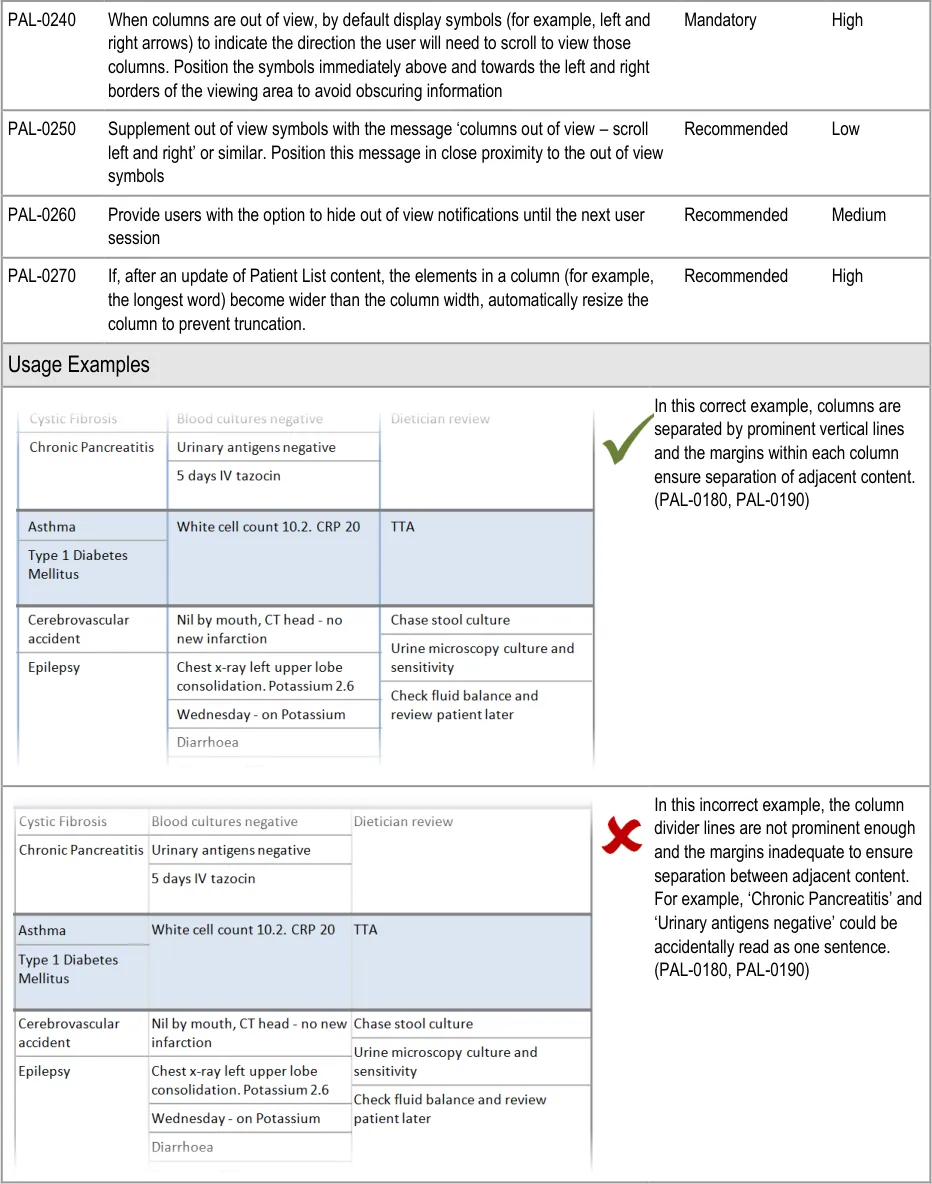
This section provides guidance on columns, which contain the sets of information for the Patient List. Figure 4 illustrates that feature:
Figure 4: Columns
Page 17
Copyright ©2013 Health and Social Care Information Centre
HSCIC Controlled Document
Page 18
Copyright ©2013 Health and Social Care Information Centre
 HSCIC Controlled Document
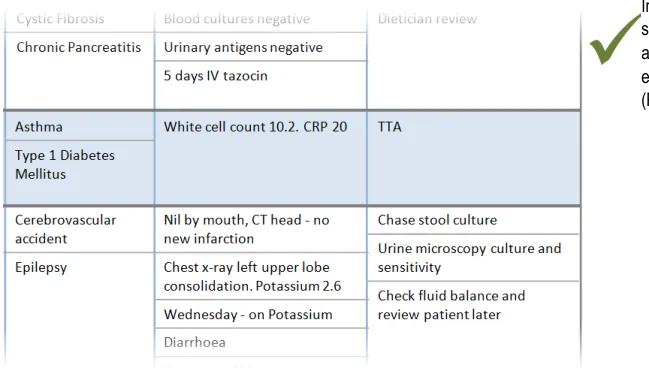
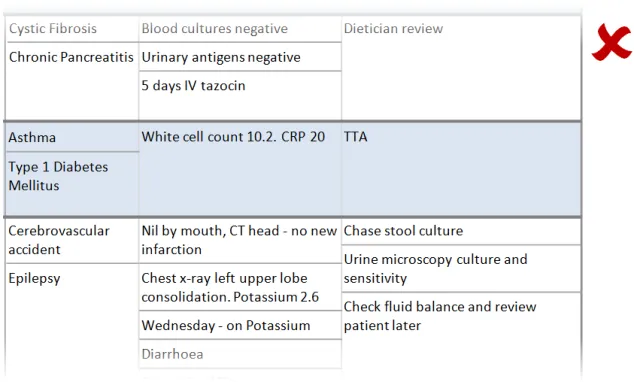
In this incorrect example, the user has been permitted to resize the middle column narrower than the widest elements resulting in the words ‘Pancreatitis’ and ‘Cerebrovascular’ being truncated. (PAL-0210)
Page 19
Copyright ©2013 Health and Social Care Information Centre
 HSCIC Controlled Document
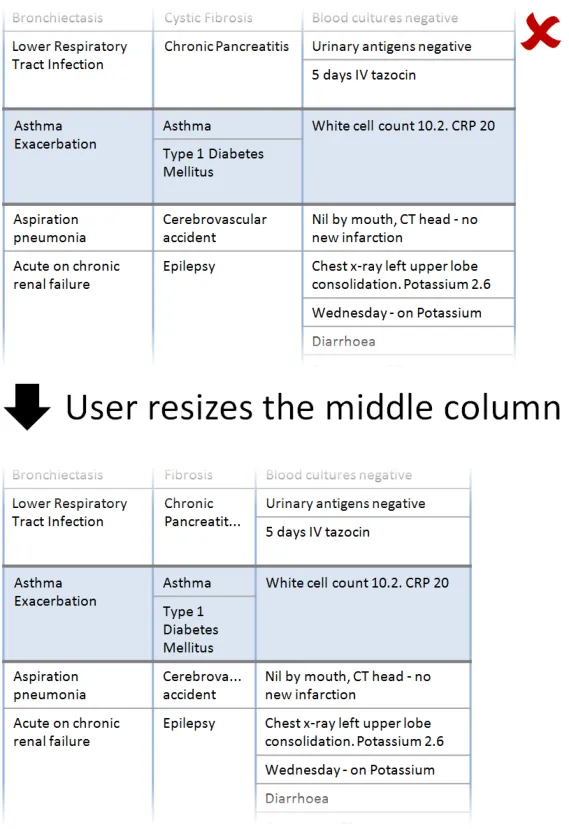
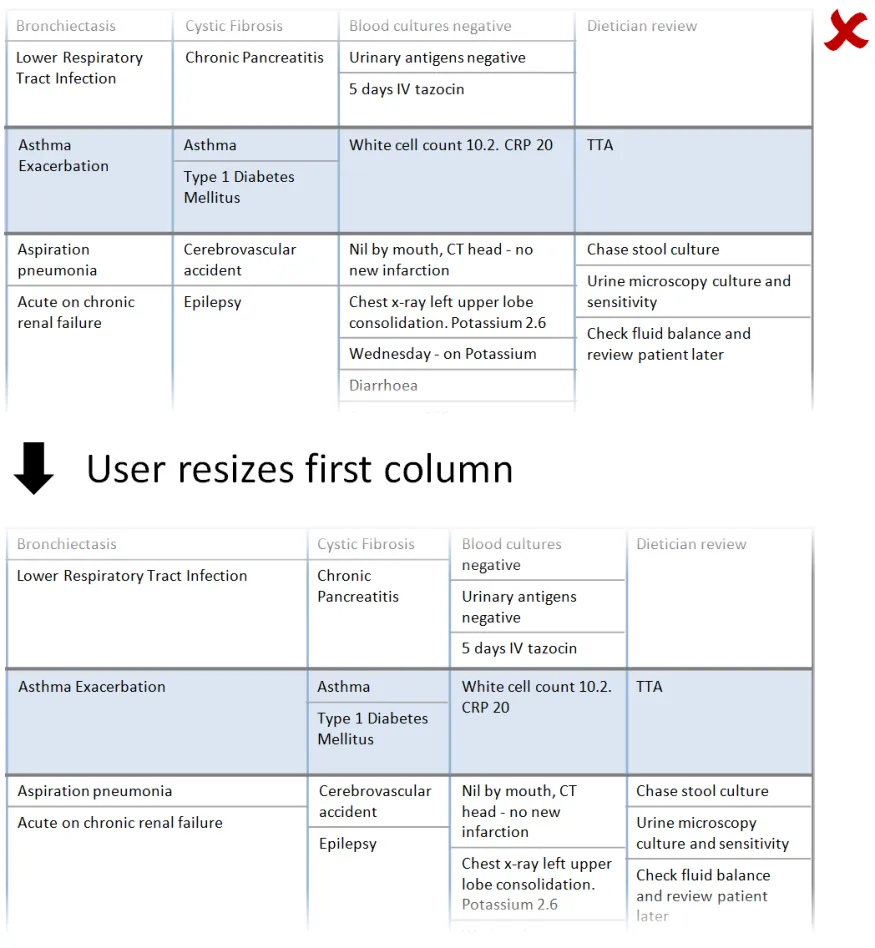
In this incorrect example, when the user resizes the first column, the other columns are automatically resized to maintain the overall width of the combined columns. As a consequence information has been relocated (for example, ‘Wednesday – on Potassium’ and ‘Diarrhoea’ are no longer in view). (This example assumes the user has not set a preference for this behaviour). (PAL-0220)
Page 20
Copyright ©2013 Health and Social Care Information Centre
 HSCIC Controlled Document
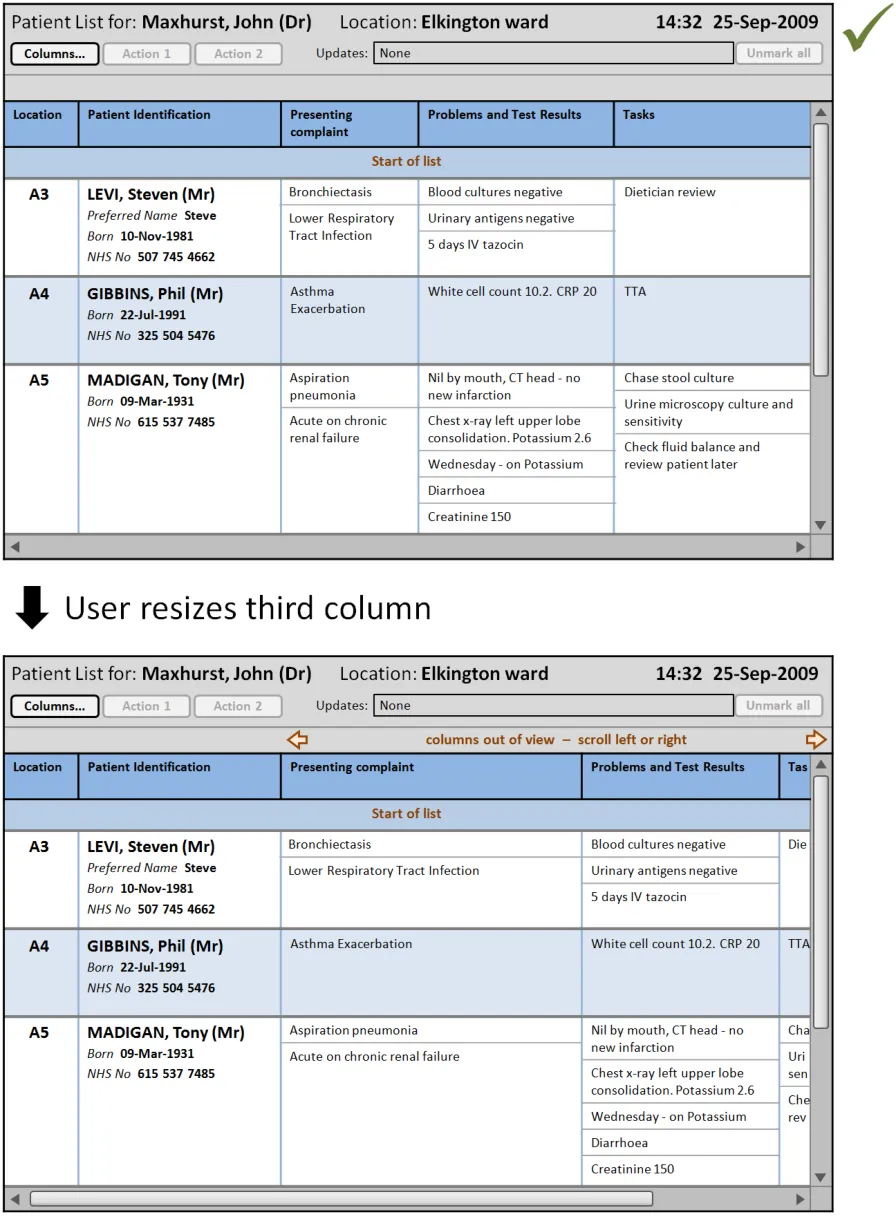
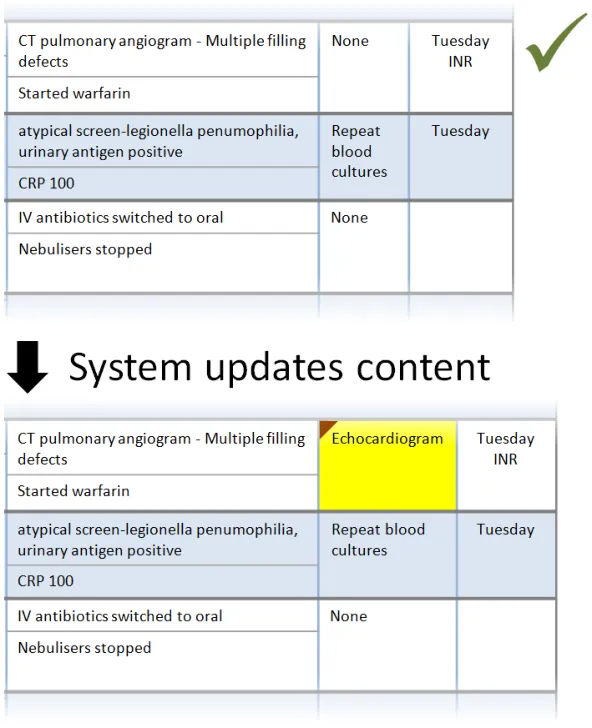
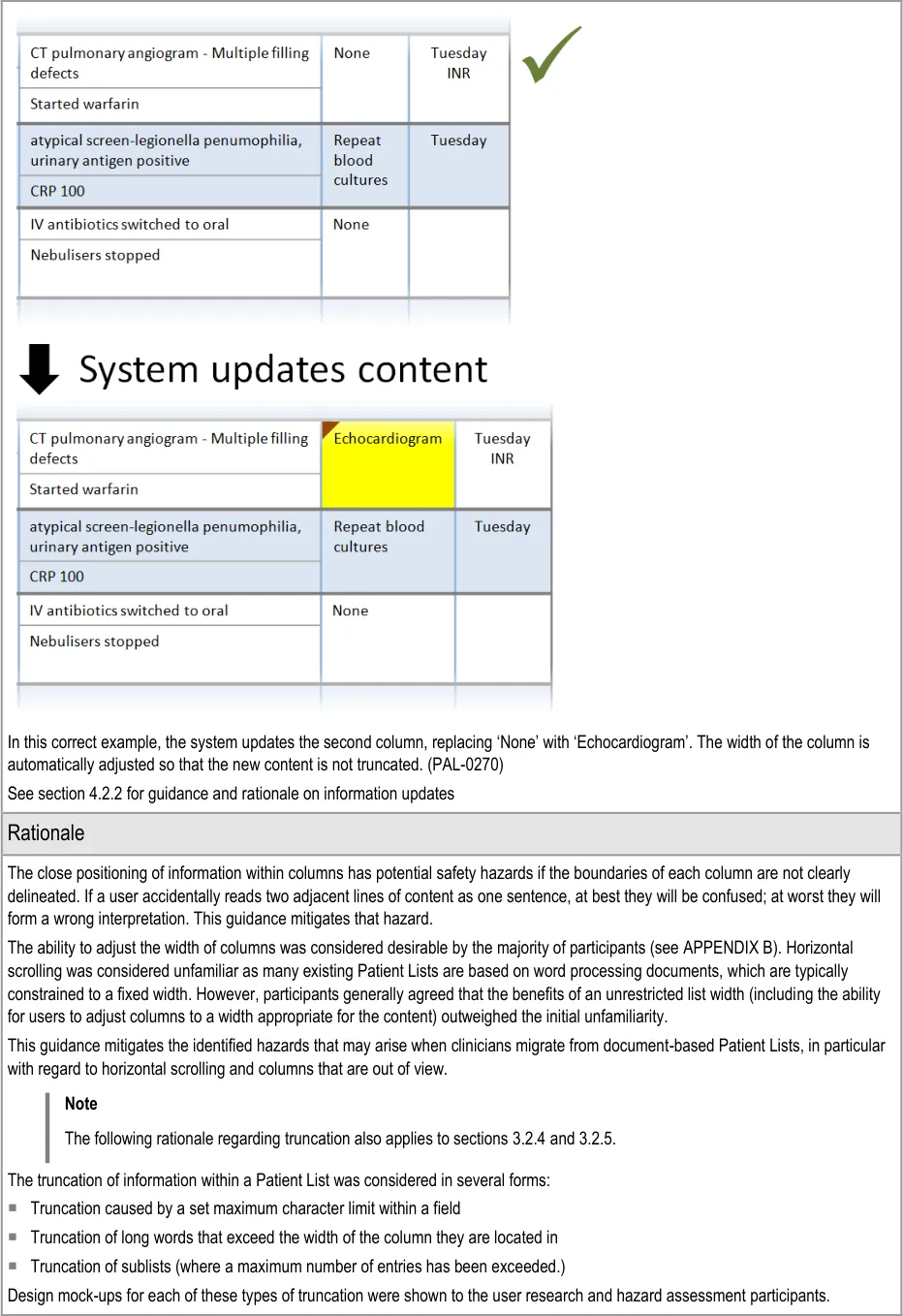
In this correct example, when the user resizes the third column (‘Presenting complaint’) the columns to the right remain the same width. The overall width has increased beyond the viewable area, so a horizontal scrollbar is displayed. The out-of-view symbols and warning message are displayed by default immediately above the viewable area. (PAL-0200, PAL-0220, PAL-0230, PAL-0240, PAL-0250, PAL-0260)
Page 21
Copyright ©2013 Health and Social Care Information Centre
 HSCIC Controlled Document
Page 22
Copyright ©2013 Health and Social Care Information Centre
HSCIC Controlled Document
3.2.4 Rows and Cells
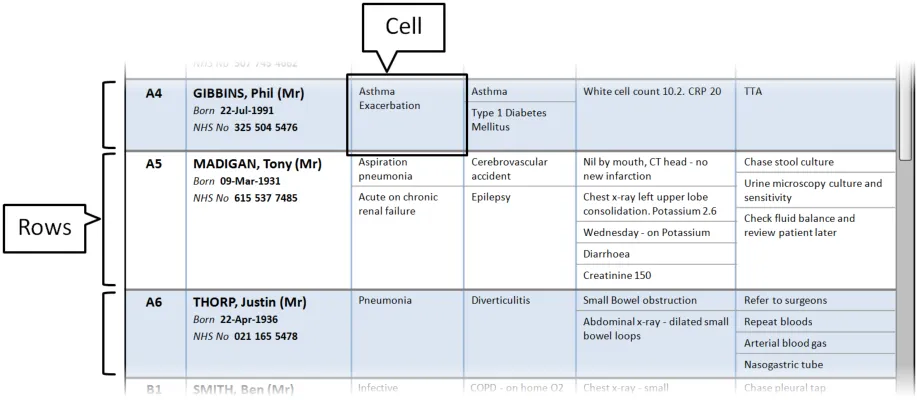
This section provides guidance on rows and cells. Rows contain the information for each patient in the Patient List. Cells contain individual content (and sublists, where required). Figure 5 illustrates those features:
Figure 5: Rows and Cells
| Col1 | Evidence ID Guideline Conformance Rating |
|---|---|
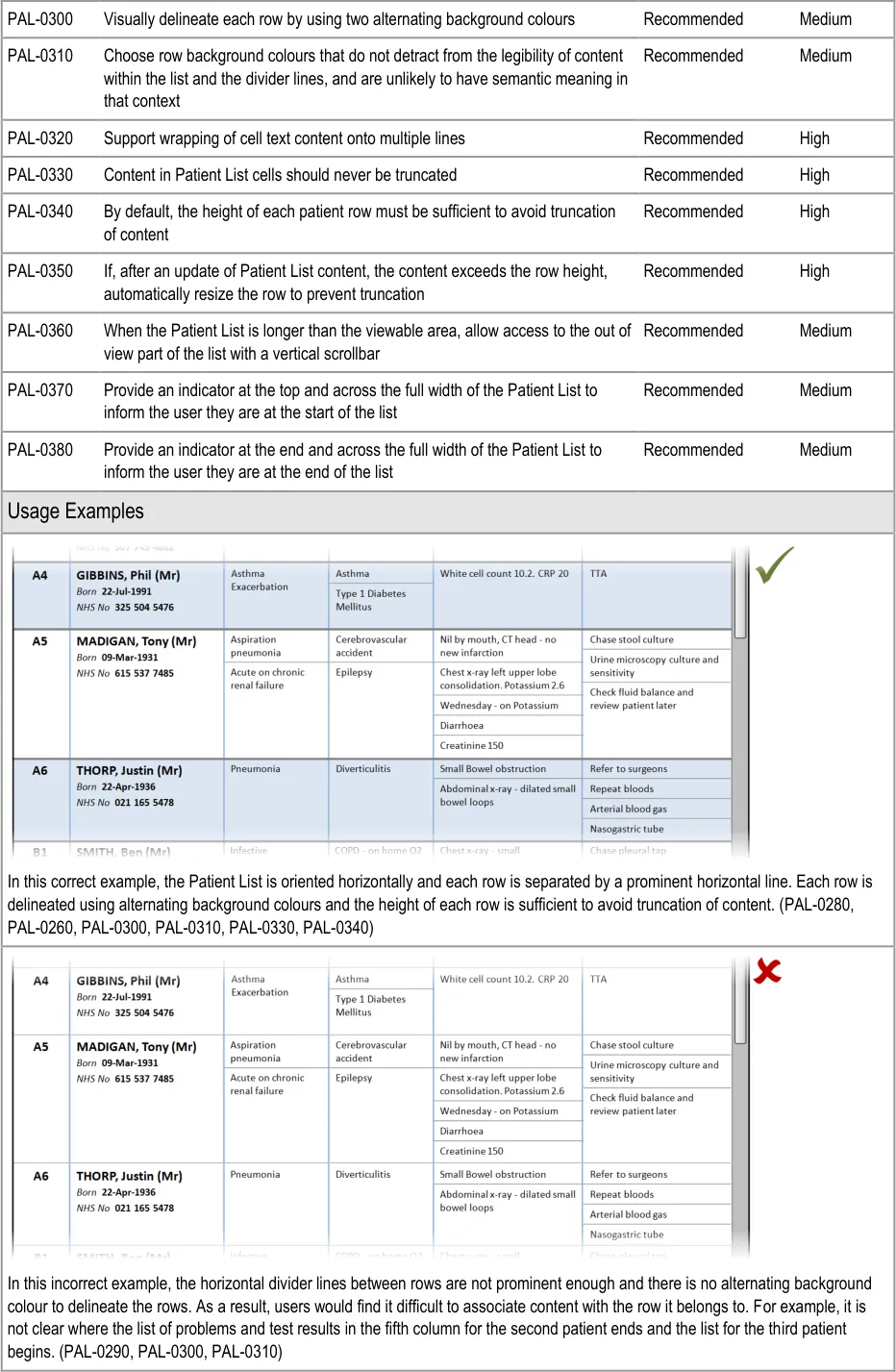
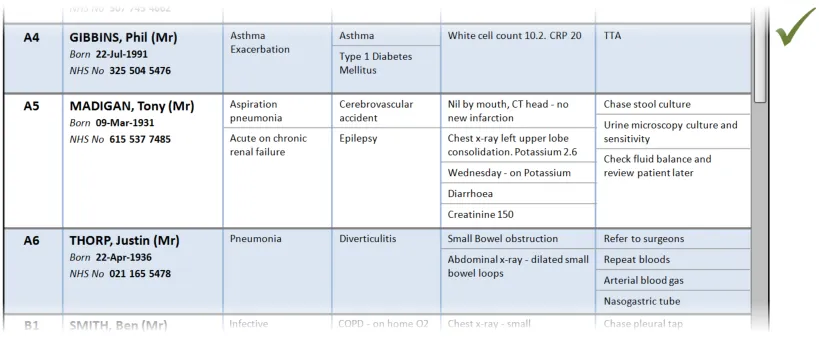
| PAL-0280 Orientate Patient List entries horizontally (that is, so the information for each patient is displayed across the viewing area.) Note This guidance overrides GTAB-191 in_Displaying Graphs and Tables –_ User Interface Design Guidance** {R4}** for Patient List contexts only Mandatory High | |
| PAL-0290 Separate rows using prominent horizontal divider lines Mandatory High |
Copyright ©2013 Health and Social Care Information Centre
Page 23
HSCIC Controlled Document
Page 24
Copyright ©2013 Health and Social Care Information Centre
 HSCIC Controlled Document
Page 25
Copyright ©2013 Health and Social Care Information Centre

 HSCIC Controlled Document
Page 26
Copyright ©2013 Health and Social Care Information Centre
HSCIC Controlled Document
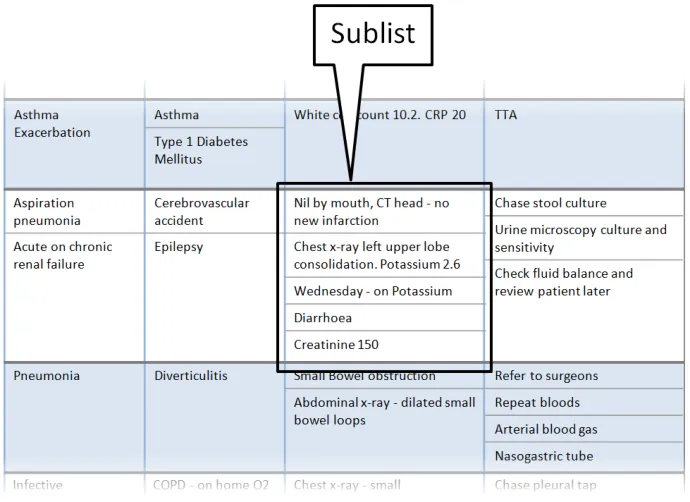
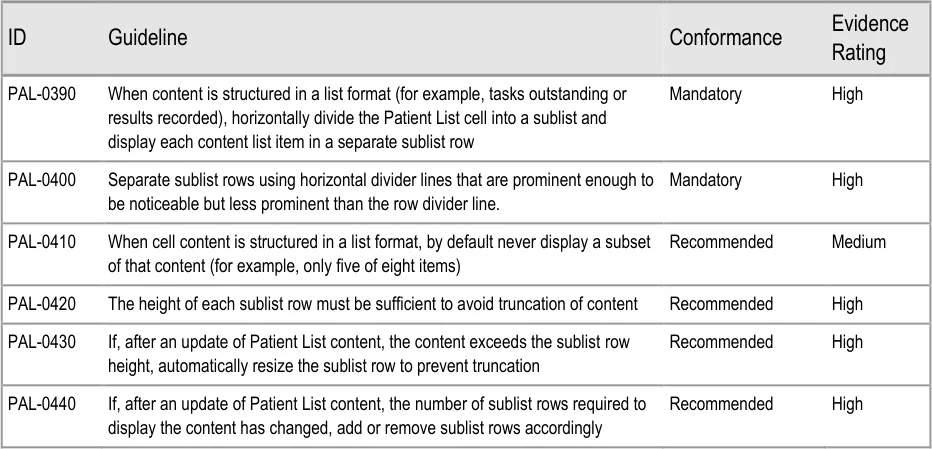
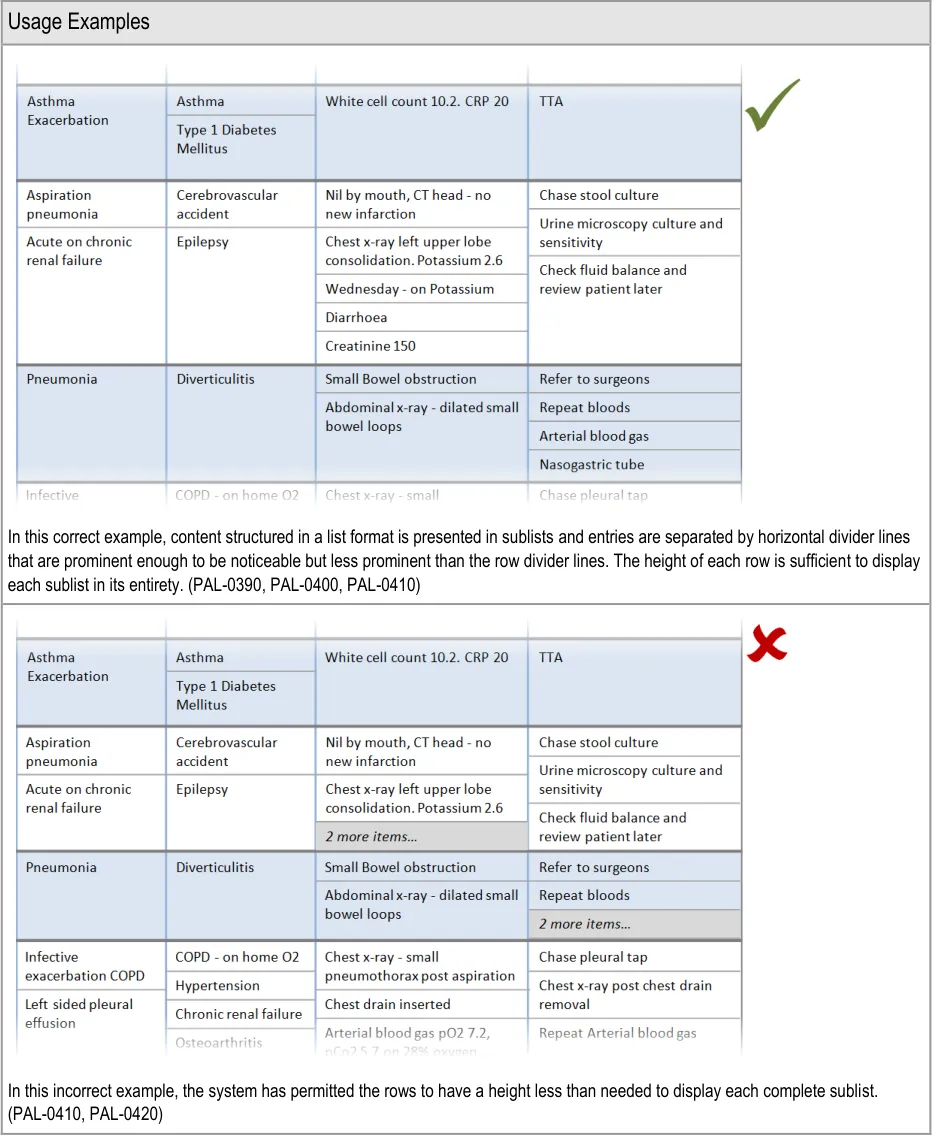
3.2.5 Sublists
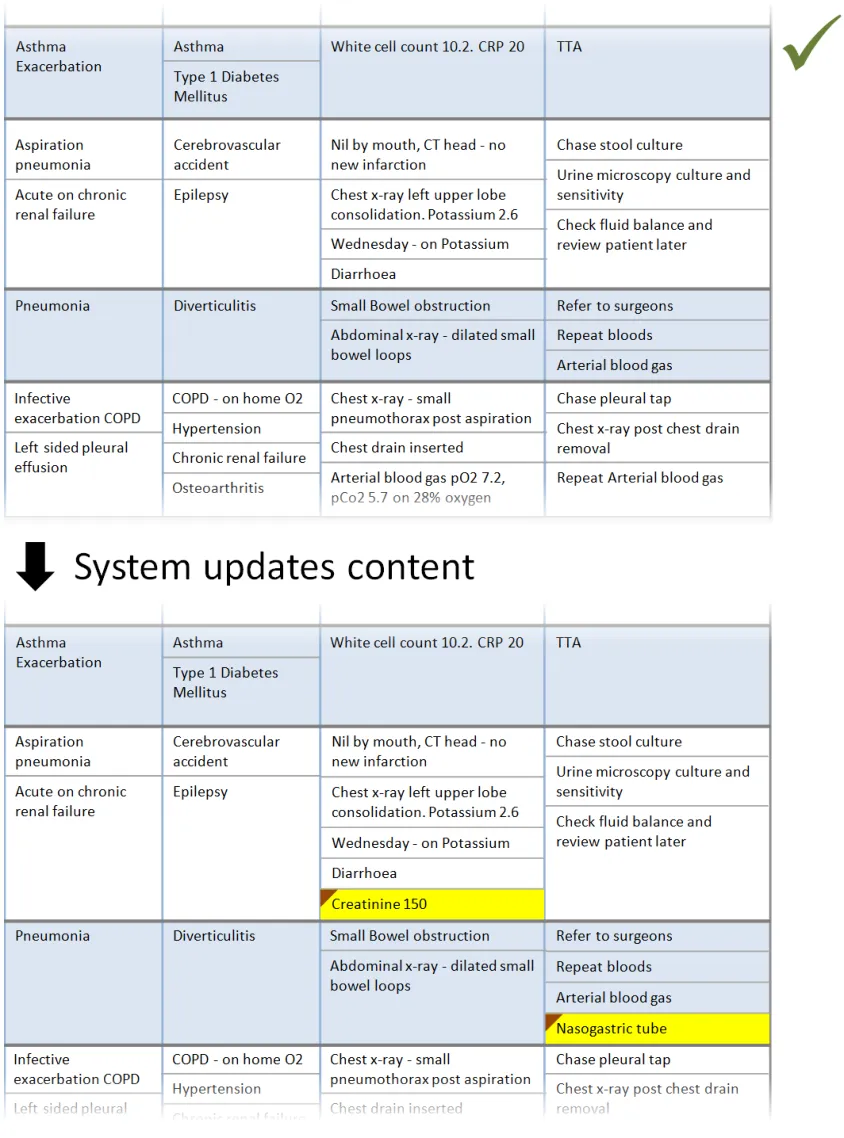
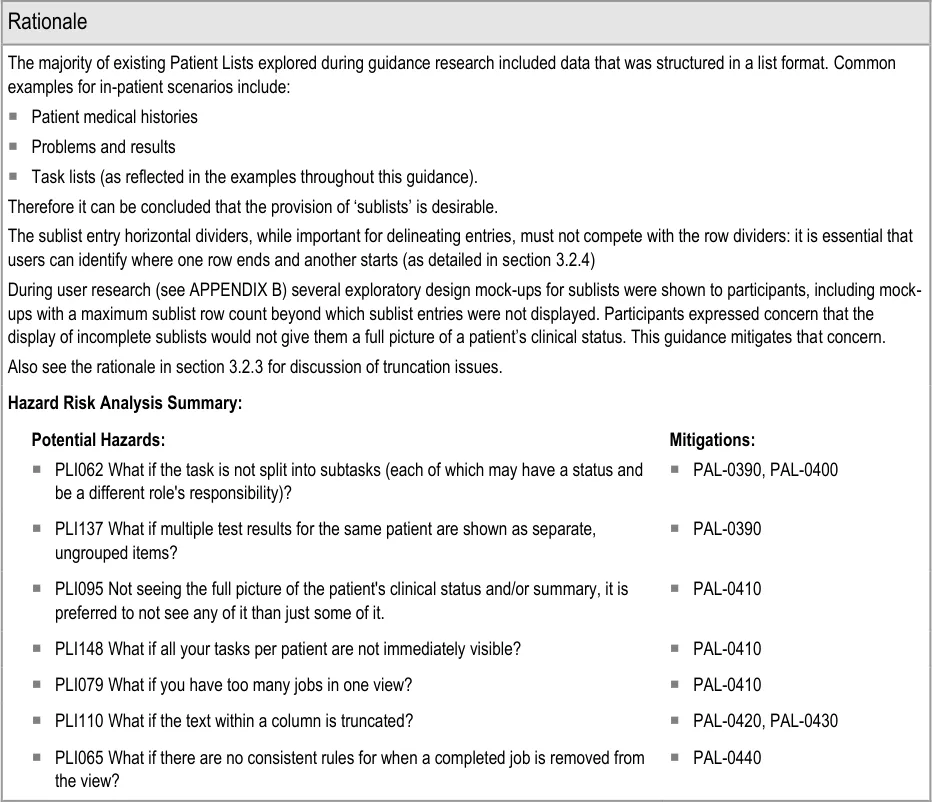
This section provides guidance on sublists, which are located within cells and contain information that is structured in a list format. Figure 6 illustrates that feature:
Figure 6: Sublists
Page 27
Copyright ©2013 Health and Social Care Information Centre
HSCIC Controlled Document
Page 28
Copyright ©2013 Health and Social Care Information Centre
 HSCIC Controlled Document
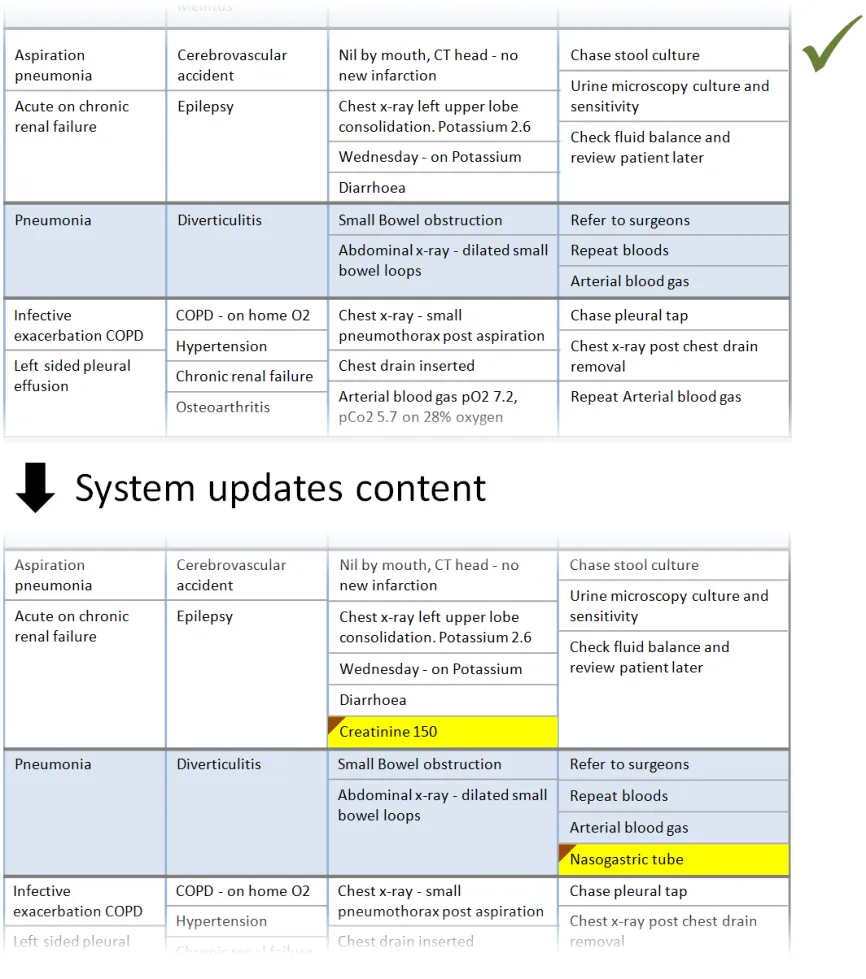
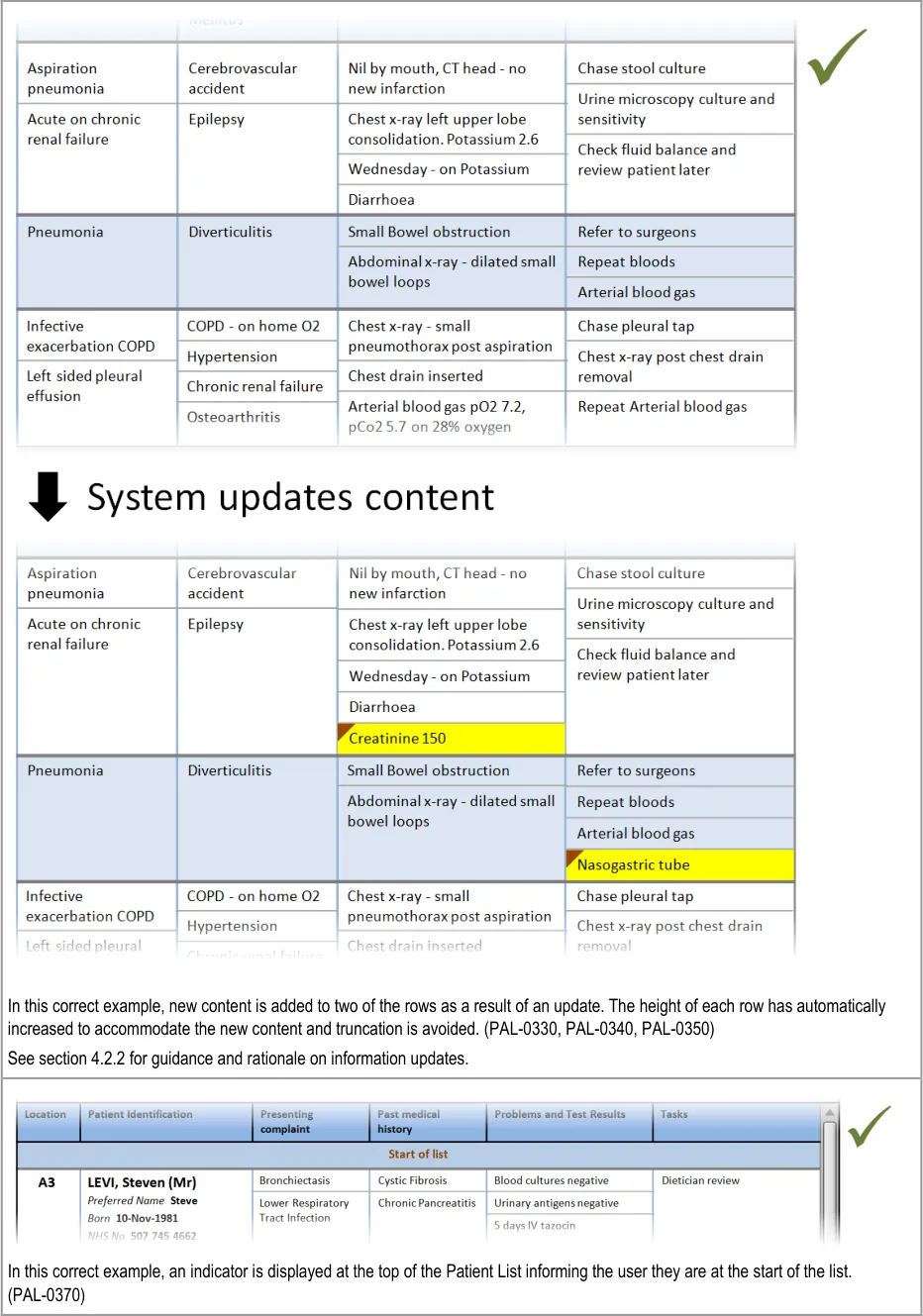
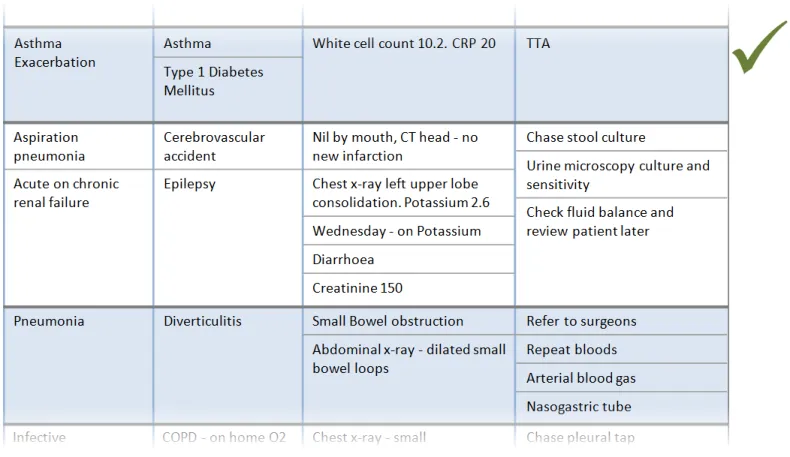
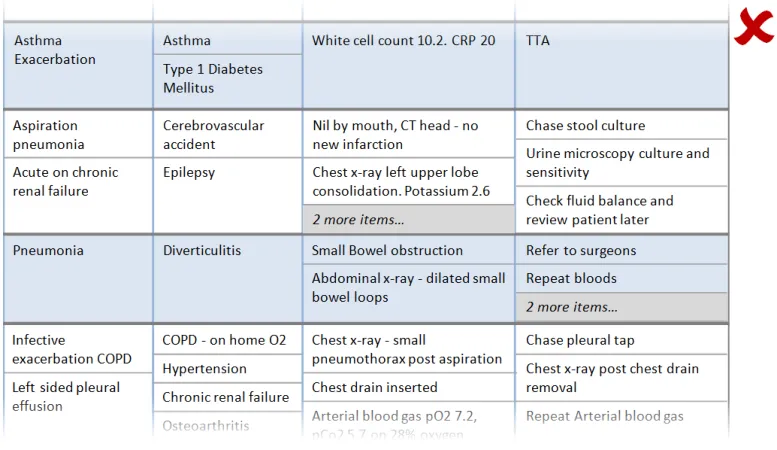
In this correct example, an update has added items to two of the sublists, which have increased in size accordingly. The rows containing the sublists have increased in height to avoid truncation. (PAL-0430, PAL-0440)
Copyright ©2013 Health and Social Care Information Centre
Page 29
 HSCIC Controlled Document
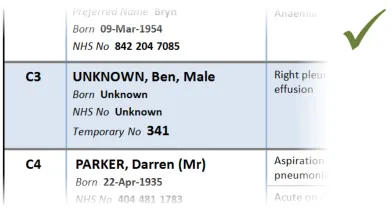
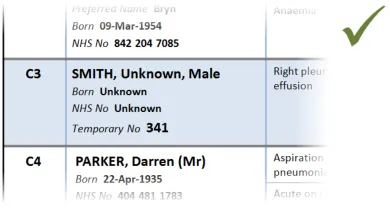
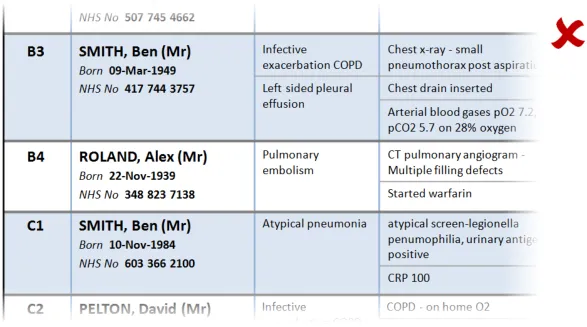
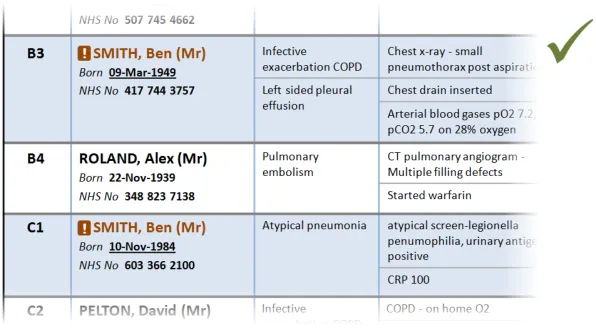
3.2.6 Patient Identification
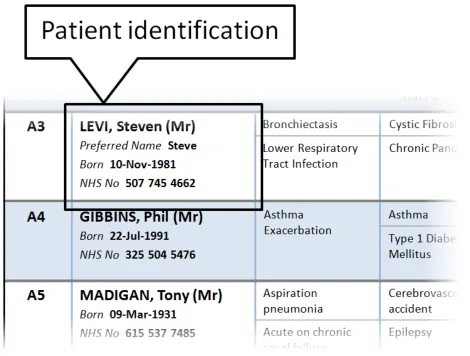
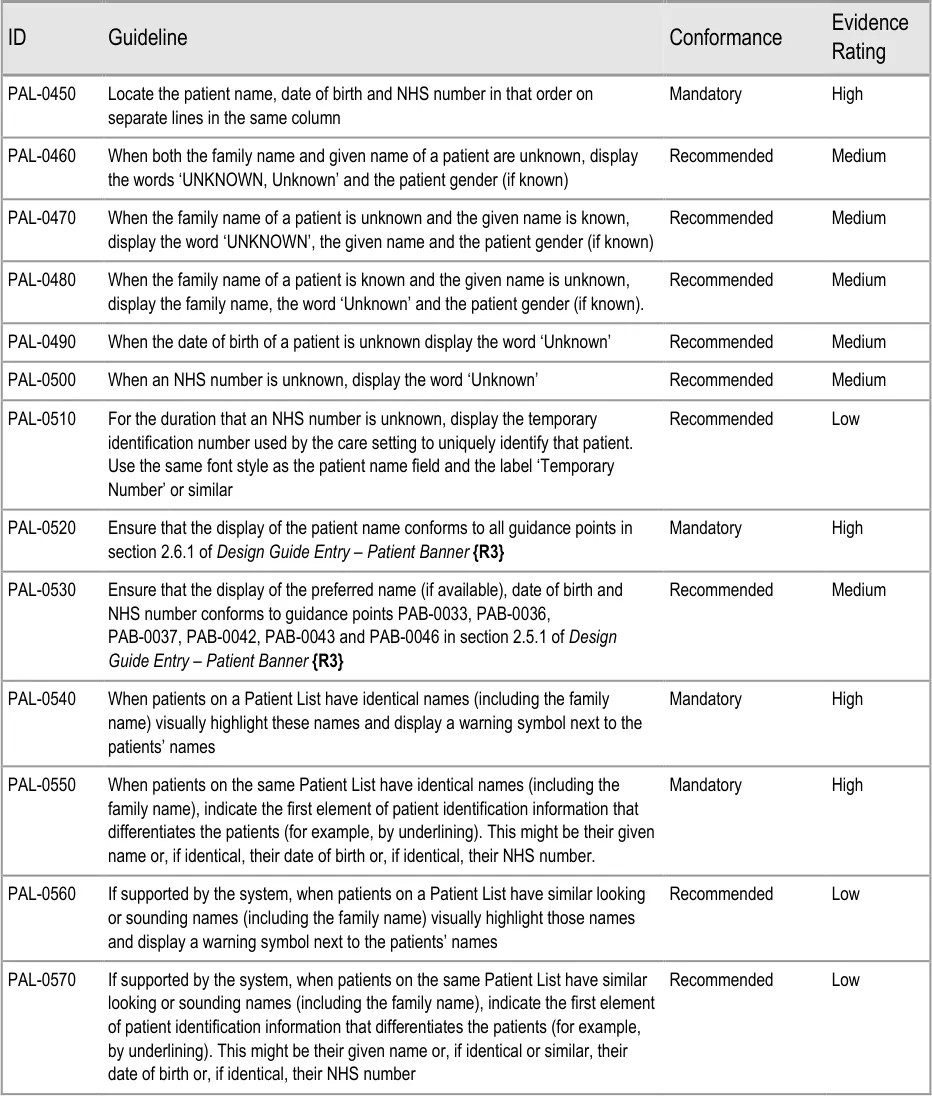
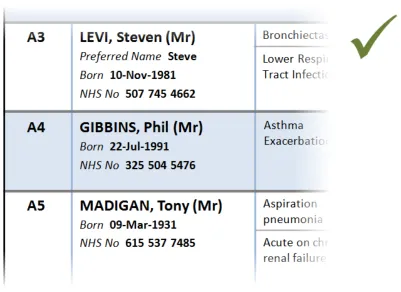
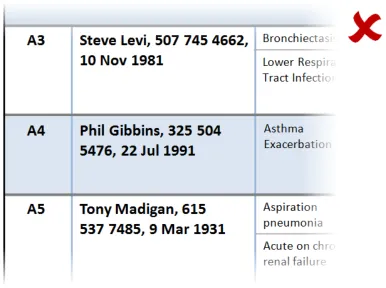
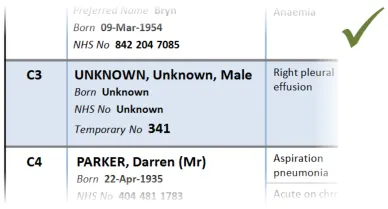
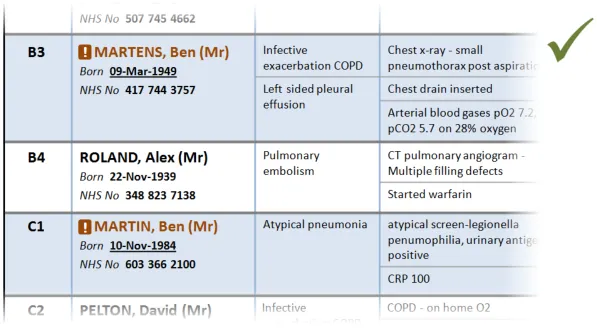
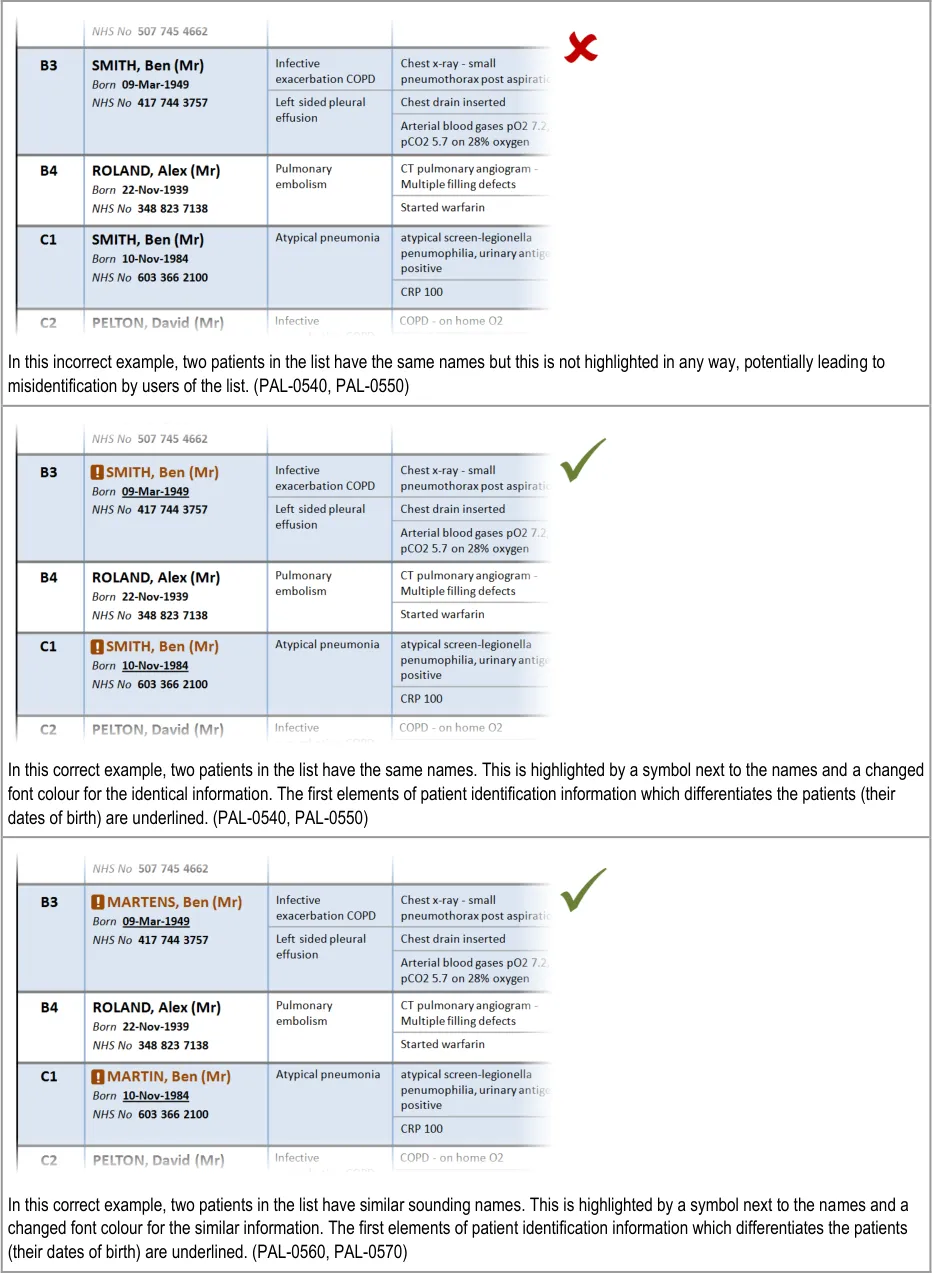
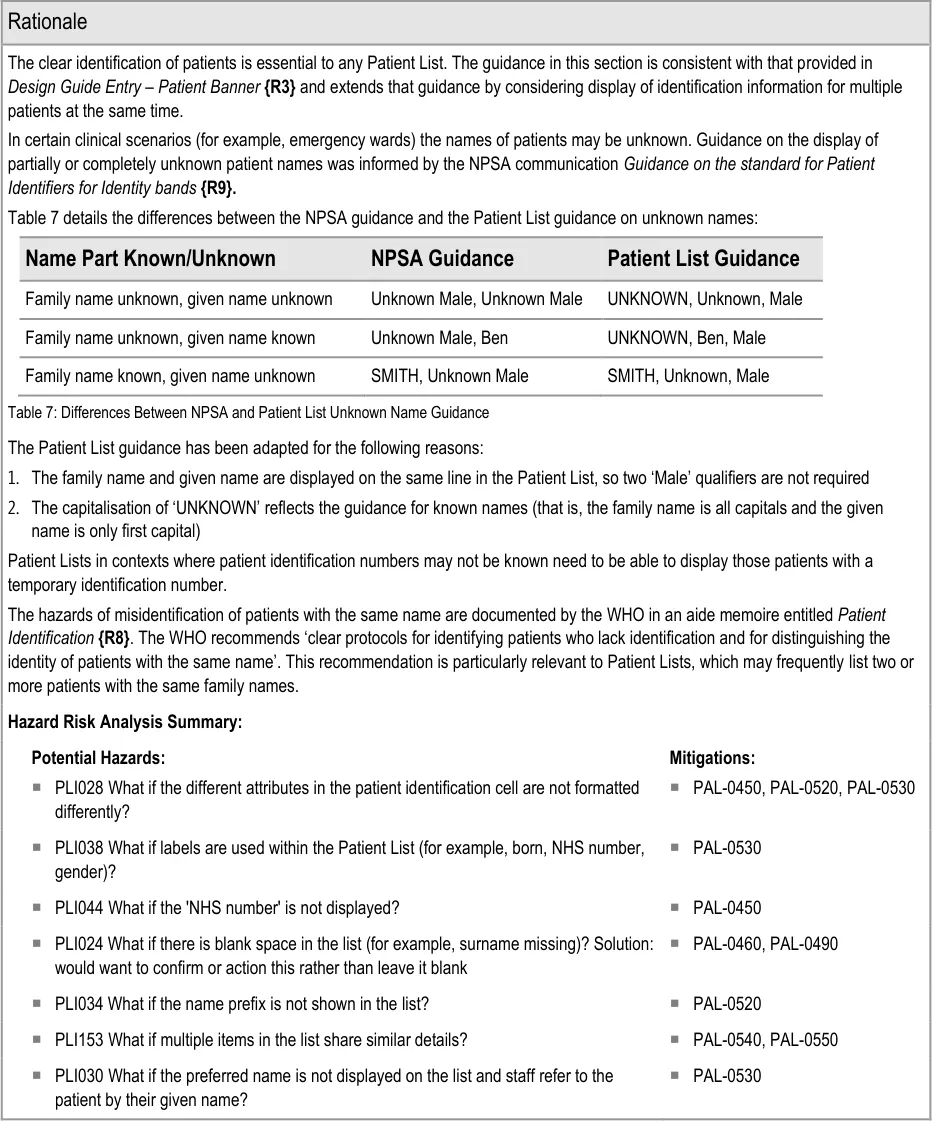
This section provides guidance on the display of patient identification information in a Patient List. Figure 7 illustrates that feature:
Figure 7: Patient Identification
Page 30
Copyright ©2013 Health and Social Care Information Centre
 HSCIC Controlled Document
Page 31
Copyright ©2013 Health and Social Care Information Centre
HSCIC Controlled Document
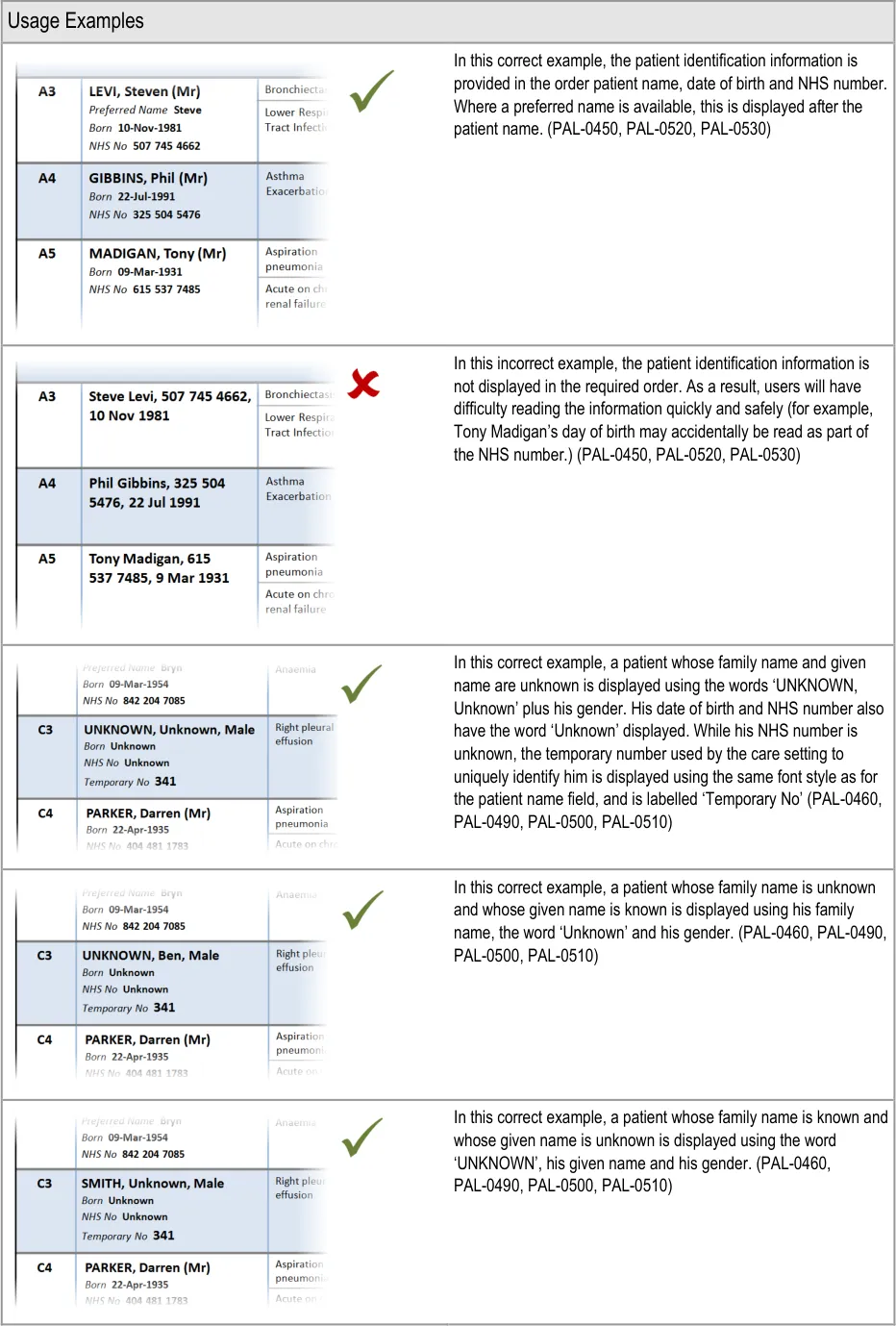
Page 32
Copyright ©2013 Health and Social Care Information Centre
 HSCIC Controlled Document
Page 33
Copyright ©2013 Health and Social Care Information Centre
 HSCIC Controlled Document
Page 34
Copyright ©2013 Health and Social Care Information Centre
HSCIC Controlled Document
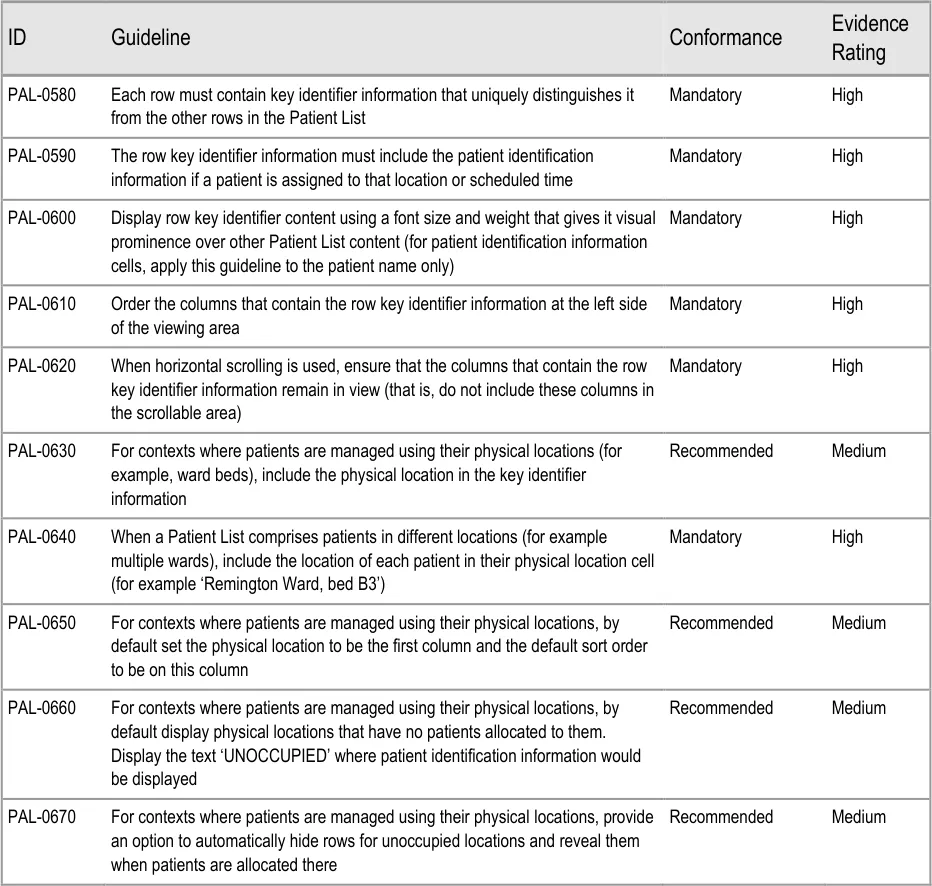
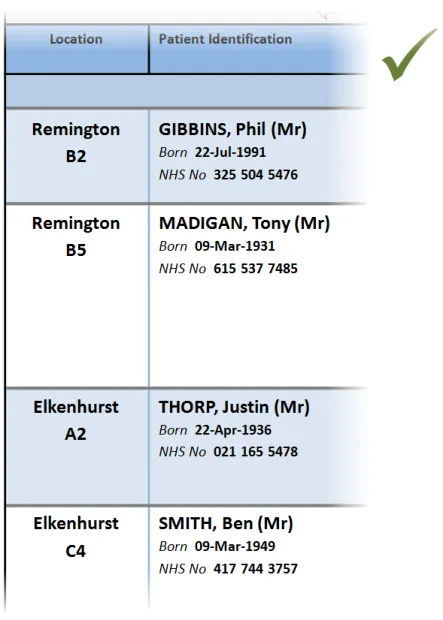
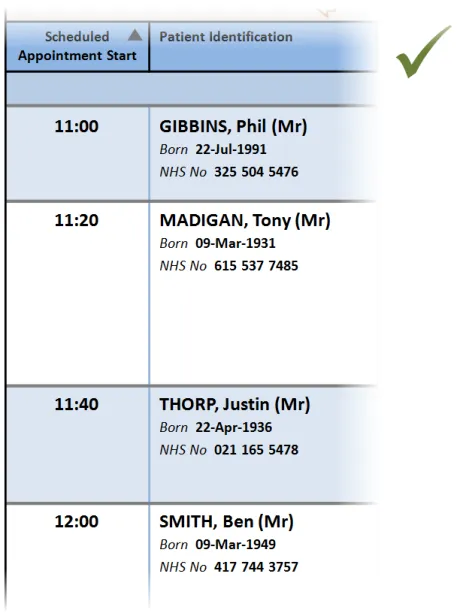
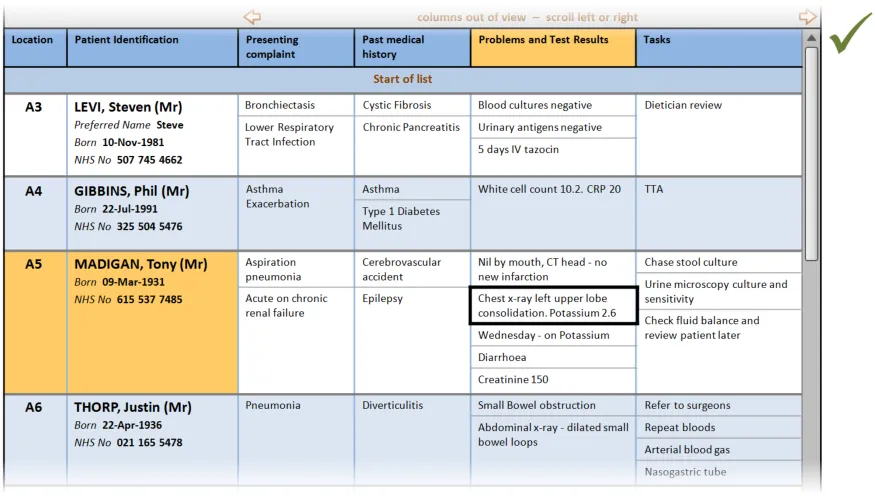
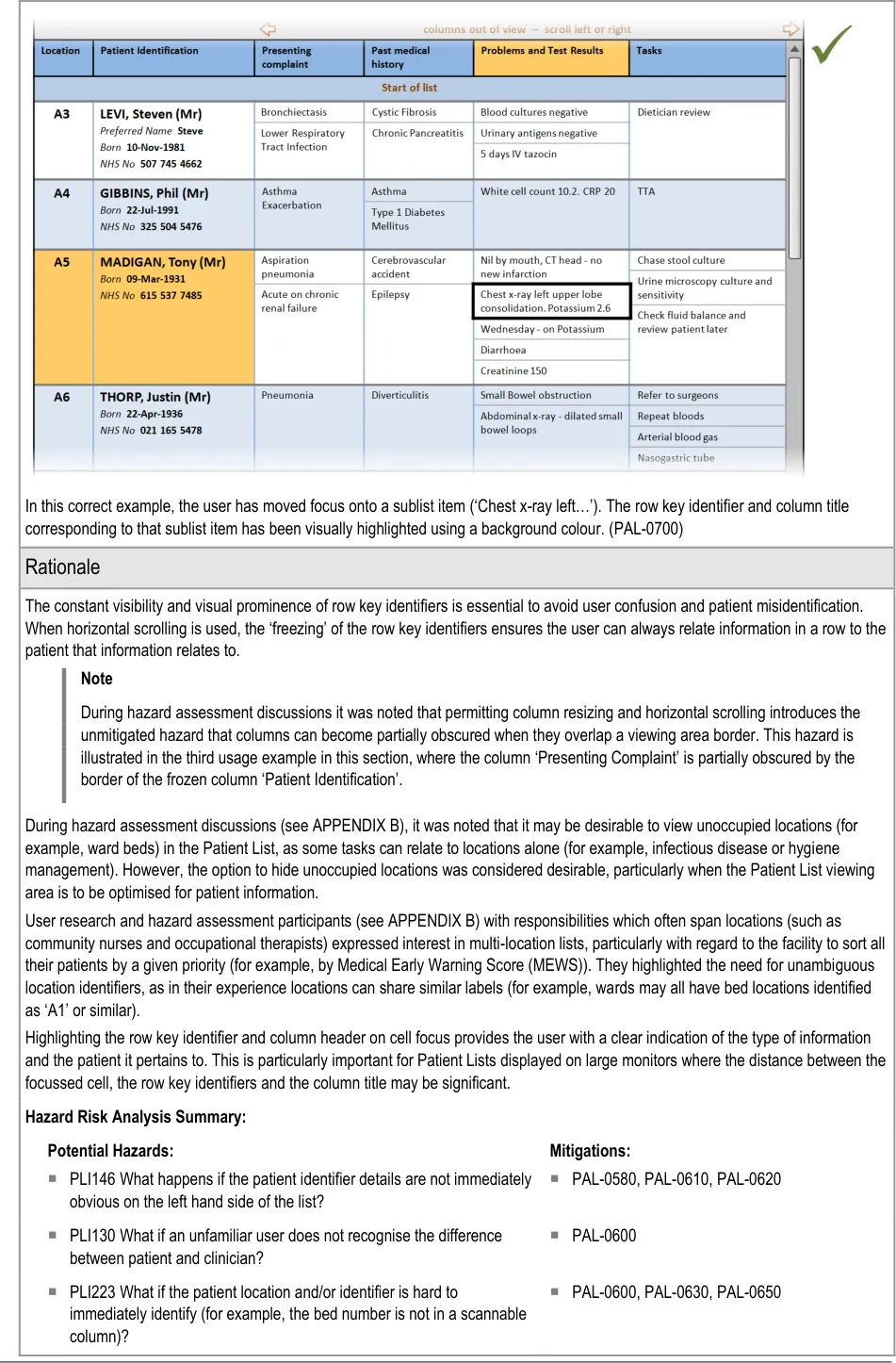
3.2.7 Row Key Identifiers
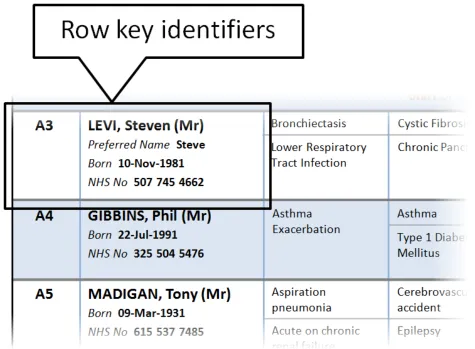
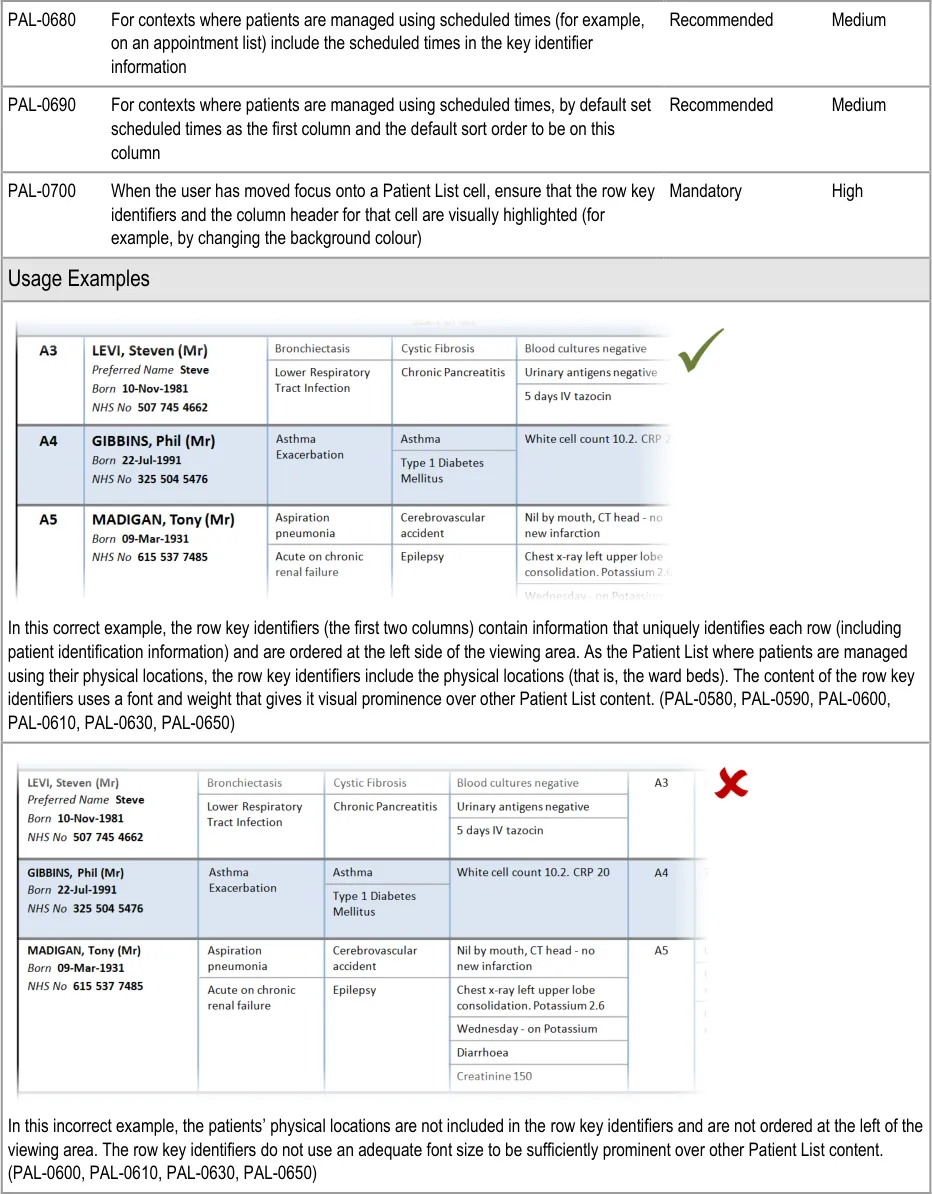
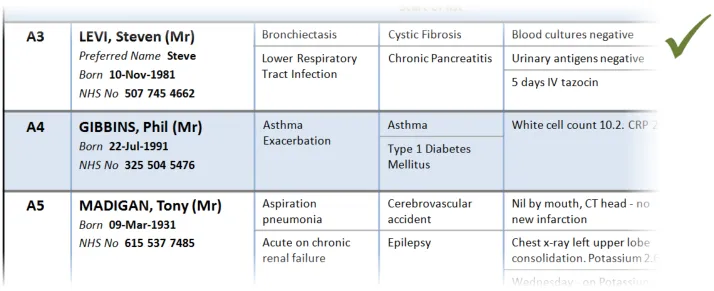
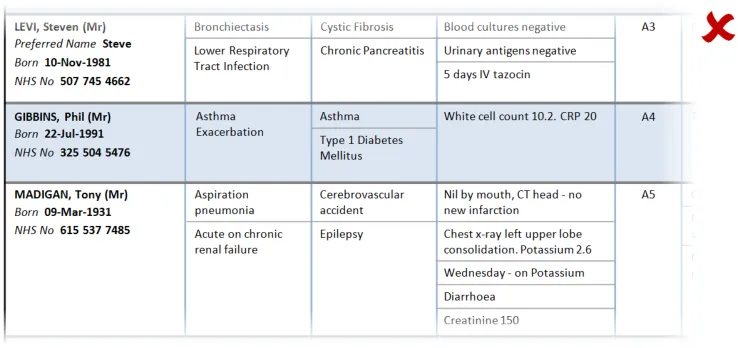
This section provides guidance on row key identifiers, which uniquely identify each row from others in the Patient List. Figure 8 illustrates that feature:
Figure 8: Row Key Identifiers
Page 35
Copyright ©2013 Health and Social Care Information Centre
HSCIC Controlled Document
Page 36
Copyright ©2013 Health and Social Care Information Centre
 HSCIC Controlled Document
Page 37
Copyright ©2013 Health and Social Care Information Centre
 HSCIC Controlled Document
Page 38
Copyright ©2013 Health and Social Care Information Centre
 HSCIC Controlled Document
Page 39
Copyright ©2013 Health and Social Care Information Centre
HSCIC Controlled Document
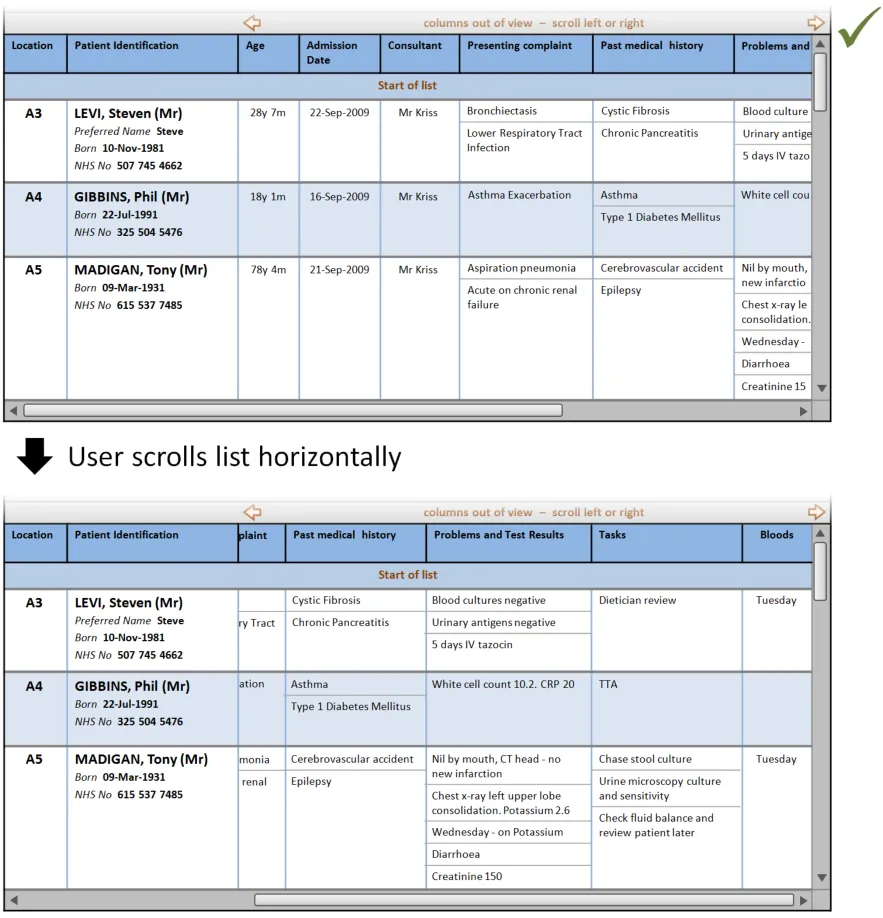
PLI029 What if the ‘main identifier’ (probably the patient name) is not the
most prominent attribute?
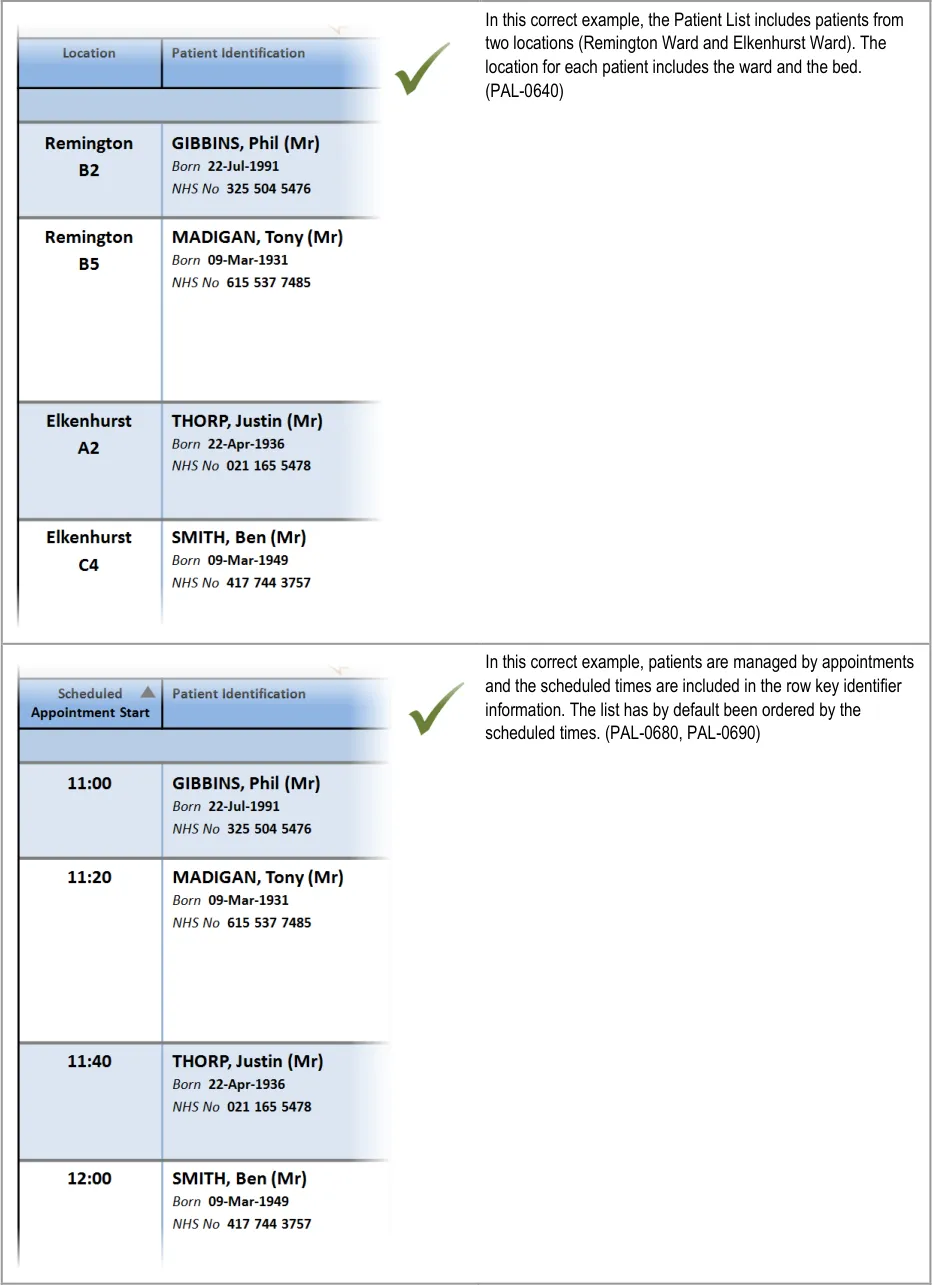
PLI283 What if the list presents patients from mixed locations (for
example, more than one hospital ward in one view)?
PLI030 What if preferred name is not displayed on the list and staff refer
to the patient by their given name?
PAL-0600
PAL-0640
PAL-0590
PLI033 What if the name prefix is shown in the list? PAL-0590
PLI044 What if the ‘NHS number’ is not displayed? PAL-0590
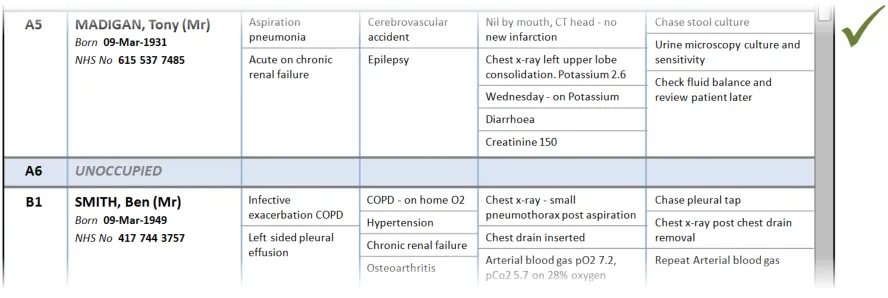
PLI016 What if empty beds are not shown in the list? PAL-0660
PLI017 What if empty beds are shown as completely blank lines (with no
bed number)?
PAL-0660
PLI015 What if empty beds are shown in the list? PAL-0670
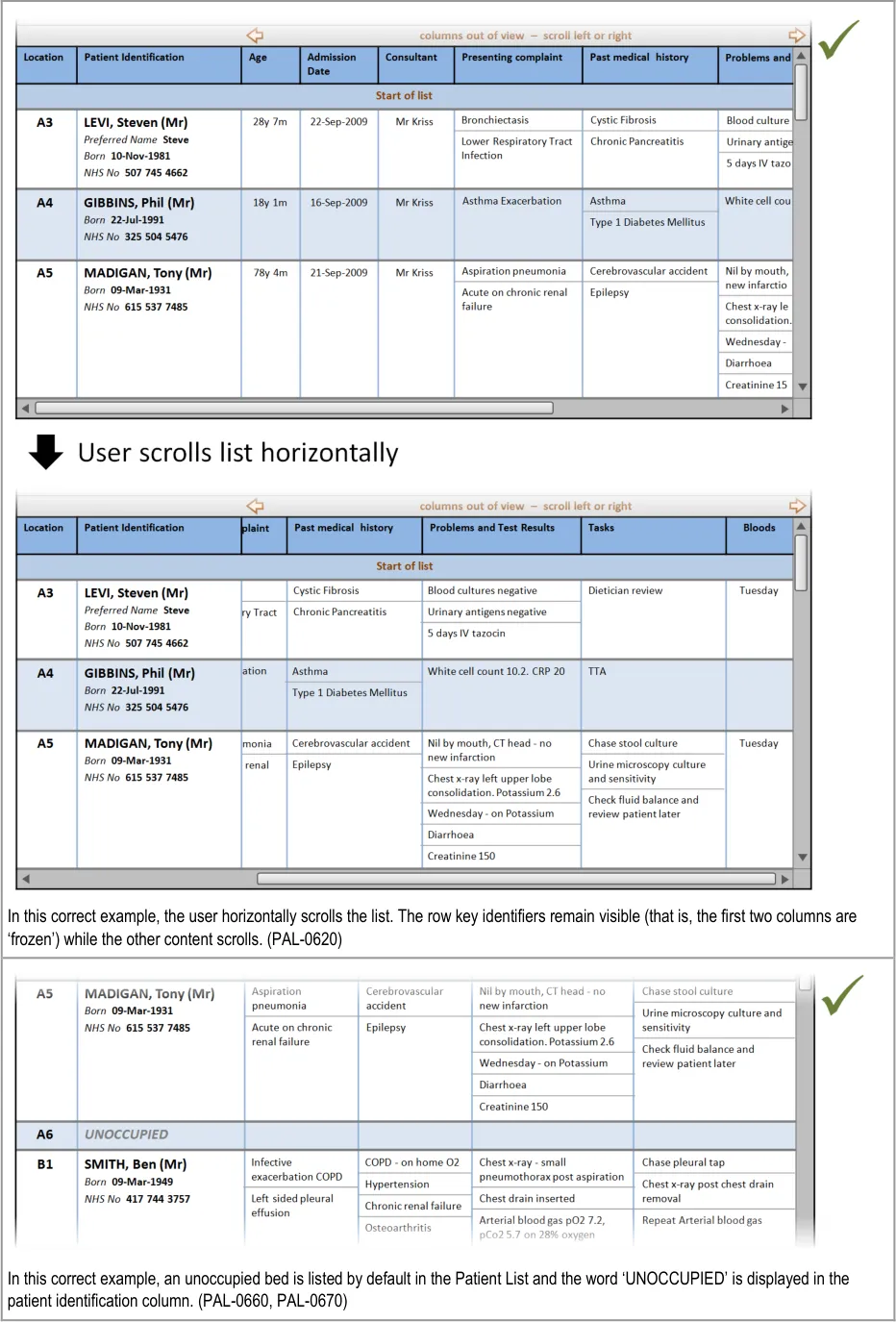
PLI072 What if the visible view is horizontally long and you want to relate
information from opposite ends of the line?
PAL-0620
Page 40
Copyright ©2013 Health and Social Care Information Centre
HSCIC Controlled Document
4 GUIDANCE DETAILS FOR MANAGING THE INFORMATION DISPLAYED
4.1 Introduction
This section includes guidance for managing the information displayed in Patient Lists, specifically:
-
Managing the columns displayed
-
Refresh options and update indication
-
Displaying historical Patient List information
-
Displaying further information
4.2 Guidelines
4.2.1 Managing the Columns Displayed
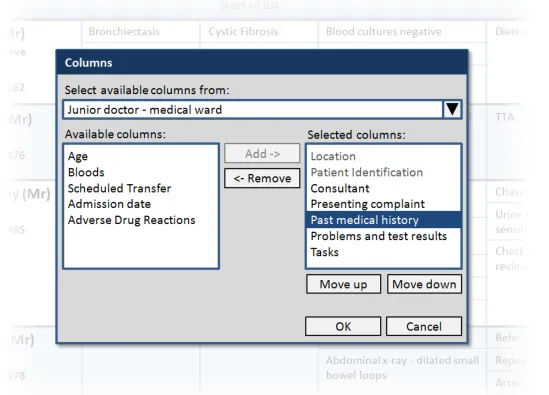
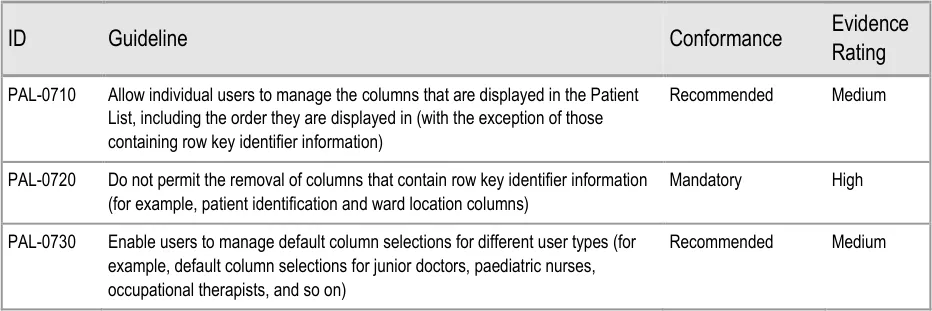
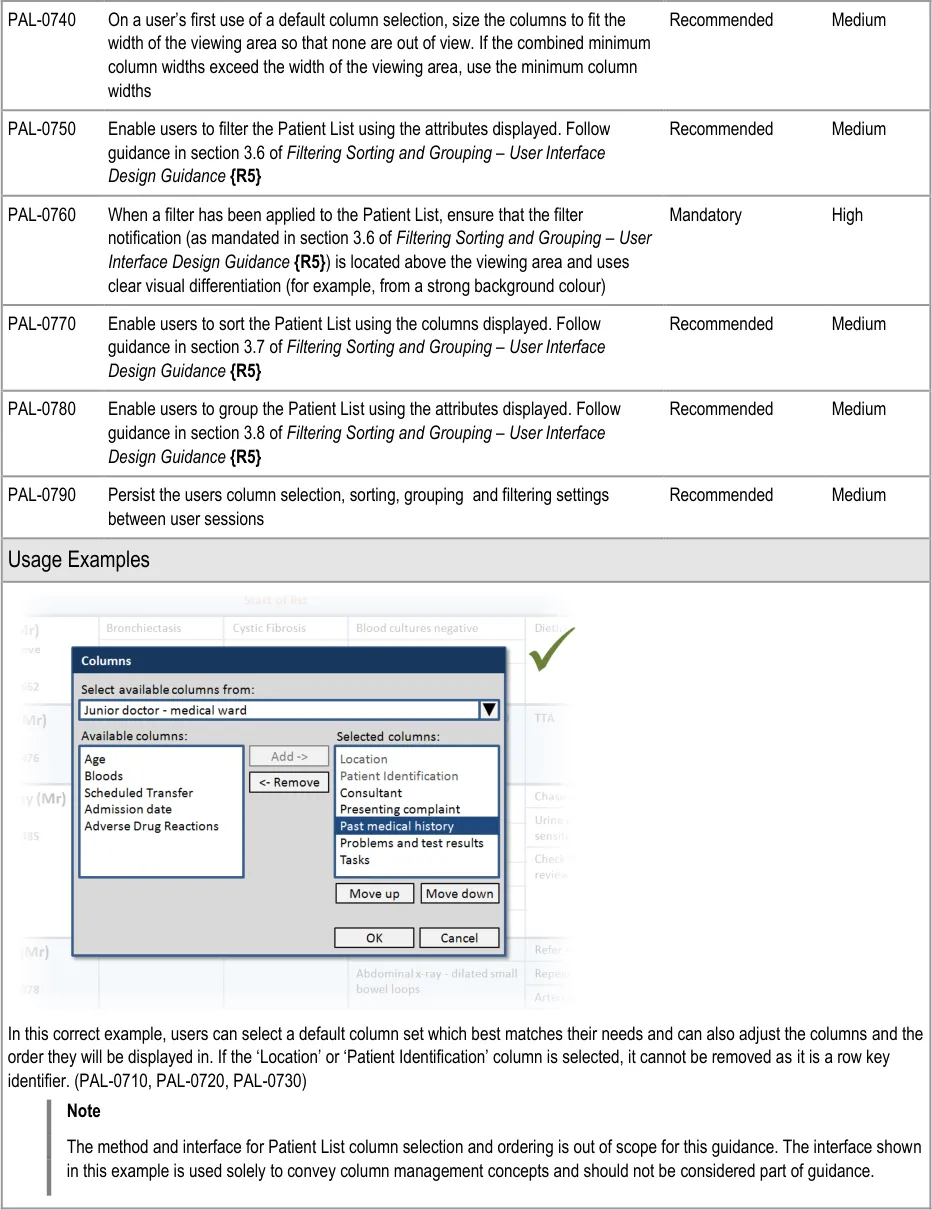
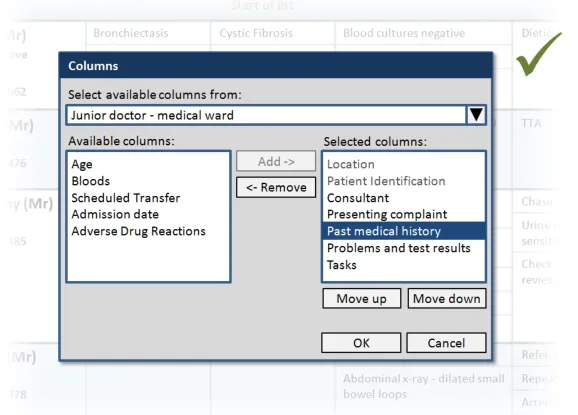
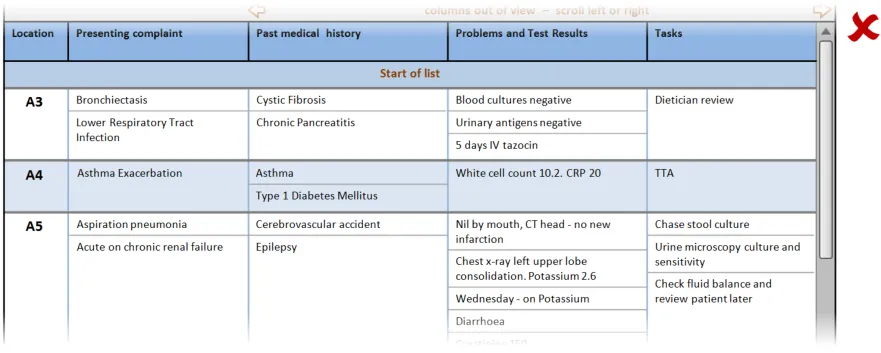
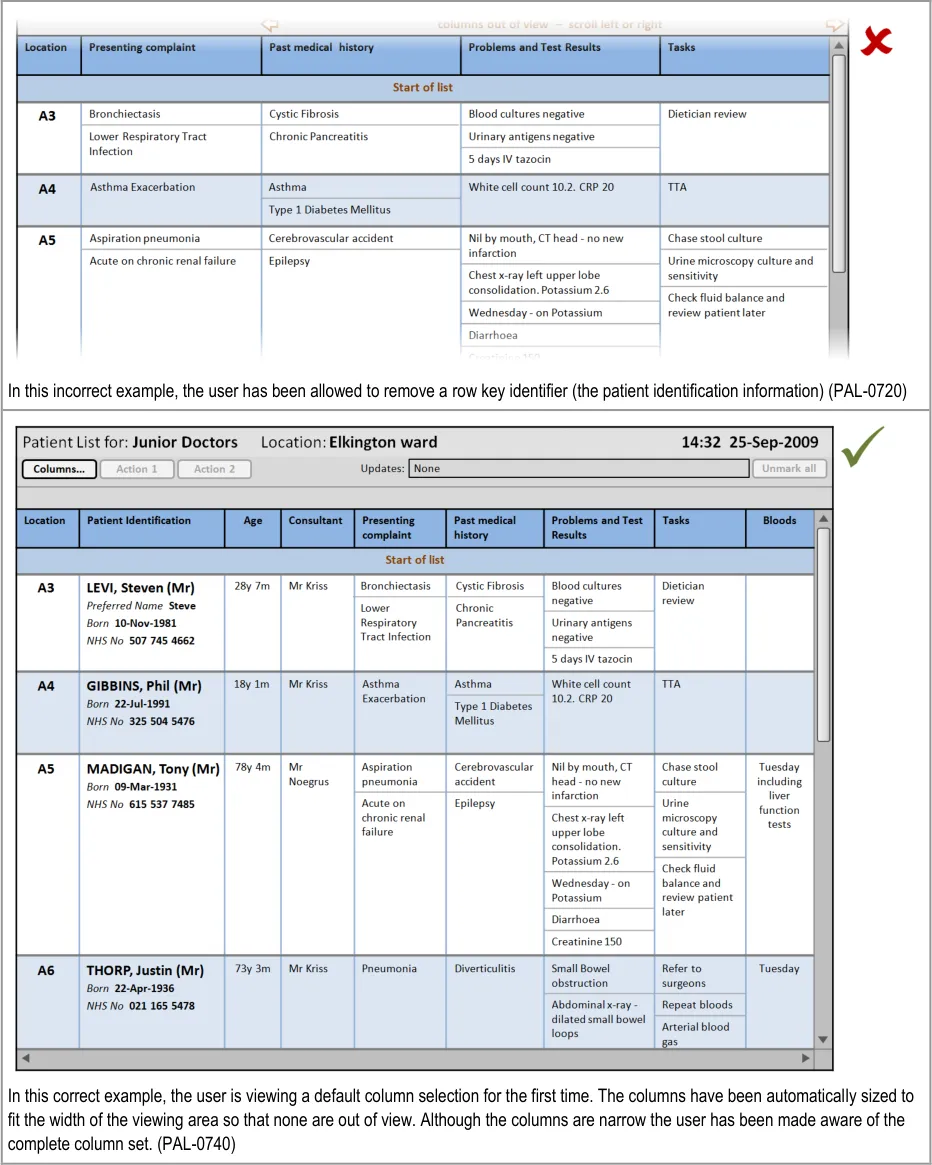
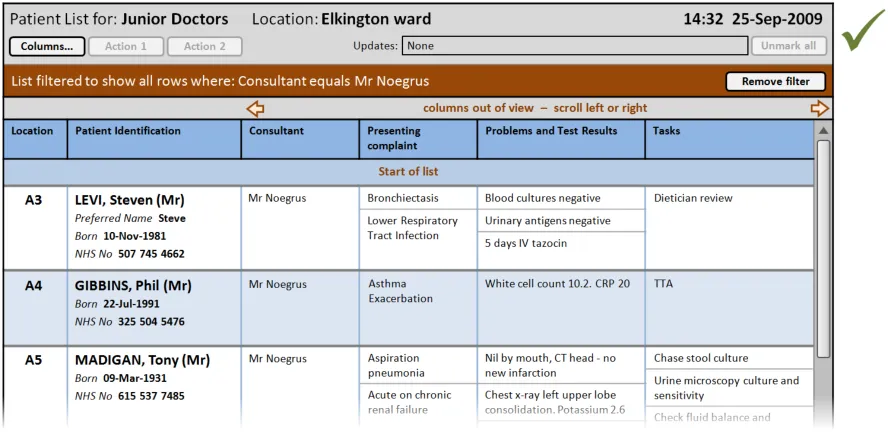
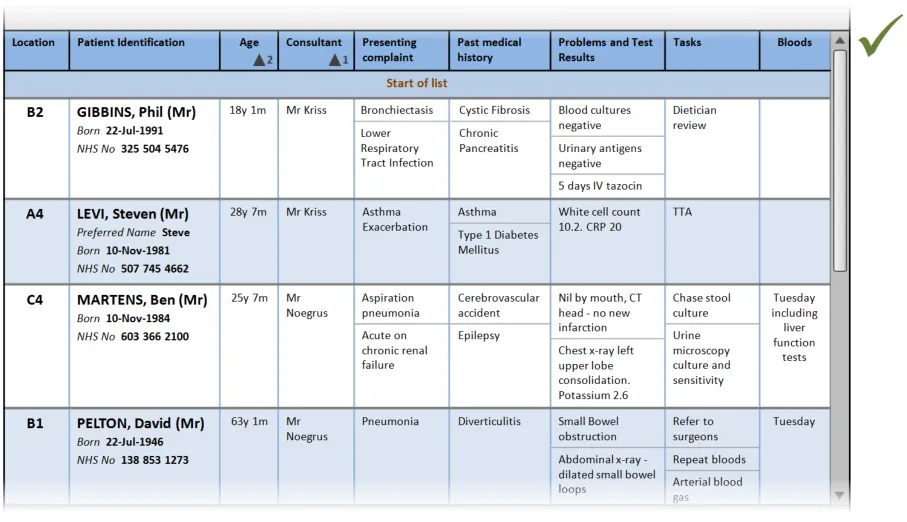
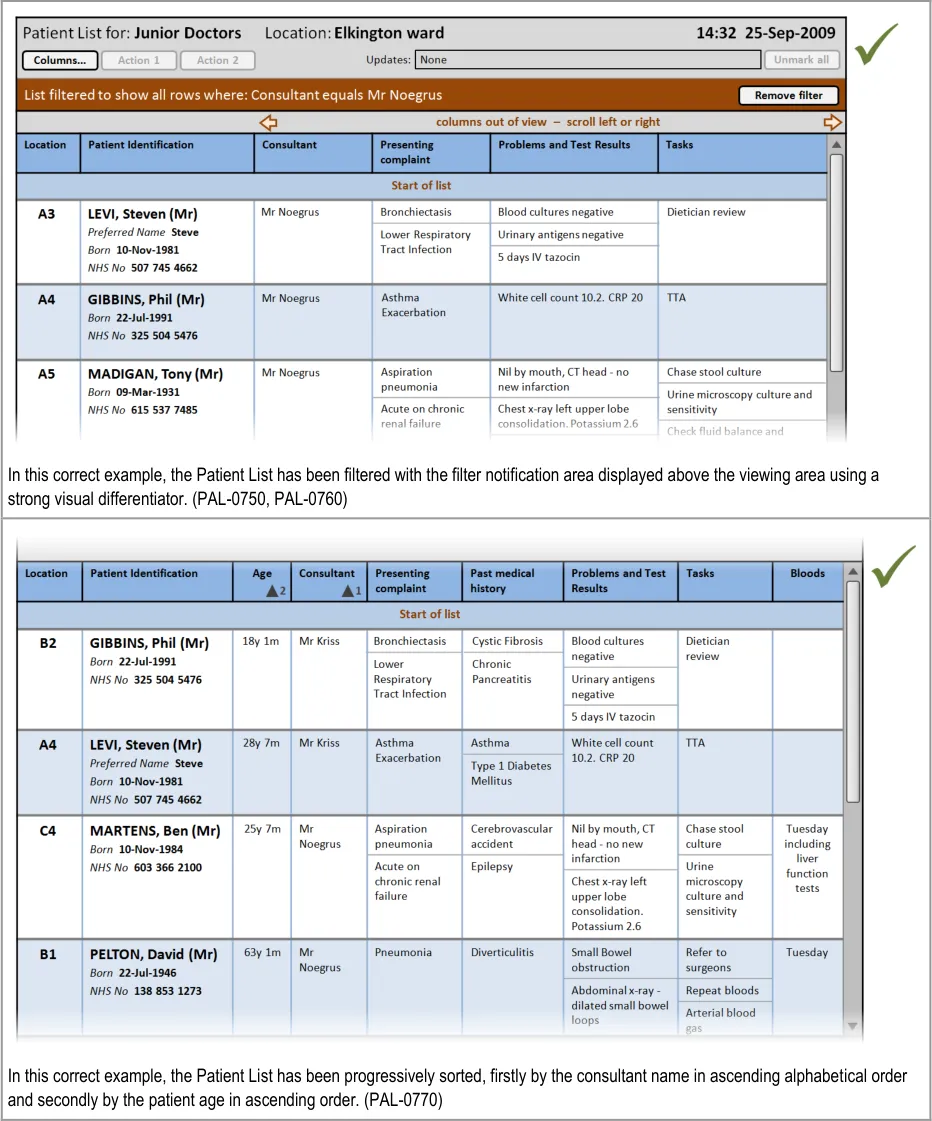
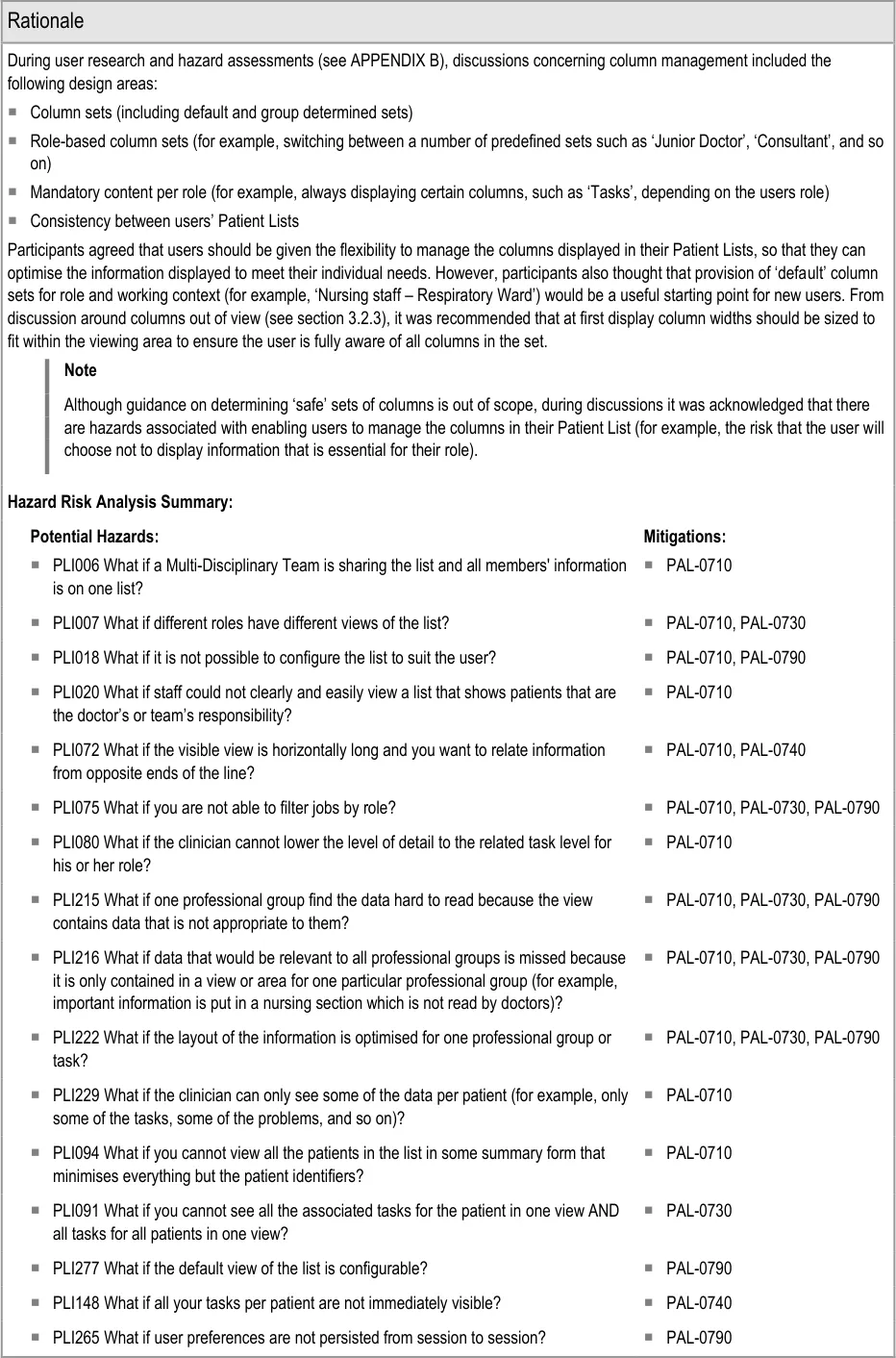
This section provides guidance on how users should be able to manage the columns displayed in the Patient List. Figure 9 illustrates that feature:
Figure 9: Managing the Columns Displayed
Page 41
Copyright ©2013 Health and Social Care Information Centre
HSCIC Controlled Document
Page 42
Copyright ©2013 Health and Social Care Information Centre
HSCIC Controlled Document
Page 43
Copyright ©2013 Health and Social Care Information Centre
 HSCIC Controlled Document
Page 44
Copyright ©2013 Health and Social Care Information Centre
 HSCIC Controlled Document
Copyright ©2013 Health and Social Care Information Centre
Page 45
HSCIC Controlled Document
PLI108 What if it is unclear that the list is filtered? PAL-0750, PAL-0760
PLI082 What if a user cannot set up lists with different inclusion criteria (for example, all
patients, all deteriorating patients)?
PAL-0750
PLI116 What if there is no indication what the list is ordered on? PAL-0770
PLI134 What if it is unclear that the sort order is per group and the amount of groups
mean the sort order is less useful than it might be?
PAL-0770, PAL-0780
PLI259 What if the list is only ever able to be sorted by one criterion? PAL-0770
PLI274 What if there is only one sort order and the user is unable to change the view of
the list depending on preference and context of use?
PLI022 What if in a list showing patients from multiple wards the patients are not
grouped by ward?
4.2.2 Refresh Options and Update Indication
PAL-0770
PAL-0780
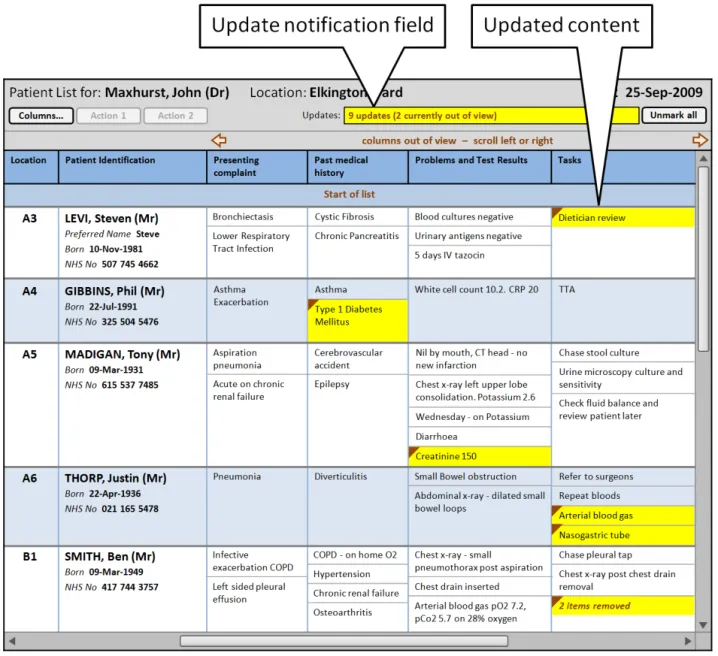
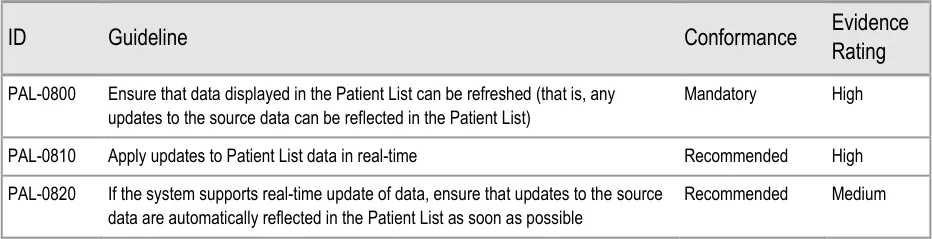
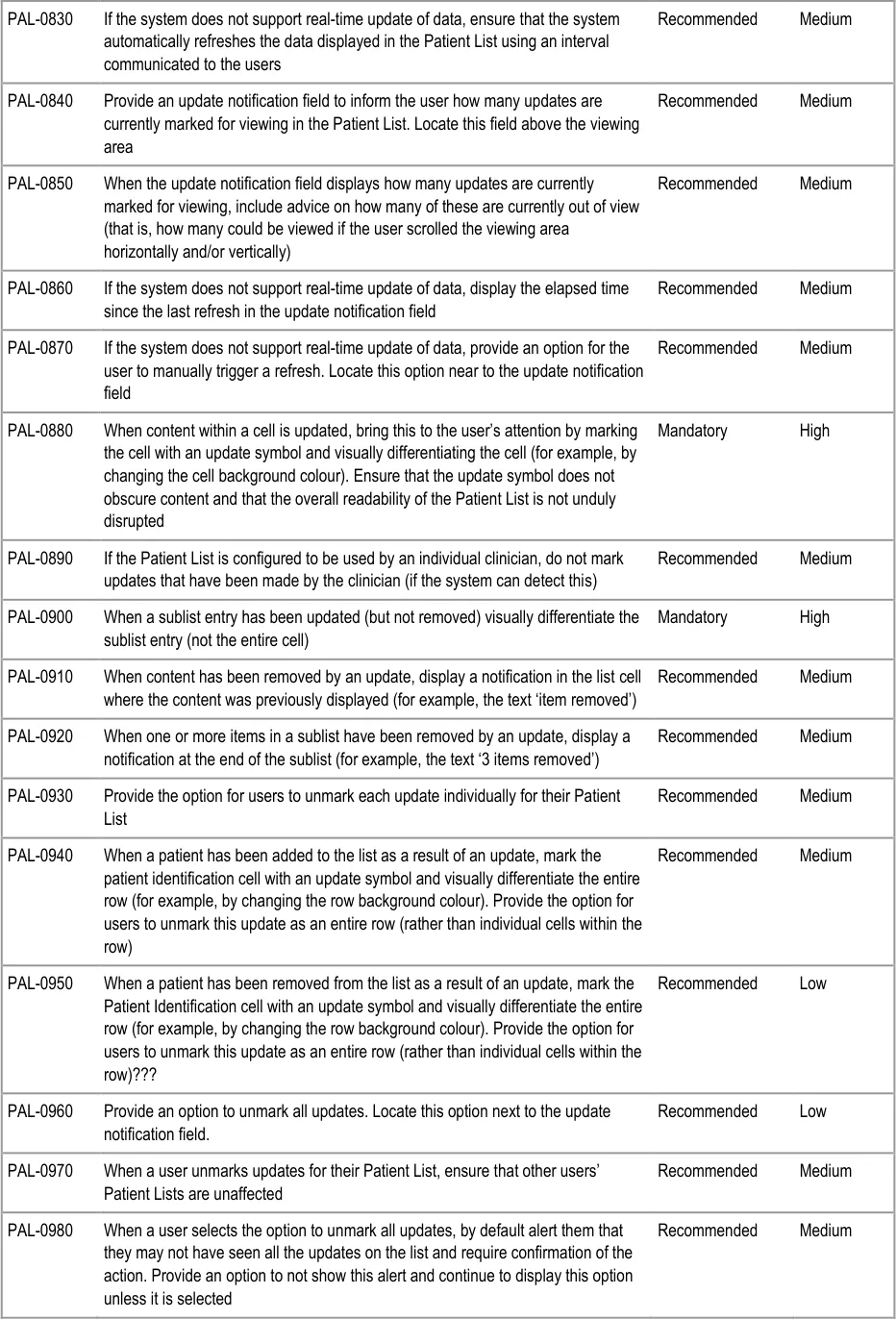
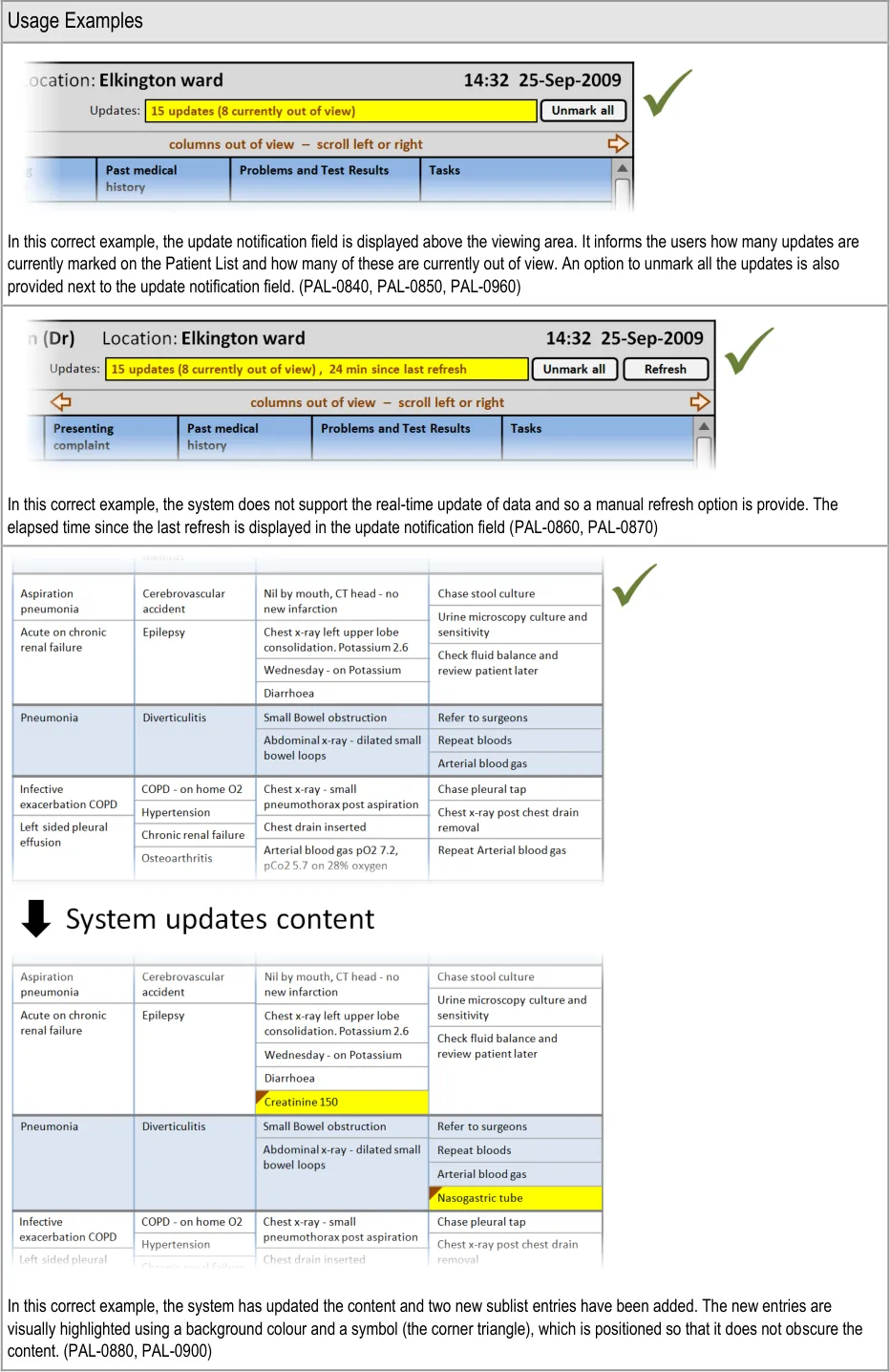
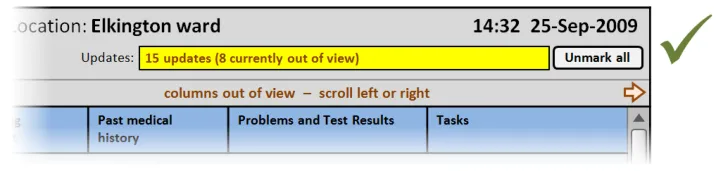
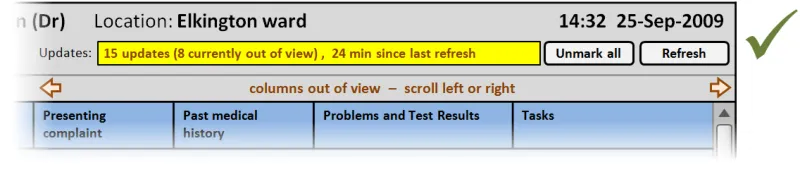
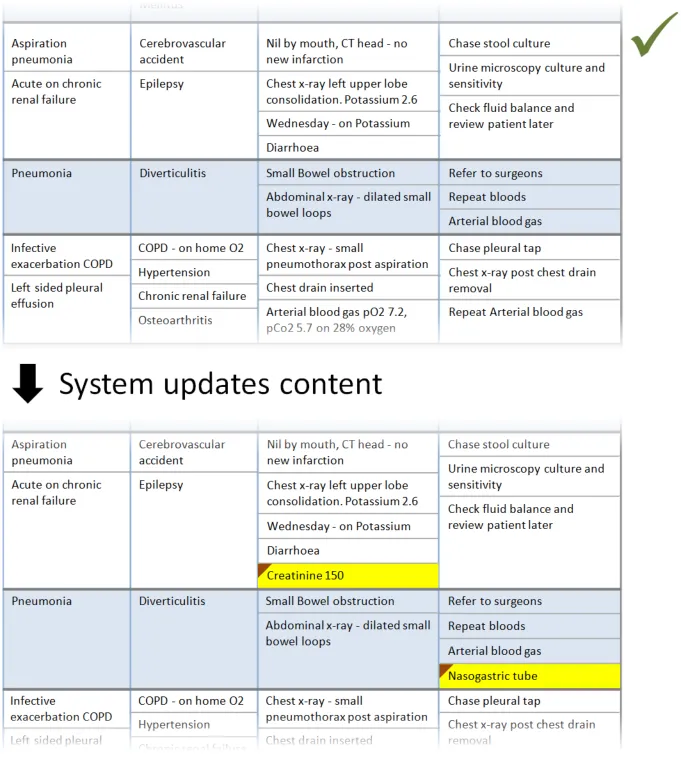
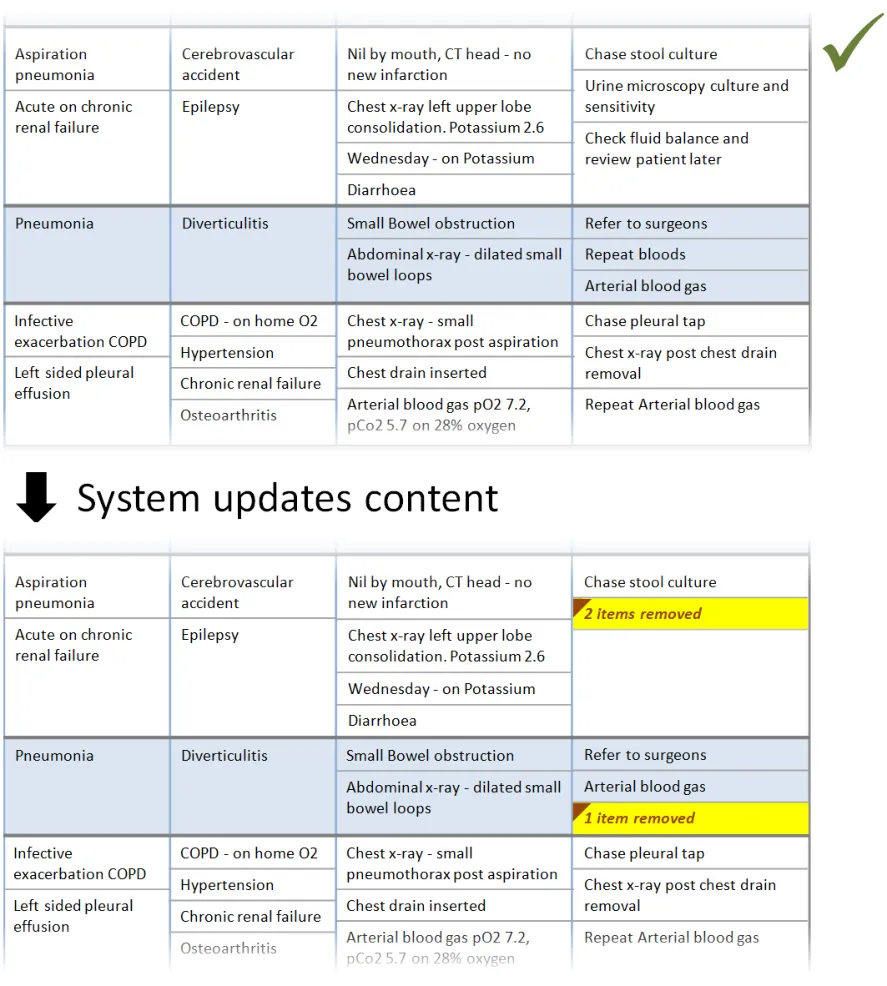
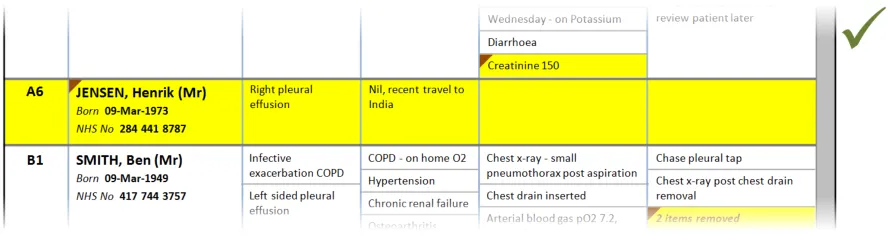
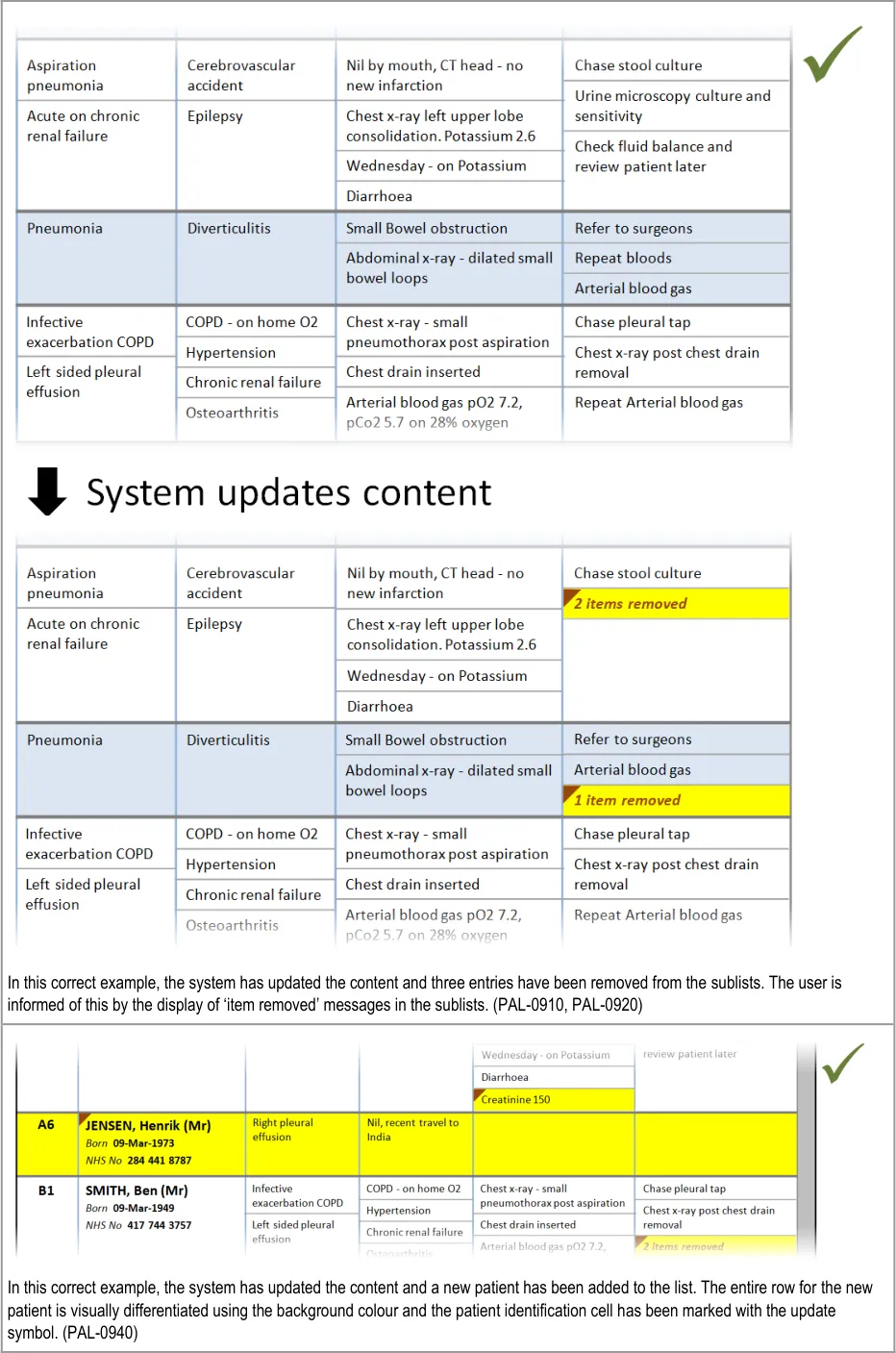
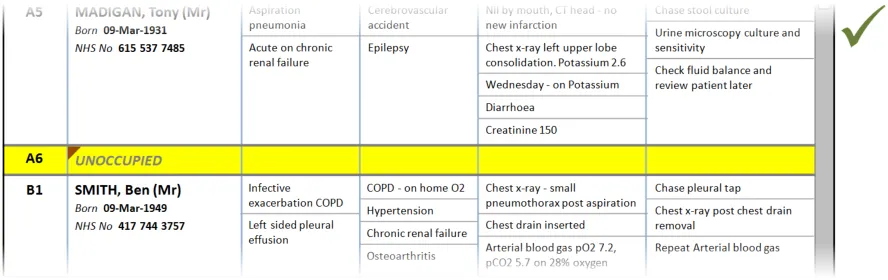
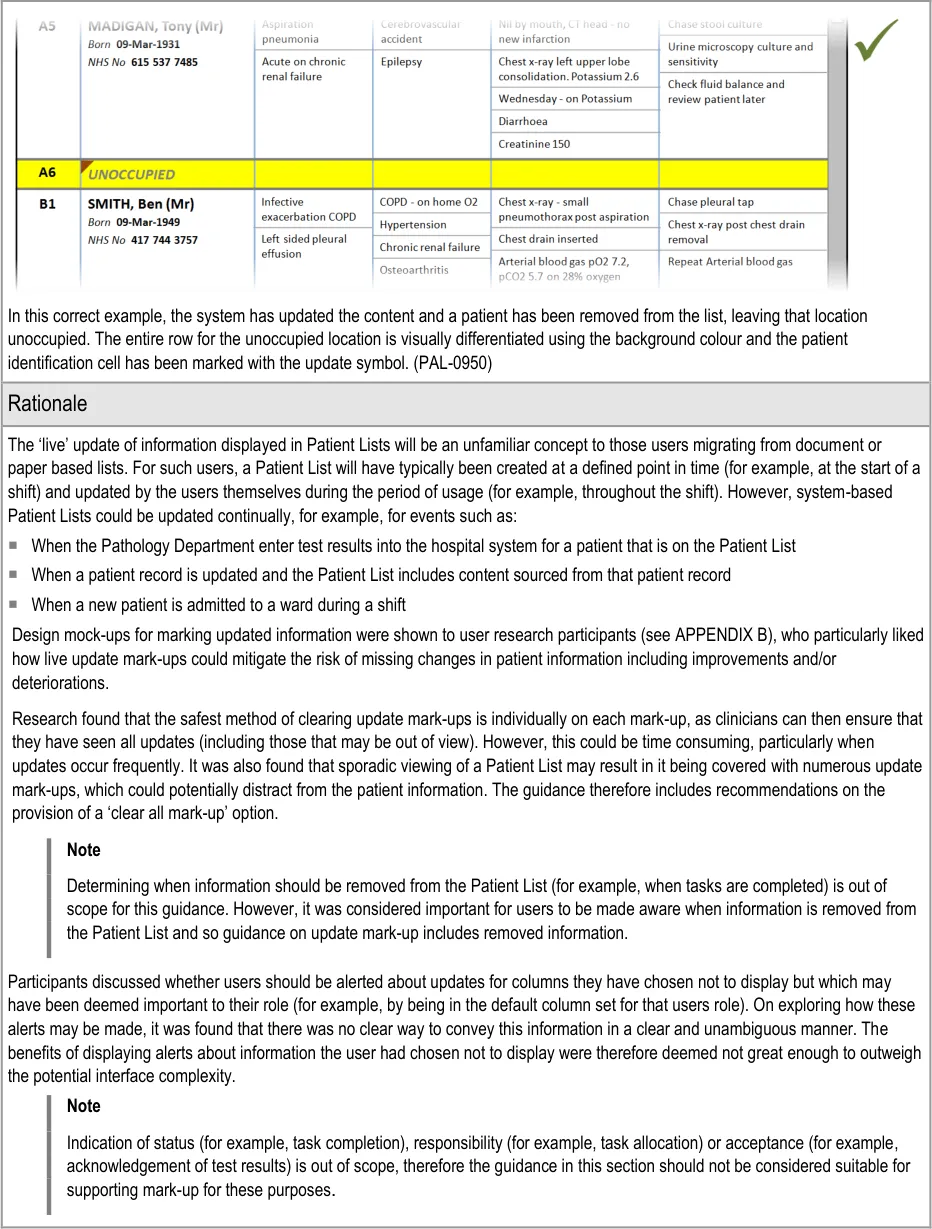
This section provides guidance on notifying the user of updates to information displayed in the Patient List. Figure 10 illustrates those features:
Figure 10: Refresh Options and Update Notification
Page 46
Copyright ©2013 Health and Social Care Information Centre
HSCIC Controlled Document
Page 47
Copyright ©2013 Health and Social Care Information Centre
HSCIC Controlled Document
Page 48
Copyright ©2013 Health and Social Care Information Centre
 HSCIC Controlled Document
Page 49
Copyright ©2013 Health and Social Care Information Centre
 HSCIC Controlled Document
Page 50
Copyright ©2013 Health and Social Care Information Centre
HSCIC Controlled Document
Hazard Risk Analysis Summary:
Potential Hazards:
PLI001 What if entries are made into the Patient List that result in two or
more versions of the same information in the record and in the Patient List?
PLI097 What if the information underlying the view has changed (since it
was opened) even though the refresh alert has not yet appeared?
PLI098 What if the view is updated while open without manual refresh or
indication of a change or what those changes are?
PLI099 What if updates are not automatic (once the view is open) and
there is no option for manual refresh?
PLI100 What if the changes since the clinician’s last view are not
indicated?
Mitigations:
PAL-0800, PAL-0820, PAL-0830
PAL-0870
PAL-0840, PAL-0880
PAL-0800, PAL-0870
PAL-0800, PAL-0840, PAL-0880, PAL-0900
PLI103 Risk of not knowing whether it was worth refreshing or not PAL-0840, PAL-0860
PLI104 Misinterpretation of time associated with refresh action PAL-0840, PAL-0860
PLI107 Updates: what if there is no marker to show what is new or what
has been updated and/or changed?
PLI111 What if you do not realise that the status of the list has to be
manually updated?
PLI125 What if you are not aware of the status of the list because no time
is shown?
PLI129 What happens if you do not notice additional data which is
appearing on screen?
PLI220 What if data in the view (either the list of patients or the data per
patient) is mistakenly interpreted to be current information when it is actually out of date?
PLI279 What if the system allows you the ability to unmark all updates
even if all updates have not been viewed?
PAL-0840, PAL-0880, PAL-0900
PAL-0870
PAL-0840, PAL-0860
PAL-0840, PAL-0880, PAL-0900, PAL-0940
PAL-0840, PAL-0860
PAL-0850, PAL-0930, PAL-0980
PLI152 What if you cannot see completed tasks? PAL-0910, PAL-0920
PLI066 What if completed jobs are removed too soon from the list? PAL-0910, PAL-0920
PLI270 What if results for unknown patient still show ‘unknown’ but live
system has now updated patient’s record with known demographics?
PAL-0820
Page 51
Copyright ©2013 Health and Social Care Information Centre
HSCIC Controlled Document
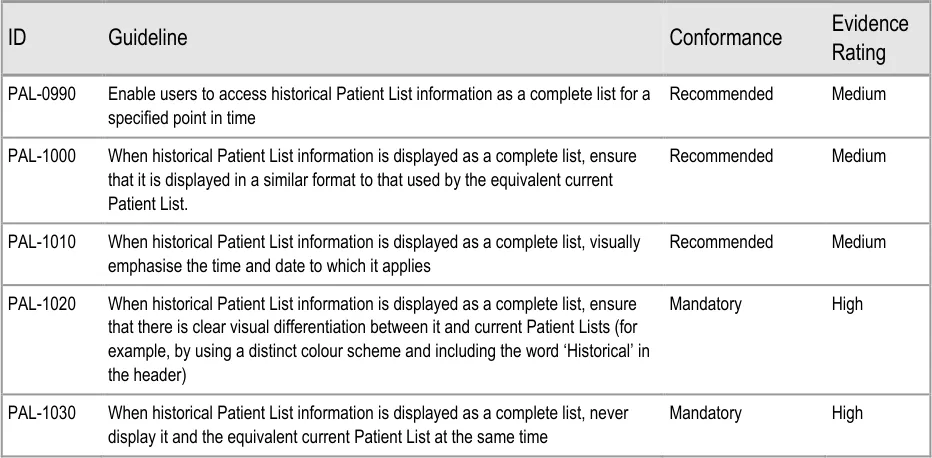
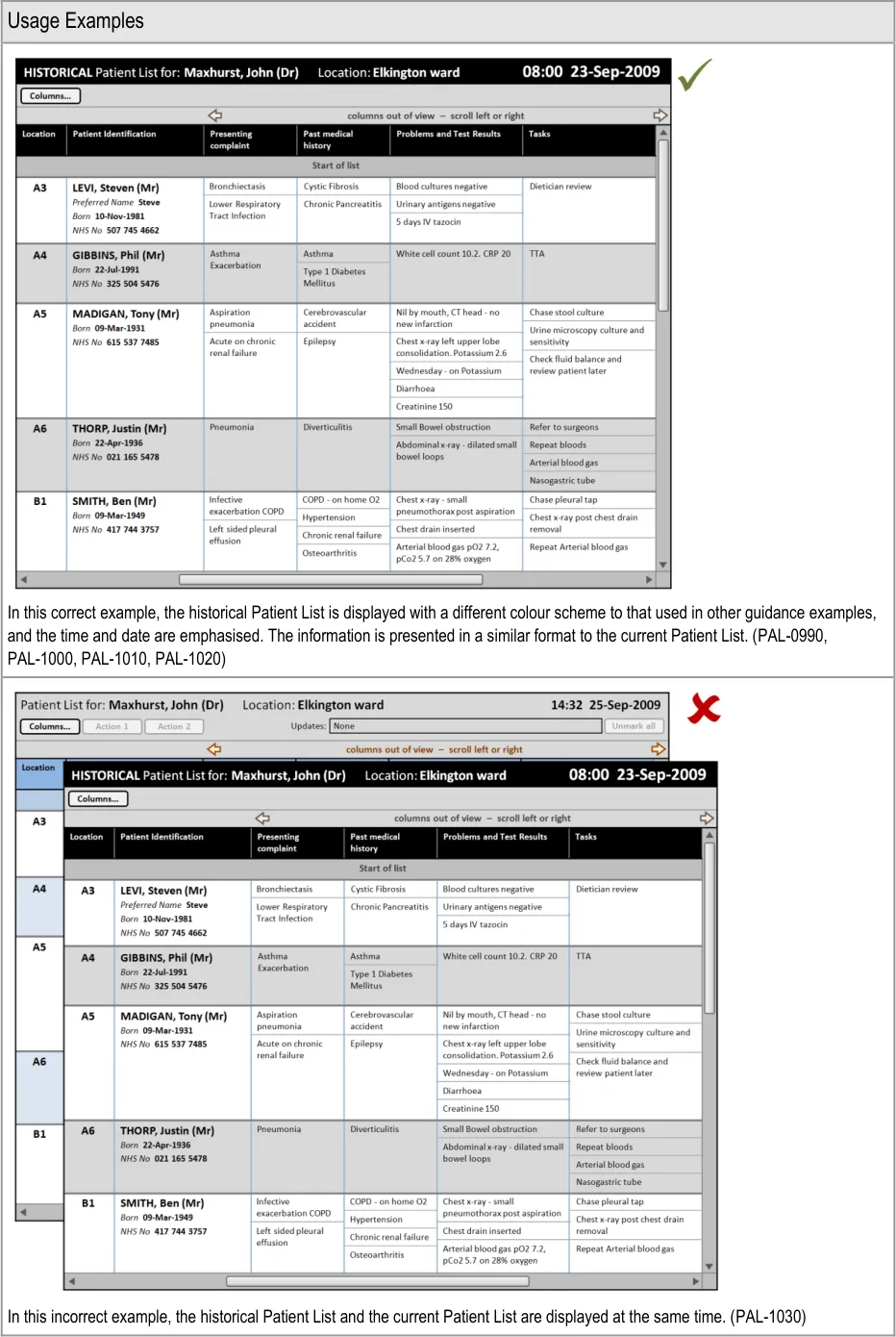
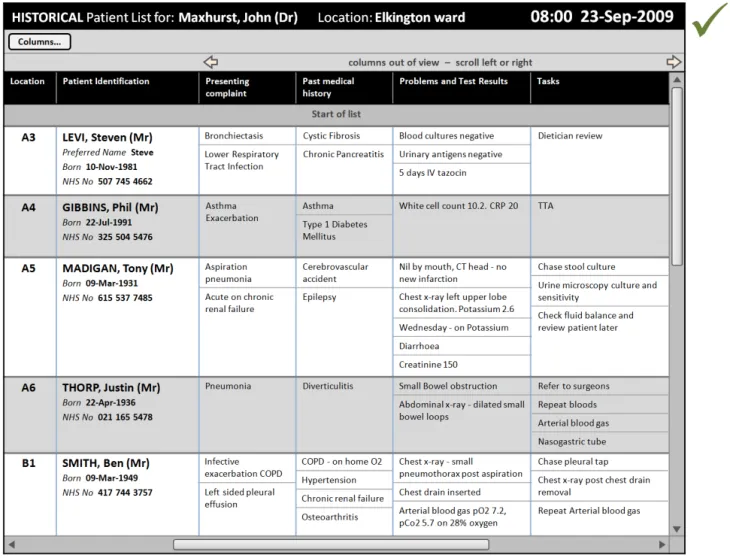
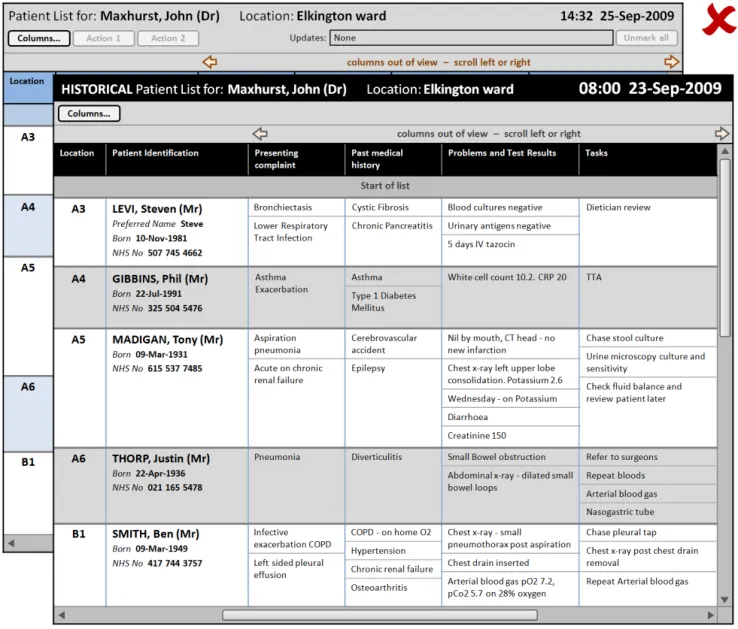
4.2.3 Displaying Historical Patient List Information
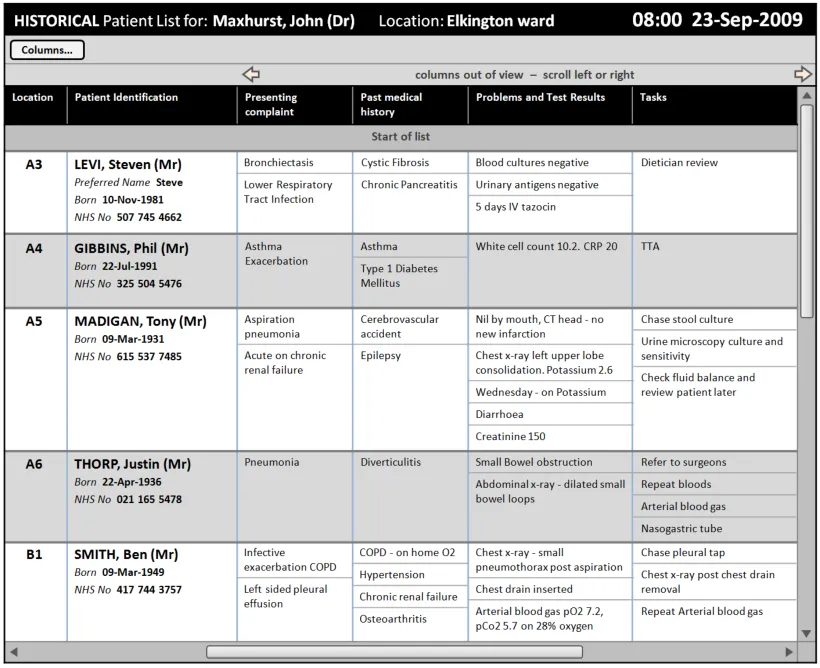
This section provides guidance on displaying historical patient information as a complete Patient List ‘snapshot’. Figure 11 illustrates those features:
Figure 11: Historical Patient List Information
Page 52
Copyright ©2013 Health and Social Care Information Centre
HSCIC Controlled Document
Page 53
Copyright ©2013 Health and Social Care Information Centre
 HSCIC Controlled Document
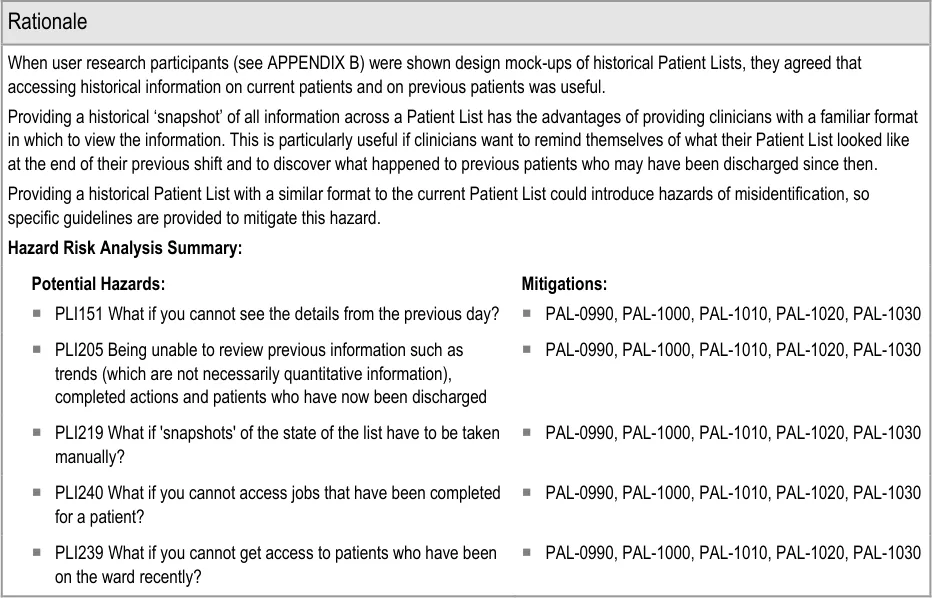
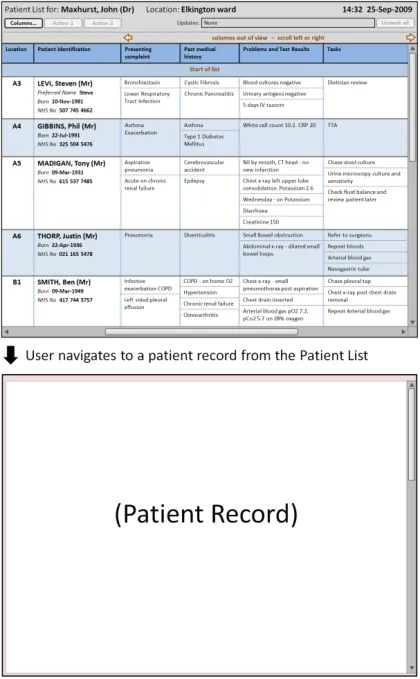
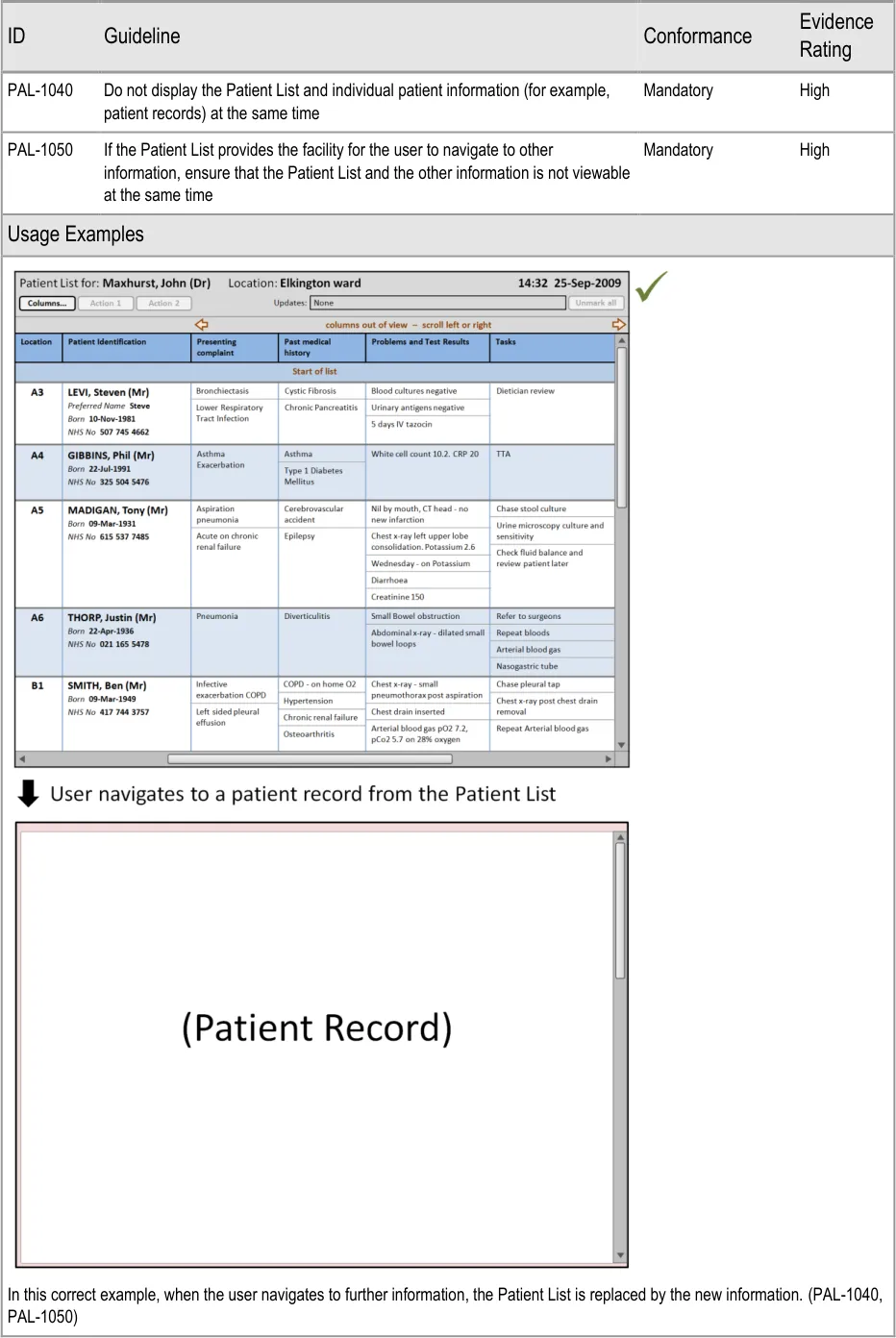
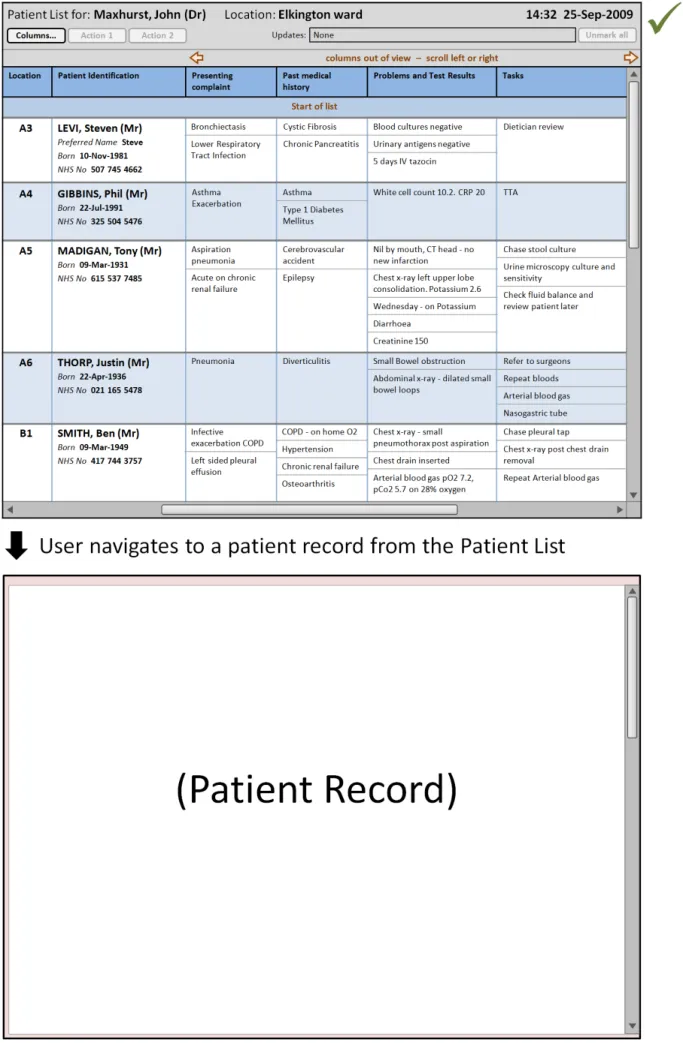
4.2.4 Displaying Further Information
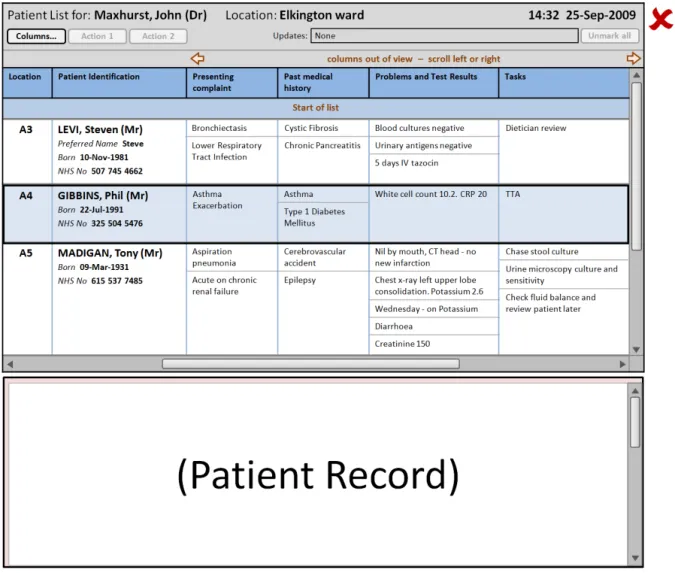
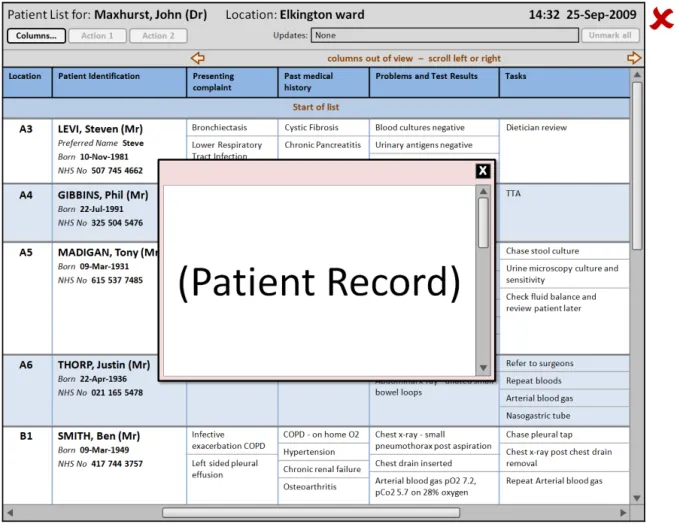
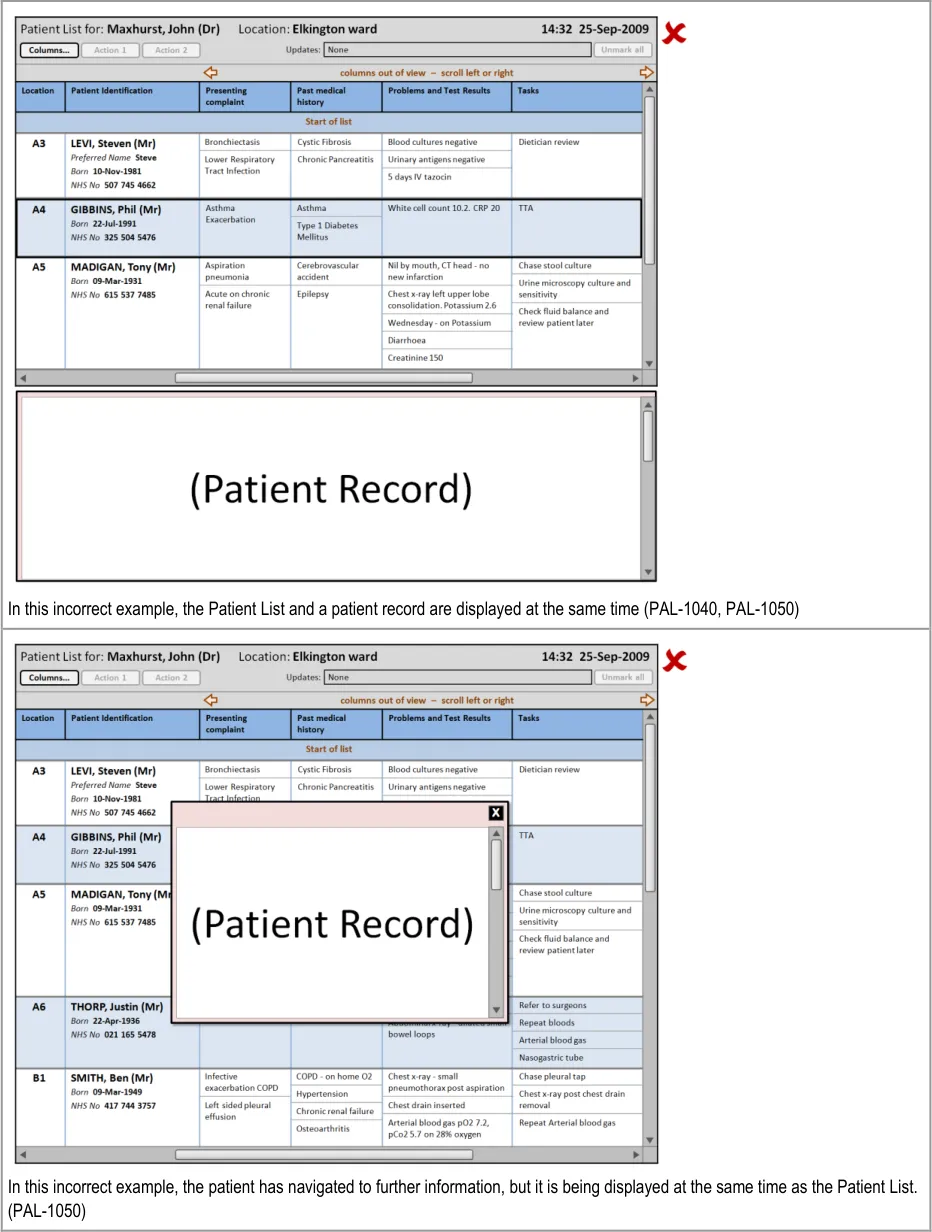
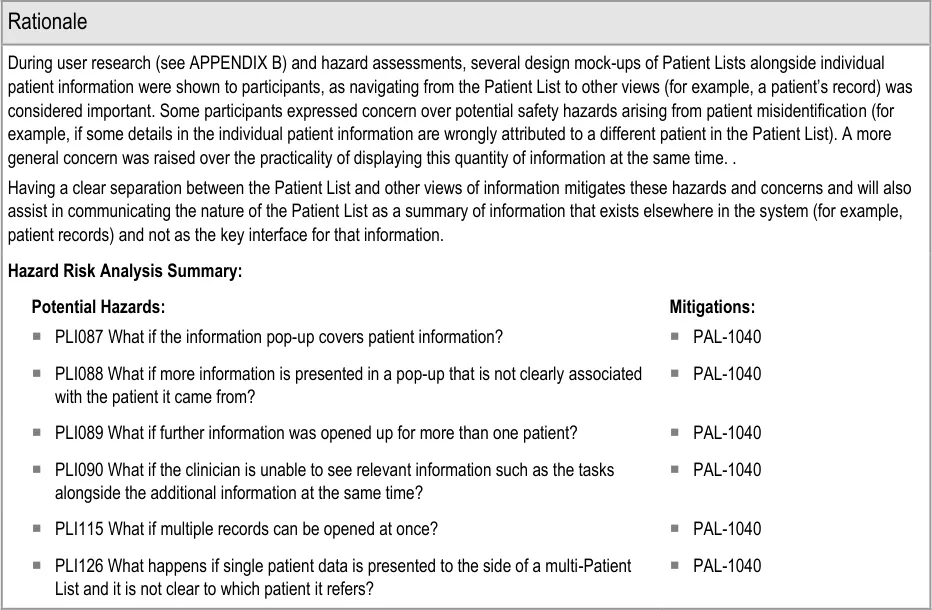
This section provides guidance on how to display further information that a user has opened from the Patient List. Figure 12 illustrates that feature:
Figure 12: Displaying Further Information
Page 54
Copyright ©2013 Health and Social Care Information Centre
 HSCIC Controlled Document
Page 55
Copyright ©2013 Health and Social Care Information Centre
HSCIC Controlled Document
Page 56
Copyright ©2013 Health and Social Care Information Centre
 HSCIC Controlled Document
Page 57
Copyright ©2013 Health and Social Care Information Centre
HSCIC Controlled Document
5 DOCUMENT INFORMATION
5.1 Terms and Abbreviations
CATR Clinical Authority to Release
CSG Clinical Safety Group
CUI Common User Interface
IG Information Governance
ISMP Institute for Safe Medication Practices
ISO International Organization for Standardization
MDT Multi-Disciplinary Team
MEWS Medical Early Warning Score
MIST Mechanism Illness/Injury Signs/Symptoms Treatment
NHS National Health Service
NHS CFH NHS Connecting for Health
NPSA National Patient Safety Agency
UI User Interface
VDT Visual Display Terminal
WHO World Health Organization
Table 8: Terms and Abbreviations
5.2 Definitions
The Authority The organisation implementing the NHS National Programme for IT (currently NHS Connecting for Health).
Conformance In the guidance tables, indicates the extent to which you should follow the guideline when defining your UI implementation. There are two levels:
Mandatory - An implementation should follow the guideline
Recommended - An implementation is advised to follow the guideline
Current best practice Current best practice is used rather than best practice, as over time best practice guidance may change or be
revised due to changes to products, changes in technology, or simply the additional field deployment experience that comes over time.
Page 58
Copyright ©2013 Health and Social Care Information Centre
HSCIC Controlled Document
Evidence Rating In the guidance tables, summarises the strength of the research defining the guideline and the extent to which it mitigates patient safety hazards. There are three ratings (with example factors used to determine the appropriate rating):
Low:
Does not mitigate specific patient safety hazards
User research findings unclear and with few participants
Unreferenced usability principles indicate the design is not significantly better than alternatives
Medium:
Mitigates specific patient safety hazards
User research findings clear but with few participants
References old authoritative guidance (for example, from National Patient Safety Agency (NPSA),
Institute for Safe Medication Practices (ISMP) or World Health Organization (WHO)) that is potentially soon to be superseded
Referenced usability principles indicate the design is significantly better than alternatives
High:
Mitigates specific patient safety hazards
User research findings clear and with a significant number of participants
References recent authoritative guidance (for example, from NPSA, ISMP or WHO)
Referenced usability principles indicate the design is significantly better than alternatives
NHS Entity Within this document, defined as a single NHS organisation or group that is operated within a single technical infrastructure environment by a defined group of IT administrators.
Table 9: Definitions
5.3 Nomenclature
This section shows how to interpret the different styles used in this document to denote various types of information.
5.3.1 Body Text
Code Monospace
Script
Other markup languages
Interface dialog names Bold
Field names
Controls
Folder names Title Case
File names
Table 10: Body Text Styles
Page 59
Copyright ©2013 Health and Social Care Information Centre
HSCIC Controlled Document
5.3.2 Cross References
Current document – sections Section number only
Current document – figures/tables Caption number only
Other project documents Italics and possibly a footnote
Publicly available documents Italics with a footnote
External Web-based content Italics and a hyperlinked footnote
Table 11: Cross Reference Styles
5.4 References
R1. British Standards Institute – BS EN ISO 9241-10:1996 Ergonomic requirements for office work with visual display terminals (VDTs) – Part 10: Dialogues principles
1996
R2. British Standards Institute – BS 7581:1992 Guide to Presentation of tables and graphs 1992
R3. NHS CUI Programme – Design Guide Entry – Patient Banner 4.0.0.0
R4. NHS CUI Programme – Displaying Graphs and Tables – User Interface Design Guidance 2.0.0.0
R5. NHS CUI Programme – Filtering, Sorting and Grouping – User Interface Design Guidance 1.0.0.0
R6. NHS CUI Programme – Design Guide Entry – Time Display 4.0.0.0
R7. NHS CUI Programme – Design Guide Entry – Date Display 5.0.0.0
R8. World Health Organization Collaborating Centre for Patient Safety Solutions – Aide Memoire – Volume 1, solution 2, May 2007 – Patient Identification
R9. National Patient Safety Agency National Reporting and Learning Service – DSCN 04/2009 – Guidance on the standard for Patient Identifiers for Identity bands
May 2007
March 2009
R10. Nielsen, J – Usability Engineering 1993
R11. Shneiderman, B – Designing the User Interface: Strategies for Effective Human-Computer Interaction
Table 12: References
Copyright ©2013 Health and Social Care Information Centre
Third Edition
Page 60
HSCIC Controlled Document
APPENDIX A USABILITY PRINCIPLES
A.1 Nielsen’s Usability Heuristics
See Usability Engineering {R10} for more information on these principles:
-
Visibility of system status
-
Match between system and the real world
-
User control and freedom
-
Consistency and standards
-
Error prevention
-
Recognition rather than recall
-
Flexibility and efficiency of use
-
Aesthetic and minimalist design
-
Help users recognise, diagnose, and recover from errors
-
Help and documentation
A.2 Shneiderman’s Eight Golden Rules of Interface Design
See Designing the User Interface – Strategies for Effective Human-Computer Interaction {R11} for more information on these principles:
-
Strive for consistency
-
Enable frequent users to use shortcuts
-
Offer informative feedback
-
Design dialogs to yield closure
-
Offer error prevention and simple error handling
-
Permit easy reversal of actions
-
Support internal locus of control
-
Reduce short-term memory load
A.3 ISO 9241: Characteristics of Presented Information
See Ergonomic requirements for office work with visual display terminals (VDTs) — Part 10: Dialogues principles {R1} for more information on these principles:
-
Clarity (the information content is conveyed quickly and accurately)
-
Discriminability (the displayed information can be distinguished accurately)
-
Conciseness (users are given only the information necessary to accomplish the task)
-
Consistency (the same information is presented in the same way throughout the
application, according to the user’s expectation)
- Detectability (the user’s attention is directed towards information required)
Page 61
Copyright ©2013 Health and Social Care Information Centre
HSCIC Controlled Document
-
Legibility (information is easy to read)
-
Comprehensibility (meaning is clearly understandable, unambiguous, interpretable and
recognisable)
Page 62
Copyright ©2013 Health and Social Care Information Centre
HSCIC Controlled Document
APPENDIX B STUDY ID 77: EXECUTIVE SUMMARY
B.1 Abstract
The UK National Health Service (NHS) Common User Interface (CUI) programme is a partnership between Microsoft [®] and NHS Connecting for Health (NHS CFH), which is part the NHS National Programme for Information Technology (NPfIT).
As part of CUI, the Clinical Applications and Patient Safety (CAPS) project has the goal of ensuring that software applications used by the NHS enhance patient safety. To achieve this, CAPS provides software developers with user interface design guidelines derived through a user-centric development process that includes explicit patient-safety evaluations.
This summary describes key findings from user research carried out in November 2009 by the CUI CAPS team on Patient List Views. These findings are a subset of those in a larger internal report prepared for the CUI CAPS Patient List Views team.
Purpose:
To gain clinical feedback on designs for Patient List Views.
Method:
Interviews: structured interviews with 11 Health Care Professionals (HCPs) eliciting HCP preferences and qualitative feedback on designs.
Key Results:
Based on clinician preference and rationale:
-
Truncating items in sublists is problematic and may hinder use of the view
-
The option for end-user clinicians to be able to customise the dataset visible should be
further explored
-
Marking of updates was a popular feature, though unmarking was initially unclear
-
A ‘snapshots’ feature was also liked, primarily in order to access patients no longer on the
current list
B.1 Research Objectives
To gather HCP preferences and qualitative feedback on, and to identify possible patient safety hazards with, CUI Patient List designs.
B.2 Research Design
11 clinicians were interviewed across 11 structured 1 hour interviews, carried out in person. Participants were shown static designs of the Patient List View, with design alternatives per design area. Designs and example data used a secondary care inpatient scenario.
Participants were asked for preferences based on patient safety criteria. Other qualitative feedback was elicited covering:
-
Rationale for preference
-
Design fit with current and best practice
-
Design understandability
-
Any potential hazards resulting from the designs
Page 63
Copyright ©2013 Health and Social Care Information Centre
HSCIC Controlled Document
Detailed notes from the interviews were qualitatively analysed using thematic coding.
B.3 Results
B.3.1 Participant Description
11 participants were interviewed in 11 sessions. Each had either volunteered through the NHS CFH Event Management System (EMS) signup or had been recruited by an HCP who had volunteered. 5 out of 11 participants had previously taken part in CUI clinical engagement for other work areas. Table 4 shows a summary of the participants’ profiles:
426 Doctor Obstetrics and Gynaecology
427 Doctor Obstetrics and Gynaecology
428 Doctor Obstetrics and Gynaecology
429 Doctor Obstetrics and Gynaecology
430 Doctor GP Rotation (Obstetrics and Gynaecology)
Senior SpR Labour board, handwritten list No
Junior SpR Labour board, printed document No
SpR Labour board, handwritten list No
SpR Labour board, printed document No
SHO Labour board, printed document (both personal and shared)
No
Yes
431 Nurse Renal (outpatients)? Consultant Printed document (both personal and shared)
432 Nurse Critical Care Senior Printed document (shared) Yes
433 Pharmacist ITU? Printed document (personal) No
434 Doctor GP Rotation / Military? F2 Electronic systems at two trusts, printed document (personal)
Yes
435 Doctor Surgery SHO Printed document (personal) Yes
436 Pharmacist Various? Electronic system, printed document (personal)
Table 13: Interview Participants
Yes
All participants were clinical staff who used patient lists as part of their role, generally for handover and supporting their work on the wards. The majority of the participants were junior doctors. Participants were from a number of different trusts around the UK.
The majority had had no experience of using electronic patient lists.
Page 64
Copyright ©2013 Health and Social Care Information Centre
HSCIC Controlled Document
B.3.2 Design Areas
Bullet text in italics represents researcher recommendations or comments in order to distinguish them from user feedback.
Current Practice
- Inpatient lists are used by junior doctors as “an aide memoire so you know where they are,
who they are, what they are, and what you’ve done” (p435)
- Several participants described using old versions of the patient list (usually from the
previous day) for:
Backup – Due to still-relevant information not being transferred to the new version
To see what had happened to patients no longer on the ward, in particular where they had been moved to
To track the responsible staff on duty on a particular day
To track infection risks
Too Much Data
- Participants were shown three designs for dealing with large numbers of items in a cell
sublist (for example, tasks)
- The most serious risks were with the design that forced the clinician to scroll the list within
the cell as this prevented them from comparing across patient’s tasks both within and between patients. They might forget to scroll, and they might mistakenly assume that the items were in order of importance (when it is likely they would not be as this is hard to reliably determine and varies depending on your clinical perspective)
- Advantages of showing all items in a sublist without truncation were that all items across all
patients could (in theory) be seen in ‘one go’, though, as each patient row was likely to be much higher in this case, the clinician would have to do more scrolling and/or paging in order to see and compare items between patients
-
All current paper patient lists follow an untruncated model
-
Participants suggested that a short list of patients might be useful to get an overview of the
location or as a way to select a patient
Current Dataset Variation
- As has been seen from analysis of current inpatient paper lists, participants described how
different wards can have very different datasets (for example, a general medical ward compared to a labour ward) and some modelled in different ways (for example, organising data by the body system in the Intensive Therapy Unit (ITU)):
Implying that a patient list design cannot ignore the issue of varying datasets between wards and/or contexts
Changing Dataset
- Participants were shown different designs for user-variation of the visible dataset. Issues
arising were:
Disorientating ‘jumping’ if datasets were presented on different pages (in that the clinician has to re-find the patient they were interested in)
Having to re-read information if datasets were presented on different pages
Page 65
Copyright ©2013 Health and Social Care Information Centre
HSCIC Controlled Document
The desire to be able to compare attributes for a given patient (difficult if attributes were always displayed on separate pages)
The belief among junior doctors that a dataset would be determined by senior staff (and possibly even non-clinical staff) and would likely be inappropriate for the juniors’ needs. Therefore, they would like the ability to vary the dataset themselves
The desire for different roles to be able to access different datasets
A desire to guide new staff to a recommended dataset for them in their context
A desire to be able to vary the dataset visible dependant on patient or clinical situation
All participants preferred a design where they could fully customise the visible dataset:
However, this may have been influenced by a desire to account for varying datasets per ward (which does not necessarily imply that the end-user can vary the dataset)
- Various risks were raised with the ability for the end-user to fully customise the visible
dataset
Updates
- All participants liked the idea of marking the updates since you last saw the list:
One participant pointed out this would be of most value in a larger team where many people were making updates to the same patients during a day (p437)
-
It was not seen as necessary to indicate times of updates in this view
-
Participants were unclear as to whether the update count included those updates on
columns out of view
- The first five participants shown the design initially (mistakenly) assumed unmarking would
clear all the updates from the whole team’s view and didn’t like this, preferring the update unmarking to be personal
- Other participants discussed the merits of using the updates as a kind of ‘micro-handover’
acknowledgement, in that the marking and unmarking could be shared between the team to indicate acceptance of information and tasks:
Following internal CUI discussion, it was felt that this kind of functionality was both out of scope for this work and probably best left to a ‘proper’ communications feature
Snapshots
- All six participants asked confirmed that they did want to know about patients who had
previously been on the ward (which is not possible from a continually updated patient list view)
- This was mainly seen as a learning opportunity, an aid in finding the patient, for checking
tasks were done for patients now not on the ward and for quick access when writing the discharge summary
A previous version of the patient list would mean that a clinician could find the patient’s details without having to remember unique identifiers and searching for them in the Patient Administration System (PAS), which may be unsuccessful or error prone as patients’ unique identifiers are hard to remember
History
- Response was generally ambivalent, with no strong opinions for or against viewing a
per-patient history
Page 66
Copyright ©2013 Health and Social Care Information Centre
HSCIC Controlled Document
Opening More Details
- The option to show more details for one patient at the same time as the patient list was only
discussed with four participants but there were more risks elicited for having the option than not having it
- It was suggested that, given space constraints, there would in any case be a limit to how
much extra information would be able to be usefully seen at the same time
Multiple Wards
- All six participants asked were initially confused by the ‘mixed’ list and all described the
benefits of seeing the patients grouped or ordered by ward
Page 67
Copyright ©2013 Health and Social Care Information Centre
HSCIC Controlled Document
REVISION AND SIGNOFF SHEET
Change Record
25-Nov-2009 Steve Loader 0.0.0.1 Initial draft for review/discussion
25-Nov-2009 Mick Harney 0.0.1.0 Made up Working Baseline version for copyedit/NHS CFH reviews
27-Nov-2009 Mick Harney 0.0.1.1 First pass copyedit
08-Dec-2009 Steve Loader 0.0.1.2 Update for copyedit and NHS CFH comments
10-Dec-2009 Mick Harney 0.0.1.3 Copyedit changes. Final points to agree.
10-Dec-2009 Mick Harney 0.1.0.0 Raised to Baseline Candidate
14-Dec-2009 Steve Loader 0.1.0.1 Updating with last changes
14-Dec-2009 Mick Harney 0.2.0.0 Bookmark and re-sequence IDs and raise to Baseline Candidate #2
17-Dec-2009 Mick Harney 1.0.0.0 Raised to Baseline
Document Status has the following meaning:
- Drafts 0.0.0.X - Draft document reviewed by the Microsoft CUI Project team and the
Authority designate for the appropriate Project. The document is liable to change.
- Working Baseline 0.0.X.0 - The document has reached the end of the review phase and
may only have minor changes. The document will be submitted to the Authority CUI Project team for wider review by stakeholders, ensuring buy-in and to assist in communication.
- Baseline Candidate 0.X.0.0 - The document has reached the end of the review phase and
it is ready to be frozen on formal agreement between the Authority and the Company
- Baseline X.0.0.0 - The document has been formally agreed between the Authority and the
Company
Note that minor updates or corrections to a document may lead to multiple versions at a particular status.
Open Issues Summary
None
Audience
The audience for this document includes:
- Authority CUI Manager / Project Sponsor . Overall project manager and sponsor for the
NHS CUI project within the Authority
- Authority Clinical Applications and Patient Safety Project Project Manager.
Responsible for ongoing management and administration of the Project
Page 68
Copyright ©2013 Health and Social Care Information Centre
HSCIC Controlled Document
- The Authority Project Team . Responsible for jointly agreeing with the Company NHS CUI
Project Team the approach defined in this document and any necessary redefinition of the Clinical Applications and Patient Safety Project strategy that results from the document or approach agreed
- Company NHS CUI Team . Responsible for agreeing with the Authority Project Team the
approach defined in this document, including any necessary redefinition of the Clinical Applications and Patient Safety Project strategy that results from the document or approach agreed
Reviewers
Mike Carey NHS CFH Project Manager 0.2.0.0 15-Dec-2009
Tim Chearman NHS CFH Project Lead 0.2.0.0 15-Dec-2009
Frank Cross Clinical Advisor 0.2.0.0 15-Dec-2009
Lindsey Butler Clinical Safety Advisor 0.2.0.0 15-Dec-2009
Peter Johnson Clinical Architect 0.2.0.0 15-Dec-2009
Greg Scott Clinical Advisor 0.2.0.0 15-Dec-2009
Priya Shah Clinical Advisor 0.2.0.0 15-Dec-2009
Distribution
As above
Document Properties
Document Title Patient List View User Interface Design Guidance
Author Clinical Applications and Patient Safety Project
Restrictions RESTRICTED – COMMERCIAL; MICROSOFT COMMERCIAL; Access restricted to: NHS CUI Project Team, Microsoft NHS Account Team
Creation Date 2 November 2009
Last Updated 23 June 2015
Copyright:
You may re-use this information (excluding logos) free of charge in any format or medium, under the terms of the Open Government Licence. To view this licence, visit nationalarchives.gov.uk/doc/open-government-licence or email psi@nationalarchives.gsi.gov.uk.
Page 69
Copyright ©2013 Health and Social Care Information Centre