Document Properties Document Title Patient Name Input and Display
 Prepared for
NHS Connecting for Health
Version 3.0.0.0 Baseline
Prepared by
Clinical Application and Patient Safety Project
NHS CUI Programme Team
cuistakeholder.mailbox@hscic.gov.uk
Prepared for
NHS Connecting for Health
Version 3.0.0.0 Baseline
Prepared by
Clinical Application and Patient Safety Project
NHS CUI Programme Team
cuistakeholder.mailbox@hscic.gov.uk

PREFACE
- PREFACE
- PATIENT SAFETY PROCESS
- 1 INTRODUCTION
- 2 RECOMMENDATIONS AND GUIDANCE
- 2.1 Patient Name Display
- Family Name, Given Name (Title) TREETAWTCHAIWONG, Lertchai (Sir)
- Family Name Given Name Title Duke James Earl Oliver Sir This example does not separate any of
- Family Name Given Name
- Family Name Given Name (Title) James Oliver Jones (Sir)
- Title Family Name
- Title Given Name
- Family Name, Given Name (Title)
- Family Name, Given Name, Initials,
- Family Name, Given Name CHARLIE, Oliver Family Name, Given Name Title TREETAWTCHAIWONG,
- Family Name, GIVENNAME (Title) TREETAWTCHAIWONG,
- 2.2 Patient Name Input Data Elements
- Title to accept 35
- Family Name to
- Given Name to
- Middle name(s) to
- Suffix to accept 35
- Preferred name to
- Minimum data set
- Input fields do not display the
- Input fields do not accept the
- Input control does not control
- Title drop-down does not have
- 2.3 InForm Input Design
- All input fields are
- Fields are not left
- Fields not in the
- 2.4 InLine Input Design
- Field input
- Fields in correct
- Fields broken
- Fields in wrong
- 2.5 Instructional Text
- Correct labelling
- No label for the
- Each input field
- Each prompt text
- Family Name
- Given Name has
- Prompts are
- Given Name does
- Standard tooltip
- Recommended
- 3 DOCUMENT INFORMATION
- REVISION AND SIGNOFF SHEET
Source PDF: patnamedisp.pdf
Documents replaced by this document Patient Name Input and Display – User Interface Design Guidance 2.0.0.0 Patient Name Input and Display – User Interface Design Guidance 1.0.0.0 Documents to be read in conjunction with this document Accessibility Checkpoints for NHS Applications 1.0.0.0 Accessibility for Clinical Applications 1.0.0.0 This document was prepared for NHS Connecting for Health which ceased to exist on 31 March 2013. It may contain references to organisations, projects and other initiatives which also no longer exist. If you have any questions relating to any such references, or to any other aspect of the content, please contact cuistakeholder.mailbox@hscic.gov.uk
PATIENT SAFETY PROCESS
The development lifecycle for this design guide includes an integrated patient / clinical safety risk assessment and management process. Known patient safety incidents relevant to this design guidance area have been researched and reviewed as part of ongoing development. The resulting guidance points aim to support mitigation of these known patient safety risks. In addition, the developers of this design guide have undertaken a patient safety risk assessment to identify new risks that could potentially be introduced by the guidance points in this document. Any potential risks identified have been assessed and managed to support the ongoing clinical safety case for this design guide. The Hazard Log records all the risks that have been identified during development and describes mitigatory actions that, in some cases, will need to be taken by users of this design guide. The Hazard Log is a live document that is updated as the design guide is developed and maintained. Until this design guide has received full Clinical Authority to Release (CATR) from the NHS Connecting for Health (NHS CFH) Clinical Safety Group (CSG) – based on an approved Clinical Safety Case – there may be outstanding patient safety risks yet to be identified and mitigated. Additionally, users implementing applications that follow this design guide’s guidelines (for example, healthcare system suppliers) are expected to undertake further clinical safety risk assessments of their specific systems within their specific context of use. Refer to www.cui.nhs.uk for further information on the patient safety process and for the safety status and any relevant accompanying safety documentation for this design guide.
1 INTRODUCTION
This document describes the design guidance for the display and input of Patient Name data. It describes the area of focus, provides guidance and recommendations, and explains the rationale behind the guidance and recommendations.
This document is intended for the use of anyone whose role includes screen design, implementation, or assessment of an NHS clinical application. This document can be used as guidance for the:
-
Specification of an input and display control for Patient Name data in a user interface (UI)
-
Implementation of an input and display control for Patient Name data within an application
-
Assessment of an input and display control for Patient Name data in an NHS clinical
application user interface
Figure 1, Figure 2 and Figure 3 show examples of Patient Name display, and the two formats that can be used to accept user input.
Figure 1: Example Patient Name Display Format
Figure 2: Example InForm Style Patient Name Input Control
Figure 3: Example InLine Style Patient Name Input Control with Prompts
Table 1 describes the changes made since the previous version of this guidance (Baseline version 2.0.0.0 dated 25-Jun-2009):
Deleted None
Modified None
Added Additional Text to Note (Section 2)
NPSA Wristband recommendations (section 2.1.4.2)
Table 1: Changes Since the Last Baseline Version
Page 1
Copyright ©2013 Health and Social Care Information Centre
 HSCIC Controlled Document
1.1 Customer Need
This section explains why the guidance has been created.
1.1.1 Overview
Patient names are displayed in multiple places within a clinical application. One example is in a patient banner where unambiguous Patient Name display enhances patient safety and application usability by:
- Ensuring the display of the Patient Name in a consistent and clear manner that is easy to
read, and clearly distinguishes name elements
- Ensuring quick and accurate identification of the patient
1.1.2 Eliminating Inconsistencies Across Systems
Significant inconsistencies exist in the labelling, inputting, and display of people’s names across various clinical applications. This can result in incorrect identification of patients, leading to safety issues and, potentially, additional staff training. Reduction of inconsistency is therefore an important goal in itself, and the primary aim of this guidance.
1.1.3 Simplified User Interface Design and Development
Having a consistent layout and set of values for the input and display of data items in clinical systems makes the design and development of such systems safer, easier and quicker.
1.2 Scope
This section defines the scope of this guidance document.
1.2.1 In Scope
This guidance is applicable primarily to electronic user interfaces such as those displayed on desktop and laptop computers. However, many of the principles can be applied to paper form design should it be required. The following items are in scope:
-
Defining the valid values for Patient Name display and input
-
Labelling of information, including:
Definition of the elements of a Patient Name
Definition of the values for each element
How items of information are to be labelled; this will cover the label text, positioning and any elements of styling required to differentiate labels visually from data
- Control layout and structure, in order to achieve:
Optimal visibility of the values
Easy recognition of the values in the context of the wider clinical application
Easy recognition of data type requested for input
Reduction of invalid entries
- Size of input fields, in order to:
Avoid wasting screen space
Ensure optimal display of entire data items
Page 2
Copyright ©2013 Health and Social Care Information Centre
HSCIC Controlled Document
1.2.2 Out of Scope
This section defines areas that are not covered in this guidance. Although there may be specific risks associated with these areas that are not addressed in this guidance, it is likely that the principles in this guidance will extend to the input and display of patient name in many of the areas listed below.
The following items are out of scope:
- Data storage - This guidance does not prescribe the format for storing data that is input or
displayed
- Terms of use - This guidance does not define when an input field or display should be
presented within a system
- Form design - This guidance does not prescribe the correct layout for a form, the
navigation around a form, or how these controls should be labelled
Note
Listing an item as out of scope does not classify it as unimportant. Project time and resource constraints inevitably restrict what can be in scope for a particular release. It is possible that items out of scope for this release may be considered for a future release.
1.3 Dependencies and Assumptions
Compliance with other guidance and standards is required as follows:
- The design of NHS clinical applications must conform to Accessibility Checkpoints for NHS
Clinical Applications {R1} and Accessibility for Clinical Applications {R2}
- Standards with regard to naming and identifying patients issued by the National Patient
Safety Agency (NPSA) ( Right patient – right care [1] and Standardising wristbands improves patient safety [2] )
Important
The visual representations used within this document to display the guidance are illustrative only. Stylistic choices are not part of this guidance and are therefore not mandatory requirements for compliance with the guidance in this document.
1.4 Key Principles
The following key principles have shaped the guidance in this document:
-
Display information according to existing standards
-
Minimise opportunities for human error
-
Display sufficient instructional information to support data quality
-
Promote consistency across the mix of users, NHS clinical applications and care settings
-
Support reliable and accurate identification of an individual patient record
-
Minimise opportunities where patient-clinician relationships may be compromised through
ambiguity
1 Right patient - right care {R3} : http://www.npsa.nhs.uk/EasySiteWeb/GatewayLink.aspx?alId=3234
2 Standardising wristbands improves patient safety {R4} : http://www.npsa.nhs.uk/EasySiteWeb/GatewayLink.aspx?alId=5346
Page 3
Copyright ©2013 Health and Social Care Information Centre
HSCIC Controlled Document
2 RECOMMENDATIONS AND GUIDANCE
The guidance provided throughout this document is based upon a programme of user research, including:
- A desk-based research project looking at a range of information entry Web pages and
clinical applications
- A Web-based survey of 41 respondents drawn from NHS clinicians and administrative staff,
Independent Software Vendors (ISVs), community pharmacists, and NHS Connecting for Health (NHS CFH)
- A Patient Safety Assessment
Important:
- The visual representations used within this document to display the guidance are illustrative only.
They are simplified in order to support understanding of the guidance points. Stylistic choices, such as colours, fonts or icons are not part of the guidance and unless otherwise specified are not mandatory requirements for compliance with the guidance in this document.
- This document refers to the various Patient Name inputs using consistent descriptors (‘Family Name’,
‘Given Name’ and so on). This includes the labels used within the visual representations. However, the wording of those labels is not Mandatory but only Recommended (see section 2.5.1). It is recognised that, where applicable and appropriate for the clinical context, implementations may use differently worded labels. An example of alternative descriptors is used within patient wristbands where ‘Family Name’ is replaced with ‘Last Name’ and ‘Given Name’ with ‘First Name’.
2.1 Patient Name Display
This section provides guidance for the display of a Patient Name with enough information to distinguish it for identification purposes. Figure 4 illustrates the correct format for displaying a Patient Name (with minimum identification attributes).
Figure 4: Patient Name Display with Minimum Attributes for Identification
2.1.1 Guidance
NID-0001 The display must present the Family Name in all uppercase letters to clearly distinguish it from the Given Name.
NID-0002 The display must separate the Family Name and Given Name using a comma to further establish that the Family Name is being placed first.
NID-0003 The display must include parentheses around the Title to separate and distinguish it from the other name elements.
Mandatory
Mandatory
Mandatory
NID-0004 The display must present the name elements strictly in the order shown. Mandatory
NID-0005 The display must present all data for each specified element (Family Name, Given Name and Title) of the Patient Name in full. Avoid truncation of information where possible.
Mandatory
NID-0006 The display must separate the presentation of Given Name and Title by a single space. Mandatory
NID-0007 The display must present the Title element in title case, for example, Sir not SIR, Mr not MR. Mandatory
NID-0008 The display must present a single pair of parentheses around the Title element, for example, (Mr).
Copyright ©2013 Health and Social Care Information Centre
Mandatory
Page 4
HSCIC Controlled Document
NID-0009 The display must allow any free-text (up to 35 characters) to be presented in the Title element.
NID-0010 The display must, in accordance with the UK Government Data Standards Catalogue guidelines, omit a trailing full stop from the Title element (for example, ‘Mr’ not ‘Mr.’).
NID-0011 The display must allow the Family Name, Given Name and Title elements to present at least the maximum field sizes given in the NHS Connecting for Health Personal Demographics Service [3] (PDS) FS 10.00, Issue 1A, 18th January 2005 (CDT D 0222).
NID-0012 The display must allow for the Family Name and Given Name elements to consist of multiple components. Components are constituent parts of the name element that combine with other parts to form the element as a whole. For example, the components of the name LIDMAN-SUN are LIDMAN and SUN and the components of Mary Jane are Mary and Jane. Components have the following features:
Family Name components must consist of UPPERCASE alphabetic characters only, for
example, SMITH.
Multiple Family Name components must be separated by a hyphen or a single space, for
example, LIDMAN-SUN-DEWAR or EVANS WEST.
Given Name components must display in title case, for example, Nadejda.
Multiple Given Name components must be separated by a hyphen or a single space, for
example, Anne-Jorun, Nis Bank.
NID-0013 The display should allow word wrapping to occur in instances where the field length exceeds the width allocated to it on the form. If word wrapping occurs, it should be applied only at the end of a whole field element or at the end of a field element component, if it comprises multiple parts (for example, Middle name(s) field).
Mandatory
Mandatory
Mandatory
Mandatory
Recommended
NID-0062 By default, include a prompt in the input boxes to indicate to a user the information required Recommended
NID-0063 Present the default prompt in an occluded form to prevent confusion with actual data input by a user
Recommended
NID-0064 Remove the default prompt when a user begins to input data Mandatory
Table 2: General Guidance for the Use of Patient Name Input Controls
2.1.2 Examples of Correct Usage
Family Name, Given Name (Title) TREETAWTCHAIWONG, Lertchai (Sir)
OLIVER, James (Mr)
RUTH, Anne (Mrs)
Table 3: How to Use the Design Guide Entry
2.1.3 Examples of Incorrect Usage
Use this format to display all Patient Names within a patient banner.
Family Name Given Name Title Duke James Earl Oliver Sir This example does not separate any of
the name elements, which contain multiple components. It is impossible to determine the Family Name, Given Name and Title.
Page 5
Copyright ©2013 Health and Social Care Information Centre
HSCIC Controlled Document
Family Name Given Name
Ruth Jacob
Family Name Given Name (Title) James Oliver Jones (Sir)
Ito Shu (Mr)
This example does not distinguish the Given Name from the Family Name or provide a Title, making it difficult to determine Given Name, Family Name and correct form of address.
These examples do not separate the Given Name from Family Name, making it difficult to determine what the Given and Family Names actually are.
These examples omit a Given Name element. Without a Given Name, identification is difficult.
These examples omit a Family Name element. Without a Family Name, identification is difficult.
These examples show all elements in the same case making it difficult to visually separate Given and Family Name elements. The comma, however, provides a visual cue that Family Name appears first.
This example shows too many name elements, which hinder rather than aid clarity.
This example shows only a Given and Family Name. It does not give enough information for a Title to be assumed.
This example shows a lack of clarity. It is unclear if the Given Name contains two name components or if the second component is actually the Title.
These examples are provided in all uppercase, making them difficult to read.
Title Family Name
Family Name (Title)
Title Given Name
Given Name (Title)
Family Name, Given Name (Title)
Given Name, Family Name (Title)
Family Name, Given Name, Initials,
Suffix (Title)
Sario Esko (Mrs)
Mr Oliver
Oliver (Mr)
Mrs Ruth
Ruth (Mrs)
JAMES, OLIVER (SIR)
James, Oliver (Sir)
OLIVER, James Earl, E, MBE MSc BSc (Sir)
Family Name, Given Name CHARLIE, Oliver Family Name, Given Name Title TREETAWTCHAIWONG,
Lertchai Sir
Family Name, GIVENNAME (Title) TREETAWTCHAIWONG,
LERTCHAI (SIR)
RUTH, JACOB (MRS)
Table 4: How Not to Use the Design Guide Entry
2.1.4 Rationale
This recommendation provides the following benefits:
- Conforms to the person Title display guidance and maximum field sizes given in the PDS
and the UK Government Data Standards Catalogue (GDSC).
- Conforms with the proposed National ID card, which uses the construct of Family Name
first, with Family Name provided in uppercase
- Ensures a consistent visual representation for Patient Name within the patient banner
across NHS clinical applications.
-
Provides a clear and readable format.
-
Identifies clearly and uniquely each of the name elements (Family Name, Given Name and
Title).
Page 6
Copyright ©2013 Health and Social Care Information Centre
HSCIC Controlled Document
- Promotes patient safety by enabling doctors, clinicians, health professionals and
non-clinical staff to read patients’ names quickly and accurately.
The recommended layout for Patient Name provides the best format because it lends itself to consistency and clarity, with a clear distinction between individual name elements. This increases patient safety by minimising the potential for reading error and providing accurate confirmation of the patient’s identity.
The recommended layout achieves this through:
- Presentation of the Family Name in all uppercase to clearly distinguish it from the Given
Name.
- Separation of the Family Name and Given Name using a comma to further establish that
the Family Name is placed first.
- Inclusion of parentheses around the Title to separate and distinguish it from the other name
elements.
2.1.4.1 Accessibility
The recommended format for the Patient Name display should present no barriers to accessibility.
Consistent adherence to the Patient Name display format aids accessibility as it makes the name elements (Family Name, Given Name and Title) uniquely identifiable and recognisable whenever they are encountered; both individually, and as part of the entire name. It also makes the name elements distinguishable from other elements. From an accessibility perspective, this means that even when the name is accessed out of context (for example, by a screen reader), it will still be easily recognisable as a name, and that each element of that name can easily be identified. Using distinct name elements in this way also means that users with imperfect vision will still be able to correctly identify them.
Screen reader software cannot pronounce highly variable items, such as names, accurately on all occasions. This however should not present any interpretation problems, as each of the name elements will be identifiable and recognisable by consistent use. If pronunciation by the screen reader causes problems, the user can spell out the name, letter by letter, using features of the screen reader software.
The Family Name element is presented in all uppercase letters. It is widely recognised that this decreases reading speed for all users, but it can cause particular problems for people with reading difficulties such as Dyslexia. Despite this, displaying the Family Name element in all uppercase is unlikely to present any accessibility problems or reading issues, for the following reasons:
- The decrease in reading speed caused by all uppercase letters is due to a disruption of the
recognition of whole word pattern, which occurs naturally for familiar words when seen using the mixed case representation. Since Family Names are highly variable and many are unusual, they do not fall into the category of known and familiar words, and so will not be affected.
- Difficulties with reading uppercase letters only occur when it is used extensively. The
Family Name element is usually relatively short.
As the Family Name is a vital element for patient identification, any slight reduction in reading speed would actually be seen to confer an advantage. The clinician will be more likely to interpret the name correctly, rather than make mistakes caused by false recognition.
2.1.4.2 Existing Standards
Existing standards for person name display are limited. Government standards focus primarily on the structure of a name, but not on the visual display of the structure. As such, these have been of limited use for defining recommendations.
Page 7
Copyright ©2013 Health and Social Care Information Centre
HSCIC Controlled Document
The following sources (as described in more detail below) provide recommendations in relation to name display:
- NPSA standards for naming and identifying patients ( Right patient – right care {R3} and
Standardising wristbands improves patient safety {R4} ).
-
NHS Data Model and Dictionary
-
NHS Connecting for Health Personal Demographics Service (PDS)
-
UK Government Data Standards (UK GDSC)
-
NHS Connecting for Health
-
NHS Message Implementation Manual (MIM)
-
Various Public Sector organisations
-
Academic research
NPSA Standardising Wristbands Improves Patient Safety
The Safer Practice Notice no.24, published 3 July 2007, sets out actions for the NHS when using patient wristbands including the core identifiers required on wristbands. From 18 July 2008 the patient name descriptors to be used on wristbands are as follows:
-
Last name
-
First name
NHS Data Model and Dictionary
The NHS Data Model and Dictionary provides a reference point for assured information standards to support health care activities within the NHS in England. During the production of this guidance references to field length and parameters were taken from the NHS Data Model and Dictionary, and were correct at the time of writing.
NHS Connecting for Health Personal Demographics Service (PDS)
The Personal Demographics Service defines the data schema for patient demographic information held by the NHS. This schema will be the basis for a single patient record for England.
The set of data values within the PDS schema defines a data storage standard for name elements as follows:
-
Person Title (35 Characters) - Title in the recommendation
-
Person Given name (40 Characters) - Given name in the recommendation
-
Person Family name (40 Characters) - Family name in the recommendation
The Patient Name display recommendation is based on the data storage requirements defined for PDS as these take priority over other contradictory standards, such as UK GDSC (below).
UK Government Data Standards Catalogue (UK GDSC)
The UK Government Data Standards Catalogue defines a data storage standard for name elements as follows:
-
Person Title (35 Characters) - Title in the recommendation
-
Person Given name (35 Characters) - Given name in the recommendation.
-
Person Family name (35 Characters) - Family name in the recommendation
Note
The UK GDSC differs from PDS for Given name and Family name data storage requirements in that UK GDSC are 5 characters shorter for these data elements. This difference in standards may pose a potential
Page 8
Copyright ©2013 Health and Social Care Information Centre
HSCIC Controlled Document
risk for patient safety. There might be a miscommunication between systems that use different standards and there is a potential for truncation or loss of information.
The UK GDSC also specifies that while the full available range of generally recognised titles is permitted, if any of these titles are used, the value must conform to the specified format, which is an appropriate abbreviated form with no full stop.
NHS Connecting for Health
NHS Connecting for Health has assumed responsibility for the NHS Data Dictionary. The NHS Data Dictionary definitions for person name data attributes (Person Title, Person Given name, Person Family name) refer directly to the UK GDSC, fully endorsing the standards defined there. The only exception is Person Title, which does not list ‘Miss’ as a generally recognised Title.
NHS NPfIT Message Implementation Manual (MIM)
The MIM definition of a person name is used to express either an unstructured name as string content of the element, or a structured name as a set of FAM, GIV, PFX and SFX child elements. Where:
-
FAM = Person Family name
-
GIV = Person Given name
-
PFX = Person Title
-
SFX = Person Suffix
Public Sector Organisations
Name identifiers exist within certain UK public sectors, for example, Passport, National ID card, Driving Licence and Proof of Age ID. There is a lack of consistency across the display standard for these identifiers; however, they all use uppercase letters for the Family name element. This is therefore a common convention that supports our recommendations.
-
The National ID card shows a person’s name as ‘FAMILY NAME Given name’
-
The Passport card shows a person’s name as ‘FAMILY NAME GIVEN NAME’ (displayed
on separate lines)
- The Driving Licence Card shows a person’s name as ‘FAMILY NAME GIVEN NAME
MIDDLE NAMES’ (with FAMILY NAME appearing first on a separate line)
- The Proof of ID card shows a person’s name as ‘GIVEN NAME FAMILY NAME’ (displayed
on separate lines)
Public sector organisations have many examples of name layouts for forms and lists. These do not show consistency or definitive ‘common practice’. However, most telephone directories (online or printed) and CRM databases list Family name first (see BT [®] directory services online [4] ).
Academic Research
There are some academic studies and written recommendations on the subject of reading patterns and pattern recognition. In general, these studies conclude that there are benefits for consistent representation of data in a recognised pattern, as this enhances familiarity and recognition of component parts. The Developing Quality Technical Information handbook by IBM [®] (2nd Edition) {R6} is one such source.
Existing standards for person name display are limited, and no definitive ‘common practice’ or consistency exists. The recommendation for Patient Name display across NHS clinical applications
Page 9
Copyright ©2013 Health and Social Care Information Centre
HSCIC Controlled Document
is therefore based on usability research, readability principles and the need for consistency, clarity and easy identification of the patient.
This recommendation was adopted on the basis of the following justifications:
- Promotion of patient safety by presenting the name in a clear and consistent format that
allows the clinician to quickly identify the patient
-
Use of an easily readable format
-
Provision of a clear distinction of the elements that are most important for identification and
formal communication, that is, Given name, Family name and Title
2.1.5 Optional Data Fields
This section gives the rationale behind the inclusion of the optional data fields.
Note
The optional data fields described in this section are not exclusive. It is acknowledged that from time to time other Patient Name fields may be required. As such circumstances cannot be anticipated, this document provides no specific guidelines. It is up to the applications developer concerned to design an appropriate solution, ensuring that there is no compromise of patient safety.
Preferred Name (Requested Name)
The NHS PDS FS 10.00 and the UK Government Data Standards Catalogue (UK GDSC) include a Person Requested Name as an element of the Person Name. The UK GDSC defines Person Requested Name as “ The name a person wishes to use which is different from the values in Title, Given name(s), Family name and Name Suffix fields ”. This would include, for example, a preference to be addressed by middle name rather than Given Name.
Nick Name (Alias or Known As)
The NHS PDS FS 10.00 and the UK GDSC also include an Alias/Known As as an element of the Person Name. Where the Preferred name is a name ‘type’ (for example, a desired alias consisting of the minimum data set for a Name) it should be displayed as a full name display control without needing a separate field in an existing data set. However, where the value is more a single Nickname, it can be attached to an existing name control as an optional field, for example, ‘JohnnyBoy’.
Suffixes
In most cases, the suffix is not needed as it does not serve as a primary means of identifying or addressing the patient and can quickly become too long, taking up valuable space in locations such as the banner (for example, Rt Hon. John Doe, K.G., K.B.E., M.B., B.Chir). The incIusion of such unnecessary data on screen only serves to distract from the important data there.
However, there are times when the use of a suffix is important:
-
When relevant for patient identification (for example, ‘Jnr’ or ‘the third (III)’)
-
When related to the correct, formal way to set out a name (for example, in a letter)
Although a minimal requirement, this demonstrates a need for the optional use of a suffix. The presence of a check box to select a) “show on screen” or b) “use on letterhead” provides a user with the ability to use where appropriate.
Middle Names and Initials
It is considered that middle name or initials are not often required as they:
-
Do not serve as a primary means for identifying or addressing the patient
-
May distract from quickly identifying the key name elements
Page 10
Copyright ©2013 Health and Social Care Information Centre
HSCIC Controlled Document
- May result in the Patient Name becoming overlong
However, they do need to be entered, where known, in the event that the primary identifiers are not sufficient to produce a unique match.
2.2 Patient Name Input Data Elements
A Patient Name input control can consist of up to six constituent fields with labels; Title, Family Name, Given Name, Middle name, Suffix, and Preferred name. The minimum data required to make the name useful is considered to be Title, Family Name and Given Name. Middle name(s), Preferred name and Suffix are considered to improve data quality, however they are not mandatory.
2.2.1 Title
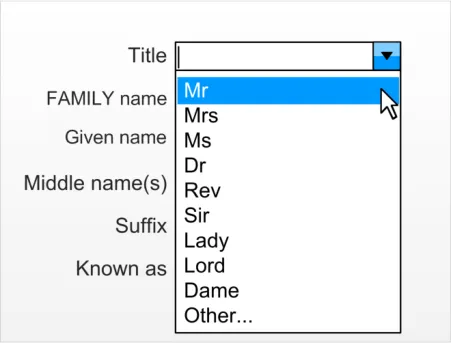
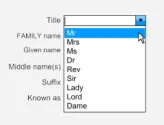
The Title field is designed as a drop-down combo-box (as shown in Figure 5). This design allows the developer to assist the user in the input of a pre-defined set from a drop-down list, whilst also allowing the flexibility of free-text input to augment the complex list of possible options.
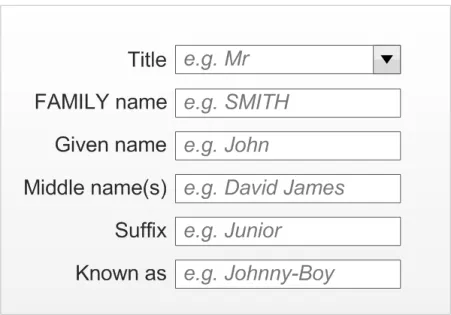
Figure 5 displays a Patient Name input control in a default state (for example, an InForm design with prompts and no data entered). Figure 6 displays the Title input element during a simple interaction.
Figure 5: InForm Design (All Six Fields are Visible)
Figure 6: InForm Design with Title Drop-Down Clicked
The input box should allow a maximum of 35 characters in order to support the recognised data entry requirements. The minimum width of the input box should be decided in accordance with the maximum length of the presets available in the drop-down box but should never be less than four characters (due to a standard requirement being to enter ‘Miss’).
Page 11
Copyright ©2013 Health and Social Care Information Centre
 HSCIC Controlled Document
2.2.1.1 Guidance
NID-0014 Input control must allow a maximum of 35 characters. Mandatory
NID-0015 Minimum visual width of the input box must display four characters. Mandatory
NID-0016 Suggested values are:
‘Mr’‘Mrs’
‘Ms’
‘Dr’
‘Rev’
‘Sir’
‘Lady’
‘Lord’
‘Dame’
‘Other…’
NID-0017 One value should allow the user to invoke free-text input mode (for example ‘Other…’ in the illustrations).
Recommended
Recommended
NID-0018 Input box should contain a relevant prompt, for example, Mr. Recommended
NID-0019 Input control should be in the form of a drop-down combo-box. Recommended
Table 5: Guidance for the Use of Title in Patient Name Input Controls
2.2.1.2 Other Usage Step-Through of Title Input
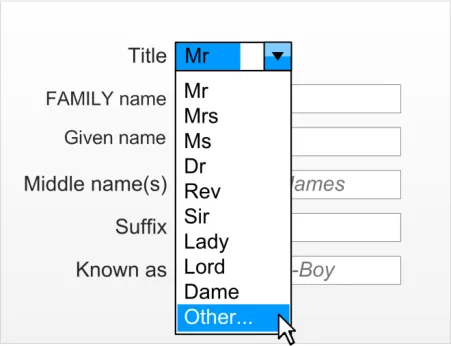
The last item in the list indicates that free-text entry is possible and therefore assists the user in finding this functionality should they require it (for example, ‘Other…’). The suggested location is at the end of the list because the user has searched the other options and not found what they are looking for.
Figure 7, Figure 8 and Figure 9 display this user behaviour in sequential stages:
Figure 7: User Chooses the Other Choice
Page 12
Copyright ©2013 Health and Social Care Information Centre
 HSCIC Controlled Document
Figure 8: Focus is Placed Back in the Free-text Entry Box
Figure 9: User Enters a Non-Preset Value
2.2.2 Family Name
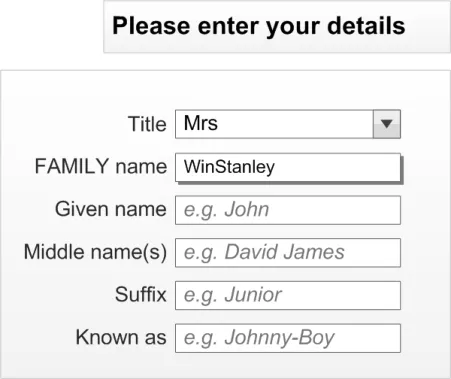
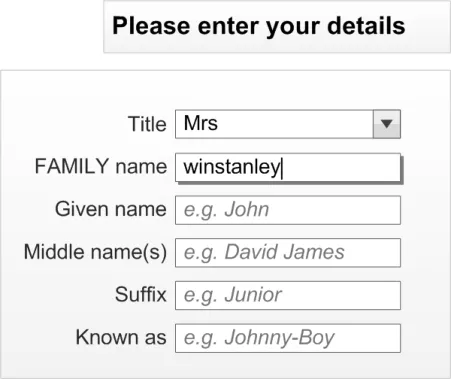
The Family Name input is in the form of a free-text entry box that accepts a maximum of 35 characters. Based upon average name length calculations, it is recommended that the width of the box should never display less than eight characters and should have an optimal display length of 14 characters. At the optimal length, the box should be able to display over 99% of expected values and even at the minimum length, it is expected that over 95% of names will be fully displayed. The Family Name will be entered in the case chosen by the user (as they enter it), however, when the entered value is displayed, it will all be in uppercase.
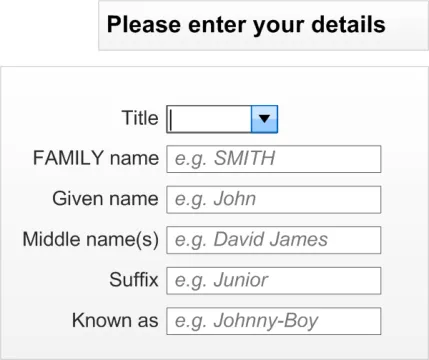
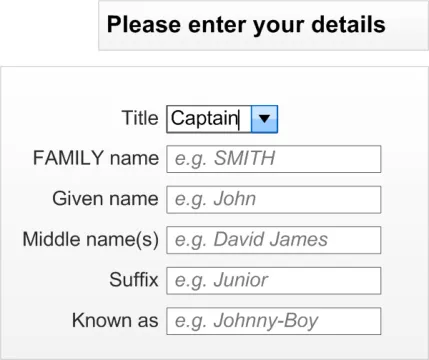
Figure 10 contains two examples of a user entering the Family Name in varieties of lowercase and uppercase. Figure 11 demonstrates that the control will reformat the data consistently to uppercase, when focus leaves the input field.
Page 13
Copyright ©2013 Health and Social Care Information Centre
 HSCIC Controlled Document
Figure 10: Two Examples of Users Entering Family Name in the Case they Believe is Most Appropriate
Figure 11: When the User moves to the Next Cell the Family Name Displays in Uppercase
2.2.2.1 Guidance
NID-0020 Family Name input must be via a free-text entry box. Mandatory
NID-0021 Family Name input box must accept a maximum of 35 characters. Mandatory
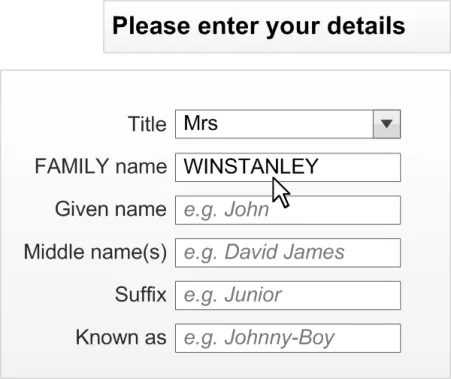
NID-0022 Family Name input box should be capable of displaying a minimum of eight characters without occlusion.
Recommended
NID-0023 Family Name input box should optimally display 14 characters without occlusion. Recommended
NID-0024 Family Name input box should contain a relevant prompt in its default state (for example, ‘e.g. SMITH’) in occluded form.
Recommended
NID-0025 When displaying a Family Name value, the characters should all be in uppercase. Recommended
Table 6: Guidance for the Use of Family Name in Patient Name Input Controls
Page 14
Copyright ©2013 Health and Social Care Information Centre
HSCIC Controlled Document
2.2.3 Given Name
The Given Name input is in the form of a free-text entry box that accepts a maximum of 35 characters. Based upon average UK name length calculations, it is recommended that the box be wide enough to display at least eight characters and should have an optimal width of 14 characters. At this optimal width, the box would be able to fully display over 99% of expected values. At the minimum width, it is expected that over 95% will be fully displayed. The Given Name will be entered in the case chosen by the user (as they enter it), however, when the value is displayed, the first character will be in uppercase.
2.2.3.1 Guidance
NID-0026 Given Name input must be via a free-text entry box. Mandatory
NID-0027 Given Name input box must accept a maximum of 35 characters. Mandatory
NID-0028 Given Name input box should be capable of displaying a minimum of eight characters without occlusion.
Recommended
NID-0029 Given Name input box should optimally display 14 characters without occlusion. Recommended
NID-0030 Given Name input box should contain a relevant prompt in its default state (for example, ‘e.g. John’) in occluded form.
Recommended
NID-0031 When displaying a Given Name value the first character should be in uppercase. Recommended
Table 7: Guidance for the Use of Given Name in Patient Name Input Controls
2.2.4 Middle Name(s)
The Middle name input is in the form of a free-text entry box that accepts a maximum of 100 characters. This length has been chosen due to the requirement for this input to accept multiple entries. This maximum allows a significant number of entries (at least 18 of our standard 7-character Given Names) to be entered. The Middle name will be entered and displayed in the case chosen by the user (as they enter it).
2.2.4.1 Guidance
NID-0032 Middle name input must be via a free-text entry box. Mandatory
NID-0033 Middle name input box must accept a maximum of 100 characters. Mandatory
NID-0034 Middle name input box should be capable of displaying a minimum of eight characters without occlusion.
Recommended
NID-0035 Middle name input box should optimally display 7 characters without occlusion. Recommended
NID-0036 Middle name input box should contain a relevant prompt in its default state (for example, ‘e.g. David James’) in occluded form.
Table 8: Guidance for the Use of Middle Name(s) in Patient Name Input Controls
2.2.5 Suffix
Recommended
The Suffix input is in the form of a free-text entry box that accepts a maximum of 35 characters. There are fewer mandatory requirements for this field because it is rarely used. The entry box should be wide enough to display at least eight characters. The Suffix will be entered and displayed in the case chosen by the user (as they enter it).
Page 15
Copyright ©2013 Health and Social Care Information Centre
HSCIC Controlled Document
2.2.5.1 Guidance
NID-0037 Suffix input must be via a free-text entry box. Mandatory
NID-0038 Suffix input box must accept a maximum of 35 characters. Mandatory
NID-0039 Suffix input box should be capable of displaying a minimum of eight characters without occlusion.
Recommended
NID-0040 Suffix input box should optimally display 14 characters without occlusion. Recommended
NID-0041 Suffix input box should contain a relevant prompt when in its default state (for example, ‘e.g. Junior’) in occluded form.
Table 9: Guidance for the Use of Suffix in Patient Name Input Controls
2.2.6 Preferred Name
Recommended
The Preferred name input is in the form of a free-text entry box that accepts a maximum of 35 characters. The box should be wide enough to display at least eight characters and should have an optimal width of 14 characters. The Preferred name will be entered and displayed in the case chosen by the user (as they enter it).
2.2.6.1 Guidance
NID-0042 Preferred name input must be via a free-text entry box. Mandatory
NID-0043 Preferred name input box must accept a maximum of 35 characters. Mandatory
NID-0044 Preferred name input box should be capable of displaying a minimum of eight characters without occlusion.
Recommended
NID-0045 Preferred name input box should optimally display 14 characters without occlusion. Recommended
NID-0046 Preferred name input box should contain a relevant prompt in its default state (for example, ‘e.g. Johnny-Boy’) in occluded form.
Table 10: Guidance for the Use of Preferred Name in Patient Name Input Controls
2.2.7 Examples of Correct Usage
Recommended
Title to accept 35
characters
Family Name to
accept 35 characters
Given Name to
accept 35 characters
Middle name(s) to
accept 100 characters
Suffix to accept 35
characters
‘abcdefghijklmnopqrstuvwxyzABCDEFGHI’ Required data length for PDS.
‘abcdefghijklmnopqrstuvwxyzABCDEFGHIJKLMN’ Required data length for PDS.
‘abcdefghijklmnopqrstuvwxyzABCDEFGHIJKLMN’ Required data length for PDS.
‘abcdefghijklmnopqrstuvwxyzABCDEFGHI’ Required data length for PDS.
Page 16
‘abcdefghijklmnopqrstuvwxyzABCDEFGHIJKLMNOPQRSTUVWXYZ abcdefghijklmnopqrstuvwxyzABCDEFGHIJKLMNOPQRSTUVWXYZ abcdefghijklmnopqrstuvwxyzABCDEFGHIJKLMNOPQRSTUVWXYZ abcdefghijklmnopqrstuvwxyzABCDEFGHIJKLMNOPQRSTUVWXYZ abcdefghijklmnopqrstuvwxyzABCDEFGHIJKLMNOPQRSTUV’
Suggested length to allow for multiple middle names to be entered.
Copyright ©2013 Health and Social Care Information Centre
HSCIC Controlled Document
Preferred name to
accept 35 characters
Minimum data set
of; Title, Family Name, and Given Name
‘abcdefghijklmnopqrstuvwxyzABCDEFGHI’ Suggested field length for a single nickname style entry.
Note
A desired full name comes under a name type rather than name field.
This data set has been identified as the minimum required to ensure data quality.
Table 11: Examples of Correct Implementation of Patient Name Guidance
2.2.8 Examples of Incorrect Usage
Input fields do not display the
majority (over 95%) of inputs, as required
Input fields do not accept the
required input characters (for example, 35 characters for Family Name)
Input control does not control
all three fields for the minimum data set (Title, Family Name, and Given Name)
Title drop-down does not have
an option to encourage the user to enter a different entry, if a more applicable one is not in the list
Table 12: Examples of Incorrect Implementation of Patient Name Guidance
2.2.9 Rationale
Not including all of the minimum data set in an input control could compromise patient safety and data quality.
The user should be encouraged to give the best quality of data available. They may not know that free-text entry is possible if an alternative option (for example, ‘Other’) is not in the list, and simply pick the most applicable one there.
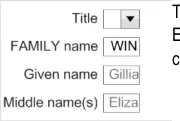
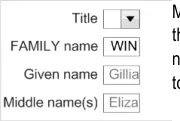
The lengths of the input values for the Title, Family Name, Given Name and Suffix input fields have been calculated based upon the rationale outlined in the Patient Name display requirements in section 2.1.4. The length of the Middle name(s) input field is a suggestion based upon the requirement for multiple name entries into this field. The length of the Preferred name is based upon the requirement to display a single nickname rather than a full name comprised of multiple elements.
The suggested lengths of the input boxes are based on the usability heuristic {R5} stating that each “text field should be large enough to accommodate the majority of anticipated entries without scrolling”. The expected values were assessed and applied to the default length size. The minimum sizes took this requirement but also looked at the requirement to restrict the control footprint (space used on a screen) due to factors outside of the control (for example, restricted space on a form).
Page 17
Copyright ©2013 Health and Social Care Information Centre
HSCIC Controlled Document
2.2.10 Mandatory and Optional fields
The minimum data set required to safely input a complete patient-safe name is as follows:
-
Family Name
-
Given Name
The following fields are optional:
-
Title
-
Middles name(s)
-
Suffix
-
Preferred name
2.3 InForm Input Design
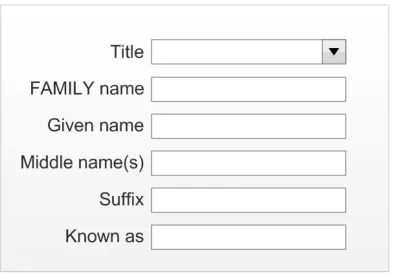
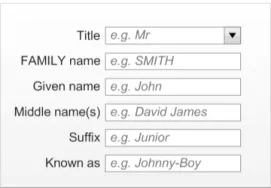
The InForm layout is considered the most desirable layout from a patient safety and usability perspective. It should therefore be the default choice for the ISV when developing a Patient Name input control. Figure 12 displays a typical InForm style input control (with all six input fields):
Figure 12: InForm Design (All Six Fields Are Visible)
2.3.1 Guidance
NID-0047 InForm field controls must be aligned on the left edge of the input boxes. Mandatory
NID-0048 InForm field controls (where they exist) must be placed underneath each other in the following order:
Title
Family Name
Given Name
Middle name(s)
Suffix
Known as
Table 13: Guidance for the Use of InForm Design in Patient Name Input Controls
Copyright ©2013 Health and Social Care Information Centre
Mandatory
Page 18
HSCIC Controlled Document
2.3.2 Examples of Correct Usage
All input fields are
left aligned underneath each other in the specified order
Table 14: Correct Patient Name Input InForm Design Examples
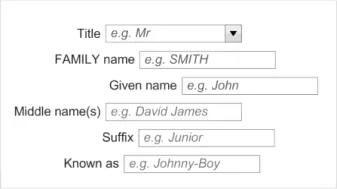
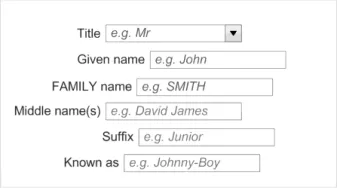
2.3.3 Examples of Incorrect Usage
The InForm control is reported by users to be the preferred design for readability, usability, and familiarity purposes.
Fields are not left
aligned to each other
Fields not in the
correct order
Table 15: Incorrect Patient Name Input InForm Design Examples
2.3.4 Rationale
Left aligning the controls aids readability for the user. Not left aligning them makes the control difficult to use and understand.
The order of the fields should reflect the display and not contradict it. Errors will occur if they are different.
This control allows the user to input a person name in its constituent parts. It is designed to increase patient safety by encouraging data quality as much as is practicable without losing flexibility.
Each individual part is referred to as a field. The minimum data set constitutes those fields that are required to safely identify a patient. The remaining fields can optionally be present in the control (for example, the developer can choose which fields they wish to use).
The InForm design is considered to be the most desirable for a majority of users due to familiarity and readability. It should therefore be the first choice of a designer.
Page 19
Copyright ©2013 Health and Social Care Information Centre
HSCIC Controlled Document
2.4 InLine Input Design
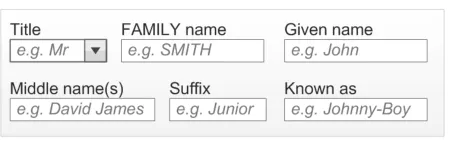
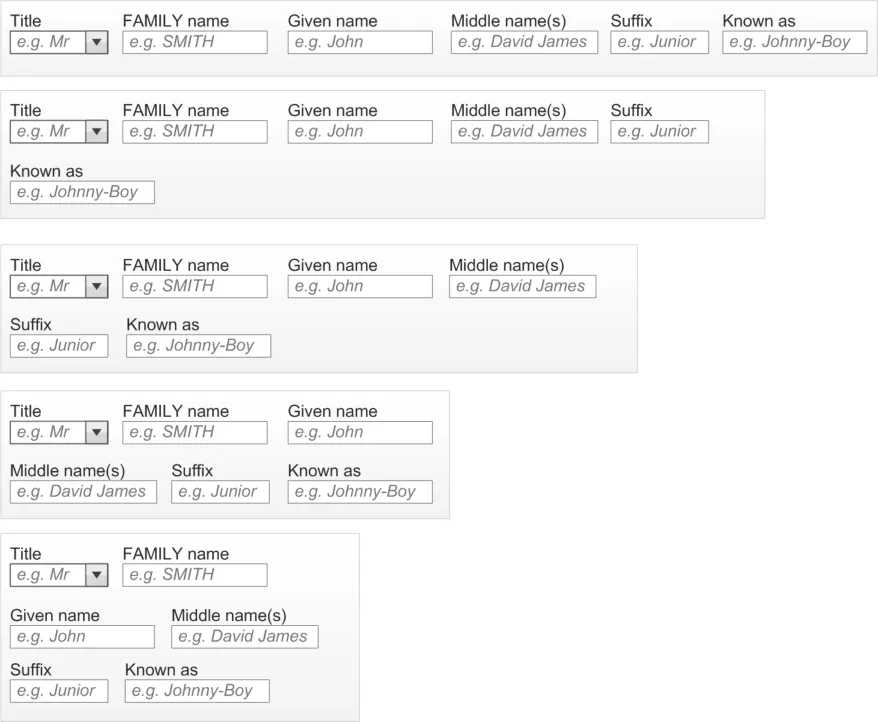
The InLine style design has the same fields as the InForm control but they are arranged horizontally rather than vertically. Figure 13 displays a typical InLine style control (with all six input fields included). Figure 14 displays how the control should wrap at whole elements, when necessary, and that subsequent rows should align to the left edge of the first input field.
Figure 13: InLine Design (With All Six Fields Visible)
Figure 14: InLine Design Wrapped onto Two Lines (Withh All Six Fields Visible)
2.4.1 Wrapping Behaviour
The inline control should follow the wrapping behaviour illustrated in Figure 15. The basic principles are:
-
Wrap at whole fields
-
Sentence style wrapping (for example, no alignment other than subsequent lines start at the
same point horizontally as the first item in the first line, therefore they are left aligned)
Page 20
Copyright ©2013 Health and Social Care Information Centre
 HSCIC Controlled Document
Figure 15: InLine Wrapping Behaviour (Examples Show All 6 Input Fields)
2.4.2 Guidance
NID-0049 Ensure wrapping only occurs on whole fields. Mandatory
NID-0050 Correct presentation order is:
Title
Family Name
Given Name
Middle name(s)
Suffix
Known as
Mandatory
NID-0051 InLine design choice should only be used when InForm has been considered undesirable. Recommended
Table 16: Guidance for the Use of InLine Design in Patient Name Input Controls
2.4.3 Examples of Correct Usage
Field input
controls only wrapped at dividing space
Fields in correct
order, to reinforce display format
Table 17: Correct Patient Name Input Wrapping and Order Examples
2.4.4 Examples of Incorrect Usage
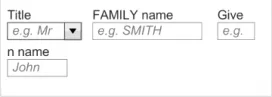
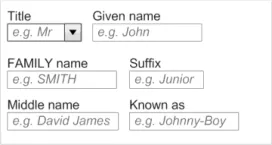
Fields must not be broken because this can lead to errors in reading the values and understanding the control.
The user will assume the input and display formats will be identical and changing these orders can lead to input error from the user.
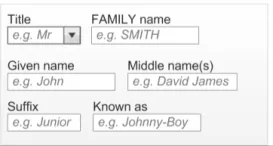
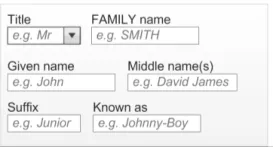
Fields broken
across a field
Fields in wrong
order
Table 18: Incorrect Patient Name Input Wrapping and Order Examples
Fields must remain intact to assist the user in understanding the control and the data.
The order of the control input should assist the user in understanding how it will be displayed, therefore not confusing the user as to the order, for example, Family Name, then Given Name.
Page 21
Copyright ©2013 Health and Social Care Information Centre
HSCIC Controlled Document
2.4.5 Rationale
This control allows the user to input a person name in its constituent parts. It is designed to increase patient safety by encouraging data quality as much as is practicable without losing flexibility.
The InLine style should be seen as the second choice for an ISV, when the InForm design has been considered undesirable for a particular form design due to factors such as space and precedent.
2.5 Instructional Text
This section explains the instructional text assistance to be considered when constructing the input controls.
2.5.1 Field Labels
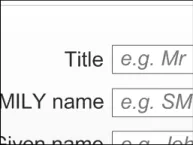
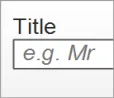
Each field used to make up the name input control must have a label associated with it to inform the user what is required of them. The location of these labels are related to the layout style of the input control selected by the developer and are displayed in Figure 16 and Figure 17.
Figure 16: Label (Title) for a Field in the InForm Style
Figure 17: Label (Title) for a Field in the InLine Style
These are the recommended field labels:
-
Title: “Title”
-
Family Name: “Family Name”
-
Given Name: “Given Name”
-
Middle name: “Middle name(s)”
-
Suffix: “Suffix”
-
Preferred name: “Known as”
Page 22
Copyright ©2013 Health and Social Care Information Centre
 HSCIC Controlled Document
2.5.1.1 Guidance
NID-0052 Each field in a name input control must have an associated label. Mandatory
NID-0053 Labels must be programmatically linked to their associated input field. Mandatory
NID-0054 Label values should be:
Title: “Title”
Family Name: “Family Name”
Given Name: “Given Name”
Middle name: “Middle name(s)”
Suffix: “Suffix”
Preferred name: “Known as”
Table 19: Guidance for the Use of Field Labels in Patient Name Input Controls
2.5.1.2 Examples of Correct Usage
Recommended
Correct labelling
Table 20: Correct Patient Name Input Control Label Formatting Examples
2.5.1.3 Examples of Incorrect Usage
Labels are correct for the field associated to them.
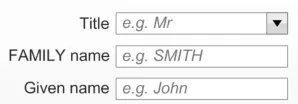
No label for the
different input fields
Table 21: Incorrect Patient Name Input Control Label Formatting Examples
2.5.1.4 Rationale
Input controls with more than a single input field require the use of labels to ensure the user understands what is required.
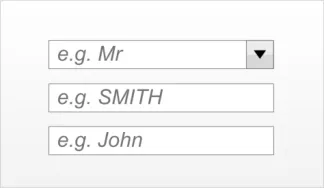
Controls that consist of multiple input fields require clear labelling to assist the user in understanding what input is required and where.
The guidelines follow the NPSA standards for naming and identifying patients ( Right patient – right care {R3} and Standardising wristbands improves patient safety {R4} ).
Page 23
Copyright ©2013 Health and Social Care Information Centre
HSCIC Controlled Document
2.5.2 Prompts
The controls could utilise a ‘prompt’ style design to give the clearest indication to the user of what is expected in which input box, without increasing the screen footprint of the design. This is displayed in Figure 18. The prompts should be visible until data is placed inside the control (either by the user or a system). Some suggested default values are:
-
Title: “e.g. Mr”
-
Family Name: “e.g. SMITH”
-
Given Name: “e.g. John”
-
Middle name(s): “e.g. David James”
-
Suffix: “e.g. Junior”
-
Known as: “e.g. Johnny-Boy”
Figure 18: Example of Input Control with Prompts
2.5.2.1 Guidance
NID-0055 Each field in a name input control should have an associated prompt. Recommended
NID-0056 Prompts for Family Name should be capitalised. Recommended
NID-0057 All prompts except Family Name should have sentence style capitalisation. Recommended
NID-0058 Prompt values should be:
Title: “e.g. Mr”
Family Name: “e.g. SMITH”
Given Name: “e.g. John”
Middle name(s): “e.g. David James”
Suffix: “e.g. Junior”
Known as: “e.g. Johnny-Boy”
Recommended
NID-0059 Prompts should be lighter in weight and colour than the input text, and italicised. Recommended
Table 22: Guidance for the Use Of Prompts in Patient Name Input Controls
2.5.2.2 Examples of Correct Usage
Each input field
has an associated prompt
Each prompt text
is in a lighter colour and italicised
Each prompt text
is italicised
The prompt text reinforces the labels as instructional text for the user.
Prompts are of a lighter colour to inform the user that it is a prompt and not a valid data value.
The italicised format reinforces the fact that it is a prompt and not a valid data value.
Page 24
Copyright ©2013 Health and Social Care Information Centre
HSCIC Controlled Document
Family Name
input field has the prompt capitalised
Given Name has
the prompt with the first letter capitalised
Table 23: Correct Patient Name Input Control Prompt Formatting Examples
2.5.2.3 Examples of Incorrect Usage
The capitalisation of the Family Name prompt assists the user by reinforcing the Family Name format for display.
The prompts should reinforce the desired entry format and for the UK, an instance of a Given Name beginning with a lowercase letter has not been discovered.
Prompts are
formatted like a real entry
Family Name
input field has the prompt not fully in uppercase
Given Name does
not have the prompt with the first letter in uppercase
Table 24: Incorrect Patient Name Input Control Prompt Formatting Examples
2.5.3 Tooltips
Users may incorrectly think that an entry has been made in the box.
Users are not informed as to the correct entry format of Family Name.
Users are not informed as to the correct entry format of Given Name.
The controls could use tooltips to give the user more verbose instructions than can be achieved in a prompt. Suggested default values are:
-
Title: “Select a Title from the list or simply type in a different Title” (illustrated in Figure 19)
-
Family Name: “Enter the person’s Family Name (surname)”
-
Given Name: “Enter the person’s Given Name (forename or Christian name)”
-
Middle name(s): “Enter the person’s middle name(s)”
-
Suffix: “Enter the person’s suffix (e.g. ‘Junior’ or ‘The Third’)”
-
Known as: “Enter the name a person likes to referred to as”
Figure 19: Example Tooltip Style Instructional Text
Page 25
Copyright ©2013 Health and Social Care Information Centre
HSCIC Controlled Document
2.5.3.1 Guidance
NID-0060 Each field in a name input control should have instructional text (for example, a tooltip). Recommended
NID-0061 Tooltip values should be:
Title: “Select a Title from the list or simply type in a different Title”
Family Name: “Enter the person’s Family Name (surname)”
Given Name: “Enter the person’s Given Name (forename or Christian name)”
Middle name(s): “Enter the person’s middle name(s)”
Suffix: “Enter the person’s suffix name (e.g. ‘Junior’ or ‘The Third’)”
Known as: “Enter the name a person likes to referred to as”
Table 25: Guidance for the Use of Tooltips in Patient Name Input Controls
2.5.3.2 Examples of Correct Usage
Recommended
Standard tooltip
presentation
Recommended
text used
Table 26: Correct Patient Name Input Control Tooltip Formatting Examples
Looks and behaves as a conventional tooltip.
Uses the recommended tooltip value.
Page 26
Copyright ©2013 Health and Social Care Information Centre
HSCIC Controlled Document
3 DOCUMENT INFORMATION
3.1 Terms and Abbreviations
CUI Common User Interface
GDSC Government Data Standards Catalogue
ISV Independent Software Vendor
MIM Message Implementation Manual
NHS National Health Service
NPSA National Patient Safety Agency
NHS CFH NHS Connecting for Health
PDA Personal Digital Assistant
PDS Personal Demographic Service
UI User Interface
Table 27: Terms and Abbreviations
3.2 Definitions
NHS Entity Within this document, defined as a single NHS organisation or group that is operated within a single technical infrastructure environment by a defined group of IT administrators.
The Authority The organisation implementing the NHS National Programme for IT (currently NHS Connecting for Health)
Current best practice Current best practice is used rather than best practice, as over time best practice guidance may change or be revised due to changes to products, changes in technology, or simply the additional field deployment experience that comes over time.
Table 28: Definitions
3.3 Nomenclature
This section shows how to interpret the different styles used in this document to denote various types of information.
3.3.1 Body Text
Code Monospace
Script
Other markup languages
Interface dialog names Bold
Field names
Controls
Page 27
Copyright ©2013 Health and Social Care Information Centre
HSCIC Controlled Document
Folder names title case
File names
Table 29: Body Text Styles
3.3.2 Cross References
Current document – sections Section number only
Current document – figures/tables Caption number only
Other project documents Italics and possibly a footnote
Publicly available documents Italics with a footnote
External Web-based content Italics and a hyperlinked footnote
Table 30: Cross Reference Styles
3.4 References
R1. NHS CUI Design Guide Workstream – Accessibility Checkpoints for NHS Clinical Applications 1.0.0.0
R2. NHS CUI Design Guide Workstream – Accessibility for Clinical Applications 1.0.0.0
R3. NPSA, Right patient - right care http://www.npsa.nhs.uk/EasySiteWeb/GatewayLink.aspx?alId=3234
R4. NPSA Safer Practice Notice, Standardising wristbands improves patient safety http://www.npsa.nhs.uk/EasySiteWeb/GatewayLink.aspx?alId=5346
R5. BS EN ISO 9241-17:1998 Incorporating Amendment No. 1 http://www.iso.org/iso/iso_catalogue/catalogue_tc/catalogue_detail.htm?csnumber=16889
R6. Developing Quality Technical Information: A Handbook for Writers and Editors, IBM Press, ISBN: 0-13-147749-8
Table 31: References
Copyright ©2013 Health and Social Care Information Centre
2004
2007
2.0.0.0
2 [nd] Edition
Page 28
HSCIC Controlled Document
REVISION AND SIGNOFF SHEET
Change Record
19-Sep-2007 Alan Pimm 1.0.0.1 Initial draft for review/discussion
16-Jan-2008 L Boardman-Rule 1.0.0.2 First copyedit complete
25-Jan-2008 Tony Rose 1.0.0.3 Accepted changes following copy edit
29-Jan-2008 L Boardman-Rule 1.0.0.4 Copyedit updates.
30-Jan-2008 Tony Rose 1.0.0.5 Accepted changes following copy edit
30-Jan-2008 L Boardman-Rule 1.0.1.0 Document cleansed
18-Feb-2008 Tony Rose 1.0.1.1 Updates following review feedback
21-Feb-2008 Simon Burnham 1.0.1.2 Second copyedit
22-Feb-2008 Tony Rose 1.0.1.3 Accepted changes following copy edit
22-Feb-2008 Simon Burnham 0.1.0.0 Raised to Baseline Candidate (version number also corrected)
28-Feb-2008 Tony Rose 0.1.0.1 Updates following verification feedback
29-Feb-2008 Vivienne Jones 0.2.0.0 Accepted and checked the two amendments
29-Feb-2008 Vivienne Jones 1.0.0.0 Baseline following email approval from Tim Chearman
20-Apr-2009 Mick Harney 1.0.0.1 Foundation draft for ISB updates
01-Jun-2009 Rachel Eno 1.0.0.2 Updates
03-Jun-2009 Tinisha Rocca 1.0.0.3 Modified wireframes for ‘Given’ > ‘First’ and ‘Family’ > ‘Last’ names
05-Jun-2009 Mick Harney 1.0.0.4 Copyedited updates
10-Jun-2009 Rachel Eno 1.0.0.5 Further modifications
10-Jun-2009 Mick Harney 1.0.0.6 Copyedited latest version
10-Jun-2009 Rachel Eno 1.0.0.7 Further updates and clarifications
10-Jun-2009 Mick Harney 1.0.0.8 Final checks
11-Jun-2009 Mick Harney 1.1.0.0 Raised to Baseline Candidate
25-Jun-2009 Simon Burnham 2.0.0.0 Raised to Baseline
16-Jul-2009 Mick Harney 2.0.0.1 ‘First’ > ‘Given’ and ‘Last’ > ‘Family’ names in figures and text
22-Jul-2009 Rachel Eno 2.0.0.2 Added note about use of labels
22-Jul-2009 Mick Harney 2.1.0.0 Raised to Baseline Candidate
16-Sep-2009 Rachel Eno 2.2.0.0 Enhanced references to NPSA wristband guidance
16-Sep-2009 Manuela Perr 3.0.0.0 Raised to Baseline
Document Status has the following meaning:
- Drafts 0.0.0.X - Draft document reviewed by the Microsoft CUI project team and the
Authority designate for the appropriate Workstream. The document is liable to change.
- Working Baseline 0.0.X.0 - The document has reached the end of the review phase and
may only have minor changes. The document will be submitted to the Authority CUI project team for wider review by stakeholders, ensuring buy-in and to assist in communication.
Page 29
Copyright ©2013 Health and Social Care Information Centre
HSCIC Controlled Document
- Baseline Candidate 0.X.0.0 - The document has reached the end of the review phase and
it is ready to be frozen on formal agreement between the Authority and the Company.
- Baseline X.0.0.0 - The document has been formally agreed between the Authority and the
Company.
Note that minor updates or corrections to a document may lead to multiple versions at a particular status.
Open Issues Summary
None
Audience
The audience for this document includes:
- Authority CUI Manager / Project Sponsor . Overall project manager and sponsor for the
NHS CUI project within the Authority.
- Authority CAPS Project Manager. Responsible for ongoing management and
administration of the Workstream.
- The Authority Project Team . The Authority team involved in the development of this
document.
- Microsoft NHS CUI Team . The team responsible for the development of this document.
Reviewers
Mike Carey Toolkit Workstream Lead
Tim Chearman UX Architect
Peter Johnson Clinical Architect
Distribution
Mike Carey Toolkit Workstream Lead
Tim Chearman UX Architect
Peter Johnson Clinical Architect
Page 30
Copyright ©2013 Health and Social Care Information Centre
HSCIC Controlled Document
Document Properties
Document Title Patient Name Input and Display User Interface Design Guidance
Author NHS CUI Programme Team
Restrictions RESTRICTED – COMMERCIAL; MICROSOFT COMMERCIAL; Access restricted to: NHS CUI Project Team, Microsoft NHS Account Team
Creation Date 19 September 2007
Last Updated 23 June 2015
Copyright:
You may re-use this information (excluding logos) free of charge in any format or medium, under the terms of the Open Government Licence. To view this licence, visit nationalarchives.gov.uk/doc/open-government-licence or email psi@nationalarchives.gsi.gov.uk.
Page 31
Copyright ©2013 Health and Social Care Information Centre