Patient Name Input and Display
Patient Name Input and Display
Source PDF: patnamedispqig.pdf
Quick Implementation Guide
Edition 1 22 [nd] April 2010
Version History to be deleted in the final version
0.0.1.1 18-May-2010 Updated diagrams for optimal character lengths
Copyright ©2013 Health and Social Care Information Centre
This document was prepared for NHS Connecting for Health which ceased to exist on 31 March 2013. It may contain references to organisations, projects and other initiatives which also no longer exist. If you have any questions relating to any such references, or to any other aspect of the content, please contact cuistakeholder.mailbox@hscic.gov.uk
Copyright: You may re-use this information (excluding logos) free of charge in any format or medium, under the terms of the Open Government Licence. To view this licence, visit nationalarchives.gov.uk/doc/open-governmentlicence or email psi@nationalarchives.gsi.gov.uk.
1
Copyright ©2013 Health and Social Care Information Centre
Guidance
Introduction
The unambiguous recording and reading of patient names is vital for patient safety and application usability. Confusion is likely to lead to delays in identification (or, even worse, cause misidentification) of patients and their associated items, such as records and letters.
Therefore, a consistent and clear format for the input and display of patient names is a key component of an effective health care system.
Important
Although it contains all of the guidance points, this document omits supporting information and is therefore not intended as a substitute for the full NHS CUI document Patient Name Input and Display [1] . Refer to that document for the definitive statement of the design guidance in this area.
The visual representations used to display the guidance are illustrative only. Stylistic choices (for example, display font used), unless otherwise specified, are not part of the guidance and are therefore not mandatory requirements.
1 Patient Name Input and Display – User Interface Design Guidance (v3.0.0.0)
Copyright ©2013 Health and Social Care Information Centre
2
Guidance
Patient Name Display
This document refers to Patient Name elements using the descriptors ‘Family Name’ and ‘Given Name’. This includes the labels used within the visual representations. However, use of these terms is not Mandatory but only Recommended (see Instructional Text section). An example of alternative terms would be ‘Last Name’ and ‘First Name’.
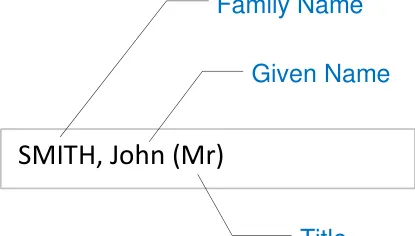
SMITH, John (Mr)
NID-0001
The display must present the Family Name in all uppercase letters to clearly distinguish it from the Given Name
Mandatory
NID-0002
3

Family Name and Given Name using a comma to further
comma
establish that the Family Name is being placed first
Mandatory
Copyright ©2013 Health and Social Care Information Centre
Patient Name Display
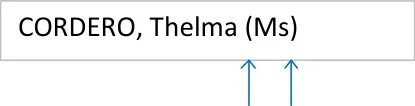
parentheses
Guidance
NID-0003
The display must include parentheses around the Title to separate and distinguish it from the other name elements
Mandatory
NID-0008
The display must present a single pair of parentheses around the Title element, for example, (Mr)
Mandatory
NID-0004

name elements strictly in the
1. Family Name
2. Given Name
3. Title
Mandatory
NID-0005
The display must present all data for each specified element (Family Name, Given Name and Title) of the Patient Name in full. Avoid truncation of information where possible
Mandatory
NID-0006
The display must separate the presentation of Given Name and Title by a single space
Mandatory
SMITH, John (Mr)
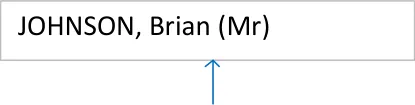
space
Copyright ©2013 Health and Social Care Information Centre
4
Guidance
Patient Name Display
JOHNSON, Brian (Mr)
COOPER, Catherine (Dr)
EVANS WEST, Jonathan (Sir)
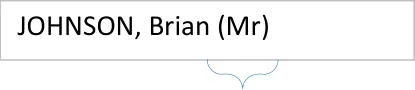
Up to 35 characters
| JOHNSON, Brian (Mr) | Col2 |
|---|---|
full stop omitted
NID-0007
The display must present the Title element in title case, for example, Sir not SIR, Mr not MR
Mandatory
NID-0009
The display must allow any free-text (up to 35 characters) to be presented in the Title element
Mandatory
NID-0011
The display must allow the Family Name, Given Name and Title elements to present at least the maximum field sizes given in the NHS Connecting for Health Personal Demographics Service (PDS) FS 10.00, Issue 1A, 18th January 2005 (CDT D 0222).
Mandatory
NID-0010
The display must, in accordance with the UK Government Data Standards Catalogue guidelines, omit a trailing full stop from the Title element (for example, ‘Mr’ not ‘Mr.’)
Mandatory
Copyright ©2013 Health and Social Care Information Centre
5
Patient Name Display
Guidance
NID-0012
The display must allow for the Family Name and Given Name elements to consist of multiple components. Components are constituent parts of the name element that combine with other parts to form the element as a whole
Components have the following features:
Family Name components must consist of UPPERCASE alphabetic characters only, for example, SMITH
Multiple Family Name components must be separated by a hyphen or a single space
Given Name components must display in title case, for example, Nadejda
Multiple Given Name components must be separated by a hyphen or a single space.
Mandatory
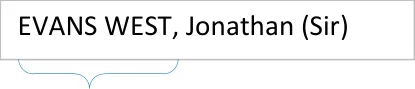
A Family Name with
two components
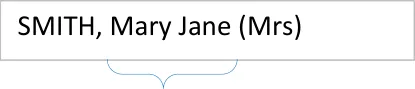
A Given Name with
two components
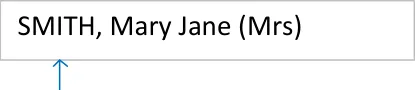
Uppercase
EVANS WEST, Jonathan (Sir)
OR
EVANS-WEST, Jonathan (Sir)
| SMITH, Nadejda (Mrs) | Col2 |
|---|---|
Title case
SMITH, Nis Bank (Mr)
SMITH, Anne-Jorun (Mrs)
Copyright ©2013 Health and Social Care Information Centre
6
Guidance
Patient Name Display
7
SUBRAMANYAN, NID-0013 Chandrasekhar (Mr) The display should allow word wrapping to occur in instances where the field length exceeds the width allocated to it on the form. If word wrapping occurs, it should be applied only at the end of a whole field element or at the end of a field element component, if it comprises multiple parts (for example, Middle name(s) field)
Recommended
Copyright ©2013 Health and Social Care Information Centre
Patient Name Input
Title
FAMILY name
Given name
Middle name(s)
Suffix
Known as
e.g. SMITH
e.g. John
e.g. David James
e.g. Junior
e.g. Johnny-Boy
Guidance
NID-0062
By default, include a prompt in the input boxes to indicate to a user the information required
Recommended
NID-0063
Present the default prompt in an occluded form to prevent confusion with actual data input by a user
Recommended
NID-0064
Remove the default prompt when a user begins to input data
Mandatory
e.g. John
Jos
Copyright ©2013 Health and Social Care Information Centre
8
Guidance
Patient Name Input
Fields
A Patient Name input control can consist of up to six constituent fields with labels: Title, Family Name, Given Name, Middle name, Suffix and Known As
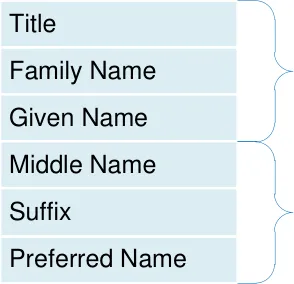
These are considered to be the minimum data required to make the name useful
These are considered to improve data quality but are not mandatory
Copyright ©2013 Health and Social Care Information Centre
9
Patient Name Input
Fields - Title
Mr
Mrs
Ms
Dr
Rev
Title
Sir
Lady
Lord
Dame
Other…
Guidance
NID-0016
This table shows suggested values for ‘Title’
Recommended
NID-0017
One value should allow the user to invoke free-text input mode (for example ‘Other…’ in the illustrations)
Recommended
NID-0018
Input box for Title should contain a relevant prompt, for example, Mr
Recommended
NID-0019
Input box for Title should be in the form of a drop-down combo-box
Recommended
| Col1 | Col2 |
|---|---|
| Mr Mrs Ms Dr Rev Sir Lady Lord Dame Other… | Mr Mrs Ms Dr Rev Sir Lady Lord Dame Other… |
Title
Copyright ©2013 Health and Social Care Information Centre
10
Guidance
Patient Name Input
Fields - Title
Title
Title
Up to 35 characters
input
NID-0014
The Title input control must allow a maximum of 35 characters
Mandatory
NID-0015
Minimum visual width of the input box must display four characters
Mandatory
Copyright ©2013 Health and Social Care Information Centre
At least four characters
displayed
11
Patient Name Input
Fields - Family Name
FAMILY name
FAMILY name
FAMILY name
e.g. SMITH
e.g. SMITH
Up to 40 characters
input
Guidance
NID-0020
Family Name input must be via a free-text entry box
Mandatory
NID-0024
Family Name input box should contain a relevant prompt in its default state (for example, ‘e.g. SMITH’) in occluded form
Recommended
NID-0021
Family Name input box must accept a maximum of 40 characters
Mandatory
NID-0022
Family Name input box should be capable of displaying a minimum of eight characters without occlusion
Recommended
NID-0023
Family Name input box should optimally display 14 characters without occlusion
Recommended
At least eight characters displayed
FAMILY name
Optimally 14 characters
displayed
Copyright ©2013 Health and Social Care Information Centre
12
Guidance
Patient Name Input
Fields - Family Name
FAMILY name
13
WINSTANLEY
NID-0025
When displaying a Family Name value, the characters should all be in uppercase
Recommended
Copyright ©2013 Health and Social Care Information Centre
Patient Name Input
Fields - Given Name
Guidance
NID-0026
Given Name input must be via a free-text entry box
Mandatory
NID-0030
Given Name input box should contain a relevant prompt in its default state (for example, ‘e.g. John’) in occluded form
Recommended
Given Name
e.g. John
Given Name e.g. John Given Name input box must accept a maximum of 35
Up to 35 characters input characters
e.g. John
NID-0027
Up to 35 characters input
Mandatory
NID-0028
capable of displaying a minimum of eight characters without
At least eight characters
displayed occlusion
At least eight characters
displayed
Recommended
Given Name input box should optimally display 14
Optimally 14 characters characters without occlusion
NID-0029
Optimally 14 characters
displayed
Recommended
Given Name Jonathan NID-0031
When displaying a Given Name value the first character should be in uppercase
Recommended
Copyright ©2013 Health and Social Care Information Centre
14
Guidance
Patient Name Input
Fields - Middle Name(s)
Middle name(s)
e.g. David James
NID-0032
Middle name input must be via a free-text entry box
Mandatory
NID-0036
Middle name input box should contain a relevant prompt in its default state, (for example, ‘e.g. David James’) in occluded form
Recommended
Middle name(s) e.g. David James Middle name input box must accept a maximum of 100
Up to 100 characters characters
e.g. David James
NID-0033
Up to 100 characters
input
Mandatory
Middle name input box should be capable of displaying a minimum
At least eight characters of eight characters without
displayed
occlusion
NID-0034
At least eight characters
displayed
Recommended
NID-0035
Optimally 7 characters
displayed
Middle name input box should optimally display 7 characters without occlusion
Recommended
Copyright ©2013 Health and Social Care Information Centre
15
Patient Name Input
Fields - Suffix
Suffix
Suffix
e.g. Junior
e.g. Junior
Up to 35 characters input
Guidance
NID-0037
Suffix input must be via a free-text entry box
Mandatory
NID-0041
Suffix input box should contain a relevant prompt when in its default state (for example, ‘e.g. Junior’) in occluded form
Recommended
NID-0038
Suffix input must accept a maximum of 35 characters
Mandatory
NID-0039
Suffix input box should be capable of displaying a
At least eight minimum of eight characters characters displayed without occlusion
At least eight characters displayed
Recommended
NID-0040
Suffix input box should optimally display 14
Optimally 14 characters characters without occlusion
Optimally 14 characters
displayed
Recommended
Copyright ©2013 Health and Social Care Information Centre
16
Guidance
Patient Name Input
Fields – Preferred Name
Known as
Known as
Known as
e.g. Johnny-Boy
Up to 35 characters input
NID-0042
Preferred name input must be via a free-text entry box
Mandatory
NID-0046
Preferred name input box should contain a relevant prompt in its default state (for example, ‘e.g. JohnnyBoy’) in occluded form
Recommended
NID-0043
Preferred name input box must accept a maximum of 35 characters
Mandatory
NID-0044
Preferred name input box should be capable of displaying a minimum of eight characters without occlusion
Recommended
NID-0045
Preferred name input box should optimally display 14 characters without occlusion
Recommended
Copyright ©2013 Health and Social Care Information Centre
At least eight characters displayed
Known as
Optimally 14 characters
displayed
17
Guidance
Patient Name Input
Control Layout
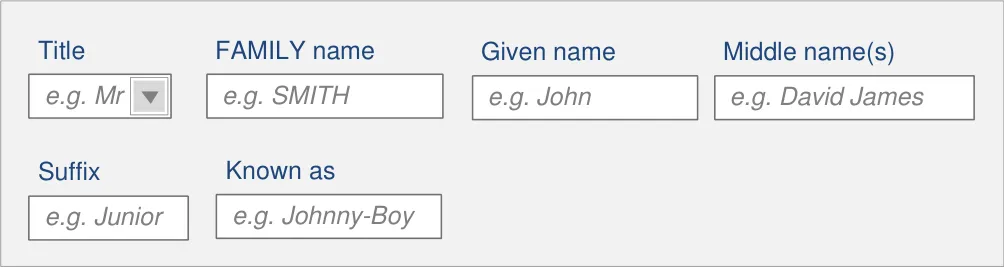
This guidance supports two patient name input control layouts
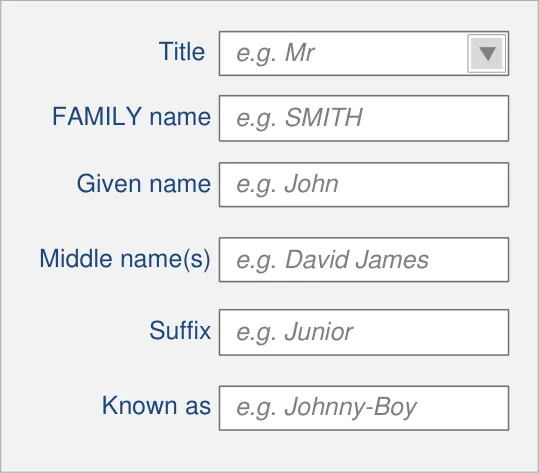
InForm Layout
The most desirable layout for patient safety and usability and the default for an application’s Patient Name Input Control
InLine Layout
The InLine layout is included for instances where vertical space is constrained or where horizontal layout is the application’s convention
Copyright ©2013 Health and Social Care Information Centre
18
Guidance
Patient Name Input
Control Layout
NID-0047
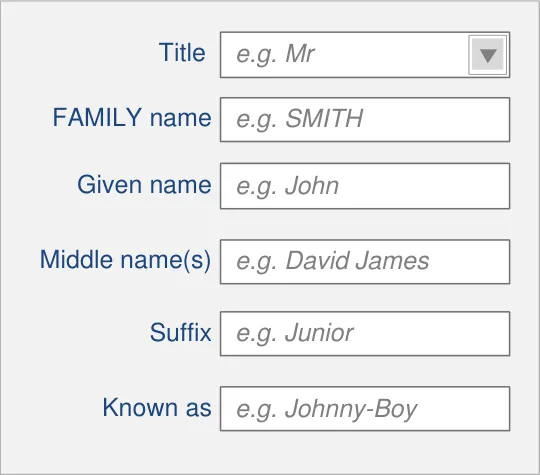
InForm field controls must be aligned on the left edge of the input boxes
Mandatory
NID-0048
InForm field controls (where they exist) must be placed underneath each other in the order illustrated
Mandatory
NID-0051 NID-0050
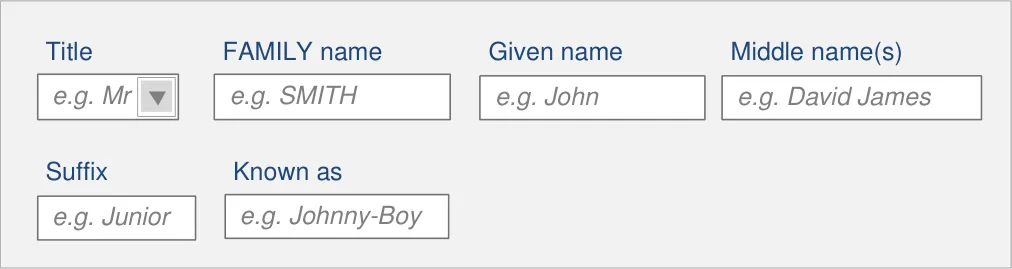
Correct presentation order is as illustrated
Mandatory
NID-0049
Ensure wrapping only occurs on whole fields
Mandatory
InLine design choice should only be used when InForm design has been considered undesirable
Recommended
Copyright ©2013 Health and Social Care Information Centre
19
Guidance
Patient Name Input
Instructional Text
Title
FAMILY name
Given name
Middle name(s)
Suffix
Known as
e.g. SMITH
e.g. John
e.g. David James
e.g. Junior
e.g. Johnny-Boy
Title
FAMILY name
Given name
Middle name(s)
Suffix
Known as
20
NID-0052
Each field in a name input control must have an associated label
Mandatory
NID-0053
Labels must be programmatically linked to their associated input field
Mandatory
NID-0054
Label values should be as illustrated
Recommended
Note ‘Known as’ is the label for the Preferred Name input control
Copyright ©2013 Health and Social Care Information Centre
Guidance
Patient Name Input
Title
FAMILY name
Given name
Middle name(s)
Suffix
Known as
21
e.g. SMITH
e.g. John
e.g. David James
e.g. Junior
e.g. Johnny-Boy
NID-0055
Each field in a name input control should have an associated prompt
Recommended
NID-0056
Prompts for Family Name should be capitalised
Recommended
NID-0057
All prompts except Family Name should have sentence style capitalisation
Recommended
NID-0058
Prompt values should be as illustrated
Recommended
NID-0059
Prompts should be lighter in weight and colour than the input text, and italicised
Recommended
Copyright ©2013 Health and Social Care Information Centre
Patient Name Input
Title
FAMILY name
Given name
Middle name(s)
Suffix
Known as
Title
| e.g. Junior Enter the person’s M | Col2 | Col3 |
|---|---|---|
| e.g. Junior Enter the person’s M | _ Junior_ Enter the person’s M | _ Junior_ Enter the person’s M |
e.g. Johnny-Boy
Middle name(s)
e.g. SMITH
e.g. John
e.g. David James
Guidance
NID-0060
Each field in a name input control should have instructional text (for example, a tooltip)
Recommended
22
Select a Title from the list or simply type in a different Title
FAMILY name
Enter the person’s Family Name (surname)
Given name
Enter the person’s Given Name (forename or Christian name)
Enter the person’s middle name(s)
Suffix
Enter the person’s suffix name (e.g. ‘Junior’ or ‘The Third’)
Known as
Enter the name a person likes to referred to as
NID-0061
Tooltip values should be as illustrated
Recommended
Copyright ©2013 Health and Social Care Information Centre