Document Properties Document Title Sex and Current Gender Input and Display

 Prepared for
NHS Connecting for Health
Version 4.0.0.0 Baseline
Prepared by
Clinical Application and Patient Safety Project
NHS CUI Programme Team
cuistakeholder.mailbox@hscic.gov.uk
Prepared for
NHS Connecting for Health
Version 4.0.0.0 Baseline
Prepared by
Clinical Application and Patient Safety Project
NHS CUI Programme Team
cuistakeholder.mailbox@hscic.gov.uk
PREFACE
- PREFACE
- 1 INTRODUCTION
- 2 RECOMMENDATIONS AND GUIDANCE
- 2.1 Current Gender Values
- Alphabetic string Male
- Numeric code 0
- Numeric code and text 0 Not Known
- 2.2 Sex Values
- Numeric code 1
- Numeric code and text 1 Male
- 2.3 Instructional Text
- Alphabetic
- 2.4 Control Layout and Structure
- Five option
- ‘Not Known’ is
- Incorrect
- Incorrect input
- Incorrect value
- Too few options
- Too many
- Incorrect control
- Four option
- ‘Null’ default state
- Drop-down list
- Incorrect default
- Four item
- ‘Null’ default state Default state should be null, which will
- 3 DOCUMENT INFORMATION
- REVISION AND SIGNOFF SHEET
Source PDF: sex.pdf
Documents replaced by this document Sex and Current Gender Input and Display – User Interface Design Guidance 3.0.0.0 Design Guide Entry – Gender and Sex Display 2.0.0.0 Design Guide Entry – Gender and Sex Display 1.0.0.0 Documents to be read in conjunction with this document Accessibility Checkpoints for NHS Applications 1.0.0.0 Accessibility for Clinical Applications 1.0.0.0 This document was prepared for NHS Connecting for Health which ceased to exist on 31 March 2013. It may contain references to organisations, projects and other initiatives which also no longer exist. If you have any questions relating to any such references, or to any other aspect of the content, please contact cuistakeholder.mailbox@hscic.gov.uk Patient Safety Process The development lifecycle for this design guide includes an integrated patient / clinical safety risk assessment and management process. Known patient safety incidents relevant to this design guidance area have been researched and reviewed as part of ongoing development. The resulting guidance points aim to support mitigation of these known patient safety risks. In addition, the developers of this design guide have undertaken a patient safety risk assessment to identify new risks that could potentially be introduced by the guidance points in this document. Any potential risks identified have been assessed and managed to support the ongoing clinical safety case for this design guide. The Hazard Log records all the risks that have been identified during development and describes mitigatory actions that, in some cases, will need to be taken by users of this design guide. The Hazard Log is a live document that is updated as the design guide is developed and maintained. Until this design guide has received full Clinical Authority to Release (CATR) from the NHS Connecting for Health (CFH) Clinical Safety Group (CSG) – based on an approved Clinical Safety Case – there may be outstanding patient safety risks yet to be identified and mitigated. Additionally, users implementing applications that follow this design guide’s guidelines (for example, healthcare system suppliers) are expected to undertake further clinical safety risk assessments of their specific systems within their specific context of use. Refer to www.cui.nhs.uk for further information on the patient safety process and for the safety status and any relevant accompanying safety documentation for this design guide.
1 INTRODUCTION
This document describes the design guidance for the display and input of information about patient ‘Sex’ or ‘Current Gender’ status. It describes the area of focus, provides guidance and recommendations, and explains the rationale behind the guidance and recommendations.
The term ‘Gender’ is now considered too ambiguous to be desirable or safe because different locations and systems use it to mean different things. It is therefore desirable to use the two distinct terms ‘Sex’ and ‘Current Gender’.
Note
Elements used within a software application are commonly referred to as a ‘control’. These can take many forms but the types referred to in this document will either be ‘input controls’ that can receive input from a user, such as a button, text box, option button (radio button) or check box, or ‘display controls’ such as a label, which can only display information.
The Current Gender input controls are used to record the gender, according to how a patient currently describes themselves, whereas the Sex input controls records their phenotypic sex (see section 2.4 for more information).
This document outlines the design guidance for the display of these statuses. Figure 1 shows an example format of these statuses:
Figure 1: Example of the Format for Displaying Gender and Sex in NHS Clinical Applications
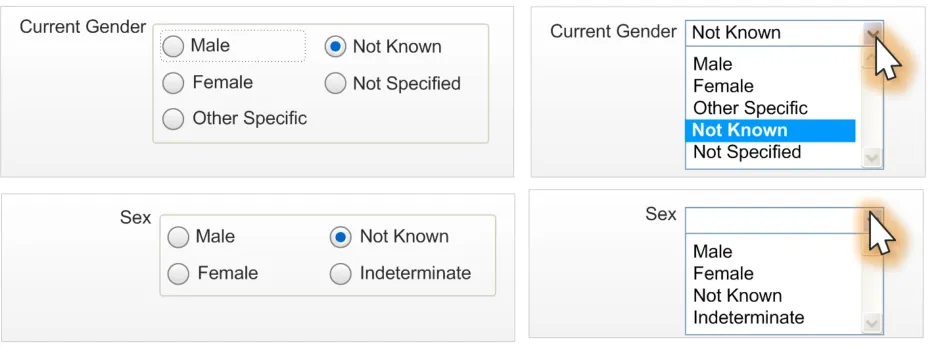
This document also outlines the design guidance for the input of these statuses; Figure 2 shows some examples of input design:
Figure 2: Example Input Designs for Current Gender and Sex Statuses
This document is intended for use by anyone whose role includes screen design, implementation, or assessment of an NHS clinical application. This document can be used as guidance for the:
- Specification of an input and display control for the Sex and/or Current Gender statuses in a
user interface
- Implementation of an input and display control for Sex and/or Current Gender within an
application
- Assessment of an input and display control for Sex and/or Current Gender in the user
interface for an NHS clinical application
Page 1
Copyright ©2013 Health and Social Care Information Centre
 HSCIC Controlled Document
Table 1 describes the changes made since the previous version of this guidance (Baseline version 3.0.0.0 dated 07-Apr-2008):
Deleted None
Modified Enhanced out of scope context setting (section 1.2.2)
Enhanced research setting (section 2)
Added Patient Safety Process note
Table 1: Changes Since the Last Baseline Version
1.1 Customer Need
This section explains why the guidance has been created.
The NHS categorises a person’s gender in two ways:
- Person Gender Current . Or ‘Current Gender’, which refers to a patient’s current gender
classification.
- Person Gender at Registration . Or ‘Sex’, which refers to the record of a patient’s gender
classification at the point of birth registration.
Note
For brevity and clarity, this document uses the term Sex in place of Person Gender at Registration and Current Gender in place of Person Gender Current.
NHS applications input and display a patient’s current gender or sex in various contexts. Users may confuse the terms current gender and sex, or assume that they are synonymous. Therefore, it is essential that all NHS applications display and explain current gender and sex terminology and values in a clear and consistent manner.
This document details the recommendations for entering and displaying current gender and sex in NHS applications. NHS clinical applications should use the Current Gender and Sex format to enhance readability, ensure consistency and to cover all possible variants of Current Gender and Sex. This recommendation provides the best display format because it decreases ambiguity through the clear presentation of data values, and intuitive, concise labelling of patient Current Gender and Sex. Additionally, this recommendation enables NHS clinical applications to display a predefined, restricted set of unknown or unspecified Current Gender and Sex values. Figure 1 shows examples of how an NHS application might display Current Gender and Sex values.
The aims of this guidance are to:
- Ensure patients are correctly identified and matched with their patient record by displaying
data items consistently
- Allow the status of the patient to be entered and displayed in a legally compliant and
patient-sensitive manner
Potential consequences of not adhering to these standards include:
- The patient is given the wrong treatment as a result of a failure to identify the patient
correctly.
- The patient is given the wrong treatment as a result of a failure to match the patient
correctly with their artefacts (samples, letters, specimens, X-rays, and so on).
- The patient is given the wrong treatment as a result of a failure in communication between
staff, or staff not performing or checking procedures correctly.
Page 2
Copyright ©2013 Health and Social Care Information Centre
HSCIC Controlled Document
-
The patient is categorised with a value that cannot be utilised by any other systems.
-
The patient is categorised incorrectly from a legal perspective.
-
The patient is categorised incorrectly from their perspective.
This guidance is concerned with each of the errors identified above, but particularly points 1 and 2.
1.2 Scope
This section defines the scope of this guidance document.
1.2.1 In Scope
This guidance is applicable primarily to electronic user interfaces such as those displayed on desktop, laptop, and PDA computers. However, many of the principles can also be applied to paper form design. It is assumed that these computers are capable of displaying Graphical User Interface (GUI) elements (such as buttons) and have a keyboard and pointing device. The following items are in scope:
-
Defining the valid values for current gender and sex
-
Labelling of information, including:
Definition of the terms Current Gender and Sex
Definition of the values
How items of information are to be labelled; this will cover the label text, positioning and any elements of styling required to differentiate labels visually from data
- Control layout and structure, in order to achieve:
Optimal visibility of the values
Easy recognition of the values in the context of the wider clinical application
Easy recognition of the data type requested for input
Reduction of invalid entries
1.2.2 Out of Scope
This section defines areas that are not covered in this guidance. Although there may be specific risks associated with these areas that are not addressed in this guidance, it is likely that the principles in this guidance will extend to the input and display of sex and current gender in many of the areas listed below.
The following items are out of scope:
- Data storage - This guidance does not prescribe the format for storing data that is input or
displayed
- Terms of use - This guidance does not define when an input field or display should be
presented within a system or when Current Gender should be used instead of Sex, and vice versa
- Form design - This guidance does not prescribe the correct layout for a form or the
navigation around a form
Note
Listing an item as out of scope does not classify it as unimportant. Project time and resource constraints inevitably restrict what can be in scope for a particular release. It is possible that items out of scope for this release may be considered for a future release.
Page 3
Copyright ©2013 Health and Social Care Information Centre
HSCIC Controlled Document
1.3 Dependencies and Assumptions
Compliance with other guidance is required as follows:
- The design of NHS clinical applications must conform to Accessibility Checkpoints for NHS
Clinical Applications {R1} and Accessibility for Clinical Applications {R2}
Important
The visual representations used within this document to display guidance are illustrative only. Stylistic choices are not part of guidance and are therefore not mandatory requirements for compliance with the guidance in this document.
1.4 Key Principles
The following key principles have shaped the guidance in this document:
-
Display information according to existing standards
-
Minimise opportunities for human error
-
Display sufficient instructional information to support data quality
-
Promote consistency across the mix of users, NHS clinical applications and care settings
-
Ensure reliable and accurate identification of an individual patient record
-
Minimise opportunities where patient-clinician relationships may be compromised
Page 4
Copyright ©2013 Health and Social Care Information Centre
HSCIC Controlled Document
2 RECOMMENDATIONS AND GUIDANCE
The guidance provided in this document is based on a programme of user research, including:
- The evaluation of the following organisations’ key standards (where relevant, standards will
have been approved by the Information Standards Board for Health and Social Care (ISB HaSC)):
NHS Connecting for Health Data Dictionary
UK Government Data Standards Catalogue (GDSC)
NHS Connecting for Health Personal Demographics Service (PDS)
NHS Connecting for Health Message Implementation Manual (MIM)
- A desk-based research project looking at a range of information entry Web pages and
clinical applications
- A Web-based survey of 41 respondents from NHS clinicians and administrative staff,
Independent Software Vendors (ISVs), community pharmacists and NHS CFH
- A Patient Safety Assessment
2.1 Current Gender Values
Any Current Gender input or display control is restricted to the predefined set of valid values shown in Table 1.
Important
The values defined in this document are based upon the current proposed changes to the NHS CFH Data Dictionary. Should future changes be made to this document, amendments to this guidance will be required.
2.1.1 Guidance
CGS-0001 Label the Current Gender input controls ‘Current Gender’. Mandatory
CGS-0002 The Current Gender values are:
Male
Female
Other Specific
Not Known
Not Specified
CGS-0003 The Current Gender status is one the following values:
Male
Female
Other Specific
Not Known
Not Specified
Mandatory
Mandatory
CGS-0004 Make the definitions of the Current Gender status values accessible to the user. Mandatory
CGS-0005 Do not abbreviate Current Gender data values. Mandatory
Page 5
Copyright ©2013 Health and Social Care Information Centre
HSCIC Controlled Document
CGS-0006 Do not display the underlying coded representation of the Current Gender data values. For example, the standard code for ‘Male’ may be the integer 1, but this number should not appear.
Mandatory
CGS-0007 Label the Current Gender status display ‘Current Gender’. Recommended
CGS-0008 Use ‘Not Known’ as the Current Gender default value. Recommended
Table 2: Guidance for Current Gender Data Values
2.1.2 Examples of Correct Usage
Alphabetic string Male
Female
Other Specific
Not Known
Not Specified
Table 3: Correct Gender Formatting Examples
2.1.3 Examples of Incorrect Usage
Use this format to display patient Current Gender within a clinical application.
Numeric code 0
1
2
9
NK
M
F
NS
Numeric code and text 0 Not Known
1 Male
2 Female
9 Not Specified
Table 4: Incorrect Gender Formatting Examples
2.1.4 Rationale
Patient-Safety-Critical
This example requires the user to understand and interpret the numeric codes or abbreviations. This representation is likely to cause recognition errors.
Lack of Readability
This example lacks clarity and readability by displaying both number and textual values for Current Gender. The relative number values could also cause offence.
The values defined here represent the current best conclusions from the healthcare industry on valid values for these statuses.
The use of an unambiguous alphabetical string is considered the most predictable and recognisable format for clinicians using the systems.
Page 6
Copyright ©2013 Health and Social Care Information Centre
HSCIC Controlled Document
2.2 Sex Values
Any Sex input or display control is restricted to the predefined set of valid values shown in Table 5.
Important
The values defined in this document are based upon the current proposed changes to the NHS Data Dictionary. Should future changes be made to this document, amendments to this guidance will be required.
2.2.1 Guidance
CGS-0009 Label the Sex input controls ‘Sex’. Mandatory
CGS-0010 The Sex values are:
Male
Female
Not Known
Indeterminate
CGS-0011 The Sex status must only contain one the following values:
Male
Female
Not Known
Indeterminate
Mandatory
Mandatory
CGS-0012 Sex data values must never be abbreviated. Mandatory
CGS-0013 The Sex default state is null. Mandatory
CGS-0014 The application must not display the underlying coded representation of the Sex data values. For example, the standard code for ‘Male’ may be the integer 1, but this number must not appear.
Mandatory
CGS-0015 Make the definitions of the Sex status values accessible to the user. Mandatory
CGS-0016 Label the Sex status display ‘Sex’. Recommended
Table 5: Guidance for Sex Data Values
2.2.2 Examples of Correct Usage
Alphabetic string Male
Female
Not Known
Indeterminate
Table 6: Correct Sex Formatting Examples
Use this format to display patient Sex within a clinical application.
Page 7
Copyright ©2013 Health and Social Care Information Centre
HSCIC Controlled Document
2.2.3 Examples of Incorrect Usage
Numeric code 1
2
9
M
F
NS
Numeric code and text 1 Male
2 Female
9 Not Specified
Table 7: Incorrect Sex Formatting Examples
2.2.4 Rationale
Patient-Safety-Critical
This example requires the user to understand and interpret the numeric codes or abbreviations. This representation is likely to cause recognition errors.
Lack of Readability
This example lacks clarity and readability by displaying both number and textual values for Sex.
The values defined here represent the current best practice regarding the use of this data area.
The use of a discrete alphabetical string is considered the most predictable and recognisable format for clinicians using the systems.
2.3 Instructional Text
The Current Gender and Sex controls are potentially confusing to the user due to the terms Sex and Gender being used inconsistently between systems and locations. It is therefore very important to facilitate a user’s understanding of a data item through the use of instructional text.
Important
This section is illustrated with examples using tooltips, however, instructional text can be provided in a variety of methods; which method is to be employed is not considered in this document as this is a system-wide issue rather than a specific one.
2.3.1 Current Gender Instructional Text
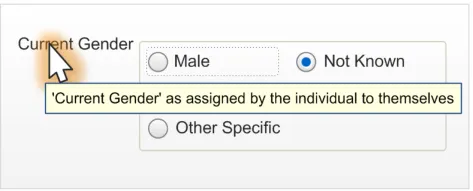
At this time, the term ‘Current Gender’ is not in widespread use and, as a result, could be confusing to the user. Therefore, the control label must provide the following definition:
Current Gender, as assigned by the individual to themselves
One method of achieving this is using a tooltip, as displayed in Figure 3:
Figure 3: Brief Definition of Current Gender from Control Label (Via a Tooltip)
Page 8
Copyright ©2013 Health and Social Care Information Centre
 HSCIC Controlled Document
ISVs need to take responsibility for informing the user about this control by providing the following instructional text in the format required by their application:
Current Gender is a statement by the individual about the gender they currently identify themselves to be (that is, self-assigned). The valid values are:
Male
Female
Other Specific - when the person has a clear idea of what their gender is, but it is neither discretely male nor female,
for example, ‘Intersex’, ‘transgender’, ‘third gender’
Not Known - used when no information on this subject is known
Not Specified - when the person is unable to specify their current gender or does not have a clear idea of their
current gender
2.3.2 Sex Instructional Text
The control must provide the following definition:
Sex, as recorded at birth or on issue of a full gender recognition certificate
A tooltip display method for instructional text is shown in Figure 4:
Figure 4: Brief Definition of Sex from Control Label (Via a Tooltip)
ISVs need to take responsibility for informing the user about this control by using the following instructional text in the format appropriate to their application:
Sex is the phenotypic sex of the person as recorded by the Registrar on the Register of Births, or other initial registration, or on issue of a full gender recognition certificate under the Gender Recognition Act. Valid values are:
Male
Female
Not Known - used when no information on this subject is known
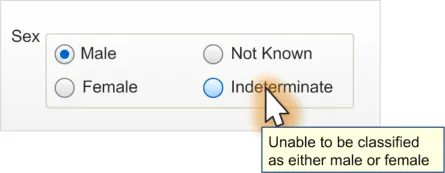
Indeterminate - used when the person is unable to be classified as either male or female
2.3.3 Data Values Instructional Text
In addition to having instructional text for the control label, instructional text for the data values should be provided. These could be added in a variety of methods, such as a tooltip, as demonstrated in Figure 5:
Figure 5: Definition of Data Value from Value Label (Via a Tooltip)
Page 9
Copyright ©2013 Health and Social Care Information Centre

 HSCIC Controlled Document
2.3.4 Guidance
CGS-0017 Provide definitions for input controls. Mandatory
CGS-0018 Provide access to definitions of the valid values. Mandatory
CGS-0019 Provide a shortened version of the definitions. Recommended
Table 8: Guidance for Instructional Text
2.3.5 Examples of Correct Usage
Alphabetic
string
Alphabetic
string
Alphabetic
string
Alphabetic
string
Current Gender is a statement by the individual about the gender they currently identify themselves to be (that is, self-assigned). The valid values are:
Male
Female
Other Specific – when the person has a clear idea of
what their gender is, but it is neither discretely male nor female, for example, ‘Intersex’, ‘transgender’, ‘third gender’
Not Known – used when no information on this subject is
known
Not Specified – when the person is unable to specify their
current gender or does not have a clear idea of their current gender
Sex is the phenotypic sex of the person as recorded by the Registrar on the Register of Births, or other initial registration, or on issue of a full gender recognition certificate under the Gender Recognition Act. Valid values are:
Male
Female
Not Known – used when no information on this subject is
known
Indeterminate – used when the person is unable to be
classified as either male or female
Sex, as recorded at birth or on issue of a full gender recognition certificate
Use this format to define Current Gender within a clinical application.
Use this format to define Sex within a clinical application.
Current Gender, as assigned by the individual to themselves Use this text as a shortened definition of
Current Gender within a clinical application, especially in cases where brevity is paramount.
Use this text as a shortened definition of Sex within a clinical application, especially in cases where brevity is paramount, such as in a tooltip design.
Table 9: Correct Examples of Instructional Text for Status Type and Data Value Definitions
2.3.6 Rationale
Shortened definitions are to be used where the full instructional text is not required or desirable, for example, when a tooltip is placed on a control label. Whilst tooltips can contain as many as 150 characters, they should ideally contain only a brief description in order to allow the user to read it. Additionally, certain technologies only allow a restricted amount of data to be contained in them (for example, the Mozilla [®] Firefox [®] Web browser truncates after about 90 characters).
Page 10
Copyright ©2013 Health and Social Care Information Centre
HSCIC Controlled Document
2.4 Control Layout and Structure
The input controls should be constructed in a manner that supports only the input of a predefined set of values. Therefore, both an ‘Option Button Group’ (also known as a ‘Radio Button Group’) and a ‘Drop-down List Box’ design have been considered.
The option button group design is considered to occupy more screen space but provides better instruction to the user.
2.4.1 Current Gender Option Button Group
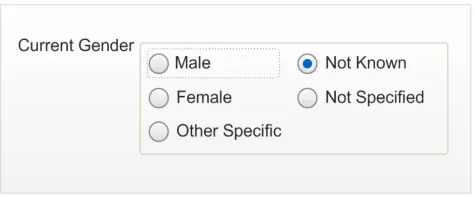
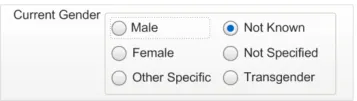
This control will be used when a user needs to enter the Current Gender that the patient has assigned to themselves. It consists of a group of five standard option buttons within a control group, as displayed in Figure 6. It should be used whenever the developer has room in their form design.
Figure 6: Current Gender Option Button Design (Focus on Male)
An alternative layout is displayed in Figure 7, which may be desirable when the layout is more suited to the available screen space:
Figure 7: Inline Option Button Design
2.4.1.1 Guidance
CGS-0020 Current Gender option button group input controls must consist of five option buttons. Mandatory
CGS-0021 Current Gender option button group labels are in the following order (top to bottom first, followed by left to right):
-
Male
-
Female
-
Other Specific
-
Not Known
-
Not Specified
CGS-0022 The Current Gender tab order is:
-
Male
-
Female
-
Other Specific
-
Not Known
-
Not Specified
Table 10: Guidance for Current Gender Option Button Design
Copyright ©2013 Health and Social Care Information Centre
Mandatory
Recommended
Page 11
HSCIC Controlled Document
2.4.1.2 Examples of Correct Usage
Five option
button group
‘Not Known’ is
the default status
Table 11: Correct Current Gender Option Button Design Formatting Examples
2.4.1.3 Examples of Incorrect Usage
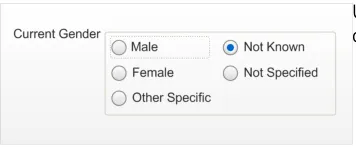
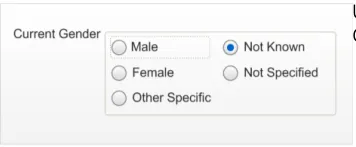
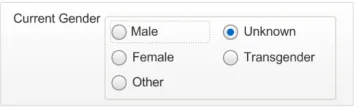
Incorrect
functionality (non-discrete choices)
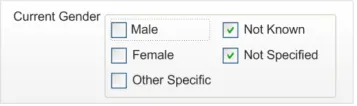
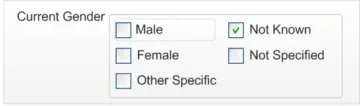
Incorrect input
convention
Incorrect value
labelling
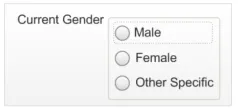
Too few options
(less than five option buttons)
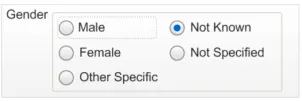
Too many
options (more than five option buttons)
Incorrect control
labelling
Table 12: Incorrect Current Gender Option Button Design Formatting Examples
Data quality
This example allows a user to select multiple data values when only one should be assigned.
User experience
This example uses checkboxes, suggesting to users that multiple selections are possible.
Data quality
This example allows a user to select a value that does not adhere to ISB HaSC standards.
Data quality
This example does not allow a user to enter all the possible valid values for this status.
Data quality
This example allows a user to select a data value that is not valid.
Data quality
This example shows a control label that could be misinterpreted as a phenotypic sex status.
Page 12
Copyright ©2013 Health and Social Care Information Centre
HSCIC Controlled Document
2.4.1.4 Rationale
The option button group design is considered to be the safest and most accessible design. It instantly displays the valid options to the user for them to assess the correct value. The option buttons are a known medium for selecting a single value from a predefined list and so the user knows what is expected. Additionally, invalid values cannot be entered and, therefore, that type of entry error is precluded.
This design minimises user effort by placing the most obvious choices first. The design also has a default of ‘Not Known’ to encourage users to select an option only when appropriate.
This design uses controls that are recognised by assistive technologies (for example, screen readers) and allow for easy implementation of instructional text through tooltips.
2.4.2 Sex Option Button Group
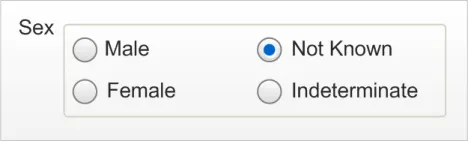
This control will be used when a user needs to enter information about the Sex value that the patient has assigned to themselves. It consists of a group of four standard option buttons within a control group, as displayed in Figure 8:
Figure 8: Sex Option Button Design with a Value Selected
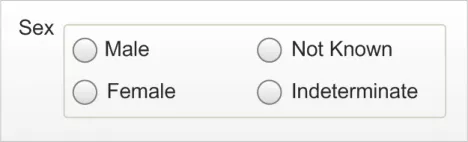
This layout should be used whenever the developer has room in their form design. Figure 9 displays the control in its default ‘null’ state (unlike the Current Gender control, which has a default value):
Figure 9: Sex Option Button Design in Default ‘Null’ State
An alternative layout is displayed in Figure 10, which may be desirable when the layout is more suited to the available screen space:
Figure 10: Inline Option Button Design
2.4.2.1 Guidance
CGS-0023 Sex option button group input controls must consist of four option buttons. Mandatory
CGS-0024 Sex option button group labels are in the following order (top to bottom first followed by left to right):
-
Male
-
Female
-
Not Known
-
Indeterminate
Table 13: Guidance for Sex Option Button Group Design
Copyright ©2013 Health and Social Care Information Centre
Recommended
Page 13
HSCIC Controlled Document
2.4.2.2 Examples of Correct Usage
Four option
button group
‘Null’ default state
Table 14: Correct Sex Option Button Grouping Examples
2.4.2.3 Examples of Incorrect Usage
Use these four discrete controls with only one selection possible at one time.
This control must have nothing selected for the null default state.
Incorrect
functionality (non-discrete choices)
Incorrect input
convention
Incorrect value
labelling
Too few options
(less than four option buttons)
Too many
options (more than five radio buttons)
Incorrect control
labelling
Table 15: Incorrect Sex Option Button Grouping Examples
2.4.2.4 Rationale
Data quality
This example allows a user to select multiple data values when only one should be assigned.
User experience
This example uses checkboxes, suggesting to users that multiple selections are possible.
Data quality
This example allows a user to select a value that is not recognisable to ISB HaSC standards.
Data quality
This example does not allow a user to enter all the possible valid values for this status.
Data quality
This example allows a user to select a data value that is not valid.
Data quality
This example shows a control label that could be misinterpreted as a Current Gender status.
The option button group design is considered to be the safest and most accessible design. It instantly displays the valid options to the user for them to assess the correct value. The option buttons are a known medium for selecting a single value from a predefined list and so the user knows what is expected. Additionally, invalid values cannot be entered and, therefore, that type of entry error is precluded.
This design minimises user effort by placing the most obvious choices first and has a default of null or blank (for example, “”). Patient Safety Assessments have revealed that this data is too important
Page 14
Copyright ©2013 Health and Social Care Information Centre
HSCIC Controlled Document
to leave in a default value, which could be misinterpreted as actual input. It was felt that if there is a default value, a user might be encouraged to tab through the input control, without attempting to select an option. Users will need to interact with a default state input control, in order to select a valid value. Once this control has a valid value, it will not be possible for a user to set it back to the default null state.
This design uses controls that are recognised by assistive technologies (for example, screen readers) and allow for easy implementation of instructional text through tooltips.
2.4.3 Current Gender Drop-Down List Box
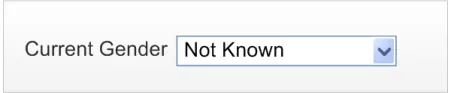
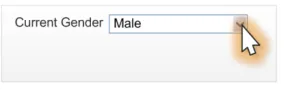
The drop-down list box design is considered desirable for developers who want to save space on a form or where many drop-down list boxes are already implemented in their design. Figure 11 displays an example of the control in a default state, which is to have ‘Not Known’ selected:
Figure 11: Current Gender Drop-Down List Box Design Default State
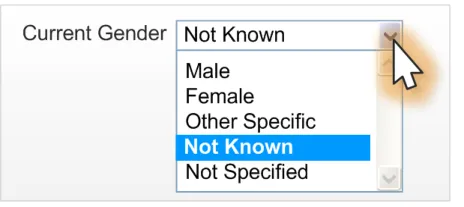
Figure 12 is an example of an interaction with the control:
Figure 12: Current Gender Drop-Down List Box with Focus Shadow
2.4.3.1 Guidance
CGS-0025 Current Gender drop-down list box options are in the following order (top to bottom):
-
Male
-
Female
-
Other Specific
-
Not Known
-
Not Specified
Mandatory
CGS-0026 Use a single drop-down list box for the Current Gender control. Mandatory
CGS-0027 Do not use a prompt for the Current Gender control, due to its default value of ‘Not Known’. Mandatory
Table 16: Guidance for Current Gender Drop-Down List Box Design
Page 15
Copyright ©2013 Health and Social Care Information Centre
HSCIC Controlled Document
2.4.3.2 Examples of Correct Usage
Drop-down list
box with five possible values
‘Not Known’ is
the default status
Table 17: Correct Current Gender Drop-Down List Box Examples
2.4.3.3 Examples of Incorrect Usage
A single drop-down list box that can be set to one option from the five available.
Use ‘Not Known’ as the default for Current Gender.
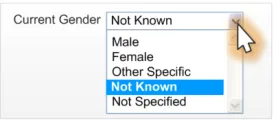
Incorrect
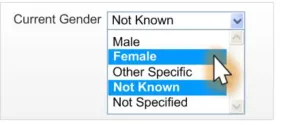
functionality (non-discrete choices)
Incorrect value
labelling
Too few options
(less than five options)
Too many
options (more than five options)
Incorrect control
labelling
Incorrect default
value
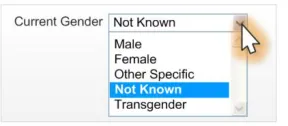
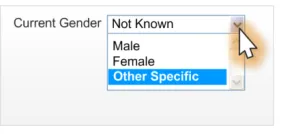
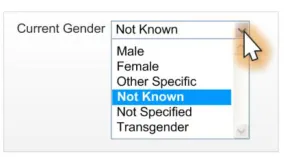
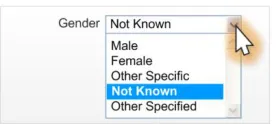
Table 18: Incorrect Current Gender Drop-Down List Box Examples
Data quality
This example allows a user to select multiple values when only one should be assigned.
Data quality
This example allows a user to select a value that is not recognisable to ISB HaSC standards.
Data quality
This example does not allow a user to enter all the possible valid values for this status.
Data quality
This example allows a user to select a data value that is not valid.
Data quality
This example shows a control label that could be misinterpreted as a phenotypic sex status.
Data quality
This example shows a control with an incorrect default value (Male).
Page 16
Copyright ©2013 Health and Social Care Information Centre
HSCIC Controlled Document
2.4.3.4 Rationale
The drop-down list box design increases data quality by allowing users to only enter discrete values whilst conserving screen space.
This design minimises user effort by placing the most obvious choices first in the list order. The design also has a default of ‘Not Known’ to encourage users to select an option only when appropriate.
2.4.4 Sex Drop-Down List Box
The drop-down list box design is considered desirable for developers who want to save space on a form or where many drop-down list boxes are already implemented in their design. Figure 13 displays an example of the control in a default state, which is to be in a null state with nothing selected:
Figure 13: Default Sex Input Drop-Down List Box
Figure 14 is an example of an interaction with the control:
Figure 14: Sex Drop-Down List Box
Figure 15 shows the resulting data value displayed:
Figure 15: Static State of Control After Data Input
2.4.4.1 Guidance
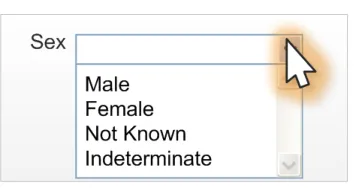
CGS-0028 Ensure that Sex controls have no value selected by default and no method of returning to this ‘null’ state.
Mandatory
CGS-0029 Use a single control for the Sex drop-down list box. Mandatory
CGS-0030 Ensure that the Sex drop-down list box is blank by default and does not contain a prompt. Recommended
Table 19: Guidance for Sex Drop-Down List Box Design
Page 17
Copyright ©2013 Health and Social Care Information Centre
HSCIC Controlled Document
2.4.4.2 Examples of Correct Usage
Four item
drop-down list box
Use four discrete controls with only one selection possible at one time.
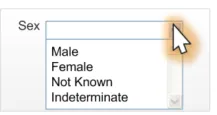
‘Null’ default state Default state should be null, which will
display to users as a blank. Once a selection has been made by a user, there is no means of returning to this state for that data item.
Table 20: Correct Sex Drop-Down List Box Examples
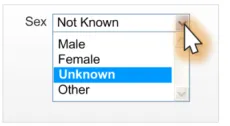
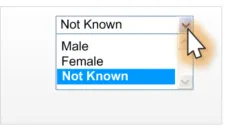
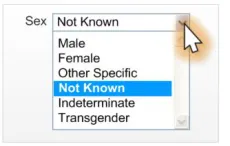
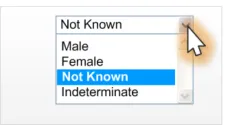
2.4.4.3 Examples of Incorrect Usage
Incorrect
functionality (non-discrete choices)
Incorrect value
labelling
Too few options
(less than four options)
Too many
options (more than four options)
Incorrect control
labelling
Incorrect default
value
Table 21: Incorrect Sex Drop-Down List Box Examples
Data quality
This example allows a user to select multiple data values when only one should be assigned.
Data quality
This example allows a user to select a value that is not recognisable to ISB HaSC standards.
Data quality
This example does not allow a user to enter all the possible valid values for this status.
Data quality
This example allows a user to select a data value that is not valid.
Data quality
This example shows a control label that could be misinterpreted as a Current Gender status.
Data quality
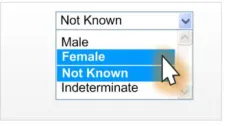
This example shows a control with an incorrect default value (Not Known).
Page 18
Copyright ©2013 Health and Social Care Information Centre
HSCIC Controlled Document
2.4.4.4 Rationale
The drop-down list box design increases data quality by allowing users to only enter discrete values whilst conserving screen space.
This design minimises user effort by placing the most obvious choices first in the list order and has a default of null or blank (for example, “”). Patient Safety Assessments have revealed that this data is too important to leave in a default value, which could be misinterpreted as actual input. It was felt that if there is a default value, the user might be encouraged to tab through the control, without attempting to select an option. Users will need to interact with a default state control in order to give it a valid value. Once this control has a valid value, it will not be possible for a user to set it back to the default null state.
Page 19
Copyright ©2013 Health and Social Care Information Centre
HSCIC Controlled Document
3 DOCUMENT INFORMATION
3.1 Terms and Abbreviations
CUI Common User Interface
GDSC Government Data Standards Catalogue
ISB HaSC Information Standards Board for Health and Social Care
ISV Independent Software Vendor
MIM Message Implementation Manual
NHS National Health Service
NHS CFH NHS Connecting for Health
PDA Personal Digital Assistants
PDS Personal Demographic Service
UI User Interface
Table 22: Terms and Abbreviations
3.2 Definitions
NHS Entity Within this document, defined as a single NHS organisation or group that is operated within a single technical infrastructure environment by a defined group of IT administrators.
The Authority The organisation implementing the NHS National Programme for IT (currently NHS Connecting for Health)
Current best practice Current best practice is used rather than best practice, as over time best practice guidance may change or be revised due to changes to products, changes in technology, or simply the additional field deployment experience that comes over time.
Table 23: Definitions
3.3 Nomenclature
This section shows how to interpret the different styles used in this document to denote various types of information.
3.3.1 Body Text
Code Monospace
Script
Other markup languages
Interface dialog names Bold
Field names
Controls
Page 20
Copyright ©2013 Health and Social Care Information Centre
HSCIC Controlled Document
Folder names Title Case
File names
Table 24: Body Text Styles
3.3.2 Cross References
Current document – sections Section number only
Current document – figures/tables Caption number only
Other project documents Italics and possibly a footnote
Publicly available documents Italics with a footnote
External Web-based content Italics and a hyperlinked footnote
Table 25: Cross Reference Styles
3.4 References
R1. NHS CUI Design Guide Workstream – Accessibility Checkpoints for NHS Clinical Applications 1.0.0.0
R2. NHS CUI Design Guide Workstream – Accessibility for Clinical Applications 1.0.0.0
R3. UK Government Data Standards Catalogue – Person Gender Current http://www.govtalk.gov.uk/gdsc/html/noframes/PersonGenderCurrent-2-0-Release.htm
Table 26: References
Copyright ©2013 Health and Social Care Information Centre
Page 21
HSCIC Controlled Document
REVISION AND SIGNOFF SHEET
Change Record
19-Sep-2007 Alan Pimm 0.0.0.1 Initial draft for review/discussion.
07-Jan-2008 Vivienne Jones 0.0.0.2 Initial sweep – Author corrections required before full copyedit.
11-Jan-2008 Alan Pimm 0.0.0.3 Updated from feedback of copyedit.
16-Jan-2008 Simon Burnham 0.0.0.4 Initial copyedit.
18-Jan-2008 Tony Rose 0.0.0.5 Accepted changes following copy edit.
22-Jan-2008 Simon Burnham 0.0.1.0 Raised to Working Baseline.
25-Feb-2008 Alan Pimm 0.0.1.1 CRS comments from CfH have been actioned.
26-Feb-2008 Simon Burnham 0.0.1.2 Copyedit following CRS comments.
27-Feb-2008 Alan Pimm 0.0.1.3 Accepted Copyedit changes
27-Feb-2008 Simon Burnham 0.1.0.0 Raised to Baseline Candidate
29-Feb-2008 Vivienne Jones 2.0.0.0 Baseline following email approval from Tim Chearman. Raised this to Baseline 2.0.0.0 as there was a previous Sex and Gender Display document that this is replacing. Baseline 2.0.0.0 is in keeping with what has been applied to other guidance documents.
01-Apr-2008 Ash Gupta 2.0.0.1 Correction made to Tables in sections 2.1.1, 2.1.2, 2.4.1.1 and 2.4.3.1, for Gender value. Was ‘Other Specified’; changed to ‘Other Specific’.
07-Apr-2008 Mick Harney 3.0.0.0 Raised to Baseline.
20-Apr-2009 Mick Harney 3.0.0.1 Foundation draft for ISB HaSC updates
22-May-2009 Rachel Eno 3.0.0.2 ISB HaSC-related updates
22-May-2009 Mick Harney 3.0.0.3 Copyedit pass over updates
01-Jun-2009 Rachel Eno 3.0.0.4 Additional clarifications
05-Jun-2009 Mick Harney 3.0.0.5 Copyedited latest changes
10-Jun-2009 Mick Harney 3.1.0.0 Raised to Baseline Candidate
25-Jun-2009 Simon Burnham 4.0.0.0 Raised to Baseline
Document Status has the following meaning:
- Drafts 0.0.0.X - Draft document reviewed by the Microsoft CUI project team and the
Authority designate for the appropriate Workstream. The document is liable to change.
- Working Baseline 0.0.X.0 - The document has reached the end of the review phase and
may only have minor changes. The document will be submitted to the Authority CUI project team for wider review by stakeholders, ensuring buy-in and to assist in communication.
- Baseline Candidate 0.X.0.0 - The document has reached the end of the review phase and
it is ready to be frozen on formal agreement between the Authority and the Company.
- Baseline X.0.0.0 - The document has been formally agreed between the Authority and the
Company.
Note that minor updates or corrections to a document may lead to multiple versions at a particular status.
Page 22
Copyright ©2013 Health and Social Care Information Centre
HSCIC Controlled Document
Open Issues Summary
None
Audience
The audience for this document includes:
- Authority CUI Manager / Project Sponsor . Overall project manager and sponsor for the
NHS CUI project within the Authority.
- Authority CAPS Project Manager . Responsible for ongoing management and
administration of the Project.
- The Authority Project Team . The Authority team involved in the development of this
document.
- Microsoft NHS CUI Team . The team responsible for the development of this document.
Reviewers
Mike Carey Toolkit Workstream Lead
Tim Chearman UX Architect
Peter Johnson Clinical Architect
Distribution
Mike Carey Toolkit Workstream Lead
Tim Chearman UX Architect
Peter Johnson Clinical Architect
Document Properties
Document Title Sex and Current Gender Input and Display User Interface Design Guidance
Author NHS CUI Programme Team
Restrictions RESTRICTED – COMMERCIAL; MICROSOFT COMMERCIAL; Access restricted to: NHS CUI Project Team, Microsoft NHS Account Team
Creation Date 19 September 2007
Last Updated 23 June 2015
Page 23
Copyright ©2013 Health and Social Care Information Centre
HSCIC Controlled Document
Copyright:
You may re-use this information (excluding logos) free of charge in any format or medium, under the terms of the Open Government Licence. To view this licence, visit nationalarchives.gov.uk/doc/open-government-licence or email psi@nationalarchives.gsi.gov.uk.
Page 24
Copyright ©2013 Health and Social Care Information Centre