Sex and Current Gender Input and Display
Sex and Current Gender Input and Display
- Sex and Current Gender Input and Display
- Quick Implementation Guide
- Edition 1 22 [nd] April 2010
- Current Gender and Sex Display
- Current Gender and Sex Input
- Current Gender Input
- Label the Current Gender input controls ‘Current Gender’
- Use ‘Not Known’ as the Current Gender default value
- Current Gender option buttons group input controls must consist of five option buttons
- Current Gender option button group labels must be in the order illustrated
- The Current Gender tab order is the same as illustrated
- 5
- Use a single drop-down list box for the Current Gender control
- Current Gender drop-down list box options are in the order illustrated
- Do not use a prompt for the Current Gender control, due to its default value of ‘Not Known’
- Make the definitions of the Current Gender status values accessible to the user
- 6
- 7
- The Current Gender values are as illustrated
- Do not abbreviate Current Gender data values
- Do not display the underlying coded representation of the Current Gender data values For example, the standard code for ‘Male’ may be the integer 1, but this number should not appear
- Sex Input
- Label the Sex input controls ‘Sex’
- The Sex default state is null
- Sex option button group input controls must consist of four option buttons
- Sex option button group labels are in the order illustrated
- 8
- 9
- Ensure that Sex controls have no value selected by default and no method of returning to this ‘null’ state
- Use a single control for the Sex drop-down list box
- Ensure that the Sex drop-down list box is blank by default and does not contain a prompt
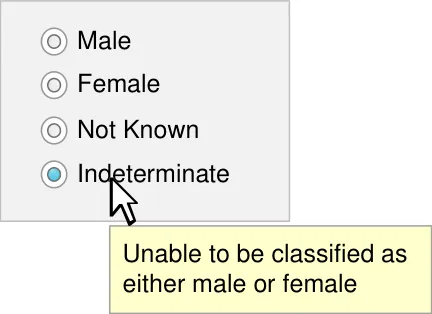
- Make the definitions of the Sex status values accessible to the user
- The Sex values are as illustrated
- Sex data values must never be abbreviated
- The application must not display the underlying coded representation of the Sex data values For example, the standard code for ‘Male’ may be the integer 1, but this number must not appear
- 10
- Input Control Definitions
- Quick Implementation Guide
Source PDF: sexqig.pdf
Quick Implementation Guide
Edition 1 22 [nd] April 2010
Current Gender and Sex Display Current Gender and Sex Input 3 4 This document was prepared for NHS Connecting for Health which ceased to exist on 31 March 2013. It may contain references to organisations, projects and other initiatives which also no longer exist. If you have any questions relating to any such references, or to any other aspect of the content, please contact cuistakeholder.mailbox@hscic.gov.uk Copyright: You may re-use this information (excluding logos) free of charge in any format or medium, under the terms of the Open Government Licence. To view this licence, visit nationalarchives.gov.uk/doc/open-governmentlicence or email psi@nationalarchives.gsi.gov.uk.
1
Copyright ©2013 Health and Social Care Information Centre
Guidance Introduction
The NHS categorises a person’s gender in two ways:
- Person Gender Current, which refers to a person’s current gender classification
For brevity and clarity, this document uses the term Current Gender for this concept
- Person Gender at Registration, which refers to the record of a person’s gender classification at the point of birth registration
For brevity and clarity, this document uses the term Sex for this concept
Healthcare professionals and patients may confuse the terms ‘Current Gender’ and ‘Sex’, or assume that they are synonymous. Therefore, all NHS applications should display and explain those terms in a clear and consistent manner, both at input and at subsequent display.
Allowable values for Current Gender and Sex need to be from a pre-defined, restricted set in order to ensure legal compliance and data interoperability and to respect patient sensitivity.
Important
The values defined in this document are based upon the current proposed changes to the NHS Data Model and Dictionary [1] . Should future changes be made to this document, amendments to this guidance will be required.
Although it contains all of the guidance points, this document omits supporting information and is therefore not intended as a substitute for the full NHS CUI document Sex and Current Gender Input and Display [2] . Refer to that document for the definitive statement of the design guidance in this area.
The visual representations used to display the guidance are illustrative only. Stylistic choices (for example, display font used), unless otherwise specified, are not part of the guidance and are therefore not mandatory requirements.
1 NHS Data Model and Dictionary
http://www.datadictionary.nhs.uk/index.asp
2 Sex and Current Gender Input and Display – User Interface Design Guidance (v4.0.0.0)
Copyright ©2013 Health and Social Care Information Centre
2
Guidance
Current Gender and Sex Display
Male
Female
Other Specific
Not Known
Not Specified
Male
Female
Not Known
Indeterminate
CGS-0003
The Current Gender status is one of the illustrated values
Mandatory
CGS-0011
The Sex status must only contain one of the illustrated values
Mandatory
CGS-0007 Current Gender Not Known
Sex Female
Label the Current Gender status display ‘Current Gender’
3
Recommended
CGS-0016
Label the Sex status display ‘Sex’
Recommended
Copyright ©2013 Health and Social Care Information Centre
Guidance
Current Gender and Sex Input
The guidance supports two control styles for input of Current Gender and Sex
Option Button Group (also known as Radio Button Group)
Current Gender
Drop-Down List Box
| Current Gender | Col2 |
|---|---|
| Not Known | |
| Male Female Other Specific Not Known Not Specified | Male Female Other Specific Not Known Not Specified |
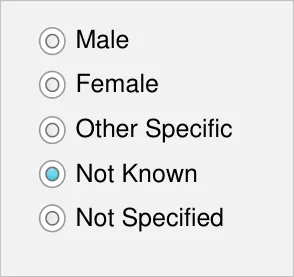
Sex
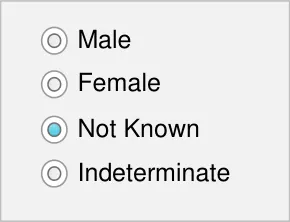
| Sex | Col2 |
|---|---|
| Male Female Not Known Indeterminate | Male Female Not Known Indeterminate |
The Option Button group design occupies more screen space but provides better instruction to the user.
This control style should be used if there is room on the input form.
Copyright ©2013 Health and Social Care Information Centre
4
Guidance
Current Gender Input
Current Gender
CGS-0001
Label the Current Gender input controls ‘Current Gender’
Mandatory
CGS-0008
Use ‘Not Known’ as the Current Gender default value
Recommended
CGS-0020
Current Gender option buttons group input controls must consist of five option buttons
Mandatory
CGS-0021
Current Gender option button group labels must be in the order illustrated
Mandatory
CGS-0022
The Current Gender tab order is the same as illustrated
Recommended
Copyright ©2013 Health and Social Care Information Centre
5
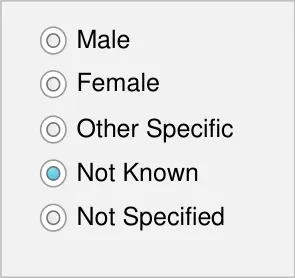
Current Gender Input
Current Gender
Current Gender
| Not Known | Col2 |
|---|---|
| Male Female Other Specific Not Known Not Specified | Male Female Other Specific Not Known Not Specified |
default value
Guidance
CGS-0026
Use a single drop-down list box for the Current Gender control
Mandatory
CGS-0025
Current Gender drop-down list box options are in the order illustrated
Mandatory
CGS-0027
Do not use a prompt for the Current Gender control, due to its default value of ‘Not Known’
Mandatory
| (thus no prom | Col2 |
|---|---|
| (thus no pro | (thus no pro |
| Not Known |
Current Gender CGS-0004
Make the definitions of the Current Gender status values accessible to the user
Mandatory
Note The tooltip is one example of how a definition might be displayed. The display style and definition are not part of the guidance
Copyright ©2013 Health and Social Care Information Centre
| Male Female Other Specific Not Known When the person ha Not Specified idea of what their ge is neither discretely | Col2 | Col3 |
|---|---|---|
| Male Female Other Specific Not Known Not Specified When the person ha idea of what their ge is neither discretely | Not Specified When the person ha idea of what their ge is neither discretely | Not Specified When the person ha idea of what their ge is neither discretely |
6
Guidance
Current Gender Input
Male
Female
Other Specific
Not Known
Not Specified
7
CGS-0002
The Current Gender values are as illustrated
Mandatory
CGS-0005
Do not abbreviate Current Gender data values
Mandatory
CGS-0006
Do not display the underlying coded representation of the Current Gender data values For example, the standard code for ‘Male’ may be the integer 1, but this number should not appear
Mandatory
Copyright ©2013 Health and Social Care Information Centre
Guidance
Sex Input
Sex
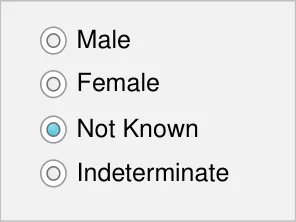
CGS-0009
Label the Sex input controls ‘Sex’
Mandatory
CGS-0013
The Sex default state is null
Mandatory
CGS-0023
Sex option button group input controls must consist of four option buttons
Mandatory
CGS-0024
Sex option button group labels are in the order illustrated
Recommended
Copyright ©2013 Health and Social Care Information Centre
8
Guidance
Sex Input
Sex
Sex
9
CGS-0028
Ensure that Sex controls have no value selected by default and no method of returning to this ‘null’ state
Mandatory
CGS-0029
Use a single control for the Sex drop-down list box
Mandatory
CGS-0030
Ensure that the Sex drop-down list box is blank by default and does not contain a prompt
Recommended
CGS-0015
Make the definitions of the Sex status values accessible to the user
Mandatory
Note The tooltip is one example of how a definition might be displayed. The display style and definition are not part of the guidance
Copyright ©2013 Health and Social Care Information Centre
| Male Female Not Known Indeterminate | Col2 | Col3 |
|---|---|---|
| Unable to be classified as either male or female | Unable to be classified as either male or female |
| Col1 | Col2 |
|---|---|
| Male Female Not Known Indeterminate | Male Female Not Known Indeterminate |
Sex Input
Male
Female
Not Known
Indeterminate
Guidance
CGS-0010
The Sex values are as illustrated
Mandatory
CGS-0012
Sex data values must never be abbreviated
Mandatory
CGS-0014
The application must not display the underlying coded representation of the Sex data values For example, the standard code for ‘Male’ may be the integer 1, but this number must not appear
Mandatory
Copyright ©2013 Health and Social Care Information Centre
10
Guidance
Input Control Definitions
Current Gender
| Male ‘Current Gender’ as bFy ethmea ilnedividual to t Other Specific Not Known Not Specified | Col2 | Col3 |
|---|---|---|
| Male Female Other Specific Not Known Not Specified ‘Current Gender’ as by the individual to t | Male Female ‘Current Gender’ as by the individual to t | assigned hemselves |
| Male Female Other Specific Not Known Not Specified ‘Current Gender’ as by the individual to t | Male Female ‘Current Gender’ as by the individual to t |
Other Specific
When the person has a clear idea of what their gender is, but is neither discretely male nor female, for example, ‘intersex’, ‘transgender’, ‘third gender’
Not Known
Used when no information on this subject is known
Not Specified
When the person is unable to specify their current gender or does not have a clear idea of their current gender
11
CGS-0017
Provide definitions for input controls
Mandatory
CGS-0019
Provide a shortened version of the definitions
Recommended
Left Examples of definitions for Current Gender values
Note These definitions are examples only and do not form part of guidance
Copyright ©2013 Health and Social Care Information Centre
Input Control Definitions
Sex
Guidance
CGS-0018
Provide access to definitions of the valid values
Mandatory
Left Examples of definitions for Sex values
Note These definitions are examples only and do not form part of the guidance
Not Known
Used when no information on this subject is known
Indeterminate
Used when the person is unable to be classified as either male or female
Copyright ©2013 Health and Social Care Information Centre