Telephone Number Input and Display

 Prepared for
NHS Connecting for Health
Version 4.0.0.0 Baseline
Prepared by
Clinical Application and Patient Safety Project
NHS CUI Programme Team
cuistakeholder.mailbox@hscic.gov.uk
Prepared for
NHS Connecting for Health
Version 4.0.0.0 Baseline
Prepared by
Clinical Application and Patient Safety Project
NHS CUI Programme Team
cuistakeholder.mailbox@hscic.gov.uk
PREFACE
- PREFACE
- 1 INTRODUCTION
- 2 RECOMMENDATIONS AND GUIDANCE
- 3 DOCUMENT INFORMATION
- APPENDIX A TELEPHONE NUMBER RULES
- REVISION AND SIGNOFF SHEET
Source PDF: tele.pdf
Documents replaced by this document Telephone Number Input and Display – User Interface Design Guidance 3.0.0.0 Telephone Number Input and Display – User Interface Design Guidance 2.0.0.0 Design Guide Entry – Telephone Number Display 1.0.0.0 Documents to be read in conjunction with this document Accessibility Checkpoints for NHS Applications 1.0.0.0 Accessibility for Clinical Applications 1.0.0.0 This document was prepared for NHS Connecting for Health which ceased to exist on 31 March 2013. It may contain references to organisations, projects and other initiatives which also no longer exist. If you have any questions relating to any such references, or to any other aspect of the content, please contact cuistakeholder.mailbox@hscic.gov.uk Patient Safety Process The development lifecycle for this design guide includes an integrated patient / clinical safety risk assessment and management process. Known patient safety incidents relevant to this design guidance area have been researched and reviewed as part of ongoing development. The resulting guidance points aim to support mitigation of these known patient safety risks. In addition, the developers of this design guide have undertaken a patient safety risk assessment to identify new risks that could potentially be introduced by the guidance points in this document. Any potential risks identified have been assessed and managed to support the ongoing clinical safety case for this design guide. The Hazard Log records all the risks that have been identified during development and describes mitigatory actions that, in some cases, will need to be taken by users of this design guide. The Hazard Log is a live document that is updated as the design guide is developed and maintained. Until this design guide has received full Clinical Authority to Release (CATR) from the NHS Connecting for Health (CFH) Clinical Safety Group (CSG) – based on an approved Clinical Safety Case – there may be outstanding patient safety risks yet to be identified and mitigated. Additionally, users implementing applications that follow this design guide’s guidelines (for example, healthcare system suppliers) are expected to undertake further clinical safety risk assessments of their specific systems within their specific context of use. Refer to www.cui.nhs.uk for further information on the patient safety process and for the safety status and any relevant accompanying safety documentation for this design guide.
1 INTRODUCTION
This document describes the design guidance for the display and input of ‘Telephone number’ data. It describes the area of focus, provides guidance and recommendations, and explains the rationale behind the guidance and recommendations.
This document is intended for the use of anyone whose role includes screen design, implementation, or assessment of a National Health Service (NHS) clinical application. This document can be used as guidance for the:
-
Specification of an input and display control for Telephone data in a user interface (UI)
-
Implementation of an input and display control for Telephone data within an application
-
Assessment of an input and display control for Telephone data in an NHS clinical
application user interface
Figure 1 shows an example of a guidance-compliant ‘Single Text Entry Box’ designed to assist in UK-based telephone number input. Figure 2 shows an example of a text entry box combined with a ‘Country Selector’, which is guidance-compliant for non-UK-based telephone number input.
Figure 1: Single Text Entry Box
Figure 2: Country Selector Assisted Text Entry Box
Note
Elements used within a software application are commonly referred to as a ‘control’. These can take many forms but the types referred to in this document will either be ‘input controls’ that can receive input from a user, such as a button, text box, option button (radio button) or check box, or ‘display controls’ such as a label, which can only display information.
Table 1 describes the changes made since the previous version of this guidance (Baseline version 3.0.0.0 dated 25 June 2009):
Deleted Brackets around area codes (throughout document)
Amended Text within paragraphs to reflect removal of brackets (throughout document)
Added Incorrect usage example (section 2.2.1.5)
Table 1: Changes Since the Last Baseline Version
1.1 Customer Need
This section explains why this guidance has been created.
1.1.1 Overview
Telephone numbers display in various contexts within an NHS application, many of which are displayed within a clinical system. As such, it is an important requirement for both patient safety and general usability that each number can be easily recognised as unique, in order to reduce errors and increase efficiency. By assisting the user when inputting telephone numbers, errors are reduced and data quality is increased.
Page 1
Copyright ©2013 Health and Social Care Information Centre
HSCIC Controlled Document
1.1.2 Eliminating Inconsistencies Across Systems
Significant inconsistencies exist across the labelling, inputting, and displaying of telephone numbers across various clinical applications. With clinical users often switching between applications, these inconsistencies can lead to the incorrect identification of patients, which in turn, leads to safety issues. Reduction of inconsistency is therefore an important goal in itself and the primary aim of this guidance.
1.1.3 Simplified User Interface Design and Development
Having a consistent layout and set of values for the input and display of data items in clinical systems potentially makes the design and development of such systems safer, easier, and quicker.
1.2 Scope
This section defines the scope of this guidance document.
1.2.1 In Scope
This guidance is applicable primarily to electronic user interfaces such as those displayed on desktop and laptop computers. However, many of the principles can also be applied to paper form design, should it be required. The following items are in scope:
-
Defining the valid values for Telephone display and input
-
Control layout and structure, in order to achieve:
Optimal visibility of the values
Easy recognition of the values in the context of the wider clinical application
Easy recognition of data type requested for input
Reduction of invalid entries
Optimal size of input fields
1.2.2 Out of Scope
This section defines areas that are not covered in this guidance. Although there may be specific risks associated with these areas that are not addressed in this guidance, it is likely that the principles in this guidance will extend to the aspects of the input and display of telephone numbers in many of the areas listed below.
The following items are out of scope:
- Data storage - This guidance does not prescribe the format for storing data that is input or
displayed
- Terms of use - This guidance does not define when an input field or display should be
presented within a system
- Form design - This guidance does not prescribe the correct layout for a form or the
navigation around a form
-
Fax numbers - This guidance does not prescribe the format for fax numbers
-
Data input control types - This document does not specify how the input controls should
be labelled, for example, ‘Home number’ or ‘Preferred contact’. The concept of types and context are not explicitly supported. However, the flexible behaviour of the input control and the exclusion of a control-level label enable the developer to reuse the same input control for multiple situations. Figure 3 displays an example of the controls used for multiple ‘types’ of telephone data:
Page 2
Copyright ©2013 Health and Social Care Information Centre
HSCIC Controlled Document
Telephone Details

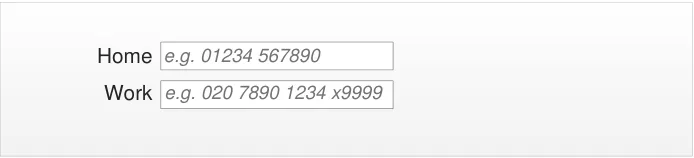
Figure 3: Example of Two Single Entry Boxes Used for Different Contexts
Note
Listing an item as out of scope does not classify it as unimportant. Project time and resource constraints inevitably restrict what can be in scope for a particular release. It is possible that items out of scope for this release may be considered for a future release.
1.3 Dependencies and Assumptions
Compliance with other guidance is required as follows:
- The design of NHS clinical applications must conform to Accessibility Checkpoints for NHS
Clinical Applications {R1} and Accessibility for Clinical Applications {R2}
Important
The visual representations used within this document to display the guidance are illustrative only. Stylistic choices are not part of the guidance and are therefore not mandatory requirements for compliance with the guidance in this document.
1.4 Key Principles
The following key principles have shaped the guidance in this document:
-
Display information according to existing standards
-
Minimise opportunities for human error
-
Display sufficient instructional information to support data quality
-
Promote consistency across the mix of users, NHS clinical applications and care settings
-
Ensure reliable and accurate identification of an individual patient record
-
Minimise opportunities where patient-clinician relationships may be compromised
Page 3
Copyright ©2013 Health and Social Care Information Centre
HSCIC Controlled Document
2 RECOMMENDATIONS AND GUIDANCE
The guidance provided throughout this document is based upon a programme of user research, including:
- Previous background research for this design specification, which reviewed the standards
of the following organisations:
UK Government Office of Communications (Ofcom)
UK Government Data Standards
Microsoft [®] Corporation
IBM [®] Corporation
Dell [®]
- A desk-based research project looking at a range of information entry Web pages and
clinical applications
- A Web-based survey of 41 respondents from NHS clinicians and administrative staff,
Independent Software Vendors (ISVs), community pharmacists, and NHS Connecting for Health (CFH)
- A Patient Safety Assessment
Important
The visual representations used within this document to display the guidance are illustrative only. They are simplified in order to support understanding of the guidance points. Stylistic choices, such as colours, fonts or icons are not part of the guidance and unless otherwise specified are not mandatory requirements for compliance with the guidance in this document.
2.1 Telephone Number Display
This section defines the recommendations for displaying telephone numbers in NHS clinical applications. NHS clinical applications should display telephone numbers in this format to facilitate contact by telephone with patients, clinicians, hospitals or surgeries.
The chosen layout provides the best display format because it shows a complete, unambiguous presentation of telephone contact details, which includes all information and clearly identifies optional digits.
Note
It is recognised that most telephone numbers stored within NHS clinical applications will relate to UK locations. In these cases, the international code element is not required.
Telephone numbers in NHS clinical applications can comprise up to four elements, are separated by spaces and are displayed in the following order:
- International Code (optional) - Is represented by a plus (+) symbol followed by the
relevant numeric country code (which will be between two and four digits)
- Area Code (mandatory) - The entire area code (including optional digits such as a leading
zero) must not be enclosed within brackets. This code is usually a sequence of between three and six digits. Where the international code is displayed, optional digits within the area code should be omitted
Note
Page 4
Copyright ©2013 Health and Social Care Information Centre
HSCIC Controlled Document
Ofcom holds responsibility for UK telecommunications. Ofcom manages the UK telephone numbering plan, including area codes, and this may change from time to time.
- Local Number (mandatory) - If the local number (typically a sequence of between four
and eight digits) contains more than six digits, then a single space should precede the final four digits
- Extension Number (optional) - Is validly represented by either:
A single input box including an ‘x’ character displayed directly after the telephone number followed by a numeric extension code (typically four digits in length)
The full telephone number then displays as:
- International Code Area Code Local Number x Extension Number
Display in a separate extension input box adjacent to the telephone number input box
The full telephone number then displays as:
- International Code Area Code Local Number [Extension Extension Number ]
Figure 4 shows an example of the recommended telephone number format:

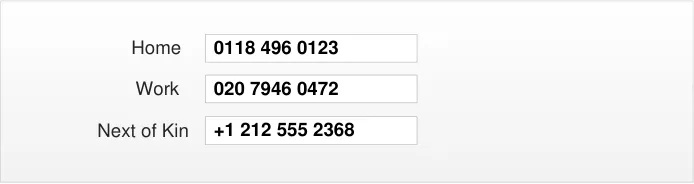
Figure 4: Recommended Telephone Number Formats Showing Telephone and Extension Number Within a Single Input Box
2.1.1 Guidance
TID-0001 If the country code is for the UK, for example, ‘+44’ or ‘0044’, then it must not be displayed. Mandatory
TID-0002 When displayed, the country code must always be displayed with a ‘+’ sign in front of it. Mandatory
TID-0003 When displayed, the country code must not display any leading zeros. Mandatory
TID-0004 When displayed, the country code must be separated from the rest of the telephone number by a single space.
Mandatory
TID-0005 For UK telephone numbers, the area code must not be displayed with brackets around it. Mandatory
TID-0006 For UK telephone numbers, the area code must be separated from subsequent numbers by a space.
TID-0007 For UK telephone numbers, extension numbers can be displayed with an ‘x’ preceding and adjacent to the number.
TID-0008 For UK telephone numbers where the telephone and extension numbers are displayed within a single input box, the extension number must be separated from the rest of telephone number by a single space that precedes the ‘x’.
TID-0026 For UK telephone numbers where the extension number is displayed in a separate input box, a label must be shown above the input box to indicate the content
Copyright ©2013 Health and Social Care Information Centre
Mandatory
Recommended
Mandatory
Recommended
Page 5
HSCIC Controlled Document
TID-0009 For UK telephone numbers, if there are more than six digits in the local number, (in other words, not the country code, area code or extension number), then a space must be inserted before the final four digits.
TID-0010 The telephone number should be formatted for display according to the rules detailed in APPENDIX A.
Table 2: Guidance for Telephone Number Display
2.1.2 Examples of Correct Usage
Mandatory
Recommended
029 2018 0928
0151 496 0947
01632 96032601632 96029
016329 60541
016329 6054
020 7946 0472 x1234
+1 555 323 1020
+356 8437 4667
+91 645623 4576 7898
Use this format to display telephone numbers within a clinical application.
[International Code
Local numbers with more than six digits include a space before the final four digits
Table 3: Correct Telephone Number Formatting Examples
2.1.3 Examples of Incorrect Usage
Where optional digits are omitted (029) 2018 0928
(0151) 496 0947
(01632) 960326
(01632) 96029
(016329) 60541
(016329) 6054
+44 029 2018 0928
+44 0151 496 0947
+44 01632 960326
+44 01632 96029
+44 016329 60541
+44 016329 6054
+44 29 2018 0928
+44 151 496 0947
+44 1632 960326
+44 1632 96029
+44 16329 60541
+44 16329 6054
Examples incorrectly shown with brackets around the area codes.
This example lacks clarity because there is no distinction between optional and mandatory digits (such as leading zeros). It includes the unnecessary International Code for the UK.
This example includes the unnecessary international code for the UK, and the leading zero from the area code is missing.
Page 6
International Code
International Code
Copyright ©2013 Health and Social Care Information Centre
HSCIC Controlled Document
+442920180928
+441514960947
+441632960326
+44163296029
+441632960541
+44163296054
This example lacks completeness and readability due to the inclusion of the international code for the UK, the omission of the optional leading zero from the area code and omission of the separators between elements.
This example lacks readability due to the omission of the separators between elements.
International Code Area Code Local Number
Area Code Local Number 02920180928
01514960947
01632960326
0163296029
01632960541
0163296054
Table 4: Incorrect Telephone Number Formatting Examples
2.1.4 Rationale
The use of spaces aids readability by logically grouping the digits into meaningful categories. The recommended grouping follows commonly-used conventions and thus aids recognisability for the user.
2.1.4.1 Accessibility
The inclusion of the international and area codes assists with the unique recognition of telephone number formats from other countries. The plus sign provide a clear indication that the value represents an international telephone number. This is important because the length of each element of a telephone number element may vary.
An inherent problem with screen reader software is that the form that numbers take when read out is dependent on the numbers themselves. Examples of spoken telephone numbers include:
- 01632 960154 dictated as “zero sixteen thirty two nine hundred sixty thousand one hundred
fifty four”
It is unfortunate that the audible reading patterns differ according to the specific number. However, this is considered acceptable because screen reader users are accustomed to dealing with such numbers.
2.1.4.2 Patient Safety
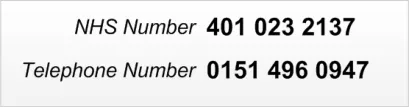
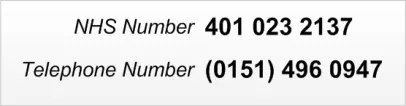
A Telephone number display affects patient safety when it appears in close proximity to the NHS Number within a screen. In such cases, the numbers could be confused, resulting in the user accessing the wrong patient record details. Therefore, the format of each number should provide a clear distinction between the relevant value types. This is illustrated in Figure 5:
Figure 5: Example of a Telephone Number Format in Close Proximity to an NHS Number
NHS numbers should display as groups of digits, separated by single spaces. Telephone numbers should exhibit formats that clearly distinguish them from associated NHS numbers. This can be achieved easily by preceding the optional international code with a plus sign (‘+’).
Page 7
Copyright ©2013 Health and Social Care Information Centre
 HSCIC Controlled Document
2.1.4.3 Clinical Utility
A user should view telephone number information in a consistent format, with a recognisable reading pattern. This format ensures a clear distinction between the constituent elements.
One of the main considerations for users is whether to display the international code. If it is displayed in all instances, there will never be a need to look up secondary sources for extra dialling codes. However, most telephone numbers stored within NHS clinical applications will relate to UK locations, in which case the international code element is redundant.
For consistency, certainty and the avoidance of ambiguity, applications should implement a single format for all telephone numbers. It is also beneficial to use a display format that clearly distinguishes telephone numbers from other numerical information, such as dates and NHS numbers.
2.1.4.4 Display Space
Telephone numbers display in various contexts within an NHS application. From an application developer’s perspective, an important consideration is display space. Telephone numbers can have variable lengths, potentially extending up to 20 digits with the international code. Separators increase the overall length.
2.2 Telephone Number Input
The purpose of the telephone number input control is to allow the user to enter a telephone number. The input control has two states: a single unassisted entry input box (primarily used for UK telephone number entry), as displayed in Figure 6, and a single entry box with country selector assistance (primarily used for non-UK telephone numbers), as displayed in Figure 7.
Figure 6: Single Text Entry Box
Figure 7: Country Selector Assisted Text Entry Box
These two different states have been designed for the specific purpose of making different number types easy to enter. The Single Text Entry Box encourages convenient entry of UK-based numbers, and the Country Selector Assisted Entry Box assists the user in the convenient entry of non-UK-based numbers. However, both designs will accept and correctly identify both UK and non-UK numbers.
2.2.1 Unassisted Design
The ‘unassisted’ single text entry box for UK telephone entry is a freeform text entry box that:
-
Uses rules to identify number formats
-
Removes extraneous characters from the input
-
Displays clean data in a safe and distinct format
Page 8
Copyright ©2013 Health and Social Care Information Centre
HSCIC Controlled Document
The size of the single text entry box is related to how the text is displayed in the interface. The size, weight, style and type of font used all affect how much space is required to display the right amount of information. The requirement is for the input box to display over 95% of the expected input values 100% of the time. It is therefore preferable to specify the size of input boxes in relation to character strings:
-
Default length to accommodate the following example prompt text: 020 1234 5678 x1234
-
Minimum length to accommodate the following example prompt text: 01234 567890
-
Maximum length is not constrained
The rules surrounding how the telephone number input box behaves is detailed in the document entitled CFH NPFIT CSA – Telecommunication Address Display Requirements for CSA {R3} . However, the NHS CUI Programme has the additional requirement to handle extension numbers upon display.
The basic principles below should be followed:
-
The Input box should accept formatted and unformatted entries
-
If the number can be identified as a valid type (as per the rules in CFH NPFIT CSA –
Telecommunication Address Display Requirements for CSA {R3} ), the input box should strip out formatting upon losing focus, and replace it with a reformatted equivalent which:
Places spaces in logical locations for readability purposes
- If the number cannot be identified as a valid type (as per the rules in CFH NPFIT CSA –
Telecommunication Address Display Requirements for CSA {R3} ) then:
The input box leaves the entry as it was entered
The input box displays the entry to the user as it was entered
- The UK country code can be entered but is removed from display after it has been
committed
- All other country codes are retained (as detailed in APPENDIX A.)
A number of different use cases are displayed from Figure 8 to Figure 15:
Figure 8: User Is Presented with a Plain Single Entry Box Without Prompt but with ISV Supplied Labels
Figure 9: User Places Focus in the Entry Box and Selects the Control to Initiate Entry Mode
Page 9
Copyright ©2013 Health and Social Care Information Centre

 HSCIC Controlled Document
Figure 10: User Types in an Unformatted Telephone Number
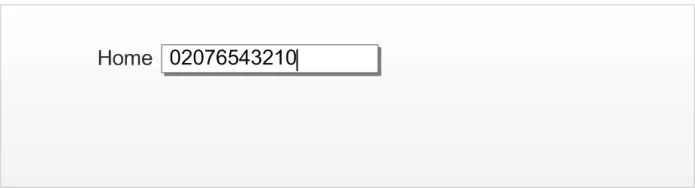


Figure 11: The Control Displays the Correctly Formatted Number to the User Upon Exit


Figure 12: Entry of an Extension Number Within a Single Text Entry Box


Figure 13: Example of a Reformatted Extension Number Within a Single Text Entry Box
Figure 14: Entry of a Number and an Extension Number in Separate Input Boxes
Figure 15: Example of a Reformatted Number and Extension Number Boxes
2.2.1.1 Prompts
The choice of what string to use for the prompt for an unassisted text entry box will be context-specific. Some suggested prompts for use with certain situations are:
Copyright ©2013 Health and Social Care Information Centre
Page 10


 HSCIC Controlled Document
-
‘Home’ label, for example, “e.g. 01234 567890”
-
‘Work’ label, for example, “e.g. 020 1234 5678 x1234”
-
‘Work’ label, for example, “e.g. 020 1234 5678 [separate extension box prompt] 1234”
2.2.1.2 Tooltips
The choice of what string to use for the tooltip for an unassisted text entry box will be context-specific. Some suggested tooltips for use with certain situations are:
-
‘Home’ label, for example, ‘Enter the ‘home’ telephone number’
-
‘Work’ label, for example, ‘Enter the ‘work’ telephone number. To include an extension
number, add an ‘x’ to the front of the extension number
- ‘Work’ label, for example ‘Enter the ‘work’ telephone number. To include an extension
number, enter the number into the extension number box’
2.2.1.3 Guidance
TID-0011 Use a free-text input box for the entry of telephone number. Mandatory
TID-0027 Use a free-text input box where extension number is input into a separate input box Mandatory
TID-0012 Ensure the input box accepts formatted and unformatted entries. Mandatory
TID-0013 If the number can be identified as a valid type (as detailed in APPENDIX A), the input box should strip out formatting upon losing focus and replace it with a reformatted equivalent.
TID-0014 Display a reformatted entry to the user which:
Places spaces in logical locations for readability
TID-0015 If the number cannot be identified as a valid type (as detailed in APPENDIX A), display the entry to the user as it was entered.
Mandatory
Mandatory
Mandatory
TID-0016 Remove the UK country code from display after it is committed. Mandatory
TID-0017 Retain all other country codes. Mandatory
TID-0018 Do not display UK numbers with the international prefix. Mandatory
TID-0019 Display non-UK numbers with a + prefixed to the country code. Mandatory
Table 5: Guidance for Unassisted Telephone Number Input
2.2.1.4 Examples of Correct Usage
A single free-text
input box design
Can identify and
reformat telephone numbers
Can identify and
reformat telephone numbers with extensions
0118 909 8765 x1234
The user should be able to input whatever data value they feel is most appropriate.
The input should intelligently reformat for readability (as detailed in APPENDIX A).
The input box should be able to handle extension numbers.
Page 11
Copyright ©2013 Health and Social Care Information Centre
HSCIC Controlled Document
Can identify and
reformat telephone number with extension number displayed in separate input box
An extension number maybe displayed using a separate input box
Telephone Number
0118 909 8765
Extension
1234
Table 6: Correct Examples of Unassisted Telephone Number Input
2.2.1.5 Examples of Incorrect Usage
Separate input
box for area code
A separate input box for the area code can cause users to incorrectly guess the area code.
Brackets are shown around the area code on a
formatted number.
Table 7: Incorrect Examples of Unassisted Telephone Number Input
2.2.1.6 Rationale
The inconsistent length of area codes in the UK can cause users to make errors when they are asked to distinguish the area code from the rest of the telephone number. Therefore, a single entry text box is the safest and most effective design.
2.2.2 Assisted Design
This control prepends a country selector to the single text input box. The country selector assists the user in selecting the correct dialling code for non-UK telephone numbers, by presenting the user with a list box of known dialling codes, at the time of creation.
The addition of the country selector increases the screen space required by the input control and is not seen as a regular usage case. As such, it is not envisaged as the default input control. The primary use case for this control is as a secondary level of input after the user has stated that they will be inputting a non-UK number.
The country selector is shown in Figure 16 and appears expanded in the context of a full input control in Figure 17.
Figure 16: Country Selector in Default State
| Country Cod | de | Col3 | Telephone Number | Col5 |
|---|---|---|---|---|
| +44 (UK) | _ e.g. 01234 567890_ | |||
| +44 (UK) +93 (AF) +355 (AL) +213 (DZ) +376 (AD) +244 (AO) +54 (AR) Congo, Democratic Republic of the +242 (CD) United Kingdom Afghanistan Albania Algeria Andorra Angola Argentina | +44 (UK) +93 (AF) +355 (AL) +213 (DZ) +376 (AD) +244 (AO) +54 (AR) Congo, Democratic Republic of the +242 (CD) United Kingdom Afghanistan Albania Algeria Andorra Angola Argentina | +44 (UK) +93 (AF) +355 (AL) +213 (DZ) +376 (AD) +244 (AO) +54 (AR) Congo, Democratic Republic of the +242 (CD) United Kingdom Afghanistan Albania Algeria Andorra Angola Argentina | +44 (UK) +93 (AF) +355 (AL) +213 (DZ) +376 (AD) +244 (AO) +54 (AR) Congo, Democratic Republic of the +242 (CD) United Kingdom Afghanistan Albania Algeria Andorra Angola Argentina | +44 (UK) +93 (AF) +355 (AL) +213 (DZ) +376 (AD) +244 (AO) +54 (AR) Congo, Democratic Republic of the +242 (CD) United Kingdom Afghanistan Albania Algeria Andorra Angola Argentina |
Figure 17: Example of an Expanded Country Selector
Copyright ©2013 Health and Social Care Information Centre
Page 12
HSCIC Controlled Document
The country selector should have the following properties:
-
Default length to accommodate the following example prompt text: “+376 (AD)”
-
Minimum length to accommodate the following example prompt text: “+376 (AD)”
-
Maximum length is not constrained
2.2.2.1 Guidance
TID-0020 Use a default value of +44 (UK) for the country code. Mandatory
TID-0021 Use the ISO 3166 names in the first column, the Ofcom list of dialling codes in the second column and the ISO 3166 abbreviated country codes in the third column. Use the abbreviation ‘UK’ instead of the ISO 3166 code of ‘GB’.
TID-0022 Order the country names alphabetically.
Include United Kingdom once at the top of the list and once in its appropriate alphabetical location.
Mandatory
Mandatory
TID-0023 Use an editable drop-down list for country codes. Recommended
TID-0024 Allow the country codes to be navigated using free-text entry. Recommended
TID-0025 Populate the country selector list with the three elements below and in this exact order:
-
Country name (left-aligned and vertically aligned to all rows).
-
Country dialling code (right-aligned using the ’+’ format, for example, ‘+44’).
-
Country abbreviation (right-aligned, two-character code, enclosed in single brackets and
vertically aligned to all rows).
Table 8: Guidance for Assisted Telephone Number Input
2.2.2.2 Examples of Correct Usage
Recommended
Default selection
is the for UK
Drop-down list to
assist country selection
Alphabetical
listing of countries (with UK duplication exception)
| Country Code | e | Telephone Number |
|---|---|---|
| +44 (UK) | _ e.g. 01234 567890_ | |
| +44 (UK) +93 (AF) +355 (AL) +213 (DZ) +376 (AD) +244 (AO) +54 (AR) Congo, Democratic Republic of the +242 (CD) United Kingdom Afghanistan Albania Algeria Andorra Angola Argentina | +44 (UK) +93 (AF) +355 (AL) +213 (DZ) +376 (AD) +244 (AO) +54 (AR) Congo, Democratic Republic of the +242 (CD) United Kingdom Afghanistan Albania Algeria Andorra Angola Argentina | +44 (UK) +93 (AF) +355 (AL) +213 (DZ) +376 (AD) +244 (AO) +54 (AR) Congo, Democratic Republic of the +242 (CD) United Kingdom Afghanistan Albania Algeria Andorra Angola Argentina |
The user is only required to interact with the country selector if it is a non-UK number.
A drop-down list of all the valid values assists the user in correctly identifying the number they need.
Alphabetising the country selector list assists the user in finding the data they require. Because ‘UK’ is expected to be the primary selection of users, it is duplicated for convenience.
Page 13
| Country Code | Col2 | Telephone Number | Col4 |
|---|---|---|---|
| +44 (UK) | _ e.g. 01234 567890_ | ||
| +44 (UK) +93 (AF) +355 (AL) +213 (DZ) +376 (AD) +244 (AO) +54 (AR) Congo, Democratic Republic of the +242 (CD) United Kingdom Afghanistan Albania Algeria Andorra Angola Argentina | +44 (UK) +93 (AF) +355 (AL) +213 (DZ) +376 (AD) +244 (AO) +54 (AR) Congo, Democratic Republic of the +242 (CD) United Kingdom Afghanistan Albania Algeria Andorra Angola Argentina | +44 (UK) +93 (AF) +355 (AL) +213 (DZ) +376 (AD) +244 (AO) +54 (AR) Congo, Democratic Republic of the +242 (CD) United Kingdom Afghanistan Albania Algeria Andorra Angola Argentina | +44 (UK) +93 (AF) +355 (AL) +213 (DZ) +376 (AD) +244 (AO) +54 (AR) Congo, Democratic Republic of the +242 (CD) United Kingdom Afghanistan Albania Algeria Andorra Angola Argentina |
Table 9: Correct Examples of Assisted Telephone Number Input
Copyright ©2013 Health and Social Care Information Centre
HSCIC Controlled Document
2.2.2.3 Examples of Incorrect Usage
Use of separate
inputs for area code
Country Code
input mechanism that does not allow free-text input or display the country code
Table 10: Incorrect Examples of Assisted Telephone Number Input
2.2.2.4 Rationale
The use of separate input boxes increases screen clutter and the likelihood of input error.
The button input design does not suggest to the user that they can type a selection here. It does not display the numerical country code and so increases the likelihood of a user committing a duplication error by inputting the country code in the second input box. Finally, the user cannot check the full numerical number because they cannot see the country code.
The country selector assists the user in the input of foreign numbers. If the user does not know the required country code, they can select it from the alphabetised list. If they do know the country code, they can input it directly as the input box is editable.
A large majority of cases will require a UK selection and therefore, this is both the default and the first item on the list. A duplicate entry for the UK is in the logical location in the subsequent alphabetised list, which ensures the user finds what they are searching for.
2.2.2.5 Text Input Box
The second field in the ‘assisted’ design, displayed with the title Telephone Number in Figure 17, is the same as the single text entry box in section 2.2.1.
Page 14
Copyright ©2013 Health and Social Care Information Centre
HSCIC Controlled Document
3 DOCUMENT INFORMATION
3.1 Terms and Abbreviations
CSA Clinical Spine Application
CUI Common User Interface
ISV Independent Software Vendor
NHS National Health Service
NHS CFH NHS Connecting for Health
Ofcom UK Government’s Office of Communications
PDA Personal Digital Assistant
UI User Interface
Table 11: Terms and Abbreviations
3.2 Definitions
NHS Entity Within this document, defined as a single NHS organisation or group that is operated within a single technical infrastructure environment by a defined group of IT administrators.
The Authority The organisation implementing the NHS National Programme for IT (currently NHS Connecting for Health).
Current best practice Current best practice is used rather than best practice, as over time best practice guidance may change or be revised due to changes to products, changes in technology, or simply the additional field deployment experience that comes over time.
Table 12: Definitions
3.3 Nomenclature
This section shows how to interpret the different styles used in this document to denote various types of information.
3.3.1 Body Text
Code Monospace
Script
Other markup languages
Interface dialog names Bold
Field names
Controls
Folder names title case
File names
Table 13: Body Text Styles
Page 15
Copyright ©2013 Health and Social Care Information Centre
HSCIC Controlled Document
3.3.2 Cross References
Current document – sections Section number only
Current document – figures/tables Caption number only
Other project documents Italics and possibly a footnote
Publicly available documents Italics with a footnote
External Web-based content Italics and a hyperlinked footnote
Table 14: Cross Reference Styles
3.4 References
R1. NHS CUI Design Guide Workstream – Accessibility Checkpoints for NHS Clinical Applications 1.0.0.0
R2. NHS CUI Design Guide Workstream – Accessibility for Clinical Applications 1.0.0.0
R3. CFH NPFIT CSA – Telecommunication Address Display Requirements for CSA 0.0.0.3
Table 15: References
Copyright ©2013 Health and Social Care Information Centre
Page 16
HSCIC Controlled Document
APPENDIX A TELEPHONE NUMBER RULES
Important
For the purposes of clarity, it is important to emphasise that this Appendix is concerned only with the display of telephone numbers. The format for telephone number storage or transmission is out of scope for this design guidance. It is assumed that the application developer implements a suitable mechanism to process the formats used in the target environment. This mechanism must ensure that the resulting display of telephone numbers conforms to the guidelines in this document.
PART I CSA Rules For Telephone Number Element Identification
This section displays the list of rules defined by the Clinical Spine Application (CSA) for identifying the elements within a telephone number. These can be found in CFH NPFIT CSA – Telecommunication Address Display Requirements for CSA {R3} .
- If the value starts with a plus sign (+) or ‘00’, then apply International Number Prefix Rules –
go to step 3 .
- Otherwise apply UK Telephone Number Representation Rules – go to step 11 .
The following numbered list describes the International Number Prefix Rules in the order they should be applied.
- If the value starts with ‘+44’, and the following digit is not ‘0’, then replace ‘+44’ with ‘0’ and
apply the UK Telephone Number Representation Rules – go to step 11 .
- If the value starts with ‘0044’, and the following digit is not ‘0’, then replace ‘0044’ with ‘0’;
apply the UK Telephone Number Representation Rules – go to step 11 .
- If the value starts with ‘+’, then apply the following International Number Representation
Rules – go to step 8 .
- If the value starts with ‘00’, then replace ‘00’ with ‘+’ and apply the following International
Number Representation Rules – go to step 8 .
- If the value starts with ‘+44’ or ‘0044’ and the following digit is ‘0’, then (this is invalid)
display the entire value as received – end .
The following numbered list describes the International Number Representation Rules in the order they should be applied.
- Add a space after the international dialling code element using the international standard
available at http://www.itu.int/ITU-T/inr/codes.html.
-
Remove any immediately following separator character.
a. If the remainder contains any non-numeric characters other than valid separator
characters, then display the remainder of the value as received – end .
b. Otherwise:
i. If the remainder contains any valid separator characters, then replace each separator character with a space – end .
ii. Else, introduce spaces preceding every four characters, from the right, so that there
are never more than 6 characters without a break, and never fewer than 3 characters in a group – end .
Page 17
Copyright ©2013 Health and Social Care Information Centre
HSCIC Controlled Document
The following numbered list describes the UK Telephone Number Representation Rules in the order they should be applied.
a. If the value contains any non-numeric characters other than valid separator characters,
then display the value without further transformation – end
b. Otherwise, if the value contains valid separator characters, then remove the separator
characters and apply the transformation rules as specified in the following sections.
- If the numeric value begins with ‘01’ or ‘02’, then test these geographic area number
representation rules in the following order. Only apply one rule.
a. If the code starts ‘02’, then insert a space after the 3rd digit.
b. If the code has a ‘1’ in the 3rd or 4th position, then insert a space after the 4th digit.
c. If the first 6 digits match any of the following 11 codes, then insert a space after the 6th
digit. 013873 Langholm; 015242 Hornby; 015394 Hawkshead; 015395 Grange-OverSands; 015396 Sedbergh; 016973 Wigton; 016974 Raughton Head; 017683 Appleby; 017684 Pooley Bridge; 017687 Keswick; 019467 Gosforth.
d. For all other codes, insert the space after the 5th digit.
- Having applied the above rules, if the remainder of the number, following the space,
contains more than 6 digits, then introduce a space preceding the final four digits.
- If the numeric value begins with ‘07’ or ‘05’ or ‘03’ or ‘04’ or ‘06’, then follow these number
representation rules:
a. Add a space after the first 5 digits (including the initial 0).
b. If the remainder contains more than 6 digits, then introduce a space preceding the final
four digits.
- If the numeric value begins with ‘08’ or ‘09’, then follow these special services number
representation rules:
a. Add a space after the first 4 digits (including the initial 0).
b. If the remainder contains more than 6 digits, then introduce a space preceding the final
four digits.
- If the numeric value does not begin with ‘0’, then display the value without further
transformation – end .
Page 18
Copyright ©2013 Health and Social Care Information Centre
HSCIC Controlled Document
PART II Example Additional Rules Handling Extension Numbers
This section lists the extra rules that are required to identify and display extension numbers. These rules are additional to, and would need to be applied before, those defined in CFH NPFIT CSA – Telecommunication Address Display Requirements for CSA {R3} .
- Identify if the number has any of the following characters or sequence of characters in it,
followed by a sequence of digits:
‘x’
‘ex’
‘ext’
‘extn’
‘extension’
‘extension number’
Any of the above, followed by: ‘.’ ‘:’ ‘=’ ‘-‘
-
If so, then remove the identified characters and replace with an ‘x’.
-
Then remove the ‘x’ with any subsequent digits and only replace them at the end of the
telephone number after all of the CFH NPFIT CSA – Telecommunication Address Display Requirements for CSA {R3} rules have been applied to the remaining telephone number.
Page 19
Copyright ©2013 Health and Social Care Information Centre
HSCIC Controlled Document
REVISION AND SIGNOFF SHEET
Change Record
19-Sep-2007 Alan Pimm 1.0.0.1 Initial draft for review/discussion
21-Jan-2008 Niki Nicolaides 1.0.0.2 Initial copyedit complete
28-Jan-2008 Tony Rose 1.0.0.3 Accepted changes following copyedit
30-Jan-2008 Niki Nicolaides 1.0.0.4 Second copyedit complete
30-Jan-2008 Alan Pimm 1.0.0.5 Accepted changes following second copyedit
31-Jan-2008 Niki Nicolaides 1.0.1.0 Copyedit complete. Raised to Working Baseline
27-Feb-2008 Simon Burnham 1.0.1.1 Copyedit of document changes
27-Feb-2008 Tony Rose 1.0.1.2 Accepted changes following copyedit
28-Feb-2008 Simon Burnham 0.1.0.0 Raised to Baseline Candidate (version number also corrected)
03-Mar-2008 Vivienne Jones 2.0.0.0 Baseline following email approval from Tim Chearman. Raised this to Baseline 2.0.0.0 as there was a previous Telephone Display document that this is replacing. Baseline 2.0.0.0 is in keeping with what has been applied to other guidance documents.
20-Apr-2009 Mick Harney 2.0.0.1 Foundation draft for ISB updates
29-May-2009 Rachel Eno 2.0.0.2 Updates
29-May-2009 Mick Harney 2.0.0.3 Copyedited updates
03-Jun-2009 Rachel Eno 2.0.0.4 Further updates
08-Jun-2009 Mick Harney 2.0.0.5 Copyedited latest changes
12-Jun-2009 Mick Harney 2.1.0.0 Raised to Baseline Candidate
25-Jun-2009 Simon Burnham 3.0.0.0 Raised to Baseline
16-Sep-2009 Rachel Eno 3.1.0.0 Removing use of brackets around area codes
16-Sep-2009 Manuela Perr 4.0.0.0 Raised to Baseline
Document Status has the following meaning:
- Drafts 0.0.0.X - Draft document reviewed by the Microsoft CUI project team and the
Authority designate for the appropriate Workstream. The document is liable to change
- Working Baseline 0.0.X.0 - The document has reached the end of the review phase and
may only have minor changes. The document will be submitted to the Authority CUI project team for wider review by stakeholders, ensuring buy-in and to assist in communication
- Baseline Candidate 0.X.0.0 - The document has reached the end of the review phase and
it is ready to be frozen on formal agreement between the Authority and the Company
- Baseline X.0.0.0 - The document has been formally agreed between the Authority and the
Company
Note that minor updates or corrections to a document may lead to multiple versions at a particular status.
Page 20
Copyright ©2013 Health and Social Care Information Centre
HSCIC Controlled Document
Open Issues Summary
None
Audience
The audience for this document includes:
- Authority CUI Manager / Project Sponsor . Overall project manager and sponsor for the
NHS CUI project within the Authority.
- Authority CAPS Project Manager. Responsible for ongoing management and
administration of the Workstream.
- The Authority Project Team . The Authority team involved in the development of this
document.
- Microsoft NHS CUI Team . The team responsible for the development of this document.
Reviewers
Mike Carey Toolkit Workstream Lead
Tim Chearman UX Architect
Peter Johnson Clinical Architect
Distribution
Mike Carey Toolkit Workstream Lead
Tim Chearman UX Architect
Peter Johnson Clinical Architect
Document Properties
Document ‘Title’ Telephone Number Input and Display User Interface Design Guidance
Author NHS CUI Programme Team
Restrictions RESTRICTED – COMMERCIAL; MICROSOFT COMMERCIAL; Access restricted to: NHS CUI Project Team, Microsoft NHS Account Team
Creation Date 19 September 2007
Last Updated 23 June 2015
Page 21
Copyright ©2013 Health and Social Care Information Centre
HSCIC Controlled Document
Copyright:
You may re-use this information (excluding logos) free of charge in any format or medium, under the terms of the Open Government Licence. To view this licence, visit nationalarchives.gov.uk/doc/open-government-licence or email psi@nationalarchives.gsi.gov.uk.
Page 22
Copyright ©2013 Health and Social Care Information Centre